
Cable Matters Punch Down Tool with 110 Blade
4.3Editor score
Adjustable impact settings
Removable locking blade
Spring-action mechanism
This guide compares the top Ethernet Punch Down Tools for reliable network installations, featuring detailed reviews of impact settings, blade types, and
Choosing the right Ethernet Punch Down Tool is essential for anyone installing network cabling in homes or offices. A good tool ensures clean connections, saves time, and reduces physical strain during repetitive termination tasks on various cable types.
We evaluated ten highly rated models based on user feedback, build quality, and versatility. Our comparison covers standard 110 tools, speed terminators, and kits to help you find the perfect match for your specific networking projects and budget.
Each product review highlights key features, pros, and cons to guide your decision. Note that prices and availability change frequently, so always check the current listing before making a purchase to ensure you get the best value available today.
4.3Editor score

4.8Editor score

4.7Editor score
The following table provides a side-by-side overview of all ten top-rated Ethernet Punch Down Tools. Compare their key specifications, included blades, and unique features to determine which tool aligns best with your installation requirements and professional standards.


The Klein Tools VDV427-300 stands out as the top choice for professionals requiring reliable performance. With a 4.8 rating, users praise its sturdy build and the versatility of including both 66 and 110 blades. This tool delivers precise connections every time, making it a staple in many network closets.
We may earn a commission when you buy through this link, at no additional cost to you.
Its metal injection molding blade ensures long-lasting performance even under heavy daily use. The adjustable force lever allows users to switch between high and low impact depending on the wire gauge, preventing damage to delicate conductors. Additionally, the included pick and spudger tools add convenience for cleanup tasks without needing separate accessories.
While it is more expensive than budget options, the durability and precision justify the investment for serious installers. The only trade-off is that it is a standard impact tool rather than a speed terminator, meaning it requires separate wire cutting steps if not using the built-in blade properly. However, for quality connections, this model excels.
If you need a dependable tool for various CAT cable types from CAT3 to CAT6A, this is the ideal choice. It is highly recommended for professionals who prioritize connection reliability and tool longevity over initial cost savings. The ergonomic handle reduces fatigue during long installations.
The metal injection molding blade provides enhanced durability compared to plastic alternatives, ensuring consistent performance over thousands of cycles.
Select between high and low impact settings to optimize termination for different wire gauges, reducing the risk of wire damage.
We may earn a commission when you buy through this link, at no additional cost to you.
The Cable Matters Punch Down Tool offers exceptional value for home users and entry-level installers. Rated at 4.3, it provides the essential features needed for terminating Ethernet cables without a high cost. Its 110 blade is designed to cut and terminate in one step, ensuring clean jacks and patch panels.
We may earn a commission when you buy through this link, at no additional cost to you.
The twist-and-lock blade design prevents loosening during use, maintaining alignment with the handle detent for consistent results. Adjustable impact settings allow users to fine-tune the force, which helps avoid damaging sensitive wires while ensuring a secure connection. The spring-action mechanism reduces effort, making it easier to complete multiple terminations quickly.
While it lacks the premium build of higher-end tools, it performs reliably for most standard installations. The main limitation is the simpler construction which may not withstand extreme heavy-duty use as well as metal-bodied alternatives. However, for occasional DIY projects, it is a practical and economical choice.
Choose this tool if you need a reliable punch down for basic home networking setups without breaking the bank. It is perfect for those who want adjustable features and good compatibility with various cable types at a budget-friendly price. Always ensure you practice on scrap wire first.
The twist-and-lock design ensures the blade remains secure during use, preventing accidental loosening for consistent termination quality.
Fine-tune the impact between low and high settings to adapt to different cable types and ensure precise seating every time.
We may earn a commission when you buy through this link, at no additional cost to you.
The Fluke Networks D914S is a premium tool designed for professionals who demand the highest reliability. With a 4.7 rating, it features EverSharp blade technology and a soft-touch ergonomic handle to minimize hand fatigue. It comes with a lifetime warranty, reflecting Fluke's confidence in the product's durability and performance.
We may earn a commission when you buy through this link, at no additional cost to you.
Its automatic spring selection adjusts impact based on wire gauge, simplifying the process for the user. The 66/110 blade cuts cleanly and lasts longer than standard blades. Additionally, the hook and spudger tools are integrated into the handle, ensuring they are always available when needed for removing excess wire or debris.
While the cost is significantly higher than other options, the lifetime warranty and robust build make it a long-term investment. The only downside is that for casual users, the price may not be justified by the occasional use. However, for daily professional use, it is an excellent choice.
Invest in this tool if you need a durable, high-performance punch down that will last for years without replacement. It is ideal for network technicians who require precision and comfort during long installation days. Always verify blade replacements match the EverSharp standard.
Fluke offers a lifetime warranty on this tool, providing long-term peace of mind and protection against manufacturing defects or wear.
The spring mechanism automatically selects the correct impact force for different wire gauges, reducing user error during termination.
We may earn a commission when you buy through this link, at no additional cost to you.
The TRENDnet TC-PDT offers versatility for those working with both 110 and Krone standards. Rated at 4.7, it includes interchangeable blades and a twist-and-lock storage system to prevent loss. It is also NDAA and TAA compliant, making it suitable for government and secure facility installations.
We may earn a commission when you buy through this link, at no additional cost to you.
The ergonomics are designed for comfort, with a grip that reduces strain during repetitive tasks. Blade storage is convenient, keeping the spare blade close at hand without clutter. The three-year manufacturer protection ensures support if issues arise, adding value to the purchase.
While it does not offer unique speed features, it is reliable for standard termination tasks. The main consideration is ensuring you have the correct blade for your specific jack standard. For general office or data center setups, it is a solid middle ground option.
Choose this tool if you need compliance features or dual standard support in one package. It is highly recommended for professionals working in regulated environments or those who prefer having backup blades stored within the tool.
This tool meets NDAA and TAA standards, making it suitable for government and public sector networking installations.
A twist-and-lock holder inside the tool body keeps spare blades secure during transport to prevent loss.
We may earn a commission when you buy through this link, at no additional cost to you.
This Cable Matters model improves on the budget option by including both 110 and 66 blades in one tool. Rated at 4.4, it allows for seamless switching between panel types without needing to buy separate tools. The internal blade storage keeps the unused blade secure during transport.
We may earn a commission when you buy through this link, at no additional cost to you.
The adjustable impact settings allow fine-tuning for different installation needs, ensuring clean cuts. The spring action mechanism reduces effort, making it suitable for bulk work. It is a cost-effective way to cover more scenarios without upgrading to premium brands.
While it lacks additional accessories like wire strippers, it focuses on core functionality. The main trade-off is that it may not fit as ergonomically as higher-end models. However, for general maintenance and installs, it is a practical and affordable choice.
Select this tool if you frequently encounter different panel standards and need a single solution. It is ideal for technicians who want versatility without spending a premium on brand names.
Comes with both 110 and 66 blades to handle various block types without needing to purchase a second tool.
Storage sockets within the handle keep spare blades secure and accessible during transport.
We may earn a commission when you buy through this link, at no additional cost to you.
The VCELINK Multi Function Tool offers a complete kit for basic networking needs. Rated at 4.3, it includes 110 and 66 blades along with a mini wire stripper. This makes it useful for quick repairs where a full toolkit is not available.
We may earn a commission when you buy through this link, at no additional cost to you.
The wirepuller on the sides helps in cleaning up excess wires efficiently. The adjustable force settings allow for precise impact control. It is a versatile option for small jobs or remote installations.
While the additional tools are basic, they add convenience to the package. The main limitation is that the mini stripper might not handle larger cables well. For general Ethernet work, it provides good value for the included features.
Pick this tool if you want a small toolkit in one device. It is best for DIY users who need occasional cutting and punching capabilities without extra bulk.
Includes a mini wire stripper to handle cable preparation in addition to punch down functionality.
Built-in wirepullers on the sides help clean excess wires quickly after termination.
We may earn a commission when you buy through this link, at no additional cost to you.
This Speed Punch Down Tool is designed for high-efficiency termination on specific VCE keystone jacks. Rated at 4.6, it punches and cuts all eight wires in one action, eliminating the need for a stand. This saves significant time when installing multiple jacks in wall plates.
We may earn a commission when you buy through this link, at no additional cost to you.
The SK5 steel blade is durable and replaceable, extending the tool's life. Its slim design fits directly into patch panels, making it easier to work in tight spaces. If you use VCE keystones, this tool drastically improves workflow.
The limitation is that it only works with VCE jacks, limiting its universal appeal. However, for bulk installations using that brand, it is unmatched. The replaceable blade head ensures you do not need to replace the entire tool if the blade dulls.
Use this tool if you are setting up many VCE keystone jacks. It is highly recommended for installers who want to reduce installation time on patch panels and wall plates.
Punches and cuts 8 wires in one smooth operation, saving time compared to traditional methods.
The blade head can be replaced separately to restore tool functionality without buying a new unit.
We may earn a commission when you buy through this link, at no additional cost to you.
The Rapink Speed Keystone Jack Tool offers fast termination for Rapink's 90-degree jacks. Rated at 4.2, it includes a built-in housing to keep the jack stable while punching, preventing finger injuries. It reduces installation time by combining cutting and punching into one step.
We may earn a commission when you buy through this link, at no additional cost to you.
The carbon steel body ensures durability, and the adjustable trimming depth helps fine-tune wire cutting to avoid damage. It is designed for high success rates, reducing the need to repunch. For users with Rapink hardware, it simplifies complex wall plate installations.
While it is brand-specific, it is effective where intended. The trimming adjustment requires practice to get right. However, it is highly useful for high-density installations where speed and safety are priorities.
Choose this tool if you are deploying Rapink keystone jacks in wall plates. It is recommended for those who value speed and want to avoid repetitive strain injuries during installs.
Keeps the keystone jack in place during termination to ensure a perfect crimp and prevent hand injuries.
The nut in the middle allows adjustment of the trimming depth to protect the keystone and ensure clean cuts.
We may earn a commission when you buy through this link, at no additional cost to you.
This kit combines coax termination with a precision 110 punch down tool for comprehensive network work. Rated at 4.8, it includes a radial stripper that adjusts to different cable diameters for accurate stripping. It is designed for modular data and coax needs in one package.
We may earn a commission when you buy through this link, at no additional cost to you.
The punch down tool features a DuraBlade edge for accurate termination. It comes with a storage bag to keep items organized during transport. For technicians working with mixed media like coax and Ethernet, this kit covers many requirements.
While it is more than a standard punch down, it is great for multi-purpose installations. The main trade-off is the bulk compared to a dedicated tool. However, for service techs, it is a powerful all-in-one solution.
Use this kit if you need to handle coax and Ethernet in the same job. It is highly recommended for installers who want a complete tool set without buying separate items.
Includes a precision punch down tool with DuraBlade for accurate wire termination alongside coax tools.
Contains crimpers, strippers, and connectors to handle coax installations alongside Ethernet punch down tasks.
We may earn a commission when you buy through this link, at no additional cost to you.
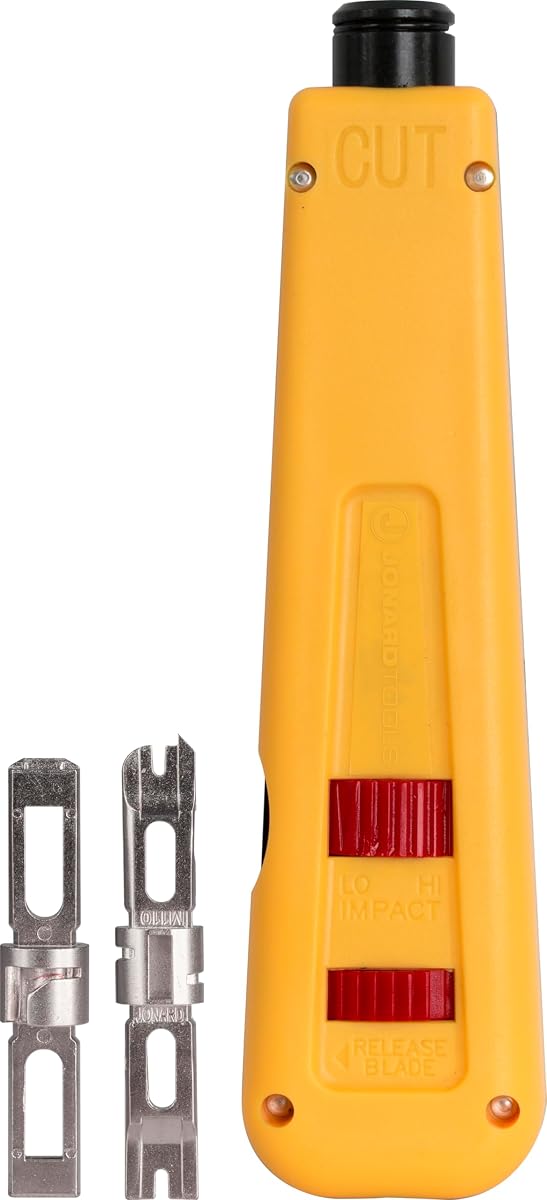
The Jonard Tools EPD-91461 offers a simple yet durable solution with a color-coded body to prevent accidental cuts. Rated at 4.5, it has been tested for 100,000 cycles at high impact, ensuring reliability. The built-in hook and spudger make cleanup easy during termination tasks.
We may earn a commission when you buy through this link, at no additional cost to you.
The color coding helps users identify the cutting side quickly, which is useful for beginners. It includes 66 and 110 blades, though they may not last as long as premium options. The ergonomic design fits comfortably for regular use.
While it is a standard tool, it is reliable for general maintenance. The main consideration is that blade replacements are sold separately. For a sturdy manual tool with clear visual cues, it is a solid choice.
Select this tool if you want a durable, color-coded punch down for general use. It is recommended for users who appreciate clear visual indicators and reliable build quality.
The half yellow and half blue body helps users identify the cutting side quickly to prevent accidental cuts.
Features a combination hook and spudger stored in the chassis for convenient wire cleanup.
We may earn a commission when you buy through this link, at no additional cost to you.
Selecting the right Ethernet Punch Down Tool depends on the types of jacks you use, your frequency of work, and your budget. This guide covers essential factors to help you decide.
Ensure the tool supports the standards you need, such as 110 or 66. Some tools include dual blades to cover both types without extra purchases. Always verify that the blade matches your patch panels or keystone jacks to avoid compatibility issues during installation.
Check for dual blade kits if you work with mixed environments.
Adjustable impact settings allow you to control the force applied during termination. This helps prevent damaging thin wires while ensuring a secure connection on thicker cables. Look for tools with clear Lo and Hi settings for different wire gauges.
Adjustable force settings protect delicate conductors.
Tools with metal components or reinforced bodies last longer under heavy use. If you install networks frequently, investing in a tool with a sturdy handle and high cycle rating is beneficial. Premium options often come with warranties to protect your investment.
Choose metal or reinforced tools for daily professional work.
An ergonomic handle reduces strain during long sessions. Features like cushioned grips or soft-touch surfaces improve comfort significantly. This is crucial if you are terminating many jacks at once, as fatigue can affect precision.
Look for soft-touch grips to reduce hand fatigue.
Speed tools can terminate and cut wires in a single step, saving time but often requiring specific jacks. Standard tools may require a separate step to cut excess wires but offer broader compatibility. Choose based on your need for speed versus flexibility.
Speed tools are fast but often jack-specific.
Some tools come with storage for spare blades or built-in spudgers and hooks for cleanup. Others may include wire strippers or connectors. Assess whether these add-ons save you from buying separate items or if they are unnecessary extras.
Built-in accessories save space and reduce extra costs.
Premium brands often offer longer warranties, sometimes for life. This ensures you can replace a tool if it fails prematurely. Check manufacturer support availability to ensure you can get help or replacement parts easily when needed.
Check warranty terms to ensure long-term reliability.
Prices range from budget-friendly options to premium professional tools. Determine how often you will use the tool. For occasional home use, a basic model is sufficient. For professionals, the higher cost of a reliable tool pays off over time.
Align cost with expected frequency of use.
To use the tool effectively, insert the wire into the correct slot on the keystone jack or panel. Align the tool over the contact point ensuring the cutting edge faces the correct direction. Apply steady pressure until you hear a click, which indicates the wire is seated. Then lift the tool to avoid damaging the wire or jack.
For tools with adjustable impact, set the force to low for thinner wires and high for thicker ones. If using a speed tool, place it directly over the jack and press down once to terminate and cut simultaneously. Always verify the connection is secure by gently pulling the wire after termination.
To maintain your tool, clean off any debris from the blade after use. Store blades securely in the provided compartment to prevent dulling or loss. Check for wear regularly and replace blades when they no longer cut cleanly. Proper care ensures consistent performance over time.
Many modern punch down tools come with a cutting edge built into the blade to trim excess wire after termination. However, some standard models may not cut cleanly, so a separate wire cutter might be helpful. Check the tool description to confirm it has a cutting feature.
The difference lies in the blade style required for different wiring blocks. 110 blades are used for modern Ethernet jacks and patch panels while 66 blades are used for older telephone blocks. Some tools come with both blades to handle various setups without buying separate tools.
No, speed termination jacks are designed to work with specific tools that can terminate all wires at once. Using a standard punch down tool will require more steps and might not achieve the same speed or reliability. Always match the tool to the jack brand.
Generally, use the low setting for 24 or 26 gauge wires and the high setting for 22 gauge wires. This prevents damaging delicate wires while ensuring a strong connection on heavier gauge cables. Adjust based on the wire type you are terminating.
Yes, many budget and mid-range tools are perfect for home networking projects. They help ensure reliable connections when installing wall jacks or patch panels. For occasional use, a basic model is usually sufficient without needing premium features.
Replace the blade when it starts to struggle to cut wires cleanly or damages the wires. For heavy use, this might be every few months depending on the quality. Store a spare blade in the tool to avoid downtime during installations.
Always ensure the cutting edge faces away from your hands to avoid injury. Use tools with safety features like non-slip grips. If possible, practice on scrap wire before working on active equipment to ensure you understand the tool's operation.
We have reviewed ten top-rated Ethernet Punch Down Tools that cater to different needs from DIY projects to professional installations. The Klein Tools VDV427-300 leads as the Editor's Choice for reliability and versatility while budget-friendly options like Cable Matters offer great value for simple tasks.
When prioritizing your purchase, consider the frequency of use and the specific jack standards you require. A tool with adjustable impact and durable blades will serve you better in the long run than a basic model. Also look for tools that save time if you handle bulk installations.
Remember that prices and availability fluctuate frequently so always check the latest listings before buying. These tools are essential for ensuring a stable network infrastructure so investing in the right one will pay off in reduced troubleshooting and better connections.