
Tripp Lite BC450
4.2Editor score
Compact design
Eight outlets
Silent operation
This guide compares the top 10 battery backup solutions for small offices, evaluating performance and features to help you choose the right UPS system.
When your small office faces unexpected power outages, having a reliable battery backup system is essential to prevent data loss and hardware damage. These devices provide uninterrupted power to keep your computers and networking equipment running smoothly during electrical disruptions.
We evaluated ten top-rated UPS models based on their runtime, outlet capacity, and advanced features like automatic voltage regulation. Each product offers unique strengths tailored to different office needs and budget constraints for optimal protection.
Each selection highlights key specifications and benefits to help you make an informed decision for your workspace. Please note that product availability and pricing may change frequently, so verify details before purchasing.
4.2Editor score

4.5Editor score
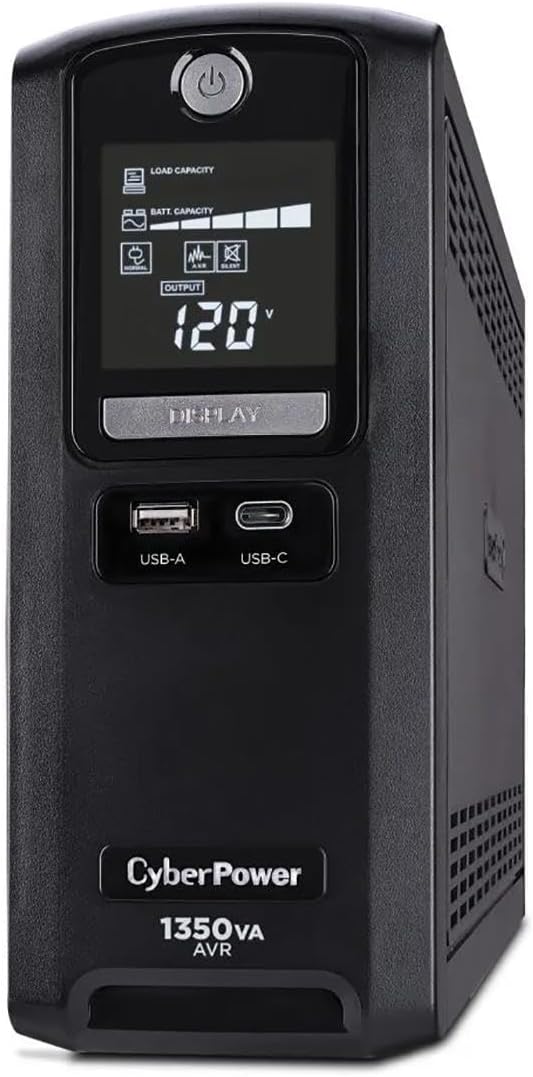
4.9Editor score
Here is a detailed side-by-side comparison of all ten selected UPS units to help you evaluate their key specifications and features easily.


The CyberPower CP1500PFCLCD is a top-rated UPS designed for small offices needing reliable power protection. With a 1500VA capacity and pure sine wave output, it supports sensitive electronics like Active PFC power supplies.
We may earn a commission when you buy through this link, at no additional cost to you.
Its twelve outlets provide ample connectivity for computers and routers. The color LCD offers clear insights into power conditions. Automatic Voltage Regulation helps prevent unnecessary battery usage by correcting minor fluctuations.
The warranty is solid but the unit is heavier than compact models. This weight ensures durability. The included software allows monitoring and management of connected devices effectively.
This UPS is ideal for office setups needing high capacity and pure sine wave output. It ensures your workstation remains operational during disruptions efficiently.
This output type ensures compatibility with devices requiring clean power to prevent damage during battery operation.
Twelve outlets allow you to connect multiple devices including routers and peripherals without needing extra power strips.
We may earn a commission when you buy through this link, at no additional cost to you.
The CyberPower CST135UC is a high-rated model offering robust protection for office networks. It includes network and coaxial line protection which is rare at this price point.
We may earn a commission when you buy through this link, at no additional cost to you.
Its surge suppression rating is excellent at 1500 Joules. USB ports with Type-C support modern mobile devices. The software interface makes monitoring easy for IT managers.
While it uses simulated sine wave output. its protections make it a standout choice. The energy-efficient design helps lower operational costs over time.
Choose this model if you need network protection alongside standard power backup. It is an ideal upgrade for office environments with shared internet connections.
Built-in network protection safeguards modems and routers from surges traveling through phone or cable lines.
Dual USB ports allow you to charge phones and tablets simultaneously during an outage to stay connected.
We may earn a commission when you buy through this link, at no additional cost to you.
The CyberPower CP1500AVRLCD3 offers high capacity at a competitive price point. It features a 1500VA rating suitable for running workstations and network gear during outages.
We may earn a commission when you buy through this link, at no additional cost to you.
Its color LCD panel provides clear status updates. Automatic Voltage Regulation helps extend battery life by fixing voltage issues without draining power. It is a practical choice for small offices.
Although it uses simulated sine wave technology. it effectively protects standard power supplies. The included software is user-friendly for basic power management needs.
This unit is a great option for those needing high capacity without premium pricing. It balances performance and features well for typical office setups.
AVR corrects brownouts and overvoltages to keep your computer running on utility power longer.
The color display alerts you to potential issues before they impact your equipment or workflow.
We may earn a commission when you buy through this link, at no additional cost to you.
The Tripp Lite BC450 is an affordable choice for small offices with minimal power needs. It provides backup for basic systems and routers without costing much.
We may earn a commission when you buy through this link, at no additional cost to you.
Its eight outlets offer decent connectivity. The silent operation ensures it does not create noise in quiet offices. The internal battery is easy to replace when needed.
While the capacity is low. it works well for essential devices. The wall mount tabs save desktop space effectively. It is a simple solution for small setups.
Select this model if you need basic protection on a tight budget. It handles power fluctuations and outages for light office equipment reliably.
Mounting tabs allow you to save valuable desk space by placing the unit on the wall.
The replaceable battery cartridge ensures you can extend the life of the unit easily.
We may earn a commission when you buy through this link, at no additional cost to you.
The CyberPower EC850LCD is designed to reduce energy consumption through ECO mode. When devices are off. it cuts power to connected peripherals to save energy.
We may earn a commission when you buy through this link, at no additional cost to you.
It provides twelve outlets for flexible connectivity. The software helps monitor usage and status efficiently. It is a practical choice for offices aiming to lower power costs.
While it lacks USB ports. the outlet count is generous. The ECO feature is beneficial for reducing idle power usage significantly over time.
Choose this unit if energy savings are a priority. It offers reliable backup while helping your office maintain a lower environmental footprint.
ECO mode automatically turns off power to peripherals when your computer enters sleep mode.
Twelve outlets ensure you have enough ports for all your office devices and accessories.
We may earn a commission when you buy through this link, at no additional cost to you.
The CyberPower AVRG900LCD includes protection against surges traveling through telephone lines. This feature safeguards modems and routers from potential damage during storms.
We may earn a commission when you buy through this link, at no additional cost to you.
Its AVR technology corrects power issues without using battery power. The twelve outlets accommodate multiple devices easily. It is a solid choice for offices with analog phone lines.
It lacks USB charging but covers standard power needs well. The battery is easy to replace when needed. The LCD panel provides clear status updates regularly.
Select this model if you need network line protection. It offers reliable backup for both power and communication lines.
Surge suppression protects electronics from voltage spikes that can damage sensitive equipment.
The display shows battery status and load levels for quick monitoring without software.
We may earn a commission when you buy through this link, at no additional cost to you.
The CyberPower ST900U features a slim profile ideal for tight spaces. It offers twelve outlets with wide spacing to accommodate bulky plugs effectively.
We may earn a commission when you buy through this link, at no additional cost to you.
Its GreenPower design reduces energy consumption during normal operation. This helps lower costs while maintaining reliable backup protection. It is a practical choice for crowded offices.
The simulated sine wave output works well for most equipment. The LCD provides essential status information. The unit is lightweight and easy to move.
Choose this if you need a compact unit with many outlets. It balances space-saving design with good power coverage for your office.
A narrow design allows the unit to fit easily on shelves or under desks.
Widely spaced outlets prevent bulky plugs from blocking adjacent sockets.
We may earn a commission when you buy through this link, at no additional cost to you.
The Tripp Lite BC350R is a small UPS designed for basic connectivity. It provides enough power for routers and small electronics to keep you online.
We may earn a commission when you buy through this link, at no additional cost to you.
Its wall mount compatibility saves desk space. The auto restart feature ensures systems come back online after a power rest. It is perfect for kiosks or retail counters.
The unit is simple to set up. The LED indicators provide clear status updates. It is a cost-effective solution for small devices.
Choose this for minimal setups needing internet uptime. It ensures your router stays on during short power interruptions efficiently.
Automatic restart ensures your devices power back on when utility power is restored.
VESA pattern slots allow easy wall installation to clear your desk surface.
We may earn a commission when you buy through this link, at no additional cost to you.
The APC BE600M1 is a trusted backup solution for routers and NAS devices. It includes a USB port to keep your phone charged during an outage.
We may earn a commission when you buy through this link, at no additional cost to you.
Its outlets are well-spaced for convenience. The battery replacement is simple and cost-effective. It is a practical choice for small offices and home setups.
While runtime is limited. it is sufficient for safe shutdowns. The surge protection is reliable. The unit is quiet and easy to maintain.
Choose this model for network gear protection. It ensures your internet connection stays up and data remains safe during brief outages.
The built-in USB port keeps your mobile devices powered to stay connected.
Replace the battery yourself easily to keep costs low.
We may earn a commission when you buy through this link, at no additional cost to you.
The CyberPower ST425 is an entry-level UPS for small offices. It offers basic protection for routers and small computers with eight outlets.
We may earn a commission when you buy through this link, at no additional cost to you.
Its GreenPower design reduces energy use. The LED indicators show wiring faults clearly. It is a good choice for tight budgets.
Runtime is limited to essential devices. The battery is replaceable. The unit is light and easy to move around your office.
Select this for basic surge protection and small backup needs. It ensures your key devices stay online during short outages reliably.
LED lights provide visual status updates for power and fault conditions.
High-efficiency design minimizes power consumption during normal operation.
We may earn a commission when you buy through this link, at no additional cost to you.
Selecting the right battery backup requires understanding several key factors that affect performance and usability in your specific office environment.
Capacity measured in VA determines how much load you can connect. Higher capacity means longer runtime for your devices during an outage.
Choose a unit with at least twice the wattage of your critical equipment to ensure sufficient backup time.
Pure sine wave models are required for Active PFC power supplies like modern PCs and servers. Simulated sine wave is acceptable for most standard electronics.
If you use high-end workstations, prioritize a pure sine wave output to avoid potential damage.
Check the number of outlets available for both battery backup and surge only protection. Some units have more total ports than battery ports.
Ensure you have enough battery-backed outlets for your most critical devices like computers and routers.
AVR helps correct minor power fluctuations without draining the battery. This extends battery life and keeps devices running on utility power longer.
Look for units with AVR if you experience frequent brownouts in your office location.
Some UPS units offer surge protection for telephone or network lines. This is essential for modems and routers connected to phone or cable services.
If you rely on internet connectivity, verify that the unit includes data line protection.
Many modern UPS units include USB ports for charging phones. This keeps your mobile devices powered during an outage for communication.
Check for Type-A and Type-C ports to ensure compatibility with your current devices.
Look for warranties that cover both the unit and the battery. Connected equipment guarantees provide financial protection against hardware damage.
Ensure the manufacturer offers accessible technical support for any issues with your setup.
Batteries degrade over time. Choose a model with easy-to-replace batteries to extend the lifespan of the unit.
Check if the unit supports user replacement without special tools or complex steps.
Proper setup is critical for performance. Ensure the UPS is plugged into a grounded wall outlet and that the battery is fully charged before relying on it for backups.
Connect your critical devices directly to the outlets marked as battery backup. Do not overload the unit by connecting too many high-wattage devices simultaneously.
Maintain your unit by testing it every few months. Replace the battery every three to five years or whenever the unit alerts you to low capacity.
A surge protector only guards against voltage spikes. A UPS provides battery backup power during an outage so you can continue working or shut down safely. The UPS includes internal batteries to supply power when the grid fails.
Runtime depends on the load connected and the unit capacity. Small units might offer a few minutes for safe shutdowns while larger models can provide longer periods for critical work.
Pure sine wave is required for Active PFC power supplies found in modern PCs and servers. Simulated sine wave works well for standard electronics like routers and monitors.
Yes but printers draw high power. Connect printers to surge-only outlets if possible. This saves battery capacity for computers and network devices.
It is recommended to test your unit every few months by unplugging it from the wall outlet. This confirms that the battery is still functional and the alarms work.
When the battery degrades. the UPS may show a low battery alert. The unit continues to provide surge protection but not backup power. The battery is replaceable.
Choosing the right backup ensures your business stays connected and data remains safe. We recommend the CyberPower CP1500PFCLCD for its high capacity and reliable features.
For budget-conscious buyers. the Tripp Lite BC450 offers essential protection at an affordable price. Consider your power needs and office size before making a final decision.
Always check current availability and prices since they may change over time. Invest in a quality unit to protect your valuable equipment from power disruptions today.