
Upgraded Watt Power Meter Plug
4.6Editor score
Seven display modes available
Adjustable backlight timer
Overload protection feature
This guide compares the top 10 energy consumption monitors for PC to help you track power usage, reduce bills, and optimize your setup efficiency.
Understanding your computer energy consumption is vital for efficiency and cost savings. These monitors help track real-time usage across various devices and systems effectively.
We compared leading models based on accuracy, features, and ease of installation. Our list covers smart plugs, panel monitors, and specialized tools for every need.
Each pick highlights key strengths and ideal use cases for your setup. Remember that pricing fluctuates frequently, so verify current deals before purchasing your device.
4.6Editor score

4.6Editor score

4.3Editor score
This side-by-side comparison highlights the distinct features and capabilities of each top-rated energy monitor to help you make an informed decision.


The Emporia Vue 3 stands out as a robust energy monitoring solution designed for whole-home and specific PC setup tracking. It offers UL certification which provides peace of mind regarding electrical safety while monitoring your consumption effectively.
We may earn a commission when you buy through this link, at no additional cost to you.
Its standout quality lies in the ability to provide real-time data through a user-friendly app. You can monitor critical loads like computers and gaming rigs alongside major appliances to see exactly where power goes.
While it offers extensive features, the installation requires access to your electrical circuit panel. This might be a barrier for renters or those uncomfortable working with electrical components without professional help.
This monitor is ideal for homeowners or tech enthusiasts who want detailed insight into their entire electrical usage. It provides the accuracy and safety needed to optimize your PC setup energy efficiency.
UL certification ensures the device meets rigorous safety standards preventing hazards like overheating during operation.
The app allows you to view live spending and actionable notifications instantly via your smartphone or web browser.
We may earn a commission when you buy through this link, at no additional cost to you.
This upgraded watt power meter plug is an excellent budget-friendly option for tracking PC energy usage without complex setup. It offers essential monitoring parameters like watts, volts, and kWh with a clear backlit display.
We may earn a commission when you buy through this link, at no additional cost to you.
The device features various monitoring parameters including voltage and power factor which are crucial for understanding computer power supply efficiency. The large screen makes reading data easy even in low-light gaming rooms.
While it lacks smart app integration, the data memory function ensures you do not lose consumption history during power outages. This is a practical trade-off for the low cost and ease of use.
This plug is perfect for users who want to check individual device usage manually. It helps identify energy hogs like old monitors or gaming PCs that run unnecessarily.
The backlight allows clear viewing in dark environments and can be adjusted to stay on for longer periods.
Overload protection warns users when appliance power exceeds safe limits preventing potential electrical hazards.
We may earn a commission when you buy through this link, at no additional cost to you.
The Meross Smart Home Energy Monitor offers premium features for those prioritizing data privacy and advanced energy insights. It is ETL certified ensuring reliability and safety for your home electrical system.
We may earn a commission when you buy through this link, at no additional cost to you.
A key strength is its focus on local data storage which protects your privacy from cloud access. It also integrates well with solar setups to maximize energy savings automatically without manual intervention.
Despite the higher cost, the device provides deep analysis tools like exportable hourly reports. This level of detail is unmatched by cheaper alternatives that rely on basic tracking.
This monitor is best for tech-savvy users who want comprehensive control and automation. It is an investment that pays off through significant long-term energy savings and privacy.
Data stays local with no cloud lock-in ensuring you maintain full control over your usage information.
Integration with Home Assistant allows automated actions like powering EV chargers during solar surplus times.
We may earn a commission when you buy through this link, at no additional cost to you.
This outlet watt meter from SURAIELEC provides a compact and accurate solution for monitoring individual PC setups. It measures a wide voltage range which makes it versatile for different regions and devices.
We may earn a commission when you buy through this link, at no additional cost to you.
Its Class 1.0 accuracy ensures precise readings crucial for calculating exact energy costs. The rechargeable battery backup allows it to store data for up to ninety days even when unplugged.
While it is a simple plug-in device, the space-saving design allows the lower outlet to remain accessible. This practical feature prevents blocking other sockets while monitoring your power usage.
This device is perfect for renters or those needing quick checks on specific appliances. It offers reliable data without the need for complex installations or monthly subscriptions.
Class 1.0 accuracy with high resolution ensures you get precise readings for watts volts and amps.
Built-in battery backup stores data for long periods so you never lose tracking history unexpectedly.
We may earn a commission when you buy through this link, at no additional cost to you.
This energy monitor stands out for its ability to track multiple circuits independently using sixteen branch sensors. It is specifically designed for shared spaces and rental homes where fair billing is essential.
We may earn a commission when you buy through this link, at no additional cost to you.
The unique rental electricity bill allocation feature allows you to track usage for each room separately. This transparency helps landlords and tenants manage costs fairly without confusion or disputes.
Its super privacy mode lets you run the system locally using your own MQTT server. This option is ideal for those who want smart features without relying on external cloud services.
This solution is best for properties with complex energy needs or shared occupancy. It provides the granularity needed to understand exactly how each area contributes to total energy usage.
Customizable templates help automatically calculate costs based on time-of-use tariffs for accurate billing.
Run without cloud or app access by using local MQTT servers for maximum control and privacy.
We may earn a commission when you buy through this link, at no additional cost to you.
The HBN Watt Meter Plug offers a wide range of data display options including apparent power and power factor. This helps users get a complete picture of their electrical load quality and consumption.
We may earn a commission when you buy through this link, at no additional cost to you.
Its backlit display provides clear visibility from wide angles making it easy to read even from below or at a distance. This is useful for tall monitors or wall outlets that are hard to reach.
While the backlight conserves energy by auto-turning off after seconds, the reset process is straightforward. You can clear cumulative data easily to start fresh measurements for new devices.
This plug is suitable for users who need detailed technical specs without complex setups. It balances functionality with a safe rating for standard household appliances like PCs.
Monitor nine parameters including frequency power factor and energy to understand full electrical performance.
Navigate through modes easily with a single button and read data clearly day or night.
We may earn a commission when you buy through this link, at no additional cost to you.
This KETOTEK monitor features a one-click switching interface that makes accessing different parameters fast and intuitive. It includes overload protection and cost alarms to keep your setup safe.
We may earn a commission when you buy through this link, at no additional cost to you.
The high-precision chip ensures accurate data storage even during power failures. This reliability is crucial for tracking energy usage over long periods without data loss.
The LCD display offers wide viewing angles so you can read numbers without bending over. This ergonomic design improves usability for outlets placed at various heights around the home.
This device is ideal for users who want robust manual monitoring with safety features. It helps protect your PC and other electronics from excessive power draw.
Overload and cost alarms flash to warn you before issues arise protecting your appliances.
Store and view data easily with a reset function that keeps settings intact.
We may earn a commission when you buy through this link, at no additional cost to you.
This two-pack offers great value for monitoring multiple PC setups or peripherals simultaneously. Each unit provides eight display modes including total cost and energy usage tracking.
We may earn a commission when you buy through this link, at no additional cost to you.
Constructed from high-quality ABS material these plugs are fireproof and durable for long-term use. The backlight ensures you can read data clearly even in dark gaming environments.
Data memory automatically saves settings and cumulative data during power failures. This ensures you never lose your consumption history when unexpected outages occur.
This is an ideal choice for families with several devices needing tracking. The two-pack allows you to monitor both a gaming rig and a workstation efficiently.
Set unit price to calculate total cost over time helping you manage electricity bills.
Premium materials ensure safety and longevity making these suitable for daily use.
We may earn a commission when you buy through this link, at no additional cost to you.
The P4400 Kill A Watt is a classic device known for its reliability and simplicity in tracking electrical efficiency. It offers four settings to monitor usage by day week month or year.
We may earn a commission when you buy through this link, at no additional cost to you.
Its large LCD display counts consumption by kilowatt-hour which is useful for long-term tracking. It also calculates electricity expenses to help you plan budgets effectively.
Compatibility with inverters makes it versatile for use with off-grid systems or emergency setups. This adds value for users who rely on battery power or solar generation.
While it lacks modern smart features it remains a trusted tool for basic assessments. It is a good entry-level choice for those new to energy monitoring.
The device calculates costs based on your electricity rate so you know exactly what usage costs.
Monitor usage over long periods to identify trends and seasonal variations in consumption.
We may earn a commission when you buy through this link, at no additional cost to you.
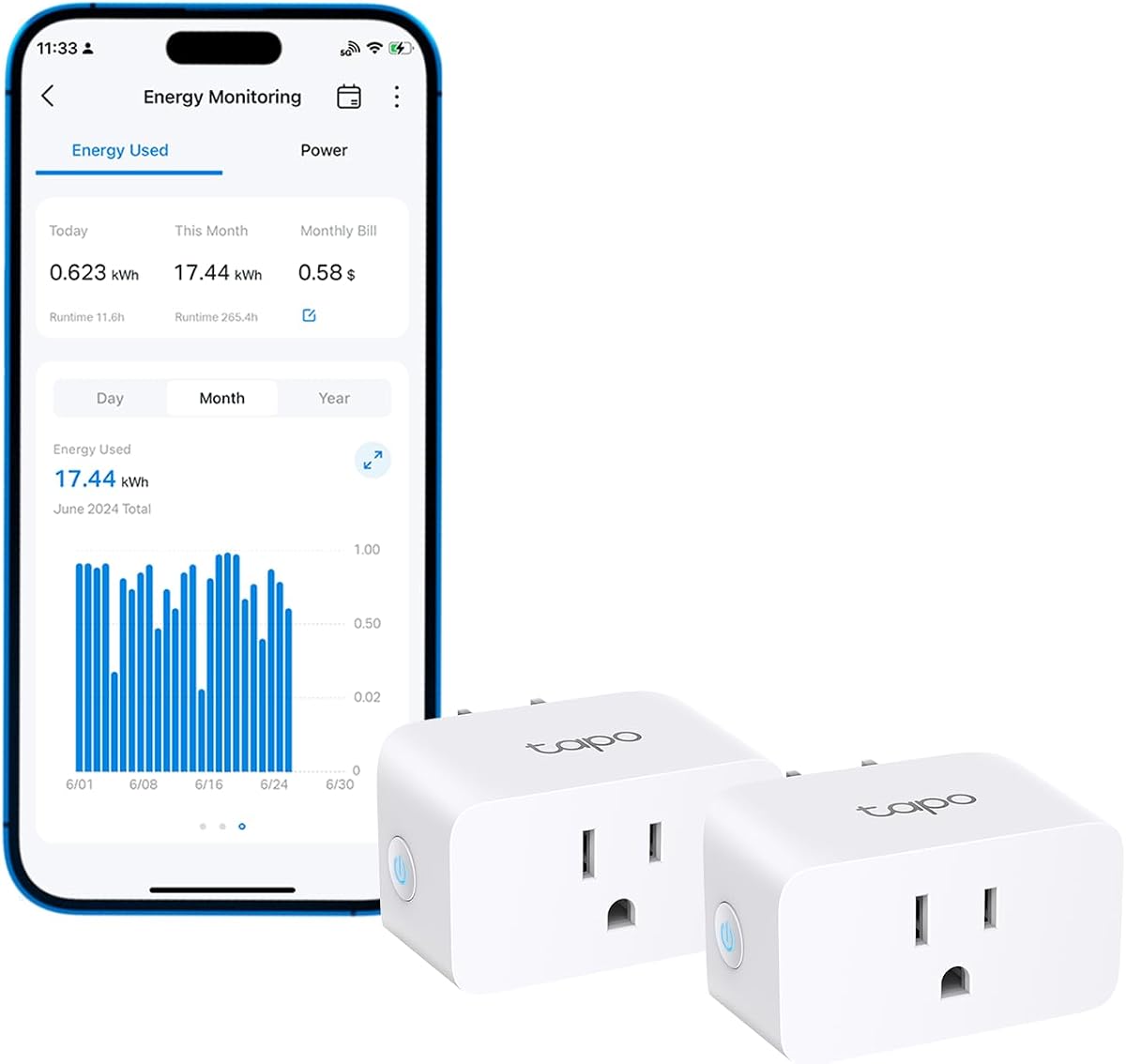
The Tapo Smart Plug combines energy monitoring with smart home features like scheduling and voice control. It helps optimize power usage by running high-consumption devices during off-peak hours.
We may earn a commission when you buy through this link, at no additional cost to you.
Insightful energy tracking provides clear charts and statistics in the app. This visual data helps you understand habits and spot areas where you can save money.
Safety features include auto-shutoff to prevent overload which protects your PC and monitor from damage. Smart charging cuts power once a device reaches a low battery limit preventing overcharging.
This smart plug is perfect for users who want convenience and safety. It allows remote control of devices so you can turn off forgotten electronics easily.
Automate devices to run when electricity rates are lower saving money automatically.
Use Alexa or Google Assistant to adjust settings and turn devices on or off hands-free.
We may earn a commission when you buy through this link, at no additional cost to you.
Selecting the right monitor depends on whether you need whole-home or device-specific tracking.
Accuracy determines how closely the monitor reflects actual usage. Look for Class 1.0 accuracy or better to ensure precise data for cost calculations.
High precision ensures your decisions about energy usage are based on true values rather than estimates.
Plug-in monitors are easiest to install requiring no electrical work. Panel monitors offer more detailed data but need professional installation.
Choose plug-in models if you want immediate setup without hiring an electrician.
Smart monitors connect via Wi-Fi to apps allowing remote tracking. Non-smart monitors show data locally on a screen.
Smart options offer convenience but require internet access and may have privacy implications.
Check if the device stores historical data during power outages. Models with battery backups or cloud storage ensure you keep your logs.
Long-term storage helps you analyze trends over weeks or months effectively.
Look for UL or ETL certification to ensure the device meets safety standards. This reduces risks of overheating or electrical hazards.
Certified devices provide peace of mind when monitoring high-power PC components.
A clear backlit display is essential for reading in low light. Wide viewing angles help if the device is placed at an angle.
Good visibility ensures you can check readings without straining or moving furniture.
Smart devices may send data to the cloud. Local-only options prevent external access to your usage patterns.
Prioritize local storage if data privacy is a top concern for you.
Some monitors let you set electricity rates to calculate costs. This feature helps in budgeting and understanding financial impact.
Always check if the device supports custom rates for accurate billing insights.
Plug the device into the wall outlet and connect your PC to it. Ensure all settings are configured correctly before starting monitoring.
Regularly reset cumulative data if you want to track usage for specific periods or new devices.
Keep the device in a cool dry place to maintain performance and prevent overheating during long sessions.
No these devices are designed to pass power through without impacting performance. They measure consumption internally and do not interfere with electrical flow.
Yes if they have proper safety certifications like UL or ETL. Ensure the device is rated for the wattage of your gaming rig to avoid overloads.
Some models support net metering and solar tracking. Check if the specific model integrates with solar data for accurate whole-home analysis.
Not for plug-in models with local displays. Smart models require Wi-Fi for app access but can function locally depending on the design.
Most offer Class 1.0 accuracy which is reliable for general tracking. High-end models may offer even better precision for detailed analysis.
You need one device per outlet or a multi-circuit system. Panel monitors allow tracking of multiple circuits simultaneously.
We reviewed ten top options ranging from smart plugs to whole-home panel monitors. Each offers unique features suitable for different budgets and needs.
Prioritize accuracy and safety features when making your choice. Consider how much data access you need versus privacy concerns.
Check current pricing and availability before buying. Prices change often so verify the best deal for your specific requirements.