
Learning Resources Code & Go Robot Mouse
4.5Editor score
Ideal for ages four and up
Includes maze grids and walls
No phone or tablet needed
This guide compares the top 10 coding toys for kids in October 2026, evaluating screen-free options, robotics kits, and educational apps to help parents choose
Coding toys have transformed how children learn technology by turning abstract programming concepts into tangible play experiences. These devices encourage logical thinking and creativity while keeping screens to a minimum or offering guided digital interaction that supports cognitive development in a safe environment.
We evaluated ten leading coding toys based on educational value, build quality, ease of use, and age appropriateness. Our analysis considers screen-free robotics, app-connected kits, and physical programming interfaces to ensure each recommendation delivers meaningful learning outcomes for young developers.
Each pick in this list highlights specific strengths like motor skills, coding logic, or creative storytelling. Remember that product availability and pricing fluctuate frequently, so verify current stock and deal terms before purchasing to ensure you get the best value for your investment.
4.5Editor score

4.1Editor score

4.6Editor score
This side-by-side comparison breaks down the key specifications and educational focuses of each featured toy to help you quickly identify which coding robot or kit matches your child's current skill level and interests.





The Thames & Kosmos My Robotic Pet stands out as a top-tier coding toy for children eight years and older. With a solid rating reflecting user satisfaction, this kit combines mechanical engineering with programming logic through a unique screen-free approach that avoids digital distractions entirely.
We may earn a commission when you buy through this link, at no additional cost to you.
Its standout qualities include a 15-inch robotic reptile that moves realistically using physical colored action cards instead of apps. Kids can program the chameleon to carry out movement series, change colors based on surroundings, or react to touch in Pet Mode. The comprehensive manual guides assembly and explains how nature inspires engineering design.
While the build process can take time and might need adult help for younger users, the result is a robust educational tool that teaches sequencing and problem-solving without screens. The color sensors work best in well-lit environments, which is a minor trade-off for the benefit of unplugged learning.
This toy is ideal for families seeking a hands-on STEM gift that bridges biology and technology. It works well for curious kids who enjoy building models and want to see immediate physical results from their coding commands without relying on tablets or phones.
Physical action cards let kids program movements without needing a tablet or smartphone, fostering focus on logic and sequence.
The manual teaches how reptile movements inspired the robot design, connecting science concepts with practical building skills.
We may earn a commission when you buy through this link, at no additional cost to you.
The Makeblock mBot is a versatile entry-level robot designed for kids aged eight to twelve who want to dive into electronics and programming. Its high rating highlights ease of use and educational value, making it a strong choice for beginners ready to learn coding step by step.
We may earn a commission when you buy through this link, at no additional cost to you.
This kit allows children to build the robot in about fifteen minutes with clear instructions, then progress from Scratch coding to Arduino as skills grow. The open-source system means it connects with over one hundred electronic modules and LEGO parts, offering endless customization possibilities for advanced users.
A notable trade-off is that batteries for the robot and remote are not included, which adds to the initial setup cost. However, the rich tutorial apps and coding cards help children maximize functionality quickly, ensuring they get long-term value from the investment.
Ideal for budding engineers who want to see how mechanics and code combine, the mBot supports remote control play and structured learning. It is perfect for birthday gifts or school projects where growth and expansion matter.
Users can start with simple block coding and move to text-based programming as they advance through lessons.
The ability to add new electronic modules encourages creativity and allows the robot to evolve over time.
We may earn a commission when you buy through this link, at no additional cost to you.
The Sphero Mini packs advanced robotics into a tiny ball the size of a ping pong ball, making it highly portable and fun for kids eight and up. Its strong rating reflects user enjoyment and the balance between gaming and educational coding features.
We may earn a commission when you buy through this link, at no additional cost to you.
Kids can learn to code using the free Sphero Edu app by drawing on screen or using drag-and-drop blocks. In Drive Mode, they can control movement via joystick or tilt, while obstacle course kits come included to encourage physical play and spatial reasoning.
While the small size makes it easy to carry, it can also be easy to misplace if not stored carefully. Additionally, coding relies on a smartphone, which might not suit families seeking screen-free options, but the app is intuitive and engaging.
This robot suits active children who want immediate feedback through movement and games. It works well for small spaces and offers a gentle entry point into robotics before moving to larger kits.
Arcade-style games in the app turn coding practice into an exciting challenge rather than a chore.
Built-in gyroscope and accelerometer allow for responsive movements that teach physics concepts through play.
We may earn a commission when you buy through this link, at no additional cost to you.
The Learning Resources Code & Go Robot Mouse is a favorite for early learners aged four and up, earning high marks for simplicity and educational impact. It teaches sequencing and logic through physical buttons and coding cards without any digital distractions.
We may earn a commission when you buy through this link, at no additional cost to you.
Children can build a maze with included walls and tunnels, then program Colby the mouse to navigate it using coded cards. The activity set supports classroom rotations and small groups, making it a practical tool for teachers and parents alike.
A minor drawback is that AAA batteries are required and not included, but the setup remains quick and intuitive. The focus on early coding concepts ensures that kids gain confidence before moving to more complex robots.
This mouse is ideal for preschoolers and early elementary students starting their STEM journey. It provides a safe, structured way to learn programming basics through trial and error in a fun context.
Simple directional buttons help kids understand sequences before introducing abstract code concepts.
Activity cards and grids support repeatable lessons that teachers can integrate into science centers.
We may earn a commission when you buy through this link, at no additional cost to you.
TEACH TECH Mech-5 offers a unique mechanical coding experience for ages ten and older who enjoy engineering challenges. Its rating reflects user appreciation for the depth of the build and the tangible results of programming physical actions.
We may earn a commission when you buy through this link, at no additional cost to you.
The robot can throw, lift, and kick using a coding wheel that snaps buttons into place. Assembly instructions are detailed and take multiple hours, ensuring a true STEM project that teaches precision and patience alongside coding logic.
While the build time might test patience, it ensures kids understand the mechanics behind the movements. The mission-based tasks provide structure so that coding learning is tied to specific, fun challenges.
This kit is perfect for aspiring engineers who want to see how gears and code interact. It is best suited for older children ready for a longer build process with immediate functional rewards.
Buttons snap onto a wheel to create sequences, avoiding screens while teaching algorithmic thinking.
The build process explains how motors and linkages create movement, bridging code and physics.
We may earn a commission when you buy through this link, at no additional cost to you.
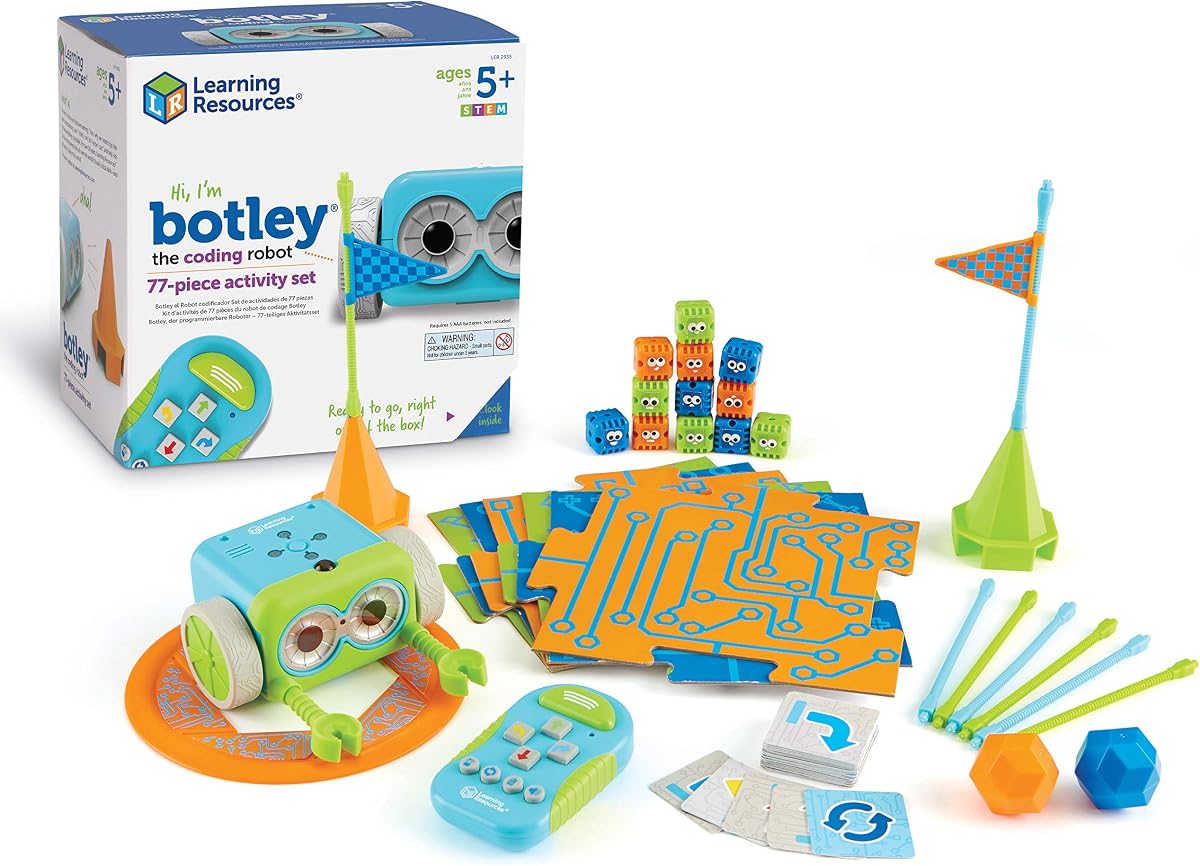
Learning Resources Botley is a well-loved coding robot for children five and up, offering a completely screen-free experience that supports critical thinking. Its high rating comes from ease of use and the fun of obstacle courses without needing digital devices.
We may earn a commission when you buy through this link, at no additional cost to you.
Botley responds to a remote programmer that sends commands to roll, loop, or avoid objects. The set includes coding cards and obstacle pieces to create custom challenges, while hidden features add surprise elements to keep play fresh.
The need for multiple batteries means extra costs upfront, but the value of unplugged learning is significant. Assembly of detachable arms is simple, allowing kids to customize Botley's form and function quickly.
This toy suits young kids eager to start coding without screen time. It is a strong choice for parents and teachers wanting to foster logic skills through tactile, interactive play.
Built-in sensors let Botley detect obstacles and change behavior, teaching cause and effect concepts.
Kids can program loops to repeat actions, simplifying complex paths into efficient code sequences.
We may earn a commission when you buy through this link, at no additional cost to you.
The Ozobot Evo is a powerful educational kit designed for grades K-12, offering both app-based and screen-free coding paths. Its strong rating reflects comprehensive resources and adaptability for different skill levels from beginner to master.
We may earn a commission when you buy through this link, at no additional cost to you.
Kids can draw colored lines with included markers for the robot to follow or use Ozobot Blockly online for more advanced coding. The kit includes 700 free lessons covering STEAM topics, ensuring long-term use as skills grow.
While the price is higher than basic kits, the educational resource value is extensive. The markers require drawing physical paths, which is engaging but needs space for paper layouts.
Ideal for teachers and parents seeking structured curriculum options, Evo grows with the child. It provides a balanced approach to coding that respects both digital and tactile learning preferences.
Special color sequences on paper tell the robot to speed up or change direction instantly.
Over 700 lessons cover core subjects, making it a robust tool for classroom integration.
We may earn a commission when you buy through this link, at no additional cost to you.
Botley 2.0 upgrades the original with object-sensing and advanced movement like 45-degree turns, making it suitable for intermediate coders ready for deeper challenges. Its rating highlights improved features and expanded play value.
We may earn a commission when you buy through this link, at no additional cost to you.
The kit offers 78 pieces including stackable obstacles and coding cards to design complex sequences. Lights and sounds add multisensory fun, while secret codes unlock new ways to interact with the robot for creative play.
A trade-off is the need for storage to keep the many pieces organized, but the open-ended design ensures kids can build new scenarios each time. The remote programmer remains easy to use.
This model is ideal for kids who outgrew basic robots and want more strategic challenges. It supports logical growth through layered missions and adaptable obstacle courses.
45-degree turns allow for intricate maze designs that test planning skills more deeply.
Hidden code combinations encourage discovery and experimentation with the robot's capabilities.
We may earn a commission when you buy through this link, at no additional cost to you.
The Wonder Workshop Dash Robot is a premium, ready-to-play coding toy for ages six and older, earning its premium badge for reliability and widespread use in schools. Its high rating comes from strong app support and fun interactive features.
We may earn a commission when you buy through this link, at no additional cost to you.
Dash responds to voice commands and can sing or dance using Blockly apps on tablets. The battery lasts up to five hours, and no assembly is needed, so kids can start coding immediately out of the box.
While it requires a device for full functionality, the integration is seamless and educational. The higher cost is justified by the longevity and school-tested curriculum resources available.
This robot is ideal for families seeking a polished, reliable tool that integrates with classroom standards. It offers a fun entry into coding with extensive resources for growth.
Dash responds to voice, adding a natural language element to coding play that feels magical.
Used in over 40,000 schools, it comes with proven lesson plans and teacher support.
We may earn a commission when you buy through this link, at no additional cost to you.
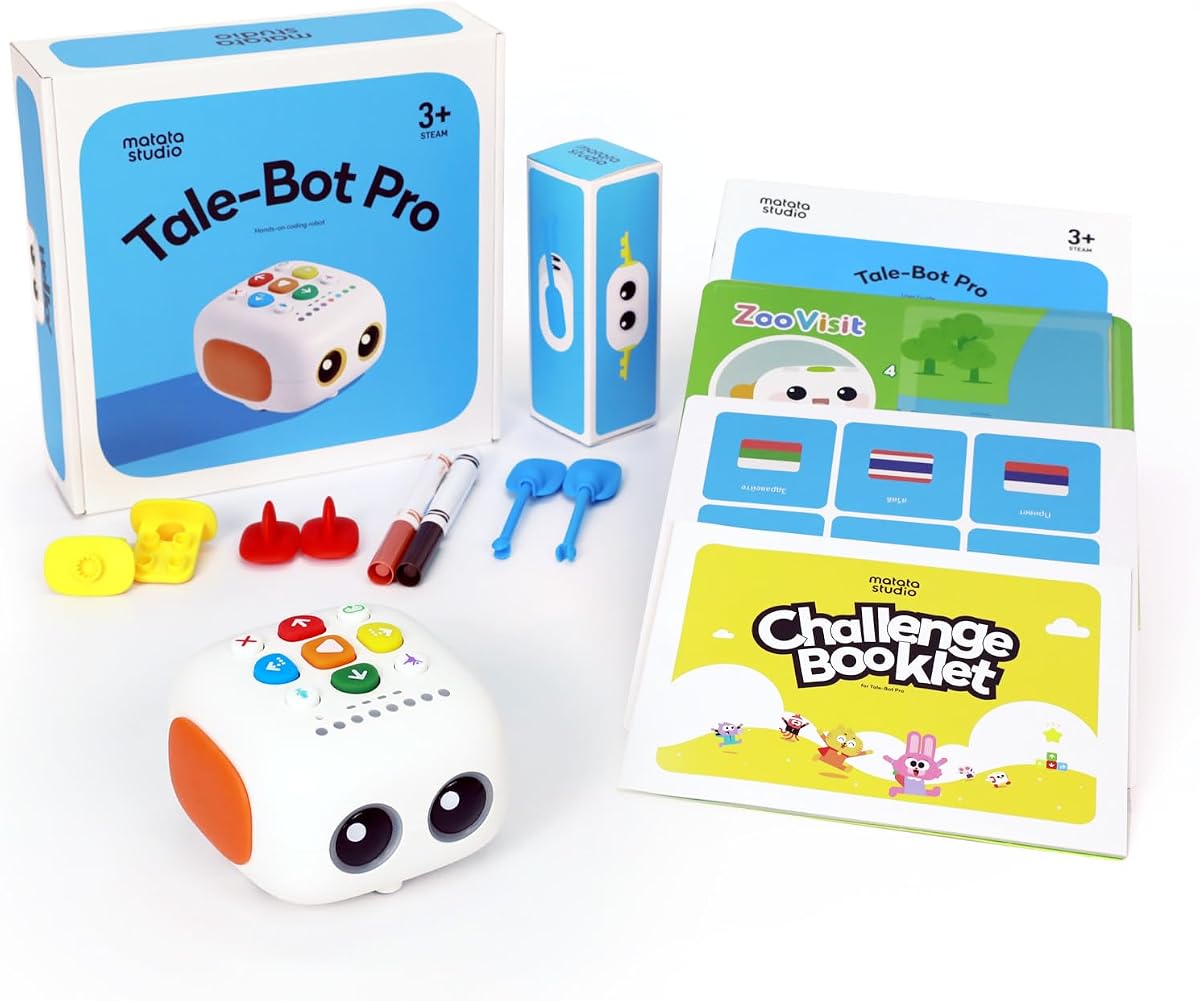
TaleBot Pro is uniquely designed for toddlers ages three to five, focusing on early coding through storytelling and music. Its highest rating reflects success in engaging very young children with language and logic skills.
We may earn a commission when you buy through this link, at no additional cost to you.
The robot uses an interactive map and voice feedback to tell stories while teaching sequencing. Kids can record voice commands and use up to 256 commands to learn loops and sequences in a playful format.
While it leans more toward storytelling than complex code, it builds foundational skills for future tech learning. Compatibility with Lego blocks allows creative physical play to complement digital concepts.
This toy is perfect for preschoolers and families valuing language development alongside tech. It works well for those wanting screen-free early learning through narrative and song.
Interactive stories and recording features help toddlers expand vocabulary and listening skills.
The robot works with Lego blocks, allowing kids to build environments that extend the play.
We may earn a commission when you buy through this link, at no additional cost to you.
Selecting the right coding toy requires balancing age appropriateness, learning style, and available space for play.
Coding toys vary widely by age complexity, with simpler button-based systems for preschoolers and app-connected kits for teens. Always check the manufacturer's recommended age to ensure the child has the motor skills and attention span needed for assembly and coding tasks.
Decide if you want a purely physical coding experience or one that uses a tablet for instruction. Screen-free options reduce distractions and focus on logic, while app-based toys often offer more complex programming and visual feedback.
Some kits require hours of assembly which teaches engineering but needs patience, while others are ready to use out of the box. Consider the child's interest in construction versus immediate play when evaluating build time requirements.
Identify whether you want to focus on storytelling, robotics, or pure coding logic. Different toys emphasize different skills like sequencing or mechanical principles, so align the toy with your child's current interests.
Look for toys with add-on packs or compatible modules that allow the set to grow as skills improve. Open-source systems or kits that work with standard blocks like LEGO offer longer usability and creative flexibility.
Most robots run on replaceable batteries like AA or AAA which are often not included in the box. Calculate ongoing costs for power and consider rechargeable models if budget is a concern for regular use.
If the toy will be used in a group setting, durability and easy storage are key factors. Kits with organized cases and sturdy materials are better for high-frequency use in classrooms or multiple children sharing.
Start by setting up the toy in a clear, flat area to allow safe movement without obstructions. Read the instruction manual together to understand the specific coding symbols or button functions before launching into a first project.
Store removable parts like coding cards or obstacles in a labeled container after play to prevent loss. If the robot requires battery changes, keep the compartment accessible for quick swaps when the unit slows down.
Regularly check for software updates on connected apps to ensure compatibility with the latest features. Wipe down plastic surfaces with a dry cloth to remove dust that could interfere with sensors or movement gears.
Yes, coding toys introduce fundamental concepts like sequencing, loops, and logic in an age-appropriate way. While they simplify syntax, they build the cognitive foundation needed for future text-based programming languages.
No, many models offer screen-free coding using physical buttons or cards. However, some advanced kits use apps for more complex features, so check product details for compatibility requirements.
Children as young as three can use simplified screen-free toys focusing on sequencing, but complex kits are better for ages eight and older. Matching the toy to developmental readiness ensures engagement and success.
Some robots like mBot or TaleBot support add-ons from other ecosystems like LEGO, but most are proprietary. Compatibility depends on the specific model and brand standards, so review specs before expanding sets.
Battery life varies by toy model and usage intensity, ranging from one hour to several hours per charge. Always check product specifications for runtime estimates to plan play sessions accordingly.
Many educational coding robots are designed for classroom use with durable parts and lesson plans. Look for sets that include multiple mats or activity cards to support group rotations and shared learning.
The top picks in this guide cover a broad range of needs from early learners to advanced young coders. Whether you prefer screen-free logic or app-integrated challenges, each option offers a unique path to understanding technology.
Prioritize factors like age match and build complexity to ensure the toy fits your child's current interests. A well-chosen coding toy can spark a lifelong passion for problem-solving and engineering.
Before purchasing, double-check current availability and pricing as these often shift. Confirm that any required batteries or accessories are included or easily obtainable to start coding right away.