
Redragon S101-3 PRO Gaming Keyboard and Mouse
4.5Editor score
RGB Backlit Keyboard
Independent Macro Keys
Complete Value Combo
Discover the top keyboards for Fortnite players. This guide compares ten gaming boards for speed, customization, and durability to help you win more battles.
Finding the right keyboard for Fortnite can significantly impact your building speed and editing precision. Competitive players need rapid actuation and reliable key registration to succeed in high-stakes matches.
We analyzed ten top-rated gaming keyboards based on switch type, layout, and customization features. Each option offers unique benefits for different playstyles and budget constraints.
Each pick highlights key features and real-world performance notes. Prices fluctuate frequently, so verify current offers before purchasing your next gaming peripheral.
4.5Editor score
4.5Editor score

4.6Editor score
This side-by-side comparison highlights the key specifications and unique selling points of all ten keyboards evaluated in this guide.






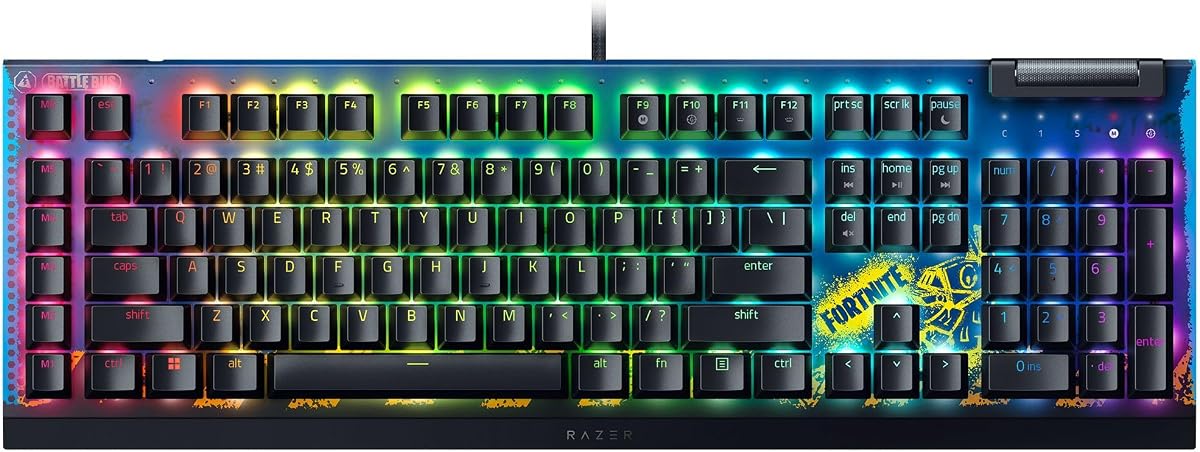
The Razer BlackWidow V4 X stands out as the top choice for Fortnite players seeking performance and customization. With a 4.5 rating, it combines rapid linear switches and macro keys to optimize your gameplay efficiency.
We may earn a commission when you buy through this link, at no additional cost to you.
Its Yellow Mechanical Linear switches actuate at 1.2mm with only 45g of force, enabling instant inputs for building and editing. The six dedicated macro keys allow you to program complex command sequences like quick rotations or resource management.
While it carries a higher price, the durability of the Double-shot ABS keycaps ensures labeling never wears off even during intense sessions. The lack of a removable cable might limit portability, but the stable connection is worth it for desktop setups.
Competitive gamers and those wanting reliable macro functionality should prioritize this keyboard. It balances speed, customization, and comfort effectively for serious Fortnite enthusiasts.
Zero distance between actuation and reset points ensures instant, rapid-fire inputs critical for Fortnite building.
Six easy-access macro keys expand your arsenal of commands to optimize playstyle and skill rotations.
We may earn a commission when you buy through this link, at no additional cost to you.
The SteelSeries Apex 3 offers solid reliability and comfort for Fortnite players on a budget. Its IP32 water resistance prevents accidental damage from liquid spills while the quiet switches ensure minimal noise.
We may earn a commission when you buy through this link, at no additional cost to you.
Features like the premium magnetic wrist rest provide full palm support during long sessions. The 10-zone RGB illumination adds aesthetic appeal without sacrificing responsiveness for casual competitive play.
Membrane switches may lack the crispness of mechanical keyboards but deliver 20 million low friction keypresses. Dedicated multimedia controls allow on-the-fly adjustments which can be useful during matches.
Players prioritizing comfort, durability, and budget-friendly options will find this keyboard appealing. It suits shared spaces where quiet operation is valued.
IP32 water resistant design prevents accidental damage from liquid spills during gaming sessions.
Premium magnetic wrist rest provides full palm support and comfort for extended play.
We may earn a commission when you buy through this link, at no additional cost to you.
The Redragon S101-3 PRO delivers exceptional value by bundling a full-size RGB backlit keyboard and high-precision gaming mouse. This complete wired set suits first-time gamers and budget-conscious users seeking an upgrade from basic peripherals.
We may earn a commission when you buy through this link, at no additional cost to you.
Features include 6 vibrant backlight modes and 5 dedicated macro keys for customizing command sequences. The software allows easy customization of colors and brightness while anti-ghosting ensures every press registers instantly.
Membrane keys provide satisfying feedback while remaining quiet and ideal for shared spaces. However, membrane durability may not match mechanical switches for long-term intensive use.
Students and new gamers wanting an affordable full setup will appreciate this kit. It covers essential gaming needs without breaking the bank.
Complete wired set includes full-size RGB keyboard and gaming mouse offering everything you need.
Dedicated macro record keys let you command complex sequences for competitive edge.
We may earn a commission when you buy through this link, at no additional cost to you.
The GEODMAER 65% gaming keyboard saves space with its ultra-compact mini design. It features separate arrow keys and no numpad, making it easy to carry in a backpack or fit on crowded desks.
We may earn a commission when you buy through this link, at no additional cost to you.
Connecting via detachable Type-C cable provides stable low latency input. With over 10 million keystrokes lifespan and UV treated caps, it resists fading and wear during regular use.
The membrane feel offers decent comfort for long sessions without high cost. However, RGB options are limited compared to premium boards and lack per-key customization.
Travelers and users with limited desk space will find this keyboard practical. It balances functionality and portability well.
65% compact design saves space on desktop and fits easily into backpacks.
More than 10 million keystrokes lifespan ensures reliable long-term performance.
We may earn a commission when you buy through this link, at no additional cost to you.
The Aula WIN60 HE features advanced Hall Effect magnetic switches delivering 8000Hz polling rate and 0.02mm rapid trigger. These provide unparalleled precision and speed for high-stakes Fortnite moments.
We may earn a commission when you buy through this link, at no additional cost to you.
The 60% compact layout saves desk space without sacrificing core gaming keys. The web-based driver allows easy key remapping and macro creation without installing bulky software.
However, the lack of arrow keys may hinder navigation for players who rely on them frequently. Additionally, driver compatibility is limited to Windows systems.
Competitive FPS players seeking cutting-edge speed and customization will appreciate this keyboard. It brings premium features to a mid-range price.
Hall Effect magnetic switches offer ultra-low latency and consistent actuation without wear.
60% design saves space while retaining essential keys for gaming and work.
We may earn a commission when you buy through this link, at no additional cost to you.
The AULA F75 Pro combines premium wireless flexibility with a hot-swappable 75% layout. It supports Bluetooth 5.0, 2.4GHz wireless, and USB-C connections allowing you to connect up to five devices simultaneously.
We may earn a commission when you buy through this link, at no additional cost to you.
Pre-lubricated stabilizers and Reaper switches deliver smooth typing and pleasant mechanical sounds. The multi-function knob lets you adjust brightness and volume effortlessly during gameplay.
Wireless use means managing battery life though the large 4000mAh cell offers long lasting performance. The price reflects the quality materials and extensive customization options.
Enthusiasts wanting top-tier build quality and seamless multi-device switching should consider this keyboard. It excels in both work and gaming environments.
Tri-mode connection supports Bluetooth 5.0, 2.4GHz wireless, and wired USB.
Hot-swappable base allows easy switch replacement without soldering issues.
We may earn a commission when you buy through this link, at no additional cost to you.
The AULA WIN68 HE mirrors the speed features of the WIN60 HE but includes arrow keys for added utility. With adjustable actuation points and 8000Hz polling it offers precise control and responsiveness.
We may earn a commission when you buy through this link, at no additional cost to you.
Its web driver enables customization without downloading extra software though Windows support is required. The detachable USB cable ensures stable connection for competitive play.
The compact design saves significant desktop space while providing arrow keys absent in other 60% boards. Some users may miss Mac compatibility for full functionality.
Players seeking speed with added navigation keys will find this model practical. It bridges the gap between portability and usability.
Adjustable actuation point allows personalized key sensitivity and response.
60% design saves space yet retains arrow keys for better navigation.
We may earn a commission when you buy through this link, at no additional cost to you.
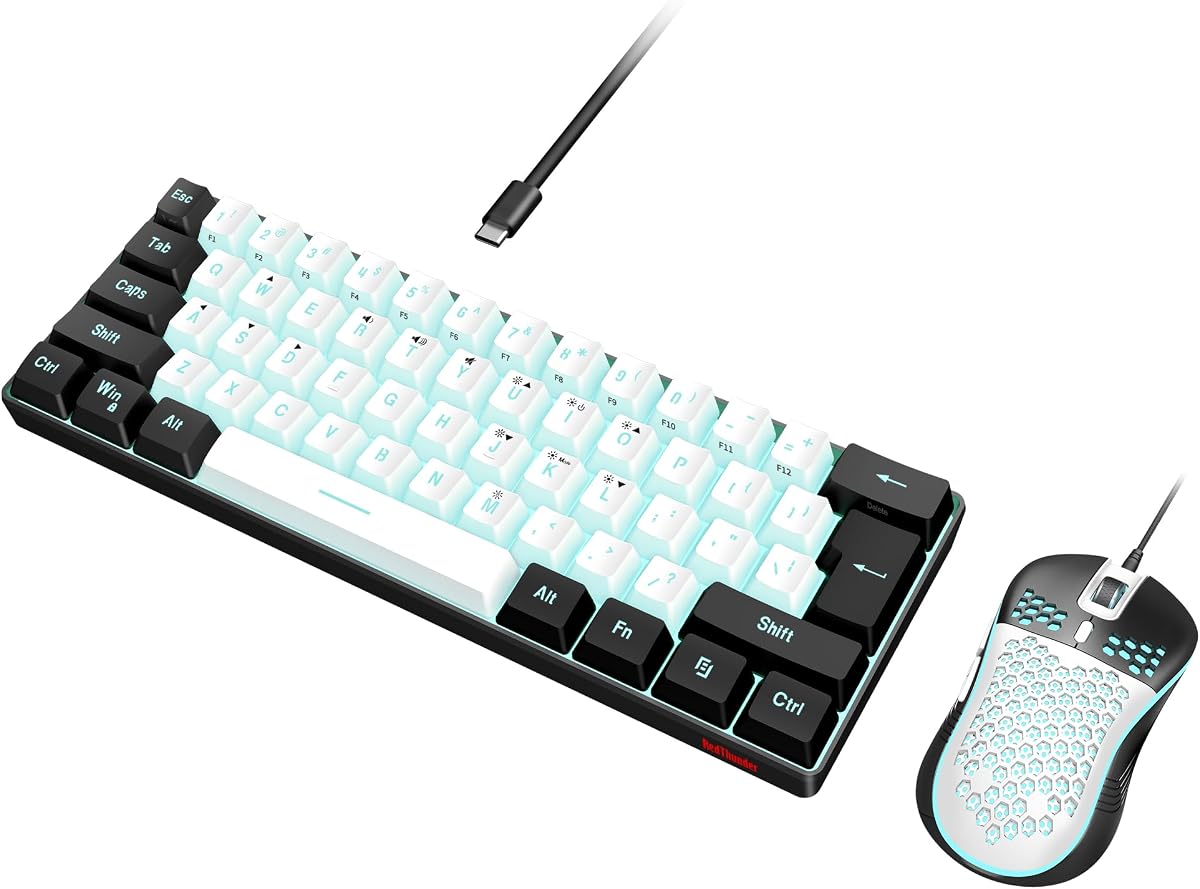
The RedThunder 60% combo offers a neat desktop setup ideal for FPS gamers who need extra mouse space. Its ultra-compact 61-key layout pairs with a lightweight honeycomb optical mouse for agile movement.
We may earn a commission when you buy through this link, at no additional cost to you.
Water resistant design protects against spills and durable braided cables ensure stable data transmission. The RGB lighting adds style though options are basic compared to advanced keyboards.
The mouse features high precision sensors and low weight reducing hand fatigue during long sessions. However, membrane keys lack tactile feedback preferred by some users.
Budget players wanting a compact and reliable gaming bundle will appreciate this set. It prioritizes space efficiency and basic durability.
60% compact layout leaves more desktop space for mouse movements.
Triple protection water resistant design prevents damage from spills.
We may earn a commission when you buy through this link, at no additional cost to you.
The Logitech G PRO TKL is built for esports athletes needing competition-level performance and precision. Its GX Blue click switches deliver audible tactile feedback and secure keypresses.
We may earn a commission when you buy through this link, at no additional cost to you.
The ultra-portable tenkeyless design frees table space and detaches easily for tournaments. LIGHTSYNC RGB can be stored in onboard memory avoiding software installation on tournament PCs.
Clicky switches may disturb others in shared rooms and software programming requires G HUB. Still the build quality and reliability stand out among competitors.
Serious competitors who value tactile clarity and portability should consider this keyboard. It offers trusted performance for high-stakes matches.
Built with and for esports athletes delivering speed and precision.
Ultra-portable tenkeyless design frees space and packs easily for transport.
We may earn a commission when you buy through this link, at no additional cost to you.
The ATTACK SHARK X68 HE delivers exceptional speed with magnetic switches and 8000Hz polling. It allows binding four functions to one key based on pressing depth providing flexible control.
We may earn a commission when you buy through this link, at no additional cost to you.
Web-based driver access means no extra software installation and supports both Windows and Mac systems. The double layer PORON and top mount design enhance stability and sound quality.
Setup may feel complex to beginners but the control and customization payoff are significant. Wired connection ensures stable performance without wireless latency.
Advanced users wanting full control over actuation points will love this keyboard. It represents cutting-edge technology at a competitive price.
Customizable dynamic keystroke allows four functions per key based on pressure.
Top mount structure with PORON provides stable and smooth typing.
We may earn a commission when you buy through this link, at no additional cost to you.
Selecting the right keyboard requires balancing speed, features, and budget. This section outlines critical factors to consider before purchase.
Mechanical keyboards with linear or Hall Effect switches offer faster actuation than membrane boards. Rapid trigger and adjustable actuation enhance building speed in Fortnite.
Prioritize switches with low actuation points and minimal latency for competitive advantage.
Full-size layouts include numpads useful for macros but occupy more space. Tenkeyless and 60% designs free mouse room for sweeping movements.
Choose compact formats if desk space is limited or if you prefer mouse mobility over number keys.
Programmable keys and macros automate complex sequences and rotations saving time during matches. Dedicated macro keys simplify access during gameplay.
Look for boards supporting key remapping and onboard memory to store profiles easily.
Keycaps made from ABS or PBT resist wear and fading over time. Water resistance protects against spills and accidents.
Invest in durable materials if you play frequently or in shared environments.
Wired keyboards provide stable low latency input ideal for competitive play. Wireless options offer convenience but require battery management.
Select wired for priority on reliability or wireless if flexibility matters more.
RGB lighting improves visibility in dark rooms and allows personalization. Per-key RGB enables intricate lighting patterns.
Choose lighting features that match your setup style and visibility preferences.
Prices vary significantly across brands and features. Entry-level boards provide essential functions while premium ones add advanced customization.
Set a budget that balances desired features with long-term satisfaction.
Install any required drivers or software to enable macros and key customization. Test key assignments in a safe environment before playing ranked matches.
Keep your keyboard clean by dusting regularly and avoiding food or drinks nearby. Wipe keycaps with a damp cloth when needed to maintain visibility.
Use the included wrist rest if provided to reduce strain during long sessions. Adjust angles for comfort to prevent fatigue and improve endurance.
Mechanical keyboards generally offer faster response and durability ideal for competitive play. Membrane boards provide budget-friendly alternatives but lack tactile precision and longevity.
60% keyboards free up space for mouse movement which benefits aiming and editing. However they omit arrow keys that some players rely on for navigation.
Lower actuation points around 1.2mm allow faster key presses and quicker building. However, extremely low points may increase accidental inputs for some users.
Macros can automate building sequences or resource management improving efficiency. Be aware that some tournaments restrict macro usage so check rules before competitive play.
Regular cleaning, avoiding liquids, and using wrist rests preserve keyboard function. Periodically check for keycap wear and recalibrate macros as needed.
Modern wireless keyboards offer latency comparable to wired for most users. Wired remain preferable for strict competitive settings minimizing any risk.
The ten keyboards reviewed offer diverse options for every player need and budget. The Razer BlackWidow V4 X and AULA F75 Pro lead with speed and flexibility.
Prioritize switch speed and customization if competitive advantage is your main goal. For beginners, value combos like the Redragon S101-3 PRO provide strong entry points.
Remember to verify current pricing and availability since deals change regularly. Invest wisely to enhance your Fortnite experience and performance.