
Cooler Master QUBE 540 ATX Mid-Tower PC Case, High Airflow, Tempered Glass
4.4Editor score
Flexible horizontal orientation design
Up to 415mm GPU clearance
Full front mesh airflow panel
Compare the top 10 Compact E ATX cases for 2026. This guide reviews airflow, compatibility, and build quality to help you choose the right chassis.
Choosing a Compact E ATX Case requires balancing size with performance. You need a chassis that fits high-end hardware while keeping thermal noise low. The right build ensures stability and airflow for demanding workloads.
We analyzed ten top models based on cooling potential, component support, and build quality. Each option offers unique features like mesh panels or tool-free access. Our comparisons highlight real-world usability for various setups.
Every pick details specific strengths and potential trade-offs for builders. We focus on airflow, motherboard support, and ease of assembly. Please note that product availability and pricing can change frequently online.
4.4Editor score

4.7Editor score

3.9Editor score
This table compares the key features of all ten selected Compact E ATX cases side by side. It highlights critical specifications like maximum GPU length, radiator support, and unique design elements.


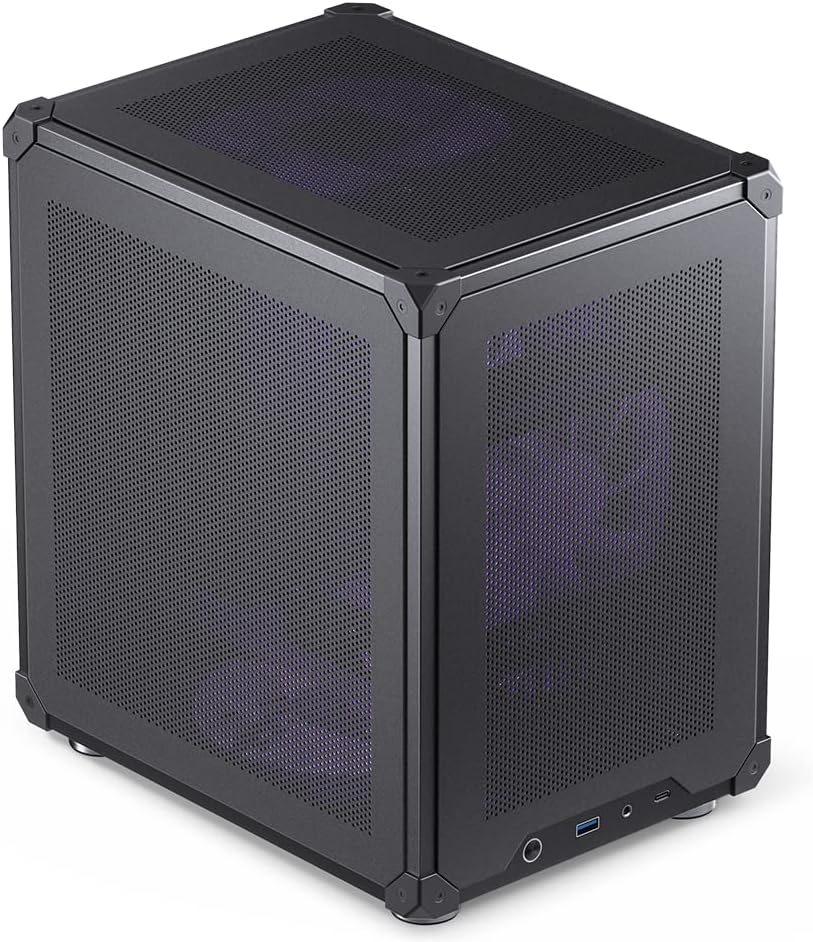

The Cooler Master QUBE 540 stands out as a highly versatile Compact E ATX case designed for modern builders. With a 4.4 rating, it balances affordability with robust feature sets. Its unique flexible orientation design allows you to position the case horizontally or vertically, adapting to various desk spaces.
We may earn a commission when you buy through this link, at no additional cost to you.
One of its strongest points is GPU compatibility, supporting cards up to 415mm without removing the front fan. This makes it future-proof for flagship graphics cards like the RTX 5090. The full front mesh panel ensures excellent airflow, while the I/O panel includes both USB 3.2 Gen1 and a convenient USB 3.2 Gen2 Type-C port for fast connectivity.
However, some users might find the tempered glass panels add weight to the build. Additionally, while it comes with a pre-installed SickleFlow fan, additional fans may be needed for top exhaust to optimize cooling. These trade-offs are acceptable given the price point and flexibility offered.
If you need a budget-friendly option that supports large components and offers layout flexibility, this case is a top recommendation. It is ideal for gamers who want high airflow and modern connectivity without breaking the bank. We suggest checking current reviews before finalizing your build plan.
The reversible I/O panel and movable handles allow you to customize the case orientation to fit your specific desk setup perfectly.
With support for GPUs up to 415mm in length, this case handles the longest high-end graphics cards without needing internal modifications.
We may earn a commission when you buy through this link, at no additional cost to you.
The Lian Li O11D Mini V2 earns our Editor's Choice badge for its premium design and thermal optimization. With a high 4.7 rating, it appeals to builders who value aesthetics and performance. The chassis features a unique 10-degree slanted bottom design that enhances cold air intake directly to the GPU.
We may earn a commission when you buy through this link, at no additional cost to you.
Its pillar-less tempered glass front and side panels offer a stunning unobstructed view of your internal components. This case also provides robust support for heavy GPUs with included horizontal and vertical anti-sag brackets. Special brackets for the 24-pin cable help maintain a tidy layout, ensuring your build looks as good as it performs.
One trade-off is that it ships without fans, meaning you must purchase separate cooling solutions. The glass panels also require careful handling to avoid fingerprints or scratches. However, the superior airflow and visual appeal make these minor inconveniences acceptable for a high-end build.
For enthusiasts seeking a compact ATX case with exceptional airflow and style, this model is an ideal choice. It supports back-connect motherboards and maintains a compact footprint while accommodating full-sized power supplies. We recommend it for builders prioritizing component protection and visual impact.
The slanted bottom design significantly improves GPU cooling performance by directing cold air intake more efficiently than standard flat bases.
Pillar-less tempered glass panels provide a completely clear view of your hardware, showcasing your components without visual obstructions.
We may earn a commission when you buy through this link, at no additional cost to you.
The Mechanic Master C34Pro offers a unique blend of portability and performance, earning its spot as Best Premium. It features a durable 2mm aluminum shell with a 1mm steel frame, providing strength and style. This case is designed for builders who need a compact chassis that can handle high-performance components with ease.
We may earn a commission when you buy through this link, at no additional cost to you.
It supports up to 420mm GPUs and 360mm radiators, ensuring flagship hardware fits without compromise. The integrated carry handle makes transportation easy for LAN events or workstation changes. Multi-zone fan mounts and dust filters optimize thermal management, allowing stable cooling even under heavy loads.
The higher price point is justified by the premium materials and unique portable features. However, the aluminum construction makes it slightly heavier than standard steel cases. Despite this, the durability and build quality offer significant value for those needing a mobile high-end setup.
If you need a rugged, portable Compact E ATX case that supports large hardware and offers excellent airflow, this is a top choice. It combines compact dimensions with robust build quality. We recommend it for professionals and enthusiasts who frequently move their systems.
The integrated carry handle and lightweight aluminum construction allow you to move your powerful desktop setup with ease and safety.
Multi-zone fan mounts and optimized airflow design ensure your components stay cool even during intense gaming or workstation sessions.
We may earn a commission when you buy through this link, at no additional cost to you.
The Cooler Master Q300L V1 is a fantastic compact case for Micro-ATX builders seeking high airflow. With a 4.5 rating, it offers exceptional value and versatility. Its open thermal design with perforations on all sides ensures heat dissipation is efficient and reliable.
We may earn a commission when you buy through this link, at no additional cost to you.
Key features include a modular I/O panel that you can adjust to the front, top, or bottom. The edge-to-edge transparent side panel showcases your build clearly. It supports GPUs up to 360mm and includes magnetic dust filters that add a distinctive aesthetic touch.
While limited to Micro-ATX boards, it maximizes the interior space for components. The only limitation is the PSU length cap at 160mm, which may not fit larger power supplies. However, for standard setups, this trade-off is negligible.
This case is ideal for budget-conscious builders needing a stylish and well-ventilated chassis. It simplifies assembly with clear panels and dust filters. We recommend it for small gaming PCs where aesthetics and airflow are top priorities.
Adjust the I/O panel position to front, top, or bottom to suit your desk layout and cable management preferences perfectly.
Perforations on all sides promote optimal airflow and heat dissipation for stable performance under heavy loads.
We may earn a commission when you buy through this link, at no additional cost to you.
The Mechanic Master C34 Ultra-Compact ATX PC Case with Handle Black provides a small form factor without sacrificing essential features. With a 4.6 rating, it supports standard ATX motherboards and offers a built-in handle for easy transport. This makes it perfect for LAN events or tight desk spaces.
We may earn a commission when you buy through this link, at no additional cost to you.
Key strengths include support for GPUs up to 335mm and USB Type-C ports on the front panel. The internal layout is optimized to simplify installation, especially when using SFX/L power supplies for cleaner cable management. The metal front I/O panel adds a premium feel to the build.
Some builders might find the GPU length limit restrictive for future high-end cards. Additionally, while ATX PSUs fit, SFX/L units are recommended for optimal cleanliness. These trade-offs are minor given the overall design and portability.
For anyone needing a portable and compact ATX case with strong component support, this is a reliable choice. We suggest checking component dimensions before purchase. It is an excellent option for those moving their PC frequently.
The integrated handle allows you to move your powerful desktop PC to LAN events or workstations with ease.
Internal design simplifies the installation process, ensuring easier cable management for a cleaner build experience.
We may earn a commission when you buy through this link, at no additional cost to you.
The ASUS Prime AP201 Micro-ATX PC Case excels in airflow and spatial efficiency. With a 4.7 rating, it features a quasi-filter mesh panel with over 57,000 holes for compelling views and increased airflow. This case is primed to handle the thermal demands of high-performance hardware.
We may earn a commission when you buy through this link, at no additional cost to you.
It supports radiators up to 360mm and GPUs up to 338mm within a 33L footprint. Tool-free side panels make assembly easy, and an extended motherboard tray with a 32mm gap keeps cables organized. It fits standard ATX PSUs up to 180mm long despite its compact size.
While limited to Micro-ATX boards, its internal space maximization is impressive. The price point is higher than some competitors but justified by the premium features and airflow design. These factors make it a strong contender for efficient builds.
We recommend this case for users prioritizing cooling and cable management in a small footprint. It balances size and functionality well. Ensure your motherboard fits the Micro-ATX requirement before buying.
The quasi-filter mesh with 57,000 precision holes maximizes airflow and provides a clear view of your internal components.
Extended motherboard tray with strategically placed cutouts allows cables to be tucked out of sight easily.
We may earn a commission when you buy through this link, at no additional cost to you.
The Cooler Master Q300L V3 Micro-ATX PC Case, High Airflow, Tempered Glass builds on the popularity of its predecessors. With a 4.6 rating, it offers builder-friendly design and premium performance. The high-airflow cooling supports up to 6x 120mm or 140mm fans for flexible setups.
We may earn a commission when you buy through this link, at no additional cost to you.
It supports GPUs up to 366mm, making it easy to build with modern NVIDIA or AMD cards. A movable I/O panel allows position adjustment, and tempered glass panels enhance the visual appeal. Magnetic dust filters ensure your internal components stay clean over time.
While it lacks built-in fans, the flexibility of mounting up to six fans is a strong advantage. The tempered glass adds to the build but requires care to avoid smudges. These factors are acceptable for a high-performance Micro-ATX case.
If you need a high-airflow Micro-ATX chassis with modern aesthetics and strong GPU support, this is a great pick. We recommend pairing it with compatible fans for optimal results. It suits builders who prioritize visual design and airflow.
Support for graphics cards up to 366mm ensures compatibility with the latest high-performance NVIDIA and AMD gaming cards.
Unique magnetic dust filters add a distinctive appearance while keeping internal components clean from dust accumulation.
We may earn a commission when you buy through this link, at no additional cost to you.
The Zalman CUBIX M-ATX Micro-ATX Compact Desktop PC Case with 80mm Fan offers a sleek and sturdy design. With a 4.5 rating, it features a compact 17.1-liter volume and durable 0.8T steel construction. The perforated front panel ensures optimal cooling for standard components.
We may earn a commission when you buy through this link, at no additional cost to you.
It supports standard ATX PSUs and GPUs up to 260mm in length. The pre-installed 80mm fan helps with airflow without requiring extra cost. Connectivity options include USB 3.0, USB 2.0, and audio jacks, covering essential needs.
The compact size limits GPU length, which may not suit large graphics cards. However, for small office PCs or basic gaming setups, this is acceptable. The build quality ensures durability for daily use.
We recommend this case for users needing a small, durable, and affordable Micro-ATX solution. It balances simplicity with functionality. Ensure your GPU fits within the 260mm limit before purchase.
With a total volume of 17.1 liters, this case fits easily into tight spaces without compromising essential connectivity.
Includes a pre-installed 80mm fan to ensure immediate cooling performance out of the box.
We may earn a commission when you buy through this link, at no additional cost to you.
The JONSBO C6 Black Mini MATX Mesh PC Case provides a simple compact desktop solution. With a 4.6 rating, it features a mesh chassis for heat-free airflow and tool-free side panels for easy access. This design simplifies building and maintenance significantly.
We may earn a commission when you buy through this link, at no additional cost to you.
It supports ATX PSUs up to 185mm and offers multiple fan mounting positions including top, bottom, and front. The Type-C interface adds modern connectivity. However, the CPU cooler height is limited to 75mm, and GPU length is between 200-255mm.
These limits make it ideal for low-profile builds rather than high-end gaming PCs. The tool-free design is a major benefit for quick upgrades. It offers good value for compact Micro-ATX needs.
We recommend this case for users needing a simple, affordable, and easy-to-assemble chassis. Ensure your CPU cooler fits the height limit. It is perfect for small office or home setups.
Upper cover and side panel tool-free design allows for easy and quick disassembly for convenient maintenance.
Mesh design on all sides ensures optimal airflow and heat dissipation for efficient thermal management.
We may earn a commission when you buy through this link, at no additional cost to you.
The NZXT H5 Flow offers exceptional GPU cooling through its perforated PSU shroud. With a 4.6 rating, it supports up to a 360mm radiator in the front. Ultra-fine mesh on the top, front, and side panels creates maximum airflow and filters dust effectively.
We may earn a commission when you buy through this link, at no additional cost to you.
It comes pre-installed with two 120mm Quiet Airflow fans for solid out-of-the-box performance. Seamless cable management channels help conceal wires effortlessly. This case balances airflow and aesthetics for a high-performance mid-tower design.
A limitation is the lack of side fan mounting options compared to other models. However, the PSU shroud design ensures heat is drawn directly away from the graphics card. These factors make it efficient for air cooling.
We recommend this case for users wanting excellent GPU cooling and simple setup. Ensure your radiator size fits the front support. It is a reliable choice for mid-tower ATX builds.
The perforated PSU shroud enables optimal air intake from two fans, ensuring direct cooling to the graphics card.
Support for up to a 360mm radiator in the front allows for powerful liquid cooling potential.
We may earn a commission when you buy through this link, at no additional cost to you.
Selecting a Compact E ATX case requires attention to several technical specifications. This section outlines the most important factors to ensure your build remains stable and well-cooled.
Ensure the case supports your specific motherboard size. Compact E ATX cases often support full ATX and E-ATX boards, but some may restrict to Micro-ATX. Check dimensions before buying.
Always verify motherboard width and depth against case specs.
High-performance graphics cards can be long. Look for cases supporting at least 300mm. Some Compact E ATX options support up to 415mm for flagship cards.
Measure your GPU length against the max clearance listed.
Liquid cooling requires space for radiators. Check if the case supports 240mm, 280mm, or 360mm radiators. Front and top mounts vary by design.
Confirm radiator length compatibility for your intended cooling solution.
Mesh panels are preferred for airflow. Look for full front mesh or perforated designs to improve cooling. Solid panels may trap heat under load.
Prioritize mesh over solid front panels for better thermals.
Standard ATX PSUs are common but require space. Compact cases may restrict PSU length to 160mm or 180mm. SFX/L PSUs are often recommended for tighter builds.
Check max PSU length if using standard ATX power supplies.
Integrated handles add mobility for LAN events or moves. Portable cases usually feature aluminum shells and lightweight frames for ease of transport.
Consider a handle if you frequently relocate your PC.
Adequate cable space keeps builds clean. Look for extended trays and gaps for routing cables. Tool-free access helps manage wires easily.
Ensure sufficient cable routing space for clean builds.
Steel vs aluminum impacts durability and weight. Aluminum offers premium feel but may cost more. Steel is robust and often budget-friendly.
Choose materials based on your durability needs and budget.
Always disconnect power before installing components. Align your motherboard standoffs correctly to avoid short circuits. Follow the manual for specific mounting instructions.
Clean dust filters every few weeks to maintain airflow. Use compressed air to blow dust out of fans and vents. This prevents overheating and extends hardware life.
Avoid placing the case on carpets that trap dust. Keep it on a hard surface to reduce intake of fibers. Ensure space around vents for proper air intake.
A Compact E ATX case supports E-ATX motherboards while maintaining a smaller footprint. These cases typically fit GPUs and PSUs standard for desktop builds. They prioritize airflow and portability without sacrificing compatibility.
Many support full ATX PSUs but restrict length. Check for 160mm or 180mm caps. Some models recommend SFX/L units for optimal cable management.
Yes, if they support large GPUs and have good airflow. Mesh panels and fan mounts ensure heat dissipation. Check GPU length clearance for your specific graphics card.
Use mesh front panels and ensure all intake vents are clear. Install fans properly to create positive or negative pressure. Clean dust filters regularly to maintain efficiency.
Most support 240mm or 280mm radiators. Some allow 360mm front mounts. Verify radiator support before choosing a cooling solution for your build.
Look for extended trays and 30mm+ gaps. Tool-free panels allow easier access. Ensure enough space behind the motherboard tray for routing cables.
Our top picks like the Cooler Master QUBE 540 and Lian Li O11D Mini V2 offer excellent balance. They provide strong airflow and compatibility for most modern builds.
Prioritize GPU clearance and airflow features when choosing. If you need portability, the Mechanic Master C34Pro is worth considering for its aluminum build.
Always check current availability and specifications before buying. Prices and stock levels change often. We hope this guide helps you find the ideal case for your setup.