
Microsoft Surface Dock (Pd9-00003)
4.5Editor score
Magnetic Surface Connect
Multiple USB ports
Affordable price
Discover the top docking stations for Surface Pro devices in our comprehensive guide comparing features, connectivity, and performance for every user.
Finding the right docking station for your Surface Pro can transform your workspace into a powerful desktop setup. The best options offer seamless connectivity, fast charging, and multiple display support to keep you productive.
We compared ten top-rated docking stations based on port variety, compatibility, build quality, and real-world performance. Each product was evaluated for its ability to handle demanding workflows and provide reliable connections.
This guide highlights the standout features of each pick along with honest pros and cons. Keep in mind that prices and availability can change, so check the current listings before making your final decision.
4.5Editor score

4.4Editor score

4.8Editor score
This side-by-side comparison highlights the key specifications and features of the top docking stations available for Surface Pro users today.


The Microsoft Surface Thunderbolt 4 Docking Station leads our list with its premium build and high-speed connectivity. With a solid rating of 4.4 stars, it stands out for users needing robust data transfer and display capabilities. Its Thunderbolt 4 technology ensures that you can stream media, transfer large files, and charge your laptop simultaneously without bottlenecks.
We may earn a commission when you buy through this link, at no additional cost to you.
This docking station offers versatile compatibility with three USB-C ports and three USB-A ports, making it easy to connect legacy peripherals alongside modern devices. The quick charge capability allows your laptop to power up in just 2.5 hours, keeping you productive throughout the day. Additionally, the raised tactile indicators on each port make it easy to identify connections even in low-light environments.
While it supports two 4K monitors for stunning visuals, the premium price might be a consideration for budget-conscious users. However, the inclusion of 2.5G Ethernet and a security lock slot adds value for enterprise environments where stability and security are paramount. The eco-friendly design using recycled ocean-bound plastic also appeals to environmentally aware professionals.
For professionals who need maximum connectivity and speed, this is the ideal choice. It transforms your Surface into a fully-featured desktop workstation. If you require multiple displays and fast data transfer regularly, the investment pays off in productivity. We recommend it for power users who demand reliability and performance from their docking solution.
Thunderbolt 4 technology allows for rapid data transfers and media streaming without lag, ensuring your workflow remains uninterrupted.
Made with recycled materials and tactile indicators, it combines environmental responsibility with practical usability for daily tasks.
We may earn a commission when you buy through this link, at no additional cost to you.
The Microsoft Surface Dock (Pd9-00003) offers excellent value for users seeking a reliable connection without breaking the bank. With a high rating of 4.5 stars, it is known for its simplicity and broad compatibility with various Surface models. It allows you to transform your portable Surface into a desktop experience quickly and efficiently.
We may earn a commission when you buy through this link, at no additional cost to you.
It features two Mini Display Ports for connecting external monitors and four USB 3.0 ports for peripherals. The magnetic Surface Connect cable is a standout feature that simplifies docking and undocking by securely snapping into place. This makes it incredibly convenient for users who frequently move their device between work and home.
While it uses older Mini Display Ports instead of newer standards, this is generally acceptable for standard 1080p or 4K setups depending on the adapter used. The Gigabit Ethernet port ensures a stable internet connection for video calls and downloads. However, it requires an external power supply which adds to the cable management on your desk.
This docking station is perfect for students or home office users who need basic connectivity. It provides a straightforward way to add more ports and a second monitor to your setup. If you prioritize ease of use and affordability over cutting-edge specs, this is an excellent option to consider for your daily workflow.
The Surface Connect cable magnetically attaches to your device, preventing accidental disconnection and making setup incredibly easy.
At an affordable price point, it offers a cost-effective way to expand your Surface's connectivity for a full desktop setup.
We may earn a commission when you buy through this link, at no additional cost to you.
This Surface Docking Station Triple Displays model boasts an impressive 4.8 rating and stands out as a top choice for users needing extensive connectivity. Its 12-in-1 design provides a wide array of ports allowing you to connect multiple screens and peripherals simultaneously. The inclusion of Surface Connection technology ensures seamless integration with your Microsoft device.
We may earn a commission when you buy through this link, at no additional cost to you.
The triple display capability allows you to boost productivity by extending your screen across multiple monitors. It supports 4K output via HDMI and 1080p via VGA offering flexibility for different types of displays. The integrated 72W power supply ensures your laptop charges fully while running all connected peripherals which is vital for mobile professionals.
Data transfer is handled efficiently with USB 3.0 and USB-C ports delivering speeds up to 5Gbps. The SD/TF card slots are particularly useful for photographers or content creators who need to offload media quickly. While it requires a power connection for full functionality, this ensures stable performance without draining your laptop battery.
This dock is ideal for creative professionals or power users who need to multitask with multiple windows and devices. It offers a robust solution for expanding your workspace significantly. If you need to connect several monitors and transfer large files frequently, this premium option provides the reliability and features required for demanding workloads.
Connect up to three external displays to maximize your workspace and multitasking efficiency without sacrificing performance.
With a 72W power supply and 5Gbps USB ports, you can charge your device and move large files simultaneously with ease.
We may earn a commission when you buy through this link, at no additional cost to you.
This alternative version of the triple display docking station offers similar features at a competitive price point. With a rating of 4.1 stars, it provides reliable connectivity for users looking to expand their Surface setup. It supports various Surface Pro models and integrates well with Surface Laptop devices as well.
We may earn a commission when you buy through this link, at no additional cost to you.
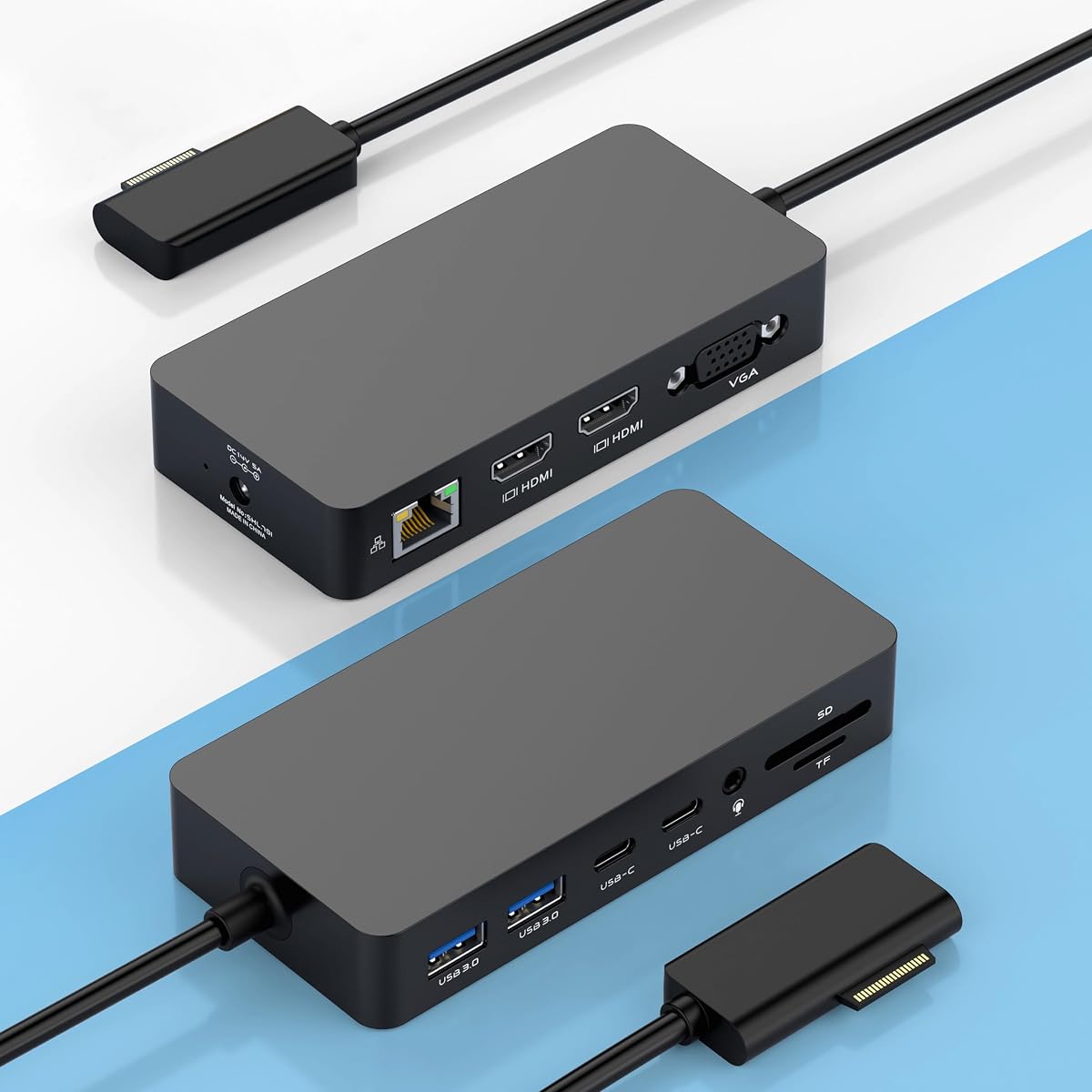
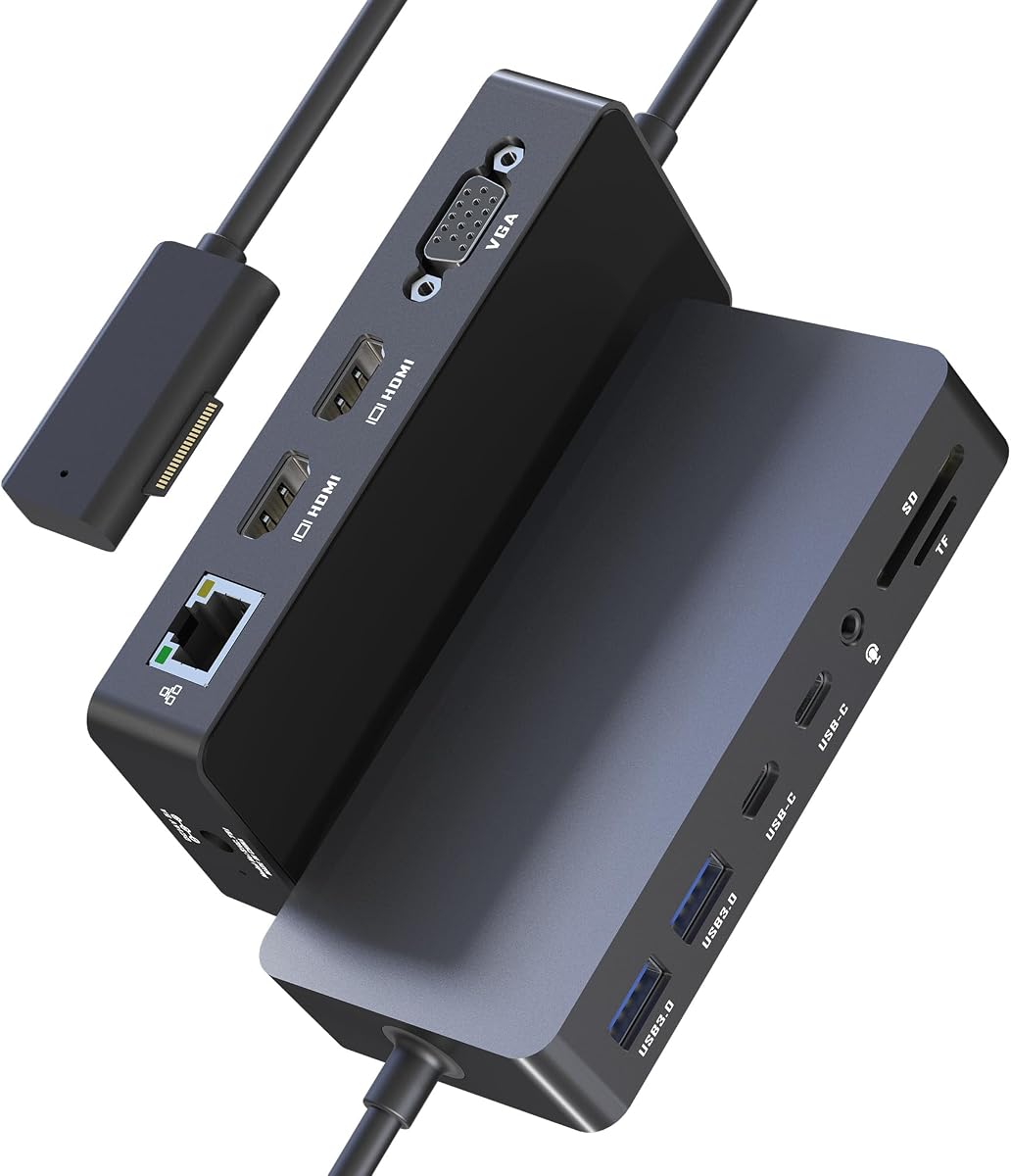
It features dual HDMI ports and a VGA port allowing for triple display support which enhances your multitasking capabilities. The USB ports offer fast data transfer rates up to 5Gbps making file transfers quick and efficient. The inclusion of card slots allows you to easily read photos from cameras without extra adapters.
While it requires an external power adapter to function fully, this ensures your device remains charged during use. The audio jack provides a convenient option for connecting headphones or speakers directly. Some users may find the setup slightly complex but the plug-and-play nature generally simplifies the process.
For those needing multiple displays on a budget, this station is a strong contender. It balances performance and cost effectively for home office or student use. If you need to connect several screens and transfer data regularly without spending too much, this model offers a practical solution.
Utilize HDMI and VGA outputs to extend your workspace and manage tasks more efficiently across different screens.
Transfer files rapidly using USB ports and card slots designed to handle large media files and data backups.
We may earn a commission when you buy through this link, at no additional cost to you.
This 12-in-1 Surface Docking Station transforms your device into a powerful workstation with its versatile port selection. Rated at 4.2 stars, it appeals to professionals who need robust connectivity options for their daily tasks. It supports a wide range of Surface Pro models ensuring broad usability across different generations of devices.
We may earn a commission when you buy through this link, at no additional cost to you.
The dual 4K HDMI ports allow for high-resolution outputs ideal for design work or media consumption. With a 72W DC power port it ensures your laptop stays charged even under heavy usage. The Ethernet port guarantees a stable internet connection which is crucial for video conferencing and large file transfers.
Data transfer is streamlined with USB 3.0 and USB-C ports supporting high-speed transfers. The SD and TF card slots provide quick access to camera media. While it relies on an external power source, the included adapter is reliable. The 18-month warranty offers peace of mind regarding long-term durability.
This docking station is recommended for hybrid workers who move between home and office setups. It simplifies your workspace by providing all necessary ports in one unit. If you need to connect multiple high-resolution monitors and stay powered up efficiently, this versatile option meets those needs effectively.
Enjoy crystal clear visuals with dual 4K HDMI outputs that enhance your visual experience for work or entertainment.
Stay connected and powered with dedicated Ethernet and 72W charging ports that ensure uninterrupted performance.
We may earn a commission when you buy through this link, at no additional cost to you.
The Microsoft Surface Dock 2 represents the next generation of Surface connectivity with enhanced features for modern workflows. With a 4.5 star rating, it offers a premium experience tailored for users requiring high power and performance. It instantly transforms your Surface into a desktop PC with next-gen ports.
We may earn a commission when you buy through this link, at no additional cost to you.
It supports dual 4K displays at 60Hz providing smooth and sharp visuals. The 199W power supply is capable of charging your device while running multiple peripherals without strain. The inclusion of USB-C ports ensures compatibility with the latest devices and transfer speeds.
The security lock support makes it a good choice for office environments where equipment security is a priority. Gigabit Ethernet ensures fast and stable network connections for demanding tasks. However, the higher cost and the need for specific cables may be considerations for casual users.
This dock is ideal for professionals who need reliable high-performance connectivity. It offers a robust solution for those who require multiple displays and high power delivery. If you value performance and future-proofing in your workstation setup, this model is a solid investment for productivity.
The 199W power supply and USB-C ports deliver the performance needed for intensive tasks and modern accessories.
Integrated security lock support and Gigabit Ethernet provide stability and safety for office use.
We may earn a commission when you buy through this link, at no additional cost to you.
This USB-C version of the Surface Dock 2 brings premium features with an impressive 4.8 star rating. It allows for seamless connectivity and transformation of your device into a desktop setup. The longer 80cm cable provides flexibility in where you place your device relative to the dock.
We may earn a commission when you buy through this link, at no additional cost to you.
With dual 4K support at 60Hz you get smooth and sharp visuals for all your tasks. The 199W power supply ensures your laptop charges efficiently even when multiple devices are connected. It includes a variety of USB ports allowing you to connect keyboards mice and other peripherals easily.
The wide compatibility across Surface models makes it a versatile option for households with multiple devices. However, the price point is higher than third-party alternatives. While this is a premium product, the performance and reliability justify the cost for power users.
This docking station is best suited for those needing top-tier performance and stability. The longer cable is particularly useful for larger desks or complex setups. If you prioritize high-quality video output and reliable charging, this dock is a strong candidate for your workspace.
The included 80cm Surface Connect cable allows for flexible placement on your desk without stretching cables.
Support for dual 4K monitors at 60Hz ensures smooth visuals for design and productivity tasks.
We may earn a commission when you buy through this link, at no additional cost to you.
This 12-in-1 Surface Docking Station provides robust connectivity and high-speed data transfer. With a rating of 4.3 stars, it caters to professionals needing reliable connections for multiple displays and peripherals. It supports dual 4K HDMI ports delivering crisp visuals and high refresh rates.
We may earn a commission when you buy through this link, at no additional cost to you.
The triple monitor support via MST allows you to expand your desktop space significantly. It includes a dedicated 100W power adapter ensuring your laptop charges fully while connected. The Gigabit Ethernet port provides a stable network connection which is essential for business users.
USB 3.0 and USB-C ports offer fast file transfers up to 5Gbps. SD/TF card slots make it easy to transfer photos and videos directly. While it is a larger unit due to the power supply it offers a complete solution. It is ideal for stationary workstations.
This docking station is recommended for traders designers and creatives needing multiple screens. It eliminates the need for multiple adapters simplifying your desk setup. If you need to connect several monitors and maintain fast transfer speeds regularly this dock offers the reliability you need.
Extend your workspace across three monitors with ease to manage complex tasks efficiently.
Move files quickly with 5Gbps ports and keep your device charged with 100W power delivery.
We may earn a commission when you buy through this link, at no additional cost to you.
This renewed Microsoft Surface Dock 2 offers a sustainable choice with full performance capabilities. With a high rating of 4.7 stars, it provides access to premium features at a potentially lower cost. The package includes the dock original power supply and a USB-C cable for immediate use.
We may earn a commission when you buy through this link, at no additional cost to you.
It features multiple USB-C and USB-A ports for high-efficiency expansion. The 199W power supply ensures high-power delivery for all connected devices. The renewed quality is rigorously tested to ensure durability consistent performance in various workspaces.
The thermal management system integrated into the design helps prevent overheating during heavy use. It supports dual 4K displays and fast data transfers. While it is a refurbished unit, the quality checks give confidence in its reliability. This option is good for budget-conscious buyers.
This dock is recommended for users seeking value without sacrificing power. It is compatible with a wide range of Surface models. If you want a high-performance docking station while reducing environmental impact this renewed version is a solid choice to consider.
Enjoy premium connectivity features with a renewed device that reduces electronic waste effectively.
Integrated thermal management ensures consistent performance even during extended usage periods.
We may earn a commission when you buy through this link, at no additional cost to you.
This Surface Dock utilizes Surface Connection technology for fast data video and audio transmission. With a rating of 4.2 stars, it is designed for simplicity and efficiency. The 90W power supply ensures reliable charging while maintaining a tidy desktop environment.
We may earn a commission when you buy through this link, at no additional cost to you.
It features Mini DP ports allowing connection to external monitors for expanded workspace. The four USB 3.0 ports support connection of U disks and mobile charging. Gigabit network card port ensures fast internet speeds for seamless streaming and file transfers.
The setup is straightforward with a magnetic connection that simplifies docking. While it may not support the highest resolution settings, it meets daily needs effectively. This model is great for basic office tasks where complex setups are not required.
This docking station is ideal for users needing a simple expansion solution. It provides essential ports without unnecessary complexity. If you want a clean setup that works reliably for everyday tasks this model is a practical choice for your Surface device.
Keep your workspace tidy with a simple design that consolidates all essential connections.
Provide essential USB and Ethernet connectivity with fast transmission speeds for daily work.
We may earn a commission when you buy through this link, at no additional cost to you.
Selecting the right docking station involves considering connectivity speed and power requirements to match your workflow needs.
Ensure the dock offers enough USB-C and USB-A ports for your peripherals. Look for HDMI or DisplayPort connections if you need multiple monitors.
Match the ports to your devices to avoid needing extra adapters. This reduces clutter and potential points of failure.
Check the wattage of the power supply to ensure it can charge your laptop while peripherals are connected. Higher wattage ensures stable performance.
A good power delivery system keeps your laptop charged even during heavy usage sessions without interruption.
Determine if you need single or multi-monitor support. Look for resolutions like 4K at 60Hz for smooth visuals.
Support for triple displays can significantly boost productivity for multitaskers and designers.
USB 3.0 or Thunderbolt 4 ensures fast data transfer for large files. Higher speeds reduce wait times when moving data.
Fast data transfer capabilities are essential for professionals working with large media files regularly.
Built-in Gigabit Ethernet provides a stable wired connection for video calls and downloads. This reduces latency compared to Wi-Fi.
A stable network connection is crucial for uninterrupted streaming and professional meetings.
Verify that the dock supports your specific Surface model generation. Compatibility ensures seamless plug-and-play functionality.
Choosing a dock that matches your device generation prevents connection issues and ensures optimal performance.
Look for durable materials and a compact design if you travel frequently. A robust build ensures long-term reliability.
Quality construction protects your investments and withstands daily wear and tear effectively.
Check the warranty period and customer support options. A longer warranty provides peace of mind for your purchase.
Reliable support ensures you can resolve any technical issues quickly without hassle.
Begin by connecting the power adapter to the dock and a power source to ensure stability before plugging in your laptop.
Use the provided Surface Connect or USB cable to attach the dock to your device securely, ensuring the connection is firm.
Clean the ports periodically with a soft dry cloth to prevent dust buildup that could interfere with connections.
Most modern docks work with Surface Pro 4 and newer models, but you should check the specific compatibility list for your device generation to ensure plug-and-play functionality.
Yes many docking stations support dual or triple monitors. Some offer HDMI DisplayPort or USB-C outputs capable of driving 4K displays at high refresh rates.
Absolutely most docks include power delivery capable of charging your Surface. Ensure the wattage matches your laptop's requirements to maintain battery life during use.
USB 3.0 and Thunderbolt 4 ports offer the fastest data transfer speeds. These are ideal for moving large files quickly between your laptop and external drives.
Some docking stations are universal and work with Macs via USB-C. However, specific Surface docks may require Surface Connect which is exclusive to Microsoft devices.
Use a soft dry cloth to wipe the exterior and ports. Avoid liquid cleaners or compressed air which might damage the internal components.
We explored ten top docking stations ranging from budget options to premium high-performance models. The Microsoft Surface Thunderbolt 4 Docking Station leads the list for connectivity and speed.
Prioritize your specific needs such as number of monitors and charging power when making your choice. Budget options still offer solid performance for everyday users.
Remember to check current prices and availability before buying as offers may change. Selecting the right dock ensures a productive and reliable desktop experience.