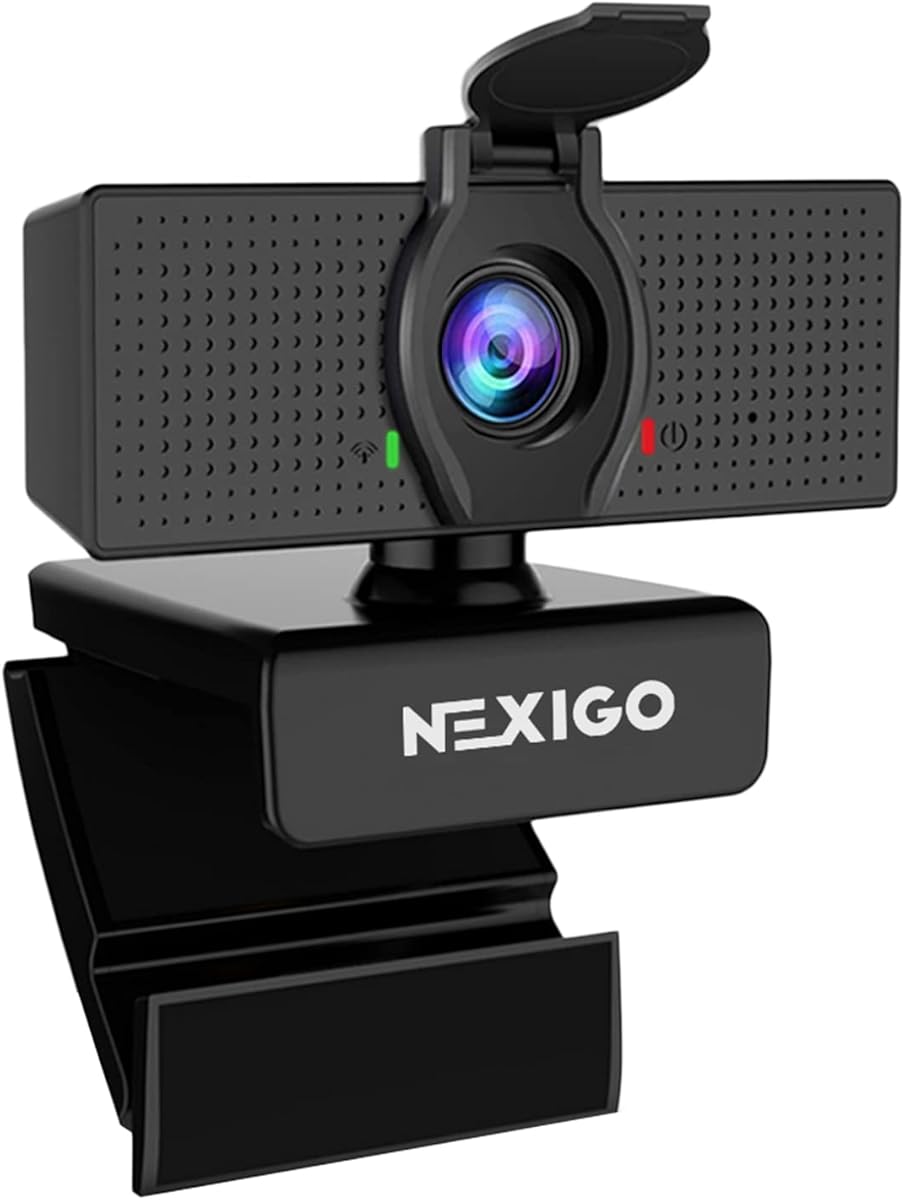
NexiGo N60
4.3Editor score
Full HD 1080p
Fixed Focus Lens
Privacy Cover Included
Built-in Microphone
Plug and Play
We compare the top ten external webcams for Mac users in October 2026, evaluating image quality, audio performance, privacy features, and compatibility to help
In today's digital landscape, having a high-quality external webcam for Mac is essential for professional video calls and content creation. Built-in laptop cameras often lack the clarity and features needed for crisp, engaging meetings and streaming sessions on your desktop or laptop.
To compile this guide, we evaluated ten top-rated external webcams compatible with macOS based on resolution, sensor quality, microphone performance, and user reviews. We focused on models that offer reliable plug-and-play functionality, privacy protections, and robust build quality for daily use.
Each pick below highlights a specific strength, from budget-friendly options to premium 4K models with advanced autofocus. Note that product availability and pricing can change frequently, so please verify current details on the product pages before making your final purchasing decision today.
4.3Editor score

4.6Editor score

4.6Editor score
The table below provides a side-by-side look at the key specifications and features of all ten external webcams reviewed in this guide. This comparison helps you quickly identify which model offers the best resolution, audio setup, and special features for your specific Mac workflow needs.




The Acer 4K Webcam stands out as the top choice for Mac users who demand professional-grade video quality. With a genuine Sony 1/2 inch sensor and true 4K resolution, it delivers crisp, detailed visuals that elevate any video conferencing experience significantly.
We may earn a commission when you buy through this link, at no additional cost to you.
Its aerospace-grade aluminum body ensures durability and effective heat dissipation during long calls, while the PDAF autofocus keeps you sharp even when you move around. The dual high-sensitivity microphones filter out ambient noise effectively for clear audio communication.
While it is priced higher than standard options, the premium build and true 4K sensor justify the cost for creators and professionals. The magnetic privacy cover offers peace of mind, ensuring your lens is secure when not actively streaming or on calls.
If you need a reliable webcam that balances performance and privacy, this Acer model is the ideal investment. It works seamlessly with macOS and major platforms like Zoom and Teams without requiring additional drivers or complex setup procedures.
The large Sony sensor captures balanced, true-to-life visuals with exceptional low-light performance, making it perfect for dimly lit home offices.
Crafted from aerospace-grade aluminum with CNC machining, this webcam feels durable and elegant while dissipating heat for reliable 24/7 use.
We may earn a commission when you buy through this link, at no additional cost to you.
The Anker PowerConf C200 delivers a solid 2K resolution that ensures sharp details for professional conferences. Its low-light correction technology allows you to look clear even in dim settings without needing extra ring lights around your desk.
We may earn a commission when you buy through this link, at no additional cost to you.
Audio clarity is enhanced through AI noise cancellation and dual mics, making it ideal for virtual meetings in noisy environments. You can customize your viewing angles via software to frame your shot perfectly during long work sessions.
While it lacks 4K resolution, the 2K output is sufficient for most business needs. The integrated sliding cover adds a layer of security, and the broad compatibility ensures it works smoothly with macOS systems.
This webcam is a great choice for professionals seeking a balance of image quality and audio clarity. Its advanced features make it a reliable tool for daily video calls and presentations.
Dual mics combined with AI noise cancellation ensure your voice comes through clearly even in noisy environments for better virtual meetings.
Choose from 65, 78, or 95 degrees via software to frame your perfect shot during video calls with this versatile webcam for PC.
We may earn a commission when you buy through this link, at no additional cost to you.
The EMEET C960 offers true 4K resolution at a competitive price point, making it an accessible option for high-quality streaming. While the default resolution is 1080p, you can switch to 4K via software to enjoy ultra-clear visuals without false upscaling.
We may earn a commission when you buy through this link, at no additional cost to you.
PDAF technology ensures stable focusing in various scenarios, while the 73-degree field of view keeps the focus on you rather than the background. Dual omnidirectional microphones capture natural audio for immersive meeting experiences.
With a flexible mounting option including a tripod thread, this webcam adapts well to different setups. The USB plug and play design simplifies connectivity, ensuring you are up and running quickly regardless of technical expertise.
This model is excellent for users wanting 4K performance without the premium price tag. Its features support remote business meetings and educational lectures effectively.
Experience ultra-clear video conferencing with a genuine EMEET SmartCam C960 4K CMOS sensor for pure quality without false upscaling.
The 73-degree field of view focuses on you rather than your background so you no longer need to painstakingly choose a blurred background.
We may earn a commission when you buy through this link, at no additional cost to you.
The NexiGo N60 is an affordable choice that delivers sharp 1080p video for everyday calls. It uses a fixed focus lens optimized for typical indoor use, producing exceptionally clear videos at up to 30 frames per second.
We may earn a commission when you buy through this link, at no additional cost to you.
The built-in noise-cancelling microphone enhances sound quality by reducing ambient noise, which is great for standard conferencing. It features a privacy cover to block the lens when not in use, ensuring your security and peace of mind.
While the focus is fixed and audio is basic compared to premium models, this webcam meets essential needs effectively. It is ready to use in minutes on any compatible device without extra drivers.
For budget-conscious Mac users who need reliable video quality, this is a solid entry-level solution. It supports all major video conferencing platforms easily.
Powered by a 1080p FHD two-MP CMOS, the NexiGo N60 Webcam produces exceptionally sharp and clear videos at resolutions up to 1920 x 1080.
The privacy cover blocks the lens when the webcam is not in use to help provide security and peace of mind to anyone.
We may earn a commission when you buy through this link, at no additional cost to you.
The Logitech Brio 100 offers Full HD 1080p resolution for clear video calls. Its Auto-Light Balance technology boosts brightness significantly to reduce shadows, helping you look your best in various lighting conditions.
We may earn a commission when you buy through this link, at no additional cost to you.
The integrated slide cover makes it easy to get reliable privacy when not on a call. Available in fun yet sophisticated colors, this webcam allows you to coordinate with your home setup aesthetic.
Made with recycled plastic, it is an environmentally friendly option. It works with most video calling platforms and is ready for use via plug-and-play connection.
For users wanting a stylish and reliable webcam with privacy features, this model is a good choice. It simplifies your setup without sacrificing clarity.
RightLight boosts brightness by up to 50% reducing shadows so you look your best compared to previous-generation Logitech webcams.
Coordinate and express yourself when working from home with a choice of fun yet sophisticated colors that go great with your setup.
We may earn a commission when you buy through this link, at no additional cost to you.
The Logitech Brio 301 provides natural image quality for all meeting apps with Full HD 1080p resolution. RightLight 2 technology automatically compensates for poor lighting so you can be seen clearly in any room.
We may earn a commission when you buy through this link, at no additional cost to you.
The mono noise reduction mic suppresses background sound so everyone on the call can hear you easily. You can spin the webcam privacy shutter to block the camera lens when you do not need to be on screen.
This webcam is certified for Zoom, Microsoft Teams, and Google Meet ensuring compatibility in the workplace. Logi Tune lets you customize your video experiences such as adjusting color and image quality easily.
For business users seeking a certified and reliable tool, this model is well-suited. It balances practical features with ease of use effectively.
Brio Webcam 301 is compatible with most video conferencing platforms and certified for Zoom, Microsoft Teams and Google Meet.
Spin the webcam privacy shutter to block the camera lens when you do not need to be on screen for instant privacy protection.
We may earn a commission when you buy through this link, at no additional cost to you.
The Logitech C920e displays individual users in a well-balanced frame with a 78-degree field of view. It features two integrated omnidirectional microphones capturing audio clearly from up to one meter away for natural sound.
We may earn a commission when you buy through this link, at no additional cost to you.
Built-in HD autofocus ensures you are seen clearly throughout your video calls with automatic light correction. The attachable privacy screen flips up and down to cover or expose the lens easily and securely.
This webcam is certified for Zoom and TAA compliant ensuring seamless integration in the workplace. Its sturdy clip makes it easy to mount on any laptop or external monitor.
For enterprise users needing reliable and certified devices, this model is a strong candidate. It helps keep everyone connected with consistent performance.
With a 78-degree fixed field of view, the C920e webcam displays individual users in a well-balanced frame while providing room to share projects.
Sync device management software helps everyone stay connected by letting you ensure their Logitech video collaboration personal devices are being used.
We may earn a commission when you buy through this link, at no additional cost to you.
The Logitech C922x HD Pro features HD lighting adjustment and autofocus to produce bright razor-sharp images even in low-light settings. It delivers Full HD 1080p video calling at 30 frames per second for strong impressions.
We may earn a commission when you buy through this link, at no additional cost to you.
Stereo audio with dual mics captures natural sound during calls and recorded videos, making it great as a video conference camera. Advanced capture software helps you create and share video content easily.
A 3-month XSplit VCam license is included to remove or replace your background without a green screen. However, it does not include a privacy shutter so you may need to cover it manually when away.
For streamers and content creators needing flexible settings and high frame rates, this is a top pick. It supports popular conferencing and streaming platforms effectively.
This web camera for desktop computers comes with a 3-month XSplit VCam license and no privacy shutter to customize your background.
Advanced capture software easily creates and shares video content with this Logitech camera that is suitable for desktop or monitor use.
We may earn a commission when you buy through this link, at no additional cost to you.
The Logitech C920S HD Pro is a classic choice offering Full HD 1080P video calls that make you look professional. It comes with a privacy shutter to protect the lens when not in use giving you full control.
We may earn a commission when you buy through this link, at no additional cost to you.
HD autofocus and light correction ensure razor-sharp high def in every environment. The dual microphones capture natural sound on calls and recorded videos for a crisp experience.
This model does not include the XSplit VCam license but still delivers premium quality. Its reliability and straightforward features make it suitable for daily personal and professional use.
For those seeking a proven and durable webcam with essential features, this is a great option. It balances quality and simplicity for most users.
Webcam comes with privacy shutter that puts you in control of what you show and protects the lens with a snugly fitting cover.
Full HD 1080P video calls mean premium video quality that makes you look like a Pro during every meeting and stream.
We may earn a commission when you buy through this link, at no additional cost to you.
This Acer 4K Webcam is crafted from aerospace-grade aluminum for a seamless unibody design that feels durable. At just 57 grams, it is ultra-portable allowing modern mobile workers to take HD video calls anywhere.
We may earn a commission when you buy through this link, at no additional cost to you.
The all-aluminum body ensures fast heat dissipation for reliable performance during long streams or meetings. It features dual high-sensitivity digital microphones capturing your voice clearly from up to 2.5 meters away effectively.
A magnetic privacy cover design snaps securely over the lens to keep your privacy safe from unwanted peeks. It connects via USB for plug and play readiness without needing drivers or apps.
For users needing a highly portable yet powerful 4K solution, this model is ideal. It works seamlessly with major platforms like Teams and Zoom for a hassle-free experience.
At just 57 grams about the size of a pair of earbuds this 4K webcam is ultra-portable for taking calls anywhere from cafes to co-working spaces.
This 4K streaming webcam features a protective cover with powerful built-in magnets that snap securely over the lens keeping your privacy safe.
We may earn a commission when you buy through this link, at no additional cost to you.
Choosing the right external webcam involves considering several factors beyond just the price. Understanding the key specifications ensures you select a model that meets your specific needs for video quality and usability on your Mac.
Resolution determines the clarity of your video. 1080p is standard, but 4K offers superior detail for professionals. A larger sensor like the Sony 1/2 inch helps in low-light performance.
For most users, 1080p is sufficient, but 4K is worth the investment if you stream or record content frequently.
Autofocus keeps you sharp as you move around. Phase Detection Autofocus (PDAF) is faster and more accurate than standard autofocus.
Look for PDAF if you move a lot during calls to avoid blurry video interruptions.
Dual microphones with noise cancellation improve audio clarity significantly. Single microphones can work but often struggle with background noise.
Prioritize dual omnidirectional mics for clearer voice capture in noisy environments.
A privacy cover or shutter is essential for security. It physically blocks the lens when you are not on a call to prevent spying.
Ensure the model you choose has a built-in cover or shutter for peace of mind.
Flexibility in mounting is key. A sturdy clip for monitors is standard, but a tripod thread allows for more versatile positioning.
Check if the webcam has a tripod mount if you plan to use it on a desk or stand.
Mac compatibility is crucial. Most modern webcams support macOS via USB, but checking specific OS version requirements avoids setup issues.
Verify that the webcam supports your macOS version for a smooth plug-and-play experience.
Materials like aluminum offer durability and better heat dissipation. Plastic models are lighter but may feel less premium over time.
Invest in a well-built webcam if you plan to use it daily for long periods.
Some webcams come with proprietary software to adjust settings like field of view or brightness. Others rely solely on system settings.
Consider if you want software control over your video settings during calls.
To install your external webcam, simply plug it into an available USB port on your Mac. Your operating system should automatically recognize the device without needing to install additional drivers.
Position the camera at eye level for the most flattering angle during video calls. This prevents the camera from looking up at your nose or chin, which can be distracting.
Clean the lens gently with a microfiber cloth to maintain optimal image quality. Avoid using harsh chemicals or spraying liquids directly on the lens or housing.
Most modern webcams support plug-and-play functionality on macOS. This means you can plug them in and use them immediately. However, specific software may be required to access advanced features.
Models with larger sensors and low-light correction technology perform best in dim settings. The Anker PowerConf C200 and Acer 4K Webcam are known for handling low light effectively without extra lights.
Yes, all the webcams listed in this guide are compatible with Zoom on macOS. They work seamlessly with the app and other major video conferencing platforms like Teams and Google Meet.
4K webcams capture significantly more detail than 1080p models. While 1080p is sharp, 4K provides a clearer image for professional presentations or streaming where quality is critical.
Privacy covers provide an extra layer of security by physically blocking the lens when not in use. They are recommended for anyone concerned about privacy or using public Wi-Fi networks.
30fps is standard for video calls and saves bandwidth. 60fps offers smoother motion, which is better for gaming or fast-paced streaming on your Mac setup.
Check that the USB connection is secure and try a different port. Restart your Mac and ensure no other app is exclusively using the camera. Updating macOS can also resolve compatibility issues.
A tripod mount offers flexibility for positioning the camera anywhere. It is useful if you want to place the webcam on a shelf or desk away from your monitor for a better angle.
The Acer 4K Webcam remains our top pick due to its premium build, true 4K sensor, and reliable autofocus. It is an excellent choice for those who need professional-grade visuals for work or streaming.
For budget-conscious buyers, the NexiGo N60 offers solid 1080p performance at a fraction of the cost. It meets basic needs well while providing essential privacy features for security.
Remember that pricing and availability change frequently. We encourage you to check the product pages for the most current deals and specifications before finalizing your purchase today.