
EooCoo for MacBook Neo Case 13 inch 2026, Scratch Resistant, Crystal Clear
4.7Editor score
Slim lightweight design
Crystal clear finish
Full edge protection
The MacBook Neo introduces a sleek design that benefits from high-quality protection and productivity tools. Choosing the right accessories ensures your device stays safe while enhancing your workflow efficiency significantly.
We evaluated ten top-rated products based on compatibility, build quality, and user feedback. Our list covers essential items like hard shell cases, privacy screens, and versatile hubs for the 2026 Neo.
Each pick highlights specific strengths to help you find the perfect match for your needs. Keep in mind that pricing and availability may fluctuate regularly on major retail platforms.
4.7Editor score

4.5Editor score

4.2Editor score
As an Amazon Associate we earn from qualifying purchases.
This comparison table breaks down key specifications for every product on our list to help you quickly identify the best fit for your specific MacBook Neo model and usage needs.



This sticker offers 52 essential macOS shortcuts placed directly on your palm rest for quick reference. With a high rating of 4.6 stars, users appreciate the convenience of having commands like screenshots and navigation at a glance.
We may earn a commission when you buy through this link, at no additional cost to you.
The sticker is designed with a clean layout grouped by tasks like Basics, Navigation, and System. It uses premium vinyl that is water repellent and fade-resistant, ensuring it stays sharp for years of daily use without damaging your device.
While most users report clean removal, there are occasional notes about adhesive residue if not removed carefully. Additionally, the specific layout is optimized for certain MacBook models, so checking compatibility before purchase is recommended to ensure a perfect fit.
If you want to boost your workflow efficiency without cluttering your workspace, this sticker is an excellent choice. It is ideal for students and professionals who frequently use keyboard shortcuts but struggle to remember them all.
By placing essential commands right where your hands rest, you eliminate the need to pause and search online for shortcuts.
The residue-free adhesive ensures your MacBook palm rest stays pristine even after you decide to remove or replace the sticker.
We may earn a commission when you buy through this link, at no additional cost to you.
This comprehensive kit provides full-body security for your MacBook Neo including a hard shell case, keyboard covers, and a screen protector. Rated 4.5 stars, it is praised for its precision fit that ensures protection without adding bulk.
We may earn a commission when you buy through this link, at no additional cost to you.
The hard shell is engineered from polycarbonate to guard against scratches and coffee rings while maintaining a clean look. It features a crystal clarity finish that allows your laptop's design to shine through while keeping fingerprints at bay.
Installation is tool-free, but you must verify your model number is A3404 before purchasing to ensure compatibility. While the design is slim, it is not recommended to use if another case is already attached to the bottom of your device.
For users seeking a simple way to protect their device from daily wear, this kit is a standout option. It offers everything you need for basic protection right out of the box, making it convenient for new MacBook owners.
Combining a case with screen and keyboard protection ensures every surface of your MacBook Neo stays in pristine condition.
The high transparency material ensures your laptop looks exactly as intended while staying safe from scratches and scuffs.
We may earn a commission when you buy through this link, at no additional cost to you.
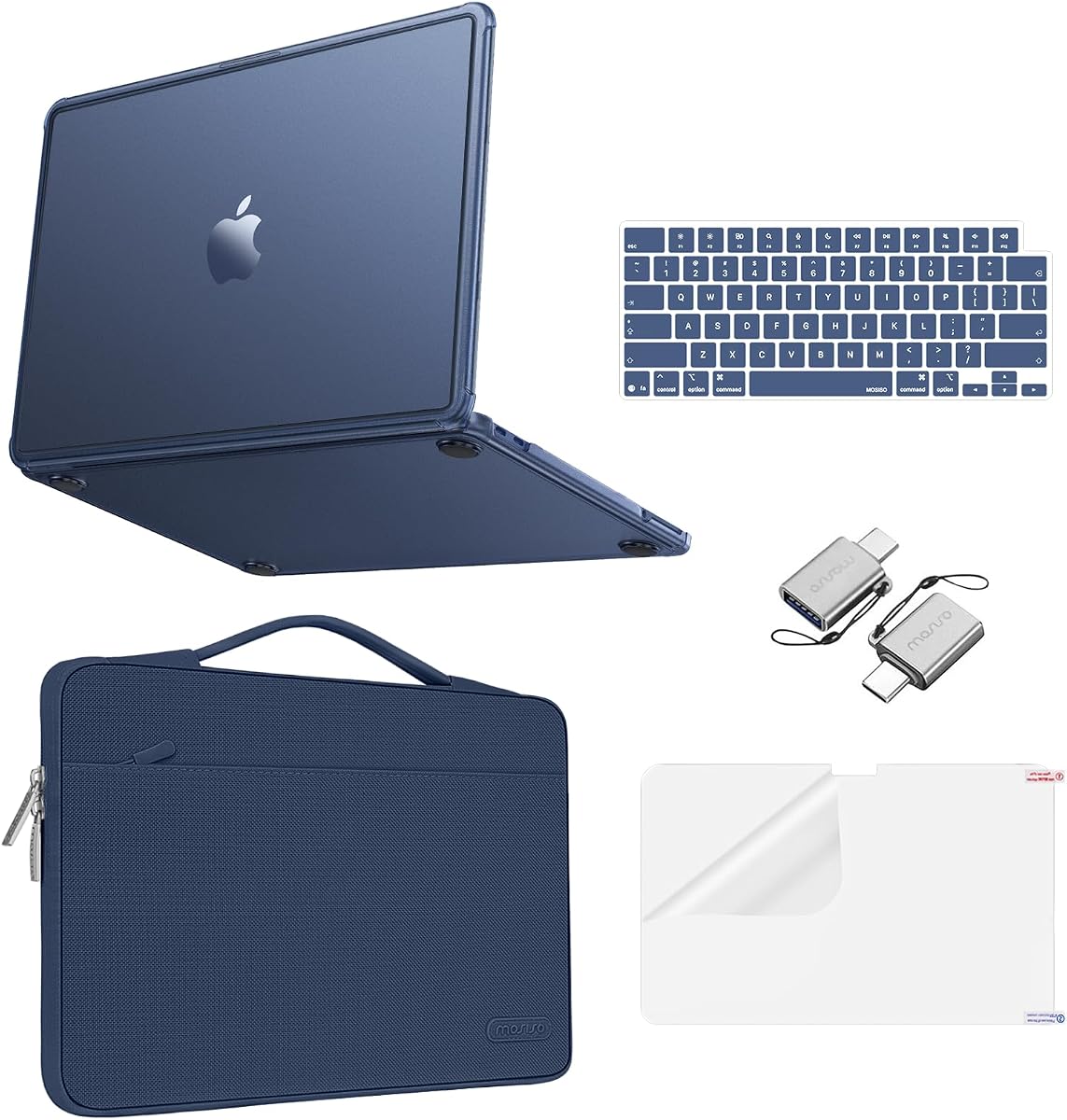
This bundle combines a matte hard shell case with a protective carrying sleeve and accessories like keyboard covers. With a 4.6 rating, users love the fingerprint-resistant finish that keeps their device looking new for longer periods.
We may earn a commission when you buy through this link, at no additional cost to you.
The case is precision-molded with a matte finish that actively repels smudges and daily scuffs. It comes with a 360-degree protective sleeve that cushions the laptop during travel, making it ideal for commuters and students.
While the matte surface resists fingerprints better than glossy options, it may show slight variations in transparency compared to other colors. The included sleeve is functional but adds some bulk to your bag when not in use.
If you frequently travel with your MacBook Neo and want to avoid fingerprints, this kit is a practical choice. It offers robust protection for both the device and its accessories at a competitive price point.
The engineered matte finish ensures your laptop stays clean and professional-looking even after hours of typing and use.
The included sleeve provides an extra layer of shock protection, making it easy to toss your laptop into a backpack safely.
We may earn a commission when you buy through this link, at no additional cost to you.
This set includes a crack-resistant case and a puffy sleeve designed to absorb shocks during daily commute. Rated 4.6 stars, it is known for the plush interior that cushions the laptop against scratches and everyday bumps effectively.
We may earn a commission when you buy through this link, at no additional cost to you.
The case is engineered to shield against scratches and scuffs while slipping off cleanly without leaving marks. The sleeve features a square quilted puffy polyester material that protects against accidental spills and is lightweight for travel.
The puffy material adds a stylish look but may attract more dust than smoother fabrics. While it is designed to be compact, users with very small bags might find the sleeve adds a bit of width to their carry.
For travelers who prioritize cushioning and spill protection, this kit offers the peace of mind needed. It ensures your laptop is safe whether it is in a busy airport or sitting on a desk.
The quilted sleeve acts as a buffer against drops and bumps, safeguarding your device during transit.
The sleek case design maintains the minimalist aesthetic of the MacBook Neo while providing essential defense.
We may earn a commission when you buy through this link, at no additional cost to you.
This ultra-slim case features transparent PC material that fully displays the beautiful color of your Neo. With a high rating of 4.7 stars, it is praised for its durable hard plastic exterior that resists scratches and minor bumps.
We may earn a commission when you buy through this link, at no additional cost to you.
In addition to the case, this product includes versatile USB-C to USB-A adapters to help with port connectivity. The design adds minimal bulk while providing full edge wrap protection to keep your device looking brand new.
While the included adapters are useful, some users may already have their own and find them unnecessary. The case is slim but precise, so ensuring you have the correct model number is essential before buying.
If you want a lightweight case that comes with extra port adapters, this is a great budget option. It balances affordability with high-quality protection for everyday use in office or school settings.
The crystal clear PC material ensures your laptop retains its original look while staying shielded from daily wear.
Included USB adapters help you connect older peripherals instantly without buying separate cables or dongles.
We may earn a commission when you buy through this link, at no additional cost to you.
This dock offers up to 80Gbps bandwidth and features a unique detachable magnetic USB-C design for easy connection. Rated 4.2 stars, it is appreciated for supporting ultra-clear 8K video output and high-speed data transfers.
We may earn a commission when you buy through this link, at no additional cost to you.
The hub includes multiple ports like HDMI and USB-A while offering 140W pass-through charging to keep your laptop powered. It is built with an aluminum alloy shell that ensures durability and better heat dissipation during heavy use.
Users should note that the magnetic connection may not fit if a bottom case is present on the laptop. Also, full 8K performance depends on using a Thunderbolt-enabled host device which may not be present in all setups.
For professionals who need high-speed data and multiple external displays, this hub is a powerful choice. It simplifies connectivity with a stylish design that enhances productivity and reduces cable clutter on your desk.
With 80Gbps bandwidth, you can move large files quickly without worrying about slow transfer times.
The detachable magnetic connector allows you to attach and detach your ports effortlessly without plugging and unplugging manually.
We may earn a commission when you buy through this link, at no additional cost to you.
This privacy protector blocks side views beyond 30 degrees while using a magnetic attachment for quick installation. It has a 4.2 rating, and users appreciate the ability to safeguard data without permanent adhesives.
We may earn a commission when you buy through this link, at no additional cost to you.
The screen uses anti-glare and blue light blocking technology to relieve eye strain during long work sessions. It is made of scratch-resistant PET material that protects your screen from abrasions without affecting the original coating.
Some users note that privacy filters can slightly reduce overall screen brightness. The magnetic strips are strong but require careful alignment to ensure the screen sits flush against the display.
If you work in public spaces and need to protect sensitive information, this screen is a top choice. It offers reliable privacy protection and eye comfort in a lightweight and portable package.
The advanced privacy technology ensures only you can see your screen, keeping data safe in crowded areas.
By filtering out harmful blue light, this protector helps reduce fatigue during long work or study hours.
We may earn a commission when you buy through this link, at no additional cost to you.
This screen features a removable magnetic design with a storage clip for easy carrying and reuse. Rated 4.2 stars, it is known for its high-definition quality that maintains picture clarity while providing strong privacy protection.
We may earn a commission when you buy through this link, at no additional cost to you.
Imported materials ensure it reduces 95% of blue light and protects against UV light for better eye health. The magnetic strip is reinforced to stick tightly, ensuring the screen remains secure even when typing.
Because it is removable, you need a place to store it when not in use, which adds a small step to setup. The higher price reflects the premium materials but may not be necessary for all users.
If you want high-quality privacy that can be taken on and off as needed, this is a strong contender. It combines eye protection with secure viewing for a comprehensive solution.
The included storage clip makes it easy to carry the screen with you without it taking up much space.
By blocking 95% of blue light, this screen helps maintain your eye health during extended periods of use.
We may earn a commission when you buy through this link, at no additional cost to you.
This sticker is designed for Air and Pro models and features laminated vinyl for durability. With a 4.6 rating, users appreciate its ability to help beginners and power users master Mac commands quickly.
We may earn a commission when you buy through this link, at no additional cost to you.
It uses a stronger adhesive hold that stays in place well during daily use. The product is printed and packaged in the USA, ensuring trusted quality and responsive customer support if needed.
While the adhesive is strong, removing it may leave a light residue that requires wiping with soap and water. It is not designed for smaller models, so checking your MacBook size is important before ordering.
If you want a durable guide to help you learn shortcuts faster, this is a reliable choice. It is perfect for students or professionals who want to improve their typing efficiency.
The laminated vinyl ensures the sticker withstands daily wear and tear better than standard paper stickers.
Keeping commands visible helps you memorize them faster, saving time on every task you perform.
We may earn a commission when you buy through this link, at no additional cost to you.
This set includes seven different types of dust plugs designed for Neo models with a flexible silicone material. Rated 4.7 stars, it is praised for keeping ports clean from debris and liquid splashes without damaging the device.
We may earn a commission when you buy through this link, at no additional cost to you.
The plugs are low-profile and sleek, maintaining your laptop's aesthetics while protecting every port including USB-C and HDMI. It also includes two webcam covers which add an extra layer of privacy when not in use.
Because the parts are small, they can be easily lost if not stored properly. The silicone fits snugly but requires careful insertion to ensure it sits correctly without falling out.
For a low-cost way to prevent dust buildup in your ports, this set is highly effective. It is a practical addition to your accessory collection to extend the life of your ports.
Covers for every port ensure no opening is left exposed to dust or debris.
Included webcam covers let you physically block your camera for added security when not using it.
We may earn a commission when you buy through this link, at no additional cost to you.
Selecting the right accessories for your MacBook Neo requires understanding compatibility, material quality, and functionality. Here are key factors to consider before making your purchase to ensure you get the best value.
Always verify that the product matches your specific MacBook Neo model number. Many cases and accessories are designed for the 13-inch 2026 release with model A3404, so checking the back of your device is crucial.
Mismatched accessories can lead to poor fit or damage. Confirming model details before buying ensures a seamless experience.
Look for accessories made from durable materials like polycarbonate for cases or PET for screen protectors. High-quality materials ensure longevity and protection against daily wear and tear.
Premium materials also resist scratches and yellowing better. Investing in good materials pays off in the long run.
Consider dust plugs to keep ports free from debris. Ports are vulnerable to damage from dust or liquid splashes, and simple silicone covers can prevent costly repairs.
A complete set covering USB-C and other ports is ideal. It adds minimal bulk but significant protection.
If you work in public spaces, privacy screens are essential. They block side views to prevent others from reading your data without obstructing your own view.
Opt for magnetic versions for easy installation and removal. This flexibility is great for on-the-go use.
Choose hubs that match your connectivity needs. Look for high-speed data transfer, multiple ports, and sufficient charging power to support your workflow.
Ensure the hub supports your laptop's power delivery requirements. High-wattage PD support is vital for keeping your device powered.
Keyboard covers shield against spills and dust. They are especially useful in environments where liquids are near your workspace.
Ensure the cover is designed for the specific keyboard layout. A good fit ensures keys are covered accurately without affecting typing.
Compare products based on value rather than just price. A higher-priced item that includes multiple accessories like a case and screen protector may offer better overall value.
Consider how long the accessory will last. Durable items often cost more upfront but save money by not needing frequent replacement.
Your accessories should match your style. Options range from clear and minimal to matte and colorful to suit different tastes.
Choose what appeals to you visually. A pleasing look can enhance your satisfaction with the device daily.
Start by cleaning your device surface before applying any stickers or screen protectors. Ensure the area is dust-free to avoid bubbles or residue that may affect adhesion and appearance.
Use the provided templates to align cases or screens precisely. Many items like privacy screens or stickers require exact placement for full functionality and aesthetic appeal.
Clean your accessories regularly with a soft cloth to remove oils and dust. Proper maintenance extends the life of your accessories and keeps your device looking new.
Most accessories listed are specifically designed for the MacBook Neo 13-inch 2026 model A3404. Check product compatibility carefully before purchasing to ensure they fit your device. Using the wrong model may lead to poor fit or damage.
Yes, you can use a protective skin inside a hard shell case. Ensure the skin is thin enough so that the case can close properly. Thick skins may interfere with the lid closing smoothly.
Replace accessories like keyboard covers or screens when they show signs of wear or tearing. Stickers and dust plugs should be replaced if the adhesive loses effectiveness. Inspect regularly to maintain protection.
Most magnetic privacy screens are designed for easy installation. Align the magnet with the top bezel and press gently. They typically take seconds to install and remove without residue.
Most USB-C hubs work with any device with a USB-C port. However, speed and charging capabilities depend on the host device's specifications. Check product details for compatibility with older systems.
Dust plugs are designed to be removed easily when needed. They should not interfere with charging or data transfer when inserted. Ensure they are fully seated to stay secure but removable.
Use a soft damp cloth to wipe the case gently. Avoid harsh chemicals that might damage the plastic. Drying thoroughly before reattaching ensures it stays clean and residue-free.
High-quality silicone covers are thin and generally comfortable to type on. However, some users may find them slightly bouncy. Choosing a thin option often improves typing feel significantly.
The best accessories for your MacBook Neo depend on your specific needs for protection, productivity, and privacy. Whether you choose a full case kit or a simple privacy screen, quality and compatibility matter.
Prioritize what matters most to you. If you travel often, a protective sleeve or case is key. If you work in public spaces, a privacy screen is essential.
Remember to check current prices and stock before purchasing as these can change frequently. Selecting the right tools ensures your device remains safe and functional for years to come.