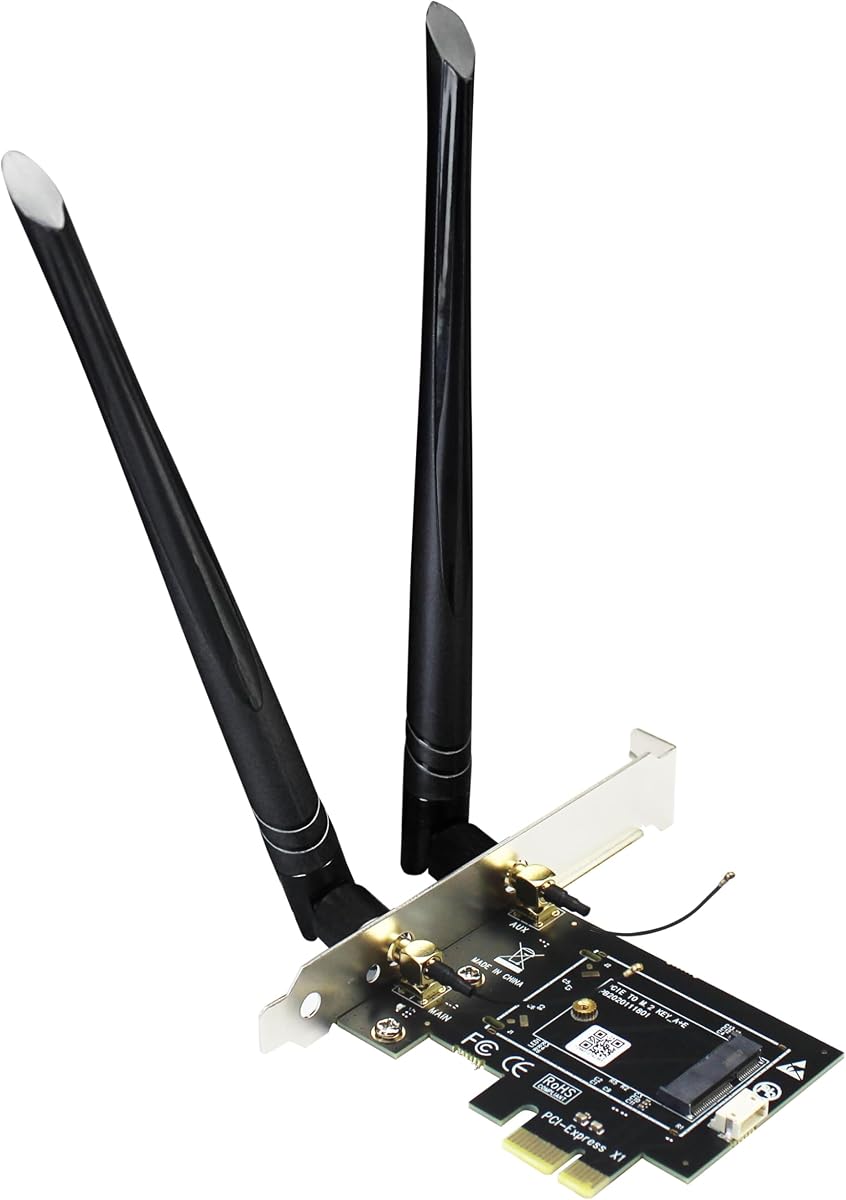
GLOTRENDS WA01
4.1Editor score
Supports multiple WiFi modules
Includes SMA antenna kits
Compatible with PCIe X1
This guide compares the top M2 Key E WiFi Cards for laptops and desktops, evaluating speed, compatibility, and features to help you choose the right wireless
Finding the right wireless connectivity solution is crucial for modern computing setups. Whether you are upgrading an old laptop or building a custom desktop, selecting a high-quality M2 Key E WiFi card ensures stable and fast internet access for all your devices and applications.
We have carefully analyzed ten top-rated products available in the market today. Our comparison focuses on critical factors such as theoretical maximum speeds, supported wireless standards, Bluetooth integration, and overall compatibility with different motherboard configurations to help you make an informed decision.
Each pick in this list highlights specific strengths tailored to different user needs. From budget-friendly options to premium Wi-Fi 7 models, you will find detailed insights into what makes each card stand out. Please note that product availability and pricing can change frequently over time.
4.1Editor score

4.6Editor score

4.1Editor score
Below is a side-by-side comparison of all ten products featured in this guide. We have extracted key specifications from each listing to help you quickly identify which card offers the features you need for your specific system configuration and performance goals.


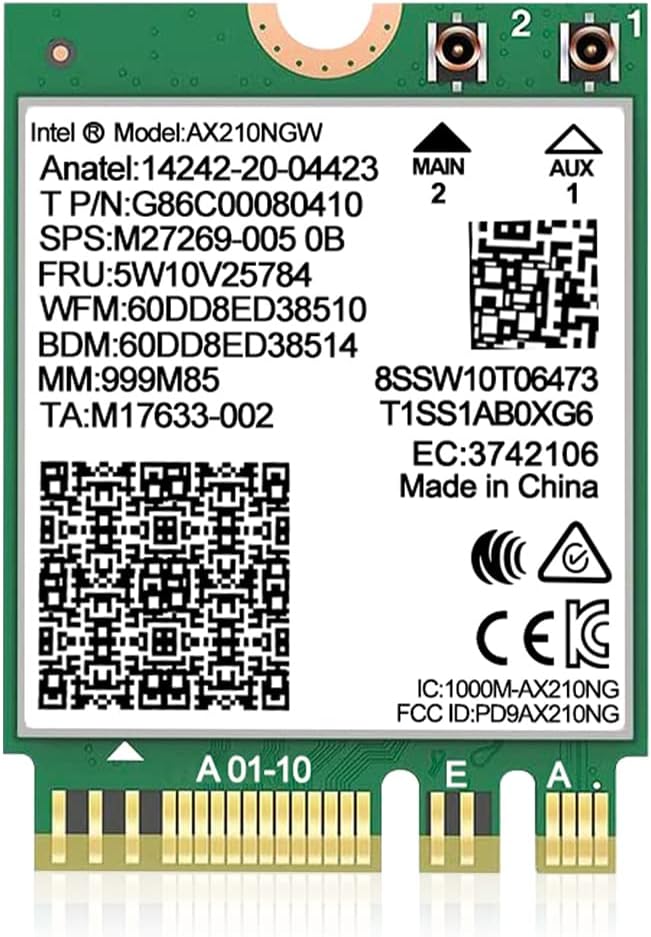



The AX210NGW DTK card stands out as a comprehensive solution for users needing reliable wireless connectivity. It features the latest Intel AX210 chipset which brings WiFi into the 6GHz band for significantly improved speeds and reduced interference.
We may earn a commission when you buy through this link, at no additional cost to you.
This kit includes everything needed for installation including high gain antennas and RF cables. The tri-band support allows your device to utilize 2.4GHz for range and 5GHz or 6GHz for high speed tasks like streaming and gaming simultaneously without bottlenecks.
While it offers exceptional performance there are minor limitations regarding motherboard compatibility. It does not support CNVio2 interfaces so checking your system specifications is essential before purchase to ensure it will work correctly with your motherboard.
If you are looking for a complete package that upgrades your system to WiFi 6E without needing extra accessories this is the ideal choice. Its strong performance and included hardware make it the top recommendation for most laptop and desktop users.
Unlike many cards sold separately this kit includes all necessary cables and brackets to get you running immediately.
Access to the 6GHz band provides interference-free channels ideal for high-density environments and real-time applications.
We may earn a commission when you buy through this link, at no additional cost to you.
The GLOTRENDS WA01 is an excellent adapter for those who want to convert their desktop PCIe slot to accept M.2 WiFi cards. It is incredibly affordable and supports a wide range of modules from WiFi 4 to the latest WiFi 7 standards.
We may earn a commission when you buy through this link, at no additional cost to you.
It comes with robust 6-dBi SMA antennas that provide strong signal reception for your system. The design allows you to use almost any M.2 Key E module giving you flexibility to choose the specific card that fits your budget and performance needs.
You must note that this is an adapter and not a complete WiFi card. You will need to provide your own M.2 module and ensure your case has a USB header for Bluetooth connectivity as the adapter routes that signal separately.
For budget-conscious builders who already have a WiFi module or plan to reuse an old one this adapter offers unmatched value. It opens up a world of compatibility options for desktop upgrades without breaking the bank.
Works with most M.2 Key E modules including future WiFi 7 cards ensuring long-term utility.
The included SMA antennas are powerful and can be positioned for optimal signal reception in your case.
We may earn a commission when you buy through this link, at no additional cost to you.
The 10Gtek adapter is designed specifically for desktop users looking to upgrade their wireless connectivity. It features a full height baffle which is often a missing part in generic adapters ensuring a professional and secure installation in your case.
We may earn a commission when you buy through this link, at no additional cost to you.
It supports various PCIe slots from x1 to x16 making it versatile for different motherboard configurations. The included Bluetooth cable allows for easy connection to your motherboard header ensuring both WiFi and Bluetooth functions work seamlessly together.
While it does not support hot swapping which is typical for internal cards it remains a robust solution for permanent installations. The dual-band antennas provide good range and speed for standard home and office networking needs.
This adapter is a reliable choice for desktop builders who need a sturdy bracket and clear cabling. It simplifies the process of moving from a legacy card to a modern M.2 module effectively.
The full height baffle ensures the card is firmly attached and properly aligned within your computer chassis.
Compatibility with multiple PCIe slot sizes means you can install it in almost any available slot on your board.
We may earn a commission when you buy through this link, at no additional cost to you.
The QCNCM865 is a cutting-edge card that brings the latest Wi-Fi 7 technology to your laptop or desktop. It supports speeds up to 5.8Gbps using advanced 4K QAM modulation which is ideal for future-proofing your network setup against modern routers.
We may earn a commission when you buy through this link, at no additional cost to you.
Multi-Link Operation allows the card to use multiple bands simultaneously to reduce latency and increase reliability. This feature is particularly beneficial for gaming and large file transfers where consistent connection quality is critical for performance.
However to take full advantage of this card you must have a compatible Wi-Fi 7 router and a system running Windows 11 with recent updates. Without these components the card will operate at lower standards which might not justify the cost for some users.
If you are building a high-end gaming rig or a workstation that needs top-tier networking this card offers unmatched potential. It is a premium option for those who want to stay ahead of the curve in wireless technology.
MLO enables the card to combine frequencies to create a wider and more stable connection pipe.
With Wi-Fi 7 support you will be ready for the next generation of routers and internet speeds.
We may earn a commission when you buy through this link, at no additional cost to you.
This AX210NGW card is a standard choice for users seeking a solid upgrade to their existing wireless hardware. It utilizes the widely trusted Intel AX210 chipset which is known for stable performance and good compatibility across different systems.
We may earn a commission when you buy through this link, at no additional cost to you.
It delivers tri-band speeds up to 5400Mbps ensuring that you can handle multiple high-bandwidth tasks without slowdowns. The Bluetooth 5.3 integration enhances connectivity for peripherals providing lower latency and better energy efficiency for connected devices.
Users should be aware that packaging may vary and antennas are not always included with this specific listing. Checking the details before buying ensures you have all the necessary hardware to install the card correctly in your device.
With a high user rating and strong manufacturer support this card is a safe bet for most upgrades. It balances performance and reliability well making it a popular choice for laptops and small form factor systems.
Using the Intel AX210 ensures you get proven drivers and consistent connectivity across various network environments.
Access to 6GHz channels helps avoid congestion common on older 2.4GHz and 5GHz bands.
We may earn a commission when you buy through this link, at no additional cost to you.
The OKN AX210 module focuses on delivering robust security and efficiency for your wireless connection. It supports WPA3 network security which is essential for protecting your data on modern networks and ensures compatibility with current standards.
We may earn a commission when you buy through this link, at no additional cost to you.
Features like MU-MIMO allow the card to communicate with multiple devices simultaneously improving overall network performance. This is particularly useful in households where many devices are connected to the internet at the same time.
While the module itself is compact and powerful it relies on your device having external antenna connections to work fully. You will need to ensure your laptop or desktop case can accommodate these antennas for optimal signal strength.
For users prioritizing security and efficient network management this module is an excellent option. It brings advanced features to mid-range systems and is highly rated for its reliability in daily use.
WPA3 protection keeps your network secure against modern threats and unauthorized access.
MU-MIMO support ensures that multiple connected devices do not slow down your overall internet speed.
We may earn a commission when you buy through this link, at no additional cost to you.
This AX210 kit is designed to provide a complete solution with high-quality accessories included. The 8dBi antennas offer superior range and signal strength compared to standard options making it great for larger spaces or distant routers.
We may earn a commission when you buy through this link, at no additional cost to you.
It supports tri-band connectivity which allows for flexible use of different frequencies based on your needs. Whether you need the range of 2.4GHz or the speed of 6GHz this card adapts to provide the best available connection.
While it offers excellent hardware the software setup requires installing drivers from the manufacturer. Ensuring your system is updated to Windows 10 or 11 is necessary to utilize all the Bluetooth and WiFi features effectively.
If you want a hassle-free upgrade that includes everything you need for strong connectivity this kit is a top contender. It is especially suitable for users who need better range than standard internal cards provide.
The included 8dBi antennas significantly improve signal reach for better internet in larger rooms.
Everything from cables to brackets is provided to simplify the installation process for you.
We may earn a commission when you buy through this link, at no additional cost to you.
This QCNCM865 network card is built to take full advantage of the latest wireless standards available today. It supports Multi-Link Operation which allows routers to use multiple bands at once for faster speeds and lower latency in real-time tasks.
We may earn a commission when you buy through this link, at no additional cost to you.
With speeds up to 5800Mbps it handles large data transfers and high-resolution streaming effortlessly. The 4K-QAM modulation ensures that data is transmitted more efficiently providing a noticeable boost in throughput compared to older standards.
You should note that this card requires a Wi-Fi 7 router to reach its full potential. If you are using an older router it will still work but at reduced speeds which might not justify the cost for non-gaming users.
For enthusiasts who want the absolute latest in networking technology this card is a compelling choice. It future-proofs your system for upcoming internet standards and offers performance that is unmatched by previous generations.
4K-QAM allows for more data to be sent per signal cycle increasing overall network capacity.
Connecting on multiple bands at once improves stability and reduces lag during critical moments.
We may earn a commission when you buy through this link, at no additional cost to you.
The BrosTrend WiFi 6 card offers a reliable dual-band upgrade for systems that do not need the latest tri-band tech. It provides solid speeds and is known for working well with Linux systems which is a rarity in this category.
We may earn a commission when you buy through this link, at no additional cost to you.
With support for Bluetooth 5.2 it ensures that your wireless peripherals remain connected with good range and stability. This is a useful feature for users who rely on wireless keyboards mice and headphones alongside their network connection.
While it does not support the 6GHz band it remains a powerful choice for standard internet usage. It improves performance significantly over older cards and is easy to install in most standard laptop or desktop slots.
If you are running a Linux system or just need a dependable dual-band upgrade this card is a great option. It offers a balanced mix of performance and compatibility for a wide range of users.
Support for Linux kernel 6.5 makes this a unique choice for open-source system users.
Standard dual-band operation provides ample speed for general home and office networking needs.
We may earn a commission when you buy through this link, at no additional cost to you.
The Intel Killer BE200 is a premium card tailored for gamers and power users who demand top performance. It features Wi-Fi 7 technology with ultra-low latency making it ideal for competitive gaming where every millisecond counts.
We may earn a commission when you buy through this link, at no additional cost to you.
It is specifically designed for Intel processors ensuring deep integration with system management tools. This integration helps in prioritizing game traffic over background downloads to ensure a smooth experience during intense gaming sessions.
However compatibility is limited to Intel based systems and requires Windows 11 to function fully. Users with AMD systems or older OS versions will not be able to use this card effectively despite its powerful features.
For dedicated gamers on an Intel platform this card offers the best wireless experience available today. It combines high speeds with reliable stability to keep you connected and competitive.
Traffic prioritization ensures your game data is always prioritized over other background internet tasks.
Designed for Intel systems it works seamlessly with system tools to manage network usage efficiently.
We may earn a commission when you buy through this link, at no additional cost to you.
Selecting the right M2 Key E WiFi card requires understanding several technical factors to ensure compatibility and performance for your specific setup.
The most critical factor is the wireless standard the card supports. Older cards may only support WiFi 5 while newer ones support WiFi 6E or WiFi 7. Ensure your router matches the card to get the best speeds and features.
Always check if your system supports the latest standards before buying a high-end card to avoid bottlenecks.
Not all M.2 slots are the same. Some use CNVio interfaces which are proprietary to certain Intel chips. You need a standard Key E or A+E slot to use most third-party cards like the AX210.
Verify your motherboard documentation to confirm the slot type before purchasing any upgrade card.
Most modern cards include Bluetooth but they may require a USB header connection on the motherboard. Ensure your desktop case has this header if you need Bluetooth functionality alongside WiFi.
Check the product details to see if Bluetooth is routed via USB or if it is fully integrated.
Newer cards especially Wi-Fi 7 models often require specific operating system versions like Windows 11 24H2 or newer. Older systems might not receive the necessary drivers for full functionality.
Confirm the system requirements match your current setup to avoid software issues after installation.
Many cards are sold without antennas requiring you to have external ones installed. If your case does not have antenna ports you may need to modify the setup or use a different kit that includes brackets.
Always check if antennas and cables are included in the package to save extra cost.
Cards based on popular chipsets like Intel AX210 tend to have better driver support and stability. Third-party branded cards might use similar internals but can vary in driver quality and support longevity.
Prioritize chips with a track record of good Linux and Windows support for long-term reliability.
Ensure the card fits your case especially if you are using a low-profile bracket. Some kits include low-profile brackets while others need full height ones for standard desktop cases.
Measure your available space to ensure the bracket and card do not interfere with other components.
Investing in a WiFi 6E or WiFi 7 card can extend the life of your setup for years. Consider what standards your future routers might use when choosing a new card for a long-term upgrade.
Higher standards ensure you are ready for faster internet speeds as they become available in your area.
Start by powering down your computer and unplugging it from the wall to ensure safety during installation. Remove the case panel to access the motherboard and locate the M.2 slot or PCIe adapter slot.
Insert the card gently into the slot and secure it with the provided screw or bracket. If using an adapter ensure all cables are connected properly to the motherboard headers before closing the case.
Once installed boot your system and install the necessary drivers from the manufacturer or Intel website. Check your network settings to confirm the new card is recognized and active before using it for general tasks.
No not all laptops support M.2 Key E WiFi cards. Some use proprietary slots like CNVio which are incompatible with standard third-party cards. Check your laptop manual to confirm the exact slot type before buying.
Yes installing a new card usually requires driver updates for full functionality. Most cards work with basic drivers but you should install the latest version for best performance and security features.
Your router may not support WiFi 6E which is required for 6GHz connectivity. Check if your router has 6GHz capability to utilize that feature on your new card.
Most modern cards include Bluetooth but some desktop adapters route it via a separate USB cable. Verify the package contents to ensure you have the required cables for Bluetooth functionality.
Generally standard Key E cards work with both Intel and AMD systems but CNVio cards are Intel specific. Check the compatibility details in the product listing to be sure for your CPU.
Replace the old card with the new one using the same slot. You may need to remove screws and brackets from the old card to use them for the new one depending on the model.
The 6GHz band offers more channels and less interference leading to faster speeds and lower latency. It is ideal for high-demand tasks like 4K streaming and online gaming.
Installation is straightforward for users comfortable with hardware. You simply slot the card into the M.2 or PCIe slot and secure it. If unsure consult a professional to avoid damage.
We have covered ten distinct options ranging from budget adapters to premium Wi-Fi 7 cards. Each provides unique benefits depending on whether you prioritize raw speed, compatibility, or cost-effectiveness for your specific setup.
Focus on compatibility with your motherboard and router to ensure you get the performance you pay for. A card that is not fully supported by your system can lead to connection drops and poor performance.
Check current availability and pricing before making a purchase as these can change quickly. Choose the model that aligns best with your technical requirements to enjoy a smooth and fast wireless experience.