
Apevia VENUS500W
3.9Editor score
Affordable ATX Power Supply
120mm Auto-Thermal Fan
Complete Protection Suite
Discover the top low power PSU options for compact builds. We compare efficiency, connectors, and reliability to help you choose the right unit for your system.
Choosing the right power supply is critical for small form factor builds. A low power PSU ensures stable energy delivery without excessive heat or noise. It must fit tight spaces while supporting your components effectively for long-term reliability.
We evaluated ten units based on efficiency ratings, connector types, and build quality. Each product offers unique advantages for ITX, TFX, or Flex ATX cases. Our analysis highlights models that balance performance with energy conservation for modern systems.
Every pick includes detailed specs and real-world usage insights. Prices and availability change frequently so verify current listings before buying. This guide helps you navigate the market confidently while finding the perfect power source for your project.
3.9Editor score

4.6Editor score

5.0Editor score
This table compares all ten selected units side by side. Review the key specifications to find the model that matches your case size and power needs.




This Thermaltake unit stands out as the top pick for its balance of efficiency and cooling. With a 4.6 rating it delivers stable power for mid-range builds requiring low power PSU features. Its 120mm fan ensures quiet operation under load.
We may earn a commission when you buy through this link, at no additional cost to you.
The continuous 500W output meets typical system needs without excess heat. Active PFC helps maintain efficiency across varying voltage conditions. Protections like OVP and SCP add essential safety layers for sensitive components.
Fixed cables might complicate tight case builds but ensure all connectors are present. While not modular the design keeps costs down while maintaining performance. This trade-off is acceptable for users prioritizing value and warranty coverage.
Ideal for home theaters or office PCs needing reliable power. The five year warranty provides peace of mind for long term usage. This model is the safest bet for most standard low power PSU applications today.
The 120mm fan operates silently even during peak loads. 80 Plus certification ensures minimal energy waste during operation.
Built-in protections guard against electrical surges and short circuits. The five year warranty reflects confidence in component longevity.
We may earn a commission when you buy through this link, at no additional cost to you.
The Apevia VENUS500W offers an accessible entry into reliable low power PSU options. Its lower price makes it ideal for basic builds or temporary setups. Despite the budget focus it includes essential connectors and safety protections.
We may earn a commission when you buy through this link, at no additional cost to you.
Voltage regulation stays within acceptable tolerance for standard components. The auto-thermally controlled fan adjusts speed based on system temperature. This helps maintain quiet operation when the system is idle or under light load.
Manual voltage switching requires attention to avoid damage if moved regions. Lack of efficiency certification means higher heat and energy use over time. These factors are manageable for users prioritizing initial cost savings.
Choose this if you need a simple power source quickly. It suits office PCs or media centers where maximum efficiency isn't critical. Always verify voltage settings before first use to ensure safe operation.
This unit delivers necessary power at a minimal cost. Perfect for non-gaming systems where performance isn't the priority.
The manual switch requires correct setup based on location. Ensure 115V or 230V selection matches your wall outlet.
We may earn a commission when you buy through this link, at no additional cost to you.
This Flex ATX unit represents the pinnacle of low power PSU efficiency. With a perfect 5.0 rating it exceeds expectations for quiet builds and NAS systems. The modular design ensures clean airflow and easy installation in tight cases.
We may earn a commission when you buy through this link, at no additional cost to you.
Over 92 percent efficiency means minimal heat generation and lower electricity costs. Japanese capacitors provide stability and longevity over many years of use. The 16-Pin connector supports newer high-performance GPU configurations safely.
The specialized Flex ATX size requires specific case compatibility checks. It is not a drop-in replacement for standard ATX or ITX form factors. Users with compatible chassis will appreciate the premium build quality and power delivery.
Select this for high-end small form factor builds requiring reliability. Its advanced features justify the cost for professionals or enthusiasts. This model sets a new standard for compact power supply performance.
Top-tier efficiency reduces thermal output significantly. Less heat means quieter fans and cooler system operation.
Japanese capacitors ensure stable output over time. The fully modular cables improve airflow in compact enclosures.
We may earn a commission when you buy through this link, at no additional cost to you.
This Apevia ITX unit is excellent for mini-ITX cases needing modular flexibility. The full range Active PFC ensures stable power delivery across different regions. It fits standard ITX chassis without modifications.
We may earn a commission when you buy through this link, at no additional cost to you.
Modular cables allow for tidy builds and better airflow management. It includes essential connectors like PCIe and SATA for modern storage and GPUs. The design supports both legacy and current motherboard power requirements.
The 40mm fan is efficient but may generate more noise under stress. Users prioritizing quiet environments should consider larger fan models instead. This trade-off helps keep the unit compact for small enclosures.
Ideal for HTPC builds or compact workstations using ITX boards. The modular design makes cable management significantly easier than fixed units. Verify case clearance for the fan before purchasing.
Modular connectors help route cables efficiently in tight spaces. Only connect necessary wires to reduce clutter.
Active PFC adjusts to voltage fluctuations smoothly. This ensures consistent power delivery for critical components.
We may earn a commission when you buy through this link, at no additional cost to you.
This 300W unit suits basic office or media PCs needing small form factor power. It includes standard connectors for motherboards and storage drives. The manual switch allows adaptation to different international voltages.
We may earn a commission when you buy through this link, at no additional cost to you.
Ideal for retro builds or simple HTPC setups where high power isn't needed. The 40mm double ball-bearing fan runs quietly during normal operation. Safety protections guard against common electrical issues.
The limited wattage restricts use to non-gaming builds. Manual switching is simple but easy to forget if traveling. Ensure you check voltage requirements before connecting to prevent damage.
Pick this for tight budgets or low-power system needs. It fits Flex ATX and ITX cases easily. Always set the correct voltage before the initial power on.
Standard SFF dimensions fit most ITX cases. Designed to work with retail motherboards effectively.
Manual selector switch must match wall outlet voltage. Use 115V for US outlets and 230V for European ones.
We may earn a commission when you buy through this link, at no additional cost to you.
This MSI unit offers 650W in a compact package suitable for demanding builds. The semi-modular design keeps essential cables connected while allowing flexibility. Bronze certification ensures decent efficiency for daily use.
We may earn a commission when you buy through this link, at no additional cost to you.
DC-DC circuit design improves voltage stability under load. Active PFC minimizes energy waste and supports a wide input range. A low-noise fan keeps acoustics low even during gaming sessions.
The price reflects its higher wattage and reliability features. It is more capable than many standard low power units available. This makes it a versatile choice for various chassis sizes.
Choose this if you need headroom for upgrades later. Its balance of power and compact size makes it ideal for SFF gaming rigs. Verify physical dimensions before purchasing.
650W output supports modern GPUs and CPUs well. Bronze rating reduces electricity costs over time.
Semi-modular cables simplify installation in tight cases. Five year warranty ensures long term peace of mind.
We may earn a commission when you buy through this link, at no additional cost to you.
NovaMist offers a unique option with a misting fan for extreme cooling. It carries Bronze certification and a strong warranty. This design suits users seeking innovative thermal management for low power systems.
We may earn a commission when you buy through this link, at no additional cost to you.
The fan maintains low noise while handling thermal load effectively. Bronze efficiency ensures reasonable power consumption during regular use. It includes necessary protections for safe operation.
Availability may vary compared to standard power supply models. The specialized design requires verifying compatibility with existing setups. Consider this if standard cooling proves insufficient.
Select this for specialized thermal needs or unique cases. It delivers solid reliability with modern safety standards. Check reviews for long term misting performance before buying.
Misting fan provides distinct cooling approach. Reduces heat build-up inside tight enclosures.
Bronze rating ensures stable power delivery. Warranty covers potential manufacturing defects.
We may earn a commission when you buy through this link, at no additional cost to you.
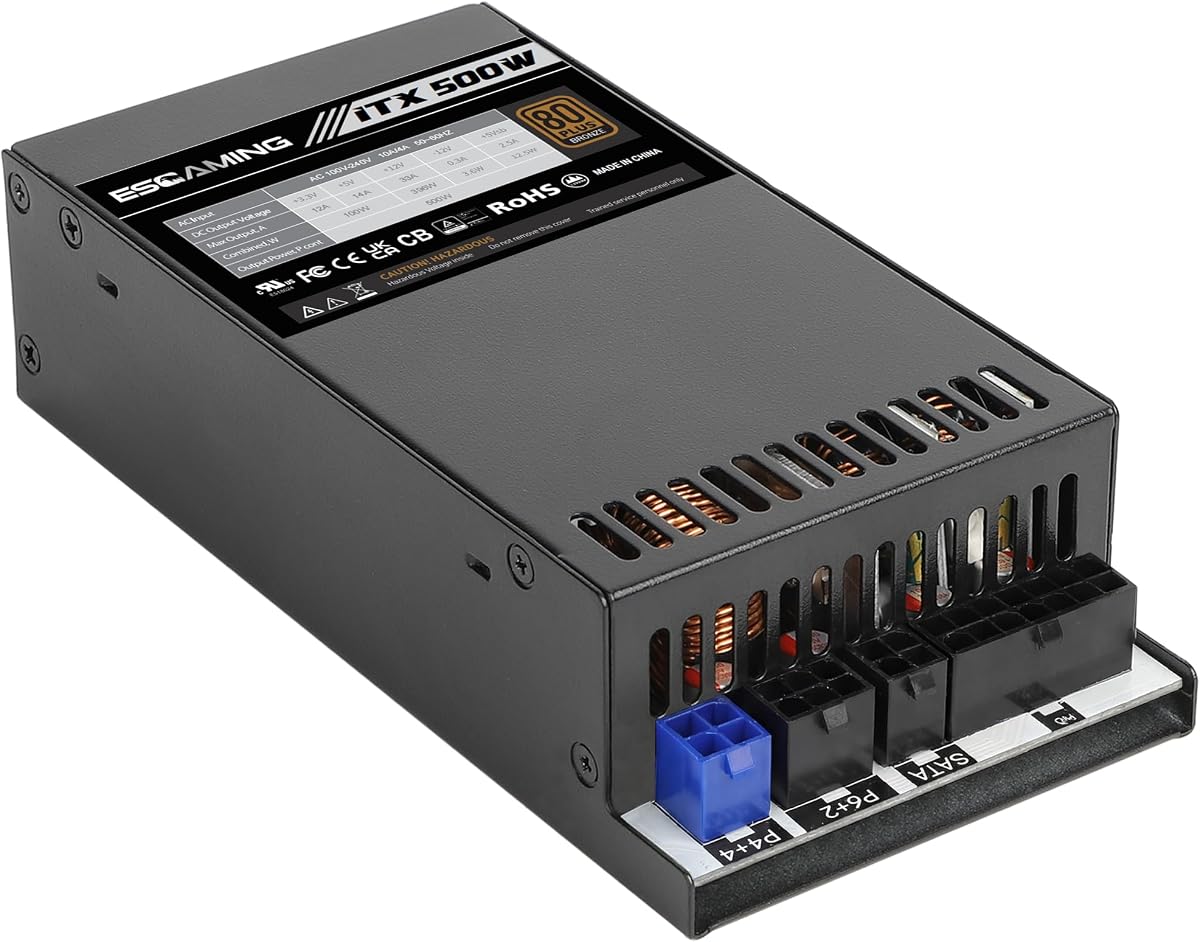
This ESGAMING unit delivers fully modular convenience for ITX builds. It includes active PFC for voltage stability across regions. The modular layout simplifies cable routing significantly.
We may earn a commission when you buy through this link, at no additional cost to you.
Efficiency is high though ratings vary slightly in testing. Full range voltage support means no manual switch is needed. Connectors include PCIe and SATA for modern system parts.
The compact design fits standard ITX cases perfectly. Modular cables reduce clutter and improve airflow inside enclosures. Some users report minor inconsistencies in power delivery.
Choose this for clean builds needing modular flexibility. It balances cost with modern features effectively. Verify current ratings before purchasing for latest updates.
Only connect needed cables to reduce noise. This improves airflow in small cases.
Full range PFC adapts to local voltage automatically. No manual switching required for safety.
We may earn a commission when you buy through this link, at no additional cost to you.
This TFX unit suits small cases with specific chassis requirements. Full range Active PFC handles voltage shifts without manual switches. It supports modern GPU and storage connectors effectively.
We may earn a commission when you buy through this link, at no additional cost to you.
The 80mm silent fan starts only when needed for efficiency. Auto switching protects against incorrect voltage settings by default. Build quality supports stable operation for daily use.
Cable length is fixed so measure clearance before purchase. Ensure case supports TFX dimensions to avoid fit issues. This design keeps costs lower than modular options.
Select this for TFX compatible builds needing reliable power. It balances performance with essential safety features. Check case specifications to confirm compatibility before buying.
Silent-Start technology keeps noise low under idle. Fan engages only when temperatures rise.
Automatic detection prevents damage from wrong settings. No manual switch needed for operation.
We may earn a commission when you buy through this link, at no additional cost to you.
This Smart unit supports the latest ATX v3.1 standards. It delivers 600W power with efficient DC-DC rails. Flat cables improve cable management in tight chassis.
We may earn a commission when you buy through this link, at no additional cost to you.
The FDB fan ensures long term reliability with low noise. Bronze certification maintains acceptable efficiency levels for daily use. Protection mechanisms guard against overloads or short circuits.
Non-modular cables require routing care for best airflow. The flat cable style reduces clutter inside the case. Overall performance is solid for mid-range systems.
Ideal for modern builds seeking latest standards at a fair cost. It is a strong choice for those prioritizing compatibility. Check physical clearance before purchasing.
ATX v3.1 ensures future compatibility. DC-DC rails improve stability for modern components.
Flat cables route neatly in small cases. FDB fan provides long life and low noise.
We may earn a commission when you buy through this link, at no additional cost to you.
Selecting the right power supply involves evaluating several key factors. Below are eight critical aspects to consider before purchasing a low power PSU for your build.
Determine your system's total power draw by adding CPU and GPU requirements. A low power PSU between 300W and 600W suits most compact builds without excess heat. Ensure enough headroom for peak performance during gaming or rendering tasks.
Always calculate your component wattage before shopping to avoid under-powering.
Efficiency ratings like 80 Plus White or Bronze indicate how much energy is wasted. Higher efficiency reduces heat and lowers electricity bills over time. Look for units with certification relevant to your budget and usage intensity.
Choose higher rated units if the system runs continuously for better savings.
Verify your case supports the PSU size such as ITX, TFX, or Flex ATX. A low power PSU must fit inside the chassis without blocking airflow or cables. Measure internal dimensions carefully before ordering to prevent return issues.
Check case specifications to confirm the exact form factor needed.
Ensure the unit has necessary connectors like 24-pin, CPU 8-pin, and PCIe for your motherboard. Modular options simplify installation in tight spaces but cost more. Fixed cables are cheaper but may limit airflow inside the case.
Count all required connectors to match your components exactly.
Look for fans with silent technologies like ball-bearing or hydraulic bearings for quiet operation. Larger fans usually move air at lower speeds reducing noise. Consider the fan size in relation to your case cooling design.
Prioritize silent fans if your PC is near your workspace.
Safety features like OVP, SCP, and OTP protect components from electrical surges. Always verify the unit includes these protections before purchase. They prevent damage to expensive hardware if power fluctuates unexpectedly.
Ensure all key protections are listed in the product description.
Reputable brands often provide better warranty terms and customer support. A longer warranty like five years suggests confidence in component durability. Research reviews to confirm long term reliability before committing to a model.
Choose established brands for peace of mind and support.
Balance the unit cost against features and efficiency benefits. Entry units save money upfront but may cost more in electricity over time. Mid-range options offer the best mix of reliability and performance for most users.
Select the option that fits your financial plan without sacrificing safety.
Always turn off your computer and unplug the PSU from the wall before installing it. Ensure you align the screws with the case and tighten them firmly to avoid vibration issues.
Clean the fan regularly using compressed air to prevent dust buildup. Dust accumulation can cause overheating and reduce the lifespan of your power supply.
Avoid using adapters unless necessary as they may introduce instability. Verify all cables are fully seated in their connectors to ensure safe and reliable operation.
A low power PSU typically delivers under 600W for small form factor systems. These units prioritize efficiency and compact designs over raw performance. They suit non-gaming PCs, HTPCs, or budget office machines where minimal power is required.
Active PFC improves efficiency and allows voltage auto-detection across regions. It is essential for stable operation in international settings. Look for this feature to reduce energy waste and ensure safer power delivery.
Modular cables help route wires neatly in tight spaces. This improves airflow and reduces clutter inside the case. Fixed cables are cheaper but may obstruct airflow in small builds.
Higher efficiency means less wasted electricity as heat. Over years of daily use this saves noticeable money on bills. Choose 80 Plus Bronze or higher for better energy savings.
You need a 24-pin main, 8-pin CPU, and PCIe connectors for GPUs. Check your component manual for exact requirements. Ensure your PSU offers these cables to avoid compatibility issues.
Yes if the GPU and CPU stay under the PSU wattage limit. Modern GPUs often need 500W to 600W for gaming. Ensure your total system load stays below the PSU capacity for stability.
The Thermaltake Smart 500W leads as the top choice for balance and reliability. The Apevia VENUS500W offers budget-friendly performance for basic setups. For premium needs the 600W Flex ATX provides unmatched efficiency and features.
Prioritize efficiency and compatibility when picking your unit. Ensure the form factor fits your case and the wattage matches your system. Always check safety features before finalizing your purchase decision.
Prices and availability shift quickly so confirm current listings before buying. Visit the product links above for the latest details and deals. Choose the right power source for a stable and efficient build.