
Monitor Light Bar Eye-Care USB
4.2Editor score
15.7 inch wide coverage
Asymmetric lighting design
Stepless dimming control
Modern digital workspaces demand lighting solutions that protect vision while enhancing productivity. A light behind monitor for eye care offers targeted illumination without screen glare. These devices reduce eye strain during long hours of computing.
We evaluated ten top-rated monitor light bars based on optical design, color rendering, and user comfort. Our comparison highlights key features like blue light reduction and dimming capabilities. Each product meets rigorous standards for eye health.
Every pick includes detailed specs and real-world performance insights. Prices and availability fluctuate frequently so check current listings before buying. This guide helps you choose the perfect lighting setup for your needs today.
4.2Editor score

4.4Editor score

4.7Editor score
As an Amazon Associate we earn from qualifying purchases.
This table compares all ten models side by side to help you find the right fit.


The YEELIGHT Monitor Light Bar delivers exceptional eye care with RG0 blue light safety. It offers high CRI and flicker-free illumination perfect for long work sessions. This model balances performance and affordability effectively.
We may earn a commission when you buy through this link, at no additional cost to you.
Its asymmetric optical design eliminates screen glare while lighting your desk evenly. The Ra95 CRI ensures true color representation crucial for designers. The metal body provides durability and heat dissipation.
Trade-offs include lack of RGB backlighting and wireless control. However these factors may not matter for pure task lighting needs. The stepless dimming provides sufficient customization for most users.
Ideal for programmers designers and writers needing reliable eye protection. Its compact design keeps desks organized without sacrificing light quality. We recommend this for anyone prioritizing visual health.
Highest standard for blue light safety reducing retinal damage risk over time.
Full-metal body improves heat conduction and long-term durability compared to plastic.
We may earn a commission when you buy through this link, at no additional cost to you.
This budget-friendly light bar offers 15.7 inch ultrawide coverage for large desks. It features stepless dimming and asymmetric lighting to reduce eye strain. Excellent value for essential task illumination.
We may earn a commission when you buy through this link, at no additional cost to you.
The 900 lux brightness eliminates dark spots on wide screens. Mechanical switches allow easy brightness and color temp adjustments. The counterweight clip ensures stable mounting on any monitor.
While lacking premium features like wireless remotes it delivers core eye care needs. The lack of RGB lighting keeps costs low. Perfect for basic home office setups.
Best for students and remote workers needing reliable lighting on a budget. It saves desk space and protects eyes during long hours. A smart choice for cost-conscious buyers.
Spans 15.7 inches ensuring even light across large desks and monitors.
Stable mounting without tools fitting flat or curved screens easily.
We may earn a commission when you buy through this link, at no additional cost to you.
BenQ ScreenBar Halo 2 sets the gold standard with wireless control and motion sensors. It offers exceptional eye care with flicker-free and blue-light-free LEDs. A top pick for professionals seeking advanced features.
We may earn a commission when you buy through this link, at no additional cost to you.
The wireless dial allows precise brightness and color adjustment without reaching. Wide backlight reduces screen contrast in dark rooms. It fits curved monitors securely without damaging them.
Price is significantly higher than competitors but justify by advanced tech. Setup takes time to calibrate motion sensors properly. Longevity and performance match the premium cost.
Ideal for creative pros gamers and executives wanting seamless control. It enhances comfort during extended sessions while maintaining desk aesthetics. A worthy investment for premium lighting.
Intuitive dial offers precise adjustments without cluttering desk space.
Ambient backlighting reduces eye strain by balancing screen contrast.
We may earn a commission when you buy through this link, at no additional cost to you.
This RGB light bar combines task lighting with ambient backlight for immersive setups. Dual modes allow independent control of front and back lights. Perfect for gamers wanting style and eye comfort.
We may earn a commission when you buy through this link, at no additional cost to you.
The RGB modes add visual flair while front light reduces glare. USB-C connectivity ensures flexible power options. Memory function saves preferred settings automatically for quick access.
Optical quality may not match premium models for professional work. Focus is more on ambiance than strict eye care standards. Still effective for general home use.
Great for gaming setups needing vibrant colors and eye protection. It balances functionality with style effectively. Ideal for entertainment zones where mood lighting matters.
Separate controls for front task light and RGB backlight.
9 lighting modes enhance gaming experience with dynamic colors.
We may earn a commission when you buy through this link, at no additional cost to you.
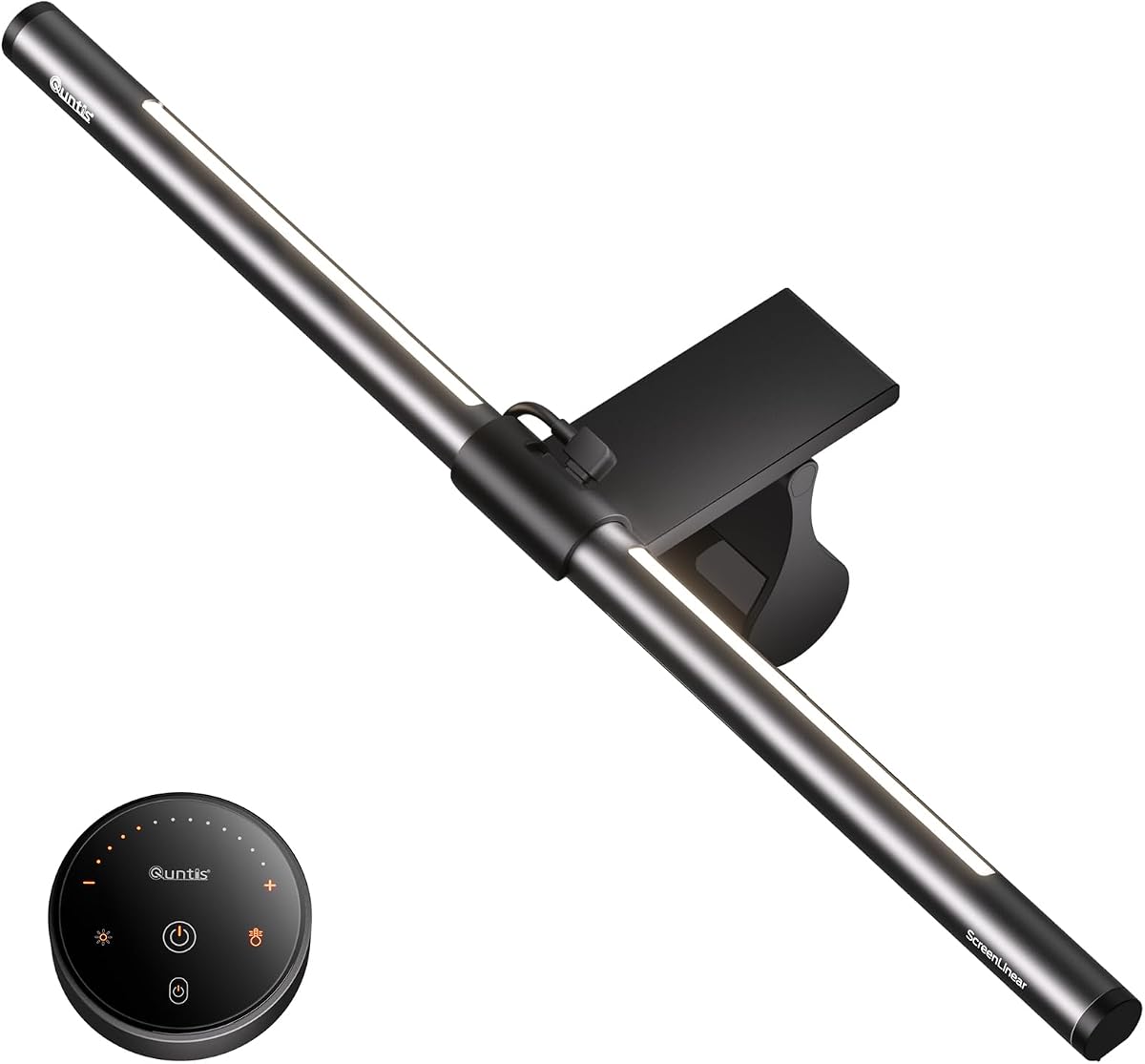
Quntis monitor lamp features auto-dimming for optimal brightness based on room light. Ra98 CRI ensures accurate color for designers. Touch controls offer precise manual adjustments when needed.
We may earn a commission when you buy through this link, at no additional cost to you.
Auto-sensor maintains consistent illumination reducing visual fatigue over time. Asymmetric design directs light only on desk preventing screen reflections. Compact footprint saves valuable desk space.
Fixed angle may not suit all monitor heights. Remote missing but touch controls are intuitive. Overall strong performance for eye health focused users.
Best for office workers seeking effortless comfort. Automatic adjustments save hassle during varying light conditions. Reliable choice for consistent visual ergonomics.
Adjusts brightness automatically to match ambient room lighting.
Near-perfect color rendering vital for design and photo work.
We may earn a commission when you buy through this link, at no additional cost to you.
LYMAX offers convenient wireless control for seamless light adjustments. Gravity damper mount ensures stability without damaging monitors. Good balance of features and affordability for everyday use.
We may earn a commission when you buy through this link, at no additional cost to you.
Remote simplifies changing modes without leaning forward. USB-C power provides reliable connectivity. Metal body adds durability against wear and tear.
Battery in remote adds maintenance step. Lacks auto-sensor compared to premium models. Still effective for users preferring remote operation.
Ideal for users needing remote control on budget. Easy to use in dark environments. Solid performance for home office lighting.
Convenient remote control for quick brightness changes.
Stable clip-free mounting secure monitor protection.
We may earn a commission when you buy through this link, at no additional cost to you.
This compact model delivers 250LM with asymmetric anti-glare optics. Memory function saves favorite settings effortlessly. Simple yet effective for small desk setups.
We may earn a commission when you buy through this link, at no additional cost to you.
Lightweight design fits tight spaces easily. Flicker-free light protects eyes during extended use. Clip-on design avoids extra desk clutter.
Brightness lower than larger bars. Basic touch controls lack advanced customization. Suitable for minimalists needing simple task lighting.
Best for smaller workstations or shared desks. Reliable performance without extra features. Great starter option for eye care.
Saves your last brightness and color temperature settings.
Directs light to desk not eyes or screen.
We may earn a commission when you buy through this link, at no additional cost to you.
Pzloz lamp features flexible arms for precise directional lighting. Ideal for drafting and study with multiple color modes. Remote offers easy control across functions.
We may earn a commission when you buy through this link, at no additional cost to you.
Flexible arms allow exact positioning for tasks. High power ensures bright illumination. Remote simplifies switching modes quickly.
Design is bulkier than fixed light bars. May limit monitor clearance on small desks. Suitable for task-oriented needs.
Great for architects and students needing adjustable light. Offers broad coverage with precision. Versatile alternative to rigid bars.
Adjustable arms direct light exactly where needed.
Smart remote simplifies mode and brightness changes.
We may earn a commission when you buy through this link, at no additional cost to you.
Quntis dual light model offers RGB backlight plus task lighting. Ra95 CRI ensures color accuracy for designers. Memory settings recall preferences instantly.
We may earn a commission when you buy through this link, at no additional cost to you.
Triangular clamp provides stable mounting. 24 RGB modes create dynamic ambiance. Wide coverage supports large work areas well.
More complex controls may confuse minimalists. Slightly higher cost due to dual lighting. Still excellent for immersive setups.
Ideal for creatives wanting color accuracy and mood lighting. Combines eye care with visual flair. Top choice for dual-mode enthusiasts.
Stable mounting system fitting varied monitor thicknesses.
Task light plus RGB backlight for immersive work.
We may earn a commission when you buy through this link, at no additional cost to you.
Quntis light bar combines front and back lighting with smart remote. Ra95 CRI supports professional color work. Memory function restores settings automatically.
We may earn a commission when you buy through this link, at no additional cost to you.
Dual protection design shields eyes from direct glare. Stepless dimming allows precise adjustments. Backlight reduces screen contrast effectively.
Interface might be complex initially. Requires setup time to optimize modes. Premium pricing justified by dual lighting tech.
Best for pros needing precision lighting and ambiance. Remote simplifies control during sessions. Strong performer for versatile needs.
Combines optical design with hood to prevent glare.
Touch-based remote offers intuitive brightness control.
We may earn a commission when you buy through this link, at no additional cost to you.
Selecting a light behind monitor requires evaluating several features for optimal eye health and desk utility.
Asymmetric optical design directs light down to the desk avoiding screen glare. Look for models with precise angles to prevent reflections on your monitor surface. This is vital for long working hours.
Always choose asymmetric lighting to avoid direct light hitting your eyes.
Certified RG0 or low blue light certifications ensure reduced retinal stress. Products meeting IEC standards minimize hazardous blue light exposure. This is critical for sleep and eye comfort.
Prioritize models with certified blue light filters for better eye health.
High CRI above Ra90 ensures accurate colors for design and editing. Lower CRI may distort on screen hues affecting work quality. Professionals should aim for Ra95 or higher.
Check CRI ratings for accurate color representation during creative tasks.
Stepless dimming offers smooth brightness changes compared to fixed steps. Touch or wireless controls enhance usability during tasks. Memory functions save your preferred settings automatically.
Choose stepless dimming and memory functions for consistent lighting ease.
Clips with silicone pads and counterweights secure to monitors without damage. Ensure compatibility with your monitor thickness and curvature. Stable mounting prevents wobbling during adjustments.
Verify clamp compatibility with your monitor size and curvature.
USB-C power offers flexible connectivity with laptops or adapters. Longer cables reduce cord clutter on your desk. Look for low power consumption for energy efficiency.
Prefer USB-C power for versatile and clean desk setup.
Metal bodies provide durability and better heat dissipation than plastic. High-quality materials ensure long lifespan under continuous use. Check for heat-resistant finishes to avoid burns.
Select metal construction for improved durability and heat management.
RGB backlight and motion sensors add convenience and ambiance. Consider if these features justify additional cost for your needs. Some models offer remote control for added ease.
Evaluate extra features like remotes or RGB against your budget.
Install the light bar by attaching the clip to the top center of your monitor. Adjust the angle so light points down to your keyboard not your eyes. Ensure it does not block webcam or cables.
Set brightness based on ambient room light to avoid contrast strain. Use stepless dimming to find the sweet spot where screens remain clear without glare. Avoid high brightness in dark rooms.
Clean the light bar regularly with soft microfiber cloth to remove dust. Avoid chemical cleaners that may scratch lenses or housing. Check mounting clips periodically for secure fit.
If poorly positioned it can cause glare. Asymmetric models prevent direct light hitting your eyes reducing strain. Use proper brightness settings to avoid contrast fatigue.
Yes certified blue light reduction helps protect eyes during extended screen time. Models with RG0 or similar certifications offer better protection for long work sessions.
Remotes add convenience but are not essential. Touch controls on the bar often suffice. Choose wireless if you want adjustments without reaching for the monitor.
Use a soft dry microfiber cloth to wipe lenses and body. Avoid harsh chemicals. Dust accumulates over time reducing light output so clean weekly.
Yes most modern bars have adjustable clips fitting curved screens. Check thickness limits before buying to ensure compatibility with your curved monitor.
No well-positioned bars do not block webcams. Look for low-profile designs that avoid camera obstruction during video conferences.
Cooler 5000K to 6500K is ideal for focus during day. Warmer 3000K suits evening work to reduce blue light impact on sleep.
Yes LED bars consume minimal power compared to traditional desk lamps. They provide bright light while using USB ports efficiently.
Top picks like YEELIGHT and BenQ ScreenBar Halo 2 lead in eye protection and performance. Budget models offer solid features without breaking the bank. Select based on your specific desk needs.
Prioritize optical design and blue light safety to ensure comfort. Consider extra features like remote control if convenience matters most. Balance cost with performance for best results.
Prices fluctuate frequently so verify current offers before buying. This guide provides comprehensive insights for informed decisions. Choose wisely to enhance your daily workspace experience.