
darkFlash V92
4.1Editor score
Free Station Space software
IPS LCD screen for PC
Flexible case mounting options
This expert guide compares the top ten LCD screens for PC cases to help you choose the best display for monitoring temps and custom visuals.
Modern PC builds often include a small LCD screen to show system stats or custom visuals. These displays add personality and functionality without cluttering your desk. A good screen should be easy to install, offer sharp visuals, and integrate well with monitoring software.
We evaluated ten popular models based on resolution, connectivity, software features, and ease of use. Our list includes options for different case sizes and budgets. Each product was analyzed for its ability to display real-time hardware data and media smoothly.
Each pick below highlights key strengths and ideal use cases for various builders. Note that availability and pricing can change frequently on major retailers. Always verify current stock and compatibility with your specific case before making a final decision on your new display.
4.1Editor score

4.4Editor score

4.5Editor score
The table below provides a side-by-side look at the key features and specifications of each model to help you make an informed choice quickly.




The Lian Li SM088X is a highly rated LCD screen for PC cases that delivers vibrant visuals and easy setup. With a 4.4 star rating, it stands out for its plug-and-play USB connection and standalone secondary monitor capability. Users appreciate the bright display that shows stats clearly without needing GPU ports.
We may earn a commission when you buy through this link, at no additional cost to you.
Its standout quality is the versatile mounting bracket that supports height and tilt adjustments. You can attach it to fan frames or case panels securely. The built-in diffused ARGB lighting strip enhances aesthetics and syncs with your system colors through L-Connect 3 software. This creates a cohesive look inside the case.
A minor trade-off is the need for specific screws during installation to avoid damage. You must follow the manual carefully to use the correct screws. Despite this, the customization options like switching between Celsius and Fahrenheit make it worth the effort for detailed monitoring.
This model is ideal for gamers who want a stylish display that functions independently. If you value a seamless setup and aesthetic lighting, this screen delivers. It offers a reliable way to show hardware stats or custom visuals with minimal hassle.
The USB-powered design allows the screen to work as an independent monitor without using GPU ports. This is great for saving video outputs for main displays.
The diffused ARGB strip can be customized through software to match your system. This adds a premium visual touch to any build.
We may earn a commission when you buy through this link, at no additional cost to you.
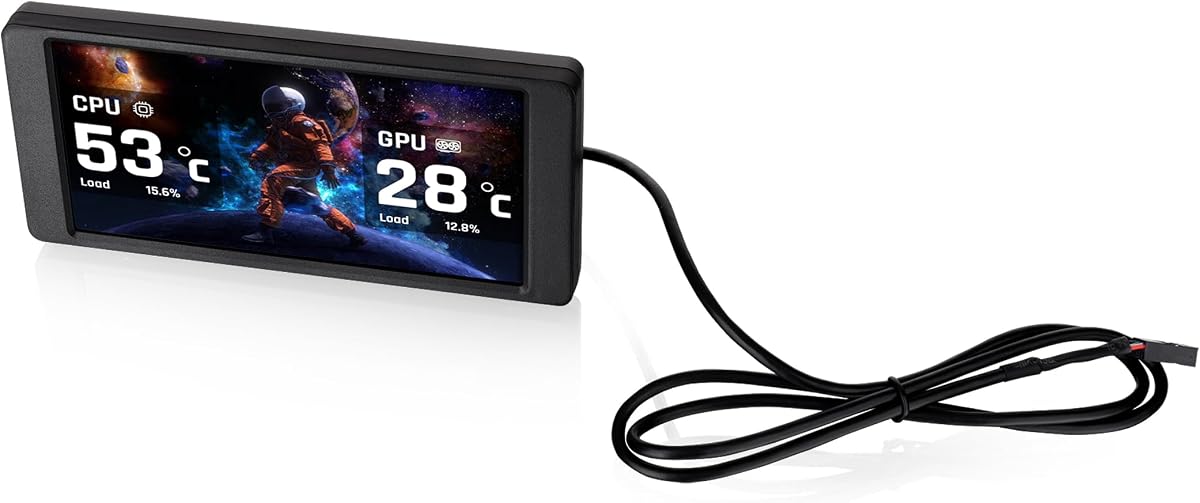
The darkFlash V92 offers excellent value for builders looking for an affordable LCD screen for PC cases. It scores a 4.1 star rating thanks to its sharp visuals and free software suite. The ultra-wide panel displays system data clearly through tempered glass.
We may earn a commission when you buy through this link, at no additional cost to you.
Its best feature is the inclusion of free Station Space software with no extra tools needed. You can monitor CPU usage and fan speeds easily. The slim aluminum body fits well inside cases without taking up too much space. This makes it a practical choice for many setups.
One limitation is that the software must remain running for the display to update. This uses a small amount of system resources. Also, it is not compatible with macOS or Linux systems. These factors might matter if you need a background process or multi-platform support.
This screen is perfect for budget-conscious users who want a dedicated case monitor. If you run Windows and want easy access to stats, this model works well. It balances performance and cost effectively for entry-level enthusiasts.
The included software allows you to use themes and plugins without extra costs. It simplifies the setup process significantly.
The slim aluminum body helps it fit into tight spaces. It provides a sleek look without adding bulk to the build.
We may earn a commission when you buy through this link, at no additional cost to you.
The WOWNOVA 8 Inch LCD screen delivers top-tier performance and features with a high 4.5 star rating. It is designed to be a premium secondary display that shows hardware data or acts as an extended desktop. Users love its simple connection process with just one cable.
We may earn a commission when you buy through this link, at no additional cost to you.
Its unique capability is switching to desktop mode to function as an extended screen. This adds utility beyond just monitoring stats. The software supports custom dynamic video themes for personalization. This level of flexibility is rare in standard case screens.
A trade-off is the specific software dependency required for full functionality. You need to run the app to manage themes and layouts. Additionally, the price is higher than basic models. However, the added functionality justifies the investment for power users.
This model is recommended for those wanting a versatile display inside or outside the case. If you need extra screen space or high-quality visuals, it fits the bill. It provides a premium experience with robust software tools.
Switching to desktop mode turns the panel into an extended screen. This helps save GPU ports for other monitors.
You can upload custom dynamic videos for the display. This allows for a personalized look that stands out.
We may earn a commission when you buy through this link, at no additional cost to you.
The wisecoco 12.6 Inch screen stands out with its large display size and built-in audio. It scores a 4.2 rating for its solid build and ease of installation. The screen is designed to fit specific case panels but works with HDMI inputs broadly.
We may earn a commission when you buy through this link, at no additional cost to you.
Its standout feature is the large viewing area ideal for detailed monitoring. With dual built-in speakers, you get audio output without external devices. The plug and play design makes setup straightforward for most users. This adds significant value to the build experience.
However, using HDMI input means consuming a GPU port. This might not be ideal if you lack extra slots. Also, power requirements vary. You may need a specific cable for full function. These details should be checked before buying.
This model is perfect for gamers wanting a large stats panel with sound. If your case has space for this width, it works great. It brings a media center vibe to your PC interior.
The 12.6 inch screen provides ample space for widgets. This makes reading data at a glance easier.
Dual speakers eliminate the need for external audio. This keeps your setup cleaner and simpler.
We may earn a commission when you buy through this link, at no additional cost to you.
The Hosyond 8.8 Inch display offers a unique touchscreen option for PC cases. With a 4.0 rating, it delivers bright visuals and responsive control. Its versatility extends beyond PCs to support devices like Raspberry Pi.
We may earn a commission when you buy through this link, at no additional cost to you.
Its main advantage is the responsive capacitive touchscreen for direct control. This lets you interact with the display without moving your hands to the mouse. The low power consumption ensures it does not drain too much energy. This makes it efficient for always-on monitoring.
A consideration is that AIDA64 software must be downloaded separately for some features. This adds a step to setup. Also, it is not a full GPU bypass display without HDMI. You need to ensure your case supports the connections.
This screen suits users wanting interactivity and broad system support. If you need a touch panel for quick access, this fits. It offers a modern interface at a reasonable cost.
The touchscreen allows direct interaction with the UI. This adds convenience for quick adjustments on the fly.
It works with Raspberry Pi and various OS options. This makes it flexible for different projects.
We may earn a commission when you buy through this link, at no additional cost to you.
The Thermalright Trofeo Vision provides a crisp and compact display for PC cases. It holds a 4.3 rating for its clear visuals and reliable performance. The USB-C connection simplifies setup without complex drivers.
We may earn a commission when you buy through this link, at no additional cost to you.
Its key strength is the real-time hardware monitoring support with easy tracking. You can see fan speeds and temps at a glance. The slim design allows it to fit inside or outside cases seamlessly. This is great for space-saving builds.
One downside is the reliance on TRCC software for functionality. You must install the app to control the display. This might be a minor hurdle compared to plug-and-play options. But it offers deep customization once set up.
This screen is ideal for those wanting a small, efficient display. If you prioritize a clean look and straightforward setup, it works well. It offers a great balance of form and function.
The USB-C interface ensures quick setup with most systems. This removes the need for complex drivers.
The compact build fits inside or outside the case easily. This allows flexibility for placement.
We may earn a commission when you buy through this link, at no additional cost to you.
The Thermaltake 6.0 Inch LCD screen kit offers a dedicated case display for specific chassis models. With a 3.8 rating, it provides solid functionality with a focus on custom graphics. It supports real-time data for key system components.
We may earn a commission when you buy through this link, at no additional cost to you.
Its main benefit is the ability to customize backgrounds with many file types. You can upload images and videos to personalize the display. The larger viewing surface allows for more detailed widgets. This helps show off your build details.
However, it is compatible with specific Thermaltake chassis series. This limits its use if you have a different case. Additionally, the rating is lower than some alternatives. It may need more tweaking for best results.
This model works best if you own a compatible Thermaltake case. If you want deep customization, it fits the bill. It offers a tailored experience for those specific setups.
Supports many file formats for custom backgrounds. This allows for unique and dynamic displays.
Get instant access to key stats like load and temps. This helps in monitoring system health easily.
We may earn a commission when you buy through this link, at no additional cost to you.
The GeeekPi 12.6 Inch screen brings interactive control to PC cases. It has a 4.0 rating for its touch features and plug-and-play design. The panel is specifically designed to fit popular case panels.
We may earn a commission when you buy through this link, at no additional cost to you.
Its key strength is the up to 10-points of multi-touch support. This allows for precise interactions with the interface. The built-in speakers add audio without extra components. This makes it a comprehensive media solution.
One note is that you must remove the protective film before use. This is a common step but easily forgotten. Also, it is designed for specific models like the Y60. Check dimensions before buying to ensure fit.
This screen is ideal for those wanting a touch-enabled large display. If you need audio and high resolution, it offers good value. It simplifies setup with ready-to-use features.
Supports multi-touch for smooth and responsive control. This enhances the user experience significantly.
Ready to use out of the box without extra software. This saves setup time and effort.
We may earn a commission when you buy through this link, at no additional cost to you.
The Thermalright TV 9.16 LCD offers a unique magnetic suction design for PC cases. It holds a 4.3 rating for its sleek build and clear colors. The magnetic design makes installation very easy without tools.
We may earn a commission when you buy through this link, at no additional cost to you.
Its standout feature is the metal frame technology that supports magnetic attachment. You can remove and install the screen effortlessly. This is great for users who swap out components often. The screen delivers accurate and delicate colors.
A consideration is that wiring must be confirmed before software installation. This requires attention to detail during setup. Also, the software controls the monitoring functions. This limits manual control without the app.
This screen suits those who want easy access and removal. If you need a flexible display, this works well. It offers a unique solution for magnetic setups.
Allows installation without screws for quick setup. This makes it easy to remove when needed.
The IPS panel ensures good viewing angles and true colors. This makes stats easy to read from any angle.
We may earn a commission when you buy through this link, at no additional cost to you.
The Thermalright Trofeo 6.86 LCD offers a very compact option for PC cases. With a 3.4 rating, it provides basic monitoring and customization. Its magnetic panel allows for flexible positioning inside the chassis.
We may earn a commission when you buy through this link, at no additional cost to you.
Its main advantage is the ability to move freely in various positions without a fixed mount. This is unique for smaller cases or coolers. The screen supports DIY static and dynamic image themes. This allows for basic personalization.
One issue is the lower user rating compared to other options. This may reflect challenges with setup or software. Also, wiring must be confirmed before software installation to avoid issues. This adds a step to the process.
This model is best for compact setups needing small displays. If you want to place a screen near a liquid cooler, it works. It offers flexibility at a lower price point.
The magnetic screen allows free positioning in the chassis. This enables unique placement options not possible before.
You can create your own static or dynamic themes. This allows for some personalization of the display.
We may earn a commission when you buy through this link, at no additional cost to you.
Choosing the right screen depends on your case size and what you want to display. We break down the key factors to consider before purchasing.
The size of the screen determines how much information you can show. Common sizes range from 6 to 12 inches. You should measure your case clearance to ensure a proper fit. Wide bar screens look good vertically, while square ones fit differently.
Most screens use USB 2.0 headers for data and power. Some require external USB ports or HDMI connections. Check if your motherboard has available headers before buying. This ensures a clean setup without cable clutter.
The software controls the display and allows customization. Some are free while others require paid versions. Check if the software supports themes and widgets you want. Compatibility with your operating system is also key.
Resolution affects how sharp the text and images look. Higher resolution allows more details on the small panel. Look for IPS panels for better viewing angles. This helps reading stats from outside the case.
Mounting can be magnetic, screw-based, or adhesive. Magnetic is easier but might be less secure. Screws provide a firm hold but need tools. Choose based on how often you open your case.
Some screens have touch, built-in speakers, or RGB lighting. These add cost but enhance the experience. Decide if you need audio output or lighting sync. These extras can change the vibe of your setup.
Some screens are made for specific cases or coolers. Ensure it fits your chassis model to avoid clearance issues. Universal screens offer more flexibility. Check the product description for supported models.
Price varies widely based on features and size. Set a budget that fits your needs. Sometimes a cheaper model works better than a premium one if you do not need extra features. Compare value for money carefully.
To install, first ensure your motherboard has a free USB 2.0 9-pin header. Connect the provided cable securely and route it through case cable routing holes to avoid pinches. Secure the screen using the included brackets or adhesive pads to keep it stable during operation.
Once powered, download the recommended software from the manufacturer's website and install it on your system. Use the software to upload themes, set layouts, or view real-time data. Keep the software running to ensure the display updates correctly.
For care, avoid touching the screen with sharp objects to prevent scratches. Dust the casing with a dry microfiber cloth periodically. If you remove it for cleaning, ensure all cables are unplugged first to avoid electrical issues.
Most modern screens use motherboard USB headers for data and power. This means they do not consume your valuable GPU video outputs. You can install them without reducing connections for your main monitors.
Each manufacturer provides specific software to control the display. Some are free while others have premium features. You typically need to keep this software running to see dynamic changes or custom themes on the screen.
Most screens are designed as secondary displays or for specific case stats. While some models support extended desktop mode, they are not usually ideal as primary screens due to size and resolution limits.
The power usage is usually minimal as they draw from USB or motherboard headers. However, high brightness or continuous playback of videos may use slightly more energy. It is generally low compared to standard monitors.
Yes, some screens are specifically designed to attach to water cooler radiators. Magnetic options also allow mounting on any metal surface in the case. Check compatibility to ensure it fits your specific cooler model.
Most allow JPG, PNG, GIF, and MP4 files. Some support dynamic themes that change over time. Check the software documentation to see which file types are accepted for customization.
We explored ten top-rated screens offering diverse features and prices. The Lian Li SM088X, darkFlash V92, and WOWNOVA 8 Inch stood out for their unique advantages. These models provide reliable performance and customization for most builders.
Prioritize your case clearance and available connectivity when making a selection. If you need a touch interface, consider the Hosyond or GeeekPi options. For easy installation and aesthetic appeal, magnetic or ARGB screens are excellent choices.
Always check current availability and compatibility before purchase. Prices and stock can change frequently on major retailers. Verify the latest specs on the manufacturer site to ensure it matches your setup needs.