
AULA WIN68 HE Mechanical Gaming Keyboard 60%
4.5Editor score
8000Hz Polling Rate
Adjustable Actuation Point
Compact 60% Layout
Discover the best keyboard for Valorant with our expert guide comparing ten top models featuring rapid trigger, high polling rates, and precise actuation.
Finding the right keyboard for Valorant is crucial for competitive players who demand speed and precision. The right input device can significantly impact your counter-strafing ability and overall reaction time during intense matches. We have analyzed the latest magnetic and optical switch technologies to help you make an informed decision.
Our team evaluated ten standout models based on polling rates, actuation customization, build quality, and user feedback. We focused on features that matter most in tactical shooters like rapid trigger and adjustable actuation points. This list covers various layouts and price points to suit every gaming setup.
Each product review highlights specific strengths and potential trade-offs to guide your purchase. You will find detailed breakdowns of switch types, connectivity options, and key features. Please note that product availability and pricing may change over time so check the latest offers.
4.5Editor score

4.1Editor score

4.4Editor score
The following table provides a side-by-side comparison of the ten best keyboards for Valorant. Each entry includes key specifications to help you quickly identify the model that fits your specific needs and budget constraints.
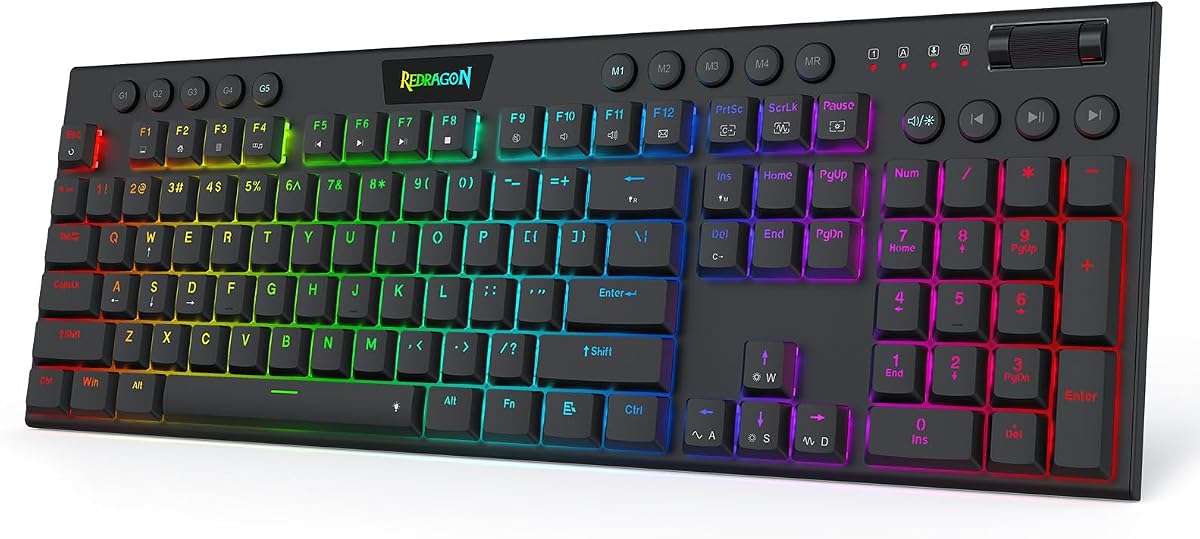



The Redragon K673 HE stands out as our top pick for Valorant players due to its rapid trigger capabilities. It features next-gen UltraMag POM magnetic switches that sense keypresses without physical contact. This design ensures your timing lands exactly when you mean it during intense matches.
We may earn a commission when you buy through this link, at no additional cost to you.
Its 8000Hz Hyper-Polling ensures your inputs transmit up to eight times faster than standard keyboards. The dynamic key activation cuts redundant keystrokes during quick direction changes. This is essential for counter-strafing in tactical shooters where milliseconds matter.
While the software-powered precision tuning offers great flexibility, it may require some initial setup. The anti-wobble independent switch-plate design gives a soft, Hi-Fi bounce. Some users might prefer a more tactile feel over the magnetic switch experience.
We recommend this for players prioritizing speed and customization. The ability to save multiple actuation profiles means your setup stays consistent across games. It delivers professional-grade performance at an accessible price point.
Rapid trigger technology allows you to reset and re-press keys instantly by lifting your finger slightly. This feature is crucial for strafing and stopping accurately in Valorant.
Magnetic switches eliminate physical contact wear ensuring consistent performance over time. You can adjust actuation from 0.1mm to 3.4mm for perfect sensitivity.
We may earn a commission when you buy through this link, at no additional cost to you.
The Redragon K686 HE offers similar performance to the K673 with a slightly different layout and higher user ratings. It utilizes the same UltraMag POM magnetic switches for contactless actuation. This ensures consistent performance and durability over extensive gaming sessions.
We may earn a commission when you buy through this link, at no additional cost to you.
Its 8000Hz polling rate guarantees near-instant input registration. The anti-wobble design reduces noise and provides a smoother typing experience. Users appreciate the one-knob simplicity for managing lighting and media without memorizing combos.
While it shares most features with the K673, the K686 focuses on providing a balanced experience. The software allows for precise tuning which may take time to master. However the payoff in in-game responsiveness is significant.
This keyboard is ideal for gamers seeking high-end features at a budget price. The floating structure design helps dampen noise effectively. It delivers a consistent setup that stays reliable across different competitive titles.
The dual-module floating structure pairs with dampening layers to reduce harsh clack sounds. This creates a soft bounce that minimizes distraction during quiet moments.
Adjust backlight brightness and media playback with a single control knob. This streamlines your setup and removes the need for complex key combinations.
We may earn a commission when you buy through this link, at no additional cost to you.
The Redragon K618 HE targets players who prefer low-profile keys without sacrificing speed. Its shortest travel magnetic switches sense keypresses faster than standard switches. This design is specifically built for counter-strafing and quick timing.
We may earn a commission when you buy through this link, at no additional cost to you.
It features 20 on-the-fly macro keys with a dedicated 4×5 zone. You can record combos or adjust volume instantly without installing any software. This convenience is rare in magnetic keyboards and adds significant utility.
The slimmer design shortens travel distance making keystrokes register quicker. It feels lighter on your wrists during long sessions. The adjustable actuation allows tuning between 0.1mm and 2.8mm for precision.
Choose this if you value ergonomics and quick macro access. The high rating reflects user satisfaction with its responsiveness. It remains a top choice for portable and fast-paced gaming.
The dedicated macro zone lets you record complex commands instantly. You can save up to 20 macros directly on the keyboard without extra software.
Low-profile switches reduce travel distance for faster actuation. This design improves comfort while maintaining the magnetic precision needed for Valorant.
We may earn a commission when you buy through this link, at no additional cost to you.
The Corsair Clipper PRO MINI combines rapid trigger with unmatched durability. Its MGX Hyperdrive Hall Effect switches offer 100M keystroke durability. This ensures long-term reliability even under intense competitive pressure.
We may earn a commission when you buy through this link, at no additional cost to you.
It features an IP57 rating for water and dust resistance. This protects your investment during marathon sessions or accidental spills. The dual-layer sound dampening keeps keystrokes quiet and distraction-free.
FlashTap SOCD enables cleaner directional inputs for sharper counter-strafing. The 8000Hz polling delivers near-instant input registration. Adjustable actuation allows you to calibrate between 0.2mm and 3.8mm precisely.
This is the best choice for players needing professional-grade robustness. While pricey the build quality and protection features justify the cost. It maximizes mouse space with its compact layout.
Water and dust resistance safeguards the keyboard during intense use. Just allow 72 hours to dry after submersion to maintain functionality.
FlashTap SOCD enables cleaner directional inputs for sharper play. This ensures your movement commands are precise and unambiguous.
We may earn a commission when you buy through this link, at no additional cost to you.
The Razer Huntsman Mini uses optical switch technology for extreme speed. Its beams register key presses at the speed of light. Actuation is 15-30% shorter than other linear switches at 1.0mm.
We may earn a commission when you buy through this link, at no additional cost to you.
It features fully programmable macros via Razer Hypershift. The Snap Tap feature prioritizes the latest input between assigned keys. This enhances responsive in-game movement when toggled on.
Construction includes a matte aluminum top frame for structural integrity. Oil-resistant PBT keycaps resist long-term grime buildup. RGB lighting syncs with popular games and partners.
This keyboard suits players wanting speed and aesthetic customization. The optical switches offer a distinct feel from magnetic ones. It remains a top-selling choice for its ecosystem support.
Optical switches use light beams for actuation ensuring minimal latency. This technology enables faster reactions compared to mechanical contacts.
Snap Tap prioritizes the latest input between assigned keys for movement. It is toggled on in Razer Synapse for responsive control.
We may earn a commission when you buy through this link, at no additional cost to you.
The Aula WIN60 HE brings magnetic switches to a budget-friendly price. It features self-developed magnetic switches without memory-intensive drivers. Polling rates reach up to 8000Hz for ultra-fast response times.
We may earn a commission when you buy through this link, at no additional cost to you.
It supports hot-swappable switches for easy customization. The web-based driver allows remapping keys and creating macros without downloads. This ensures seamless experience across devices.
Rapid trigger mode offers a 0.02mm RT step for lightning-fast responses. Dynamic RGB lighting illuminates PBT keycaps with millions of colors. The compact design saves desk space effectively.
Ideal for gamers seeking performance on a budget. The accessibility of web customization makes it user-friendly. It delivers precision and speed comparable to higher-end models.
Switch out magnetic keys easily to adjust your feel. This feature allows you to upgrade individual keys without soldering.
Customize settings via any device with internet access. No bulky software is required to manage RGB and macros.
We may earn a commission when you buy through this link, at no additional cost to you.
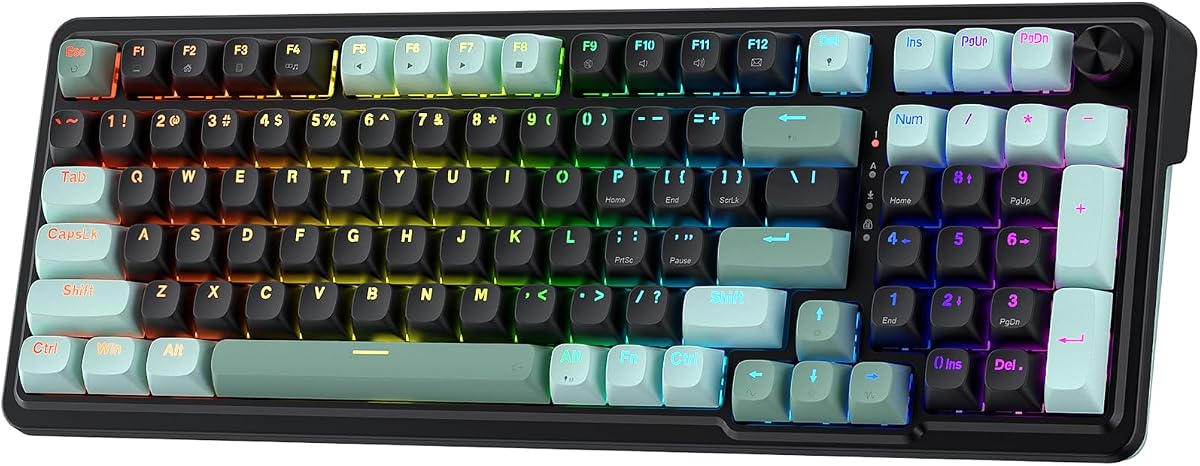
The AULA WIN68 HE offers industry-leading polling rates and low latency. Its magnetic switches allow actuation personalization down to 0.1mm units. This precision enhances your keying experience significantly.
We may earn a commission when you buy through this link, at no additional cost to you.
It retains arrow keys and basic functions despite its compact 60% size. The web driver supports Windows systems without requiring downloads. It provides one-stop management for mapping and macros.
Dynamic RGB lighting adds ambiance with millions of colors. The south-facing LEDs ensure better visual experience. The detachable cable makes it easier to carry.
This keyboard is perfect for coders and gamers needing speed. The adjustable sensitivity helps minimize fatigue over time. It balances portability with essential functional keys.
Low latency ensures your commands take effect instantly. This gives you a critical edge in game over traditional mechanical setups.
The layout keeps arrow keys and basic functions. You avoid the full loss of navigation found in standard 60% boards.
We may earn a commission when you buy through this link, at no additional cost to you.
The AULA F75 Pro offers wireless freedom with custom feel. It connects via Bluetooth 2.4GHz and USB-C for five devices. The 4000mAh battery ensures long-lasting usage.
We may earn a commission when you buy through this link, at no additional cost to you.
It features pre-lubricated stabilizers for a smooth creamy sound. The five-layer filling silencer counteracts cavity noise effectively. This results in a thocky heavy mechanical experience.
Side-printed keycaps take double injection molding for durability. The multi-function knob controls backlight and media easily. RGB lighting supports music rhythm effects.
Ideal for those wanting wireless with premium build. The 75% layout saves space while keeping arrows. It offers a solid and responsive typing experience.
Connect via Bluetooth 2.4GHz or USB-C to switch devices. You can easily switch modes without unplugging cables.
Swap switches to adjust the feel to your preference. Beginners can DIY without soldering to customize sound.
We may earn a commission when you buy through this link, at no additional cost to you.
The ATTACK SHARK X68 HE combines rapid trigger with high polling. It features true 8000Hz polling rates and 0.01mm RT accuracy. Latency is reduced to an impressive 0.125ms.
We may earn a commission when you buy through this link, at no additional cost to you.
It uses a top mount structure for stable typing. The dual layer PORON enhances gaming efficiency and satisfaction. Satellite switches ensure smoother experience with less wobble.
RGB LEDs shine through solid pure color PBT keycaps. South-facing LEDs provide superior shine-through capabilities. The curved wrist rest aids ergonomic design.
This is a top choice for fast-paced games. The web driver allows full control without installs. It delivers accuracy needed for rhythm and shooter games.
True polling ensures no compromise on input speed. This rate is critical for competitive accuracy in fast games.
The top mount structure provides a stable base. This design reduces flex for consistent and smooth typing.
We may earn a commission when you buy through this link, at no additional cost to you.
The ASUS ROG Strix Scope II 96 offers full-size keys in a compact design. It retains number pad keys while saving space. Connectivity includes Bluetooth 2.4GHz and USB for versatility.
We may earn a commission when you buy through this link, at no additional cost to you.
It provides up to 1500 hours battery life. Pre-lubed switches offer smooth and thocky keystrokes. Sound-dampening foam absorbs noises for quieter typing.
The layout supports gaming and daily work with pre-programmed hotkeys. A multi-function wheel handles media adjustments. Detachable wrist rest offers ergonomic comfort.
Ideal for users needing number pads. Wireless freedom. It balances full functionality with modern connectivity. The battery life ensures uninterrupted usage.
Up to 1500 hours of battery life. You can game and work for days without recharging.
Retains number pad keys in a space-saving design. This layout suits users who need full input functionality.
We may earn a commission when you buy through this link, at no additional cost to you.
Selecting the right keyboard requires understanding technical specs that impact performance. We break down the key factors to help you choose the best option for your playstyle.
Rapid trigger allows keys to reset and re-register instantly as you lift your finger. This feature is vital for counter-strafing in tactical shooters like Valorant. Without it players may experience lag or missed inputs during rapid direction changes.
Look for keyboards that explicitly support rapid trigger for competitive advantage.
A high polling rate ensures your inputs are sent frequently to the computer. Modern keyboards now offer up to 8000Hz rates which are eight times faster than standard ones. This reduces input lag significantly during critical moments.
Choose a keyboard with at least 8000Hz polling to match modern gaming standards.
Magnetic switches use magnetism to actuate and offer adjustable actuation points. They eliminate physical contact and increase durability. Optical switches use light beams and offer extreme speed but fewer customization options.
Consider magnetic switches if you want adjustable sensitivity and longevity.
Adjustable actuation lets you set how deep a key must be pressed to register. Some models allow adjustments from 0.1mm to 3.4mm. Fine tuning this helps reduce fatigue and increase speed.
Select a keyboard with customizable actuation to match your finger strength.
The layout affects how much mouse space you have and how many keys you use. A 60% keyboard saves space but lacks arrows. Larger layouts like 96% keep full functionality. Pick one that fits your desk size.
Ensure your keyboard layout retains necessary keys for your workflow.
Wired connections offer zero latency but limit movement. Wireless options like 2.4GHz provide freedom without lag. Bluetooth is useful for multi-device switching. Decide based on your need for mobility.
Check connectivity options to match your setup needs.
Look for keyboards with durable keycaps like PBT and solid frames. Some models feature water resistance like IP57 ratings. High durability ensures your keyboard lasts through intense sessions.
Prioritize build quality to ensure long-term reliability.
Web-based drivers are often easier to manage than desktop apps. They allow you to remap keys and save macros without installing software. Look for software that lets you tune settings easily.
Check for intuitive software tools for seamless customization.
To get the most out of your keyboard use the included software to adjust actuation points. Start with a standard setting and tweak based on your comfort. This ensures the keyboard matches your specific playstyle and finger strength.
Keep your keyboard clean by regularly using a soft cloth to remove dust. For magnetic keyboards avoid spills to protect the electronics. Regular maintenance helps maintain the precise feel of the switches.
Update your drivers periodically to ensure compatibility with new games. Check for firmware updates that improve performance. This keeps your hardware running smoothly over time.
Yes Valorant supports rapid trigger keyboards as long as they are connected via wired or wireless input. There are no anti-cheat restrictions for rapid trigger technology on most platforms.
Magnetic switches offer higher durability and adjustable actuation without physical wear. They are ideal for fast-paced games where precision and speed are critical. They eliminate contact friction common in mechanical switches.
Use the keyboard driver software or web interface to access actuation settings. Adjust the depth of each key press to your preference. Save the profile to apply changes across your system.
Higher polling rates reduce input lag significantly by sending data more frequently. This helps you react faster to in-game events. It can provide a noticeable advantage in competitive scenarios.
Compact 60% keyboards are popular to free up mouse space for low sensitivity aiming. Larger layouts like 96% offer full functionality if you need numpad keys. Choose based on your desk space preferences.
Yes modern wireless keyboards with 2.4GHz connectivity offer performance comparable to wired ones. Look for models with ultra-low latency and robust battery life to ensure stability.
We have reviewed the top ten keyboards for Valorant focusing on speed durability and customization. The Redragon K673 HE stands out as our top choice for its rapid trigger features. Other models like the Aula WIN60 HE offer great budget alternatives.
Prioritize rapid trigger and high polling rates to maximize your competitive edge. Ensure the layout fits your desk and mouse space needs. Check durability features like keycap material to ensure longevity.
Please note that product availability and pricing may change over time. Verify current details on the manufacturer websites before making a purchase. We hope this guide helps you choose the right setup.