
Redragon K617 HE Wired Hall-Effect Rapid Trigger Magnetic Gaming Keyboard
4.3Editor score
Hall Effect magnetic switches
8000Hz hyper-polling
Software-adjustable actuation
Explore the top keyboards for CS2 optimized for competitive play. We compare Hall Effect switches, Rapid Trigger technology, and precision features for
Choosing the right keyboard for CS2 can dramatically improve your aim and movement precision. Competitive players need rapid response times and reliable key registration to succeed in high-stakes matches. This guide reviews the best options tailored for Counter-Strike 2 gameplay and performance.
We evaluated ten keyboards based on switch technology, polling rates, and build quality. Hall Effect magnetic switches offer adjustable actuation and rapid trigger capabilities that mechanical switches cannot match. Our comparison highlights features that matter most for FPS gaming and tactical accuracy.
Each selection includes detailed specs and pros to help you decide quickly. Prices and availability change frequently so check current listings before purchasing. We focus on performance attributes that enhance your experience in Counter-Strike 2 without unnecessary extras.
4.3Editor score
4.4Editor score
4.5Editor score
This side-by-side comparison highlights key specifications across all ten keyboards. We focus on switch types, polling rates, actuation ranges, and layout designs that directly impact Counter-Strike 2 performance and comfort.


The Redragon K617 HE stands out as an affordable entry point into Hall Effect technology for CS2 players. With a strong rating and magnetic switches, it delivers rapid trigger capabilities essential for quick counter-strafing. This keyboard proves you do not need to spend a fortune for competitive performance.
We may earn a commission when you buy through this link, at no additional cost to you.
Its magnetic switches detect keypresses without physical contact allowing faster response times than mechanical switches. The software lets you fine-tune actuation points from 0.1mm to 3.4mm giving you control over sensitivity. The 8000Hz polling rate ensures inputs register nearly instantly during intense firefights.
While it lacks advanced features like onboard memory or wireless connectivity it excels in core performance metrics. The 60% layout frees up desk space for mouse movement which is critical in CS2. Some users may miss dedicated media keys but the tradeoff helps keep costs low.
Budget-conscious gamers seeking rapid trigger performance should consider this keyboard. It offers reliable Hall Effect switches at a fraction of the cost of premium boards. For CS2 players prioritizing speed and affordability this model delivers excellent value without sacrificing essential competitive features.
Rapid Trigger allows keys to reset instantly when released enabling smoother strafing and quicker directional changes essential for CS2 movement mechanics.
The 60% form factor removes numpad and nav cluster keys creating more room for low-sensitivity mouse swipes during aim training.
We may earn a commission when you buy through this link, at no additional cost to you.
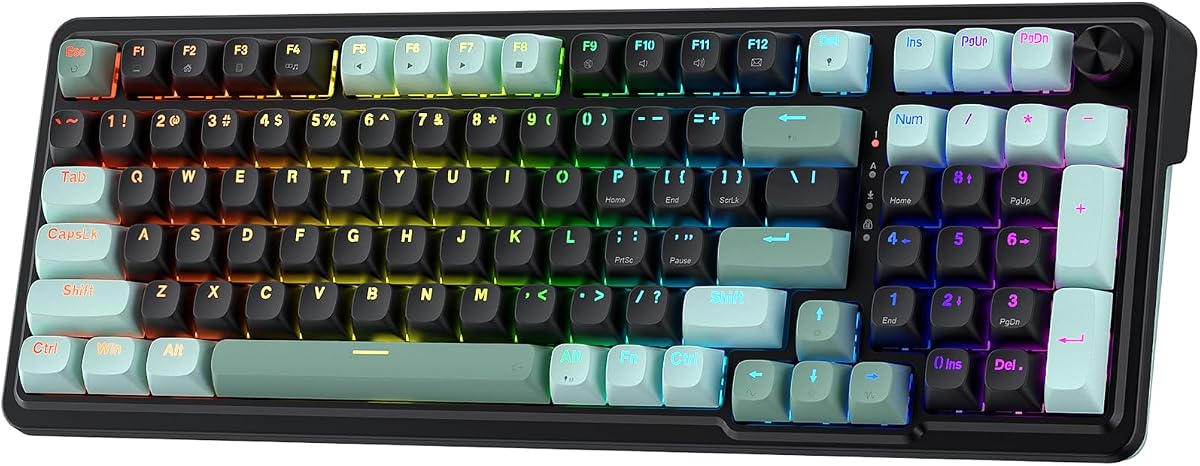
The Redragon K686 HE adds convenience with a control knob while maintaining rapid trigger performance for CS2. Its improved rating reflects a solid balance between features and cost. This model suits players who want media access without leaving their keyboard setup.
We may earn a commission when you buy through this link, at no additional cost to you.
UltraMag POM switches provide a consistent feel with magnetic detection for fast response. The floating structure includes dampening layers that reduce noise and wobble for a premium typing experience. You can adjust actuation through software to match your gaming or typing style.
The media knob simplifies volume and playback control during matches. While it costs more than the K617 the added convenience and better sound profile justify the upgrade. Some may find the software dependency a minor hurdle but it enables precise tuning.
Players seeking a budget board with extra control features will appreciate this keyboard. It delivers competitive hall Effect performance alongside practical usability benefits. For CS2 gamers who value sound quality and media access the K686 offers a compelling middle ground.
The dual-module floating structure with dampening layers produces a soft bounce reducing harsh clacks that can distract during long sessions.
A single knob adjusts backlight brightness and media playback eliminating the need for complex key combinations during gameplay.
We may earn a commission when you buy through this link, at no additional cost to you.
The Redragon K673 HE offers similar features to the K686 at a competitive price point. It brings Hall Effect rapid trigger technology to a wider audience for CS2 gaming. The media knob and sound dampening make it a versatile choice for daily use.
We may earn a commission when you buy through this link, at no additional cost to you.
Its magnetic switches sense keypresses without contact ensuring fast input registration. The floating structure minimizes wobble and noise for a comfortable experience. Software lets you customize actuation points between 0.1mm and 3.4mm for tailored sensitivity.
While it shares specs with the K686 it scores slightly lower in user reviews potentially due to minor quality variations. The lack of onboard storage means you need the software running for custom settings. This may inconvenience users who prefer hardware profiles.
For players wanting magnetic switches and media control at a lower price this model is worth considering. It balances performance with affordability effectively. CS2 gamers on a budget who need quick adjustments will find it meets core requirements without premium costs.
UltraMag POM switches use magnetic fields for detection providing consistent actuation regardless of finger pressure or key tilt.
A dedicated knob manages brightness and volume quickly so you stay focused on the match without interrupting gameplay.
We may earn a commission when you buy through this link, at no additional cost to you.
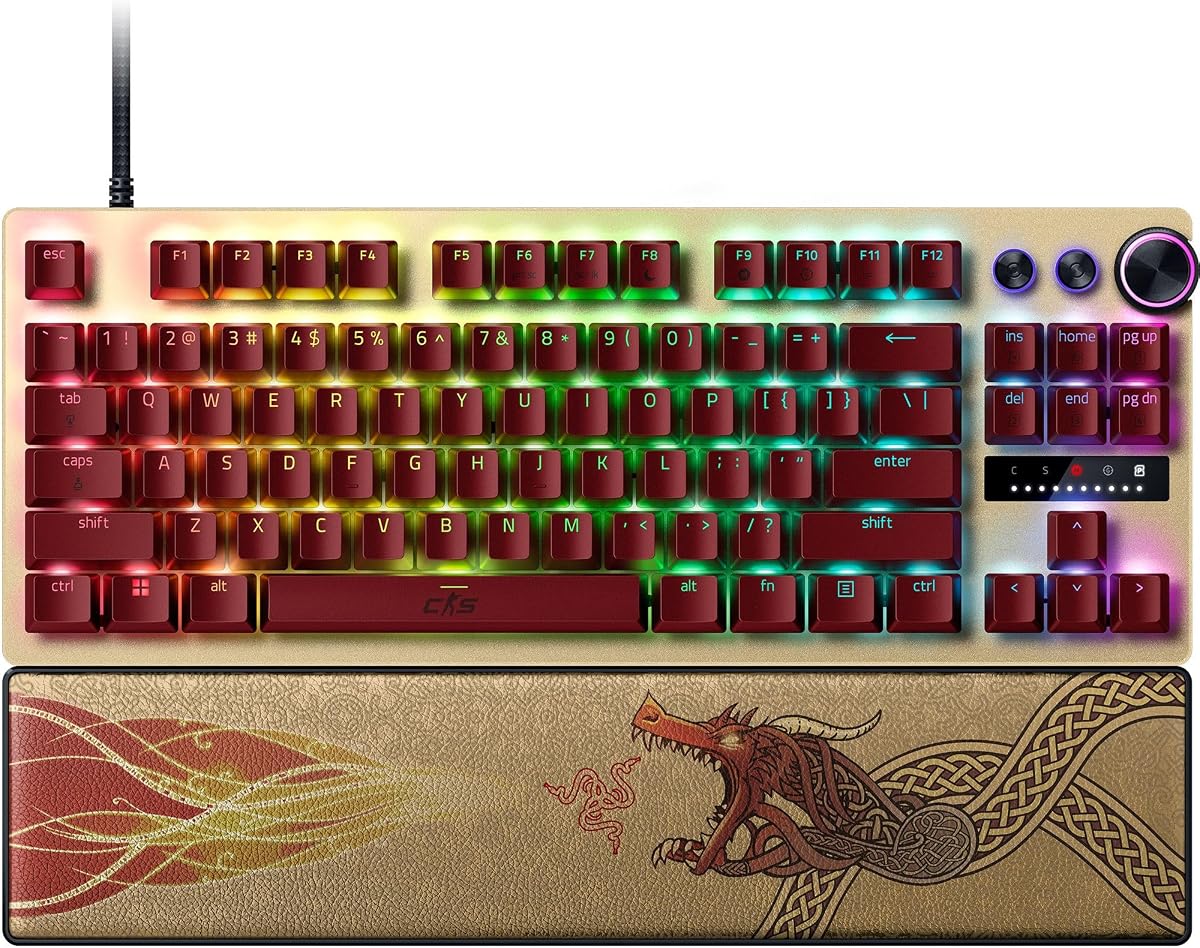
The Razer Huntsman V3 Pro TKL CS2 Edition represents the pinnacle of competitive keyboard engineering. It combines optical switches with proprietary Snap Tap technology for unmatched movement precision. This keyboard is designed for serious players who demand the absolute best performance.
We may earn a commission when you buy through this link, at no additional cost to you.
Analog optical switches offer a wide actuation range and rapid trigger capabilities. Snap Tap prioritizes inputs between two keys enabling near-instant directional changes without releasing the previous key. Onboard LED arrays allow you to adjust settings without software during matches.
The premium build includes textured PBT keycaps and a magnetic leatherette wrist rest for comfort. While expensive its durability and feature set justify the cost for enthusiasts. The weight may be a drawback for portability but adds stability to your desk.
Professional CS2 gamers should consider this keyboard for its unmatched features and reliability. It delivers every competitive advantage you could want in one package. If budget is not a concern and you seek the top tier this model stands out as the definitive choice.
Snap Tap lets you prioritize the latest input between two keys enabling faster strafing and counter-strafing without complex key combos.
Visual LED arrays guide you through on-the-fly adjustments to actuation height saving settings directly to the keyboard without software.
We may earn a commission when you buy through this link, at no additional cost to you.
The Corsair Clipper PRO MINI 60 blends durability with competitive hall Effect features for CS2. Its IP57 rating protects against spills and dust ensuring reliability in intense setups. This keyboard is ideal for players who prioritize longevity alongside performance.
We may earn a commission when you buy through this link, at no additional cost to you.
MGX hyperdrive switches deliver adjustable actuation and zero drift for consistent inputs. FlashTap SOCD ensures clean directional inputs during counter-strafing. Smart Tap features reduce finger fatigue during long sessions. The compact 60% design maximizes mouse space.
While the white finish looks clean it may show wear over time without careful maintenance. The lack of a number row limits productivity use but suits pure gaming setups. Overall it remains a robust choice for those needing resistance to wear.
CS2 players in humid or messy environments will appreciate the IP57 durability. It offers premium features in a compact form factor. For gamers who value resilience and a clean desk layout this keyboard provides excellent protection without compromising speed.
IP57 protection guards against water and dust allowing you to play longer without worrying about accidental spills stopping gameplay.
FlashTap SOCD logic eliminates conflicting signals ensuring precise directional movement during fast strafing sequences in ranked matches.
We may earn a commission when you buy through this link, at no additional cost to you.
The Redragon K745 HE adds sound dampening layers for a quieter gaming experience. It retains rapid trigger and high polling rates essential for CS2 responsiveness. This model targets users who prefer a soft sound profile without sacrificing speed.
We may earn a commission when you buy through this link, at no additional cost to you.
Five layers of dampening reduce noise compared to standard keyboards. Magnetic switches ensure fast key registration while RGB lighting adds style. You can adjust actuation points through software to fit your playstyle preferences.
It scores lower in reviews possibly due to minor build inconsistencies. The software is functional but lacks advanced features found in premium models. Despite this it delivers core performance features at an accessible price point for budget gamers.
Players seeking a quiet magnetic keyboard on a budget should consider this option. It balances sound reduction with competitive responsiveness. CS2 users who value a silent setup will find the dampening makes a noticeable difference during matches.
The five-layer noise dampening gives a soft bounce reducing harsh clacks for a quieter environment during long gaming sessions.
Adjustable brightness and lighting modes let you personalize your setup to match your desktop theme or team colors.
We may earn a commission when you buy through this link, at no additional cost to you.
The Keychron C0 HE 8K is a one-handed keypad designed to complement a main keyboard for CS2. It brings rapid trigger hall Effect switches to a compact layout for macros or specialized commands. This makes it a versatile addition for advanced setups.
We may earn a commission when you buy through this link, at no additional cost to you.
Thirty-five programmable keys allow quick access to abilities or shortcuts without moving your hand. The web-based configurator supports Windows and macOS enabling easy customization without installing software. Eight thousand hertz polling ensures precise tracking.
It requires setup time to map keys effectively but rewards users with smoother control. As an accessory it does not replace a full keyboard but enhances specific functions. Some may find the learning curve steep but it pays off in efficiency.
Players who use extensive macros or need extra key capacity will benefit from this keypad. It adds flexibility to your gaming rig. CS2 gamers seeking to optimize command access without cluttering their desk should explore this tool.
The one-handed layout keeps essential commands within reach reducing hand movement and fatigue during extended competitive matches.
Web-based customization works on Windows and macOS allowing seamless setup across multiple systems without installing extra software.
We may earn a commission when you buy through this link, at no additional cost to you.
The renewed version of the Razer Huntsman V3 Pro TKL offers high-end features at a reduced cost. It includes analog optical switches and Snap Tap for competitive advantage in CS2. This is an entry point for premium tech without full pricing.
We may earn a commission when you buy through this link, at no additional cost to you.
Snap Tap enables near-instant directional changes enhancing movement speed. The digital dial helps manage volume and switch settings quickly. An aluminum plate provides stability during intense use. White finishes offer a clean look for modern setups.
Buying renewed carries potential risks such as wear or minor cosmetic flaws. Warranty terms vary by seller so check details before purchasing. Despite this the performance remains identical to new units for serious players.
Budget-minded gamers wanting top-tier features should consider this renewed option. It brings elite performance within reach. CS2 enthusiasts who prioritize specs over perfect condition will find it delivers value effectively.
Snap Tap mode prioritizes inputs between two selected keys enabling faster direction changes without releasing previous keys for smoother strafing.
A multi-function dial adjusts volume and analog settings directly so you stay focused on gameplay without opening software.
We may earn a commission when you buy through this link, at no additional cost to you.
The Corsair K55 RGB PRO is an entry-level membrane keyboard suitable for casual CS2 play. It offers six macro keys and spill resistance for practical use. While not designed for competitive speed it provides reliability and comfort at a low cost.
We may earn a commission when you buy through this link, at no additional cost to you.
Membrane switches produce softer keystrokes which may suit quieter environments. The detachable palm rest adds comfort during long sessions. IP42 protection guards against accidental spills ensuring durability. Six macro keys allow basic command shortcuts via iCUE software.
It lacks rapid trigger technology and fast actuation found in magnetic switches. Competitive players may find it less responsive for precise movement. For beginners or those prioritizing comfort and budget over performance this model meets basic needs effectively.
Casual gamers or those new to CS2 might prefer this reliable option. It offers essential features without complexity. If speed is less critical than comfort and cost this keyboard remains a solid entry point for daily gaming.
Six dedicated macro keys let you trigger commands quickly via iCUE software helping manage streaming tools during gameplay.
A soft rubber palm rest reduces hand strain during extended play while providing a textured surface to prevent slipping.
We may earn a commission when you buy through this link, at no additional cost to you.
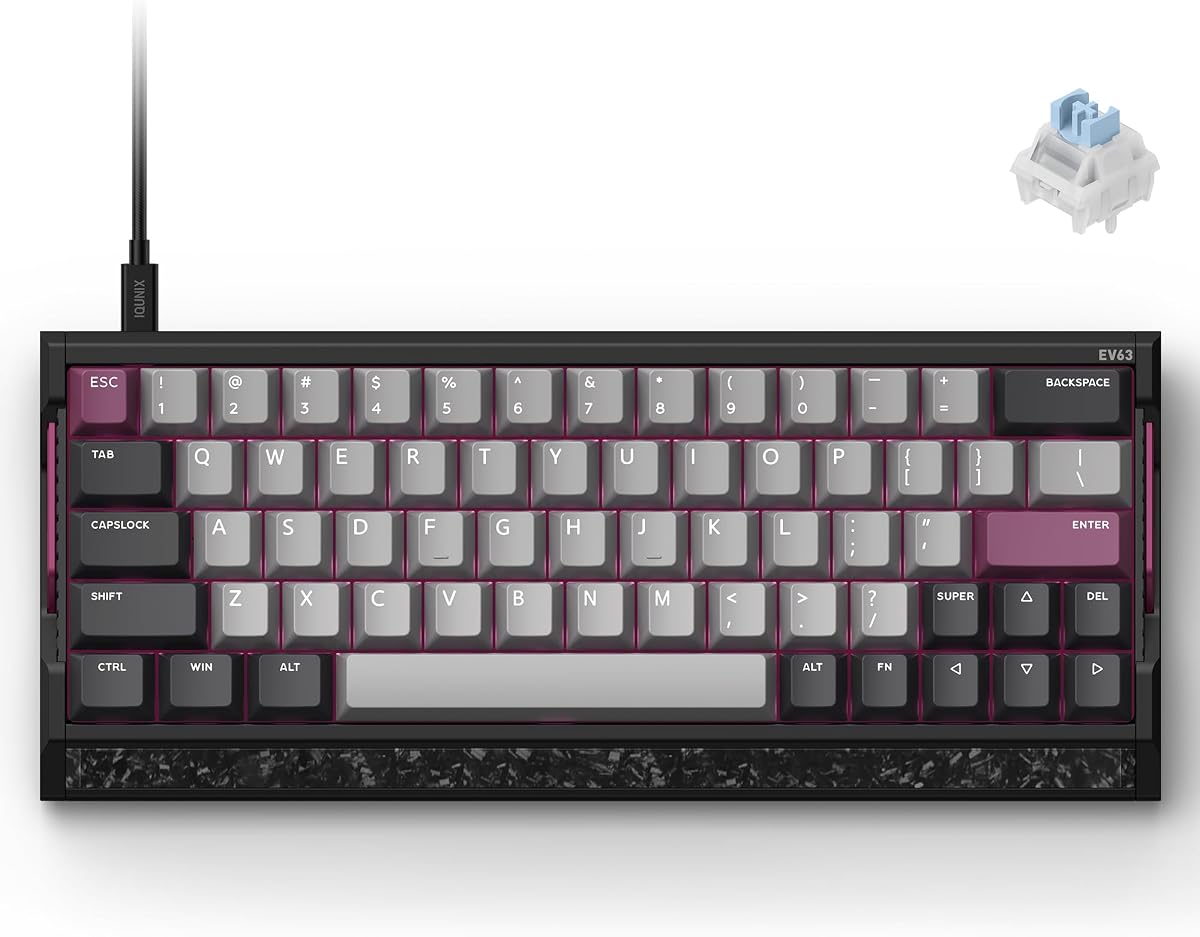
The IQUNIX EV63 features a unique 64-key layout and premium materials for elite CS2 performance. Its forged carbon plate and aluminum chassis deliver exceptional stability. The M.A.T. 2.0 algorithm reduces missed inputs ensuring consistent tracking during movement.
We may earn a commission when you buy through this link, at no additional cost to you.
Magnetic X Ultra switches offer precise 0.01mm rapid trigger and adjustable actuation. Driver 3.0 includes pro-tuned FPS presets to simplify setup. The solid build prevents desk vibration even during intense use. RGB lighting adds customization to this high-end board.
The 64-key layout requires adjustment for users used to full-size keyboards but optimizes mouse space. The price reflects premium materials and advanced algorithms. If build quality and input stability are priorities this model delivers a custom keyboard experience.
Advanced CS2 players who value stability and precision will appreciate this keyboard. Its algorithm minimizes input lag and missed keys. For those willing to adapt to a compact layout the EV63 offers a top-tier combination of durability and performance.
The M.A.T. 2.0 algorithm checks keys in real time and separates power circuits to reduce voltage fluctuations during fast movement.
Aircraft-grade aluminum and real forged carbon front plates give a custom-like feel that reduces unwanted desk movement.
We may earn a commission when you buy through this link, at no additional cost to you.
Selecting the right keyboard involves evaluating several technical and ergonomic factors. This guide breaks down key considerations to help you prioritize features that enhance your Counter-Strike 2 performance.
Switch technology determines how quickly inputs register. Hall Effect magnetic switches detect keypresses without physical contact enabling rapid trigger and adjustable actuation. Mechanical optical switches are also fast but may lack the same reset speed. Prioritize magnetic switches for precise counter-strafing and speed advantages.
Look for Hall Effect switches if you want rapid trigger support.
Polling rate refers to how often the keyboard reports inputs to your computer. Standard boards use 1000Hz while many modern gaming keyboards support 8000Hz. Higher rates reduce input latency and provide near-instant registration during fast actions. Ensure the keyboard supports at least 4000Hz for competitive play.
Choose a polling rate of 4000Hz or higher for minimal latency.
Adjustable actuation lets you customize where keys register. Rapid Trigger allows keys to reset immediately upon release. This enables faster directional changes in CS2. Look for boards that let you fine-tune both actuation and reset points through software or onboard controls.
Prioritize rapid trigger and adjustable actuation for movement advantage.
Layout affects desk space and mouse movement. Compact 60% or TKL designs free up room for low-sensitivity aiming. Full-size boards offer more keys but restrict movement. Decide if you need number rows or media keys versus space for mouse swipes.
Select a compact layout to maximize mouse movement area.
Durable materials ensure longevity during intense sessions. Aluminum cases and PBT keycaps resist wear and vibration. Water and dust resistance ratings protect against accidents. A stable chassis prevents shifting while you play for consistent aim.
Opt for aluminum builds and PBT keycaps for durability.
Software enables key remapping and profile management. Onboard memory allows settings without software running. Web-based configurators simplify setup across systems. Ensure the keyboard supports intuitive adjustments for actuation and macros relevant to CS2.
Check for onboard storage or easy web-based config options.
Sound dampening reduces noise from keystrokes. This matters if you play in shared spaces or record streams. Dampening layers and floating structures soften key impacts. Quiet boards help maintain focus without distractions.
Consider dampening features if noise is a concern.
Prices vary from entry to premium tiers. Budget models offer essential features while premium boards add build quality and advanced tech. Evaluate which features align with your needs. Balance performance with cost for long-term satisfaction.
Match your budget to performance needs for best value.
Set up actuation points in software to match your playstyle. Shorter actuation helps with fast movements but may increase accidental presses. Test different settings in matches to find what feels natural.
Clean your keyboard regularly using compressed air to remove dust between keys. Wipe surfaces with a slightly damp cloth avoiding liquid ingress. This preserves switch integrity and ensures consistent performance.
Store your keyboard in a dry place when not in use. Avoid placing heavy objects on it to prevent key damage. Regular maintenance extends lifespan and keeps inputs reliable for competitive gaming.
Rapid Trigger resets a key instantly once it is released allowing faster directional changes. This is vital for counter-strafing in CS2 where split-second movement matters. It outperforms standard mechanical resets by detecting key lift without fixed reset points.
Hall Effect switches use magnetic detection instead of physical contact. This reduces wear and enables adjustable actuation plus rapid trigger. Faster inputs and consistent detection improve precision in competitive matches.
A polling rate of at least 4000Hz is recommended for competitive play. Many modern keyboards support 8000Hz which further reduces latency. Higher rates ensure inputs register quickly during fast movements.
Yes. Compact layouts like 60% or TKL free up desk space for wide mouse swipes. This is crucial for low-sensitivity aim training and gameplay. Full-size keyboards limit movement room.
Most gaming keyboards support both Windows and macOS. Some software may be Windows-only but basic functions work universally. Check product specs for cross-platform compatibility before purchasing.
No. Magnetic switches do not need lubrication like mechanical ones. They are sealed to prevent dust interference. This reduces maintenance needs while delivering smooth consistent key presses.
We explored ten keyboards tailored for Counter-Strike 2 performance featuring Hall Effect switches and rapid trigger tech. Budget options like Redragon models deliver speed while premium choices offer advanced features and durable builds.
Prioritize rapid trigger actuation adjustability and polling rate when selecting your keyboard. These factors directly impact your ability to move and shoot precisely in ranked matches. Ensure the layout fits your desk and mouse habits.
Prices and availability change so verify current listings before buying. Check seller ratings for renewed items to avoid issues. Investing in the right keyboard can significantly enhance your gaming experience over time.