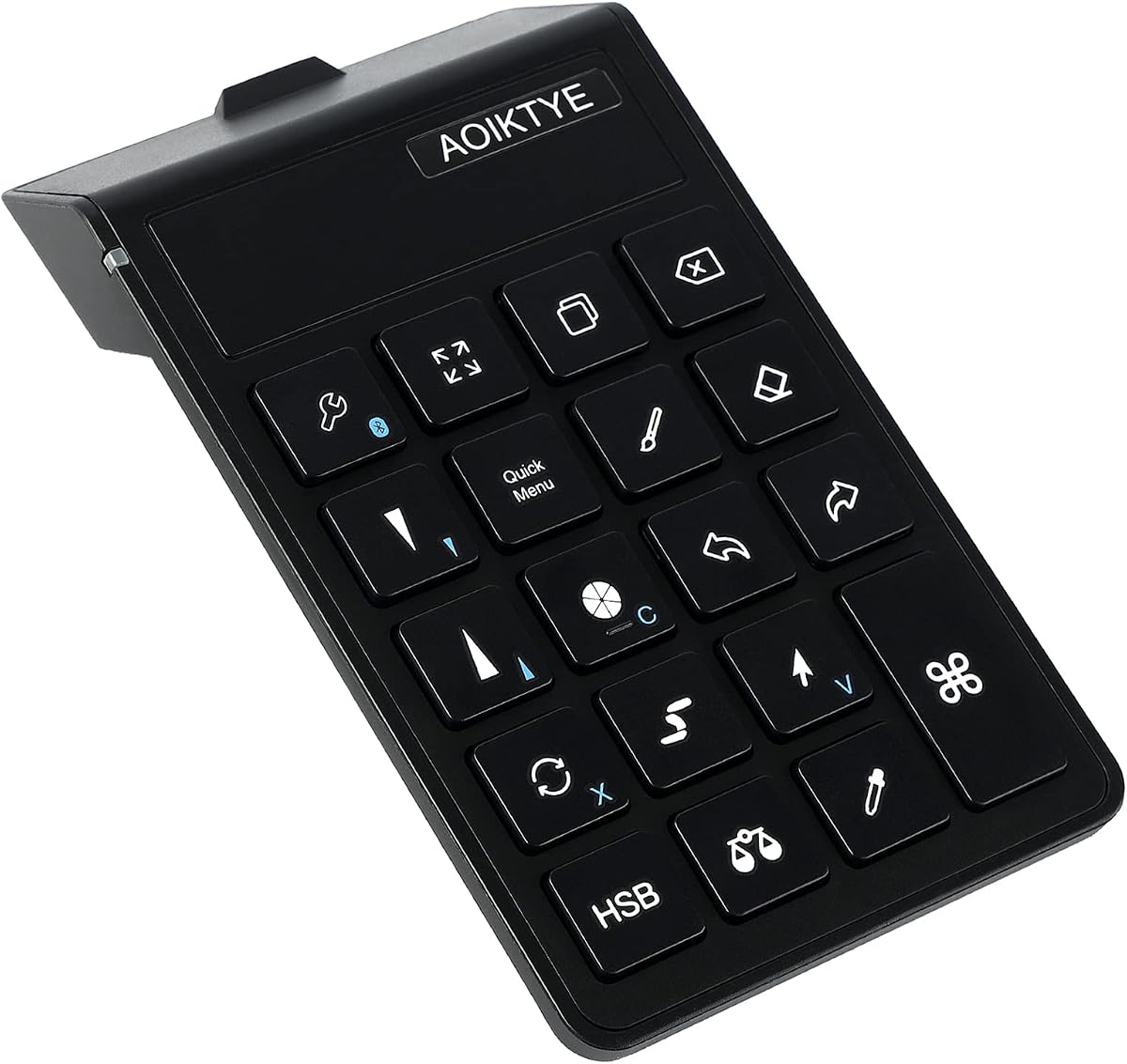
Keyboard for Procreate
4.5Editor score
Optimized for Procreate app
22 dedicated shortcut keys
84 hour battery life
This guide compares the top ten iPad Drawing Bluetooth Controller options to help artists find the perfect shortcut device for their creative workflow today.
Finding the right iPad Drawing Bluetooth Controller can transform your digital art workflow by adding physical shortcuts to your creative process. These devices allow you to access common tools without reaching for on-screen menus or external keyboards.
We evaluated ten distinct controllers based on connectivity stability, customization depth, ergonomic design, and software compatibility. Our analysis focuses on how well each device integrates with popular drawing applications like Procreate, Photoshop, and Clip Studio Paint.
Each pick highlights specific strengths such as dial precision, key count, or battery life to help you match a device to your needs. Remember that product availability and pricing fluctuate regularly so check current listings before finalizing your purchase decision.
4.5Editor score

4.3Editor score

5.0Editor score
The following table provides a side by side comparison of all ten selected controllers focusing on key specifications and compatibility details to streamline your selection process.


The XPPen Mini Keydial ACK05 stands out as a versatile wireless shortcut keyboard designed specifically for creative workflows. With a solid 4.3 star rating it offers a compact solution for artists seeking physical controls without cluttering their desk space.
We may earn a commission when you buy through this link, at no additional cost to you.
Its key strength lies in the customizable dial and ten programmable keys which allow for quick access to brush sizes layer switching and other frequent actions. The anti-ghosting technology ensures reliable multi-key input during complex operations while the Bluetooth 5.0 connection provides stable performance up to several meters.
Users should note that downloading the driver is essential for full customization on most systems and an app is needed for iOS setup. While ten keys may seem limited compared to full keypads the ability to switch between four sets expands utility significantly for diverse projects.
This controller is ideal for digital painters and video editors who want to streamline their workflow on a budget. The lightweight profile and high capacity battery make it suitable for portable setups ensuring you can work uninterrupted throughout long sessions.
The dial provides clear click feedback every 1/24 rotation allowing precise adjustments without looking away from your canvas.
Weighing only 75 grams and featuring a thin profile this device fits easily in bags for mobile creative work.
We may earn a commission when you buy through this link, at no additional cost to you.
Designed with iPad artists in mind this wireless keyboard delivers an impressive 4.5 star rating for its ability to speed up the drawing process. It targets Procreate users specifically but remains functional for other painting software like Photoshop and Clip Studio Paint.
We may earn a commission when you buy through this link, at no additional cost to you.
The 22 dedicated shortcut keys cover essential functions such as color picking layer management and brush adjustments making the workflow seamless. With an 84 hour battery life it offers weeks of use on a single charge which is exceptional for this category of devices.
The device includes OTA system upgrades allowing functionality to improve over time and custom layouts to be added. While it shines on iPad the design is less optimized for desktop use and some shortcuts may require manual mapping for non Procreate apps.
For digital illustrators working primarily on iPad this keyboard provides the best value proposition available. Its ergonomic shape and focus on frequent tasks make it an essential tool for anyone looking to enhance their Procreate experience.
Placing frequently used keys in accessible positions reduces hand movement and keeps your focus on the artwork.
A full charge takes only two hours yet supports continuous use for days or weeks depending on usage frequency.
We may earn a commission when you buy through this link, at no additional cost to you.
The DIGIDRAW K30 holds a rare perfect 5.0 star rating among iPad drawing controllers due to its thoughtful design for professional workflows. It features dual precision dials paired with eleven programmable keys providing immediate access to essential creative functions without disrupting your focus.
We may earn a commission when you buy through this link, at no additional cost to you.
One of its standout features is the tactile positioning markers on each key allowing artists to press commands by feel alone. This blind operation capability ensures your eyes stay locked on the canvas maintaining creative flow during intense drawing sessions.
Weighing just 82 grams the device is ultra-light and fits comfortably in one hand for hours without fatigue. The 40 hour battery life coupled with USB-C charging ensures power is rarely an issue though the higher cost may deter casual users.
Artists seeking the ultimate control experience should consider this premium option for its dual dial functionality and ergonomic excellence. It is a powerful investment for those who value precision and speed in their digital art toolkit.
Two dials allow simultaneous control of brush size and canvas zoom for fluid adjustments during painting.
Raised markers on keys enable quick muscle memory access so you do not need to look at the device.
We may earn a commission when you buy through this link, at no additional cost to you.
The HUION Keydial Mini offers a robust 4.2 star rating with eighteen programmable keys and a dial for efficient workflow management. It is a versatile choice for artists working across multiple platforms including Mac and Windows systems.
We may earn a commission when you buy through this link, at no additional cost to you.
The anti-ghosting technology supports up to five simultaneous key presses ensuring reliable performance during complex shortcut combinations. With a 70 hour battery life it is ready for extended work sessions without needing frequent recharges or interruptions.
The device includes a unique setting preview function that displays current button configurations with a single press saving memory effort. While it requires the Huion driver for customization the flexibility it provides is valuable for users managing various creative software.
Ideal for multi-software artists this controller balances key count with portability effectively. It serves as a practical add on for those needing more physical buttons than standard remotes offer at a competitive price point.
Eighteen keys allow deep mapping of shortcuts to simplify complex commands into single taps.
Advanced anti-ghosting ensures accurate input even when multiple buttons are pressed rapidly together.
We may earn a commission when you buy through this link, at no additional cost to you.
TourBox Lite brings a refined 4.4 star rating with its compact eight key layout and ergonomic design tailored for creative tasks. It is a strong contender for digital artists seeking a stylish and efficient controller that reduces keystrokes.
We may earn a commission when you buy through this link, at no additional cost to you.
The TourBox Console app detects active applications and switches control sets automatically removing the need to memorize complex mappings. Tactile knobs and buttons offer clear feedback for precise adjustments of colors layers and timelines without looking at the device.
While the device is lightweight and wireless it requires a connection to the TourBox ecosystem for full functionality which can be a barrier for some users. However the intuitive workflow and cross-platform support make it appealing for professional editors.
This controller is perfect for those transitioning from traditional keyboards who want a dedicated creative interface. Its balance of style and function adds an uplifting touch to the workspace while boosting daily task efficiency.
The device automatically detects which app is active and switches controls accordingly for a seamless experience.
Ergonomic data informs the shape to support long sessions without causing hand fatigue or strain.
We may earn a commission when you buy through this link, at no additional cost to you.
The Wacom Intuos Small holds a 4.4 star rating as a complete graphic drawing solution that includes a pen and software. It is an excellent choice for those who prefer a traditional drawing surface over a remote keyboard for iPad use.
We may earn a commission when you buy through this link, at no additional cost to you.
Using Wacom's EMR battery free technology the pen feels like drawing on paper providing superior control and precision. Bluetooth connectivity allows you to work wirelessly from your desk or couch making it flexible for various environments.
Every purchase includes access to creative software and online training helping users get started quickly without extra costs. While it is not a keyboard controller it serves the same goal of enhancing digital creativity through physical input devices.
For artists needing a reliable pen interface this tablet remains a top recommendation. Its brand reputation and included resources make it a safe investment for students and professionals alike.
EMR technology removes the need for batteries in the pen ensuring a consistent weight and feel.
Included software and training offer immediate value helping you maximize the hardware from day one.
We may earn a commission when you buy through this link, at no additional cost to you.
The Modded Tablet Controller G8 boasts a perfect 5.0 star rating for its robust compatibility across numerous tablet brands and models. It features Hall Effect sticks and a 6-axis gyroscope providing precise control that can be adapted for creative applications.
We may earn a commission when you buy through this link, at no additional cost to you.
With an extendable design it supports many phones and tablets securely offering a universal fit that works across different devices without needing specific clamps for most larger tablets. The durable build ensures long-lasting performance for daily use.
Although primarily marketed for gaming its motion sensing and vibration feedback can enhance interactive art experiences or navigation. However users should note that separate holders are required for some specific devices which adds to the overall setup complexity.
This controller is ideal for users who want a single input device for both entertainment and creative tasks on the go. Its durability and precision make it a versatile tool for varied tablet workflows.
Magnetic Hall Effect technology ensures smooth and durable stick movements without wear over time.
A 6-axis gyroscope enables precise motion controls useful for games or dynamic navigation tasks.
We may earn a commission when you buy through this link, at no additional cost to you.
The Clip Studio Tabmate 2 holds a 4.0 star rating and is a specialized handheld shortcut device designed exclusively for Clip Studio Paint users. It supports Ver 3.0 and later making it a powerful tool for artists working in this specific ecosystem.
We may earn a commission when you buy through this link, at no additional cost to you.
Assigning frequent operations to physical buttons significantly speeds up the production process allowing for faster drawing and editing. The included 12-month Clip Studio Paint Debut license adds immediate value for those looking to start creating on iPad or Android.
While it requires AA batteries it offers energy efficiency with Bluetooth Low Energy 5.1 ensuring long use without frequent replacements. Users should note that it is not compatible with older versions of the software which limits its utility for some.
For dedicated CSP artists this device offers a seamless workflow improvement. It is a specialized investment that pays off in productivity for those deeply invested in the Clip Studio Paint workflow.
Frequent operations become single button presses saving time during long drawing sessions.
Included software license provides immediate access to a robust drawing app for new users.
We may earn a commission when you buy through this link, at no additional cost to you.
The TNP iPad Remote carries a 3.6 star rating and offers a unique trackpad feature for cursor control on iOS devices. It acts as a versatile media and presentation remote suitable for broader device management beyond just drawing.
We may earn a commission when you buy through this link, at no additional cost to you.
You can move a mouse cursor on the screen using the trackpad which helps in navigating complex interfaces without touching the display. The built-in Home button allows easy switching between apps or activating Siri for quick commands.
It includes multimedia controls for adjusting volume or pausing streaming apps making it useful for breaks between creative sessions. However it lacks dedicated drawing shortcuts and is more general-purpose than dedicated art controllers.
Ideal for general navigation this remote helps reduce finger strain from repeated swiping. It is a functional option for managing tasks while drawing rather than direct art creation shortcuts.
Move a cursor on the screen to interact with tools without touching the main display area.
The Home button feature allows quick navigation between apps to keep workflow smooth.
We may earn a commission when you buy through this link, at no additional cost to you.
The ShanWan Portable Controller holds a 3.4 star rating and supports custom button mapping for various devices including iPad and PC. It is a budget-friendly option for those needing a flexible input tool across multiple platforms.
We may earn a commission when you buy through this link, at no additional cost to you.
Its design supports mouse control which can be mapped to specific drawing functions for basic navigation and selection tasks. The ergonomic grip and rechargeable battery make it comfortable for extended use without needing constant charging.
While it is a versatile controller its drawing specific capabilities rely heavily on third party apps or manual mapping. This adds setup time compared to dedicated shortcuts and may result in less seamless integration.
This controller is suitable for users on a tight budget who need a general-purpose device. It provides basic functionality for creative tasks but lacks the specialized features found in higher end art controllers.
Works across PC and mobile making it a flexible choice for mixed hardware setups.
Comfortable grip reduces fatigue during long sessions with its intuitive button layout.
We may earn a commission when you buy through this link, at no additional cost to you.
Selecting the right controller depends on your workflow needs software requirements and comfort preferences.
Ensure the controller supports your primary drawing app like Procreate or Clip Studio Paint. Some devices work better with specific software and may require drivers or apps for full functionality.
Check for official support or community plugins to avoid workflow interruptions after purchase.
Bluetooth 5.0 or newer offers stable wireless connections with lower latency. Look for devices that support both Bluetooth and USB for backup options during setup.
Wireless is preferred for portability but wired modes can be useful for troubleshooting or power savings.
More keys provide greater flexibility for shortcuts but may increase size and complexity. Consider whether you need a simple remote or a full keypad with dial controls.
A compact layout saves desk space while ensuring buttons are reachable without hand strain.
The device should fit comfortably in one hand for extended use without causing fatigue. Tactile feedback on buttons helps in locating keys by feel during intense sessions.
Lightweight designs are preferable for travel but ensure they remain durable enough for daily use.
Aim for a battery life of at least 40 hours to avoid frequent recharges. USB-C charging is becoming standard and allows quick top-ups during breaks.
Long standby times are useful for users who do not use the device daily.
Programmable keys and driver software allow you to map shortcuts to your specific workflow. Some controllers offer multiple sets of keys for different apps.
Easy-to-use configuration tools save time and make learning new shortcuts manageable.
Set a budget based on your needs ranging from simple remotes to complex dial devices. Compare features against the cost to determine the best value for your workflow.
Higher priced models often offer better build quality and more customization options.
If you work from multiple locations choose a device that is compact and comes with a case. Lightweight materials help reduce burden during travel.
Ensure the device fits in your bag without taking up too much space alongside other gear.
Begin by pairing the controller with your iPad via Bluetooth settings ensuring the device is in pairing mode. Follow any included setup guides to download necessary drivers or apps for customization.
Customize your keys using the provided software to map frequently used tools to specific buttons. Test each key to ensure it triggers the desired function within your drawing application.
Keep the device clean by wiping it with a dry cloth and store it in a protective case when not in use. Regularly charge the battery to maintain optimal performance and avoid unexpected shutdowns.
Not all controllers support every app universally. Many are designed specifically for creative software like Procreate or Clip Studio Paint. Check product details for supported apps before buying to ensure compatibility with your workflow.
Some controllers require a companion app or driver to configure keys on iPad while others work out of the box. Always verify if software installation is needed for full customization functionality.
Connection drops can occur due to interference or low battery. Ensure the device is fully charged and within range of your iPad. Restarting Bluetooth on both devices often resolves minor connectivity issues.
Yes many controllers support video editing software like Premiere Pro or Final Cut Pro. Check the product compatibility list to confirm support for the specific applications you intend to use.
Battery life typically ranges from 40 to 84 hours on a single charge depending on the model. Look for USB-C charging options for convenient power management during long work sessions.
Some models allow switching between multiple devices like iPad and PC easily. Look for multi-device support or easy pairing functions if you need to connect to more than one device.
Most controllers are not waterproof so avoid using them near water. Keep them dry and clean with a soft cloth to maintain their functionality and longevity.
Drivers are usually available on the manufacturer's official website. Follow the product instructions to find the correct version for your operating system to ensure proper configuration.
We have reviewed ten top controllers including the XPPen Mini Keydial ACK05 and DIGIDRAW K30 which offer the best balance of features and performance for artists.
Prioritize software compatibility and customization needs when choosing a device to ensure it fits your specific creative workflow and enhances your productivity.
Prices and availability change frequently so always check current listings and reviews before making a final purchase decision to get the best value.