T8 Standalone Drawing Tablet
4.4Editor score
Android 13 OS
Up to 20 hours battery
Portable 8 inch screen
Finding the right tool for digital creation is essential for artists who want precision and portability. Many users seek devices that offer powerful drawing features without relying on a traditional computer setup. These alternatives provide versatile options for sketches, illustrations, and professional designs.
Our team analyzed ten leading devices based on screen quality, pen performance, battery life, and software compatibility. We focused on models that deliver a natural drawing experience while supporting a wide range of creative applications. This list includes both standalone tablets and connected pen displays for various needs.
Each pick highlights key strengths and ideal use cases to help you decide quickly. We ensure all details reflect current specifications and user feedback for accuracy. Keep in mind that availability and specific offers may shift over time, so verify details before purchasing.
4.4Editor score

4.5Editor score

4.4Editor score
As an Amazon Associate we earn from qualifying purchases.
This side-by-side comparison summarizes the core specifications of each device to help you evaluate performance, screen size, and connectivity options at a glance.


This device stands out as a top choice for artists seeking a high-performance standalone tablet. With a rating of 4.5 stars, it offers a premium experience that rivals many desktop setups while maintaining portability. The combination of a high refresh rate and precise pen technology makes it ideal for detailed work.
We may earn a commission when you buy through this link, at no additional cost to you.
The 90Hz refresh rate ensures that strokes appear instantly, reducing lag during fast drawing sessions. Coupled with 16K pressure levels and tilt recognition, the pen feels natural and responsive. The screen delivers accurate colors right out of the box thanks to factory calibration, which is crucial for professional designers.
While the price is higher than budget options, the performance justifies the investment for serious creators. The battery life supports a full day of use, and the large storage allows for extensive projects without needing external drives. The Android 16 system provides access to a wide range of apps.
Professional artists and designers who need a reliable, standalone solution should consider this model. It balances high-end features with portability effectively. If you prioritize color accuracy and smooth performance, this tablet delivers on those fronts consistently.
The Huion PenTech 4.0 delivers 16384 pressure levels and tilt auto-alignment for natural shading and precise control.
The 99% sRGB coverage with factory calibration ensures that your digital artwork matches your intended colors accurately.
We may earn a commission when you buy through this link, at no additional cost to you.
The T8 offers an accessible entry point for those new to digital art without needing a computer. It holds a strong rating of 4.4 stars and focuses on portability and ease of use. Its compact size makes it easy to carry, while the Android system allows for diverse app usage.
We may earn a commission when you buy through this link, at no additional cost to you.
One of its biggest strengths is the battery life, which can last up to 20 hours of drawing. This is exceptional for a device of this size and allows for extended creative sessions without interruption. The pre-installed apps and tutorials help beginners get started immediately without additional costs.
The smaller screen might be a limitation for detailed work, but it is perfect for sketches and on-the-go ideas. The quad-core processor handles standard drawing apps smoothly. If budget is a primary concern, this device provides essential features without compromising on core functionality.
Students and casual artists looking for an affordable, portable tool will find this tablet useful. It is a great second device for quick notes or travel. The long battery life ensures you stay creative wherever you go without worrying about power.
With up to 20 hours of battery life, this tablet supports long creative sessions without frequent charging needs.
Pre-installed drawing apps and comprehensive tutorials provide immediate value for artists just starting their digital journey.
We may earn a commission when you buy through this link, at no additional cost to you.
Wacom continues to lead with the MovinkPad 11, offering a premium feel that mimics traditional drawing tools. Its rating of 4.4 reflects consistent quality in pen performance and build. The unique etched glass surface reduces glare and provides a textured experience similar to paper.
We may earn a commission when you buy through this link, at no additional cost to you.
The Pro Pen 3 is battery-free and offers 8,192 pressure levels, ensuring precise control. The device allows instant launch of the drawing app, streamlining your workflow significantly. It weighs just 1.3 lbs, making it easy to slip into a bag for travel.
While the price is on the higher end, the quality of the pen and display justifies it for professionals who value tactile feedback. The included software trials provide immediate value upon setup. Storage is fixed at 128GB, which may require management for large files.
Professional illustrators and designers who prioritize pen feel and portability will appreciate this model. It is a top choice for those who want a reliable tool that integrates seamlessly into a professional workflow.
The matte etched glass surface reduces glare and provides a natural, textured feel similar to traditional paper.
The battery-free Pro Pen 3 offers 8,192 pressure levels and three programmable buttons for efficient creative work.
We may earn a commission when you buy through this link, at no additional cost to you.
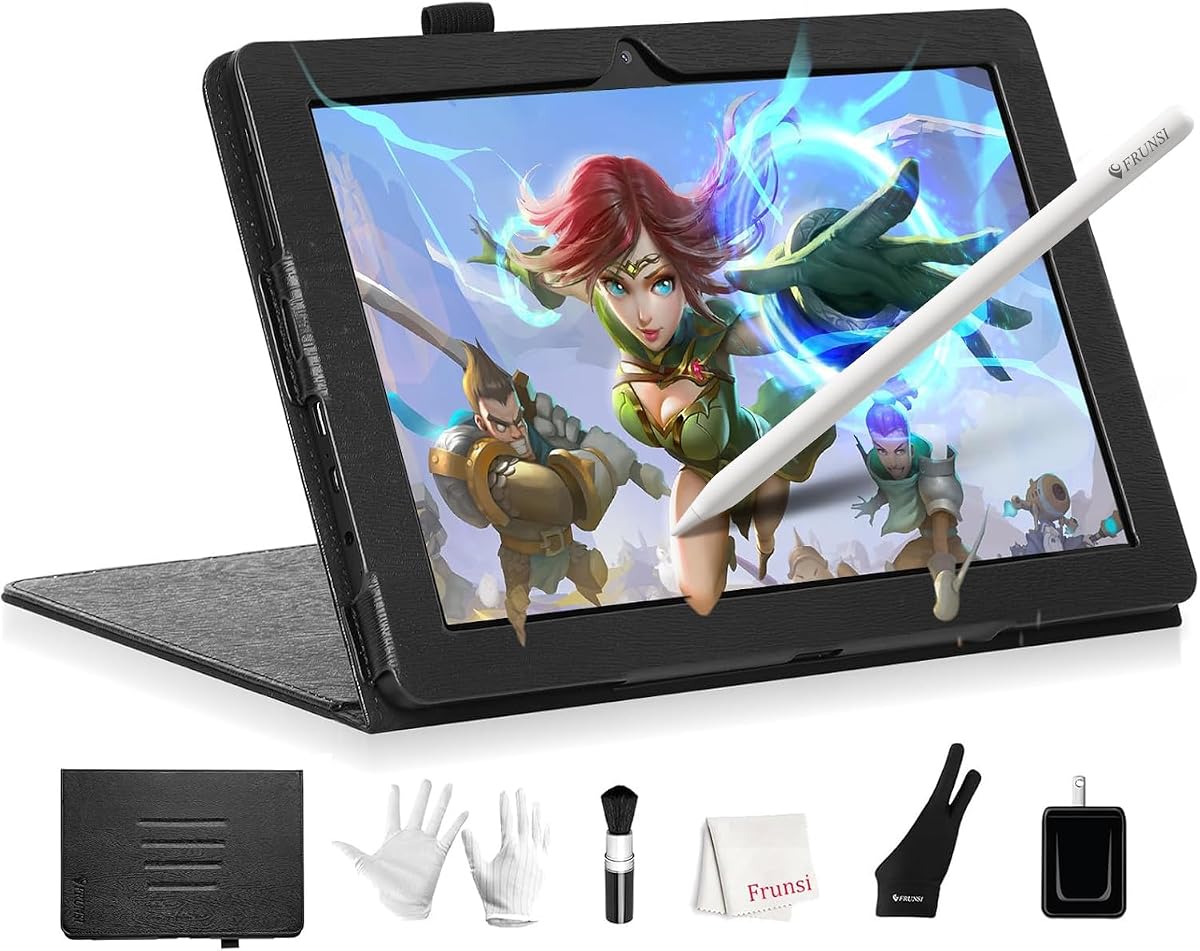
The RubensTab T11 Pro is designed for artists who want independence from a computer. It holds a 4.4 rating and offers a self-contained experience with pre-installed drawing apps. The 10.1-inch screen provides a good balance between portability and workspace.
We may earn a commission when you buy through this link, at no additional cost to you.
Its standout feature is the complete independence; you can power it on and start creating without external devices. The included stand case adds versatility for both desktop and travel use. The screen delivers vibrant colors and sharp details suitable for digital sketching.
Battery life is moderate at around 5 hours, which is sufficient for short sessions but may need charging for longer trips. The pressure-sensitive pen works well for fluid strokes. It is a practical choice for students or hobbyists needing a basic standalone solution.
Users who need a simple, no-fuss drawing device for notes or sketches will find this useful. It is an excellent option for those transitioning to digital art without investing in high-end gear immediately.
This tablet is fully self-contained with no external device required, allowing you to start creating immediately.
Beyond drawing, you can use it for note-taking, classroom work, or browsing online resources via Wi-Fi.
We may earn a commission when you buy through this link, at no additional cost to you.
For artists who prefer a desktop setup, the Kamvas Pro 16 offers a larger workspace. It holds a 4.5 rating and features a 15.6-inch full-laminated screen for accurate visuals. The wide color gamut ensures that your work looks true to life.
We may earn a commission when you buy through this link, at no additional cost to you.
The device includes 6 express keys and a touch bar, allowing you to control software functions without taking your eyes off the canvas. The adjustable stand supports comfortable angles for long sessions. The pen is battery-free and supports tilt recognition for natural shading.
While it requires a computer connection, the cable management is simplified with a 3-in-1 USB-C cable. This option is better suited for studio environments where portability is less critical than screen real estate. The price is competitive for a professional pen display.
Digital artists and graphic designers working primarily from a desk will appreciate the larger screen and color accuracy. It is a solid upgrade from screenless tablets for those seeking a more immersive drawing experience.
With 120% sRGB coverage, you can see your creations in vibrant and true-to-life colors with excellent contrast.
Customizable express keys and a touch bar help you access shortcuts quickly, saving time on repetitive tasks.
We may earn a commission when you buy through this link, at no additional cost to you.
The RubensTab T14 brings a larger canvas to the standalone category with a 14.1-inch FHD screen. It maintains a 4.4 rating and is designed for users needing more space without a computer. The battery capacity is notably high, supporting extended sessions.
We may earn a commission when you buy through this link, at no additional cost to you.
The device is fully self-contained, allowing you to sketch anywhere. The Octa-Core CPU ensures smooth performance when handling multiple apps. The pen delivers natural strokes and precision control for detailed illustrations. The included stand case aids in portability.
Battery life of up to 5 hours is reliable for travel or work sessions. The Wi-Fi connectivity allows access to cloud storage and tutorials directly on the device. It is a practical tool for students and professionals who need a larger portable workspace.
Users requiring a bigger screen than standard tablets will find this model useful. It bridges the gap between portability and workspace effectively, making it suitable for both creative and productivity tasks on the go.
The built-in 10000mAh battery provides up to 5 hours of continuous use, perfect for long creative sessions.
The 14.1-inch FHD screen offers a stunning canvas for immersive digital art and detailed sketching anywhere.
We may earn a commission when you buy through this link, at no additional cost to you.
The PicassoTab A10 is tailored for beginners who want a complete package with learning resources. It has a 4.2 rating and includes lifetime VIP tutorials to guide new artists. The laminated screen reduces glare and parallax for a smoother drawing feel.
We may earn a commission when you buy through this link, at no additional cost to you.
The 4096 pressure-sensitive stylus ensures accurate strokes. With expandable storage, you can save more projects without running out of space. It comes with premium accessories like a case and drawing glove. The octa-core processor handles apps and multitasking easily.
While the rating is slightly lower than others, the value for beginners is high. The included app upgrades add significant worth. It is a supportive tool for those who need structured guidance while learning digital art techniques.
New artists and students looking for a guided learning experience will benefit most from this tablet. It is an ideal first device that combines hardware with educational resources to foster creativity.
Lifetime VIP tutorials provide step-by-step lessons and exercises to help beginners master digital art quickly.
The laminated 10-inch screen reduces glare and parallax for a smoother, more natural drawing feel.
We may earn a commission when you buy through this link, at no additional cost to you.
The XPPen Artist 13.3 Pro V2 offers excellent value for artists needing a connected pen display. It holds a 4.5 rating and features a Red Dial for intuitive workflow adjustments. The fully laminated screen minimizes parallax for precise pen placement.
We may earn a commission when you buy through this link, at no additional cost to you.
With 16K pressure levels, the pen captures light strokes and shading effectively. The 8 customizable shortcut keys streamline tasks like zooming and canvas flipping. The color gamut is accurate, making it suitable for design and illustration work.
While it requires a computer connection, the included 3-in-1 cable simplifies setup. The battery-free stylus ensures consistent performance. It is a solid choice for those upgrading from a screenless tablet and wanting more control.
Designers and illustrators working from a desktop setup will find this device efficient. The Red Dial adds a unique benefit for workflow optimization, making it a standout in its price category.
The Red Dial allows natural drawing postures and lets you zoom or adjust brush sizes with a simple turn.
The fully-laminated screen combines glass and display to create a distraction-less environment with minimal parallax.
We may earn a commission when you buy through this link, at no additional cost to you.
The PicassoTab X14 offers the largest portable canvas in the lineup with a 14-inch screen. It has a 4.2 rating and focuses on providing a spacious environment for detailed work. The laminated display reduces parallax and glare significantly.
We may earn a commission when you buy through this link, at no additional cost to you.
The 4096 pressure-sensitive pen ensures precise strokes for sketching and illustration. With 128GB storage expandable to 1TB, you can store extensive projects easily. The Octa-Core CPU supports smooth multitasking. Certification standards ensure safety and reliability.
While the size makes it slightly heavier, it remains travel-friendly. It includes bonus accessories like a case and gloves. This device is a strong contender for artists needing a larger standalone workspace without connecting to a computer.
Professional artists needing more screen real estate on the go should consider this model. It balances size and portability well, offering a dedicated space for creative work without external dependencies.
Enjoy the freedom to draw on the largest portable PicassoTab, delivering a premium and spacious workspace.
With 128GB storage expandable to 1TB, the X14 handles large files and multitasking without lag.
We may earn a commission when you buy through this link, at no additional cost to you.
The Callsky-Tab 12 Inch is a versatile device for both drawing and general productivity. It holds a 4.2 rating and features a powerful 16GB RAM for smooth multitasking. The 2K display delivers crisp visuals for detailed artwork.
We may earn a commission when you buy through this link, at no additional cost to you.
The rechargeable pen supports 4096 pressure levels and attaches magnetically to prevent loss. The flip case offers multiple viewing angles for comfort. With an 8000mAh battery, it supports hours of continuous work. The reinforced charging port ensures durability.
While the pen requires charging, the battery life of the tablet itself is robust. It is suitable for online teaching, meetings, and creative tasks. The large screen enhances the experience for both work and entertainment.
Professionals needing a hybrid device for work and art will find this useful. It is a flexible option for those who want high performance and screen quality without relying on a laptop.
Powered by an octa-core processor with 16GB RAM, this tablet handles smooth multitasking and creative work.
An 8000mAh battery provides up to 6 hours of creative work, giving you more uninterrupted time for projects.
We may earn a commission when you buy through this link, at no additional cost to you.
Selecting the right device involves considering several key factors that impact your creative workflow and satisfaction.
Screen size determines how much space you have for your work. Larger screens like 14 inches offer more detail, while 10 inches are more portable. Resolution impacts clarity; Full HD or 2K ensures sharp lines for precise drawing.
A quality pen is essential for natural strokes. Look for battery-free options and high pressure sensitivity like 16K levels. Tilt support adds shading capabilities, making your digital art feel more like traditional media.
Decide if you need a standalone tablet that runs independently or one that connects to a computer. Standalone offers portability and simplicity, while connected displays often provide access to heavier desktop software.
For portable use, battery life is critical. Aim for models offering at least 5 to 10 hours of continuous use. High capacity ensures you can work throughout the day without searching for a power outlet.
Designers need accurate color reproduction. Look for high color gamut percentages like 120% sRGB and factory calibration. This ensures your digital work matches print or web standards accurately without extra adjustment.
Ensure the device supports your preferred creative apps. Most standalone tablets run Android, allowing access to many drawing tools. Check for compatibility with professional software if you plan to use complex programs.
Weight and size matter if you travel often. Lighter models under 1.5 lbs are easier to carry. Consider protective cases and stands included in the box to ensure durability during transit.
Prices vary widely based on features. Determine what you need; a lower budget may suffice for hobbyists. High-end models offer premium pen feels and color accuracy worth the investment for professionals.
To maintain optimal performance, keep your stylus clean and store it properly in its case. Avoid applying excessive pressure that might damage the screen surface.
Regularly update your operating system and apps to access the latest features and security patches. This ensures smooth multitasking and compatibility with new drawing tools.
Use a screen protector if desired to reduce glare and protect against scratches. Clean the display with a soft, lint-free cloth to maintain visibility and drawing feel.
No, many devices in this list are standalone tablets that run independently. However, some pen displays require a computer connection to work. Check the specific model details to confirm its setup needs.
Most standalone tablets run on Android versions like Android 13 or 14. Connected displays typically support Windows and macOS. Always verify OS compatibility before purchasing to ensure it fits your workflow.
Most battery-free pens come with replacement nibs and a tool. Simply press the old nib out and insert the new one until it clicks. This process is easy and keeps the pen responsive for years.
Yes, most standalone tablets support web browsing, video playback, and note-taking apps. They function as versatile multimedia devices beyond just digital art, making them great for daily use.
Yes, all models in this guide feature pressure-sensitive technology. This allows you to vary line thickness and opacity based on how hard you press. It is a key feature for natural drawing.
Battery life ranges from 5 hours to 20 hours depending on the model. Larger batteries generally last longer but may add weight. Standalone tablets are designed to provide decent endurance for daily tasks.
For professional designers, color calibration is vital. Some devices come factory calibrated to ensure accuracy. If you are just starting, a standard screen may suffice, but pros should look for high gamut support.
Many standalone tablets support expandable storage via micro SD cards. This allows you to save more art files and media without using internal space. Check the product details for expansion limits.
We reviewed ten exceptional alternatives ranging from portable standalone tablets to professional pen displays. Each option offers unique strengths to support different types of artists and needs.
Prioritize screen quality and pen feel to ensure a smooth creative experience. Decide whether you need portability or desktop power to narrow your choices effectively.
Always check current availability and offers before buying to ensure you get the best deal. These devices are designed to empower your creativity and provide lasting value.