
NOYAFA NF-488 POE Cable Tester
4.5Editor score
Multifunctional Ethernet testing
Identifies standard and non-standard PoE
Large LCD backlit screen
This guide compares the top ten Inline POE testers for network technicians. It covers features, ratings, and specs to help you choose the right tool for your
Inline POE testers are essential tools for network technicians and IT professionals who install and maintain powered devices. They ensure that switches and injectors deliver the correct voltage and current to cameras, phones, and access points without interruption.
We compared ten highly rated models based on their testing modes, display clarity, and compatibility with various PoE standards. Each product was evaluated for its ability to detect power, measure usage, and troubleshoot issues quickly in the field.
Each pick below shows detailed specs and real-world performance insights to help you find the right fit for your budget. Please note that prices and availability can change frequently on Amazon and other retailers.
4.5Editor score

4.1Editor score

4.1Editor score
The following table offers a side-by-side comparison of all ten Inline POE testers included in this guide. Use it to quickly compare key specifications, display types, and unique features across the entire selection.


The TRENDnet TC-NTP1 stands out as a reliable Inline POE tester for professionals who need compliance and ease of use. With a solid rating, it offers robust testing modes that cover standard and non-standard PoE requirements effectively.
We may earn a commission when you buy through this link, at no additional cost to you.
Its T-mode tests PSE devices to confirm standards, while N-mode handles passive PoE and I-mode shows real-time voltage, amperage, and wattage. The step button allows you to lock readings for monitoring, making it ideal for installations.
While its rating is slightly lower than top models, the lack of battery dependency and NDAA compliance make it a strong choice for government projects. The 2-year protection adds peace of mind for long-term field work.
This model is best for installers and IT professionals who prioritize compliance and straightforward functionality. If you need a tool that works right out of the box without charging, this is a top recommendation.
NDAA compliant status ensures it meets federal standards for secure network installations in the US and Canada.
The step button lets you lock wattage displays for continuous observation without cycling through data constantly.
We may earn a commission when you buy through this link, at no additional cost to you.
The PoE-T100 brings modern design with its bright OLED display, making it easy to read power data even in low-light conditions. It eliminates the need for batteries entirely by drawing power from the line it tests.
We may earn a commission when you buy through this link, at no additional cost to you.
It covers a wide range of standards including 802.3af/at/bt and 4PPoE, while also measuring DC supplies from 12 to 57 volts. The single-page layout shows voltage, current, power, and polarity instantly for faster troubleshooting.
As a newer model, it lacks long-term user history but offers essential features for modern installations. Its self-powered nature is a huge advantage over models that require frequent battery swaps or charging.
Network engineers and installers who need quick, clear feedback will appreciate this tool. It reduces downtime by providing all critical power data in one view without switching screens.
The bright OLED screen ensures all measurements are visible at a glance without needing external light sources.
Drawing power directly from PoE or DC means you never have to worry about dead batteries in the field.
We may earn a commission when you buy through this link, at no additional cost to you.
The NOYAFA NF-488 is a high-rated budget option that delivers core PoE testing capabilities without breaking the bank. It is designed for low-voltage installations and offers essential network continuity checks.
We may earn a commission when you buy through this link, at no additional cost to you.
Its voltage test range spans 0 to 60V, covering most standard and non-standard PoE systems. The backlit screen ensures you can read results in dark server rooms, and it can detect open circuits and shorts.
While it may not have the most advanced features of premium models, its versatility and low cost make it a fantastic choice for smaller jobs or backup tools. It handles polarity and jumper methods well.
If you need a reliable tester that is easy to carry and inexpensive to replace, this is an excellent pick. It saves time by confirming wiring integrity before connecting active devices.
This model offers a strong balance of features and cost for technicians who do not need enterprise-grade diagnostics.
The backlight feature solves visibility issues when testing cables in cramped or poorly lit network cabinets.
We may earn a commission when you buy through this link, at no additional cost to you.
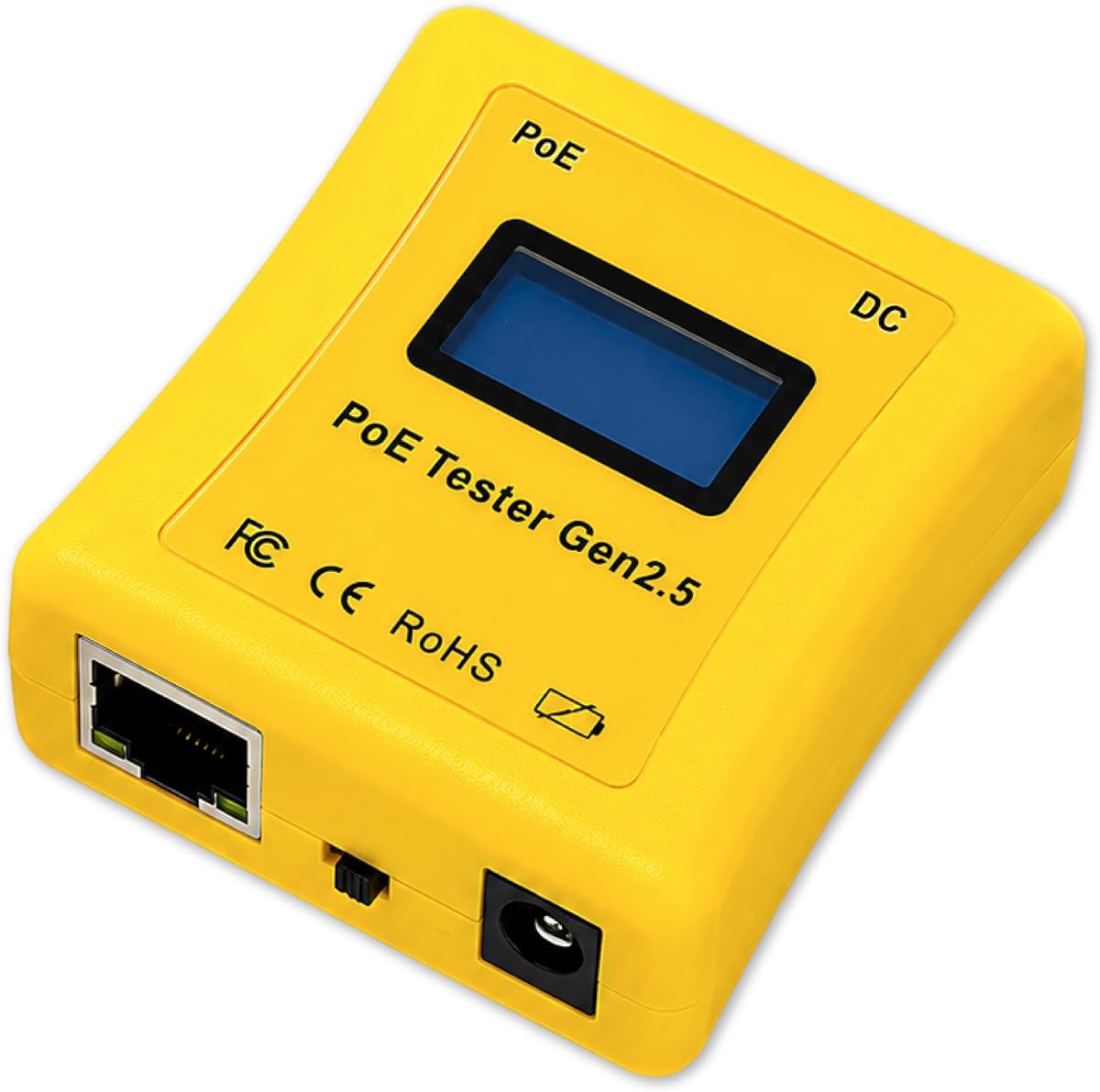
The PoE Texas tester is designed to eliminate guesswork by simulating a powered device so you can test switch ports without extra hardware. It is a professional tool for checking voltage and compatibility before full installation.
We may earn a commission when you buy through this link, at no additional cost to you.
It can measure DC supplies and displays Mode A and B data automatically. The ergonomically curved body makes it 25% smaller than previous models, fitting easily in a pocket while working on ladders.
Although it lacks a remote unit, its ability to detect power loss and consumption makes it valuable for diagnosing long cable runs. Its self-sufficient design means you never carry chargers or spare cells.
This tool is ideal for technicians who need to validate switch performance quickly and accurately. It is a solid investment for those who work heavily with managed or auto-negotiating switches.
Activate any port on an AF/AT/BT switch by simulating a device to confirm power delivery matches specs.
The compact curved design ensures it is easy to hold and stow away when moving between job sites.
We may earn a commission when you buy through this link, at no additional cost to you.
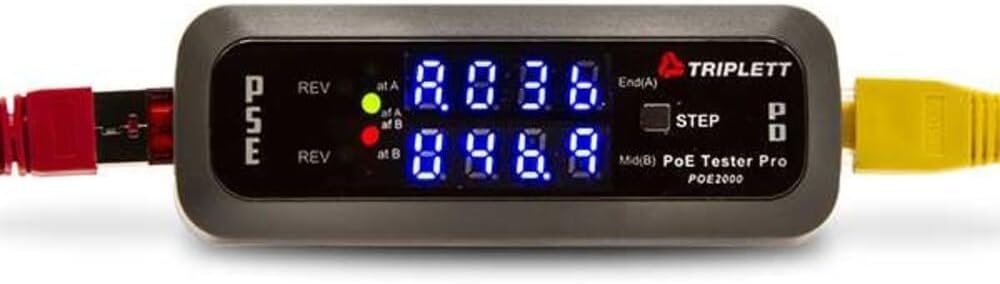
The Triplett POE2000 relies on clear LED indicators to show power sources and polarity quickly. It is a straightforward tool for confirming End Span or Mid Span connections without complex menus.
We may earn a commission when you buy through this link, at no additional cost to you.
Dual 7-digit LEDs provide strong visibility even in bright outdoor environments, making it useful for outdoor network deployments. Yellow LEDs alert you immediately if polarity is reversed to prevent damage.
Its display cycles between voltage, current, and power with a step button to lock views. While it does not offer rich numeric readouts, its simplicity ensures fast verification of basic PoE presence.
This model suits those who prefer visual cues over detailed screens. It is best used for quick checks where knowing the power source type is more important than precise measurements.
Large LEDs ensure that status indicators are visible even in direct sunlight without needing reflection protection.
Yellow LEDs warn instantly if polarity is reversed so you can correct wiring before connecting devices.
We may earn a commission when you buy through this link, at no additional cost to you.
The Triplett POE3000 builds on the brand's legacy with enhanced detection capabilities. It uses 4 LEDs to show IEEE standards and includes clear indicators for power types and polarity status.
We may earn a commission when you buy through this link, at no additional cost to you.
It determines standard or non-standard passive PoE, and monitors power levels inline to ensure devices receive consistent supply. The step button allows you to select specific data like voltage for focused checks.
As a newer entry in this lineup, it lacks user ratings but aligns with Triplett's history of durable network tools. It is well suited for general maintenance where basic power verification is key.
Consider this if you prefer a trusted brand with clear visual feedback. It is effective for rapid diagnostics where you need to confirm power existence and type immediately.
Four LEDs provide immediate confirmation of IEEE 802.3af or at/bt standards without needing to read text.
Inline monitoring helps detect power drops or inconsistencies that could lead to device malfunctions later.
We may earn a commission when you buy through this link, at no additional cost to you.
The Jonard Tools POE-1 provides both PoE and cable continuity in one package. It verifies Ethernet cables from Cat5 to Cat6a while confirming power presence and standards.
We may earn a commission when you buy through this link, at no additional cost to you.
You can use it as battery-free when drawing from PoE lines or insert an AA battery for testing unpowered cables. The included belt clip makes it easy to keep at your side during work.
The kit includes a remote unit and female-female RJ45 adapter which adds flexibility for complex setups. This completeness ensures you can handle different scenarios without hunting for accessories.
This tool is great for techs who need both power and cable checks in one handheld unit. It supports continuity verification effectively to ensure flawless data transmission.
The package includes a remote unit and adapters making it a full solution for common installation tasks.
Options to use batteries or PoE power ensure you can test even disconnected or unpowered network segments.
We may earn a commission when you buy through this link, at no additional cost to you.
This PoE Cable Tester stands out for its ability to measure Ethernet cable lengths up to 300 meters. It also handles faults like shorts and miswires effectively ensuring thorough network analysis.
We may earn a commission when you buy through this link, at no additional cost to you.
Its rechargeable 1500mAh battery offers extended testing sessions without constant swaps. You can customize auto-shutoff times to conserve power during longer jobs while keeping readings clear.
The tool supports both STP and UTP cables and includes port flash detection for locating active ports. This ensures your connected devices receive stable power without unexpected interruptions.
It is highly rated for users who need to verify long cable runs alongside power delivery. A great choice for installation verification where distance and continuity are critical.
Measuring cable lengths helps verify that your runs stay within distance limits for reliable data transmission.
A rechargeable battery reduces waste and cost compared to models that rely on disposable cells for power.
We may earn a commission when you buy through this link, at no additional cost to you.
This tester combines CAT5 and CAT6 DVM capabilities with Network PoE testing. It is designed for environments where physical panel diagnostics are more useful than handheld tools.
We may earn a commission when you buy through this link, at no additional cost to you.
The power panel integration allows you to check network PoE status at the source or patch points. It is suitable for maintenance tasks where you need consistent monitoring of connected lines.
Because of limited detailed descriptions in available data, it is best suited for fixed installations where the panel remains accessible. It handles standard network maintenance needs effectively for teams.
Consider this for scenarios requiring a stationary testing point. It is less portable than others but offers integration that can simplify access for technicians in server rooms.
DVM panel integration allows for stable testing at a specific point without needing to carry a handheld unit.
Suitable for regular maintenance where quick status checks on power and connectivity are needed at a location.
We may earn a commission when you buy through this link, at no additional cost to you.
The NF-488 Network Cable Tester offers strong loop detection capabilities alongside standard PoE checks. It supports power detection up to 180W and helps diagnose issues related to loops in the network.
We may earn a commission when you buy through this link, at no additional cost to you.
Its current detection goes up to 3A and includes an LED lamp for visibility in dark areas. This helps you find root causes of poor networks quickly without bringing extra lights.
Lifetime friendly customer service adds value if you need support with setup or usage. The model is well suited for environments where loop problems might cause connectivity drops or power issues.
Choose this if you need to verify loop status alongside power integrity. It is a reliable tool for maintaining complex setups where multiple devices might create network complications.
The loop-back test helps diagnose problems caused by improper connections that might disrupt your network flow.
Built-in LED lamp ensures you have light during tests in dark cabinets or outdoor enclosures without tools.
We may earn a commission when you buy through this link, at no additional cost to you.
Choosing the right Inline POE tester depends on your specific testing needs and the environment where you will use it. Below are key factors to consider to ensure you get the right tool.
Look for testers that offer multiple modes such as PSE testing, PD testing, and inline pass-through. This versatility allows you to verify power sourcing, test switches, and monitor devices without additional tools.
Ensure the device supports the PoE standards you encounter most often, including 802.3af, at, and bt, as well as non-standard passive PoE, for broader compatibility.
Consider the clarity and brightness of the display. OLED or LCD screens with backlighting help you read values in dark server rooms or outdoor environments without external lighting.
A clear display that shows voltage, current, and power simultaneously reduces the need to cycle through menus during urgent troubleshooting tasks.
Some testers draw power from the line they test, eliminating the need for batteries. This is ideal for field work where you may forget to charge or carry spares.
If you need to test unpowered cables, check for options that include battery backups or AA battery slots to ensure full functionality in all scenarios.
Verify the supported Ethernet speeds to ensure your tester works with your network gear. Most modern tools support Gigabit speeds but some older models might be limited to 100Mbps.
Selecting a model with Gigabit ports ensures you do not bottleneck your data flow during testing or fail to detect speed-related power negotiation issues.
If you work on government or regulated projects, check for NDAA compliance. These testers are approved for use in sensitive installations and meet specific security standards.
Durability features like anti-slip cases and compact ergonomic designs ensure the tool survives rough field conditions and remains easy to hold for long periods.
Tools with extra features like cable length measurement or continuity checks provide more value. These can save you from needing separate testers for basic network verification.
Look for indicators like LEDs for polarity alerts or loop detection. These visual cues can help you avoid wiring mistakes that could damage expensive network equipment.
Check the manufacturer protection period offered with the tester. A longer warranty or strong support team ensures you can get help if the device malfunctions or fails.
Responsive customer support can be critical when you are stuck on a job site. Reliable brands often include contact options and detailed manuals for easier setup and use.
Before testing, ensure your network cables are securely connected to both the switch or injector and the powered device. This guarantees that you get accurate readings without connection noise or intermittent drops.
Use the step button or menu to select the specific data you need such as voltage or wattage. Lock the display to monitor real-time changes and prevent flickering readings during active load testing.
Store your tester in a dry place when not in use to protect the display and ports from moisture. If the unit uses batteries, remove them before long storage to prevent leaks that could damage the device.
An Inline POE Tester is used to verify that switches and injectors deliver the correct power to devices. It measures voltage, current, and wattage to ensure your cameras, phones, and access points function properly.
Many modern testers draw power directly from the PoE line so they do not require batteries. However some models allow battery operation to test unpowered cables without a live connection.
Most quality Inline POE testers support both standard 802.3af/at/bt and non-standard passive PoE. Always check the device specifications to confirm it covers the voltage range you are working with.
A loop-back test checks if a network loop is causing connectivity issues by analyzing the loop status. It helps you detect wiring faults that might disrupt data flow or power delivery.
An OLED display provides clear and bright readings even in low-light conditions. This makes it easier to read measurements in dark server racks without needing additional lighting sources.
Professional testers are designed to provide accurate voltage and wattage readings within a small margin of error. This ensures you can trust the data when diagnosing power shortages or surges.
Some models offer cable length measurement features allowing you to check run lengths up to 300 meters. This helps verify that your installations meet distance standards for reliable performance.
NDAA compliance is crucial for government and federal projects to ensure security and reliability. If you work with public sector clients, you should choose a tester that explicitly meets these standards.
We reviewed ten top Inline POE testers ranging from budget-friendly models to premium OLED options. Each tool brings unique strengths like NDAA compliance loop detection or self-powered design for different tasks.
Prioritize features based on your environment. If you work in dark or outdoor conditions choose a model with a bright display or LED lighting. For government work ensure NDAA compliance is present.
Prices and stock vary across retailers. Check current availability on trusted sites before purchasing to ensure you get the best value for your specific networking needs today.