
380W USB C Charger Block
4.4Editor score
380W Total Output Power
Includes Four USB Cables
GaN III Generation Chip
Compare the top high wattage USB C chargers for laptops and phones. This guide reviews power output, safety features, and port counts to help you choose.
Modern devices demand more power than ever before. Finding a reliable high wattage USB C charger ensures your laptop and phone charge quickly. Look for GaN technology and multiple ports for versatility.
We compared ten top-rated models based on power delivery, build quality, and safety features. Our analysis focuses on real-world performance and compatibility with popular devices like MacBooks and smartphones.
Each pick highlights specific strengths for different needs. You will see detailed breakdowns of ports and charging speeds. Prices vary by seller, so check current listings before buying your new charger.
4.4Editor score

4.7Editor score

4.5Editor score
This table compares all ten selected chargers side by side. You can quickly see port counts, max power, and key features to find the right fit.


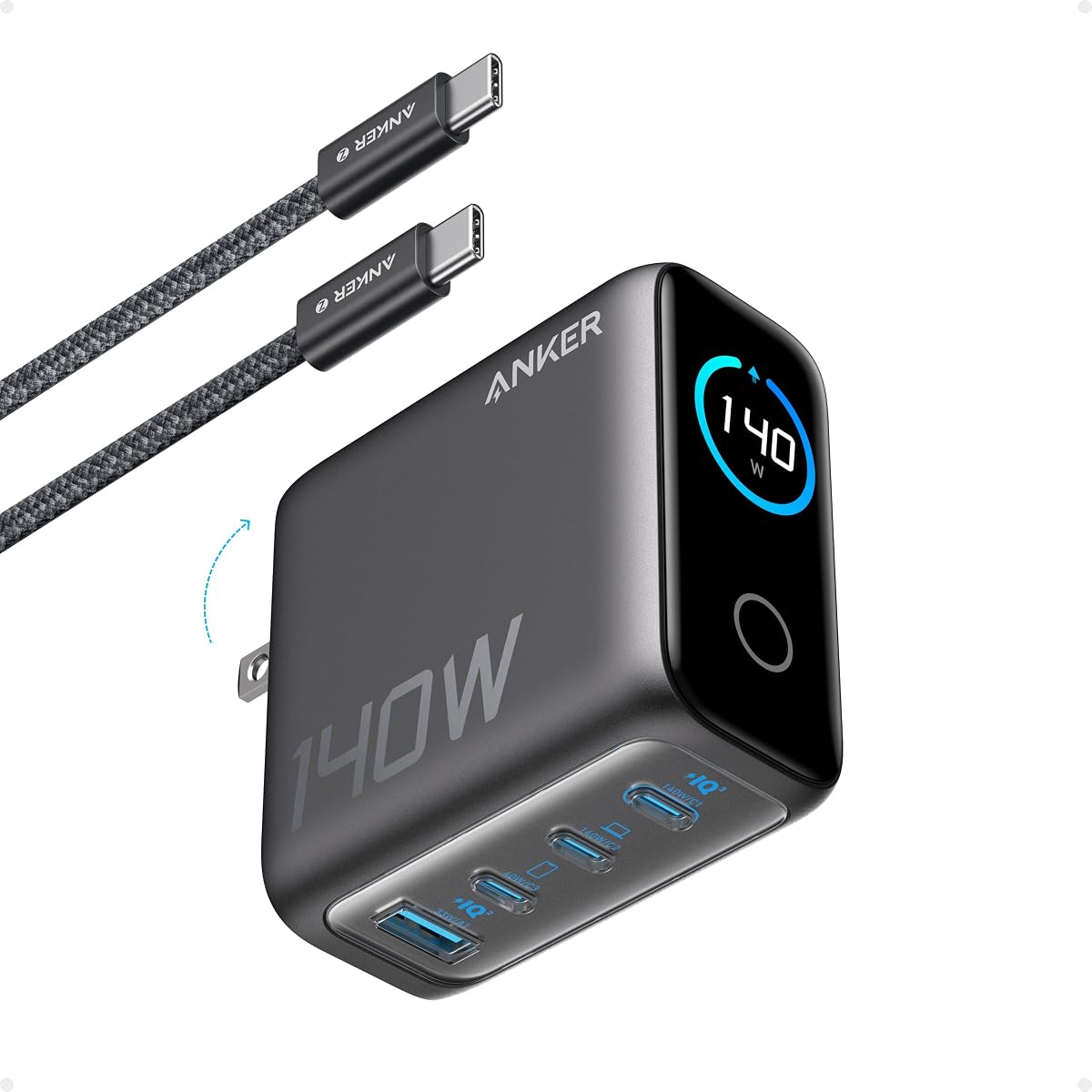


This charger stands out for its massive power capacity. It combines four USB C ports and multiple USB A ports into one block. With a total of 380W, it can charge a whole family of devices at once. The rating reflects solid performance for such high output.
We may earn a commission when you buy through this link, at no additional cost to you.
The standout feature is the inclusion of four USB cables. You get a 100W braided cable and others for different needs. The GaN III generation chip ensures efficient heat dissipation. This makes it safer and smaller than traditional silicon chargers with similar power.
While it handles many devices, the size is notable. It takes up significant desk space compared to single port chargers. Also, managing the cables provided can require some effort to keep neat. However, these trade-offs are acceptable given the power and convenience offered.
Buy this if you need a central charging hub for many devices. It is perfect for a home office or shared living space. The versatility covers laptops phones and accessories simultaneously. It saves money and space compared to buying separate adapters.
The 380W total output supports high power devices like gaming laptops and phones at the same time.
Receiving four cables in the box means you can connect multiple devices immediately without extra purchases.
We may earn a commission when you buy through this link, at no additional cost to you.
This charger is designed for laptop users on the go. It delivers 100W which is enough to power high performance machines like the MacBook Pro. The rating is high due to consistent speed and safety. It is a trusted choice for travelers.
We may earn a commission when you buy through this link, at no additional cost to you.
Key strengths include the foldable plug and ActiveShield technology. The plug saves space in your bag and the safety tech monitors temperature constantly. The included 5ft cable adds convenience for desk use. PowerIQ 3.0 ensures compatibility with many devices.
The main limitation is that it only has one port. You cannot charge a phone and laptop simultaneously with this single unit. It lacks a display to show power stats. These are minor issues for a portable charger focused on simplicity and speed.
This is the best pick for frequent travelers with a laptop. It balances power and portability well. Keep it in your bag for reliable charging anywhere. It simplifies your tech setup with one robust adapter.
The 100W output boosts a MacBook Pro 16 inch to full charge in record time for productivity.
ActiveShield technology checks temperatures continuously to prevent overheating during heavy use.
We may earn a commission when you buy through this link, at no additional cost to you.
This charger offers a unique smart display feature. It shows real-time output and temperature status directly on the device. With 160W total power, it handles demanding devices easily. The rating reflects user satisfaction with its tech and reliability.
We may earn a commission when you buy through this link, at no additional cost to you.
The 5 in 1 design replaces multiple chargers on your desk. The rotatable touch panel is intuitive and fun to use. GaN construction keeps it compact despite the high power. It supports laptops phones and tablets simultaneously without speed loss.
Cost is higher than basic models. The touch interface might take a moment to learn for some users. These are small trade-offs for the added visibility and power. The display gives you control and peace of mind while charging.
Buy this for a high tech desktop setup. It is ideal if you monitor your charging stats often. The power is sufficient for gaming laptops and phones. It combines style function and speed in one premium block.
The smart display lets you see exactly how much power each port is using right now.
With 160W total output it can charge multiple high demand devices like laptops and tablets together.
We may earn a commission when you buy through this link, at no additional cost to you.
This model brings display tech to a smaller frame. It offers 100W max power on any single USB C port. The smart display shows temperature and charging status. It is a favorite for travelers who want visibility and speed.
We may earn a commission when you buy through this link, at no additional cost to you.
The 3-port design allows charging a laptop and two small devices. It adapts to low power devices safely without issues. The foldable plug makes it easy to carry in a coat pocket. It is robust yet tiny for its capabilities.
It does not come with a cable which is a minor inconvenience. The total power is less than the bigger hubs so it fits fewer heavy loads. However for daily carry and desk use it strikes a great balance between size and function.
Choose this if you need a compact multi port solution. It fits well in bags and on nightstands. The display adds a nice touch of control. It is a versatile choice for modern tech users.
This charger is smaller than many similar models making it easy to slip into any bag.
It switches to low current mode automatically for safety with small devices like earbuds.
We may earn a commission when you buy through this link, at no additional cost to you.
This charger offers essential features at a simple price point. It delivers 120W total power across three ports. The nano size saves space in your travel bag. It is a practical choice for those needing speed without extra cost.
We may earn a commission when you buy through this link, at no additional cost to you.
It supports fast charging for phones and laptops. The foldable plug helps with portability and storage. Safety features protect your devices from overcharging. It works with universal voltages so it is great for trips abroad.
It lacks a cable so you must use one you have. The design is very basic with no display or extras. For a functional charger it gets the job done well. It fits budget conscious buyers who want reliability.
Buy this for a simple travel or office setup. It is good for basic charging needs. The power is sufficient for most devices. It keeps your bag light and your charging fast.
The ultra compact size makes it easy to carry without taking up much space.
It works with any voltage worldwide so you can use it in different countries easily.
We may earn a commission when you buy through this link, at no additional cost to you.
This unit is built for power and visibility. It provides 140W of max output which is great for fast charging. The color display offers clear details on status. It supports up to four devices at the same time.
We may earn a commission when you buy through this link, at no additional cost to you.
The two high speed ports can charge a MacBook Air to 50 percent in minutes. The safety system monitors temperature millions of times a day. It is robust enough for professional use on a desk. The cable included is long for convenience.
It is heavier and bulkier than travel chargers. This makes it less ideal for a daily carry bag. But for a home station it is perfect. The power and features justify the size for desktop setups.
Choose this for a fixed office or home hub. It handles multiple high power devices without slowing down. The display keeps you informed during use. It is a strong choice for heavy users.
The 140W output ensures fast charging even when multiple heavy devices are connected.
The color screen gives you a clear view of temperature and port data.
We may earn a commission when you buy through this link, at no additional cost to you.
This charger is tiny yet powerful. It fits easily next to AirPods Pro in your bag. It charges a MacBook Pro to 50 percent in minutes. The matte prongs lock in place so it stays secure in the outlet.
We may earn a commission when you buy through this link, at no additional cost to you.
The ActiveShield technology monitors temperature frequently for safety. It comes with a 6 ft cable which is very convenient. The small size makes it perfect for daily use. It is reliable and sturdy despite being compact.
It only has one port so it is for laptop only. There is no display for status updates. However for portability it is hard to beat. It simplifies your packing for work or school.
Buy this for a minimal travel setup. It is great for commuters or students. The speed and size are unmatched. It keeps your bag light and your device charged.
Its small size means it takes up almost no room in your bag or drawer.
The durable prongs ensure the charger does not wiggle or fall out of the wall.
We may earn a commission when you buy through this link, at no additional cost to you.
This charger is designed for professionals with multiple laptops. It supports charging two MacBook Pros simultaneously. The 200W total output ensures fast speeds for all. It has a 4-port setup for phones and accessories too.
We may earn a commission when you buy through this link, at no additional cost to you.
The single port can deliver up to 140W with PD 3.1. This is great for the latest high power laptops. The foldable plug helps with portability. It fits well in a professional bag for business trips.
It does not include a cable so you must provide one. The price is higher due to the power capacity. But for dual laptop needs it is a top choice. It saves you from carrying multiple heavy adapters.
Buy this if you use two laptops often. It simplifies your power needs significantly. The efficiency and safety are top notch. It is a serious tool for power users.
The 200W output allows you to charge two high performance laptops at the same time.
PD 3.1 support ensures the fastest charging speeds for modern devices.
We may earn a commission when you buy through this link, at no additional cost to you.
This is the ultimate station for heavy power needs. It delivers 300W total to charge three laptops at once. The 5-port design handles phones and tablets too. It is a central hub for a busy office.
We may earn a commission when you buy through this link, at no additional cost to you.
The USB-C1 port supports 140W for the fastest laptops. Safety features protect against overheat and overcurrent. The design is meant for a desk not travel. It replaces multiple chargers and keeps things neat.
The size is large and not meant for a bag. It is an investment due to the high power. But for a shared space it is unmatched. It keeps every device powered up efficiently.
Choose this for a main office desk. It handles all your devices with ease. The power and reliability are excellent. It simplifies your entire workspace power setup.
It supports charging three laptops simultaneously without slowing down performance.
Advanced GaN tech and protection circuits keep devices safe from electrical issues.
We may earn a commission when you buy through this link, at no additional cost to you.
This set gives you two chargers for the price. Each provides 85W which is enough for most laptops. The cube design saves space. It is a great way to cover home and office.
We may earn a commission when you buy through this link, at no additional cost to you.
Each charger has three ports to handle a laptop and phone. The thermal sensors keep temps safe. It works with many devices including Macs and phones. The 2-pack value makes it very affordable.
The power per charger is lower than high end models. It may not support the very largest laptops at full speed. But for daily use it is plenty. The dual unit option is very convenient.
Buy this for rooms at home. You get a charger for your desk and bedroom. The value is unbeatable. It is a smart choice for families or shared spaces.
You get two complete units in one package to cover multiple locations.
Thermal sensors and material protection keep your devices safe from heat.
We may earn a commission when you buy through this link, at no additional cost to you.
Selecting the right charger involves looking at power ports safety and size. Here are key factors to consider before you buy.
Total power determines how much energy the charger can provide across all ports. For laptops look for at least 65W to 100W per port. Higher total wattage like 150W or 200W is needed to charge multiple laptops at once.
Choose higher wattage if you plan to run heavy devices together.
Ports decide how many devices you can charge at the same time. A 2 port charger is fine for a phone and laptop. A 5 port charger is better for a family or office setup.
More ports mean you need fewer adapters on your desk.
Gallium Nitride or GaN chips allow for smaller and cooler chargers. They are more efficient than older silicon types. This technology helps the charger stay cool even during high power use.
Look for GaN labeled chargers for better portability and safety.
Safety is critical for high wattage devices. Look for overheat overvoltage and short circuit protection. Some brands add ActiveShield or smart monitoring systems to prevent issues.
Always choose a charger with robust safety standards.
If you travel a lot pick a foldable plug and compact size. Nano chargers are ideal for bags. Desktop stations are bigger and better for home use.
Consider where you will use the charger most.
Some chargers come with cables which saves money. Others are just the block. Check the box content before buying. A good cable is needed for high speed charging.
Ensure you have the right cable type and length.
Smart displays show real-time power and temp data. This helps you manage charging better. Not all chargers have this feature so check specs.
A display is useful for tech enthusiasts and power users.
A good warranty shows the brand stands by the product. Look for 18 to 24 month warranties. Reliable brands offer better customer service if issues arise.
Check warranty terms before making your final choice.
Plug the charger into a stable power outlet. Ensure the outlet can handle the power draw. Connect your devices to the ports using high quality USB C cables.
Allow the charger to cool down between heavy use if it gets hot. Avoid covering it with objects while it is charging. Keep it away from moisture and direct sun.
Clean the ports with a dry soft brush to remove dust. Do not use liquids on the charger. Store it in a safe place when not in use to prevent damage.
Yes modern chargers support smart power distribution. They adjust the output to the device needs so your phone will only draw what it needs. Look for safety features like overcurrent protection for peace of mind.
GaN stands for Gallium Nitride which is a material that allows for smaller and more efficient chargers. These chargers run cooler and charge faster than older types. It is a standard for modern high performance chargers.
Absolutely most high wattage chargers have multiple ports. You can connect both devices to the same block. The charger will split the power between them so both charge safely.
Yes for speeds over 60W you need a high quality USB C cable rated for that power. Look for cables marked 100W or 240W. Using a low watt cable will limit your charging speed.
It is normal for chargers to get warm during use due to power conversion. GaN chargers run cooler but still heat up. If it gets very hot to touch stop using it and check ventilation.
A display is helpful if you want to see real-time stats. It is not required for safe charging. If you prefer knowing power use and temp pick one with a screen otherwise a basic model works fine.
Look for foldable plugs and compact sizes labeled Nano or travel. Avoid large desktop stations for travel. Check the weight and dimensions to ensure it fits in your carry on easily.
We reviewed ten excellent options from budget blocks to premium stations. Each offers unique strengths for different needs. The UGREEN Nexode Pro stands out with its smart display and power.
Prioritize port count and safety features based on your daily use. If you travel choose compact models. If you have a desk pick a multi port hub.
Prices change often so check current listings for the best deals. Selecting the right charger ensures your devices stay powered efficiently.