
NZXT H5 Flow
4.7Editor score
Ultra-fine mesh panels
Compact mid-tower design
Pre-installed quiet airflow fans
This guide compares the top high airflow PC cases for performance builds, evaluating cooling design, fan support, and airflow efficiency for enthusiasts.
Building a powerful gaming PC requires more than just top-tier components. Proper airflow ensures your hardware stays cool under pressure. High airflow PC cases are designed to maximize ventilation, reducing hotspots and extending component lifespans.
We analyzed ten leading models based on their ventilation design, fan compatibility, and build quality. Our focus was on cases that prioritize unrestricted air movement while maintaining structural integrity and aesthetic appeal for modern setups.
Each pick highlights specific strengths like modular features, pre-installed cooling, or unique airflow paths. Prices fluctuate often so check current listings before buying to ensure you get the best deal for your specific budget and needs today.
4.7Editor score

4.8Editor score

4.8Editor score
Below is a detailed side-by-side comparison of all ten selected cases. We highlight key specifications like fan size, radiator support, and unique features to help you decide which case fits your build requirements best.




The MONTECH AIR 903 MAX stands out as our top pick for high airflow cases. It offers exceptional value with four high-quality fans pre-installed right out of the box. This setup ensures you have immediate cooling power without needing to buy extra accessories.
We may earn a commission when you buy through this link, at no additional cost to you.
Its mesh front panel allows unrestricted air intake while the spacious interior accommodates large components like E-ATX motherboards and oversized GPUs. The HP140 ARGB PWM fans provide excellent static pressure and airflow ratings that help manage heat effectively under load.
While the side panel is tempered glass which might limit airflow slightly compared to mesh, the overall design still prioritizes ventilation. The front I/O is functional though not overly feature-rich. These trade-offs are acceptable given the price point and performance.
If you need a case that delivers top-tier cooling without breaking the bank this is the one to choose. It balances aesthetics with function making it ideal for gamers and creators who want reliable thermal performance.
With four fans already installed you save time and money on extra hardware. The 140mm units move significant air volume ensuring your system breathes easily.
Supporting up to 400mm GPUs and E-ATX boards means this case won't limit your next upgrade. You can plan ambitious builds without worrying about size constraints.
We may earn a commission when you buy through this link, at no additional cost to you.
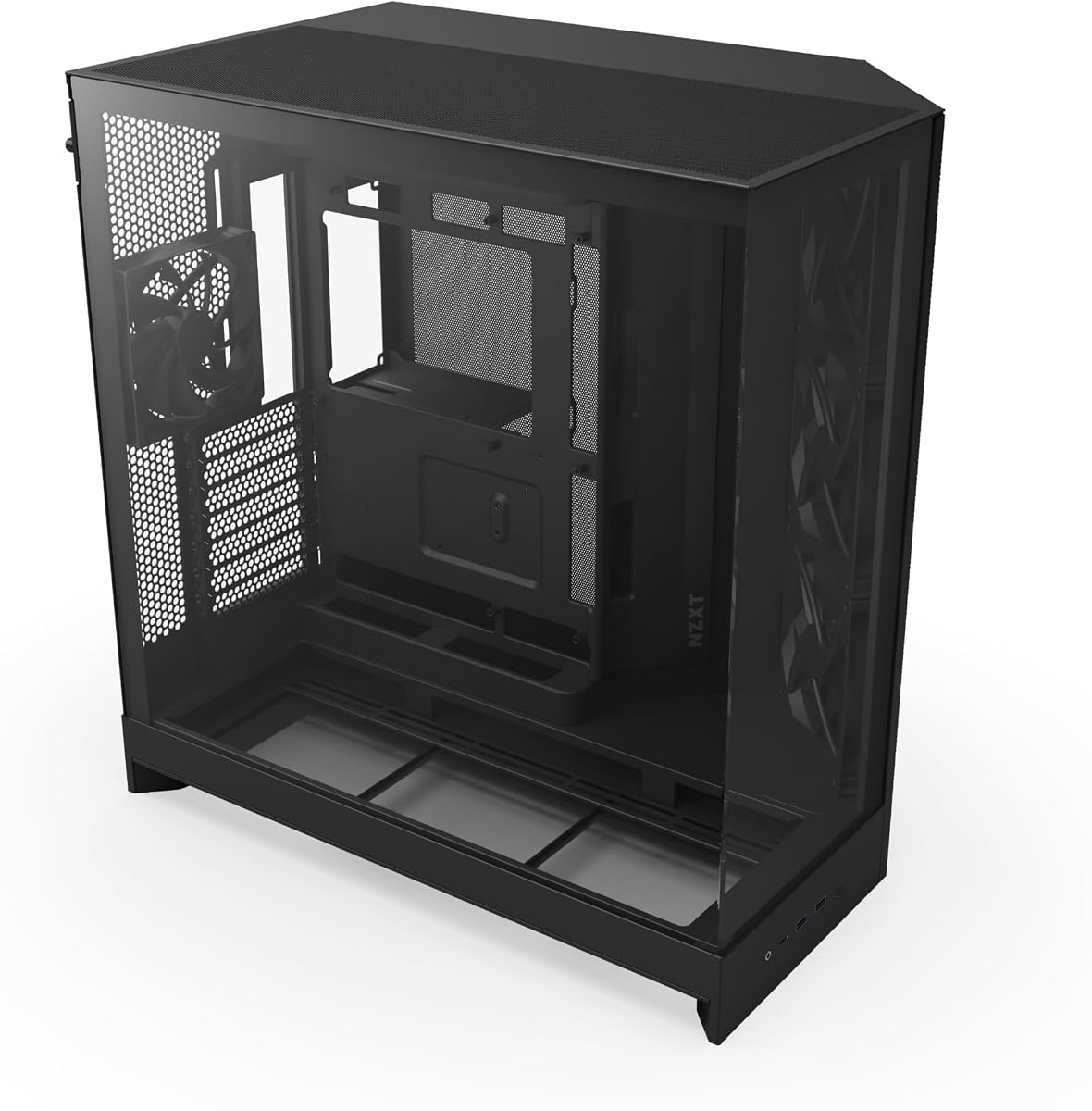
The NZXT H5 Flow proves that high airflow doesn't have to be expensive. This compact case uses ultra-fine mesh panels on all sides to maximize ventilation while keeping dust out. It comes with two Quiet Airflow fans for solid baseline performance.
We may earn a commission when you buy through this link, at no additional cost to you.
The perforated PSU shroud is a standout feature allowing extra intake from the bottom which helps cool your graphics card directly. Cable management is straightforward with wide channels and hooks that keep wires tidy without clutter.
Because it is smaller than other cases you might face constraints with very large components or extensive liquid cooling setups. However for most standard ATX builds the cooling efficiency is more than adequate and the price is hard to beat.
This case is perfect for budget builders who want a sleek look without sacrificing thermal performance. It fits well in smaller desks and delivers reliable cooling for gaming and daily tasks.
The ultra-fine mesh acts as a filter and air intake combined. You get high airflow without inviting dust into sensitive components.
Its compact size saves desk space while still supporting big GPUs and radiators. This makes it ideal for smaller rooms or limited areas.
We may earn a commission when you buy through this link, at no additional cost to you.
The Cooler Master HAF II 500 is a powerhouse designed for enthusiasts who prioritize airflow above all else. Its dual 220mm front intake fans deliver an immense volume of air that keeps components cool even under heavy loads. The rear 180mm fan aids exhaust efficiently.
We may earn a commission when you buy through this link, at no additional cost to you.
The split-level cable management system creates dedicated pathways for wires ensuring they do not obstruct airflow. This attention to detail extends to the MasterRail mounting system which offers flexibility for fan and radiator placement across the case.
The premium pricing reflects the build quality and unique features like the Dual-Mode GPU Holder which stabilizes heavy graphics cards. While the size is substantial it is necessary to accommodate the large fans and provide enough internal clearance for top-tier hardware.
If you are building a high-end workstation or gaming rig this case offers unmatched thermal headroom. The design ensures air moves smoothly from intake to exhaust keeping your system running cool and quiet.
The 220mm fans move more air than standard 120mm units. This reduces noise per CFM and keeps temperatures lower under pressure.
The GPU holder ensures even heavy cards stay straight. This protects your motherboard and improves longevity for your investment.
We may earn a commission when you buy through this link, at no additional cost to you.
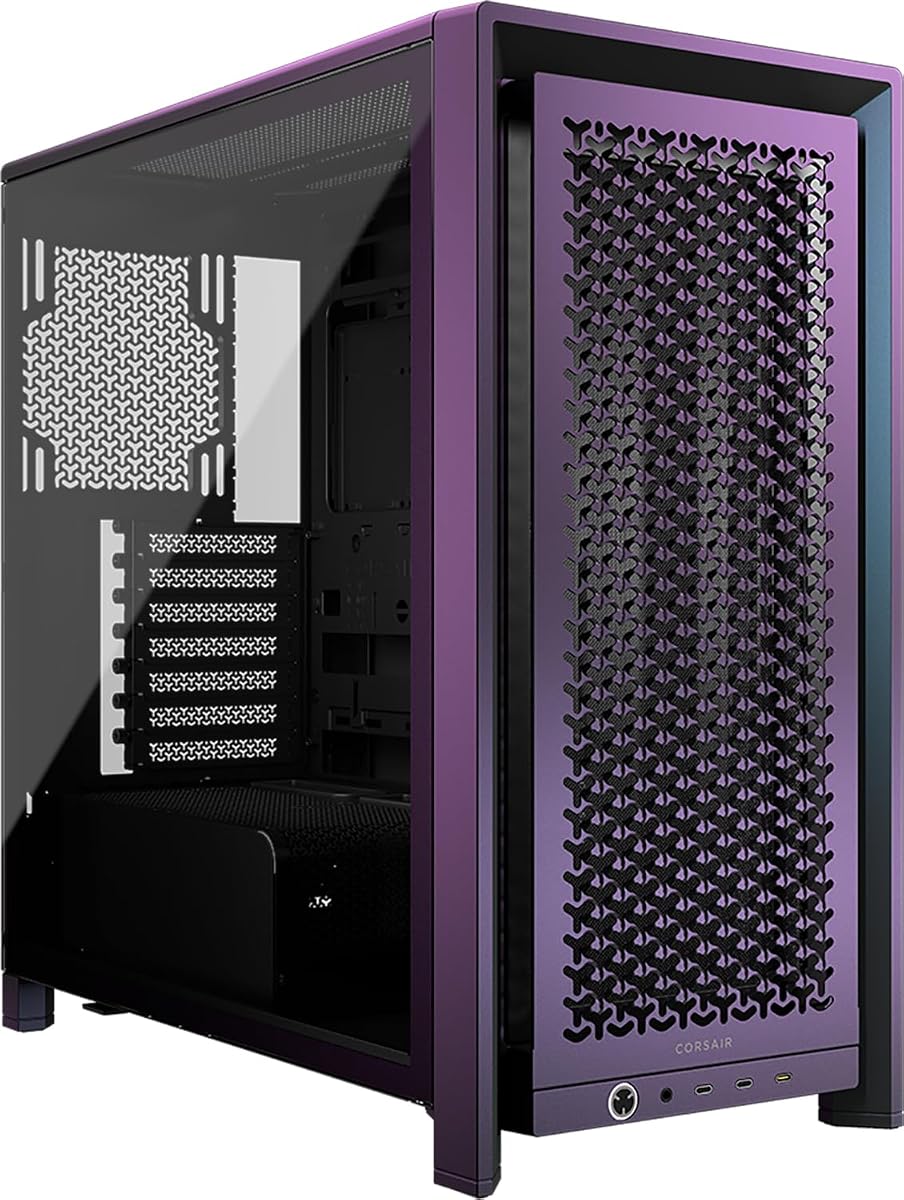
The CORSAIR 4000D RS ARGB introduces the revolutionary FRAME system allowing you to swap out parts like the motherboard tray or I/O panel. This level of modularity is rare in standard cases. The 3D Y-Pattern airflow panel ensures smooth air intake with minimal restriction.
We may earn a commission when you buy through this link, at no additional cost to you.
Pre-installed RS ARGB fans provide excellent performance and aesthetic control. The InfiniRail mounting system lets you slide fans up to 200mm anywhere on the front or roof. This flexibility helps you target cooling where you need it most in your build.
While the base model is solid upgrading the frame requires additional purchases which can increase costs. The cable management features are top-notch making it easy to hide wires behind the tray. This keeps airflow pathways clear and the build looking clean.
For builders who want to tweak their case over time this option stands out. It combines premium cooling with unique customization features that appeal to enthusiasts and modders alike.
The FRAME system means the case grows with your needs. You can swap panels for more ports or better cooling later.
The Y-Pattern panel optimizes air path without turbulence. This reduces noise while ensuring cool air reaches your components directly.
We may earn a commission when you buy through this link, at no additional cost to you.
The LIAN LI LANCOOL 216 focuses on cooling efficiency with its two massive 160mm front fans. These move air much more effectively than standard 120mm units. The fine mesh on the front top and PSU shroud supports ventilation to keep temperatures down.
We may earn a commission when you buy through this link, at no additional cost to you.
A modular motherboard I/O bracket allows you to adjust the motherboard position for better airflow or cable clearance. This flexibility is great for complex builds. The case fits GPUs up to 392mm easily ensuring you won't hit size limits.
The build quality is robust but results in a heavier case that might be difficult to move. Storage space is modest compared to full towers so plan your drives carefully. These are minor trade-offs for the thermal performance you get.
If you have a high-end graphics card this case handles it with ease. The fan quality and design ensure your system stays cool during intense gaming sessions without loud noise.
The 160mm fans provide high static pressure and airflow. They move air efficiently without needing extreme speeds.
Adjusting the motherboard position helps optimize airflow. This small feature adds significant value for custom build planners.
We may earn a commission when you buy through this link, at no additional cost to you.
The Antec Flux Pro combines a premium aesthetic with serious cooling power. It includes six PWM fans out of the box ready for immediate setup. The multi-directional vent design supports up to 12 fans total if needed for extreme cooling demands.
We may earn a commission when you buy through this link, at no additional cost to you.
Its design incorporates metal glass and wood for a high-quality texture that looks unique. The iShift PSU mount allows rotating the power supply to optimize space and airflow. This is particularly useful for large radiator setups or dense builds.
While it fits E-ATX boards and massive radiators the case is quite large. Ensure you have the desk or floor space before buying. The cable management and cooling features are excellent for those building extreme systems.
This case is ideal for workstation users needing maximum capacity and looks. It balances style with function making it a standout in the full tower category.
The wood accents add a premium touch rarely seen in cases. This makes your PC look unique on your desk.
With support for dual 420mm radiators you can cool high-TDP CPUs easily. This is perfect for intensive workloads.
We may earn a commission when you buy through this link, at no additional cost to you.
The CORSAIR 3500X RS ARGB delivers a wraparound glass aesthetic that showcases your build perfectly. Despite the glass it maintains high cooling capacity with multiple fan mounting points. Three RS120-R ARGB fans are included to ensure performance right away.
We may earn a commission when you buy through this link, at no additional cost to you.
Removable tempered glass panels make building and accessing your system easy. You can still install up to ten 120mm fans for extensive cooling. The side and roof mounting options allow you to balance intake and exhaust efficiently.
Glass panels generally trap more heat than mesh but this case mitigates that with robust ventilation elsewhere. If looks are a priority for you this case offers a great compromise between style and cooling capability.
Choose this if you want a display-quality PC that still performs well. It balances beauty with function making it a top choice for showpiece builds.
The panoramic glass creates a seamless view of your hardware. Every component is visible and well-lit.
Despite the glass design airflow is optimized through roof and side vents. This keeps your system cool effectively.
We may earn a commission when you buy through this link, at no additional cost to you.
The Lian Li V100 offers impressive specs for a mid-tower case. It includes four PWM-controlled ARGB fans and supports back-connect motherboards which reduce cable clutter. The tool-less mounting mechanism on side panels makes access quick and simple.
We may earn a commission when you buy through this link, at no additional cost to you.
With support for GPUs up to 420mm and top radiators up to 360mm it handles modern hardware well. The 26-LED ARGB strip adds vibrant lighting without extra wires. This makes setup clean and efficient.
While compact the design is efficient and ensures air moves freely. The fan noise can be noticeable at high RPMs but adjustable PWM settings mitigate this. It is a solid choice for small form factor gaming.
Ideal for those wanting a balance of cooling and compact design. The features ensure high performance without taking up too much desk space.
The compact size hides powerful cooling capabilities. You get great airflow in a small footprint.
Support for back-connect boards means fewer visible cables. This keeps your build looking pristine and professional.
We may earn a commission when you buy through this link, at no additional cost to you.
The NZXT H9 Flow uses a dual-chamber design to separate the PSU and drives from the main components. This improves thermal performance and keeps your interior cleaner. The perforated steel panels ensure air moves efficiently where it is needed.
We may earn a commission when you buy through this link, at no additional cost to you.
Support for ten fans and large radiators like 420mm models means you can tailor cooling to your exact needs. The seamless wraparound glass makes it look premium. Cable channels are extra-wide making routing simple.
While it supports back-connect motherboards the price is on the higher side. The build quality justifies the cost with robust steel and precision engineering. It fits modern builds that require high airflow and aesthetics.
This case is best for those prioritizing cleanliness and performance. The dual-chamber layout is unique and beneficial for thermal management.
Separating the PSU keeps dust and heat away from your CPU. This is great for maintaining long-term system health.
The panoramic glass offers a wide view of your hardware. It creates an impressive display effect for your PC.
We may earn a commission when you buy through this link, at no additional cost to you.
The CORSAIR Frame 4000D Vault Series is a limited edition collector item with unique Galaxy finishes. It includes all the modular features of the standard model but with a rare aesthetic appeal. Each case is individually numbered adding to its exclusivity.
We may earn a commission when you buy through this link, at no additional cost to you.
The InfiniRail mounting system and 3D Y-Pattern panel ensure high airflow performance. Dual 360mm radiator support means cooling is not sacrificed for looks. It keeps components cool and quiet even with intense hardware.
The price is significantly higher than standard versions due to the limited run. For most builders this is a splurge but for enthusiasts it is a worthy investment. The case stands out as a premium piece of hardware.
Choose this if you value exclusivity and want a unique build. It delivers top-tier performance while being a collector's item.
With only 1337 units the chance of owning one is rare. This makes your build truly unique among peers.
The FRAME system allows you to change panels easily. You can adapt the case to your mood or needs.
We may earn a commission when you buy through this link, at no additional cost to you.
Selecting the right case requires evaluating several factors beyond just appearance. We break down the key features to consider when seeking optimal thermal performance.
A perforated mesh front panel is critical for high airflow cases. It allows air to pass through directly to your components. Glass panels look great but restrict intake which can raise temperatures.
Look for cases with at least a mesh front. If you prefer glass ensure there is ample intake on top or bottom to compensate for the restriction.
Check how many fans the case supports and if any are included. Cases that come with pre-installed fans save you money and ensure compatibility. Large fans like 140mm or 220mm move more air efficiently.
Choose a case that supports enough fans for your needs. Ideally look for options that allow flexible mounting positions.
Ensure the case supports your motherboard form factor. Whether you need ATX or E-ATX support check the specs clearly. A mismatched case can lead to build issues and poor cooling alignment.
Always confirm dimensions before buying. The case should fit your board comfortably with room for cable routing.
Modern GPUs can be large and liquid cooling setups need space. Check the max GPU length and radiator sizes the case supports. This prevents your from buying a case that is too small for your parts.
Prioritize cases with generous internal dimensions. This ensures you can fit large components and maintain optimal airflow pathways.
Clean cable management improves airflow by reducing obstructions. Look for cases with wide channels and hooks for routing wires. A well-organized interior allows air to flow freely around components.
Avoid cases with tight cable spaces. Good management tools make it easier to hide wires and keep air paths clear.
High airflow cases can bring in dust along with air. Look for fine mesh filters on fans and bottom panels. This prevents dust buildup inside your case which reduces cooling performance over time.
Check if filters are removable for cleaning. Good filtration keeps your system cleaner and running efficiently.
Sturdy steel frames and tempered glass ensure durability. A solid case protects components and maintains structural integrity over time. Lightweight materials might be easy to move but can feel cheap.
Invest in a case with strong construction. This ensures your investment lasts longer and protects your hardware better.
Determine how much you want to spend on a case. High airflow features usually increase the cost. Balance price with the performance you need to avoid overspending on unnecessary features.
Compare total costs including extra fans. Sometimes a slightly more expensive case with included fans offers better value overall.
When installing your components ensure cables are tucked behind the motherboard tray. This keeps the front and rear airflow unobstructed. Use the included straps and hooks to organize wires neatly.
Regularly clean the dust filters to maintain high airflow performance. Use a soft brush or compressed air to remove debris every few months. This prevents dust from clogging fans and radiators.
Monitor your fan speeds and temperatures after building. Adjust fan curves in BIOS or software to balance noise and cooling. Ensure your fans spin correctly and air flows in the intended direction.
Mesh panels allow air to enter freely while glass panels restrict airflow. Mesh is better for cooling but glass looks sleeker. High airflow cases prioritize mesh or perforated designs.
At least two fans are recommended one for intake and one for exhaust. More fans provide better pressure and cooling. Look for cases supporting four or more fans for optimal performance.
Most high airflow cases support large GPUs up to 400mm. Always check the maximum GPU length before buying. Cases like the MONTECH AIR 903 MAX fit oversized cards well.
Yes most cases support radiators up to 360mm or 420mm. Check the mounting points to ensure compatibility. Many models allow front and top radiator installation.
Clean filters every three to six months. Dust buildup reduces airflow and increases temperatures. Regular maintenance keeps your system running cool and efficient.
Back-connect support reduces cable clutter by routing cables to the rear. This improves airflow and aesthetics. It is optional but highly recommended for clean builds.
We have reviewed ten top cases including the MONTECH AIR 903 MAX as our top pick. Each offers unique strengths ranging from modular features to massive fans. Your choice depends on your specific budget and build needs.
Prioritize mesh panels and fan support when choosing. A well-designed airflow path will keep your components running cooler for longer. Do not forget to consider cable management features too.
Prices and availability change often so check current listings before purchasing. Ensure you get the best value for your investment today. With the right case your PC will perform at its best.