As an Amazon Associate we earn from qualifying purchases. We may earn a commission when you buy through links on this page, at no additional cost to you. Read our affiliate disclosure.As an Amazon Associate we earn from qualifying purchases.Purchases through our links may earn us a commission, at no extra cost to you. Read our affiliate disclosure.
HDMI dummy plugs are essential tools for anyone running a headless PC or remote server. These small devices trick your graphics card into thinking a monitor is connected, unlocking full performance without physical displays.
We evaluated ten top-rated models based on resolution support, build quality, and compatibility. Our list covers everything from basic emulators to high-refresh-rate options for gaming and professional workflows.
Each pick highlights key features and real-world use cases to help you decide. Prices and availability change frequently, so verify details on the retailer site before purchasing your new virtual display adapter.
Top 3 Picks for Best HDMI Dummy Plug
Best Budget
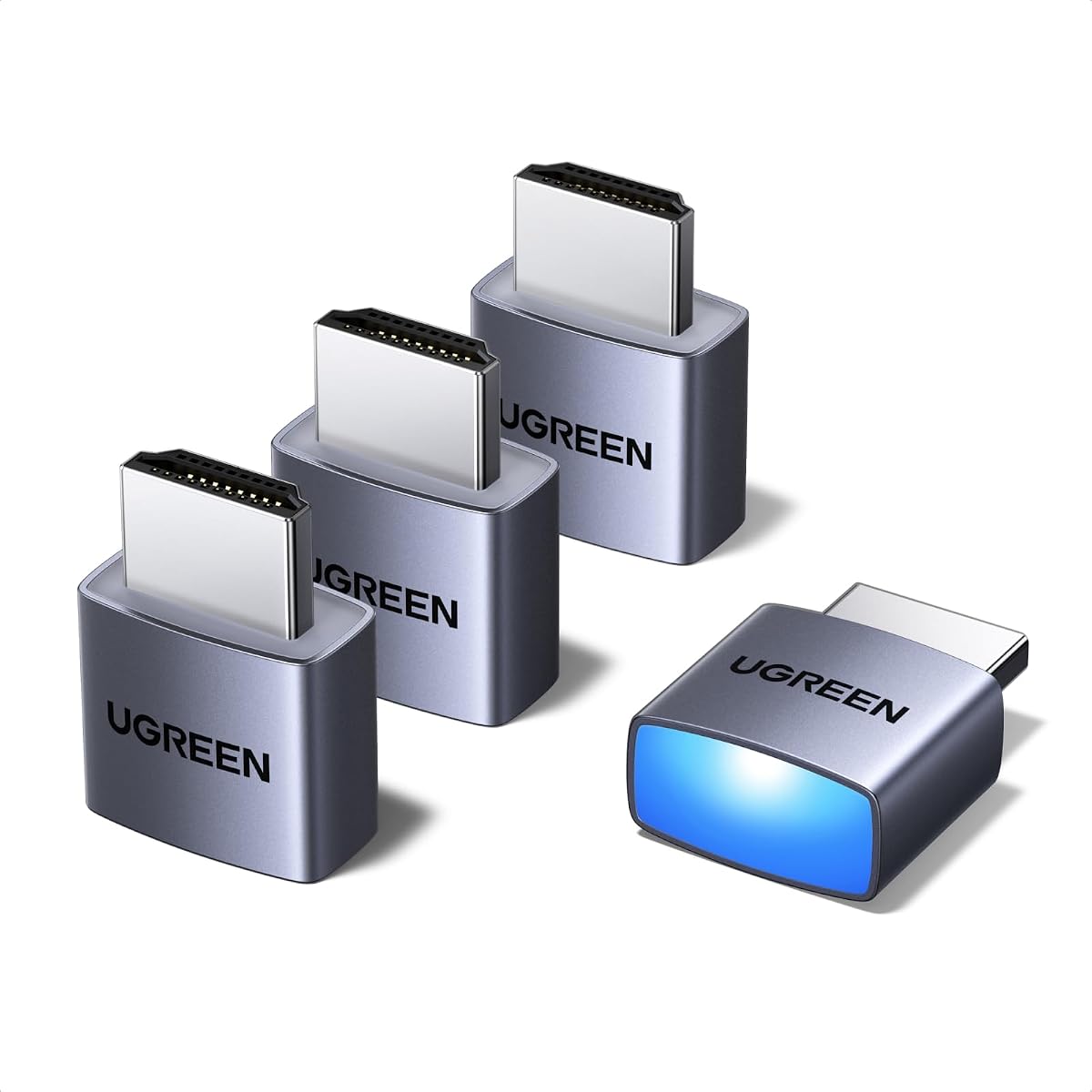
4 Pack HDMI Dummy Plug 4K HDR, Virtual Monitor EDID Emulator 4K@60Hz 2K@60Hz 1080P@120Hz, Virtual Monitor Emulator, HDMI Headless Adapter for Remote PC, Laptop, with Windows Mac OSX Linux
This table compares the key specifications of all ten reviewed models. Use it to quickly identify which dummy plug matches your specific resolution and compatibility requirements.
The UGREEN 4 Pack stands out as our top choice for its balance of performance and reliability. It supports true 4K@60Hz HDR which unlocks full GPU power for remote desktops and mining rigs.
Pros
Excellent 4K support
Durable aluminum shell
Four pack value
Status LED indicator
Stable connection
Cons
Slightly bulkier design
No HDMI 2.1
We may earn a commission when you buy through this link, at no additional cost to you.
Its aluminum shell actively dissipates heat, ensuring long-term stability during 24/7 operations. The status LED provides instant visual confirmation that your GPU remains active and recognized by the system.
While it lacks HDMI 2.1 for 120Hz, the 60Hz output suffices for most professional tasks. The four-pack ensures you can equip multiple servers without needing extra purchases later.
Buy this if you need a stable headless solution for Windows Mac or Linux. It offers the best mix of build quality and performance for general server management and virtual display needs.
Superior Heat Management
The aluminum casing ensures the device stays cool even during intensive tasks like video rendering or cryptocurrency mining.
Status Indicators
An integrated LED light lets you verify connectivity at a glance without needing remote monitoring tools.
4 Pack HDMI Dummy Plug 4K HDR, Virtual Monitor EDID Emulator 4K@60Hz 2K@60Hz 1080P@120Hz, Virtual Monitor Emulator, HDMI Headless Adapter for Remote PC, Laptop, with Windows Mac OSX Linux
4K@60Hz HDR
Aluminum armor
Universal OS compatible
No drivers needed
This four-pack offers incredible value for budget-conscious buyers needing multiple dummy plugs. It delivers 4K@60Hz HDR performance comparable to premium brands but at a fraction of the cost.
Pros
Highest user rating
Excellent price point
Wide resolution support
Solid build quality
Cons
Brand not widely known
Generic packaging
We may earn a commission when you buy through this link, at no additional cost to you.
The aluminum armor ensures durability while maintaining effective heat dissipation. Users report stable connections across diverse environments from home labs to colocation centers.
While the brand is less familiar, its high ratings reflect consistent reliability. The lack of drivers makes it ideal for quick deployments across varied systems without software hassles.
Choose this for large-scale deployments or testing multiple setups. It provides the best performance per dollar for reliable headless operation on Windows Mac or Linux.
Cost Efficiency
The four-pack format lowers the per-unit cost significantly compared to single-pack alternatives.
Versatile Compatibility
Works seamlessly with NVIDIA AMD and Intel GPUs across multiple operating systems without configuration.
This model pushes the boundaries of current virtual display technology with 8K and 120Hz support. It is designed for advanced users who need high frame rates for cloud gaming or VR.
Pros
Supports 8K resolution
120Hz refresh rate
Ideal for streaming
Future-proof design
Cons
Higher price point
Requires HDMI 2.1 GPU
We may earn a commission when you buy through this link, at no additional cost to you.
Built with HDMI 2.1 standards it ensures compatibility with the latest GPUs. The gold-plated connector guarantees a clean signal free from interference during intensive tasks.
While it costs more than standard models the performance justifies the price for specific use cases. It enables smooth streaming to devices like Steam Deck or ROG Ally without frame drops.
Invest in this if you need top-tier resolution for professional workloads. It is the best choice for high-end gaming rigs and next-generation server setups.
High Frame Rate Streaming
Supports 120Hz for buttery smooth remote desktop gaming and VR setups on compatible hardware.
Future-Proof Technology
With 8K support it remains relevant as displays and GPUs advance to higher resolutions.
DTech HDMI Dummy Plug 4K Display Emulator Compatible with Windows Mac OSX Linux (fit-Headless, 3 Pack)
4K@60Hz support
Gold-plated connector
3-pack value
Headless operation
The DTech three-pack is a solid option for users needing reliable 4K performance. It is particularly noted for solving common headless issues on Apple Mac systems.
Pros
Reliable 4K emulation
Solves macOS issues
Compact design
Consistent stability
Cons
Plastic housing only
No status LED
We may earn a commission when you buy through this link, at no additional cost to you.
Its compact design makes it ideal for tight server rack spaces. The gold-plated connector ensures signal integrity even when left plugged in for extended periods.
While it lacks an LED indicator for status checks its stability is widely praised. It offers a dependable balance between price and performance for home labs.
Buy this if you run multiple Mac Minis or need a simple plug-and-play solution. It is a trusted choice for developers and home server enthusiasts.
Mac OS Optimization
Specifically addresses known headless display issues on Apple macOS environments.
Compact Profile
Low profile design allows installation in crowded server racks without obstruction.
This single-pack model focuses on simplicity for basic headless tasks. It ensures your system runs as if a monitor is connected without needing any software.
Pros
Ultra-compact design
Simple setup
No configuration
Low cost
Cons
Fixed 1080p resolution
Basic plastic build
We may earn a commission when you buy through this link, at no additional cost to you.
The low-profile design is great for portable setups or systems with limited clearance. It works immediately upon insertion making it ideal for quick server checks.
While limited to 1080p it fulfills its purpose for general system administration. Users appreciate the 'set and forget' nature of this basic emulator.
Choose this for simple tasks like checking system status remotely. It is a no-fuss solution for older systems or basic office automation needs.
Plug and Play
No drivers or configuration required just insert and the system recognizes the display.
Space Saving
Its tiny size allows installation even in very compact server cases.
This three-pack offers reliable 4K performance for small server deployments. The included two-year warranty provides peace of mind for business users.
Pros
2-year warranty
Gold-plated signal
Cost-effective
Simple use
Cons
Average build quality
Limited support docs
We may earn a commission when you buy through this link, at no additional cost to you.
Its gold-plated interface minimizes signal degradation over time. It is designed for easy hot-swapping which is useful for maintenance without rebooting systems.
While it lacks advanced features its consistent performance makes it a strong contender. Users report stable connections across various Linux and Windows environments.
Select this for small offices needing multiple headless units. It balances essential features with cost efficiency for everyday use.
Warranty Coverage
Includes a two-year unconditional warranty for customer support and product security.
Hot Swap Capable
Allows inserting or removing the device without restarting the host computer.
This five-pack supports refresh rates up to 240Hz making it suitable for gaming and high-speed simulations. The aluminum shell helps manage heat during continuous operation.
Pros
High refresh rates
Five pack value
HDR support
Shielded design
Cons
Mixed build quality
No clear brand
We may earn a commission when you buy through this link, at no additional cost to you.
Users appreciate the flexibility to switch between resolutions via OS settings. The copper board construction is designed to reduce electromagnetic interference for stable signals.
However some users note variability in individual unit quality. It remains a budget-friendly option for those needing many high-refresh adapters.
Pick this for gaming labs or high-speed data rendering needs. It provides essential high-performance features at an affordable price point.
High Refresh Support
Supports up to 240Hz for smooth motion in virtualized gaming environments.
EMI Protection
Enhanced electromagnetic shielding prevents signal drops in noisy electrical environments.
This model brings HDMI 2.1 capabilities to virtual displays unlocking 120Hz at 4K for cloud gaming. It is specifically optimized for Moonlight streaming setups.
Pros
HDMI 2.1 standard
120Hz refresh rate
Moonlight optimized
Gold connectors
Cons
Windows 11 limited
Higher price
We may earn a commission when you buy through this link, at no additional cost to you.
The gold-plated connectors ensure reliable signal transmission even under heavy loads. It works well for VR setups requiring high refresh rates for immersion.
Note that Windows 11 may restrict some features to 60Hz. It is best suited for systems where high bandwidth is crucial for performance.
Invest in this if you stream to Steam Deck or ROG Ally. It offers the bandwidth necessary for lag-free remote gaming experiences.
Moonlight Streaming
Optimized for Moonlight clients to enable smooth game streaming on portable devices.
Bandwidth Capacity
HDMI 2.1 provides the necessary bandwidth for high-resolution high-frame-rate output.
This eight-pack provides a massive quantity for large-scale server farms. It supports 1440p as default which is a good balance for many virtual monitors.
Pros
Eight pack quantity
High refresh support
Stable build
Cost efficient
Cons
Inconsistent units
Bulk packaging
We may earn a commission when you buy through this link, at no additional cost to you.
The aluminum shells help prevent overheating in densely packed racks. Users report stable performance for rendering tasks and remote management tools.
Quality control may vary across all eight units in the pack. It is a budget choice for those who need many adapters and can test individually.
Choose this for enterprise environments needing bulk deployment. It is an economical solution for large data centers and IT departments.
Volume Deployment
Provides eight units ideal for outfitting multiple servers in a single purchase.
Heat Resistance
Aluminum shells help dissipate heat in tightly packed rack environments.
This five-pack defaults to 2160p which is ideal for high-resolution remote desktops. The aluminum shell provides durability and heat resistance for continuous use.
Pros
High default resolution
Five pack value
Shielded design
Reliable
Cons
Default settings vary
Price per unit
We may earn a commission when you buy through this link, at no additional cost to you.
The EMI shielding ensures clean signals even in electrically noisy environments. It supports HDR which enhances color accuracy for media preview tasks.
While effective it requires proper OS configuration to utilize full resolution. Users find it reliable for professional rendering workflows.
Select this for high-fidelity virtual displays needing resolution fidelity. It balances quality and quantity for mid-scale server deployments.
High Default Resolution
Defaults to 2160p offering clear visuals for remote professional workflows.
Signal Purity
Enhanced shielding ensures stable connections without electromagnetic interference.
We may earn a commission when you buy through this link, at no additional cost to you.
Buying Guide – How to Choose the Best HDMI Dummy Plug
Choosing the right dummy plug depends on your resolution needs, hardware support, and deployment scale. This guide breaks down key factors to help you make an informed decision.
Resolution Support
Ensure the plug supports your GPU's maximum output. Most modern plugs handle 4K@60Hz which is sufficient for most tasks. For high-refresh gaming, look for models supporting 120Hz or higher.
Check if the default resolution matches your remote needs. Some models default to 1080p while others start at 1440p or 2160p.
Build Quality
Aluminum shells are preferred over plastic as they dissipate heat better. This is critical for 24/7 mining or server operations where overheating can cause instability.
Gold-plated connectors prevent corrosion and ensure reliable signal transmission over time. Look for units with sturdy construction.
Operating System Compatibility
Most plugs work across Windows, macOS, and Linux. However macOS sometimes needs specific emulators to detect virtual displays correctly. Check compatibility lists before buying.
Verify support for remote tools like RDP, VNC, or Parsec. Some plugins offer better performance for specific streaming applications.
Package Quantity
Bulk packs like 3, 4, or 5 units often offer better value. They are ideal for server farms or home labs with multiple machines.
Single units might suffice for temporary testing. Consider your total deployment size before purchasing to save on long-term costs.
HDMI Version
HDMI 2.0 supports 4K@60Hz. HDMI 2.1 allows for higher refresh rates and bandwidth. Ensure your GPU supports the version you need for 120Hz.
Older HDMI 1.4 plugs are cheaper but may not unlock full GPU power. Match the version to your hardware capabilities.
Status Indicators
LED lights indicate connection status. This is useful for verifying if the GPU is active without remote access. It adds convenience for physical checks.
Some models lack LEDs to keep costs low. Decide if visual feedback is necessary for your use case.
Warranty and Support
Look for products with at least a one-year warranty. Some brands offer two years which shows confidence in durability. Check support contact options.
Quality support helps if you face compatibility issues. Reputable brands often provide clearer documentation.
Heat Management
Passive cooling via aluminum is standard. Active cooling is rare but useful for mining rigs. Ensure the design allows airflow around the device.
Overheating leads to disconnections. Prioritize units with proven heat dissipation features for continuous tasks.
How to Use and Care for Your HDMI Dummy Plug
Insert the dummy plug into the HDMI port of your computer. Ensure it is fully seated to guarantee connection detection. The device does not need external power.
Configure display settings in your OS to match the desired resolution. Most systems will recognize the virtual screen immediately. Restart if changes do not apply.
Keep the plug clean from dust and debris. Avoid bending the HDMI connector. Store it in a dry place when not in use to prevent corrosion.
Frequently Asked Questions
Do HDMI dummy plugs work with Mac?
Yes, many dummy plugs work with Mac but some need specific emulators. Apple systems sometimes have trouble detecting headless displays without additional software. Check macOS compatibility before purchase.
Will a dummy plug affect gaming performance?
No, it prevents GPU sleep mode which can actually improve gaming performance. It allows hardware acceleration to remain active for smoother graphics and higher frame rates.
Can I use a dummy plug for mining?
Yes, mining rigs often need dummy plugs to keep the GPU enabled. Without it, the GPU may reduce performance or stop processing when no monitor is detected.
Do I need drivers for a dummy plug?
Most dummy plugs are plug-and-play requiring no drivers. They emulate a standard monitor that your OS recognizes automatically. No software installation is needed.
What is the difference between 4K and 1080p plugs?
4K plugs support higher resolutions and unlock more GPU bandwidth. 1080p plugs are cheaper but may limit your display settings. Choose based on your maximum resolution needs.
Do dummy plugs consume power?
They consume negligible power as they are passive devices. They draw minimal energy from the HDMI port itself. This makes them ideal for energy-efficient setups.
Can I use them for VR?
Yes, they work for VR headsets that use HDMI to transmit video. They help maintain high refresh rates needed for smooth VR rendering. Check VR compatibility.
Why does my screen flicker with a dummy plug?
Flickering usually means a bad connection or wrong resolution setting. Ensure the plug is fully inserted and the display settings match the plug's supported resolutions.
Final Thoughts on Choosing the Best HDMI Dummy Plug
The UGREEN 4 Pack stands out as our top pick for its reliability and heat management. It offers 4K support perfect for general remote work and gaming streaming.
If you need high performance, consider the 8K 120Hz HDMI 2.1 model. For budget needs, the four-pack generic models provide excellent value at low prices.
Prices and availability change frequently. Always check current listings and confirm compatibility before finalizing your purchase.
This guide compares the top 10 handheld GPS devices for boating based on durability, chart support, satellite accuracy, battery life, and marine features.