
GIGABYTE B650 Eagle AX
4.6Editor score
Cost Effective Pricing
Solid VRM Solution
Wi-Fi 6E Included
This guide compares the top ten Gigabyte Motherboard models across AMD and Intel platforms to help you find the right fit for your build needs today.
Choosing the right motherboard is essential for any computer build because it connects all components and determines system stability. A good Gigabyte Motherboard offers reliable power delivery, modern connectivity, and robust thermal solutions for demanding workloads.
We compared ten leading models from the latest AMD and Intel chipsets focusing on performance features and value. This list covers boards for gaming, productivity, and enthusiast builds with detailed analysis of specs and user ratings.
Each pick highlights unique strengths like VRM quality, expansion slots, or onboard networking capabilities. Please note that prices change frequently so check current listings before purchasing to ensure you get the best deal available.
4.6Editor score

4.4Editor score

4.2Editor score
This table provides a side-by-side look at all ten featured models highlighting their core specifications and key selling points to help you decide which Gigabyte Motherboard fits your needs best.



The B650 AORUS Elite AX stands out as a balanced choice for AMD builds. It holds a 4.4 user rating and delivers excellent power delivery for Ryzen 7000 and newer chips.
We may earn a commission when you buy through this link, at no additional cost to you.
Its 14+2+1 phase VRM ensures stable performance under load while the 6mm heatpipe keeps VRM temps low. PCIe 5.0 M.2 support future proofs storage choices.
While it is pricier than basic boards the feature set justifies the cost with Wi-Fi 6E and USB-C rear ports. Some may want more RGB zones but functionality takes priority.
Ideal for users wanting a reliable platform for gaming or productivity without overspending on extreme features. It is our top pick for most AMD AM5 builders today.
The VRM design handles high core count CPUs efficiently ensuring consistent boosts without thermal throttling during intensive tasks or gaming sessions.
With PCIe 5.0 M.2 and USB-C Gen 2 this board supports next gen SSDs and peripherals without needing additional adapter cards.
We may earn a commission when you buy through this link, at no additional cost to you.
The X870 AORUS Elite WIFI7 pushes AMD AM5 capabilities further with newer standards. It carries a 4.5 rating and offers exceptional connectivity for enthusiasts.
We may earn a commission when you buy through this link, at no additional cost to you.
Features like Wi-Fi 7 and USB4 provide bandwidths that match high speed networking and peripheral needs. The 16+2+2 VRM ensures overclocking stability.
The main trade off is the premium price point which limits appeal for budget builds. Users also need a compatible Ryzen 9000 or 8000 series CPU.
This board is perfect for those needing maximum throughput and future proofing in a single package. It represents the cutting edge of Gigabyte AM5 offerings.
Wi-Fi 7 offers significantly lower latency and higher throughput ideal for cloud gaming and large file transfers over wireless connections.
Four M.2 slots allow massive SSD capacity directly on the motherboard without sacrificing PCI slots for expansion cards.
We may earn a commission when you buy through this link, at no additional cost to you.
The X870E AORUS PRO ICE brings the same high end specs as the Elite in a striking white design. It rates 4.4 and is a top choice for aesthetic focused builders.
We may earn a commission when you buy through this link, at no additional cost to you.
It matches the Elite with USB4 and Wi-Fi 7 while the white PCB makes it easy to build clean rigs without hidden cables or mismatched parts.
The premium pricing reflects both the feature set and the special finish. Availability can be sporadic compared to standard dark boards in this class.
Recommended for users wanting a unified look for their build with zero compromises on performance or connectivity. It is the best white board in this lineup.
The white color scheme simplifies cable management and component matching making it easier to create a polished professional looking system.
Even with the special finish you get full access to high speed USB4 and Wi-Fi 7 ensuring no features are cut for style.
We may earn a commission when you buy through this link, at no additional cost to you.
The Z890 AORUS Master leads the Intel Core Ultra lineup with unmatched connectivity options. It holds a 4.2 rating and is built for workstation level tasks.
We may earn a commission when you buy through this link, at no additional cost to you.
Dual Thunderbolt 4 and 10GbE LAN allow fast external storage and network speeds directly from the motherboard. The VRM supports heavy multi core workloads easily.
Cost is the main barrier as this board is priced for enthusiasts and professionals. The new CPU socket also limits current compatibility to the latest series.
This is the definitive choice for power users needing maximum I/O and overclocking headroom. It delivers flagship features for the latest Intel platform.
Thunderbolt 4 provides up to 40Gbps throughput enabling fast data transfer and support for multiple high resolution monitors seamlessly.
10GbE LAN allows gigabit class speeds over local networks ideal for NAS setups or content delivery workflows on desktop.
We may earn a commission when you buy through this link, at no additional cost to you.
The B650 Eagle AX offers the best value for new AMD AM5 builds. It holds a strong 4.6 user rating and includes essential features without the premium markup.
We may earn a commission when you buy through this link, at no additional cost to you.
Its 12+2+2 VRM is sufficient for most Ryzen CPUs while the three M.2 slots provide ample storage options. Wi-Fi 6E ensures fast wireless performance.
Some users may find the USB rear panel limited compared to costlier boards. Aesthetics are functional rather than flashy but that keeps costs down.
This is the ideal pick for budget builders wanting modern DDR5 and PCIe 5.0 features. It balances cost and capability better than any other board on this list.
This board makes the latest AMD platform accessible without cutting critical features like Wi-Fi or M.2 expansion slots.
Stable performance and good thermals make this board reliable for everyday use without needing constant tweaking.
We may earn a commission when you buy through this link, at no additional cost to you.
The B550 AORUS Elite AX V2 is a reliable choice for those keeping or upgrading on AM4. It has a 4.5 rating and delivers strong performance for older Ryzen chips.
We may earn a commission when you buy through this link, at no additional cost to you.
Its 12+2 VRM handles Ryzen 5000 series well while Wi-Fi 6 keeps wireless up to date. Q-Flash Plus allows BIOS updates without CPU installation.
DDR4 is a limitation as it lacks DDR5 support but memory costs are lower. The platform is mature and stable for general use cases.
This board is best for budget builds or those refreshing an existing AM4 system. It offers great value for the price within the AM4 ecosystem.
Q-Flash Plus lets you update firmware using just a USB drive ensuring CPU compatibility even before installing parts.
2.5GbE LAN provides faster wired speeds than standard Gigabit which is useful for NAS or high speed local transfers.
We may earn a commission when you buy through this link, at no additional cost to you.
The Z790 Eagle AX is a dependable board for Intel 14th gen CPUs. It rates 4.4 and provides a good balance of features for gamers and creators.
We may earn a commission when you buy through this link, at no additional cost to you.
Its 12+1+1 VRM is stable for daily use while Wi-Fi 6E keeps connectivity modern. PCIe 5.0 support ensures long term storage compatibility.
The VRM is not designed for extreme overclocking which limits it for high end Core i9 chips. Aesthetics are simple compared to AORUS models.
This board is ideal for mid range Intel builds needing DDR5 and reliable connectivity. It offers strong performance for the price without unnecessary extras.
DDR5 support allows faster data rates and future proofing for next gen applications and workloads.
EZ-Latch mechanisms simplify GPU and storage swaps making it easier to maintain or upgrade your system over time.
We may earn a commission when you buy through this link, at no additional cost to you.
The Z790 AORUS Elite AX refines the Eagle AX with more slots and power. It holds a 4.4 rating and is great for multi SSD setups.
We may earn a commission when you buy through this link, at no additional cost to you.
Its 16+1+2 VRM supports heavy loads while four M.2 slots allow massive local storage. Thermal guards help maintain SSD performance over time.
The board is more expensive than the Eagle and BIOS settings can be complex for beginners. However the feature set justifies the price for enthusiasts.
This board suits users needing multiple drives and reliable power for Intel Core i7 or i9 chips. It is a strong contender for high capacity builds.
Four M.2 slots mean you can install multiple fast drives without needing PCIe adapters or slowing down other slots.
Dedicated guards on M.2 slots help dissipate heat keeping SSDs running at peak speeds during long transfers.
We may earn a commission when you buy through this link, at no additional cost to you.
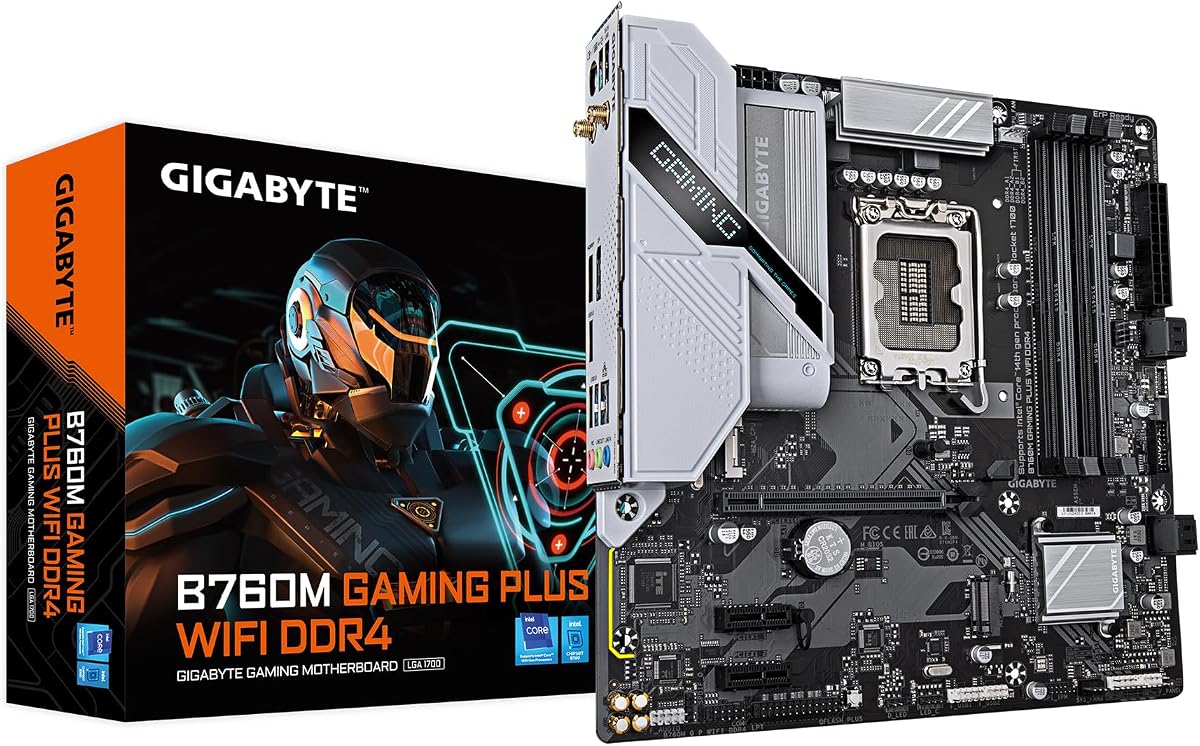
The B760M Gaming Plus WiFi offers a compact solution for Intel builds on a budget. It rates 4.3 and fits well in small cases without Wi-Fi.
We may earn a commission when you buy through this link, at no additional cost to you.
Its hybrid power design works well for i5 chips but lacks headroom for i7 or i9. DDR4 keeps memory costs down compared to DDR5 options.
The M-ATX size limits future expansion options which may matter for users planning to add many cards later. Front USB-C is a nice touch.
This board is perfect for small form factor builds needing basic Wi-Fi and solid daily performance. It is a smart choice for cost conscious builders.
M-ATX format allows smaller cases which reduces desk space usage and keeps the system portable.
Q-Flash Plus ensures BIOS updates are simple even without a CPU installed reducing setup risks.
We may earn a commission when you buy through this link, at no additional cost to you.
The B550 Gaming X V2 delivers essential features at a very low cost. It holds a 4.5 rating and is ideal for strict budget constraints.
We may earn a commission when you buy through this link, at no additional cost to you.
Its 10+3 VRM provides reliable power for most Ryzen 5000 CPUs. The lack of onboard Wi-Fi is offset by the affordable price point.
Basic audio and no Wi-Fi mean you may need add on cards for some features. However these trade offs make it one of the cheapest AM4 options.
This board is best for users willing to add a USB Wi-Fi adapter to save money. It is a smart value pick for tight budgets.
Low price leaves room for better CPU or GPU upgrades within the same total system budget.
Front USB-C allows modern case connectivity while adding Wi-Fi via USB keeps costs low.
We may earn a commission when you buy through this link, at no additional cost to you.
Selecting the right motherboard requires balancing platform needs, budget, and desired features. This guide breaks down key factors to consider.
First verify socket compatibility. AMD AM5 boards support Ryzen 9000/8000/7000 series while Intel LGA 1700 supports 14th/13th/12th Gen. LGA 1851 is for Core Ultra. Matching the board to your CPU is mandatory.
Always check manufacturer compatibility lists before buying.
Most newer boards use DDR5 which offers higher bandwidth. Older AM4 or budget boards may use DDR4. Ensure the RAM you want matches the board support to avoid compatibility issues.
Choose DDR5 for new builds to future proof performance.
The VRM (Voltage Regulator Module) supplies power to the CPU. Higher phase counts like 16+2+2 handle high end CPUs better. For Ryzen 9 or i9 chips look for stronger VRMs to avoid throttling.
Select a VRM rating that matches your CPU's power needs.
Check M.2 slot count and PCIe generation. PCIe 5.0 M.2 offers highest speeds but costs more. Most boards offer at least two M.2 slots. Consider how many drives you need now and later.
Prioritize enough M.2 slots for your storage plan.
Built-in Wi-Fi saves space and adapters. Wi-Fi 6E and Wi-Fi 7 are fastest. Wired LAN speed (GbE vs 2.5GbE vs 10GbE) affects local transfers. Choose based on your network speed.
Look for 2.5GbE or higher if you use fast NAS.
Count USB types and numbers. Front USB-C ports on boards allow easy case access. Ensure enough USB-A and USB-C ports for your peripherals. Some boards have limited rear ports.
Verify rear I/O matches your peripheral needs.
M.2 Thermal Guards prevent SSD throttling. VRM heatsinks with heatpipes keep power delivery cool. Boards with better thermal designs sustain performance longer under load. Check reviews for thermals.
Stronger heatsinks help with overclocking or heavy workloads.
Q-Flash Plus allows updates without CPU install. RGB Fusion syncs lighting. BIOS interface quality matters for tuning. Check warranty length too. Some boards offer 5 year coverage.
Prioritize Q-Flash Plus if you plan future CPU upgrades.
Install the motherboard carefully using standoff screws to prevent shorts. Connect power cables for CPU and GPU correctly and ensure all SATA and front panel wires are seated.
Update the BIOS immediately upon setup for better compatibility and security. Use Q-Flash if available for easy updates. Check Gigabyte support for latest versions.
Keep the system ventilated and clean dust from heatsinks regularly. Monitor VRM and CPU temps in BIOS to ensure thermals stay stable. Avoid overclocking beyond recommended specs.
For AMD Ryzen 9000 series the B650 AORUS Elite AX is recommended for most users. It offers strong VRM power and PCIe 5.0 support. Enthusiasts can consider the X870 models for newer standards.
Yes the Gigabyte B650 Eagle AX includes built-in Wi-Fi 6E. This allows fast wireless connections without needing a separate adapter card. It also includes Ethernet for wired setups.
No DDR5 is only supported on newer boards like AM5 or Intel 700 series. Older AM4 boards use DDR4. To upgrade to DDR5 you must replace both the motherboard and RAM.
Z790 supports 12th-14th Gen Intel CPUs on LGA 1700. Z890 supports Core Ultra (Series 2) on LGA 1851. Z890 offers newer Thunderbolt and Wi-Fi standards but requires a newer CPU.
Not all boards include Wi-Fi. Models with AX in the title usually have Wi-Fi. Non AX models may lack Wi-Fi so check the specs carefully. You may need a USB or PCIe adapter if not included.
Q-Flash Plus is found on many AORUS and some budget boards. It lets you update BIOS with a USB stick without CPU. Check the product page to confirm if your specific model has this feature.
For small cases look at the B760M Gaming Plus WiFi which is M-ATX. It is compact and still has Wi-Fi. ATX boards are too large for mini ITX or mATX cases unless the case supports them.
Check the board size in the title. ATX fits most full towers and mid towers. M-ATX fits most mid towers and smaller. Mini ITX fits all but is limited on slots. Match board to case support.
We reviewed ten top models including the B650 AORUS Elite AX as our top pick and the B650 Eagle AX as best budget. Each offers unique strengths depending on your CPU and needs.
Prioritize platform compatibility VRM quality and expansion slots for long term value. Ensure Wi-Fi and port needs match your daily setup. Consider thermals for heavy usage scenarios.
Prices change often so check current listings before buying. Visit the links in this guide for up to date details. You will find the right Gigabyte Motherboard with careful planning.