
SteelSeries Nimbus+ Bluetooth Mobile Gaming Controller with iPhone Mount, 50+ Hour Battery Life, Apple Licensed, Made for iOS, iPadOS, tvOS
4.0Editor score
Official Apple License
50+ Hour Battery Life
Clicker Joysticks Included
This guide compares the top gaming controllers for Apple TV, evaluating compatibility, battery life, and features to help you choose the best wireless gamepad
Finding the right gaming controller for Apple TV can transform your living room into an immersive gaming hub. With so many options available, selecting a device that offers seamless connectivity and responsive controls is essential for an enjoyable experience.
We compared ten top-rated controllers based on Bluetooth compatibility, battery longevity, button layout, and motion control features. Each product was analyzed for its ability to pair reliably with tvOS and deliver precise input during intense gaming sessions.
Every pick highlights unique strengths such as programmable macros, Hall Effect joysticks, or official Apple licensing. Note that product availability and specific feature support may vary, so check current listings before making your final decision for your Apple TV setup.
4.0Editor score

4.7Editor score

4.4Editor score
The following table provides a side-by-side comparison of all ten controllers evaluated in this guide. Review the key specifications and features to quickly identify which model aligns best with your gaming preferences and Apple TV requirements.
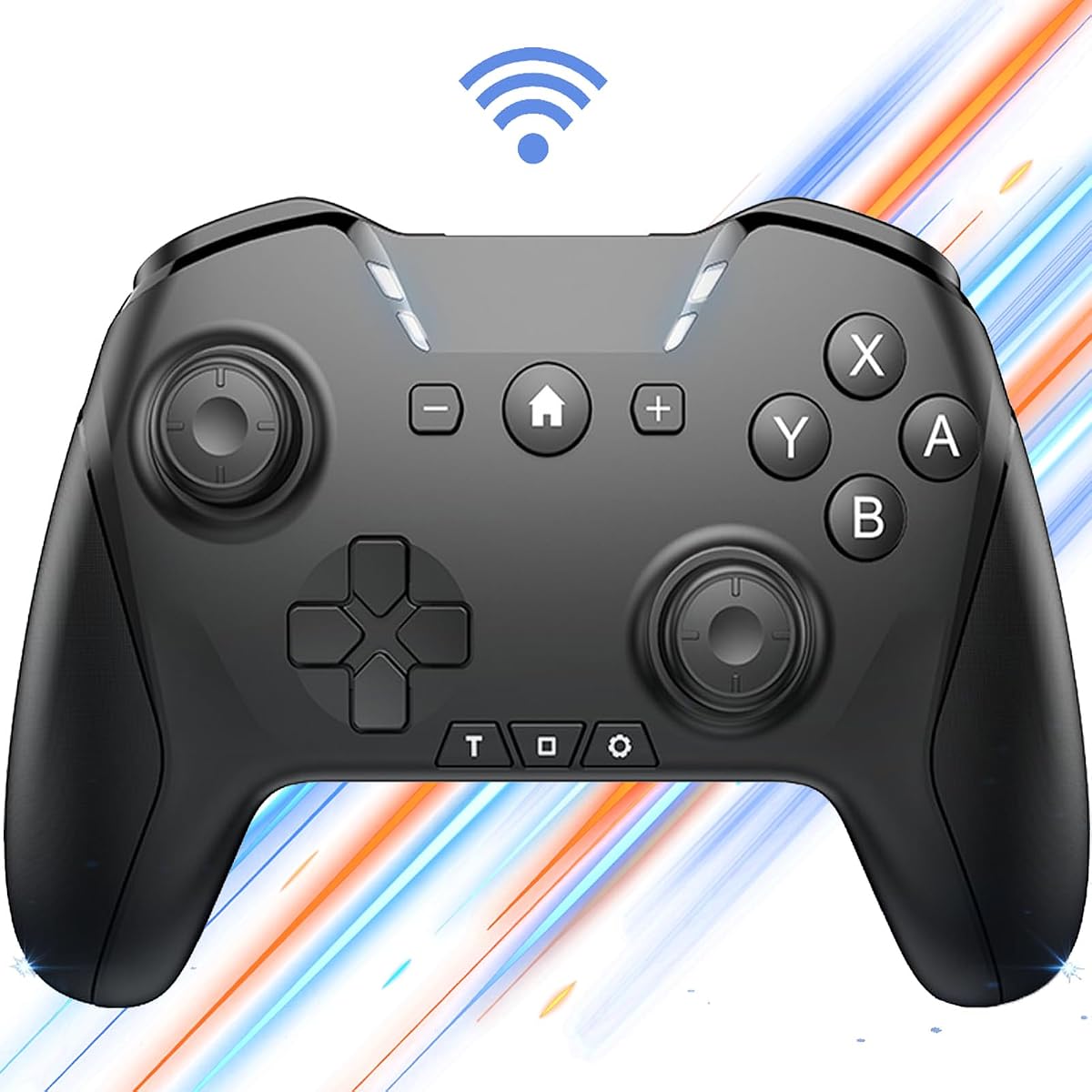

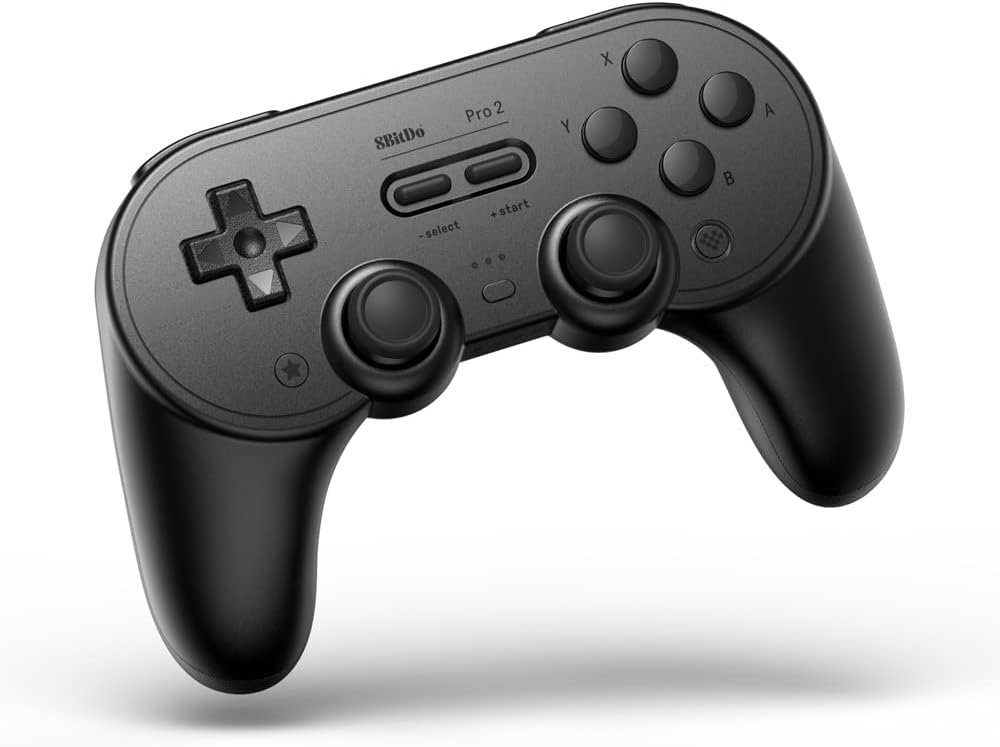


The 8BitDo SN30 Pro stands out as the top choice for Apple TV gamers seeking a blend of classic design and modern performance. With an impressive 4.7 rating, this controller delivers precision through Hall Effect joysticks that eliminate stick drift issues common in other models.
We may earn a commission when you buy through this link, at no additional cost to you.
Its official support for Apple TV ensures seamless pairing and reliable performance during cloud gaming sessions. The full button set includes clickable joysticks and motion controls, making it versatile for both retro emulation and modern titles streamed to your TV.
While the compact size is excellent for portability, users with larger hands might find the grip less comfortable during extended sessions. Additionally, it lacks a built-in mount for mobile devices, which limits its utility outside the living room.
Overall, this controller is ideal for retro enthusiasts and casual gamers who prioritize accuracy and style. Its robust build and extensive compatibility make it a strong investment for enhancing your Apple TV gaming experience.
Hall Effect joysticks use magnetic sensors to detect movement, ensuring long-term accuracy without physical wear.
The SN30 Pro combines a classic SNES-style layout with modern wireless tech, appealing to nostalgia-driven gamers.
We may earn a commission when you buy through this link, at no additional cost to you.
The SteelSeries Nimbus+ is a premium option designed specifically for the Apple ecosystem, offering an official license that guarantees optimal performance with Apple TV. Its standout feature is the massive 50+ hour battery life, allowing for weeks of gaming on a single charge.
We may earn a commission when you buy through this link, at no additional cost to you.
Players appreciate the tactile D-pad and clickable joysticks, which provide more input options for complex games. The included phone mount adds versatility for mobile gaming, though the primary focus remains on console and TV experiences.
The main drawback is the need to update the controller via SteelSeries Engine for full compatibility, which adds a setup step. Additionally, the price is higher than budget alternatives, though the quality and battery life justify the investment for serious users.
If you prioritize seamless integration with your Apple devices and long play sessions, the Nimbus+ is a top-tier choice. Its premium build and certified status make it a reliable centerpiece for your gaming setup.
Official licensing ensures the controller works flawlessly with tvOS and iOS games without compatibility issues.
With over 50 hours of playtime, you can game for weeks without needing to recharge, reducing interruptions.
We may earn a commission when you buy through this link, at no additional cost to you.
The VOYEE Switch Controller offers an excellent entry point for Apple TV gamers on a budget. Boasting a 4.4 rating, it includes features typically found in more expensive models, such as programmable buttons and a 6-axis gyro for motion controls.
We may earn a commission when you buy through this link, at no additional cost to you.
Its RGB lighting modes add a fun aesthetic to your setup, and the one-key wake up feature simplifies accessing your Switch or TV quickly. The 10-15 hour battery life is sufficient for casual gaming sessions without frequent recharging.
The lack of an official Apple license means users may need to verify compatibility with specific tvOS titles. Additionally, keeping RGB lights on can reduce battery efficiency, so disabling them is recommended for longer play.
For gamers looking for value without sacrificing essential features, this controller is a strong contender. It delivers solid performance and extra customization options at a price that is hard to beat.
Programmable M1/M2 keys and turbo settings allow you to map complex actions to single button presses.
With four LED light modes including RGB strobe, you can match the controller to your room's lighting.
We may earn a commission when you buy through this link, at no additional cost to you.
This versatile Switch Pro Controller is designed for gamers who switch between multiple devices, including Apple TV. With a 4.0 rating, it offers robust features like macro programming and wake-up functionality that simplify repetitive tasks and console access.
We may earn a commission when you buy through this link, at no additional cost to you.
The 650mAh battery supports up to 15 hours of gameplay, and the USB-C charging ensures you can play while plugged in. Adjustable turbo and 6-axis gyro controls add depth to your gameplay, suitable for action and racing titles.
Users may find the extensive customization options overwhelming at first, as they require following a specific manual to set up correctly. The interface for programming macros is not as intuitive as dedicated software found in premium brands.
Despite the learning curve, this controller provides significant value for those who need flexibility and advanced features. Its ability to handle multiple platforms makes it a practical choice for diverse gaming environments.
Program loops of up to 30 seconds to automate grinding tasks, saving time and effort during gameplay.
Compatible with Apple TV, Switch, and PC, this controller adapts to your needs across different gaming hubs.
We may earn a commission when you buy through this link, at no additional cost to you.
The renewed version of the SteelSeries Nimbus+ offers access to premium features at a reduced cost. While the rating is lower at 3.6, this reflects variability in used condition rather than design flaws, with many units performing well after inspection.
We may earn a commission when you buy through this link, at no additional cost to you.
It maintains the key benefits of the original model, including wireless connectivity and rechargeable power. Certified renewals undergo testing to ensure they meet quality standards, providing a reliable alternative for budget-conscious Apple TV owners.
Potential buyers should note that battery health may vary compared to brand new units, though Amazon's renewed standards aim to mitigate this. It is an excellent option for those willing to accept slight variability for significant savings.
If you prioritize value and trust certified refurbishment processes, this controller is a smart choice. It delivers the same core functionality as the new model with added financial flexibility for your setup.
Professionally inspected and tested units offer significant savings while maintaining reliable gaming performance standards.
Choosing a renewed product helps reduce electronic waste by extending the lifecycle of high-quality hardware.
We may earn a commission when you buy through this link, at no additional cost to you.
The 8BitDo Pro 2 is a top-tier controller designed for professionals and enthusiasts who demand high performance. With a 4.5 rating, it offers dual back buttons and custom profile switching, which provide competitive advantages in complex games.
We may earn a commission when you buy through this link, at no additional cost to you.
Official support for Apple TV ensures seamless integration, while the 20-hour battery life supports extended gaming marathons. The premium build quality and ergonomic grip make it comfortable for long sessions without causing hand fatigue.
It is heavier than compact alternatives, which may affect portability. Additionally, the price point is higher, reflecting its advanced features and build quality. However, serious gamers will find the value in its performance.
Ideal for competitive players, the Pro 2 balances performance and durability effectively. Its feature set makes it a powerful tool for mastering challenging games on Apple TV and other platforms.
Two rear triggers allow you to map actions like jump or reload to fingers not on the main buttons.
Toggle between different control layouts instantly for different games without needing to reconfigure settings.
We may earn a commission when you buy through this link, at no additional cost to you.
This standard SteelSeries Nimbus+ remains a solid choice for users seeking a reliable accessory directly aligned with the Apple ecosystem. With a 4.1 rating, it delivers the core experience of wireless freedom and premium build quality expected from the brand.
We may earn a commission when you buy through this link, at no additional cost to you.
It integrates seamlessly with Apple TV and iOS devices, offering a consistent and intuitive gaming experience. The rechargeable battery ensures you are not tethered by cables, while the grip is designed for comfort during regular use.
Compared to newer or renewed models, it may lack specific upgrades like extra-long battery life. The price reflects the brand's market position, which can be higher than generic alternatives for similar functionality.
For those who value brand trust and ecosystem harmony, this controller provides a safe and effective solution. It is a dependable option for casual gamers who prioritize simplicity and reliability.
Designed as a 'Made for iOS' device, it ensures maximum compatibility and stability within Apple's platform.
SteelSeries is known for durable hardware, ensuring the controller withstands regular gaming sessions over time.
We may earn a commission when you buy through this link, at no additional cost to you.
The AceGamer Aurora II is a robust controller tailored for users needing stability and longevity. Featuring a 1000mAh battery, it outlasts many competitors, ensuring you can play for extended periods without interruption. Hall Effect joysticks add precision to your movements.
We may earn a commission when you buy through this link, at no additional cost to you.
Its 2.4G wireless transmission minimizes interference, providing a stable signal for smooth gameplay. The programmable back buttons offer additional control options for complex games. However, the pairing process involves specific steps that might be confusing initially.
It does not support Xbox systems, which limits its cross-platform versatility. The technical features are impressive, but the user manual is critical for mastering the connection and customization capabilities effectively.
For those seeking a durable and accurate controller with strong battery performance, the Aurora II is a compelling choice. It balances high-end features with competitive pricing for the average consumer.
The 1000mAh battery provides an extra-long playtime, reducing the need for frequent recharges during extended sessions.
Hall Effect sensors ensure precise joystick tracking without drift, crucial for aiming and navigation in games.
We may earn a commission when you buy through this link, at no additional cost to you.
The Official Luna Wireless Controller is designed primarily for cloud gaming, offering unique features like seamless screen switching. With a 4.4 rating, it integrates directly with Amazon's Luna service, providing low-latency gameplay via Cloud Direct technology.
We may earn a commission when you buy through this link, at no additional cost to you.
It supports multiple devices, including iOS and Fire TV, allowing you to continue games across screens. Bluetooth connectivity ensures it works as a standard controller on various compatible systems, adding versatility to its specialized functions.
Because it is optimized for Luna, its performance on non-Amazon platforms is functional but not as refined. Users not heavily invested in cloud gaming may find the specialized features less useful than standard controllers.
This controller is best for frequent Luna users who want a seamless experience. For general Apple TV gaming, it serves well, but its full potential is realized within the Amazon ecosystem.
Pause a game on one device and resume on another instantly, providing flexibility for multitasking gamers.
Direct connection to game servers minimizes input delay, ensuring responsive controls even in cloud scenarios.
We may earn a commission when you buy through this link, at no additional cost to you.
The GMBACK Switch 2 Pro Controller is a feature-rich option for gamers who enjoy customization. With a 4.1 rating, it offers loop macros that automate repetitive actions and a home wake-up function that simplifies console access.
We may earn a commission when you buy through this link, at no additional cost to you.
Its 800mAh battery supports 15-20 hours of gameplay, and the 6-axis gyro enables precise motion controls. The remappable buttons and RGB lighting add a personal touch to your setup, making it visually and functionally appealing.
Setting up macros requires following specific instructions, which can be time-consuming for new users. The device is packed with features, but ensuring you utilize them effectively depends on your willingness to experiment with settings.
Ideal for tech-savvy gamers, this controller provides extensive control options. It is a strong choice for those who want a blend of modern aesthetics and practical automation features for their gaming sessions.
Record and loop button sequences to automate repetitive tasks, saving time during farming or grinding phases.
Press the home button to wake your device directly from sleep, reducing the steps needed to start playing.
We may earn a commission when you buy through this link, at no additional cost to you.
Selecting the right controller involves assessing connectivity, battery life, button layout, and additional features like motion controls or programmable inputs.
Ensure the controller supports standard Bluetooth Low Energy protocols for seamless pairing with tvOS. Official Apple-licensed controllers guarantee optimal performance and driver support.
Look for models with easy pairing modes and reliable connection stability to avoid interruptions during gameplay.
A long battery life minimizes interruptions, allowing you to play for hours without needing to recharge. Models with 10+ hours of playtime are generally preferred for casual use.
Rechargeable batteries with USB-C charging are standard; check charging times to understand how quickly you can get back to gaming.
The physical layout should feel natural, with accessible triggers, D-pads, and joysticks. Ergonomic shapes prevent hand fatigue during extended sessions.
Consider if you need extra buttons like back paddles or customizable triggers for competitive games.
6-axis gyro sensors enable motion-based controls, which are essential for certain games that require aiming or steering via movement.
Check if motion controls are supported on Apple TV for the games you intend to play to ensure functionality.
If you use multiple consoles or devices, a controller that works across PC, Switch, and iOS offers better value and flexibility.
Verify that the model supports seamless switching between platforms without requiring hardware resets.
Macro capabilities allow you to automate repetitive inputs, which is useful for grinding or complex combos in games.
Evaluate if the setup for macros is user-friendly and accessible through hardware buttons or software.
High-quality materials and durable switches extend the lifespan of the controller. Look for models with strong reputations for reliability.
Reputable brands often provide better warranty support and have proven track records for consistent performance.
Balance the feature set against your budget. Budget controllers offer basic functionality, while premium ones add advanced features and build quality.
Consider if the specific features like wireless stability or battery life justify the higher cost for your usage habits.
To pair your controller, press and hold the Bluetooth pairing button until the light starts flashing. Navigate to Settings on your Apple TV, select Controllers, and choose your device from the list to connect.
Keep your controller charged by using the provided USB-C cable and monitoring battery levels through on-screen indicators. Disconnect it when not in use to conserve power and extend battery life.
Avoid exposing the controller to moisture or extreme temperatures. Clean the buttons and joysticks with a dry, soft cloth periodically to prevent dust buildup and ensure smooth operation.
Most of the listed controllers support Apple TV via standard Bluetooth protocols. However, models with official Apple licenses ensure the smoothest experience. Always verify product specifications for tvOS support before purchasing.
Check the manufacturer's website for dedicated software. Download and install the app on your PC or mobile device, connect the controller via USB, and follow the update prompts to install the latest firmware.
Standard Xbox controllers can connect to Apple TV via Bluetooth, but some models may require specific adapters. For best compatibility, look for controllers explicitly labeled as iOS or tvOS compatible.
Ideally, you should look for at least 15 hours of playtime to cover multiple sessions. Higher capacity batteries like 1000mAh allow for longer gaming marathons without needing frequent recharging.
Wireless controllers provide freedom of movement and reduce cable clutter, which is ideal for living room setups. Modern Bluetooth technology ensures low latency comparable to wired connections for most casual gamers.
Yes, many of the models support multiple platforms including Windows PC and macOS. Check the product description for specific OS compatibility before purchasing for multi-device use.
Most controllers have a small reset button on the back or bottom near the charging port. Press it briefly with a paperclip to return the device to factory pairing mode.
This guide covered ten top controllers for Apple TV, including the 8BitDo SN30 Pro for retro fans and the SteelSeries Nimbus+ for premium users. Each offers unique features tailored to different preferences and gaming needs.
Prioritize battery life and Bluetooth compatibility to ensure a smooth experience. If you want advanced features like macros or motion controls, consider models like the GMBACK or 8BitDo Pro 2.
Remember that prices and availability may change. Check current listings on Amazon for the latest deals before making your final decision for your Apple TV setup.