
OwlTree Desktop Computer Power Button
4.8Editor score
Acrylic material construction
Includes boot and restart buttons
1.6 meter cable length
Finding the right external PC power button can transform how you interact with your desktop setup. Whether you need a simple replacement for a broken switch or a convenient extension for a hidden case, these devices offer flexibility and ease of use for every builder.
We evaluated ten highly rated options based on cable length, build quality, installation ease, and additional features like USB hubs or wireless control. Our analysis focuses on real-world usability, compatibility with standard ATX motherboards, and value for money across different price points.
Each pick highlights specific strengths such as durability, LED indicators, or splitter boards for dual control. Prices and availability change frequently, so always check the current listing before purchasing to ensure you get the best deal for your specific hardware configuration.
4.8Editor score

4.6Editor score

4.5Editor score
As an Amazon Associate we earn from qualifying purchases.
The following table provides a side-by-side comparison of all ten products reviewed in this guide. Each entry lists key specifications to help you quickly identify the model that best fits your specific setup requirements and budget constraints.




This external PC power button stands out with its impressive 118 inch cable, making it ideal for setups where the tower is far from the desk. It holds a strong 4.6 rating from users who appreciate its versatility and ease of installation.
We may earn a commission when you buy through this link, at no additional cost to you.
The standard 4 pin connector ensures compatibility with about ninety percent of ATX motherboards, while the included splitter allows you to keep your original case button functional. The adhesive mount eliminates the need for drilling, keeping your workspace intact and clean.
While the long cable offers great flexibility, it might create clutter if not managed properly in smaller setups. The lack of a dedicated reset button is a minor trade-off given the primary focus on power control and accessibility.
Buy this if you need maximum reach for your power switch or want to relocate controls to a more convenient spot without losing original functionality. It is a reliable choice for custom builds and hard to reach placements.
The 118 inch cable allows you to place the button anywhere from floor to desk height without worrying about connection limits.
The included splitter board enables simultaneous use of both the external and internal power switches for added convenience.
We may earn a commission when you buy through this link, at no additional cost to you.
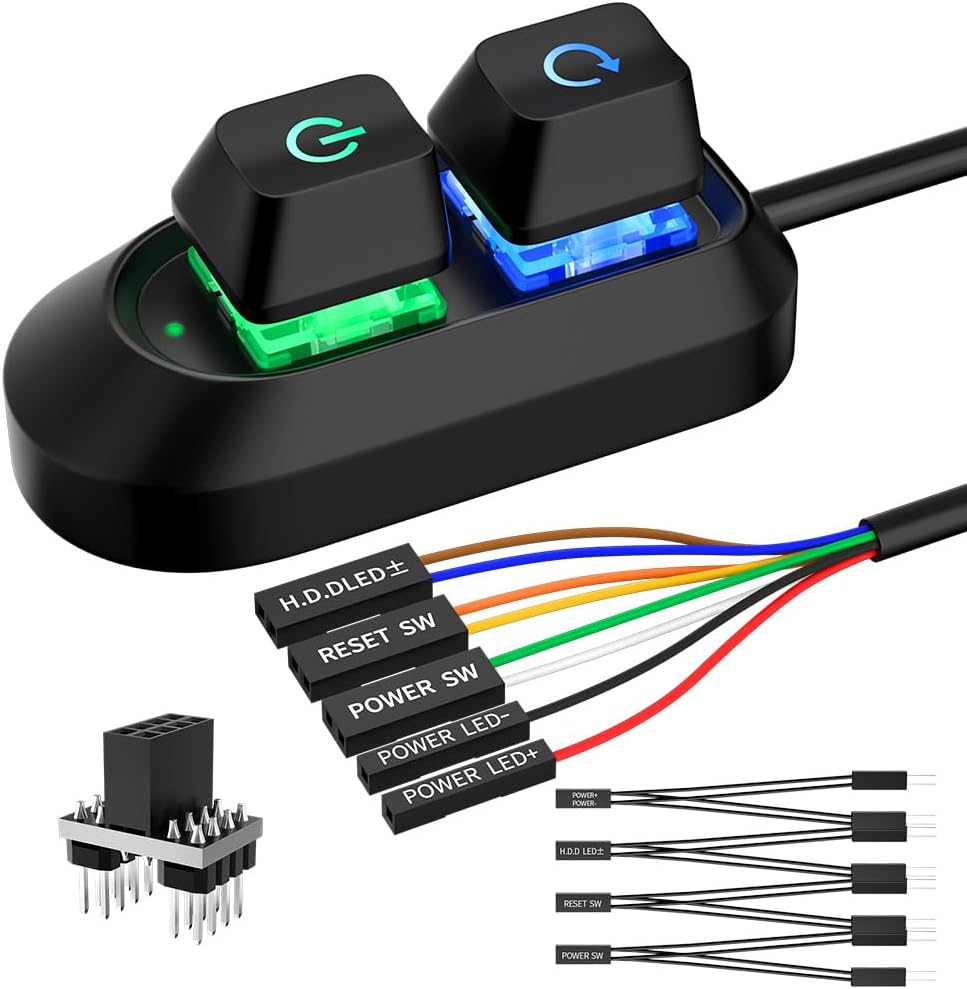
With a 4.8 rating, this OwlTree model offers exceptional value for money. It includes both power and reset buttons along with indicator lights, providing comprehensive control in a compact and durable acrylic design.
We may earn a commission when you buy through this link, at no additional cost to you.
The 1.6m cable is sufficient for most standard desktop setups, and the acrylic material gives it a premium feel without a high price. Users report that the adhesive mount holds well and the wiring is straightforward to connect.
The cable length might be limiting if your PC is placed under a desk far from the button location. Additionally, the design is fixed to the provided color scheme which might not match all aesthetic preferences.
Choose this if you want a reliable, high rated button with reset functionality at an affordable price. It is perfect for home users needing a straightforward upgrade to their current setup.
The 4.8 rating reflects consistent customer satisfaction with build quality and functionality across various desktop environments.
Includes both power and reset buttons plus indicators for full control without needing additional hardware.
We may earn a commission when you buy through this link, at no additional cost to you.
This wireless option brings modern convenience to PC control with remote operation up to fifty feet away. It eliminates cable clutter entirely by using a PCIe receiver board to connect directly to your motherboard headers.
We may earn a commission when you buy through this link, at no additional cost to you.
The one button operation allows short presses for power on and long presses for shutdown, mimicking standard case behavior. Installation involves plugging the card into an available PCIe slot and securing the button with adhesive tape.
The requirement for an open PCIe slot may limit compatibility with mini ITX systems or fully occupied motherboards. The price is higher than wired alternatives but justifies the convenience of wireless access.
Invest in this if you frequently turn your PC on from across the room or prefer a wire free desk setup. It is ideal for studios or home offices where accessibility is a priority.
Operate your PC from anywhere within 50 feet without running long cables across your room or under your desk.
No drivers or software needed; just insert the PCIe card and connect the header cable for immediate functionality.
We may earn a commission when you buy through this link, at no additional cost to you.
This model offers a balanced mix of features at a competitive price point. The 1.7M cable provides decent reach while the included splitter allows you to maintain the original case button functionality without extra cost.
We may earn a commission when you buy through this link, at no additional cost to you.
Users appreciate the LED indicator which provides visual feedback on power status. The adhesive mounting kit ensures you can place the button anywhere on your desk or wall without permanent modification to the surface.
The build quality is functional but lacks the premium feel of metal or acrylic alternatives. Some users might find the installation manual less detailed than other products in this list.
Select this if you need a straightforward splitter enabled solution that keeps both switches active. It works well for general home use and custom chassis builds requiring flexible routing.
The included 1 to 2 splitter ensures you do not lose access to your original chassis power button.
An integrated LED indicator helps you quickly confirm if the system is on without needing to check other lights.
We may earn a commission when you buy through this link, at no additional cost to you.
With a 2M cable, this option extends your reach further than most standard buttons. It supports both power and reset functions along with HDD LED connections making it suitable for users who want full front panel functionality.
We may earn a commission when you buy through this link, at no additional cost to you.
The package includes both a splitter board and a splitter cable giving you flexibility in how you install the device. This redundancy ensures you can adapt to different motherboard layouts or space constraints easily.
More connections can mean a slightly more involved installation process compared to simple power only buttons. The longer cable requires careful routing to avoid tangling or obstruction in your workspace.
Opt for this if you need extended reach and full functionality including HDD LEDs. It is a strong candidate for enthusiasts who want complete control over their system status lights.
The 2 meter cable provides ample length for under desk or distant placements without stretching the connection.
Supports power reset and HDD LED connections so you do not lose any standard case features.
We may earn a commission when you buy through this link, at no additional cost to you.
This model adds a touch of style with a breathing RGB LED effect that requires no software. The 2M cable ensures you can position it wherever you need while maintaining a clean aesthetic glow on your desk.
We may earn a commission when you buy through this link, at no additional cost to you.
It is designed with safety in mind using a low voltage design to protect your system from power fluctuations. The ATX compatibility means it will fit almost any standard desktop motherboard without needing adapters.
The RGB effect is static and cannot be customized to match specific colors or patterns. If you need dynamic lighting sync with other components this might be a limitation.
Choose this if you want a stylish button that enhances your desk ambiance. It suits users looking for a simple upgrade that adds visual appeal without complex configuration.
A breathing RGB LED adds visual appeal without needing RGB cables or software control.
Designed with low voltage to ensure safe and stable performance without risking your motherboard.
We may earn a commission when you buy through this link, at no additional cost to you.
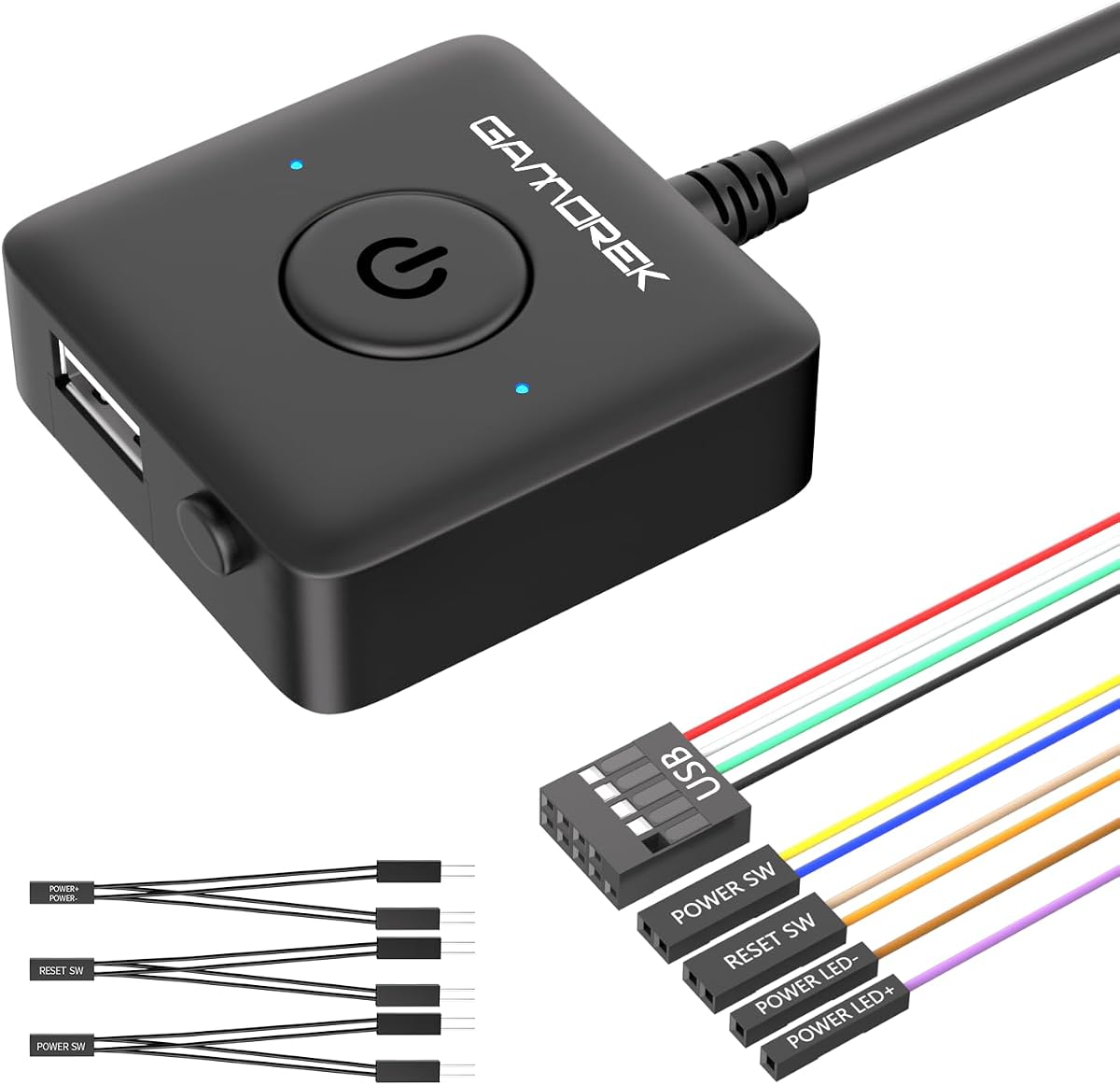
This switch combines power control with USB 2.0 header support allowing you to move a USB port to your desk. The high 4.7 rating indicates strong satisfaction with its multi functional approach to desktop management.
We may earn a commission when you buy through this link, at no additional cost to you.
It includes a PCI bracket that helps keep the internal routing clean and organized especially useful for ATX and MATX cases. The power and reset switch functionality gives you all the essential controls in one device.
Using the USB header takes up a motherboard header which might be limited on some boards. Installing the PCI bracket requires opening the case and mounting a bracket which might be daunting for beginners.
Buy this if you need an accessible USB port on your desk alongside power control. It is ideal for office setups where frequent drive swapping or peripheral connections occur.
Connects to USB 2.0 headers to extend easy access USB functionality to your desk surface.
The included PCI bracket allows neat internal routing helping keep your desktop build cleaner.
We may earn a commission when you buy through this link, at no additional cost to you.
This unit combines a power switch with a 4 port USB 3.0 hub offering high speed data transfer right at your fingertips. It is perfect for users who need quick access to flash drives or fast charging for devices.
We may earn a commission when you buy through this link, at no additional cost to you.
The 5Gbps transfer rate ensures fast file movement which is useful for creative professionals or gamers. The adhesive mount makes it easy to place near your keyboard or work area for immediate access.
The cable is shorter at 1.2M which may limit placement options compared to longer alternatives. The hub adds some bulk which might make the button larger than simple power only switches.
Select this if you need high speed USB access near your keyboard. It is a practical choice for workstations where peripherals need to be swapped frequently.
Provides 5Gbps data transfer for quick file access and fast charging compatible with modern devices.
Four USB ports allow connecting multiple devices without moving cables across your desk.
We may earn a commission when you buy through this link, at no additional cost to you.
This DKE switch is designed for portability and discreet placement with a tiny 2.1cm size. It holds a high 4.7 rating for reliability and ease of use in tight or hard to reach spots.
We may earn a commission when you buy through this link, at no additional cost to you.
The 2M cable gives ample reach while the splitter allows you to keep your original button working. Its lightweight design means it does not add noticeable weight to your desk surface or workspace.
The design is very basic without additional features like LEDs or reset buttons. If you need more than just a simple on off control this might feel too minimal.
Ideal for users who want a discreet compact switch that does not attract attention. It fits well in minimal setups where simplicity is the main priority.
At 2.1cm size and only 1 ounce weight it is one of the smallest options available.
The 2 meter cable ensures you can place the switch far away from the PC tower.
We may earn a commission when you buy through this link, at no additional cost to you.
Built with aluminum this model offers a durable and premium feel that stands out from plastic alternatives. It includes both reset and HDD LED support plus a 2M cable for versatile installation options.
We may earn a commission when you buy through this link, at no additional cost to you.
The aluminum casing is robust and resists wear better than standard plastic which helps it last longer. The 4.6 rating reflects solid performance across various setups including gaming lounges and office desks.
The weight is slightly higher than plastic models which might matter if using it on a movable surface. The price is higher but justified by the metal construction and comprehensive feature set.
Pick this if you want a durable metal finish that matches high end PC components. It suits builds where aesthetics and build quality are top priorities for your setup.
Aluminum construction provides better durability and a premium look compared to plastic alternatives.
Includes power reset and HDD LED connections for full front panel control capabilities.
We may earn a commission when you buy through this link, at no additional cost to you.
Selecting the right external power button depends on your specific needs such as cable length, features, and installation method. Consider the following factors to find a model that fits your setup perfectly.
Cable length determines how far you can place the button from your computer case. For under desk or hidden setups look for at least 1.7 meters or longer to ensure flexible placement.
Choose a longer cable if your PC is far from your desk to avoid tension on the connector.
Most buttons use a standard 4 pin connector which works with nearly all ATX motherboards. Verify that your board has accessible front panel headers before purchasing.
Ensure the connector matches your motherboard header to avoid installation issues or needing adapters.
Some models include reset switches HDD LEDs or even USB hubs for added convenience. Decide which features you need beyond simple power control to avoid paying for extras.
Prioritize reset and HDD LEDs if you need full front panel control on your desk.
Build material affects durability and aesthetics. Acrylic or aluminum offers a premium feel while plastic is lightweight and budget friendly.
Select metal or acrylic if you want a sturdy feel that matches high end builds.
Most units use adhesive stickers for placement but some require PCI brackets for internal routing. Choose a method that suits your case and desk layout without permanent modification.
Adhesive is best for non permanent setups while brackets help organize internal cables.
A splitter allows the new button to work alongside the original case button. This is essential if you want to keep both controls active without losing functionality.
Ensure the package includes a splitter if you plan to retain your original case button.
Wireless models eliminate cables entirely but require a PCIe slot and may cost more. These are ideal for minimal desk setups where you want to avoid running wires.
Choose wireless if you have an open PCIe slot and want cable free control.
LED indicators help you see the power status at a glance. Some buttons offer RGB breathing lights for style while others provide simple status feedback.
Look for LED indicators if you want visual confirmation of power state without checking the screen.
First disconnect your PC from power before opening the case. Locate the front panel header on your motherboard and connect the button wires matching the labels such as POWER SW or RESET SW.
Second use the included adhesive sticker to mount the button on your desk or panel. Press firmly for thirty seconds to ensure a strong bond before plugging the connector into the motherboard.
Third test the button by pressing it to see if your PC powers on. If it does not work check the BIOS settings to ensure ErP is disabled and verify all connections are secure.
Yes most external power buttons work with any standard ATX motherboard using the front panel header. Just ensure your motherboard has available pins for the switch which is true for almost all desktop models.
No you do not need drivers for standard external switches. They work at a hardware level so plug and play setup is all that is required for basic power control.
Yes if you use a splitter which is included in most packages. The splitter allows both the original case button and the new external button to trigger the power switch simultaneously.
An external button is an excellent replacement for broken original buttons. You can route the wires through case openings and mount the new button anywhere for easy access.
It depends on the cable length usually between 1.7 meters to 2 meters. Some models offer up to 118 inches which allows placement even across the room.
Yes routing wires through the optical drive bay or back panel vents is safe and common. Ensure wires are not pinched by moving parts and secure them properly with zip ties.
No these switches are designed only for desktop ATX motherboards. Laptops do not have the same front panel headers so external switches will not work with laptop systems.
Only RGB models allow color changes but many are fixed breathing colors. Always check the product description to see if customization is supported before purchasing.
We reviewed ten models from budget friendly options to premium wireless solutions. The PC Power Button with 118 Cable Cable offers top versatility while the OwlTree model delivers excellent value for basic needs.
When choosing prioritize cable length and connector compatibility first then consider additional features like USB hubs or reset switches. Decide whether wireless freedom justifies the extra cost for your use case.
Prices change frequently on online retailers so always check the latest listing before buying. Verify current compatibility details and read recent reviews to ensure the product still meets quality standards.