
Dell Wired Mouse MS116
4.6Editor score
Reliable wired connection
Affordable price point
Simple plug-and-play use
Discover the top external mouse for Dell laptop users. We compare wireless and wired options from Dell, Logitech, and TECKNET to find the best match.
Finding the right external mouse for Dell laptop users is essential for productivity and comfort. A good mouse offers precision tracking, ergonomic design, and reliable connectivity to match your workflow needs.
We evaluated ten top-rated mice based on performance, battery life, comfort, and value. This guide covers wireless and wired models compatible with your Dell system and other devices.
Each pick highlights key features, pros, and cons to help you decide. Prices and availability change frequently, so verify details before purchasing to ensure the best current deal.
4.6Editor score

4.9Editor score

4.6Editor score
Here is a side-by-side look at the top external mice for Dell laptop users. Compare specs and features to find the perfect fit for your needs.






The Dell Advanced Wireless Compact Mouse is our top pick for Dell laptop users. It offers seamless connectivity and a robust design that supports productivity tasks without frequent interruptions.
We may earn a commission when you buy through this link, at no additional cost to you.
Its dual-mode connectivity allows you to connect via Bluetooth 5.0 or 2.4GHz wireless. The Swift Pair feature lets you connect instantly without diving into system settings. The 36-month battery life ensures you won't face frequent replacements, and the Dell Display and Peripheral Manager software optimizes performance.
The main trade-off is that you need AA batteries. While long-lasting, this may not suit those seeking rechargeable options. Also, Swift Pair only works on Windows 10 v1803 onward. These are minor issues given the overall performance.
If you want a reliable mouse specifically optimized for Dell systems, this is the best choice. It balances comfort, precision, and connectivity perfectly for both office and travel use.
Dual Bluetooth and wireless modes ensure you stay connected without drops. Connect quickly via Swift Pair for a smooth workflow.
The Dell Display and Peripheral Manager software tailors the mouse to your Dell workspace. This ensures smooth tracking and extended battery life.
We may earn a commission when you buy through this link, at no additional cost to you.
The Dell Wireless Gaming Mouse MS5120W is perfect for those who need precision and versatility. It features high DPI settings and seven programmable buttons to streamline your workflow.
We may earn a commission when you buy through this link, at no additional cost to you.
With a 4000 DPI sensor, it handles detailed work or gaming effortlessly. The dual-mode connectivity supports Windows, Mac, Chrome, and Linux. The Peripheral Manager software helps you manage shortcuts efficiently. The Advanced Exchange Service provides a replacement within one business day if issues arise.
This mouse leans towards gaming, which may feel large for users with small hands. It also relies on AA batteries, requiring periodic changes. Despite these factors, its performance and durability make it a strong contender.
Choose this if you need a versatile mouse that bridges work and entertainment. It offers reliable connectivity and customization options that support intense multitasking.
The 4000 DPI sensor offers precise control for detailed tasks. Switch DPI levels easily to suit your current activity needs.
Compatible with major OS platforms like Windows and Mac. This flexibility allows seamless switching between devices.
We may earn a commission when you buy through this link, at no additional cost to you.
The Dell Wired Mouse MS116 is an excellent budget-friendly choice. It provides a simple and reliable way to navigate your system without extra costs or complexity.
We may earn a commission when you buy through this link, at no additional cost to you.
Its plug-and-play design ensures you start using it immediately. The wired connection offers zero lag, making it ideal for basic tasks. It is compatible with Dell laptops and other standard systems. The price makes it accessible for anyone needing a quick replacement.
The limitation is the lack of wireless connectivity. The cord can limit movement compared to wireless models. However, for stationary setups, this is rarely an issue.
If you need a no-fuss mouse for work or school on a budget, this is a solid pick. It is durable, simple, and gets the job done effectively.
Wired connections eliminate latency. This ensures precise cursor movement for tasks requiring accuracy.
No software or drivers are needed. Simply plug the USB into your port and start working immediately.
We may earn a commission when you buy through this link, at no additional cost to you.
The VssoPlor Wireless Mouse is designed for portability and quiet operation. It features a slim profile and silent clicks, making it ideal for travelers or shared workspaces.
We may earn a commission when you buy through this link, at no additional cost to you.
Its 2.4GHz wireless provides a stable connection up to 10 meters. The auto sleep mode helps extend battery life when not in use. The silent clicks are great for libraries or offices. It is compatible with most major operating systems including Windows and Mac.
The slim design may feel less comfortable during long sessions compared to ergonomic models. It lacks advanced programmable buttons. However, it covers basic needs well for casual or travel use.
If you need a compact mouse that saves space and noise, this is a strong candidate. It balances affordability and functionality for everyday tasks.
Auto sleep mode activates after inactivity. This feature extends battery life significantly for travel use.
Silent clicks reduce noise disturbance. Perfect for shared offices or quiet environments like cafes.
We may earn a commission when you buy through this link, at no additional cost to you.
The Logitech M510 offers a premium ergonomic experience. Its contoured shape and soft grips provide all-day comfort, while its advanced scrolling options boost productivity.
We may earn a commission when you buy through this link, at no additional cost to you.
You get side-to-side scrolling and zoom features. This helps navigate maps and spreadsheets efficiently. The Unifying receiver stays in your laptop so you don't lose it. Battery life lasts up to two years, which is impressive for daily use.
The full size design may not fit smaller hands well. Extra features require Logitech SetPoint software which may be tedious for some. Still, the comfort and utility are top-tier for power users.
Choose this if you spend hours at a desk and need maximum comfort. Its premium build and features justify the investment for productivity-focused users.
Side-to-side scrolling saves time on maps and spreadsheets. Zoom features add another layer of control.
Two years of battery life eliminates frequent replacements. Smart sleep mode helps conserve power.
We may earn a commission when you buy through this link, at no additional cost to you.
The Logitech M185 is a compact, reliable wireless mouse. It is perfect for users seeking portability without sacrificing essential comfort.
We may earn a commission when you buy through this link, at no additional cost to you.
Its ambidextrous design fits both left and right hands. The nano receiver stays in your laptop port. It lasts up to a year on a single battery. It is made partly with recycled materials, showing Logitech's commitment to sustainability.
It lacks the advanced buttons of more expensive models. The scroll wheel is basic. Still, its reliability and size make it a practical choice for travelers.
For simple wireless needs with a focus on portability, this is ideal. It combines reliability with eco-conscious design in a compact package.
Uses certified recycled plastic. This reduces environmental impact while maintaining durability.
Nano receiver ensures stable connection. Battery life covers long periods of use.
We may earn a commission when you buy through this link, at no additional cost to you.
The TECKNET Compact Mouse brings a colorful twist to basic utility. Its mint green finish and small size make it ideal for users who value aesthetics.
We may earn a commission when you buy through this link, at no additional cost to you.
It is designed for small to medium hands. The quiet buttons are great for shared spaces. It offers three adjustable DPI levels to adapt to different tasks. The battery lasts up to 15 months on one AA cell.
The receiver must be stored inside the mouse body. This adds a step when setting up. The grip is small which may feel cramped for larger hands. Still, it is a fun and functional pick.
If you want a cheerful, reliable mouse for travel, this fits well. Its unique design and reliable performance stand out in this category.
Mint green design adds personality to your setup. Stands out against typical black options.
Three DPI levels let you switch precision levels. Useful for browsing or precision work.
We may earn a commission when you buy through this link, at no additional cost to you.
The Logitech M330 Silent Plus is the quietest wireless mouse available. Its SilentClick technology reduces clicking noise by over 90%, perfect for quiet settings.
We may earn a commission when you buy through this link, at no additional cost to you.
It features a contoured design for comfort. The battery lasts 18 months. It is simple to use with no complex software required. The quiet clicks ensure you can work without disturbing others nearby.
This model is right-handed only. Left-handed users will find it uncomfortable. It also lacks advanced scrolling features. Still, for quiet comfort, it excels.
If you need a mouse for libraries or shared offices, this is unmatched. Its silent design and comfort make it a practical pick for daily use.
SilentClick reduces noise significantly. Ideal for open offices or home libraries.
Contoured shape supports natural hand position. Reduces strain during long tasks.
We may earn a commission when you buy through this link, at no additional cost to you.
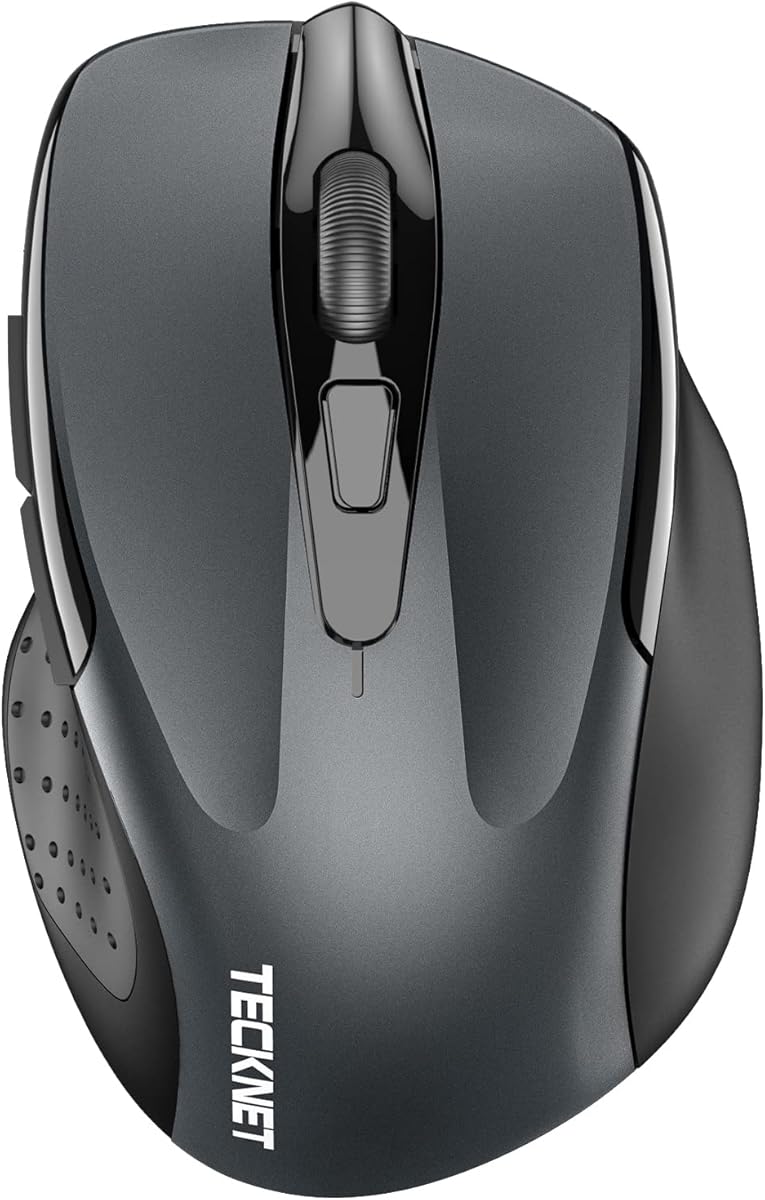
The TECKNET Wireless Mouse allows effortless switching between two devices. This is perfect for users managing multiple computers or tablets daily.
We may earn a commission when you buy through this link, at no additional cost to you.
You can switch between Bluetooth and USB with a button slide. It offers six adjustable DPI settings up to 4800. Silent clicks ensure quiet work. The ergonomic design supports comfortable use for hours.
Mac users will find side buttons incompatible. Two AAA batteries are needed for power. Still, the versatility and high DPI make it a great multi-device tool.
If you juggle multiple systems, this mouse simplifies your workflow. Its dual-device capability and comfort are standout features for productivity.
Switch between devices instantly. Ideal for multi-device work setups.
Six DPI levels offer precise control. Adapt to different screen sizes easily.
We may earn a commission when you buy through this link, at no additional cost to you.
The TECKNET Rechargeable Mouse removes the need for disposable batteries. It offers a sustainable solution with high performance and versatile connectivity.
We may earn a commission when you buy through this link, at no additional cost to you.
You can charge it in just two hours for months of use. It connects via Bluetooth or USB and supports dual devices. Silent clicks make it suitable for quiet spaces. High DPI settings support detailed tasks.
If the battery is low, the connection may become unstable. You should recharge when alerted. This adds a step compared to AA models but saves long-term waste.
Choose this if you want an eco-friendly, versatile mouse. Its rechargeable design and robust features make it a smart investment for modern users.
Rechargeable battery eliminates waste. Reduces plastic battery usage for environment.
Fully charged battery lasts months. Fast charge ensures you are ready quickly.
We may earn a commission when you buy through this link, at no additional cost to you.
Selecting the right mouse involves considering several factors that affect usability and performance. This section helps you decide which features matter most for your needs.
Wireless mice offer freedom of movement but require batteries or charging. Wired mice eliminate lag and power concerns but restrict range. Consider your workspace needs to choose between Bluetooth, USB receiver, or wired options.
Choose wireless for portability and wired for stability. Ensure your Dell laptop supports the chosen connection type like Bluetooth or USB ports.
Ergonomic design reduces strain on your hand and wrist during long sessions. Contoured shapes and soft grips enhance comfort. If you work long hours, prioritize models designed for your dominant hand.
Look for ergonomic features if you experience discomfort. A comfortable mouse improves productivity and prevents repetitive strain injuries.
Battery life varies significantly between models. Some last over a year while others need frequent replacements. Check if the mouse is rechargeable or uses replaceable batteries based on your preference.
Opt for long battery life or rechargeable options to minimize interruptions. Consider maintenance time versus battery performance.
Dots Per Inch (DPI) determines cursor sensitivity. Higher DPI allows faster movement and precision. Choose adjustable DPI if you work across different screen sizes or tasks like gaming or editing.
Adjustable DPI offers flexibility for various tasks. Match DPI to your screen resolution for smooth cursor control.
Ensure the mouse works with your operating system. Most support Windows and Mac but some features like extra buttons may not work across all systems. Check specific compatibility notes before purchasing.
Verify OS support to avoid feature limitations. Most modern mice are universal but advanced features may vary.
Extra buttons, scroll wheels, and silent clicks add convenience. Silent clicks are great for shared spaces. Programmable buttons improve workflow efficiency. Decide which features matter most based on your workflow.
Prioritize features that match your workflow. Extra functions enhance productivity but may increase cost or complexity.
A solid warranty protects your investment against defects. Some models offer exchange services. Look for brands with reliable support to ensure long-term usability.
Check warranty terms before buying. Strong support services add value and reduce long-term risk.
Prices range from affordable wired options to premium wireless models. Consider the balance between cost and features. A higher price often means better ergonomics and durability.
Set a budget that fits your needs. Balance features and cost to find the best value for your setup.
Connect your mouse to your Dell laptop via Bluetooth or USB. If it requires drivers, install them and configure settings through your OS for optimal performance.
Adjust DPI settings and scroll direction based on your preference. Use the settings menu to customize buttons and shortcuts for efficient workflows.
Keep your mouse clean by wiping it with a dry cloth. For rechargeable models, charge them fully before first use. Store wireless receivers in the mouse to avoid losing them during travel.
The Dell Advanced Wireless Compact Mouse is our top pick for its seamless connectivity and long battery life. It offers a balance of comfort and performance suited for Dell users.
Wireless mice offer flexibility and reduce clutter. Wired mice provide zero lag and eliminate battery issues. Choose based on whether you prioritize convenience or performance.
Most USB and Bluetooth mice work with Dell laptops. Check for specific driver support if you need advanced features. Universal mice are generally plug-and-play compatible.
Enable Bluetooth in your Dell settings. Put your mouse in pairing mode and select it from the available devices list. Follow on-screen prompts to complete the connection.
The Dell Wired Mouse MS116 offers a reliable, affordable option. It provides essential performance for basic tasks without breaking the budget.
Rechargeable mice can last months on a single charge. Some models offer up to three months of daily use. Charging times are typically short for quick return to work.
Yes, gaming mice often offer high DPI and programmable buttons ideal for work. Ensure they have the comfort needed for long office sessions.
We have reviewed ten top-rated mice for Dell laptop users. Each option offers unique strengths, from the premium Dell Advanced Wireless Compact Mouse to budget-friendly wired models.
Choose a mouse that matches your comfort and connectivity needs. Consider ergonomics, battery life, and features like DPI customization for your specific workflow.
Prices and availability may change. Always check the latest information before purchasing to ensure you get the best value for your purchase.