
IPEVO VZ-X Wireless 8MP Document Camera
4.6Editor score
Wi-Fi HDMI and USB connectivity
Near 4K quality in USB mode
9 to 12 hours battery life
Discover the top document cameras for teaching and presentations. This guide compares ten models based on resolution, connectivity, and software features to
Document cameras have become essential tools for modern educators and professionals who need to share physical materials digitally. These devices capture documents, objects, and demonstrations in real time, allowing for seamless integration with video conferencing and presentation software. Whether you are teaching a remote class or conducting a business meeting, a reliable document camera ensures your audience sees every detail clearly.
Choosing the right device involves evaluating resolution, connectivity options, and software compatibility. High megapixel counts ensure crisp images while multiple connection methods like USB HDMI or Wi-Fi offer flexibility for different setups. We have analyzed ten top models to find the best options for various budgets and use cases ensuring you can make an informed decision for your specific needs.
Each pick in this guide highlights key features pros and cons to help you navigate the market easily. We focus on performance durability and ease of use to ensure the selected models meet professional standards. Keep in mind that prices and availability can change so always verify the latest details before making your final purchase decision for your workspace.
4.6Editor score
4.5Editor score

4.4Editor score
This side-by-side comparison highlights the key specifications and features of the top ten document cameras available today. By reviewing resolution connectivity and unique capabilities you can quickly identify which model aligns best with your classroom or office requirements.


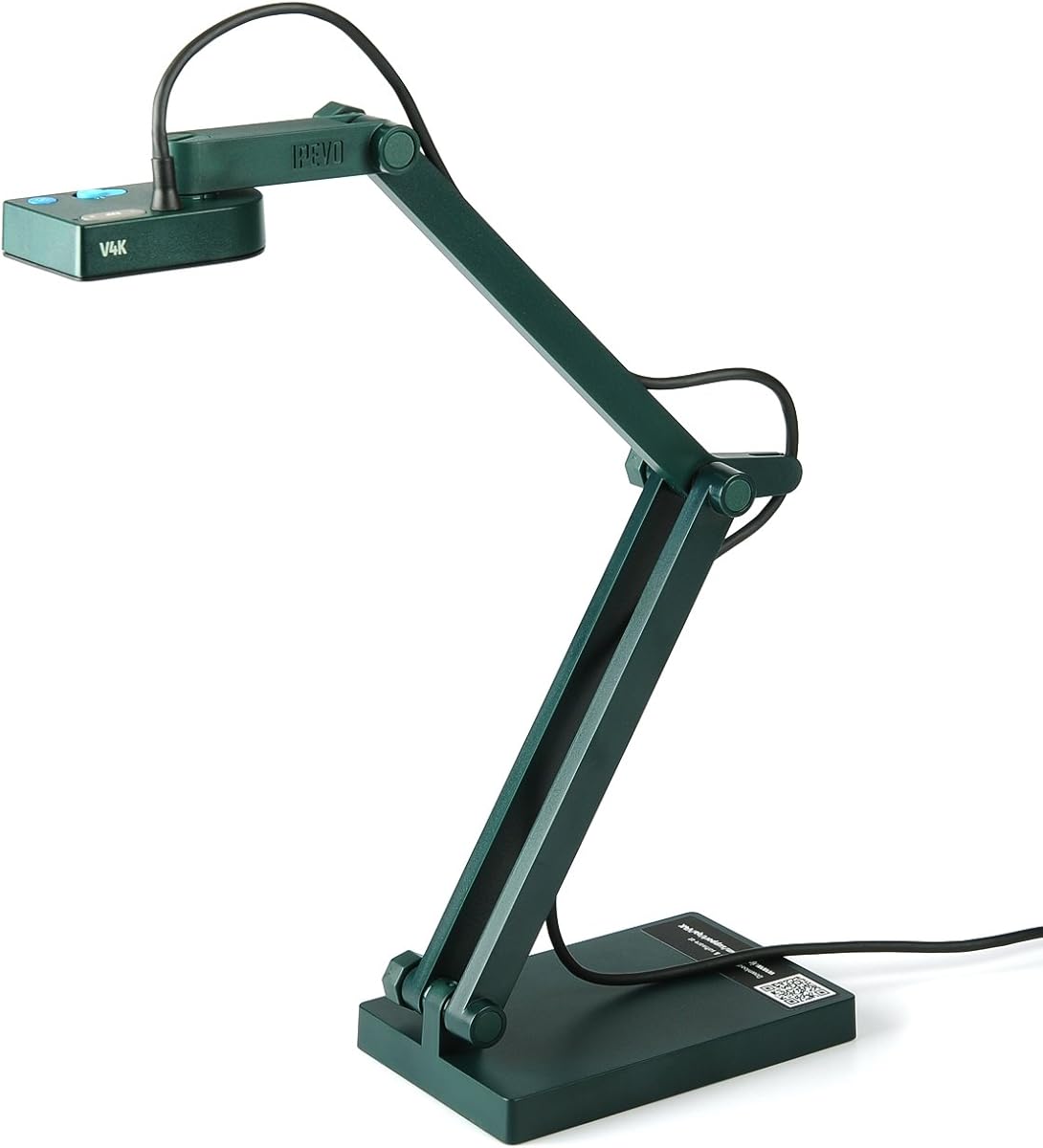
The IPEVO V4K stands out as a top-tier document camera offering high definition imaging for educational and professional use. With an 8 Megapixel sensor it captures live images up to 3264 x 2448 pixels ensuring every detail is visible. Its Sony CMOS Image Sensor provides excellent noise reduction and color reproduction making it ideal for dimly lit environments.
We may earn a commission when you buy through this link, at no additional cost to you.
One of its key strengths is the high frame rate which allows for lag-free live streaming at up to 30 fps at full HD. The fast focusing speed helps minimize interruptions when switching between different materials during a presentation. The multi-jointed stand offers a simple fix for tightening loose joints caused by heavy daily use which enhances longevity.
While the device is powerful it does rely on specific software to unlock all features which might require setup time for new users. The stand might also loosen over time with extensive use but the design allows for easy tightening. These trade-offs are acceptable given the high performance and clarity it delivers.
This camera is perfect for teachers and remote workers who need reliable high quality visual aids. If you prioritize image quality and smooth streaming the V4K is a strong recommendation for your setup. It works well with a variety of software on Mac PC and Chromebook ensuring flexibility.
The Sony CMOS sensor ensures vibrant colors and minimal noise even in low light conditions.
The multi-jointed stand allows for versatile angles and can be adjusted to suit various desk sizes.
We may earn a commission when you buy through this link, at no additional cost to you.
The IPEVO VZ-X Wireless is a premium choice for those needing maximum flexibility in connectivity. It supports Wi-Fi HDMI and USB modes allowing you to connect to computers iOS devices or projectors easily. The camera captures images in high definition with near 4K quality in USB mode ensuring crisp visuals for any presentation.
We may earn a commission when you buy through this link, at no additional cost to you.
Its 9 to 12 hours of battery life ensures a complete class or presentation session without interruptions. The wireless range allows teachers and presenters to capture different objects all over the room without being tethered to a desk. The built-in LED illuminates the viewing area which helps in varying lighting conditions.
The main drawback is the higher price point compared to wired models which might not fit all budgets. It is also heavier than some counterparts making it less portable for travel. However the convenience of wireless operation justifies the cost for many professional users.
Ideal for dynamic classrooms or conference rooms where mobility is key. If you need to move around while presenting this camera offers the freedom to do so. Its compatibility with web conferencing software makes it a versatile tool for modern communication.
Connect via Wi-Fi HDMI or USB to match your existing hardware setup effortlessly.
Enjoy a full day of use on a single charge making it reliable for long sessions.
We may earn a commission when you buy through this link, at no additional cost to you.
The THUSTAR 8MP Document Camera offers exceptional value for those seeking a cost-effective solution. It delivers ultra-high-definition images and videos live transmission up to 2448P megapixels. The USB camera has brightness buttons allowing you to manually adjust image brightness to ensure clear images in any lighting.
We may earn a commission when you buy through this link, at no additional cost to you.
Its foldable design means it occupies a small space after folding making it easy to carry. The multi-joint support allows multi-angle rotation to capture 2D and 3D objects better. Built-in dual silicon microphones reduce noise and improve sound quality for video chats.
The software features are more basic compared to premium models which might limit advanced editing. The build quality feels lighter than high-end options but remains sufficient for regular use. These trade-offs are minor considering the low price point.
This is the best choice for budget-conscious educators or home users needing a reliable camera. It works with Windows Mac and Chromebooks automatically installing drivers when plugged in. Its versatility makes it a practical choice for distance learning and demos.
Foldable design ensures it fits easily into bags for on-the-go presentations.
Dual microphones provide clear audio reducing the need for external speakers.
We may earn a commission when you buy through this link, at no additional cost to you.
The 4K USB Document Camera is a robust visualiser designed for teaching needs. It uses a high-end image sensor to output ultra-high-definition images up to 2448P megapixels. The USB document camera has brightness buttons allowing manual adjustment to ensure clear images in dark and bright environments.
We may earn a commission when you buy through this link, at no additional cost to you.
It features an image reversal function that can be adjusted freely left/right and up/down without software. The embedded design occupies a small space after folding making it easy to carry. It works with Windows PCs Macs and Chromebooks with plug-and-play operation.
Manual focus might be a slight inconvenience for quick switching compared to auto focus models. The software is minimal but sufficient for live demos and recordings. These limitations are balanced by the high image quality and ease of use.
Ideal for classrooms that need a reliable camera for presentations and video chats. It supports TikTok Google Meet Teams and Zoom making it versatile for modern education. The USB-C cable ensures future-proof connectivity for newer devices.
Manually adjust image direction directly on the device for immediate corrections.
USB-C cable ensures compatibility with the latest laptops and tablets.
We may earn a commission when you buy through this link, at no additional cost to you.
The PAKOTOO Document Camera offers a high coverage area capturing up to 16.5 x 11.6 inches. It features 3 levels of brightness adjustment and 10 levels of exposure adjustment for clear images. The image reversal function can be realized through buttons without needing software for convenience.
We may earn a commission when you buy through this link, at no additional cost to you.
Its embedded design takes up little space after folding and is easy to carry. The multi-joint support allows multi-angle free rotation to better capture 2D and 3D objects. It connects via USB-C cable which can be directly used with devices like MacBook.
It is not always plug and play and may require selecting USB Camera in system settings. It does not support zoom or HDMI features which limits some use cases. These constraints are manageable for basic teaching and learning needs.
Best for teachers needing a large capture area without breaking the bank. It works with Zoom Google Meet Teams and TikTok ensuring wide platform compatibility. The dual mic and selfie fill light add value for remote teaching scenarios.
Cover A3 size documents easily without moving papers around during presentations.
Adjust image reversal and brightness directly on the device for quick changes.
We may earn a commission when you buy through this link, at no additional cost to you.
The OKIOCAM S-4K is an ultra HD portable setup designed for teachers with limited space. It features an 8MP Sony Exmor R Sensor capturing real-time images at up to 3264 x 2448p. It offers enhanced low-light performance and image noise reduction for vibrant color reproduction.
We may earn a commission when you buy through this link, at no additional cost to you.
It includes OKIOPoint for AI tracking documents with the visual pointer on the OKIOCAM Live software. This makes lessons fun and engaging by zooming in and following wherever you point. The hinges are tested for over 10,000 rotations ensuring durability for daily use.
The viewing area is smaller than A3 models which might restrict large document displays. Low-light performance is good but not as advanced as some competitors. These issues are minor for typical classroom or home office use.
Perfect for educators needing a portable yet powerful camera for distance learning. It is plug and play and compatible with Windows Mac iOS Chrome and interactive displays. The AI tracking feature adds a unique interactive element to presentations.
OKIOPoint zooms in on your pointer making presentations interactive and engaging.
Hinges tested for 10,000 rotations ensure longevity in active environments.
We may earn a commission when you buy through this link, at no additional cost to you.
The OKIOCAM S2 Pro boasts a 13MP 4K UHD CMOS image sensor for true 4K resolutions. It offers true-to-life colors and minimal graininess in low light conditions. The high frame rate provides lag-free streaming with 4K video at 30 fps for clear display.
We may earn a commission when you buy through this link, at no additional cost to you.
It includes OKIOPoint for smart tracking making presentations interactive and engaging. The camera features a high quality metal weighted base and glass-fiber reinforced arm for stability. All hinges are tested for over 10,000 rotations ensuring durability over time.
The maximum viewing area is smaller than some competitors which may limit large document capture. The higher cost may be a barrier for budget-conscious buyers. However the image quality and build strength justify the investment for professional users.
Ideal for users prioritizing resolution and build quality for remote teaching. It is plug and play and supports popular software like Google Meet and Zoom. The included USB Type C adapter ensures easy connection to modern devices.
Experience true 4K resolution with minimal graininess in low light.
Metal weighted base and glass-fiber arm provide stability and longevity.
We may earn a commission when you buy through this link, at no additional cost to you.
The OKIOLABS OKIOCAM T-4K is a compact choice for showcasing large-sized images. It captures full Ledger-size materials or both pages of an open book at once. It features an 8MP Exmor R sensor from Sony capturing real-time images up to 3264 x 2448p.
We may earn a commission when you buy through this link, at no additional cost to you.
It offers lag-free streaming at up to 30fps in full HD. The document camera features four button controls for easy adjustment of focus and exposure. It includes OKIOPoint for AI tracking documents with the visual pointer on the software.
The bulkier design might take up more desk space than smaller models. It is priced higher than budget options but offers professional quality. These factors are acceptable for users needing large format support regularly.
Best for architects or teachers working with blueprints and maps. It is plug and play and compatible with Windows Mac iOS Chrome and interactive displays. The software includes features like stop-motion and timelapse for creative presentations.
Capture Ledger-size materials or open books completely without moving them.
Software includes stop-motion and timelapse for engaging creative presentations.
We may earn a commission when you buy through this link, at no additional cost to you.
The OKIOCAM S2-4K excels in low light without needing extra lights. Equipped with an 8MP Exmor R CMOS sensor it captures crystal-clear live images up to 3264 x 2448 pixels. The back-illuminated design doubles light sensitivity reducing noise for vibrant colors.
We may earn a commission when you buy through this link, at no additional cost to you.
It boasts a durable glass-fiber reinforced extendable arm tested for 10,000+ rotations. Despite its compact size it captures a 15.1 x 11.2 in area including near-Ledger documents. The OKIOPoint AI-tracking software zooms in and follows your pointer in real-time.
It requires specific software for full functionality which might complicate setup. The price is higher than budget models but offers superior low light performance. These trade-offs are acceptable for users needing clear images in varied lighting.
Perfect for hybrid classrooms or professional setups needing clarity in any light. It works with Windows Mac iOS and Chromebook without extra software. The built-in microphone supports seamless audio for video calls and recordings.
Exmor R sensor doubles light sensitivity for clear images in dim conditions.
OKIOPoint AI-tracking zooms in on your pointer to keep students focused.
We may earn a commission when you buy through this link, at no additional cost to you.
The INSWAN INS-1 Classic features an 8 Megapixel SONY camera capturing images up to 3264 x 2448 pixels. It includes a built-in LED and an anti-glare sheet for exposure challenges in varying lighting. The 7-segment brightness control and built-in mic ensure top-notch performance.
We may earn a commission when you buy through this link, at no additional cost to you.
The bundled full-function INSWAN Documate software offers digital zoom image annotation video recording and snapshots. It supports plug-and-play operation with a USB-A cable for instant setup. The multi-joint design ensures durability with a generous viewing size of 14.72 x 11 inches.
Software download is required for all features which adds setup time. Connectivity is limited to USB-A which might not suit modern USB-C laptops. These are minor drawbacks for a device offering strong performance and software tools.
Ideal for users needing a classic reliable solution with software support. It works seamlessly with Documate and other webinar software on PC Mac and Chromebook. The anti-glare sheet helps in bright environments ensuring clear image output.
Anti-glare sheet reduces exposure challenges in bright lighting conditions.
Documate software provides annotation recording and digital zoom tools.
We may earn a commission when you buy through this link, at no additional cost to you.
Selecting the right document camera requires evaluating key factors to match your specific needs. This guide breaks down the most important aspects to consider before making a purchase.
Resolution is critical for capturing clear text and details. Look for cameras with at least 8MP to ensure sharp images that are easy to read on screens. Higher resolution sensors like 13MP provide even better clarity for detailed diagrams.
Prioritize models with high megapixel counts for professional quality output.
Connectivity determines how you connect to devices. USB is standard but HDMI and Wi-Fi offer more flexibility for projectors and wireless setups. Ensure the camera supports your existing devices and operating systems.
Choose USB or wireless based on your need for mobility and device types.
Software features add value beyond basic streaming. Look for cameras with live annotation digital zoom and video recording capabilities. Compatibility with Zoom Google Meet and Teams ensures smooth integration into your workflow.
Verify software support matches your presentation and conferencing needs.
Good lighting is essential for clear images especially in varying environments. Built-in LEDs with adjustable levels help capture objects in dark or bright conditions. Some models offer anti-glare sheets for additional clarity.
Check for adjustable brightness and anti-glare features for consistent results.
Durability ensures longevity in daily use. Metal bases and reinforced arms withstand frequent adjustments. Hinges tested for thousands of rotations indicate robust construction for classroom environments.
Opt for sturdy materials and reinforced components for heavy use.
Portability matters for users who move between rooms. Foldable designs and compact builds save space and fit in bags easily. Multi-joint stands allow flexible positioning for different angles.
Select a foldable design if you need to transport the camera regularly.
Prices vary significantly from budget to premium models. Determine your budget balance it with necessary features like resolution and software. Higher prices often reflect better build quality and advanced capabilities.
Balance cost with required features to find the best value.
Audio quality is important for presentations with voice commentary. Built-in microphones with noise reduction improve sound clarity during video calls. Dual mics offer better capture of voice and surroundings.
Look for built-in mics to avoid needing separate audio devices.
To start using your document camera connect it to your computer via the provided USB cable. Ensure your software like Zoom or Teams is open and select the camera as the video source. Adjust the stand to position the lens over the document for best framing.
Position the camera to capture the entire document or object without cutting off edges. Use the brightness buttons or software settings to adjust exposure for clear images. If using wireless models ensure a strong network connection for stable streaming.
Clean the lens regularly with a soft cloth to maintain image quality. Store the camera in a dry place and fold it properly if portable. Avoid touching the lens with fingers to prevent smudges or damage.
Document cameras allow you to share physical documents objects and live in high definition. This enhances engagement in virtual meetings and classes by making visual content easy to see and interact with.
Most document cameras are compatible with both Mac and Windows operating systems. Check system requirements before purchase to ensure your specific OS version is supported for plug-and-play functionality.
Basic functions work via plug-and-play but advanced features require specific software. Many cameras come with their own apps for annotation and recording which enhance functionality beyond standard webcam use.
Use a camera with built-in LED lights and adjustable brightness settings. Ensure the room has adequate ambient light and use the camera's exposure controls to balance brightness and avoid glare.
Many modern cameras support tablets via USB-C or Wi-Fi. Check compatibility with your tablet's OS and port type. Some models offer adapters for connecting to devices without USB-A ports.
Viewing areas range from letter size to A3 or ledger size. Choose a model that fits the documents you typically present. Larger sensors capture more content without moving papers around.
Wireless cameras are reliable with stable internet connections. They offer great mobility but may have latency issues compared to wired connections. Ensure your network can handle video streaming for best results.
In summary the best document camera depends on your specific needs and budget. Models like the IPEVO VZ-X and THUSTAR offer excellent options for premium and budget users respectively. Each camera brings unique features tailored to enhance virtual presentations.
Prioritize resolution connectivity and software compatibility when making your decision. Ensure the device supports your platforms and offers the tools you need for effective communication. Investing in quality ensures a smoother and more professional experience.
Remember that prices and availability change frequently so verify current details before buying. Checking reviews and current specs helps confirm the device meets your expectations. Choose wisely to maximize the value of your purchase.