
AULA S99
4.2Editor score
Multi-Device Connectivity
Dual-Mode Rotary Knob
Ergonomic Foldable Stand
This guide compares the top 10 creamy keyboards for typing and gaming. Find your perfect match with our expert analysis of sound, build quality, and features.
Creamy keyboards offer a unique typing experience that blends smooth tactile feedback with a satisfying auditory profile. Enthusiasts and professionals alike seek these boards for their ability to reduce finger fatigue while delivering a consistent and enjoyable keystroke across long sessions.
We evaluated ten leading models based on connectivity options, switch customization, and acoustic tuning. Our analysis covers wireless capabilities, hot-swap support, and ergonomic design to help you navigate the crowded market and find a board that truly meets your specific workflow needs.
Each product section details specific strengths and trade-offs to guide your decision. Please note that pricing and availability fluctuate frequently so verifying current listings on the manufacturer sites is essential before finalizing your purchase for the best value.
4.2Editor score

4.8Editor score

4.8Editor score
This section provides a side-by-side comparison of all ten reviewed models to highlight their distinct specifications and target use cases at a glance for easy reference.





The YUNZII B98 PRO stands out as a top-tier option for users seeking a premium typing experience without compromising on features. It scores highly for its robust wireless capabilities and versatile layout that retains the number pad.
We may earn a commission when you buy through this link, at no additional cost to you.
Its gasket mount structure combined with five layers of filling material creates a sound profile that is deep and muted. The QMK and VIA support allows for extensive remapping and macro programming.
While the dual knob design offers great utility it may require some adjustment for users accustomed to standard layouts. The build quality is excellent but the price reflects the higher end of the market.
We recommend this keyboard for enthusiasts who value deep customization and long battery life. It serves well for both office work and gaming sessions due to its stable connection and comfortable keycaps.
Users can remap keys and design intricate RGB lighting to create complex shortcuts tailored to specific workflows or gaming needs.
An 8000mAh battery provides exceptional runtime ideal for uninterrupted work sessions without frequent charging interruptions or cable dependency.
We may earn a commission when you buy through this link, at no additional cost to you.
The AULA S99 offers a compelling entry point into wireless mechanical-style typing for budget conscious buyers. It provides a full numeric layout and strong connectivity options at a very accessible price point.
We may earn a commission when you buy through this link, at no additional cost to you.
Its dual-mode rotary knob allows for easy volume and lighting adjustments which adds a layer of convenience typically found on more expensive models. The macro customization supports basic scripting for efficiency.
The membrane switches lack the tactile feedback of true mechanical boards which may disappoint purists. Durability is decent for the price but the acoustic dampening is minimal compared to premium options.
This model is ideal for casual users or those needing a compact wireless setup for multiple devices. It balances functionality and cost effectively for everyday typing tasks.
Supports Bluetooth 5.0 2.4GHz wireless and USB wired modes to switch between different devices and environments seamlessly without lag.
The 96% compact design retains all necessary keys including the number pad to save desk space while maintaining full functionality.
We may earn a commission when you buy through this link, at no additional cost to you.
The Redragon K768 PRO delivers a premium typing feel with its gasket mount construction and substantial battery capacity. It is designed for users who prioritize longevity and a solid typing sensation over complex software customization.
We may earn a commission when you buy through this link, at no additional cost to you.
The use of PBT keycaps ensures resistance to shine and wear over time while the gasket mount absorbs vibrations for a softer keystroke. The one-knob simplicity makes basic controls very intuitive.
Software support is basic compared to other top contenders which may limit advanced macro users. The layout is compact but the lack of a full number pad might not suit all workflows.
We recommend this keyboard for users needing a durable wireless option with long battery life. It offers a high-quality typing experience that feels polished and reliable.
An 8000mAh battery provides days of usage between charges eliminating the need for frequent recharging during extended work or gaming sessions.
PBT keycaps and gasket construction ensure the keyboard remains durable and comfortable even after hours of continuous use daily.
We may earn a commission when you buy through this link, at no additional cost to you.
The AULA F75 is a strong contender for those seeking a compact wireless board with mechanical switch flexibility. It offers a 75% layout that balances functionality with desk space efficiency for various users.
We may earn a commission when you buy through this link, at no additional cost to you.
Its tri-mode connectivity supports up to five devices which is excellent for multi-platform workflows. The pre-lubed switches provide a smooth typing experience that rivals more expensive options in this category.
The stabilizers require some tuning out of the box to eliminate rattle which adds a slight barrier for beginners. The driver software can be a bit complex for users who prefer plug-and-play solutions.
We suggest this keyboard for enthusiasts who want to customize switches without soldering. It offers a solid foundation for building a custom setup at a reasonable price point.
The hot-swappable base allows users to easily replace switches and tailor the tactile and acoustic profile to their personal preferences.
Bluetooth 5.0 and 2.4GHz wireless connections provide stable low latency performance for both office tasks and gaming environments.
We may earn a commission when you buy through this link, at no additional cost to you.
The HUO JI E-Yooso provides a solid wired option for users who prioritize a consistent connection and acoustic quality over wireless flexibility. Its gasket structure is designed to minimize noise and improve feel.
We may earn a commission when you buy through this link, at no additional cost to you.
The inclusion of five layers of sound-absorbing foams significantly reduces hollow sounds making it a great choice for shared spaces. The hot-swap PCB allows for easy modification if desired later.
Being a wired model limits its portability and desk space efficiency compared to wireless alternatives. The software support is minimal which restricts advanced lighting customization options.
This keyboard is recommended for users who do not need wireless and want a quiet mechanical experience. It offers a good balance of features for a budget-friendly price.
Dampening foams reduce noise by forty percent and hollow sounds by eighty percent for a cleaner quieter typing experience.
The compact design saves desk space while retaining full keyboard functionality including the number pad for efficient daily tasks.
We may earn a commission when you buy through this link, at no additional cost to you.
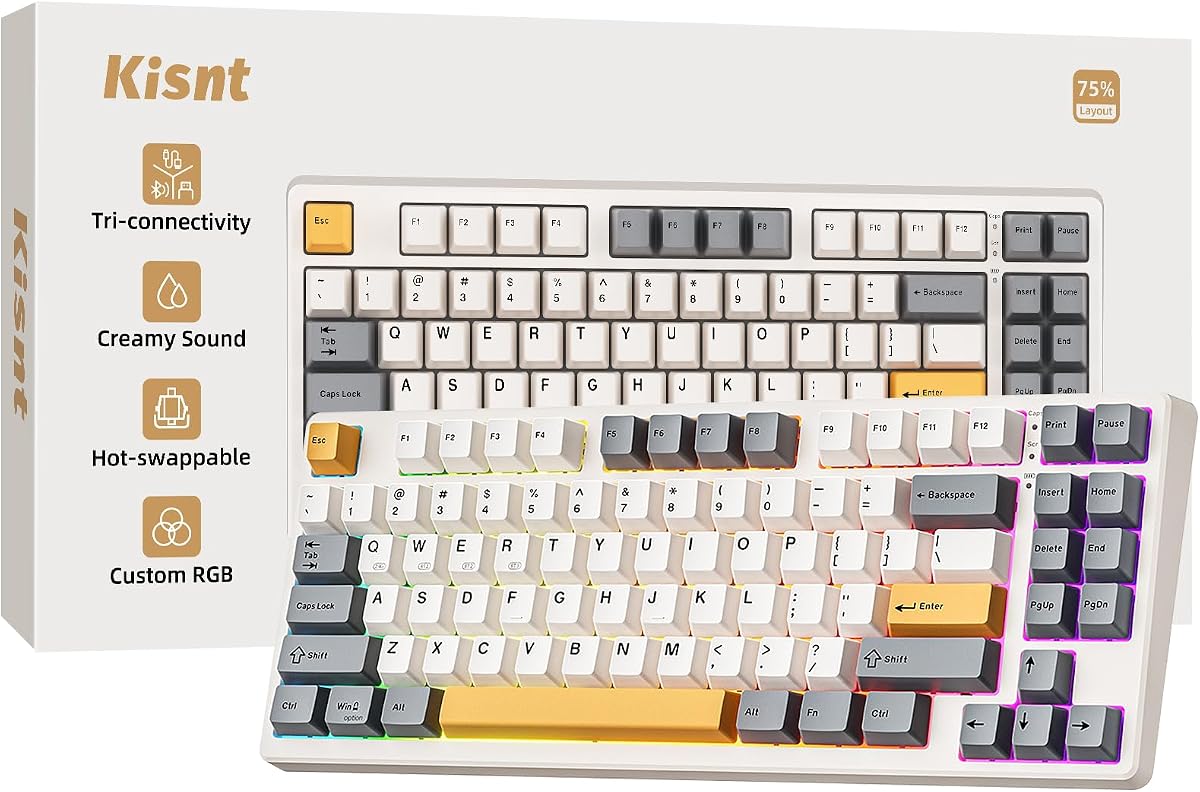
The Kisnt KN85 focuses on delivering a smooth tactile experience with a compact wireless design. It targets users who need a full set of function keys without the bulk of a full-size board.
We may earn a commission when you buy through this link, at no additional cost to you.
Its gasket mount absorbs harsh vibrations to create a thocky sound profile that is pleasing to many typists. The tri-mode connectivity ensures reliable performance across multiple devices without pairing issues.
Driver support is currently limited to Windows and wired modes which restricts full customization for other users. The battery life is solid but not class-leading compared to larger models.
We recommend this keyboard for hybrid workers and gamers needing a portable yet functional board. It offers a reliable typing experience with good wireless capabilities.
Supports USB C 2.4GHz wireless and Bluetooth 5.0 with ultra-low latency for seamless switching between PCs and laptops.
Adjustable RGB backlighting creates a warm ambient glow around the desk to enhance the workspace atmosphere and style.
We may earn a commission when you buy through this link, at no additional cost to you.
The Redragon K745 PRO offers a full-size wireless solution with dedicated hotkeys for quick access to common functions. It suits users who need a traditional layout without sacrificing the benefits of wireless connectivity.
We may earn a commission when you buy through this link, at no additional cost to you.
Its gasket construction provides a soft typing feel that reduces impact stress during long sessions. The PBT keycaps are translucent to allow RGB light to shine through cleanly while resisting wear.
The large footprint may not fit smaller desks easily and the battery life is average compared to premium competitors. The software is functional but lacks advanced scripting features.
This model is ideal for office users needing a complete keyboard layout with some gaming features. It provides a stable wireless experience with convenient shortcut access.
Four dedicated hotkeys allow for immediate access to functions like mute calculator screen lock and desktop for streamlined workflow.
Tri-mode connectivity jumps between USB-C Bluetooth and 2.4GHz wireless for quick transitions without re-pairing devices.
We may earn a commission when you buy through this link, at no additional cost to you.
The SOLAKAKA A99 Pro distinguishes itself with an integrated LCD screen that displays status information and customization options. This visual feedback enhances usability for users who want clear control over settings.
We may earn a commission when you buy through this link, at no additional cost to you.
The metal knob offers precise control for volume and lighting adjustments while the gasket structure ensures a consistent and quiet typing feel. Web-based drivers simplify software installation without downloads.
The screen consumes significant power which reduces overall battery life when active. The layout may feel slightly unconventional for users accustomed to traditional designs.
We suggest this keyboard for users interested in visual customization and advanced features. It offers a unique experience that blends aesthetics with functional utility.
The LCD display shows time date and system info providing clear real-time feedback on keyboard status without needing software.
Users can customize functions via a web driver without downloading software making setup easier across different computer systems.
We may earn a commission when you buy through this link, at no additional cost to you.
The AULA S99 Pink focuses on delivering a visually appealing wireless option with a retro aesthetic. It targets users who prioritize style and basic functionality over mechanical tactile feedback.
We may earn a commission when you buy through this link, at no additional cost to you.
Its multi-device connectivity allows for easy switching between devices while the dual-mode knob offers convenient control over volume and lighting. RGB effects add a vibrant touch to any desk setup.
The membrane switches do not offer the same precision or longevity as mechanical alternatives which limits its appeal for enthusiasts. It lacks hot-swap capabilities meaning switches cannot be replaced.
This keyboard is suitable for casual users or those building a themed setup on a budget. It provides reliable performance for everyday typing tasks with a unique look.
The pink retro design and customizable RGB lighting allow users to create a personalized desk vibe that matches their aesthetic.
A dedicated rotary knob adjusts volume and connection modes quickly without needing software or key combinations.
We may earn a commission when you buy through this link, at no additional cost to you.
The AULA F75 Blue offers the same high-quality performance as its sibling model with a distinct colorway. It is designed for users seeking a reliable wireless mechanical board in a compact footprint.
We may earn a commission when you buy through this link, at no additional cost to you.
Its pre-lubed switches provide a smooth typing experience right out of the box which appeals to users who prefer convenience. The compact 75% layout saves space while keeping essential keys accessible.
Software dependency is required for full macro programming which may be a hurdle for some users. The stabilizers are decent but may benefit from minor tuning for optimal silence.
We recommend this keyboard for general users and gamers needing a portable and functional setup. It offers a balanced feature set for everyday productivity and entertainment tasks.
Supports Bluetooth and 2.4GHz wireless for stable connectivity across multiple devices with minimal lag for daily use.
The 75% layout retains arrow keys while saving significant desk space for better mouse movement and organization.
We may earn a commission when you buy through this link, at no additional cost to you.
Selecting the right creamy keyboard requires understanding several key factors that influence performance comfort and durability for your specific needs.
Switch type determines the tactile feedback and sound profile of the keyboard. Creamy keyboards often use linear switches that are lubed to create a smooth soft impact and a deep sound.
Look for models with lubed switches to ensure a consistent feel across all keys.
Connectivity options include wireless Bluetooth 2.4GHz and wired USB. Wireless offers flexibility while wired ensures stability and latency free performance.
Consider if you need multi-device support or just a single dedicated connection.
Layout refers to the arrangement of keys such as 60% 75% 96% or full size. Smaller layouts save desk space while larger ones include number pads for data entry.
Choose a layout that matches your typing habits and available desk space.
Build quality involves the materials used for the case keycaps and switches. PBT keycaps resist shine while ABS wear faster. A solid case reduces vibration and wobble.
Prioritize durable materials to extend the lifespan of your keyboard.
Customization features include hot-swapping RGB lighting and programmable macros. Hot-swapping lets you change switches without soldering for easy experimentation.
Check for driver support if you plan to remap keys extensively.
Ergonomics involve the keyboard tilt and wrist support features. Adjustable stands help reduce strain during long typing sessions.
Look for adjustable angles or wrist rest compatibility for comfort.
Battery life is critical for wireless models and varies by usage and RGB settings. Higher capacity batteries reduce charging frequency.
Verify the mAh capacity to ensure it meets your daily usage needs.
Start by ensuring the keyboard is fully charged before first use to establish baseline battery performance. Connect to your device via Bluetooth or wireless receiver to confirm stable connectivity.
Customize your layout and macros using the provided software or firmware tools to match your workflow needs. Adjust backlight settings to preserve battery life during non-essential periods.
Clean the keycaps regularly with compressed air and a soft cloth to maintain the creamy feel. Avoid harsh chemicals that may damage the PBT coating or internal components.
A creamy keyboard produces a soft muted sound and smooth tactile feel. This is achieved through lubricated linear switches gasket mounts and internal sound dampening materials that reduce sharp clicks.
Yes modern wireless keyboards with 2.4GHz connections offer latency comparable to wired models. They are excellent for gaming if you choose reputable brands with optimized wireless chips.
Only if the keyboard supports hot-swapping. Check product specifications for hot-swap PCB support to replace switches without soldering if you want to customize the feel later.
Battery life typically ranges from forty to one hundred hours on a single charge. It depends heavily on RGB usage and wireless connection settings so adjusting brightness helps extend time.
Most models support both Windows and Mac via Bluetooth. Check specific compatibility notes for layout mapping as some function keys may need to be remapped for macOS systems.
The 96% layout saves space by placing the number pad and arrow keys close together. It retains full functionality for work and gaming while reducing the overall desk footprint significantly.
We found the YUNZII B98 PRO AULA S99 and Redragon K768 PRO to be the top contenders for their balance of features and sound profiles.
Prioritize switch quality and connectivity to ensure a smooth experience whether you work or play. Choose a layout that fits your desk and workflow requirements.
Always check current prices and stock before purchasing to ensure you get the best deal. Prices vary by retailer so comparing options online is recommended.