
NZXT H5 Flow
4.6Editor score
Perforated PSU shroud for intake
Supports 360mm front radiator
Ultra-fine mesh on panels
Discover the top cooling computer case options for 2026. This guide compares airflow, fan support, and build quality to help you choose the right chassis.
Choosing the right cooling computer case is essential for maintaining optimal performance and longevity of your PC components. A well-designed chassis ensures efficient airflow, reducing heat buildup during intense gaming or workloads.
We evaluated ten top-rated models based on airflow design, fan inclusion, build quality, and compatibility with modern hardware. Each product was analyzed for its ability to handle high-performance CPUs and GPUs effectively.
Each pick highlights unique strengths, from modular flexibility to triple-chamber isolation. Prices and availability change frequently, so verify current details before purchasing to ensure you get the best value for your build.
4.6Editor score

4.7Editor score

4.7Editor score
This side-by-side comparison highlights key specifications across all ten models to help you quickly identify which case best fits your specific cooling and aesthetic requirements.


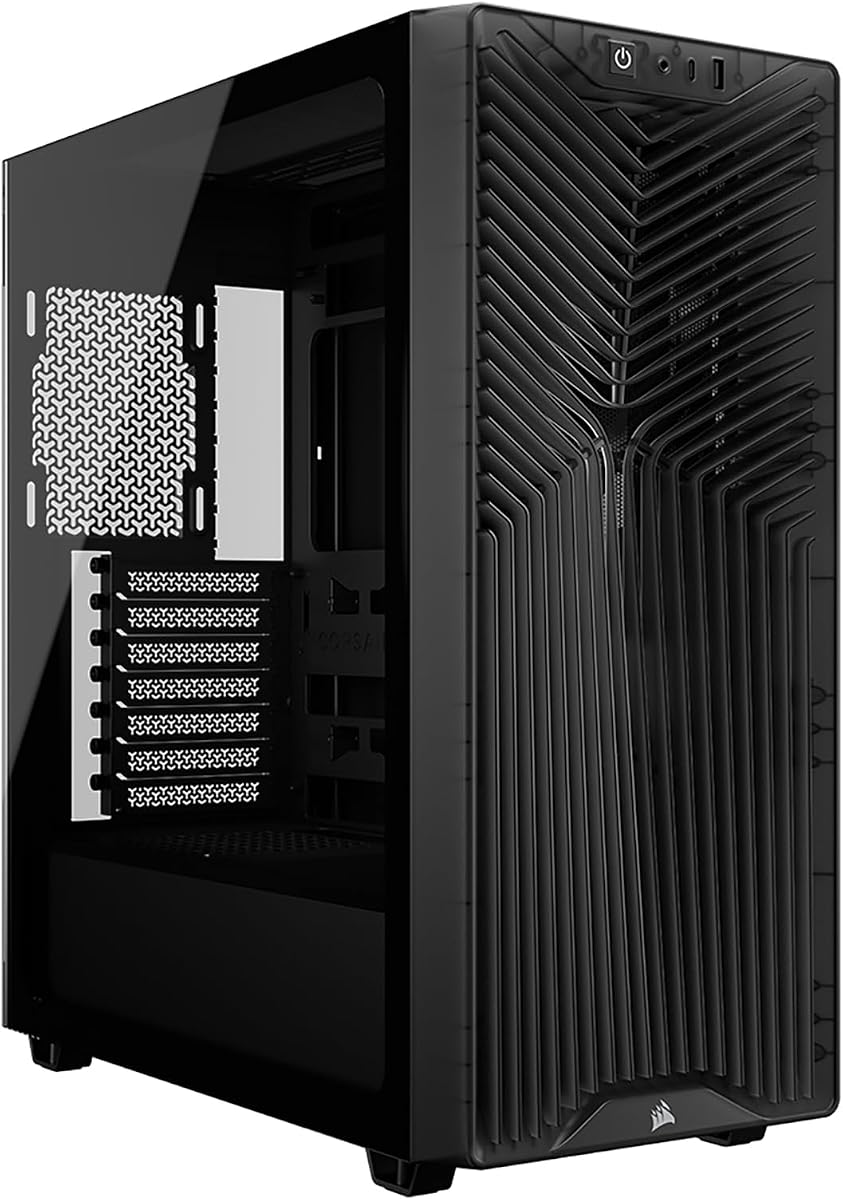


The CORSAIR 4000D RS stands out as a top contender for builders seeking both performance and flexibility. It earns a 4.7 rating thanks to its innovative FRAME system and high-quality pre-installed fans. This case redefines customization, allowing you to adapt the chassis as your needs evolve without replacing the entire unit.
We may earn a commission when you buy through this link, at no additional cost to you.
Its standout feature is the FRAME Modular Case System, which lets you swap components like the motherboard tray or I/O panel easily. The three pre-installed CORSAIR RS ARGB PWM fans provide immediate cooling power with Zero RPM mode for silence at low loads. The InfiniRail mounting system offers unmatched flexibility for positioning fans up to 200mm for targeted airflow.
While the customization is a major strength, it requires some assembly to realize full benefits. The rear fan configuration is less flexible than the front and roof. However, these trade-offs are acceptable given the modular potential and excellent default airflow design.
Ideal for enthusiasts who want a chassis that grows with their system, the 4000D RS is the best overall choice for airflow and flexibility. Its design supports clean builds with or without the side panel cover, making it versatile for various cooling setups.
The FRAME system allows you to upgrade the motherboard tray to billet aluminum or swap I/O panels, ensuring your case adapts to future needs.
With the InfiniRail system, you can mount fans wherever needed, creating a low-obstruction path for cool air through the 3D Y-Pattern panel.
We may earn a commission when you buy through this link, at no additional cost to you.
The NZXT H5 Flow offers exceptional value for builders on a budget who still demand strong thermal performance. With a 4.6 rating, it delivers excellent airflow and compatibility for a variety of components. Its design focuses on efficient cooling paths without requiring high-end investment.
We may earn a commission when you buy through this link, at no additional cost to you.
A key strength is the perforated PSU shroud, which enables optimal air intake from two 120mm fans to cool the graphics card effectively. The case supports up to a 360mm radiator in the front and 240mm on top, providing powerful liquid cooling potential for demanding CPUs. Ultra-fine mesh on panels ensures maximum airflow while filtering dust.
The compact mid-tower size may limit some future upgrades, and the shroud fans are not included despite the design intent. However, the included quiet airflow fans and easy cable management make it a solid out-of-the-box solution for most users.
If you need a reliable, budget-friendly case with strong cooling features, the H5 Flow is the best pick. Its design prioritizes thermal efficiency and ease of use, making it perfect for entry-level to mid-range builds.
The perforated PSU shroud allows air from fans to flow directly onto the GPU, reducing heat buildup without needing extra hardware.
Support for large radiators means you can install high-performance AIOs to keep your system cool during intensive tasks.
We may earn a commission when you buy through this link, at no additional cost to you.
The CORSAIR AIR 5400 LX represents the pinnacle of cooling performance with its innovative triple-chamber design. Rated 4.7, it separates the CPU, GPU, and PSU into isolated chambers to prevent heat crossover. This design ensures each component gets optimal airflow without affecting others.
We may earn a commission when you buy through this link, at no additional cost to you.
Its standout feature is the isolated CPU cooling chamber, which holds a 360mm radiator for efficient CPU cooling independent of GPU heat. The GPU and motherboard chamber offers massive vertical airflow, while the PSU chamber has dedicated intake and exhaust. Airflow ducts on the bottom fan array accelerate airflow velocity without increasing noise.
The premium price and larger footprint may not suit all users, but the thermal performance is unmatched. The panoramic design adds aesthetic appeal while maintaining functional superiority. These trade-offs are acceptable for high-end builds where thermal control is critical.
For builders with top-tier hardware who demand the best cooling, the 5400 LX is the ultimate choice. Its design ensures every component operates at peak efficiency, making it worth the investment for serious enthusiasts.
Separating the CPU chamber ensures that heat from the GPU does not affect CPU temperatures, maintaining stable performance under load.
Innovative ducts accelerate airflow velocity into the main chamber, improving cooling power without requiring louder fan speeds.
We may earn a commission when you buy through this link, at no additional cost to you.
The Antec Flux Pro is a full-tower option that prioritizes maximum airflow and component support. With a 4.7 rating, it includes six PWM fans and supports complex cooling setups. It is ideal for users needing space for E-ATX boards and multiple radiators.
We may earn a commission when you buy through this link, at no additional cost to you.
Its multi-directional vent design supports up to 12 fans simultaneously, with pre-installed units on front, rear, and PSU shroud. The innovative iShift PSU mount and CPU/GPU dual temperature display add unique functionality. High-quality materials like metal, glass, and wood create a premium texture.
The large size may not fit standard desks, and managing 12 fans can be complex. However, for builds requiring extensive cooling and storage, these are minor drawbacks. The included fans and display features provide excellent value.
If you need a spacious case with top-tier cooling potential, the Flux Pro is the best fit. It supports massive radiators and offers advanced features for monitoring and thermal management.
Support for 12 fans allows extensive customization for cooling, enabling optimal airflow across all components simultaneously.
The dual temperature display for CPU and GPU provides immediate feedback on thermal performance during operation.
We may earn a commission when you buy through this link, at no additional cost to you.
The Lian Li V100 combines aesthetics and performance with four pre-installed ARGB fans and an integrated strip. Rated 4.8, it features tool-less panels and high hardware support. This case is ideal for builders wanting vibrant lighting and easy access.
We may earn a commission when you buy through this link, at no additional cost to you.
Its standout features include the 4x PWM-controlled ARGB fans with daisy-chain connectivity and a 26-LED ARGB strip for full spectrum color control. The case supports ATX to Mini-ITX boards and high-end GPUs up to 420mm. Tool-less side panels make access fast and easy.
Fan noise can increase at maximum speed, and cable management options are standard. However, the visual impact and build quality outweigh these minor issues. It provides a clean, customizable setup for most systems.
For those prioritizing looks and ease of use, the V100 is the best choice. Its balance of cooling and lighting options makes it a standout for gaming builds.
Integrated ARGB strip and fans synchronize with motherboard software, allowing full spectrum color control for a customized look.
Tool-less mounting mechanisms on side panels streamline the build process and allow easy upgrades without tools.
We may earn a commission when you buy through this link, at no additional cost to you.
The Cooler Master HAF II 500 delivers extreme airflow with its oversize Mighty40 cooling system. Rated 4.8, it features 220mm front intake and 180mm rear exhaust fans. This design ensures maximum airflow throughput with low resistance for efficient cooling.
We may earn a commission when you buy through this link, at no additional cost to you.
Key strengths include low airflow resistance design with large ventilation openings and split-level cable management to optimize space. The MasterRail mounting system supports various fan and radiator sizes. Dual-Mode GPU holder provides stability for single or dual GPU setups.
The case is physically large, requiring adequate desk space. Fan power draw is higher due to size, but cooling performance is exceptional. These are acceptable for high-performance builds requiring top thermal management.
If you need the highest airflow for demanding workloads, the HAF II 500 is the top pick. Its design prioritizes cooling efficiency and flexibility for any component configuration.
Oversized fans and low resistance design ensure cool air moves quickly through the case, reducing component temperatures significantly.
The Dual-Mode GPU holder clamps single GPUs or supports two GPUs up to 72mm thick each for versatile setups.
We may earn a commission when you buy through this link, at no additional cost to you.
The MSI MAG Forge 321R offers premium lighting integration with Mystic Light Sync and bundled ARGB control. Rated 4.6, it supports up to 11 fans and includes magnetic dust filters. This case is ideal for gamers wanting synchronized lighting and easy maintenance.
We may earn a commission when you buy through this link, at no additional cost to you.
Its standout features include the bundled ARGB LED control board for versatile decoration and Mystic Light Sync for complete software control. The magnetic top dust filter simplifies cleaning, while the vented front panel ensures optimal airflow. A tempered glass side panel showcases components effectively.
The control board may add setup complexity, and cable paths are limited. However, the lighting capabilities and premium build quality offer great value. It balances aesthetics and functionality well for gaming rigs.
For gamers focused on aesthetics and sync, the 321R is the best choice. Its comprehensive lighting support and quality design make it a standout for visible builds.
Mystic Light Sync provides complete control over all ARGB components in one software, creating a seamless lighting experience.
Magnetic filters on top allow easy un-installing and cleaning, keeping your system dust-free without hassle.
We may earn a commission when you buy through this link, at no additional cost to you.
The CORSAIR 3200D RS is designed for modern builds with reverse-connector motherboard support and strong cooling options. Rated 4.6, it includes three RS120 ARGB fans and supports up to nine 120mm fans. It is ideal for users wanting easy cable management and modern compatibility.
We may earn a commission when you buy through this link, at no additional cost to you.
Its standout features include built-in GPU anti-sag stabilization for heavy cards and a built-in shroud to hide cables. Reverse-connector support simplifies routing, while a single connector for front cables streamlines the build process. Top-mounted 360mm radiator support ensures efficient CPU cooling.
While it lacks unique airflow innovations, the focus on ease of build and modern compatibility is valuable. The anti-sag arm and fan capacity provide reliable performance. These features make it a practical choice for standard builds.
If you need a reliable case with modern features and simple cable management, the 3200D RS is the best fit. It supports current hardware trends and ensures stable system performance.
Reverse-connector support simplifies cable routing, reducing clutter and improving airflow efficiency in the case.
A built-in GPU anti-sag arm ensures stability for heavy graphics cards, preventing damage and sagging over time.
We may earn a commission when you buy through this link, at no additional cost to you.
The CORSAIR AIR 5400 RS offers a triple-chamber design similar to the LX, providing superior cooling performance with a panoramic glass front. Rated 4.6, it isolates CPU, GPU, and PSU for optimal airflow. It is ideal for enthusiasts seeking aesthetics and thermal efficiency.
We may earn a commission when you buy through this link, at no additional cost to you.
Key strengths include the isolated CPU cooling chamber for independent heat management and airflow ducts for high velocity without noise. The dedicated PSU chamber has its own intake and exhaust, ensuring cables and components stay cool. The panoramic design adds visual impact to any setup.
The higher cost and larger size may deter casual users, but the thermal performance justifies the investment. The design ensures no heat crossover between components. These trade-offs are acceptable for high-end builds.
For those needing both cooling and aesthetics, the 5400 RS is the best choice. Its design combines superior airflow with a showcase look for gaming PCs.
The panoramic glass front showcases your GPU and cooling setup while maintaining the thermal isolation of the triple-chamber design.
Isolated chambers prevent heat from the GPU affecting CPU temperatures, ensuring stable performance during intensive loads.
We may earn a commission when you buy through this link, at no additional cost to you.
The MONTECH XR brings panoramic aesthetics to a budget-friendly mid-tower design. Rated 4.7, it features tempered glass front and side panels with reverse-blade side fans. This case offers a premium look without the high price, making it popular for gamers.
We may earn a commission when you buy through this link, at no additional cost to you.
Its standout feature is the side-mounted reverse-blade ARGB PWM fans that present illuminated faces inward for a cleaner showcase. The front and side glass keep the GPU in view, while the wood-grain I/O adds a warm accent. Support for up to nine fans or a 360mm radiator allows scaling.
The wood-grain accent may not suit all tastes, and fan speed is standard. However, the value for a panoramic case is excellent. Magnetic filters simplify cleaning, and the clearance fits high-end hardware comfortably.
If you want a panoramic case without spending premium prices, the XR is the best pick. It delivers strong aesthetics and solid cooling for most gaming builds.
Reverse-blade fans show their faces to the interior rather than the support frames, enhancing the visual appeal of your components.
With support for up to nine fans or a 360mm radiator, you can easily scale cooling as your build grows.
We may earn a commission when you buy through this link, at no additional cost to you.
Selecting the best cooling computer case requires considering several key factors to ensure your components stay cool and stable.
Look for cases with mesh panels or perforated metal to allow air to enter freely. A balanced setup of intake and exhaust fans ensures heat exits efficiently. Cases with front, top, and side vents provide flexible cooling options.
Prioritize open-air designs over closed panels to prevent heat buildup inside the chassis.
Check how many fans the case supports and if they are included. Pre-installed PWM fans save cost and ensure immediate performance. Support for large fans like 140mm or 200mm improves cooling capacity.
Always verify fan size compatibility to avoid fitting issues during installation.
If you plan to use liquid cooling, ensure the case supports the radiator size you need. Common sizes include 240mm, 280mm, and 360mm radiators in front or top positions. Support for large radiators indicates strong cooling potential.
Choose cases with enough clearance for both the radiator and fans.
Verify GPU and CPU cooler clearances to ensure your hardware fits comfortably. High-end GPUs can be large, requiring cases with 400mm or more clearance. Check PSU clearance too, especially with larger power supplies.
Measure your components before purchasing to avoid compatibility issues.
A case with good cable management options helps keep airflow paths clear. Look for wide channels, hooks, and straps to route cables neatly. Built-in shrouds can hide cables for a cleaner look and better airflow.
Efficient cable routing reduces turbulence and improves cooling efficiency.
Dust filters on intake points protect components from debris and help maintain cooling over time. Magnetic filters simplify cleaning and are easier to remove than screws. Cases with filters on top, front, and bottom offer complete protection.
Regular cleaning ensures your system runs cool and extends hardware life.
Some cases offer modular components like swappable I/O panels or motherboard trays. This flexibility allows you to adapt the case to new needs without replacing it. Check for upgrade options like additional fan mounts or storage.
Modular designs protect your investment as your system evolves over years.
Look for features like Zero RPM mode on fans or sound-dampening materials. Quiet operation is important for home or office environments. Cases with large fans running slower can move the same air more quietly.
Balance cooling performance with noise levels to suit your environment.
Start by planning your component layout before assembly. Ensure cables fit within channels and fans have clear paths. Use the included screws and tools for secure mounting.
Regularly clean dust filters every few months to maintain optimal airflow. Use compressed air to remove buildup from fans and radiators. This keeps your system running efficiently.
Monitor temperatures using software after setup. Adjust fan curves in BIOS for balanced performance and noise. Proper setup ensures your case delivers its designed cooling potential.
An effective cooling computer case prioritizes open airflow designs with mesh panels and adequate fan support. It should allow air to enter freely and exit efficiently, preventing heat buildup. Features like large fan mounts and dust filters also contribute to consistent thermal management.
Pre-installed fans save time and cost while ensuring immediate cooling performance. However, if you have specific fans you prefer, a case without them offers flexibility. Check compatibility for fan size and connectors before buying.
Most modern cases support 240mm to 360mm radiators in front or top positions. Always check the specific clearance for your chosen size. Some models support even larger radiators for extreme cooling.
Cleaning dust filters every two to three months is recommended for most environments. Use compressed air to clear dust from fans and heat sinks. Regular cleaning prevents overheating and extends hardware life.
A modular case offers flexibility to upgrade components like I/O panels or trays without replacing the whole chassis. This can be cost-effective if your needs change over time. It is ideal for enthusiasts planning long-term builds.
Use cases with large fans that spin slowly to move air quietly. Look for Zero RPM modes that stop fans during low loads. Proper airflow design also helps reduce the need for high-speed fans.
Not all cases support liquid cooling. Look for models that explicitly list radiator support for sizes like 240mm or 360mm. Ensure there is enough space for both the radiator and fans in the designated locations.
Dust filters trap debris before it enters the case, protecting components and maintaining airflow. Magnetic filters are easy to remove for cleaning. Proper filtration keeps your system cooler and extends component lifespan.
We reviewed ten top cooling computer cases, highlighting their unique strengths. The CORSAIR 4000D RS leads with modularity, while the NZXT H5 Flow offers best budget value.
Prioritize airflow design and fan support based on your hardware needs. Cases with large radiators and mesh panels provide the best cooling potential for demanding builds.
Remember that prices and stock fluctuate often. Verify current availability and pricing before purchasing to ensure you get the best deal for your specific build requirements.