
Omada AX3000 Wireless Access Point EAP650
4.5Editor score
Free cloud management included
Five year warranty support
PoE plus power option
This guide compares the top 10 commercial wireless routers for business needs, covering security, speed, and management features to help you choose the right
Selecting the right commercial wireless router is critical for maintaining reliable connectivity and security in any business environment. Modern enterprises require robust hardware that can handle high device counts while providing advanced management tools for IT staff.
We evaluated ten leading models based on performance metrics, security protocols, ease of deployment, and scalability options. Our analysis focuses on real-world business scenarios ranging from small offices to large multi-site enterprises requiring centralized control.
Each product review highlights key strengths and potential limitations to help you match hardware capabilities with your specific operational needs. Keep in mind that pricing and availability may fluctuate, so verify current details before making a purchase decision.
4.5Editor score
4.2Editor score

4.6Editor score
The following table provides a side-by-side comparison of the top commercial wireless routers available this month, highlighting core specifications and key capabilities for business deployment.





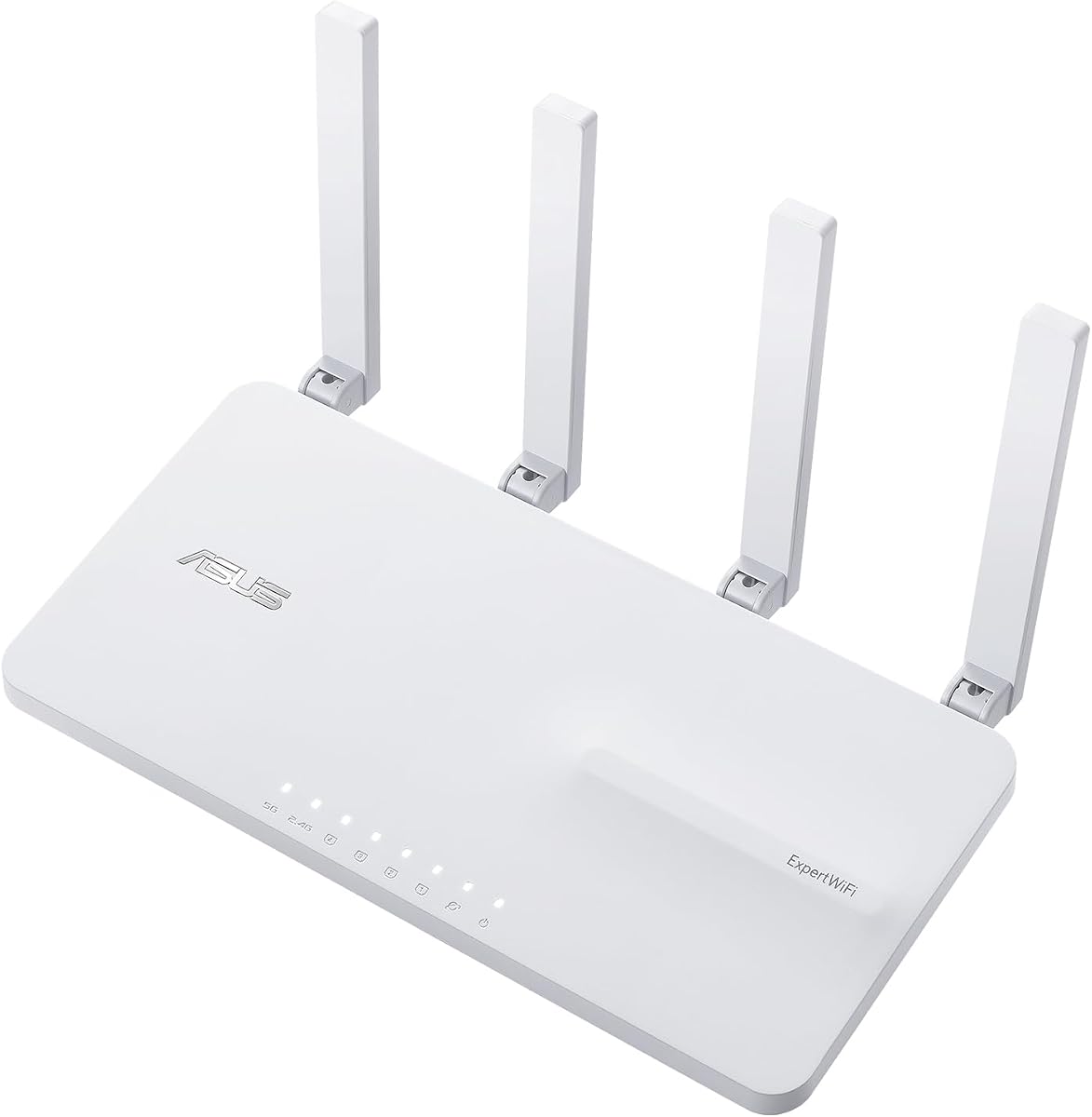
The ASUS ExpertWiFi EBR63 is a dedicated commercial router designed to handle the demands of modern business environments. With a solid rating and robust feature set, it separates guest traffic from internal operations efficiently.
We may earn a commission when you buy through this link, at no additional cost to you.
Its ability to manage up to five SSIDs allows IT administrators to prioritize devices and secure different business scenarios independently. The customizable guest portal enhances brand identity while maintaining network control for visitors.
While the initial investment is higher than consumer units, the included commercial-grade security and remote management capabilities reduce long-term operational costs. The backup WAN feature via USB ensures critical connectivity remains stable during primary line failures.
This router is ideal for small to medium businesses needing enterprise features without complex infrastructure. It balances performance, security, and manageability effectively for organizations scaling their wireless networks.
Custom branding on guest portals creates a professional first impression while keeping internal data secure.
Backup WAN via mobile hotspot prevents downtime when primary internet services experience interruptions.
We may earn a commission when you buy through this link, at no additional cost to you.
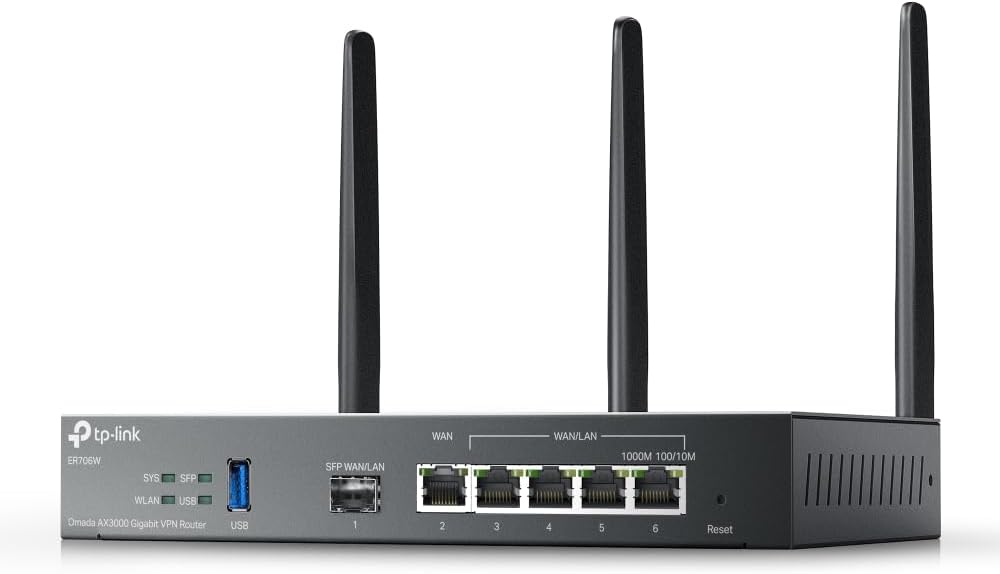
The Omada ER706W stands out for businesses requiring multiple internet connections to maximize bandwidth and redundancy. Its AX3000 speeds support high-throughput environments while the integrated VPN suite secures remote access effectively.
We may earn a commission when you buy through this link, at no additional cost to you.
With load balancing across up to five WAN ports, this router optimizes broadband utilization significantly. The inclusion of an SFP slot offers flexibility for fiber connections or specialized network backhauls in diverse infrastructure setups.
Security is a strong suit with support for multiple VPN protocols including WireGuard and OpenVPN. This makes it suitable for organizations needing secure tunnels without additional hardware appliances or software overhead.
While it demands familiarity with the Omada SDN ecosystem for full potential, the performance and security benefits justify the learning curve. It is a powerful choice for businesses prioritizing uptime and flexible connectivity options.
Load balancing ensures all internet lines work together to prevent bottlenecks during peak business hours.
Multiple VPN protocols allow secure connections for remote employees without exposing internal resources.
We may earn a commission when you buy through this link, at no additional cost to you.
The Ruckus R750 is engineered specifically for environments where dozens or hundreds of devices connect simultaneously. Its Wi-Fi 6 architecture delivers consistent performance even when networks are heavily congested during peak usage times.
We may earn a commission when you buy through this link, at no additional cost to you.
Built for indoor ultra-dense scenarios, this access point manages interference effectively to maintain throughput. Users in conference rooms or lecture halls experience stable connections without frequent drops or slow speeds.
While the cost reflects its specialized design, the reliability it provides in critical areas justifies the investment. IT teams appreciate the robust handling of simultaneous connections that often overwhelm standard consumer access points.
For businesses needing to support crowded spaces with predictable high performance, the R750 is a top tier choice. It ensures that device density does not compromise productivity or user experience in key areas.
The hardware is optimized to manage many clients at once without degrading individual user speeds.
Even under heavy load, the R750 maintains stable throughput for essential business applications.
We may earn a commission when you buy through this link, at no additional cost to you.
The Ruckus R670 brings Wi-Fi 7 capabilities to enterprise indoor deployments, offering exceptional speed and latency improvements. With a combined data rate nearing 10 Gbps, it prepares networks for future bandwidth demands.
We may earn a commission when you buy through this link, at no additional cost to you.
BeamFlex+ adaptive antenna technology maximizes signal coverage and throughput dynamically. This ensures that clients receive optimal bandwidth delivery regardless of their position or the interference levels in the environment.
Security is strengthened with WPA3 and DPSK integration, allowing flexible passphrase management. The built-in BLE or Zigbee support also enables converged access for IoT devices without separate systems.
While currently a premium option, the performance leap makes it ideal for modernizing critical business networks. Organizations aiming to stay ahead of technology curves will find its advanced features highly valuable.
Wi-Fi 7 support ensures longevity as more devices adopt next generation wireless standards.
Adaptive antennas optimize signal paths to reduce errors and increase effective range.
We may earn a commission when you buy through this link, at no additional cost to you.
The NETGEAR Orbi 970 Series delivers unparalleled coverage with its mesh system designed to blanket up to 10,000 square feet. This makes it perfect for large commercial spaces or campus-like environments needing seamless roaming.
We may earn a commission when you buy through this link, at no additional cost to you.
Patented Quad-Band technology reserves a dedicated lane for satellite traffic, ensuring speeds remain consistent. The inclusion of 10 Gig internet ports and LAN ports supports ultra-fast wired connections for demanding devices.
Setup is simplified through guided steps in the Orbi app, making deployment accessible. Security features are enabled out of the box, protecting connected devices from potential threats automatically.
For businesses where coverage and speed are non-negotiable, the investment pays off in reduced IT overhead. It remains a top choice for organizations prioritizing reliability and expansive wireless reach.
The mesh system ensures devices stay connected without interruption as users move across large areas.
Multi-Gig ports allow wired devices to access full bandwidth without wireless interference.
We may earn a commission when you buy through this link, at no additional cost to you.
The Omada EAP650 offers exceptional value with free cloud management and no additional fees. Its dual-band Wi-Fi 6 speeds support high device counts while the slim design blends into modern office aesthetics.
We may earn a commission when you buy through this link, at no additional cost to you.
Installation is flexible with multiple power options including PoE plus, removing the need for nearby power outlets. A five-year warranty provides peace of mind for IT managers managing large deployments across sites.
For businesses seeking a balance of cost and performance, this access point stands out as a budget-friendly choice. It includes essential features like seamless roaming and load balancing without complex hardware controllers.
While it lacks some advanced enterprise features, it delivers reliable connectivity for standard commercial needs. It remains a top recommendation for small to medium businesses prioritizing affordability and ease of use.
Free cloud management eliminates recurring software costs typically associated with enterprise access points.
Multiple power inputs allow deployment in locations without convenient electrical access.
We may earn a commission when you buy through this link, at no additional cost to you.
The Ubiquiti U6+ provides high-speed wireless connectivity with a compact and reliable design. Its IEEE 802.11ax standard ensures efficient communication, making it suitable for environments with many simultaneous users.
We may earn a commission when you buy through this link, at no additional cost to you.
Installation is simplified by PoE+ support, which delivers both data and power through a single cable. This reduces cabling clutter and allows placement in areas where power outlets are scarce or distant.
The wall-mountable form factor maximizes comfort and minimizes visual impact in office or retail settings. Data encryption features protect valuable business information from unauthorized access effectively and consistently.
For businesses integrating into the UniFi ecosystem, this access point offers consistent performance and management. Its balance of speed and design makes it a strong contender for professional wireless deployments.
Single cable power and data simplifies deployment in existing infrastructure without extra wiring.
Built-in encryption protects sensitive business communications from unauthorized access.
We may earn a commission when you buy through this link, at no additional cost to you.
The TP-Link BE6500 brings Wi-Fi 7 technology to businesses seeking next-generation performance at a reasonable price. With six streams and MLO, it delivers optimized speeds on the latest devices and laptops.
We may earn a commission when you buy through this link, at no additional cost to you.
Coverage extends up to 2,400 square feet, sufficient for medium-sized offices. High-performance antennas and beamforming ensure reliable connections for remote workers and essential business tools.
Wired connections are supported with 2.5 Gbps ports for multi-gig internet integration. Security features are designed with safety in mind, aligning with cybersecurity agency standards and practices.
For businesses needing future-proof networking without premium costs, this router offers solid value. Its compatibility with existing modems and mesh extenders makes it a flexible choice for varied setups.
Multi-Link Operation transmits data across bands simultaneously to reduce latency.
Built-in security features protect against malware and unauthorized access by default.
We may earn a commission when you buy through this link, at no additional cost to you.
The NETGEAR Nighthawk delivers fast and reliable Wi-Fi 7 speeds up to 9.3 Gbps. This performance ensures that demanding applications like video calls and streaming remain smooth during business hours.
We may earn a commission when you buy through this link, at no additional cost to you.
Multiple 2.5 Gig ports allow wired connections for gaming rigs or NAS drives. The tri-band design assigns the 6 GHz band to fastest devices, preventing congestion from slower clients.
Management is simplified through the Nighthawk app, allowing device control from anywhere. Security features are enabled out of the box to protect against threats without additional configuration.
For businesses needing high-speed wired and wireless performance in one device, this router fits well. It provides the reliability necessary for modern operational requirements without complex IT overhead.
The 6 GHz band reserves speed for high-performance devices to avoid slowdowns.
Multiple multi-gig ports support high-speed wired devices for critical workloads.
We may earn a commission when you buy through this link, at no additional cost to you.
The ASUS RT-BE88U offers blazing-fast performance with dual 10G ports and Wi-Fi 7 speeds up to 7.2 Gbps. This makes it ideal for businesses handling large data transfers or multi-gigabit internet plans.
We may earn a commission when you buy through this link, at no additional cost to you.
AI WAN detection ensures reliable internet connectivity by optimizing configuration automatically. The powerful quad-core CPU handles demanding applications without latency or slowdowns during peak times.
Security is enhanced with commercial-grade AiProtection Pro and one-tap scanning. Guest Network Pro simplifies IoT device setup and management while keeping main network traffic segregated effectively.
For businesses requiring the highest wired and wireless speeds available, this router delivers. It combines future-proof connectivity with strong security and mesh compatibility for scalable growth.
AI detection optimizes internet connections automatically to ensure stable uptime.
Built-in protection tools secure network access and simplify IoT device management.
We may earn a commission when you buy through this link, at no additional cost to you.
Choosing the right commercial wireless router involves evaluating several technical factors to match performance with business needs and budget.
The Wi-Fi standard determines the maximum throughput and efficiency of your network. Newer standards like Wi-Fi 7 offer faster speeds and better handling of multiple devices than older generations.
Look for routers that support the latest standards to future-proof your network against growing bandwidth demands and new device adoption.
Business networks face higher security risks, so built-in protection is vital. Commercial routers should include firewalls, intrusion prevention, and secure guest networks to protect sensitive data.
Prioritize models offering enterprise-grade security subscriptions or native tools to safeguard against threats without additional hardware.
As businesses grow, networks must expand to cover more space without losing performance. Mesh support allows multiple units to work together seamlessly for whole-premises coverage.
Choose routers that easily scale through additional access points or mesh satellites to accommodate future physical expansion.
Administrators need intuitive tools to configure settings, monitor usage, and manage devices remotely. Cloud-based management simplifies oversight for distributed networks without local hardware controllers.
Select models with user-friendly apps or portals that reduce IT overhead and enable quick troubleshooting during disruptions.
Wired connections often support servers or storage devices that need stable bandwidth. Check for Gigabit or Multi-Gig ports that match your internet plan and internal device requirements.
Ensure the router includes enough ports for critical wired devices to avoid additional switch purchases.
Guests often need internet access without reaching internal business systems. Commercial routers should offer dedicated SSIDs with isolation to protect private data.
Look for features like guest portals that allow branding while keeping internal network traffic secure from visitor devices.
Hardware failures can interrupt business operations, so reliable support is essential. Commercial-grade units usually offer longer warranties and dedicated technical assistance for quick resolution.
Verify the warranty length and support hours to ensure timely fixes if connectivity issues arise unexpectedly.
For access points, Power over Ethernet simplifies installation by delivering both power and data through one cable. This reduces electrical wiring needs in ceilings or walls.
Check if the router or switches support PoE standards to streamline deployment in hard-to-reach areas.
Begin installation by connecting the modem to the router using Ethernet cable. Follow setup guides to configure SSIDs and passwords securely without leaving default credentials active.
Place the router in a central elevated location away from obstructions to maximize signal reach. Avoid placing it near large metal objects or appliances that might cause interference with wireless signals.
Regularly check for firmware updates to patch security vulnerabilities and improve performance. Schedule routine tests to ensure all connected devices are receiving consistent speeds and coverage throughout the workspace.
Commercial routers offer better security features, multi-gigabit throughput, and advanced management tools. They support more simultaneous devices, provide VLAN separation, and include robust guest network isolation essential for business operations.
Depending on space and device count, you may need access points to extend coverage. Mesh systems or SDN platforms allow additional units to work seamlessly with the router for complete premises coverage.
Wi-Fi 7 provides faster speeds and better latency handling which benefits high-demand applications. While older standards work, adopting the latest technology future-proofs networks against increasing bandwidth requirements.
Yes, cloud-based management platforms allow centralized control of multiple sites. Administrators can configure settings and monitor status from anywhere without physical access to each router or access point.
Prioritize firewalls, intrusion detection, and guest network isolation to protect internal data. Automatic firmware updates and encrypted traffic are also critical to prevent unauthorized access or malware infections.
Use separate SSIDs with isolation to prevent guest devices from accessing internal resources. Customizable portals help enforce terms of service while maintaining a professional brand image for visitors.
Yes, longer warranties reduce downtime risks by ensuring quicker replacements if hardware fails. Commercial-grade routers usually come with extended support to maintain business continuity and minimize IT overhead.
Our top picks highlight routers offering strong performance and security for various business needs. The ASUS ExpertWiFi EBR63 leads in overall balance while Omada and NETGEAR options offer cost effective alternatives.
Prioritize models with future-proof standards, robust management tools, and sufficient port configurations. Matching features to specific business environments ensures long-term reliability without unnecessary upgrades.
Always verify current availability and pricing before purchasing as market conditions change. Ensure your chosen solution aligns with both immediate operational needs and future growth expectations.