
VIVO Premium Black Clamp-on 27 x 11 in Keyboard Tray, MOUNT-KB05HT
4.3Editor score
Tilt adjustment for comfort
Adjusting brackets and swivel clamps
Premium tray design
Finding the right clamp on keyboard tray can transform your workspace into a more ergonomic and efficient environment. These devices mount securely under your desk to free up valuable surface area while promoting better posture during long work sessions.
We analyzed ten leading models based on build quality, adjustment features, and ease of installation. Each product offers unique benefits such as rotating bases, tilt adjustments, or dedicated storage spaces to meet diverse user needs effectively.
Every pick highlights key specifications and real-world performance traits to guide your decision. Please note that availability and pricing may change over time so verify current details before finalizing your purchase decision today.
4.3Editor score

4.4Editor score
4.4Editor score
As an Amazon Associate we earn from qualifying purchases.
This side-by-side comparison highlights key specifications across all ten models to help you identify the best fit for your desk size and ergonomic requirements.


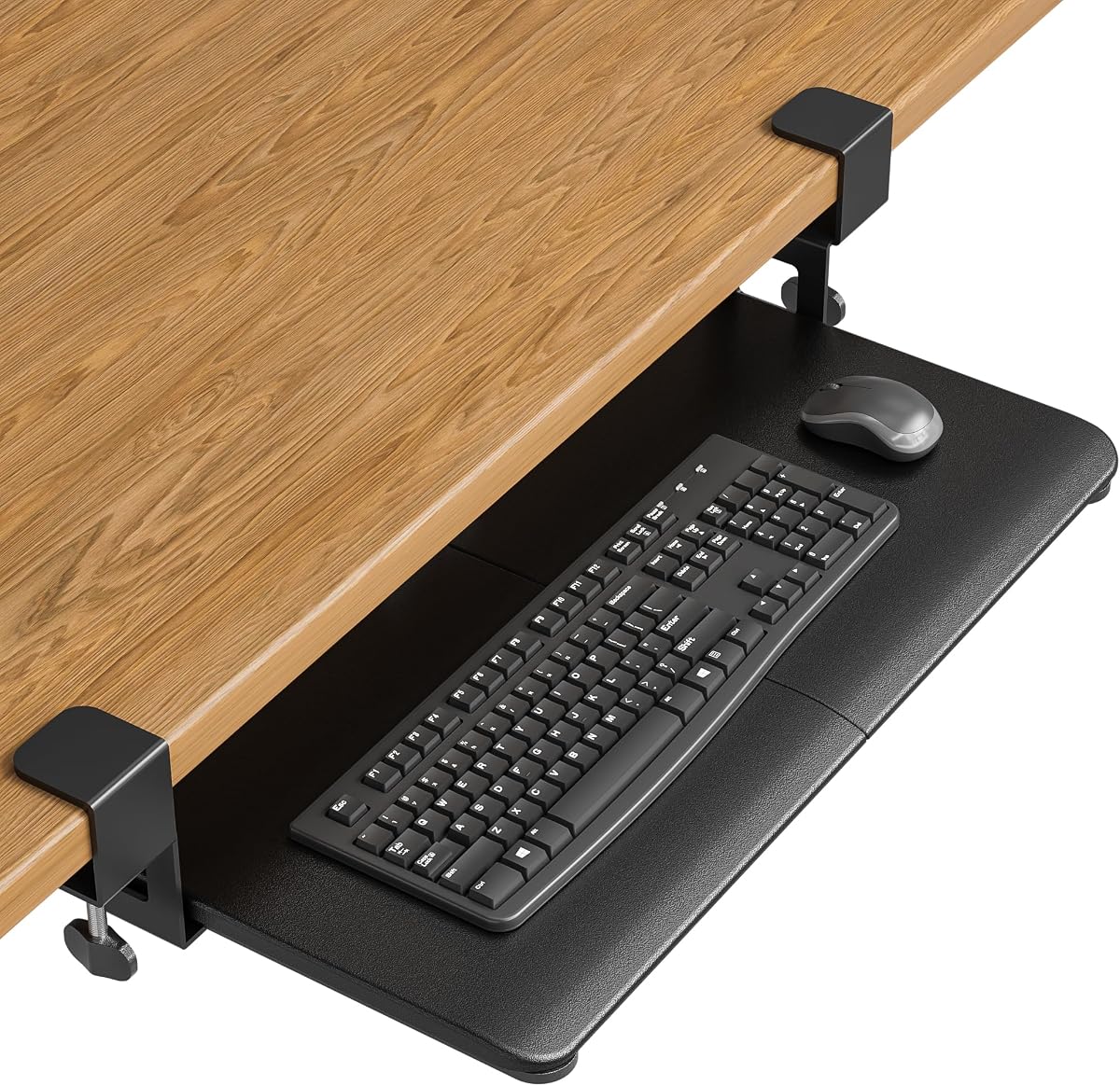
This VIVO model stands out as a reliable solution for freeing up desk space while maintaining ergonomic comfort. With a rating of 4.4 stars it offers a balanced combination of sturdiness and ease of use for most standard office desks.
We may earn a commission when you buy through this link, at no additional cost to you.
The tray measures 26.8 inches by 11 inches which provides ample room for a full-size keyboard and mouse. The sliding mechanism allows smooth extension up to 8.5 inches from the desk edge enabling you to push it away when not in use.
While the clamps are sturdy they may not fit desks thicker than 1.25 inches and beveled edges are incompatible. These limitations are acceptable given the strong hold and protective pads that prevent desk damage during installation.
Buyers seeking a straightforward upgrade to their workstation will find this tray a solid choice. It effectively reduces clutter and supports healthier typing postures without requiring permanent modifications to your existing desk setup.
Moving your input devices under the desk instantly clears valuable surface area for documents and monitors enhancing overall workflow organization.
The ability to slide the tray in and out lets you maintain neutral wrist and shoulder positions reducing strain during long typing sessions.
We may earn a commission when you buy through this link, at no additional cost to you.
The Mount-KBST1 offers exceptional versatility with adjustable height and width settings to fit various desk configurations. Its 4.3 star rating reflects user satisfaction with the added flexibility and included accessories that enhance comfort.
We may earn a commission when you buy through this link, at no additional cost to you.
Users can adjust the tray height across 2.4 inches with five set points ensuring optimal positioning for their chair and body type. The width adjustable from 8.8 to 10 inches allows further customization based on available underdesk space.
Although the clamps support desks up to 3.4 inches thick beveled edges remain incompatible which limits some vintage furniture options. However the included wrist rest and mouse pad add value that justifies the higher cost for many buyers.
This model is ideal for those who need precise ergonomic tuning beyond basic sliding. It delivers a premium experience with thoughtful in like integrated wrist support and robust construction for daily use.
Multiple height and width settings allow users to tailor the tray to their specific seating and typing style for maximum comfort.
Included wrist and mouse pads provide immediate comfort benefits without requiring separate purchases or additional desk clutter.
We may earn a commission when you buy through this link, at no additional cost to you.
This tray introduces a unique rotating clamp mechanism that allows full 360 degree pivoting for ultimate placement flexibility. With a 4.0 rating it appeals to users who need to swing the keyboard out of the way completely when not typing.
We may earn a commission when you buy through this link, at no additional cost to you.
The single clamp design simplifies installation while still supporting up to 11 lbs securely. When not in use the tray can be rotated completely under the desktop which clears the space entirely for other tasks like drafting or meetings.
The smaller 22.8 by 9.8 inch surface may not fit oversized keyboards but works well for standard setups. Additionally the two inch desk thickness limit restricts it to thinner surfaces though the clamp holds tightly without damage.
Buyers looking for maximum space clearance during non-typing hours will appreciate this innovative design. It transforms a standard workstation into a dynamic workspace where input devices disappear when not actively needed.
Full rotation capability lets you move the keyboard aside instantly creating an unobstructed surface for other creative or work tasks.
When tucked away the tray remains invisible under the desk maintaining a clean professional look without permanent removal steps.
We may earn a commission when you buy through this link, at no additional cost to you.
BONTEC delivers a highly affordable solution without compromising on core features like stability and ease of use. Its 4.4 star rating highlights customer satisfaction with the build quality and practical design for home offices.
We may earn a commission when you buy through this link, at no additional cost to you.
The 25.6 by 11.8 inch platform is large enough to accommodate full-size keyboards and mice comfortably. Sliding mechanisms work smoothly to let you pull the tray out for typing and push it back for a clear desk.
Compatibility requires a flat unobstructed underside which means beveled or rounded edges may prevent proper fitting. Users should measure their desk depth and width before ordering to ensure the tray can extend fully without hitting obstructions.
This option is perfect for budget-conscious shoppers seeking reliable ergonomics. It offers significant value by freeing up desk space while maintaining durability and protecting your furniture from scratches or holes.
Achieve professional-grade workspace organization without spending a fortune on expensive motorized or complex solutions.
Clamps secure the tray without drilling keeping your rental or shared office desk intact while providing stable support.
We may earn a commission when you buy through this link, at no additional cost to you.
This premium model elevates the standard tray with precise tilt adjustments to help you find the perfect typing angle. A 4.3 rating reflects strong user approval for the extra comfort features and sturdy construction that supports heavy usage.
We may earn a commission when you buy through this link, at no additional cost to you.
Users can select from nine tilt settings ranging from negative to positive degrees to align with their natural hand posture. The swivel clamps rotate independently allowing secure attachment even on corner desks or complex workstation layouts.
While the price is higher the added ergonomic fine-tuning justifies the investment for those with wrist pain. The tray accommodates desks up to 3.4 inches thick but avoid beveled edges to ensure a secure fit without slippage.
It is the top choice for professionals seeking maximum control over their input device ergonomics. The combination of tilt adjustability and robust clamping ensures long-term comfort and reliability in demanding work environments.
Multiple tilt angles let you neutralize wrist strain by aligning the keyboard exactly with your arm's natural resting angle.
Swiveling clamps adapt to L-shaped desks making it easy to secure the tray even in irregular corner configurations.
We may earn a commission when you buy through this link, at no additional cost to you.
Designed specifically for L-shaped workstations this tray addresses the unique challenges of corner desk setups. Its 4.2 rating indicates solid performance in securing the tray across angled desks without causing structural damage or instability.
We may earn a commission when you buy through this link, at no additional cost to you.
The swiveling C-clamps can rotate 90 degrees independently to match the corner geometry ensuring a tight hold. This feature allows users to position the tray exactly where needed while maintaining easy access to both keyboard and mouse areas.
Users must ensure their desk thickness does not exceed 1.25 inches and the edges are flat not beveled. These constraints are typical for clamp-on trays but critical to check before purchasing to avoid installation issues.
This is the go-to choice for L-shaped desk owners needing extra stability. It offers a tailored solution that standard trays cannot match ensuring your corner workspace remains organized and ergonomic.
Independent rotating clamps allow the tray to align perfectly with corner desk angles for secure mounting.
The clamping system holds the tray firmly in place preventing wobbling even during rapid typing sessions.
We may earn a commission when you buy through this link, at no additional cost to you.
This unique model combines a keyboard tray with an integrated pencil drawer to offer dual functionality. A 4.4 rating shows users appreciate the extra storage that helps keep pens and small items organized near the typing area.
We may earn a commission when you buy through this link, at no additional cost to you.
The 17 inch drawer sits below the keyboard tray providing a convenient spot for office supplies. The tray itself slides out smoothly up to 8.5 inches while the combined extension reaches 18.5 inches for flexible access.
Installation requires a flat desk edge and the same 1.25 inch thickness limit as other VIVO models. While the drawer adds value it also adds a slight bulk that may not fit under very shallow desks.
Ideal for those who want to maximize underdesk utility this tray simplifies your workflow by keeping essentials close at hand. It reduces surface clutter significantly while maintaining strong ergonomic support.
The integrated drawer transforms a simple tray into a versatile storage solution for frequently used office tools.
Storing small items under the desk keeps the main surface clear for focused work and professional presentation.
We may earn a commission when you buy through this link, at no additional cost to you.
This tray is designed for desks that are thicker than average with clamps supporting up to 2.76 inches of thickness. Its 4.4 rating highlights the reliable build quality and smooth sliding action that users find satisfying daily.
We may earn a commission when you buy through this link, at no additional cost to you.
The built-in back baffle prevents keyboards from sliding off during aggressive typing or gaming sessions. The tray extends 7.8 inches from the desk edge which fits many standard setups without requiring deep underdesk clearance.
The surface is slightly smaller than others but still accommodates standard keyboards and mice comfortably. Non-slip pads on the clamps enhance stability and protect the desk from scratches during installation and use.
It is a strong contender for users with thicker desktops who need secure installation. The smooth mechanism and stability features make it a dependable choice for both office and gaming environments.
Upgraded slide mechanisms ensure smooth extension and retraction without binding or jamming over time.
A back baffle keeps your keyboard in place even during fast typing so you never worry about accidental slips.
We may earn a commission when you buy through this link, at no additional cost to you.
This desk extender functions as a keyboard tray but can also support printers or speakers depending on need. With a 4.2 rating it is valued for its flexibility and strong weight capacity of up to 44 lbs on the larger platform.
We may earn a commission when you buy through this link, at no additional cost to you.
The foldable design allows you to press release levers and fold the platform out of the way when not in use. Reinforced K-shaped brackets provide rigid support ensuring stability even with heavier equipment on the surface.
It supports desks up to 3.5 inches thick which is generous for most office setups. However beveled edges remain incompatible and you should verify the underside is flat for the clamps to grip securely.
Buyers who need a versatile surface that can disappear when not needed will find this ideal. It adapts to changing workstation needs without permanent commitment or complicated setup procedures.
Use it as a keyboard tray or printer stand and fold it away to reclaim floor space instantly.
High weight capacity allows you to place heavier devices on the platform safely without wobbling or collapse.
We may earn a commission when you buy through this link, at no additional cost to you.
Mount-It! offers a robust tray with a lifetime warranty that signals confidence in its durability and build quality. Its 4.4 rating indicates high customer satisfaction with the solid sliding motion and the support team behind the product.
We may earn a commission when you buy through this link, at no additional cost to you.
The extra-wide 27 by 11 inch platform provides room for full-size keyboards and mice to move freely. Installation requires no drilling which makes it perfect for renters or shared offices where you cannot modify the desk.
Glass desks are not compatible due to clamp pressure limits and the 2.2 inch thickness max fits most standard desks. Users appreciate the responsive US-based support that helps resolve any installation questions quickly.
This is the safest long-term investment for anyone needing a dependable keyboard tray. The warranty and sturdy construction ensure you will not need replacements soon making it a reliable choice for years.
A lifetime warranty ensures that if any defects occur you can replace the tray without additional cost to you.
The wide platform fits standard and large keyboards comfortably giving your hands plenty of room to move.
We may earn a commission when you buy through this link, at no additional cost to you.
Choosing the right tray requires attention to desk dimensions compatibility ergonomic needs and additional features like storage or tilting capabilities.
Measure your desk thickness and width to ensure the clamps can fit properly. Most models support up to 1.25 to 2.76 inches so check specifications before buying to avoid installation failures.
Look for sturdy metal construction that can support at least 11 lbs of keyboard and mouse weight. Quality materials prevent wobbling and ensure the tray lasts through daily heavy use without bending or cracking.
Consider whether you need height or tilt adjustments to customize ergonomics. Some trays offer multi-level height settings or tilt angles which can reduce wrist strain for users with specific health needs.
Most trays require flat unbeveled edges to clamp securely. Check your desk's profile to confirm compatibility because lipped or rounded edges may prevent a stable hold or cause the tray to slip.
Decide if you want additional storage like a pencil drawer for office supplies. Integrated storage keeps your workspace tidy by moving small items below the desk level out of sight.
Ensure the installation is drill-free if you want to protect your desk from permanent damage. Quality models come with all necessary hardware and clear instructions to simplify setup without professional help.
Inspect the rails and slides for smooth extension and retraction. A well-built mechanism will move quietly without sticking ensuring you can push the tray away easily when not typing.
Look for manufacturers that offer warranties to protect against defects. Good customer support can help resolve installation issues quickly ensuring your product works as intended.
Install the tray by attaching the clamps to the edge of your desk ensuring they are tight and aligned. Adjust the height to keep your wrists straight when typing to maintain healthy posture during long sessions.
Clean the tray surface regularly with a soft cloth to remove dust and debris that could interfere with smooth sliding. Lubricate the rails occasionally to prevent friction and extend the life of the moving parts.
Regularly check the clamps for tightness to ensure the tray remains secure. If the tray slips or wobbles during use retighten the screws or reposition the clamps to restore stability.
Most clamp-on trays are not recommended for glass desks because the clamps can crack the surface. Some models have special rubber pads but verify compatibility with the manufacturer before attempting installation.
No tools are typically required for installation as the clamps use hand-tightened screws. The trays come with all necessary hardware and instructions to make the process simple and tool-free for most users.
Yes you can still use your existing mouse pad on the tray if it fits within the platform dimensions. The tray provides enough surface area for a mouse pad but check width requirements before purchasing.
You need at least 11 to 12 inches of vertical space under your desk to accommodate the tray's height. Measuring this clearance ensures the tray will not hit your knees or chair when extended.
Most trays are not compatible with beveled edges because the clamps need a flat surface to grip. Check your desk edge profile carefully to confirm it meets the manufacturer's flatness requirements.
Yes you can install a clamp on tray on a standing desk as long as the desk thickness and edge type match the tray's requirements. Ensure the clamps are secure enough to hold during adjustments.
Most models support up to 11 lbs which is sufficient for standard keyboards and mice. Heavier mechanical keyboards or large mouse setups should still fit within this weight limit comfortably.
Use a dry cloth to wipe dust from the rails and apply a small amount of silicone lubricant if movement becomes stiff. Avoid oil-based lubricants that might attract dirt or damage the finish over time.
Our top picks offer a range of solutions from budget-friendly options to premium models with tilt adjustments and unique rotation features. Each tray aims to free up desk space while maintaining stability and ergonomic comfort.
Prioritize desk compatibility and adjustability to ensure the tray fits your workspace perfectly. Consider features like storage drawers or corner design if your setup requires specialized solutions beyond standard underdesk placement.
Remember to verify current product details and availability before purchasing as specs may vary. A well-chosen keyboard tray is a worthwhile investment that improves posture and organization for years.