
Guiheng Wired Portable 60% Mechanical Gaming Keyboard
4.3Editor score
Compact 68 keys design
Rainbow backlit RGB effects
Compatible with multiple systems
This guide compares the top affordable mechanical keyboards for gaming and typing, evaluating build quality, switch types, and features to find the best value
Finding a reliable mechanical keyboard does not require breaking the bank. Many budget-friendly options deliver satisfying tactile feedback and durable construction suitable for daily use. This guide explores affordable models that balance performance with cost effectively.
We evaluated ten top-rated mechanical keyboards based on user feedback, build quality, and feature sets. Each entry offers unique strengths ranging from compact layouts to full-size functionality. Our analysis helps you identify the right fit for your specific needs.
Each product review highlights key specifications, pros, cons, and ideal use cases. Remember that availability and pricing fluctuate regularly across retailers. Always verify current details before purchasing to ensure you get the best deal available today.
4.3Editor score

4.6Editor score

4.5Editor score
The following table provides a side-by-side comparison of all ten mechanical keyboards reviewed in this guide. Use this reference to quickly identify key specifications and features that match your preferences.



The Redragon K671 stands out as a top contender for budget-conscious buyers seeking a mechanical keyboard. With a rating of 4.3 stars, it delivers reliable performance for both gaming and typing tasks. Its standout quality lies in the inclusion of hot-swappable switches and high-quality PBT keycaps at an accessible price.
We may earn a commission when you buy through this link, at no additional cost to you.
This keyboard features red switches that require less force to press, making them ideal for rapid inputs in RPGs and MMOs. The double-shot PBT keycaps ensure clear backlight visibility and resist wear over time. Users can adjust lighting speed and brightness across five levels for a comfortable environment day or night.
While the macro editing support is robust, the software does not allow color changes to the backlight. This is a minor trade-off given the overall value. The full keys anti-ghosting ensures no conflicting inputs during intense sessions, and multimedia shortcuts add practical utility.
Anyone looking for a durable keyboard without overspending should consider this model. It provides excellent ergonomics and customization options for gamers and typists alike. We recommend checking current availability to secure this feature-rich keyboard for your setup.
The red switches provide a smooth linear feel that reduces finger fatigue during long typing or gaming sessions.
Macro editing allows you to remap keys and set shortcuts for improved efficiency in work and gaming environments.
We may earn a commission when you buy through this link, at no additional cost to you.
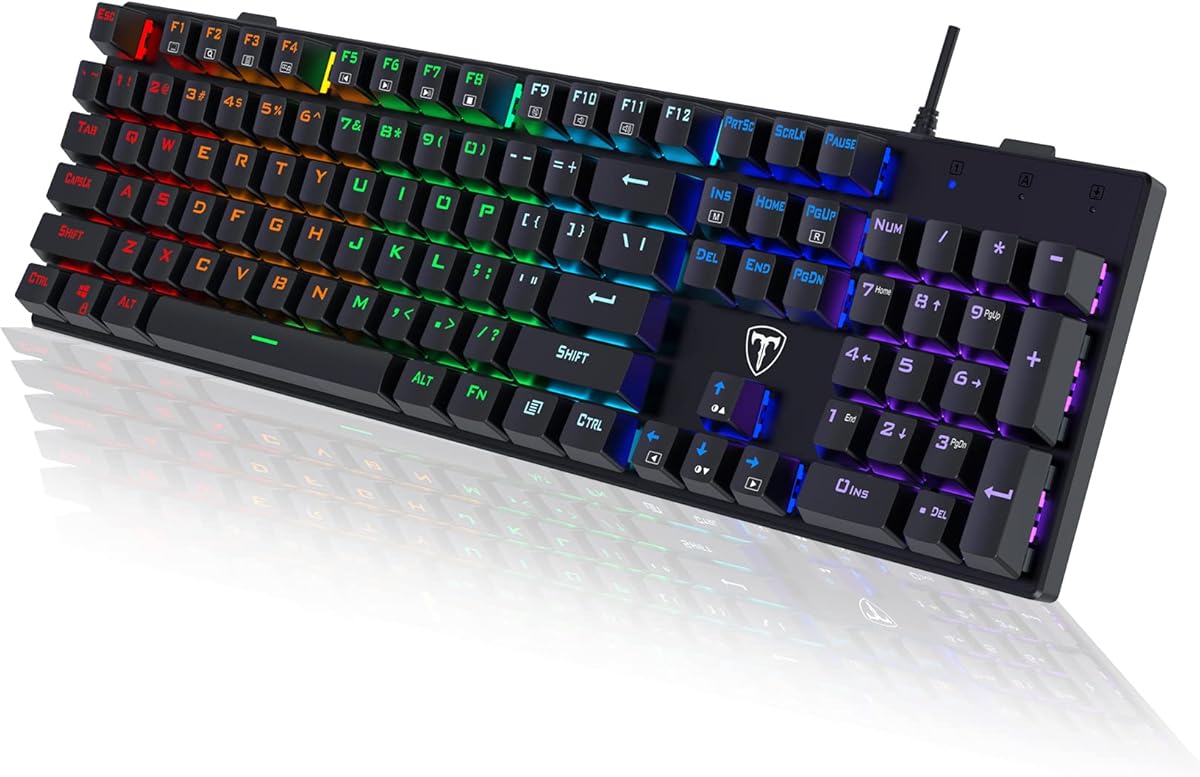
The Guiheng Wired Portable 60% offers exceptional value for users needing a compact mechanical keyboard. With a 4.3 rating, it balances portability with mechanical feel effectively. Its standout quality is the 68-key design that maximizes desk space while maintaining essential functionality.
We may earn a commission when you buy through this link, at no additional cost to you.
Equipped with red switches, this keyboard delivers precise tactile feedback suitable for typing and gaming. The rainbow backlit effects enhance visibility in low-light conditions. Compatibility extends across Windows, Mac, Linux, and even gaming consoles like PS4 and PS5.
The loud click sound may not suit quiet environments but provides clear input confirmation. The double-shot injection keycaps are durable and non-slip. Adjustable kickstand feet allow for comfortable typing angles during extended use.
Ideal for students or professionals with limited desk space, this keyboard is a practical choice. It is easy to carry and set up anywhere. We suggest verifying specific feature needs before purchasing to ensure it meets your workflow requirements.
The compact 60% layout removes the numpad to provide ample room for mouse movement and desk organization.
Splash-proof design and durable panel protect the keyboard from everyday wear and accidental spills.
We may earn a commission when you buy through this link, at no additional cost to you.
The AK96 Mechanical Keyboard introduces modern features like a smart display and rotary knob to a compact form factor. Rated 4.1 stars, it aims for a premium feel at an accessible price point. Its standout quality is the combination of a 96% layout with advanced customization tools.
We may earn a commission when you buy through this link, at no additional cost to you.
Featuring blue switches, this board offers rapid and responsive typing with tactile feedback. The PBT keycaps resist fading while retaining essential arrow keys and numpad. RGB backlighting enhances immersion with 17 modes and dual-side LEDs for visual appeal.
The adjustable kickstands and non-slip rubber pads ensure stable placement on any desk. However, the blue switches produce a distinct click that might be loud for shared spaces. Software support adds layers of customization for advanced users.
This keyboard suits those who want premium features like smart displays without paying high-end prices. It works seamlessly across PC and Mac systems. We recommend checking software compatibility with your OS before finalizing your decision.
The smart display and knob provide quick access to settings and media controls without navigating complex menus.
The 96% layout balances compactness with the utility of a full numpad for productivity tasks.
We may earn a commission when you buy through this link, at no additional cost to you.
The wegear Wired Mechanical Gaming Keyboard delivers robust performance with a focus on tactile precision. With a 4.2 rating, it appeals to users who enjoy the distinct feel of clicky switches. Its standout quality is the satisfying tactile bump provided by professional blue switches.
We may earn a commission when you buy through this link, at no additional cost to you.
The immersive multi-color spectacle features fixed colors across rows with dynamic backlight modes. This keyboard ensures flawless multi-key input with 100% anti-ghosting for reliable gaming performance. The Win Lock function prevents accidental Windows key presses during intense sessions.
Ergonomic comfort is addressed with adjustable tilt and anti-slip pads to keep the board stable. However, the fixed color lighting lacks the dynamic effects found in RGB models. The build is robust, which may add weight to portable setups.
For gamers and typists prioritizing feedback over flashy lighting, this is a strong option. The full numeric pad supports productivity workflows effectively. We suggest reviewing lighting preferences to ensure it matches your aesthetic needs.
100% anti-ghosting ensures every keystroke is registered accurately during complex key combinations.
Rigorously tested for 50M+ keystrokes, the switches and keycaps maintain quality over extended usage.
We may earn a commission when you buy through this link, at no additional cost to you.
The Redragon K668 stands out with 108 keys including four dedicated hotkeys for enhanced productivity. Rated 4.5 stars, it combines standard full-size utility with extra functionality. Its standout quality is the inclusion of extra hotkeys for mute, calculator, and desktop management.
We may earn a commission when you buy through this link, at no additional cost to you.
The upgraded socket accepts almost any 3-pin or 5-pin switch without soldering. This allows users to customize their typing feel easily. Vibrant RGB lighting includes music-sync modes that react to desktop audio for an immersive experience.
While the software offers deeper customization like macros and lighting effects, it requires initial setup time. The ergonomic 2-stage feet help relax wrists during long sessions. Two sets of mixed color keycaps add visual versatility.
Best suited for power users who need extra shortcuts and customization options. It balances gaming performance with workflow efficiency. We recommend exploring the software features to maximize the keyboard's potential in your daily tasks.
Dedicated hotkeys streamline access to common functions like volume control and screen locking instantly.
Hot-swap capability lets you experiment with different switches without risking damage or requiring soldering tools.
We may earn a commission when you buy through this link, at no additional cost to you.
The Redragon K617 earns Editor's Choice for its perfect balance of compact design and premium features. With a high 4.6 rating, it is a favorite among gamers seeking space efficiency. Its standout quality is the 60% layout combined with hot-swappable switch sockets.
We may earn a commission when you buy through this link, at no additional cost to you.
Ditching the numpad and nav cluster frees up space for wide mouse swipes, which helps maintain sensitivity and accuracy. The upgraded socket accepts almost any 3-pin or 5-pin switch, allowing for future customization. Vibrant RGB modes include music-sync effects to elevate your setup.
While compact, the board is built to outlast with switches rated for 50 million keypresses. The clean white and grey colorway stands out from typical black peripherals. Customization software allows you to program advanced macros and design lighting effects.
Ideal for competitive gamers and minimalist setups, this keyboard delivers high performance in a small package. We highly recommend it for those who prioritize desk space without sacrificing features. Verify compatibility with your workflow before purchasing.
The compact layout provides optimal mouse movement range for competitive gaming scenarios.
Hot-swap sockets allow you to change switches as your preferences evolve without buying a new board.
We may earn a commission when you buy through this link, at no additional cost to you.
The Logitech G413 SE offers premium durability with its brushed aluminum-magnesium alloy top case. Rated 4.5 stars, it is designed for competition-level performance and longevity. Its standout quality is the heat- and wear-resistant PBT keycaps that resist shine.
We may earn a commission when you buy through this link, at no additional cost to you.
Taking gaming skills to the next level, this keyboard features tactile mechanical switches for uncompromising performance. The robust body design minimizes flex during intense typing or gaming sessions. Media controls allow quick adjustments to volume and playback via FN keys.
While the price is higher than budget models, the build quality justifies the investment for those who value durability. The white LED lighting and sleek finish elevate the aesthetic of any gaming setup. It provides reliable anti-ghosting for accurate inputs.
Best for gamers who prefer a professional build and durable materials. It suits setups where longevity and performance are critical. We recommend considering the premium features if you seek a keyboard that lasts years of heavy use.
The aluminum top case provides structural rigidity and a premium feel under typing.
6-Key rollover anti-ghosting ensures all necessary keys register accurately during simultaneous presses.
We may earn a commission when you buy through this link, at no additional cost to you.
The Newmen GM611 adopts a 60% layout to optimize desktop space while maintaining full mechanical gaming performance. With a 4.3 rating, it offers versatile typing experiences for both gamers and typists. Its standout quality is the combination of compact design and detachable cable.
We may earn a commission when you buy through this link, at no additional cost to you.
This keyboard features 19 LED rainbow backlight effects with adjustable brightness and speed levels. The double-color injection molding keycaps are transparent and luminous for clear visibility. N-key rollover and anti-ghosting ensure every keystroke registers accurately during intense gaming.
Portability is enhanced with a detachable data cable, making it easy to transport. While software customization is supported for macros and bindings, initial setup may be required. The layout is perfect for users seeking portability without sacrificing key functionality.
Best for portable gaming setups or limited desk spaces where a small footprint is essential. We recommend checking software compatibility to ensure all features work smoothly with your system.
The detachable cable allows for easy packing and transport for gaming on the go.
N-key rollover ensures no missed keystrokes even when multiple keys are pressed simultaneously.
We may earn a commission when you buy through this link, at no additional cost to you.
The Newmen GM325Pro features a rugged metal top plate for outstanding durability and a refined tactile feel. With a 4.2 rating, it appeals to gamers needing reliability and strong aesthetics. Its standout quality is the solid metal construction at a budget-friendly price.
We may earn a commission when you buy through this link, at no additional cost to you.
Equipped with smooth red switches, this keyboard delivers ultra-responsive typing and fast actuation. RGB side-edge illumination transforms any desktop into a glowing command center. The detachable USB cable offers easy portability and convenient cable management for LAN parties.
While RGB lighting is limited to the side edges, the immersive effect remains appealing. The software allows remapping and macro recording for personalized workflows. Full-key rollover ensures seamless accuracy during rapid-fire gaming actions.
Best for gamers who value a robust build and full-size layout in an affordable package. We recommend checking lighting preferences to ensure the side illumination meets your aesthetic expectations.
The metal top plate provides structural integrity and prevents flex during intense usage.
FN shortcuts allow quick access to media controls and calculator functions for efficiency.
We may earn a commission when you buy through this link, at no additional cost to you.
The RisoPhy Mechanical Gaming Keyboard stands out with its ultra-slim LED backlit design and responsive blue switches. Rated 4.5 stars, it offers higher accuracy and quicker response with an enjoyable click sound. Its standout quality is the spill-resistant design with hydrophobic holes.
We may earn a commission when you buy through this link, at no additional cost to you.
This keyboard features rainbow backlit lighting with levels of light speed and brightness adjustments. The stair-up keycap design minimizes hand fatigue by keeping arms in a natural state. Win lock function prevents accidental mistyping during gaming sessions.
The keycaps are pluggable and easy to clean, saving you unnecessary trouble. Included hydrophobic holes allow water to flow away quickly to prevent internal damage. While the ABS keycaps are durable, they may show wear over time compared to PBT.
Best for users seeking a slim profile and robust spill protection in a full-size layout. We recommend keeping the included keycap puller for maintenance. Verify system compatibility to ensure full feature support.
Hydrophobic holes allow liquid to drain quickly, protecting internal electronics from damage.
Scientific stair-up keycap design reduces hand fatigue during long typing or gaming sessions.
We may earn a commission when you buy through this link, at no additional cost to you.
Selecting the right mechanical keyboard requires understanding key specifications that influence performance and durability. This section breaks down the most important factors to consider before making a purchase.
Switches determine the tactile feel and sound of the keyboard. Linear switches offer smooth presses ideal for gaming, tactile switches provide a bump for typing, and clicky switches add audible feedback. Budget options usually include red or blue switches, so choose based on your preference for feedback and noise.
Focus on selecting a switch that matches your primary use case, whether gaming or typing, to ensure comfort.
Layout sizes range from compact 60% to full-size 104-key configurations. Smaller layouts save desk space and improve mouse movement, while full-size boards include a numpad essential for productivity. Consider your desk dimensions and workflow needs when choosing between these layouts.
Measure your desk space to ensure the keyboard fits comfortably alongside your other peripherals.
Material construction affects the keyboard's lifespan and stability. Look for boards with sturdy frames, metal plates, or reinforced ABS cases to minimize flex. While budget models use plastic, some mid-range options offer aluminum accents for better durability without high costs.
Check user reviews for feedback on flex and sturdiness before buying a cheaper option.
Keycaps come in ABS or PBT materials. ABS is common in budget boards but may shine over time. PBT keycaps are more durable and texturized, providing better longevity. If long-term appearance matters, look for models that include PBT double-shot keycaps.
Prioritize PBT keycaps if you type frequently and want a keyboard that maintains its look.
Backlighting helps visibility in low-light environments. Options range from simple white LEDs to vibrant RGB with customizable modes. Ensure the keyboard offers adjustable brightness and speed settings to suit your environment without causing distraction.
Select lighting options that enhance your setup without consuming excessive power or software attention.
Most budget mechanical keyboards use wired connections for stable performance. Look for USB-C or standard USB-A connectors with detachable cables for easy transport. While wireless exists, wired options reduce latency and charging requirements common with gaming peripherals.
Verify the cable length and connector type match your setup requirements before purchasing.
Software allows remapping keys, setting macros, and customizing lighting. Some budget models have limited software support. Check if the brand offers user-friendly tools to tailor the keyboard to your workflow or gaming needs.
Confirm software availability and compatibility with your operating system before finalizing your choice.
Anti-ghosting ensures multiple keys register simultaneously during intense gaming. Full N-key rollover is ideal, but many budget boards offer sufficient coverage for casual users. Review specifications to avoid input lag issues during complex key combinations.
Ensure the keyboard supports the number of simultaneous keypresses you typically need.
To maintain optimal performance, regularly clean your keyboard using compressed air to remove debris between keycaps. Wipe the surface with a damp cloth to prevent dust buildup and ensure smooth operation.
Avoid spills by keeping drinks away from the desk. If liquid exposure occurs, unplug the keyboard immediately and let it dry completely before reconnecting to prevent electrical damage.
Use the included software to update drivers and configure macros for your workflow. Periodically check for firmware updates to ensure compatibility with new operating systems and performance improvements.
Yes, many budget mechanical keyboards are built with durable switches rated for tens of millions of keystrokes. While materials may differ from premium models, selecting brands with solid build quality ensures longevity for everyday typing and gaming tasks.
Linear switches provide smooth, consistent presses without a tactile bump or noise. Clicky switches offer audible feedback and a tactile bump when pressed, which helps confirm input but may disturb others in quiet environments.
Many budget models include basic lighting customization such as brightness and mode adjustments. Some mid-range options offer RGB and software support for advanced effects. Check product specifications to confirm available lighting features before purchasing.
Most mechanical keyboards function as plug-and-play devices without special software. However, advanced features like macros or key remapping often require manufacturer-specific software. Ensure you have access to these tools if they are important for your workflow.
A 60% keyboard is compact and great for saving space, but lacks a dedicated numpad. For productivity involving numbers, a 96% or full-size layout is more convenient. Consider your specific workflow needs when choosing the layout size.
Check the product description for specific mentions of hydrophobic designs or drainage holes. Some models feature sealed circuits to prevent water damage. Always prioritize keyboards with confirmed spill resistance if accidents are a concern.
Hot-swappable switches allow you to change switches without soldering, offering flexibility to adjust feel or replace damaged keys. For enthusiasts or those who experiment with different switches, this feature is a valuable investment.
Prioritize switch type, build quality, and layout based on your specific needs. Ensure the board offers essential features like anti-ghosting and comfortable ergonomics. Reading reviews helps identify reliable models within your budget range.
This guide highlights ten exceptional mechanical keyboards that deliver value across different layouts and feature sets. Whether you need a compact gaming board or a full-size productivity tool, affordable options exist to meet your needs.
Prioritize switch type and build quality to ensure long-term satisfaction. Customization features like hot-swap sockets or RGB lighting can enhance your experience significantly without costing a fortune.
Prices and availability change regularly, so verify current details on retailer sites before purchasing. Always check recent user reviews to confirm product performance before making your final decision.