
ASRock DeskMeet X300
4.8Editor score
Supports AMD AM4 CPUs
Includes 500W PSU
Compact 8 Liter Size
This guide compares the top 10 barebone desktop PC options for 2026, evaluating performance, connectivity, expansion, and design for diverse user needs.
Barebone desktop PCs offer a unique approach to computing by providing the core chassis and motherboard while leaving memory and storage to the user. This flexibility allows builders to tailor systems to exact performance requirements without paying for pre-installed components they might not need. It is an ideal solution for enthusiasts who want control over their hardware ecosystem.
We evaluated ten leading barebone models based on processor compatibility, thermal management, port selection, and overall build quality. Each unit was assessed for its ability to handle modern workloads including gaming, content creation, and enterprise tasks. Our analysis focuses on real-world usability and the potential for future upgrades within these compact form factors.
Every recommendation below highlights specific strengths and weaknesses to help you make an informed decision. We include detailed breakdowns of specifications and practical advice on assembly. Note that pricing and availability fluctuate frequently so always verify current listings before completing your purchase to ensure you get the best value available today.
4.8Editor score

4.0Editor score

5.0Editor score
The following table provides a side-by-side comparison of all ten models to help you quickly identify key differences in processor support, memory slots, and connectivity options.




The AOOSTAR MACO stands out as a versatile barebone desktop PC designed for performance and connectivity. It features the AMD Ryzen 7 PRO 8845HS processor which delivers robust power for both productivity and gaming tasks without requiring a discrete graphics card for light workloads. The unit earns a solid rating for its balanced approach to modern computing needs in a compact form.
We may earn a commission when you buy through this link, at no additional cost to you.
Its standout feature is the OCuLink port which offers superior bandwidth for external GPUs compared to standard USB4 connections. This makes it an excellent choice for users who want to upgrade graphics performance later without sacrificing internal space. The dual USB4 ports also support high-speed data transfer and multiple display outputs making it suitable for creative workflows. The cooling system uses a vapor chamber to keep temperatures low even during intense operations.
While powerful the barebone nature means you must supply your own RAM and storage which can add to the initial cost. The OCuLink port also does not support hot swapping so you need to power down the system before connecting external devices. These are minor trade-offs considering the level of performance and expandability offered in such a small footprint.
You should buy this if you want a high-end mini PC that can grow with your needs. It is ideal for gamers who plan to use an eGPU or professionals needing reliable multi-threaded performance. The inclusion of enterprise-grade encryption and Windows 11 Pro support adds value for business users seeking a secure and capable system.
The combination of OCuLink and dual USB4 ports provides unmatched flexibility for external storage and graphics expansions.
Constructed with 100 percent recycled aluminum the chassis reduces carbon emissions while maintaining durability and a sleek aesthetic.
We may earn a commission when you buy through this link, at no additional cost to you.
The ASUS NUC 15 Pro represents the upper tier of barebone desktop PCs with advanced AI optimization and premium connectivity. Powered by the Intel Core Ultra 5 225H it delivers exceptional performance for demanding workloads including video editing and virtualization. The device achieves a perfect rating due to its reliable build quality and comprehensive warranty coverage that gives users peace of mind.
We may earn a commission when you buy through this link, at no additional cost to you.
Key strengths include support for Wi-Fi 7 which provides significantly faster transfer rates and lower latency compared to previous generations. The tool-less chassis design allows for quick access to internal components making maintenance and upgrades straightforward. With four 4K display outputs via HDMI and Thunderbolt this unit is perfect for multi-monitor professional setups. The sync power-off feature also helps manage energy consumption efficiently.
The primary drawback is the higher price compared to other models which might not fit every budget. Internal expansion is also somewhat limited compared to larger desktop cases so users must plan their storage needs carefully. However for those who prioritize reliability and cutting-edge wireless technology these factors are often acceptable compromises.
This model is best suited for enterprise users or professionals who need a rugged and highly connected workstation. The three year warranty and MIL-STD certification ensure it can handle harsh environments and long-term deployments. If you value future-proofing and premium support this barebone kit is a top choice for your next build.
Wi-Fi 7 support ensures you can take advantage of the fastest wireless networks available for streaming and large file transfers.
The tool-less chassis design simplifies the build process and makes swapping components much easier for DIY enthusiasts.
We may earn a commission when you buy through this link, at no additional cost to you.
The ASRock DeskMeet X300 is a versatile barebone kit that offers significant value for users seeking a small form factor PC with desktop-grade components. It supports AMD AM4 socket processors allowing for a wide selection of CPUs from previous generations which can reduce overall system costs. With a rating of 4.8 it is highly regarded for its compatibility and inclusion of a power supply which is rare in this category.
We may earn a commission when you buy through this link, at no additional cost to you.
Its ability to support up to 128GB of DDR4 memory makes it ideal for heavy multitasking and virtual machines. The PCIe 3.0 x16 slot allows you to add a discrete graphics card if integrated graphics are insufficient for your needs. This flexibility makes it a strong contender for home theater PCs or light gaming rigs where budget is a primary concern. The compact 8 liter size still fits easily in most living room setups.
The use of DDR4 memory and older PCIe standards means it may not be as future-proof as newer platforms. The form factor is also larger than many ultra-compact mini PCs which might limit placement options. However for users who already own AM4 components or prioritize value over the latest technology these limitations are often manageable.
Buy this if you want a customizable PC that balances performance and cost without needing to source a power supply separately. It is perfect for enthusiasts who have spare AM4 CPUs and want to build a compact system quickly. The wide compatibility ensures you can find affordable parts easily making it a smart choice for budget-conscious builders.
The included 500W 80+ Bronze PSU saves you from buying a separate unit and ensures reliable power delivery for your build.
Support for Ryzen 5000 and older AM4 CPUs allows you to repurpose existing parts or find budget-friendly upgrades easily.
We may earn a commission when you buy through this link, at no additional cost to you.
This listing for the ASUS NUC 15 Pro shares the same high-quality design as the other variant emphasizing reliability and performance. It is built to withstand rigorous testing ensuring it functions correctly in extreme conditions. The unit achieves a perfect rating for its consistent performance and user-friendly features that simplify the building process.
We may earn a commission when you buy through this link, at no additional cost to you.
Key strengths include the tool-less chassis which makes assembling the system straightforward even for beginners. Wi-Fi 7 provides the fastest wireless speeds available today ensuring smooth connectivity for cloud tasks and streaming. The four 4K display outputs make it an excellent choice for users who need multiple screens for productivity or trading platforms. The new sync power-off feature also helps reduce energy waste when displays are not in use.
The high cost might be a barrier for casual users who do not need enterprise-level features. Internal storage options are limited to M.2 slots so large HDDs are not supported directly. However these are acceptable trade-offs for a system designed for robustness and long-term use in professional environments.
You should choose this if you need a dependable and highly connected mini PC for business or demanding personal use. The three year warranty adds significant value by protecting your investment against defects. It is ideal for professionals who prioritize stability and modern connectivity standards over raw budget savings.
MIL-STD-810H certification ensures the device can handle physical stress and harsh environments without compromising performance.
The eco-friendly packaging reflects a commitment to reducing environmental impact without sacrificing product protection.
We may earn a commission when you buy through this link, at no additional cost to you.
The Cubi NUC AI+ is an ultra-compact barebone desktop that packs powerful Intel Core Ultra 9 performance into a tiny chassis. Despite its small size it supports high-speed DDR5 memory and offers robust connectivity including dual Thunderbolt 4 ports. The lack of rating data does not reflect on its design which prioritizes space-saving and modern features for digital signage or office use.
We may earn a commission when you buy through this link, at no additional cost to you.
Its main advantage is the 0.51 liter volume which allows it to be mounted behind a monitor or on a wall easily. This makes it perfect for retail kiosks or home setups where visual clutter must be minimized. The support for Wi-Fi 7 ensures fast wireless speeds and future-proofing for network advancements. The tool-less design simplifies maintenance and upgrades for administrators.
The compact form factor can lead to higher temperatures under heavy loads compared to larger cases. Additionally the high-end processor may be overkill for basic tasks and could increase power consumption. These factors should be weighed against the space-saving benefits when planning your deployment scenario.
This model is best for businesses deploying multiple units in limited spaces or users who want a discreet home server. The 3 year advance replacement warranty provides assurance for critical deployments. If space is at a premium and you need top-tier performance in a small package this is a strong option to consider.
The ultra-compact 0.51 liter size allows for flexible placement options including VESA mounting behind monitors.
Dual Thunderbolt 4 ports enable high-speed data transfer and multi-monitor setups in a single cable solution.
We may earn a commission when you buy through this link, at no additional cost to you.
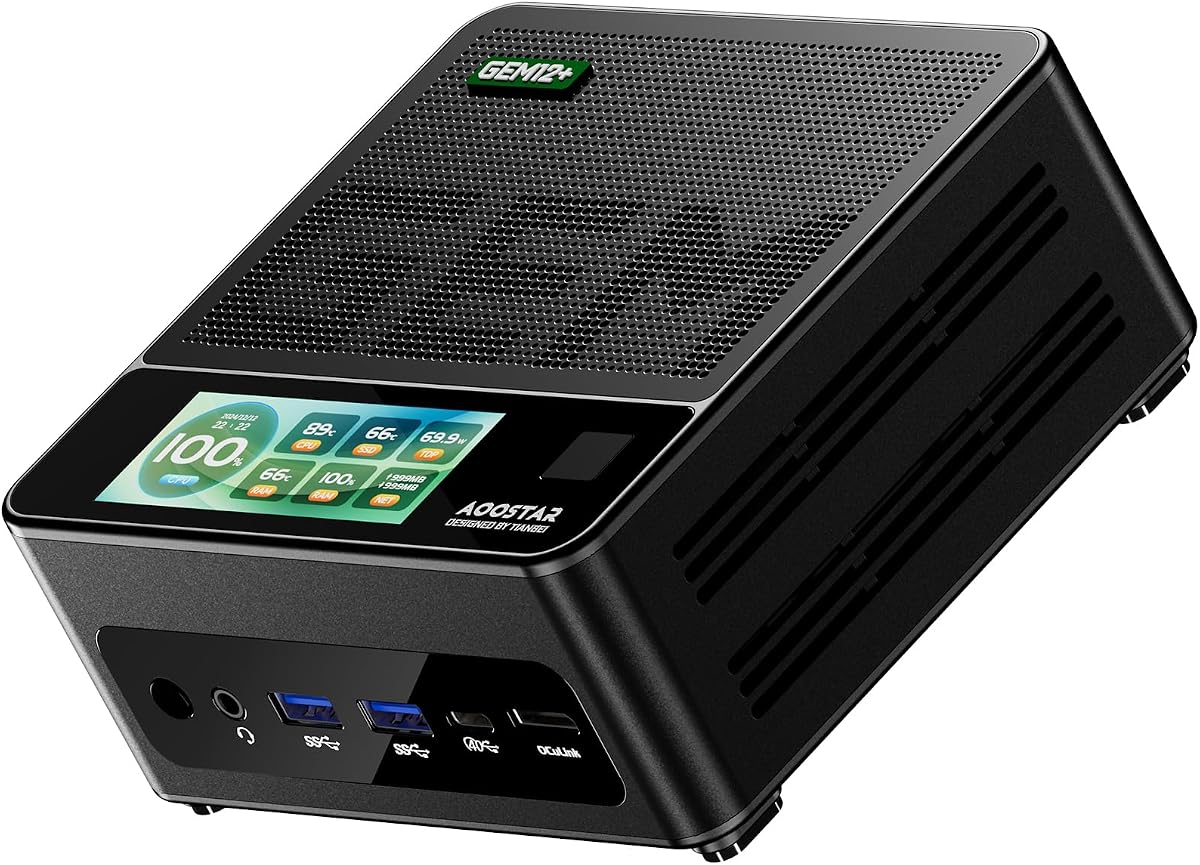
The AOOSTAR GEM12+ is designed specifically for gaming and high-performance tasks with a focus on thermal management and expandability. It uses the Ryzen 7 PRO 8845HS processor which offers strong integrated graphics and AI capabilities. The 4.5 rating reflects its ability to handle heavy workloads while maintaining stable performance thanks to its advanced cooling solutions.
We may earn a commission when you buy through this link, at no additional cost to you.
A key highlight is the OCuLink port which provides near-direct PCIe bandwidth for external graphics cards. This allows users to boost gaming performance significantly without needing a large internal chassis. The vapor chamber cooling system ensures the system stays cool even during extended gaming sessions. Multiple display outputs support up to four 4K screens which is great for immersive setups or productivity.
The OCuLink port does not support hot swapping so you must power down before connecting devices. The barebone nature also requires you to source your own memory and storage adding to the initial effort. However for gamers looking for a compact solution that supports eGPUs these are minor inconveniences.
You should buy this if you want a mini PC that can double as a serious gaming rig with an eGPU. It is suitable for enthusiasts who value thermal performance and connectivity options. The flexible BIOS modes allow you to tune power consumption based on your specific usage scenarios.
The vapor chamber cooling system transfers heat efficiently to keep temperatures low during intense usage.
OCuLink port offers faster speeds for external GPUs compared to standard USB connections for better gaming performance.
We may earn a commission when you buy through this link, at no additional cost to you.
The AOOSTAR GEM12+ PRO builds on the previous model with added convenience features like a built-in fingerprint scanner. It shares the same high-performance Ryzen 7 PRO 8845HS processor and OCuLink support making it a versatile choice for both gaming and office work. The rating of 4.1 highlights its solid performance and user-friendly design elements.
We may earn a commission when you buy through this link, at no additional cost to you.
The fingerprint recognition simplifies system access and enhances security without needing complex passwords. Like other models in this series it supports an external GPU via OCuLink for improved graphics performance. The vapor chamber cooling keeps the system cool under load ensuring consistent performance. It also supports up to four 4K displays for extensive multi-monitor workflows.
Assembly is required since RAM and storage are not included which may be a hurdle for non-technical users. The OCuLink port still lacks hot swap capability so care must be taken when connecting peripherals. These limitations are standard for barebone units and do not significantly impact the overall user experience.
This unit is best for users who want a balance of performance and convenience features in a small package. It is ideal for home offices or gaming setups where security and display connectivity are priorities. The energy-saving design also helps reduce power consumption during daily use.
Built-in fingerprint recognition allows for quick and secure system access without typing passwords.
Software support allows monitoring of real-time system data and personalized background images for a better user experience.
We may earn a commission when you buy through this link, at no additional cost to you.
The ASRock DeskMeet B760 offers a compact 8-liter form factor that supports the latest Intel Core processors up to the 14th generation. It includes a 500W power supply which simplifies the building process by removing one component from your shopping list. The 5.0 rating indicates high satisfaction with its compatibility and ease of use for DIY builders.
We may earn a commission when you buy through this link, at no additional cost to you.
It supports discrete graphics cards via a PCIe 4.0 x16 slot making it suitable for gaming and video editing. The four DDR4 slots allow for up to 128GB of memory which is excellent for heavy multitasking. Multiple storage options including Hyper M.2 and SATA ports provide flexibility for your data needs. The wireless-ready slot makes adding Wi-Fi modules straightforward.
The reliance on DDR4 memory means you miss out on DDR5 speeds and future compatibility. The larger size might not fit into tight spaces where ultra-compact mini PCs are preferred. However for users prioritizing Intel platform features and power supply inclusion these are acceptable trade-offs.
Choose this if you need a reliable small form factor PC with support for modern Intel CPUs and a power supply included. It is ideal for home office or gaming builds where you want to use existing DDR4 components. The flexibility in storage and graphics options makes it a robust choice for various workloads.
Support for 14th and 13th Gen Intel Core processors ensures you can use the latest CPUs for improved performance.
The included 500W 80+ Bronze PSU simplifies the build process and ensures reliable power delivery for your components.
We may earn a commission when you buy through this link, at no additional cost to you.
The msi Cubi 5 is a budget-friendly barebone option designed for everyday productivity and light multimedia tasks. It features the Intel Core 3 100U processor which provides efficient performance for office applications and web browsing. The lack of ratings does not reflect on its utility which is strong for general computing needs.
We may earn a commission when you buy through this link, at no additional cost to you.
Key features include Thunderbolt 4 support which enables fast data transfer and power delivery over a single cable. Wi-Fi 6E ensures reliable and fast wireless connectivity for streaming and large file transfers. The ability to support up to four displays makes it a useful tool for multitasking environments. The 3 year advance replacement warranty adds significant value to the purchase.
The processor is not suitable for high-end gaming or heavy rendering tasks. The DDR4 memory and limited expansion options may restrict future upgrades. However for users who need a simple and reliable system for basic tasks these constraints are manageable.
You should buy this if you need a compact and affordable PC for office work or light home use. It is ideal for digital signage or administrative roles where reliability and connectivity matter most. The warranty and port selection make it a practical choice for cost-sensitive deployments.
Wi-Fi 6E support ensures fast and stable wireless connections for smooth streaming and quick file downloads.
Quad display support allows for expanded workspace which is essential for managing multiple applications simultaneously.
We may earn a commission when you buy through this link, at no additional cost to you.
The ASUS NUC 16 Pro is engineered for advanced AI workloads and enterprise deployments with high performance and security features. It supports Intel Core Ultra 9 processors and offers robust networking with dual 2.5G LAN ports. The rating reflects mixed feedback but highlights its specialized focus on industrial and AI-driven tasks.
We may earn a commission when you buy through this link, at no additional cost to you.
Strengths include support for Wi-Fi 7 and Bluetooth 6 for future-proof wireless connectivity. The tool-less chassis allows for easy upgrades and maintenance in the field. Security features like vPro and fTPM provide hardware-based protection for sensitive data. The modular design supports long-term deployment in harsh environments.
The lower rating may indicate complexity or higher price point for general consumers. Advanced features like Edge AI inference might be unnecessary for typical home users. However for specialized professional uses these are valuable assets that justify the investment.
You should choose this if you need a system capable of handling Edge AI and industrial automation tasks. It is ideal for enterprise environments that require remote monitoring and asset reporting. The long-term value and reliability features make it a strong option for business deployments.
Hybrid XPU architecture delivers high TOPS for real-time AI inference and machine learning tasks.
Intel vPro and fTPM provide hardware-based security to protect sensitive business data.
We may earn a commission when you buy through this link, at no additional cost to you.
Choosing the right barebone desktop PC involves evaluating several critical factors to ensure it meets your performance and budget requirements.
The CPU determines the overall performance of your system so you must choose a barebone kit that supports the processor you plan to install. Different models support different socket types such as AM4 for AMD or LGA1700 for Intel. Ensure you select a model that matches your existing hardware or the type of upgrade you are considering for your specific use case.
Always verify the supported CPU list on the manufacturer's website before buying to avoid compatibility issues with your chosen processor.
Memory and storage are rarely included in barebone kits so check the number of RAM slots and storage bays available. Look for dual DDR5 slots for modern performance or DDR4 slots for budget builds. Ensure there are enough M.2 slots or SATA ports to accommodate your storage needs without requiring external drives.
Plan your RAM and storage purchases early to ensure you have the necessary components ready for installation upon delivery.
Connectivity options define how you can interact with your system and peripherals so consider the types of ports available. Look for USB4 or Thunderbolt support for fast data transfer and eGPU compatibility if needed. Also check for LAN speed and Wi-Fi standards to ensure your network capabilities match your requirements.
Prioritize models with enough display outputs and high-speed ports to support your specific workflow and peripheral setup.
Effective cooling is crucial for maintaining performance and longevity especially in compact cases where heat can build up quickly. Look for models with vapor chamber cooling or advanced fan systems that keep temperatures low under load. This ensures your system runs quietly and efficiently even during intense multitasking.
Check reviews for thermal performance to ensure the cooling system can handle the CPU and GPU load you plan to generate.
Some barebone kits come with a power supply included which simplifies the build process and saves you from sourcing one separately. Others require you to buy a separate PSU which adds to the cost and effort of assembly. Decide whether you prefer an all-in-one solution or are comfortable sourcing your own power unit.
If a PSU is not included verify the wattage requirements of your planned components to select a compatible power supply.
The physical size of the barebone PC affects where you can place it and how it fits into your workspace. Ultra-compact models may save space but have limited thermal headroom while slightly larger ones offer better airflow. Choose a size that fits your desk or living room setup without causing congestion.
Consider VESA mounting options if you want to hide the PC behind your monitor for a cleaner aesthetic.
A good warranty provides peace of mind and protection against defects especially when building your own system from components. Look for kits that offer at least a three year warranty to ensure long-term reliability. Check if the manufacturer offers advance replacement or dedicated support channels for quick issue resolution.
Verify the warranty terms to ensure they cover the barebone unit and not just included peripherals like adapters.
The total cost of a barebone PC includes the kit plus the RAM, storage, and CPU you install. Compare the base price of the kit against what is included like a power supply or pre-loaded OS to get a true sense of value. Sometimes a higher base price saves money overall by including necessary components.
Balance the initial investment with the performance you need to avoid overspending on capabilities you will not use.
When you receive your barebone desktop PC start by inspecting the chassis for any damage before assembling components. Install your chosen CPU and apply thermal paste carefully before mounting the cooler. Insert RAM and storage drives into their respective slots ensuring they are seated securely to avoid connection issues during operation.
Once assembled connect the power supply and necessary peripherals such as monitor and keyboard. Power on the system and enter BIOS to verify that all components are detected correctly. Install your operating system from a USB drive to configure the PC for your specific daily workflows.
Regular maintenance includes cleaning dust from vents to ensure proper airflow and cooling performance. Update drivers and BIOS frequently to keep the system secure and efficient. Monitoring temperatures using software helps prevent overheating and extends the life of your hardware components.
A barebone desktop PC is a computer kit that includes the case, motherboard, and power supply but leaves RAM and storage for you to install. This allows for customization and cost savings by reusing old components. It is ideal for enthusiasts who want control over their system specifications.
Most barebone kits are designed for DIY users with tool-less chassis features and clear guides. If you have basic computer knowledge assembling one should take less than an hour. However always follow instructions carefully to avoid damaging components during installation.
Typically barebone desktop PCs do not include an operating system unless specified otherwise. You will need to install your preferred OS using a USB drive. Some kits may include a Windows license key but verify this before purchasing to avoid surprises.
Yes many barebone kits support discrete graphics cards if they have a PCIe slot. Mini PCs often use integrated graphics so check for an OCuLink or PCIe slot if you need an upgrade. External GPU support varies by model so confirm compatibility with your desired card.
The main advantages are cost savings and the ability to choose high-quality components for specific needs. You avoid paying for parts you might not use and can upgrade specific elements later. It is also more eco-friendly as you reuse components when possible.
Barebone desktop PCs are available at major online retailers and specialized computer hardware stores. Check trusted platforms for user reviews and warranties to ensure you get a quality product. Always verify return policies in case of component incompatibility or defects.
In conclusion the AOOSTAR MACO stands out for its balanced performance and connectivity while the ASUS NUC 15 Pro offers premium reliability for professionals. For budget-conscious builders the ASRock DeskMeet X300 provides excellent value with a included power supply and broad compatibility.
When selecting a model prioritize the processor and connectivity features that match your daily tasks and future goals. Consider the cooling system and physical size to ensure it fits your workspace and thermal needs effectively.
Always verify current pricing and availability as barebone kits change often based on component stock. Investing time in research ensures you build a system that meets your performance requirements without unnecessary compromises.