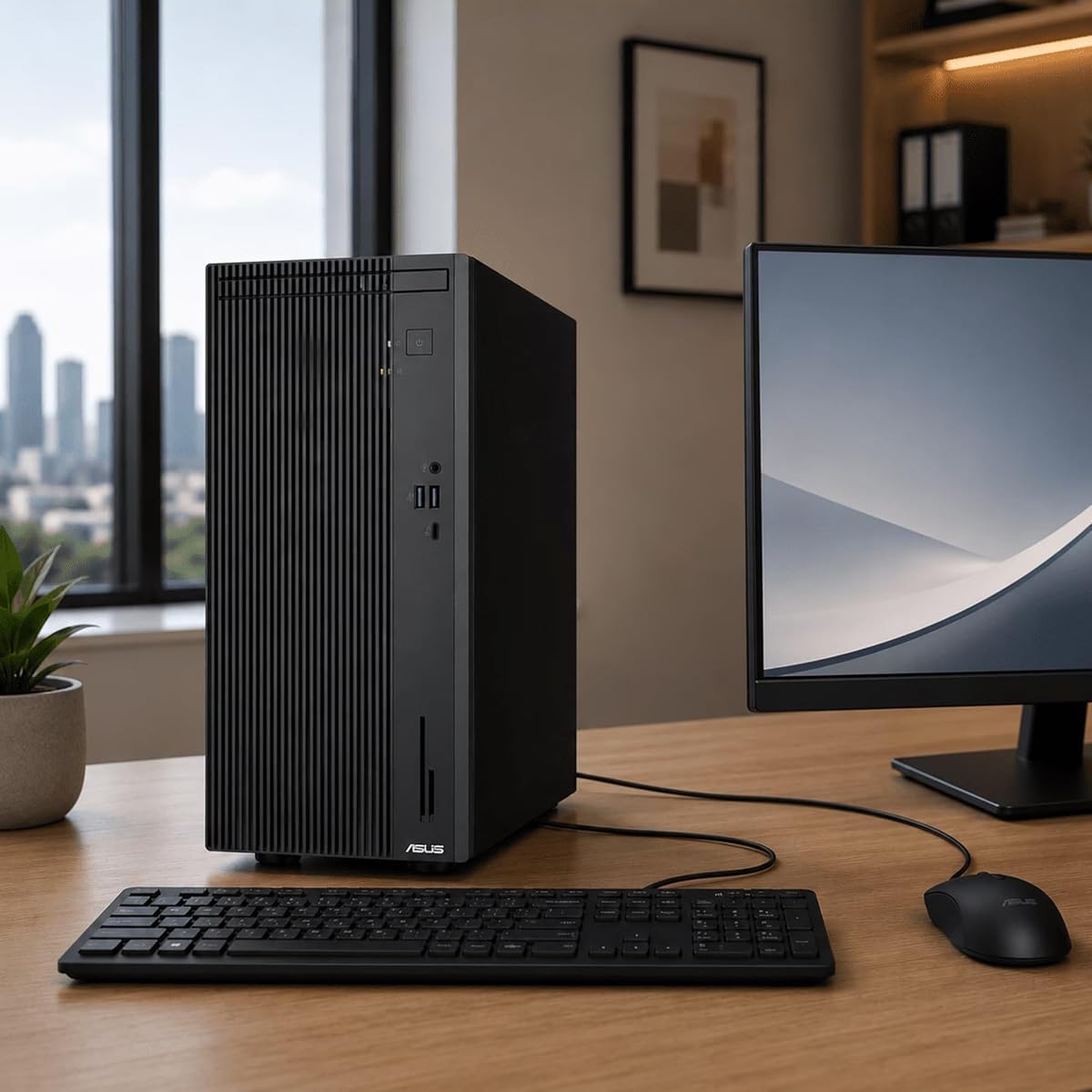
ASUS V500 Business Tower Desktop Computer
5.0Editor score
10 core Intel i7 processor
16GB DDR5 RAM
1TB storage capacity
This guide compares the top ASUS desktop PCs for business and gaming, analyzing performance, memory, storage, and connectivity to help you choose the right
ASUS desktop PCs offer a wide range of computing solutions tailored for business productivity, creative work, and high performance gaming. Each system combines reliable hardware with sleek designs to meet diverse user requirements effectively.
We evaluated ten top models based on processor power, memory capacity, storage speed, and connectivity options. This analysis ensures you receive accurate insights into real world performance capabilities across different use cases.
Each selection highlights unique strengths such as multitasking efficiency, cooling systems, or expandability. Keep in mind that availability and specifications may vary over time, so verify current details before purchasing any system.
5.0Editor score

4.7Editor score

4.2Editor score
This table provides a side by side overview of all ten desktop models, highlighting key specifications and unique features to assist your selection process.


This desktop delivers exceptional value for small businesses needing reliable performance. The 5.0 rating reflects high satisfaction among users who appreciate its balanced hardware configuration and included peripherals.
We may earn a commission when you buy through this link, at no additional cost to you.
Powered by the 10-core Intel i7-13620H processor, it handles demanding tasks seamlessly. The 16GB DDR5 RAM ensures smooth multitasking while the 1TB storage provides ample space for files and applications.
While graphics performance is limited to integrated UHD visuals, this model focuses on productivity over gaming. The included wired keyboard and mouse ensure immediate usability upon unboxing without extra costs.
Ideal for offices or home users seeking efficient daily computing. Its robust connectivity options support dual monitors and wired networks for stable professional workflows.
The 10-core processor enables seamless multitasking across multiple applications simultaneously.
Included peripherals eliminate the need for additional purchases, streamlining setup.
We may earn a commission when you buy through this link, at no additional cost to you.
This gaming desktop balances performance and aesthetics effectively. The 4.7 rating indicates strong approval from users valuing smooth gaming experiences and professional build quality.
We may earn a commission when you buy through this link, at no additional cost to you.
The Core Ultra 7 265F processor paired with RTX 5060 graphics supports competitive AAA titles. 32GB DDR5 RAM ensures seamless streaming while playing without performance bottlenecks or lag.
Air cooled thermal design maintains stable operation under heavy loads. RGB keyboard and mouse complete the setup though the premium cost reflects advanced component choices.
Recommended for gamers seeking immersive visuals and reliable multitasking. The extended protection plan adds peace of mind for long term ownership.
Core Ultra 7 and RTX 5060 deliver high frame rates for competitive titles.
Efficient thermal design prevents overheating during extended gaming sessions.
We may earn a commission when you buy through this link, at no additional cost to you.
This model features the latest 14th Gen Intel Core i7 processor. The 4.2 rating suggests solid performance though users note potential limitations in RAM expandability.
We may earn a commission when you buy through this link, at no additional cost to you.
With 16GB DDR5 RAM and 1TB PCIe SSD, it delivers fast boot times and responsive multitasking. Wi-Fi 6E ensures stable wireless connections for modern network demands.
Expansion slots allow future upgrades despite current limitations. The compact design fits easily on desks while offering versatile connectivity options for peripherals.
Ideal for professionals needing reliable computing with upgrade potential. The modern hardware ensures longevity for evolving software requirements over time.
14th Gen i7 processor handles demanding productivity tasks efficiently.
Multiple expansion slots allow for hardware upgrades over time.
We may earn a commission when you buy through this link, at no additional cost to you.
This desktop excels in home office environments with ample memory. The 5.0 rating highlights its consistency in running business applications smoothly without interruptions.
We may earn a commission when you buy through this link, at no additional cost to you.
Equipped with 32GB RAM and 1TB SSD, it handles large files and multiple tabs effortlessly. Integrated graphics support 4K streaming for entertainment during downtime.
While not suited for heavy gaming, its productivity focus is unmatched in this tier. Keyboard and mouse inclusion simplifies setup for immediate daily use.
Perfect for professionals managing complex workloads. The high memory ensures seamless workflow even with resource intensive software.
32GB RAM allows multiple applications to run without slowdown.
Supports 4K monitors for crisp visual output and productivity.
We may earn a commission when you buy through this link, at no additional cost to you.
This model prioritizes thermal management with liquid cooling technology. Despite limited data, its design suggests high performance capabilities for demanding workloads.
We may earn a commission when you buy through this link, at no additional cost to you.
The RTX 5070 GPU combined with Core Ultra 7 ensures strong gaming performance. Dual glass chassis showcases iconic ROG aesthetics with Aura Sync RGB lighting integration.
Tool-less access facilitates easy component swaps for future upgrades. While 16GB RAM may limit streaming, it supports high frame rate gaming effectively.
Recommended for enthusiasts seeking advanced thermal management. The dual glass design adds premium appeal to high performance computing.
Liquid cooling maintains stable temperatures during intensive gaming sessions.
Tool less design allows quick component swaps without specialized tools.
We may earn a commission when you buy through this link, at no additional cost to you.
This AMD focused system delivers exceptional power for creators. The 4.2 rating reflects strong performance though users note the significant investment required.
We may earn a commission when you buy through this link, at no additional cost to you.
Ryzen 7 9800X3D processor paired with RX 9070 XT GPU provides immersive visuals. 32GB RAM and 2TB storage ensure smooth workflows for editing and gaming.
AV1 encoding supports efficient streaming workflows. While premium pricing applies, the performance and storage capacity justify the cost for professionals.
Ideal for users preferring AMD architecture. The system supports demanding creative tasks without bottlenecks during heavy processing.
Ryzen 7 9800X3D offers top tier performance for gaming and creation.
2TB SSD provides extensive space for large game libraries and media.
We may earn a commission when you buy through this link, at no additional cost to you.
This desktop is tailored for business environments with Pro features. The 3.0 rating indicates users may prefer more customization options in the future.
We may earn a commission when you buy through this link, at no additional cost to you.
Windows 11 Pro offers advanced security and management tools. Included USB flash drive provides convenient portable storage for quick data transfers.
Dual monitor support enhances workflow efficiency. While solid for basic tasks, users might seek higher RAM for heavier workloads.
Suitable for small business offices needing security. The bundle adds immediate utility for daily business operations.
Windows 11 Pro provides enhanced security and system management tools.
Included USB drive offers convenient external storage for data transfer.
We may earn a commission when you buy through this link, at no additional cost to you.
This desktop offers unparalleled storage and memory. The 5.0 rating reflects satisfaction with its raw capabilities though it suits specific high needs.
We may earn a commission when you buy through this link, at no additional cost to you.
128GB DDR5 RAM and 11TB storage support massive libraries and workloads. Core Ultra 9 processor delivers top speed for demanding professional tasks.
RTX 4060 Ti ensures visual quality though GPU may lag behind CPU power. Wi-Fi 6E connectivity ensures robust networking for large file transfers.
Ideal for professional workstation users. The massive capacity eliminates storage anxiety for media libraries or complex data.
128GB RAM and 11TB storage handle massive workloads effortlessly.
Core Ultra 9 processor reaches 6GHz for instant task execution.
We may earn a commission when you buy through this link, at no additional cost to you.
This variant emphasizes high capacity memory for multitasking. The N/A rating suggests limited data but specs indicate high value for professionals.
We may earn a commission when you buy through this link, at no additional cost to you.
64GB RAM allows extensive virtualization or rendering tasks. Integrated graphics handle 4K visuals while the SSD ensures quick access to files.
Ideal for users needing memory over graphical power. Dual monitor support enhances workspace efficiency significantly.
Best suited for content creators needing RAM. The system supports heavy multitasking without performance drops.
64GB RAM handles intensive virtualization or rendering workflows smoothly.
Integrated graphics support 4K streaming for high quality visuals.
We may earn a commission when you buy through this link, at no additional cost to you.
This desktop provides secure professional features. The 5.0 rating indicates strong user satisfaction with its reliability for daily business tasks.
We may earn a commission when you buy through this link, at no additional cost to you.
Windows 11 Pro ensures enhanced security. DDR5 RAM at 5600MT/s delivers quick responsiveness for standard office work.
Compact design saves space on desks. Integrated graphics suffice for business needs though gaming is not supported.
Recommended for secure office environments. The system balances performance and space efficiency effectively.
Windows 11 Pro provides enhanced security features for business data.
Compact tower design balances performance with office space efficiency.
We may earn a commission when you buy through this link, at no additional cost to you.
Choosing the right system requires evaluating performance needs and budget. We highlight key factors to consider for business and gaming use cases.
Intel Core i7 or Core Ultra series processors provide robust performance for multitasking and content creation. Look for high core counts and turbo speeds to ensure smooth operation.
Prioritize newer generations like 14th Gen or Ultra 7 for best efficiency and longevity.
16GB DDR5 RAM is standard for most users, but 32GB or 64GB is better for heavy multitasking or virtualization. Ensure the system supports future upgrades.
Higher RAM capacity prevents bottlenecks during complex workflows and large application usage.
NVMe SSDs offer fast boot times and file access. Aim for at least 1TB storage for modern games or media libraries. PCIe 4.0 drives provide better bandwidth.
Choose systems with multiple M.2 slots for expanding storage capacity over time.
Integrated UHD graphics suit office work while dedicated RTX cards are essential for AAA gaming. Consider VRAM size and generation for future proofing.
If gaming is a priority, invest in systems with discrete GPUs rather than relying on integrated chips.
Modern systems should include USB-C, HDMI, and DisplayPort options for versatile external device connections. Wi-Fi 6E ensures fast wireless networking.
Check rear port layouts to ensure enough connections for monitors and peripherals.
Windows 11 Pro provides advanced security and management features for businesses. Home edition is sufficient for personal use and gaming.
Verify OS version to avoid extra upgrade costs after purchase.
ROG models often feature advanced cooling and RGB aesthetics. Business towers prioritize compact and functional design for desk efficiency.
Look for airflow design and dust filters to maintain internal component health.
Extended protection plans offer peace of mind for critical workloads. Check terms for accidental damage or electrical failures.
Ensure manufacturer support is accessible in your region for technical assistance.
Place your desktop in a well ventilated area to prevent overheating. Ensure the intake vents are not blocked by walls or furniture.
Regularly update drivers via the official ASUS website to maintain system stability and performance. Use the provided software for BIOS and utility updates.
Use surge protectors to shield components from power fluctuations. Keep the tower off the floor to avoid dust accumulation and static discharge.
The ROG G700 series offers dedicated GPUs like RTX 5060 or 5070 for high performance gaming. These models include advanced cooling systems to maintain frame rates during long sessions. For competitive play, the GM700 provides powerful Ryzen CPUs paired with high end Radeon GPUs.
Yes, most V500 models include HDMI and DisplayPort outputs to support multiple displays. This allows users to expand their workspace for better productivity. Check specific port configurations on the product page before purchasing.
Many models allow upgrades up to 64GB depending on available DIMM slots. Business towers often support expansion while gaming models may have limited slots. Verify motherboard specifications for maximum supported memory capacity.
Systems with M.2 slots support additional NVMe SSDs for expanding storage capacity. Some models also include SATA ports for adding traditional hard drives. Ensure your power supply has sufficient connectors for new drives.
Most V500 and ROG bundles include wired keyboards and mice in the box. This simplifies setup for users who want immediate usability. Gaming keyboards often feature RGB lighting to match the system aesthetic.
Pro edition offers BitLocker and remote desktop features essential for business environments. For home users, Home edition provides all necessary gaming and multimedia tools. Consider your specific security needs when choosing the OS.
We reviewed ten top models ranging from budget business towers to premium gaming rigs. Each system offers distinct strengths tailored for productivity or entertainment needs.
Prioritize processing power and memory capacity for workloads requiring high multitasking. Gaming users should focus on GPU options and thermal performance for stability.
Check current availability and specifications before purchasing as details may change over time. Selecting the right fit ensures long term satisfaction with your computing investment.