
ASUS Prime MR120 ARGB Fan Black Triple Pack
4.6Editor score
28mm extra-thick frame
20 ARGB LEDs
Dual-sided lighting
Up to 1600 RPM
This guide compares the top 10 ASUS case fans for 2026 focusing on airflow static pressure noise levels RGB lighting and build quality to help you choose.
Choosing the right cooling solution is vital for any modern computer build. ASUS case fans offer a blend of performance and aesthetics that cater to various user needs from silent office PCs to high-performance gaming rigs.
We evaluated these models based on airflow metrics static pressure noise output and lighting customization. Each entry provides detailed specifications and real-world application scenarios to help you make an informed decision for your specific system.
Every pick highlights unique strengths like quiet operation or high static pressure. Prices and availability can change so check the links for the most current offers before finalizing your upgrade or new build plans.
4.6Editor score

4.7Editor score

5.0Editor score
This side-by-side comparison highlights the key specifications and features of all ten models to help you quickly identify which fan fits your specific cooling and aesthetic requirements.


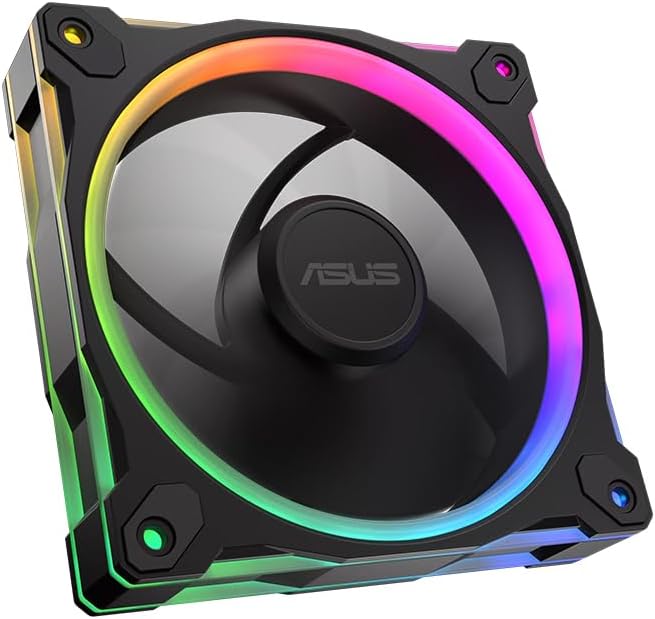
This triple pack offers a cost-effective way to cool your entire chassis without breaking the bank. With a 4.6 rating it delivers solid performance for everyday computing and gaming tasks.
We may earn a commission when you buy through this link, at no additional cost to you.
The extra-thick 28mm frame ensures better airflow and stability compared to thinner alternatives. Its dual-sided lighting creates a seamless visual effect that complements modern case designs beautifully.
While it lacks some high-end features like extreme static pressure it provides more than enough cooling for standard setups. The quiet operation ensures your focus remains on work or gameplay.
Ideal for budget-conscious builders looking for reliable cooling and decent aesthetics. It serves as a perfect entry point into ASUS cooling ecosystems with solid build quality.
The triple pack allows full system coverage at a single price point which is rare in this category.
Dual-sided lighting ensures the fan looks great from any angle within your PC case.
We may earn a commission when you buy through this link, at no additional cost to you.
Designed for professionals and enthusiasts who demand absolute cooling reliability. The PF120 stands out with its 3000 RPM capability and robust build quality ensuring long-term stability.
We may earn a commission when you buy through this link, at no additional cost to you.
Its CNC-milled brass bearing housing offers superior durability compared to plastic alternatives. This ensures consistent performance over years of operation without significant degradation in noise or airflow.
While the noise level might increase at maximum speeds it offers unparalleled cooling capacity for tight spaces or high thermal load components. The daisy-chain design simplifies cable management.
Perfect for workstation builds or extreme gaming rigs where cooling efficiency is paramount. It balances professional aesthetics with raw performance capabilities effectively.
The brass bearing and LCP blades ensure the fan withstands continuous heavy loads.
Daisy-chain connectors reduce cable clutter making your build cleaner and more organized.
We may earn a commission when you buy through this link, at no additional cost to you.
The reverse blade design eliminates visible cables on the front of the case for a cleaner look. This aesthetic innovation makes it a favorite among builders who prioritize visual appeal.
We may earn a commission when you buy through this link, at no additional cost to you.
With 2.75mm H2O static pressure it performs exceptionally well even when pushing air through dense radiators or filters. The 16 addressable RGB LEDs allow for intricate lighting effects.
While it requires careful installation to achieve the cable hiding effect the result is worth the effort. It balances performance and aesthetics better than most competitors in its class.
Recommended for gamers and enthusiasts seeking a modern clean look without sacrificing cooling power. It brings a unique design element to standard PC builds effectively.
Reverse blades hide cables behind the fan frame for an uninterrupted front view.
Despite its look focus it maintains strong airflow and pressure metrics for cooling.
We may earn a commission when you buy through this link, at no additional cost to you.
This triple pack delivers the highest static pressure in the lineup making it ideal for radiators and restrictive filters. The 3.3mm H2O rating ensures it moves air effectively against resistance.
We may earn a commission when you buy through this link, at no additional cost to you.
The dual-layer LED matrix creates a vibrant visual effect that stands out even in bright environments. Users appreciate the robust build quality that matches the high performance ratings.
While the price is higher per fan than budget options the performance gain justifies the cost for high-end builds. It provides comprehensive cooling coverage for complex systems.
Perfect for enthusiasts building high-end gaming rigs where thermal headroom is critical. It combines aesthetic flair with robust engineering standards.
The high static pressure makes this fan exceptional for radiators and thick dust filters.
Dual-layer LEDs offer a unique depth to RGB lighting that enhances the case interior.
We may earn a commission when you buy through this link, at no additional cost to you.
Although not an ASUS fan it serves as a strong alternative within the broader cooling market. It competes well on performance and offers unique AirGuide Technology for focused airflow.
We may earn a commission when you buy through this link, at no additional cost to you.
The magnetic dome bearing reduces friction to ensure quieter operation and longer lifespan. Users appreciate the streamlined cable management provided by the daisy-chain connectivity.
While it fits well with ASUS systems via Aura Sync integration it is optimized for its own ecosystem. It provides a quiet yet powerful cooling solution for various builds.
Ideal for those seeking high performance and quiet operation without being tied to a single brand. It offers versatile mounting and connectivity options.
AirGuide technology directs airflow precisely to hot components for efficient heat removal.
Magnetic Dome Bearing reduces friction to minimize noise during high RPM operation.
We may earn a commission when you buy through this link, at no additional cost to you.
Designed specifically for white themed builds this fan matches high-end white hardware perfectly. Its dynamic plain bearing promises an operating life of up to 250000 hours.
We may earn a commission when you buy through this link, at no additional cost to you.
Anti-vibration pads effectively reduce noise by dampening rattling which is crucial for quiet office or home environments. The double layer LED array produces rich colors that stand out.
While it is sold individually the quality justifies the cost for specific aesthetic needs. It ensures your white build remains cohesive without sacrificing cooling performance.
Perfect for users aiming for a cohesive white build theme with reliability. It combines long-term durability with visual appeal.
The dynamic plain bearing ensures the fan lasts for years of continuous operation.
Double layer LEDs create rich saturated colors that enhance the white aesthetic.
We may earn a commission when you buy through this link, at no additional cost to you.
This pack offers a complete white cooling solution for large cases requiring multiple fans. It combines high static pressure with premium aesthetic features suitable for white builds.
We may earn a commission when you buy through this link, at no additional cost to you.
Aura Sync compatibility allows seamless integration with other ASUS devices for a unified lighting system. The flexible side pattern adds a unique touch to the fan design.
While expensive it ensures a uniform look across multiple fans which is hard to match with mixed batches. It delivers robust cooling for demanding thermal requirements.
Ideal for users building a premium white workstation or gaming PC. It ensures aesthetic consistency and high performance across the chassis.
Aura Sync support allows coordinated lighting effects across your entire ecosystem.
Having all fans from the same pack ensures matching aesthetics and performance.
We may earn a commission when you buy through this link, at no additional cost to you.
This fan offers the reverse blade design in a clean white finish perfect for modern builds. It balances airflow and noise effectively making it suitable for quiet environments.
We may earn a commission when you buy through this link, at no additional cost to you.
With only 23 dBA of noise it operates nearly silently at standard speeds. The circular design of the LEDs creates a pleasing visual effect that blends well with white hardware.
While it may not offer the highest pressure it excels in general case cooling and aesthetic value. It is an excellent choice for front intake fans.
Recommended for users prioritizing noise and looks over extreme thermal performance. It enhances your build with minimal acoustic intrusion.
The low noise level makes it ideal for users who value a quiet workspace.
White LEDs and frame blend seamlessly into white builds for a minimalist look.
We may earn a commission when you buy through this link, at no additional cost to you.
This black variant provides the reverse blade aesthetic at a competitive price point. It delivers consistent airflow with minimal noise making it versatile for many builds.
We may earn a commission when you buy through this link, at no additional cost to you.
The double-sided frame lighting ensures the fan looks vibrant from every angle inside the case. It avoids the cable clutter typically associated with standard fans.
While it prioritizes looks it still meets standard cooling requirements for most gaming PCs. It serves as a reliable upgrade for users seeking visual improvement.
Best for those wanting reverse aesthetics without premium pricing. It balances style and function effectively for everyday cooling.
Reverse blades allow you to hide power cables behind the fan frame neatly.
This model fits various case styles offering a modern look for many builds.
We may earn a commission when you buy through this link, at no additional cost to you.
This fan is designed for professional workstations requiring absolute reliability. Its precision engineering ensures it handles heavy thermal loads efficiently and quietly.
We may earn a commission when you buy through this link, at no additional cost to you.
The 3-phase 6-pole motor delivers smooth robust performance with minimal vibration. This level of engineering contributes to its perfect 5.0 rating among professionals.
While costly it offers unmatched stability and build quality for critical systems. It reduces the risk of failure in long-term high-load environments.
Ideal for professional workstations or servers where uptime is critical. It sets a high standard for durability and engineering quality.
Precision engineering reduces vibration for smoother and more stable long-term operation.
The robust motor and bearing design minimize the risk of failure under load.
We may earn a commission when you buy through this link, at no additional cost to you.
Choosing the right case fan involves balancing cooling performance noise levels and visual aesthetics. Understanding these factors helps you select a model that suits your specific build requirements.
Airflow measures how much air the fan moves while static pressure indicates its ability to push air through restrictive components like radiators. High static pressure fans are best for radiators while high airflow fans suit open cases.
Select based on your component layout. Choose high static pressure for radiators and high airflow for open case ventilation.
Noise is measured in decibels (dB). Lower dB ratings mean quieter operation which is vital for office or home environments. Many ASUS fans offer PWM control to adjust speed and noise dynamically.
Check the dB rating to ensure the fan fits your noise tolerance. PWM control helps manage noise during low load scenarios.
ASUS fans offer features like dual-sided lighting addressable RGB and Aura Sync compatibility. These allow customization to match your system theme. Ensure your motherboard supports the chosen RGB protocol.
Verify motherboard compatibility for RGB control. Choose dual-sided or reverse designs for specific visual preferences.
Bearings like Fluid Dynamic or Magnetic Dome affect lifespan and noise quality. Higher-end fans often use brass housings or specialized bearings to reduce vibration and increase longevity.
Look for advanced bearing technologies to ensure long-term stability and low noise.
Thicker frames like 28mm provide better airflow and stability compared to standard 25mm frames. They offer a solid mounting structure which can reduce vibration noise.
Prioritize thicker frames for better stability and airflow especially in restricted spaces.
Daisy-chain connectors simplify wiring by allowing multiple fans to connect through a single hub. This reduces cable clutter and improves airflow inside the case.
Check if the fan supports daisy-chain or single header control to streamline setup.
Reverse blade fans hide the cables on the front of the case for a cleaner look. Standard fans offer traditional airflow but may show cabling depending on mounting orientation.
Choose reverse blades for a cleaner front view and standard blades for cost efficiency.
Buying in packs like triple packs often offers better value than single fans. However ensure the features meet your specific cooling needs before buying in bulk.
Evaluate cost per fan and feature utility to get the best value for your build.
Install fans with proper airflow direction. Typically intake fans pull cool air in while exhaust fans push hot air out. Ensure all fans align to create an efficient airflow path.
Connect fans to the motherboard or a dedicated fan controller. Use PWM connectors for dynamic speed control and ARGB connectors for synchronized lighting effects.
Periodically clean fans to remove dust buildup. Dust can cause imbalance and increase noise. Use compressed air to clean blades and check for any rattling sounds.
Most modern ASUS fans support Aura Sync but check the specific model details. Some older models may not have the necessary controllers for RGB synchronization. Verify compatibility before purchasing.
Daisy-chain fans simplify cable management by using fewer cables. If your case has limited header ports on the motherboard this feature is useful. It reduces clutter and improves airflow.
Yes reverse blade fans can work in both orientations but they are optimized for intake where cables need to be hidden. Ensure airflow direction matches your cooling plan.
Fluid Dynamic bearings and Magnetic Dome bearings are among the most durable options. They offer long lifespans and quiet operation which suits both gaming and office environments.
Fans with at least 2.0mm H2O of static pressure are generally recommended for radiators. High-density radiators may require fans with higher pressure to push air through effectively.
Yes you can mix different models as long as they are compatible with your motherboard's headers. Ensure PWM and ARGB connectors align to avoid installation issues.
Ideally you should clean your fans every three to six months. Dust buildup can reduce airflow and increase noise significantly over time.
Triple packs usually offer better cost efficiency per fan. They also ensure consistent performance and aesthetics across your system which is helpful for uniform builds.
We recommend the ASUS TUF Gaming TR120 ARGB Triple Pack Black Edition for its high static pressure and vibrant RGB. It balances performance and aesthetics better than most alternatives.
Prioritize noise levels and airflow based on your specific case and cooling needs. Choose reverse designs for clean aesthetics and standard designs for cost efficiency.
Check current pricing before finalizing your order as deals may vary. Ensure compatibility with your motherboard's RGB and PWM headers for best results.
