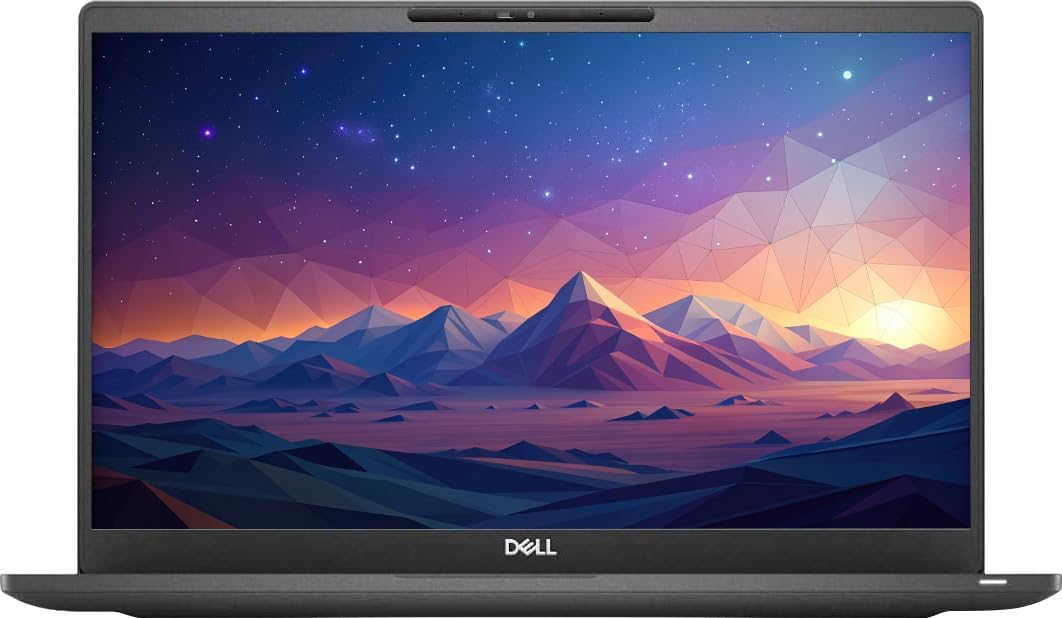
Dell 7400 Latitude
3.9Editor score
Intel Core i5 8365U Processor
16GB DDR4 RAM
256GB M.2 NVMe SSD
Finding a reliable laptop does not require breaking the bank. Amazon Renewed laptops offer certified pre owned machines that undergo strict testing. These devices provide excellent value for students and professionals seeking high performance without the premium price tag.
We compared ten distinct models ranging from budget friendly options to powerful business machines. Our analysis focuses on processor speed, memory capacity, storage types, and overall build durability. Each entry in this list represents a verified refurbished unit ready for immediate use.
Every pick highlights specific strengths like battery life or display clarity. Note that stock availability and pricing fluctuate frequently on the platform. Always check the current listing details before purchasing to ensure you get the exact configuration you need.
3.9Editor score

4.0Editor score

3.9Editor score
As an Amazon Associate we earn from qualifying purchases.
The following table provides a side by side overview of all ten certified laptops. We include essential specifications like processor generation, RAM size, and storage capacity to help you make a quick informed decision based on your specific computing needs.


The Dell Latitude 7420 stands out as a reliable choice for business professionals seeking a balanced machine. It features an 11th Gen Intel Core i5 processor that handles multitasking with ease. Users appreciate the 16GB of RAM which ensures smooth operation during heavy workloads.
We may earn a commission when you buy through this link, at no additional cost to you.
This model comes equipped with a 512GB SSD providing ample space for files and applications. The FHD display delivers clear visuals for documents and video calls. Connectivity options include USB ports and HDMI making it versatile for office setups.
While the battery life may vary depending on usage patterns the performance remains consistent. The screen brightness is adequate for indoor use but might struggle in direct sunlight. These trade-offs are acceptable given the price point and overall reliability.
Buyers looking for a sturdy workhorse for daily tasks should consider this option highly. It is ideal for remote work or small business environments needing dependable hardware. The included warranty adds peace of mind for long term use.
The 16GB RAM allows users to run multiple applications simultaneously without slowdowns. This is crucial for professionals managing emails spreadsheets and video conferences at once.
The 14-inch FHD screen offers sharp text and vibrant colors suitable for creative tasks. It supports anti glare features to reduce eye strain during long work sessions.
We may earn a commission when you buy through this link, at no additional cost to you.
The Dell 7400 Latitude offers exceptional value for users on a tight budget. Despite being an 8th Gen model it pairs well with 16GB of RAM for smooth performance. The M.2 NVMe SSD ensures quick boot times and responsive file access.
We may earn a commission when you buy through this link, at no additional cost to you.
Connectivity is strong with Thunderbolt support allowing for fast data transfer and docking stations. The build quality feels robust and suitable for daily commuting. It runs Windows 11 Pro out of the box for enhanced security features.
The processor is older which might limit performance in demanding tasks like video editing. The 256GB storage is manageable but requires external drives for large media files. These limitations are minor for basic office work and web browsing.
Students and entry level professionals will find this laptop meets their needs effectively. It balances cost and performance better than many competitors in this segment. The refurbished process ensures it functions like a new device.
The NVMe technology provides significantly faster load times compared to traditional hard drives. This means less waiting and more productivity throughout the day.
Thunderbolt and USB Type C ports allow for modern peripherals and external monitors. This future proofs the device even with an older core processor.
We may earn a commission when you buy through this link, at no additional cost to you.
The Lenovo ThinkPad L14 brings modern AMD Ryzen power to the refurbished market. Its 6 core processor handles heavy multitasking effortlessly while maintaining battery efficiency. The IPS display offers wide viewing angles ideal for collaborative work.
We may earn a commission when you buy through this link, at no additional cost to you.
Advanced connectivity like WiFi 6E ensures fast wireless speeds in crowded networks. The classic TrackPoint allows for precise cursor control without lifting fingers from the keyboard. Build quality adheres to ThinkPad standards with a durable chassis.
The price point is higher than basic models but justified by the newer technology. The trackpad is functional but some users may prefer the precision of the TrackPoint. These factors make it a premium choice for demanding users.
This laptop is perfect for engineers or data analysts needing reliable performance. The combination of speed and build quality makes it a top contender. Users get a near new experience with significant savings.
WiFi 6E support ensures minimal latency and high throughput for cloud applications. This is critical for remote teams relying on stable internet connections.
The TrackPoint allows for efficient navigation and document editing without touchpad gestures. It is a hallmark feature for productivity focused professionals.
We may earn a commission when you buy through this link, at no additional cost to you.
This Dell Latitude 5420 model is designed specifically for business environments. It features the reliable 11th Gen i5 processor and 16GB of RAM for daily tasks. The 256GB SSD provides sufficient storage for operating systems and essential software.
We may earn a commission when you buy through this link, at no additional cost to you.
Connectivity is well thought out with HDMI and USB ports for peripherals. Windows 11 Pro ensures enterprise grade security and management features are available. The camera is included for video conferencing which is vital for remote teams.
The screen quality is standard for office work but lacks the vibrance of premium models. Security features like a fingerprint reader are not present in this configuration. These are minor trade-offs for the overall value and reliability.
Companies purchasing in bulk will appreciate the consistency and durability of this unit. It serves well as a primary workstation for sales and support staff. The refurbishment ensures it is ready for immediate deployment.
Windows 11 Pro offers BitLocker and other tools essential for protecting business data. This adds a layer of security often missing in consumer models.
The combination of 16GB RAM and quad core processing ensures smooth switching between apps. This reduces frustration during busy workdays.
We may earn a commission when you buy through this link, at no additional cost to you.
This variation of the Latitude 7420 stands out with its carbon fiber construction. It offers a lighter weight profile while maintaining rugged durability. The Intel Core i7 processor provides a step up in performance for demanding applications.
We may earn a commission when you buy through this link, at no additional cost to you.
Storage is ample with 512GB allowing for local backups and extensive file libraries. The IPS display provides excellent contrast and clarity for visual work. It is fully configured with Windows 11 Pro and latest drivers.
The carbon fiber surface can show fingerprints easily requiring regular cleaning. Under heavy load the cooling fans may become noticeable during long sessions. These aspects do not detract significantly from the overall utility of the machine.
Travelers who need a durable and light laptop will love this option. The i7 chip handles data analysis and coding tasks without breaking a sweat. It is a premium refurbished choice that feels like a flagship device.
The carbon fiber chassis resists minor drops and wear better than plastic. This extends the lifespan of the device during travel.
The i7 processor boosts multitasking speeds for complex spreadsheets and virtual machines. This is a key benefit for power users.
We may earn a commission when you buy through this link, at no additional cost to you.
The Dell Latitude 5400 is a workhorse known for stability and reliability. It comes with 16GB of RAM ensuring smooth operation for everyday tasks. The inclusion of an Ethernet port is a major plus for stable network connections.
We may earn a commission when you buy through this link, at no additional cost to you.
Despite the HD resolution the screen is clear enough for document editing. The processor is older but sufficient for web browsing and basic office suites. The build is sturdy with a focus on function over form.
The display resolution is lower than FHD which might strain eyes over long periods. The chassis is also slightly heavier than newer 14 inch models. These are acceptable compromises for the reliability and price point offered.
IT departments often choose this model for general staff due to its dependability. It handles legacy software well and integrates easily into existing networks. A solid pick for users prioritizing function over flash.
The built-in Ethernet port ensures reliable internet access in environments with weak Wi-Fi. This prevents connection drops during critical meetings.
16GB of RAM allows for running multiple browser tabs and applications simultaneously. This improves workflow efficiency significantly.
We may earn a commission when you buy through this link, at no additional cost to you.
This Latitude 5420 variant is optimized for users with light computing needs. The i5 1135G7 is a strong processor that keeps the system responsive. It comes in a compact form factor that is easy to carry around.
We may earn a commission when you buy through this link, at no additional cost to you.
Storage is handled by a 256GB SSD ensuring quick boot times and app loads. The keyboard is comfortable for typing and the trackpad is responsive. It includes a camera for essential video calls.
The 8GB RAM is a limitation for heavy multitasking or large spreadsheets. Users who need to run many apps at once might face slowdowns. Upgrading RAM is often not possible on these specific models.
Ideal for students or users who mainly browse and type documents. It is affordable and efficient for basic home or office tasks. A good choice if you do not need heavy power.
The SSD ensures the system wakes up quickly from sleep mode. This saves time during morning routines.
The thin profile makes it easy to fit into small bags. Perfect for commuters on the go.
We may earn a commission when you buy through this link, at no additional cost to you.
The Dell Latitude 5490 is a strong contender for users needing legacy ports. It features a VGA port useful for older projectors and monitors. The 512GB SSD provides plenty of room for data and system files.
We may earn a commission when you buy through this link, at no additional cost to you.
Memory is ample at 16GB allowing for smooth operation of modern browsers. The FHD screen ensures text is crisp and readable. It is a well rounded machine for general administrative work.
The processor is from an older generation which limits gaming or heavy editing. The port selection lacks the Thunderbolt speeds of newer models. These issues are minor for basic office and legacy hardware needs.
Educational institutions and older businesses often prefer this model. It bridges the gap between old and new technology effectively. A reliable choice for users needing specific connectivity options.
The VGA port allows connection to older display systems without adapters. This is vital for older conference rooms.
512GB of storage means you do not need to constantly manage files. It provides headroom for multiple projects.
We may earn a commission when you buy through this link, at no additional cost to you.
This Dell Latitude 5400 offers a sharp 1920×1080 screen for clear visuals. It handles basic tasks with ease thanks to the i5 processor. The SSD ensures the machine is ready to work almost instantly.
We may earn a commission when you buy through this link, at no additional cost to you.
The black chassis looks professional and fits well in corporate settings. It is lightweight enough for daily commuting without causing strain. The keyboard has good travel for comfortable typing sessions.
The 8GB RAM limits performance if you keep many browser tabs open. The lack of a touchscreen is standard for this model but some may prefer one. These are minor factors for a device focused on productivity.
It is ideal for users who need clarity and speed without heavy power. Perfect for administrative roles or home use. The FHD screen makes a noticeable difference in visual comfort.
The FHD resolution ensures spreadsheets and text are sharp and easy to read. This reduces eye strain during long hours.
The SSD and processor combination ensures quick response times. This keeps the workflow smooth and uninterrupted.
We may earn a commission when you buy through this link, at no additional cost to you.
This laptop is the top of the line for performance in the list. It features 32GB of RAM and an i7 processor which is powerful. You can run virtual machines or heavy software without any hesitation.
We may earn a commission when you buy through this link, at no additional cost to you.
Thunderbolt support allows for fast external storage and dual monitor setups. The FHD screen is vibrant and suitable for visual work. It is a robust tool for professionals who need raw power.
The price is higher due to the premium specs but it offers longevity. Fan noise may be present when under heavy load but is manageable. These features justify the cost for power users.
This model is perfect for engineers video editors and data scientists. It handles complex tasks efficiently and provides future proof performance. A top choice for those who need maximum capability.
32GB of RAM handles virtual machines and heavy databases easily. This prevents bottlenecks in professional workflows.
Thunderbolt ports enable lightning fast data transfer and daisy chaining. This is essential for professional peripheral setups.
We may earn a commission when you buy through this link, at no additional cost to you.
Choosing a refurbished laptop requires careful attention to several key factors. This guide breaks down the essential specifications and conditions to ensure you select a reliable device.
The processor is the brain of your laptop. Look for at least an 8th Gen Intel Core i5 or newer for good performance. Newer generations offer better power efficiency and speed.
Prioritize models with 11th Gen or AMD Ryzen 5000 series for longevity.
RAM determines how many applications you can run at once. 8GB is the minimum for basic tasks but 16GB is recommended for smooth multitasking.
Ensure the laptop has enough RAM to handle your specific software needs.
Always choose a Solid State Drive over a Hard Disk Drive. SSDs provide faster boot times and better reliability.
Aim for at least 256GB of storage to accommodate your operating system and essential files.
The screen is your primary interface. Look for Full HD resolution for clear text and images.
IPS panels offer better viewing angles which are helpful for collaborative work.
Check the available ports for your peripherals. USB Type C and HDMI are standard for modern setups.
If you use legacy projectors ensure there is a VGA or DisplayPort option available.
Refurbished laptops vary in battery health. Check the seller details for battery cycle counts.
Always plan to keep the charger with you if the battery is not guaranteed to be new.
Ensure the laptop comes with a genuine copy of Windows 11 Pro. This offers better security features.
Verify that the license is active before purchase to avoid activation issues.
Always buy from sellers offering a minimum 90-day warranty. This covers hardware failures shortly after arrival.
Tech support access can save you time if you encounter configuration issues.
Unbox your device carefully and perform a full system check. Ensure all ports function correctly and the battery charges without issues. Update the operating system to the latest version for security patches.
Keep the laptop clean by using a microfiber cloth on the screen and keyboard. Avoid placing heavy objects on the lid to prevent structural damage. Use a cooling pad if you run intensive applications for long periods.
Back up your data regularly to an external drive or cloud service. This protects your work in case of hardware failure. Manage your startup programs to maintain speed and extend battery life over time.
Amazon Renewed products are pre-owned items that have been professionally inspected and tested to work like new. They undergo a refurbishing process that includes cleaning and functionality checks. You can expect minimal to no signs of wear on the exterior.
Most Certified Refurbished products on Amazon come with a minimum 90-day warranty. This protects you against hardware failures shortly after purchase. It is always wise to verify the specific warranty terms on the product page before buying.
Many business models like the Latitude series allow for RAM upgrades. However some newer thin models have soldered memory. Always check the specific service manual for the model you choose before assuming upgrades are possible.
Yes they are generally safe because they undergo rigorous testing by qualified vendors. The devices are cleaned and checked for malware before shipping. Ensure you change your password upon receipt for added account security.
The listing should mention the battery health or cycle count. If not listed it may vary. You can check the system details after receiving the item to see the remaining battery capacity percentage.
On Amazon these terms are often used interchangeably for similar tiers. Renewed generally implies a broader range of conditions. Certified Refurbished specifically means it was tested and certified by a qualified third party.
Yes Amazon has a return policy for Renewed products. You typically have 30 days to return the item if it does not meet expectations. Ensure you keep the original packaging for a smooth return process.
Most listings for these models confirm Windows 11 Pro pre-installed. Some older units might come with Windows 10. Check the product details to confirm the exact operating system version before purchasing.
This guide highlights ten excellent options for those seeking reliable refurbished laptops. From budget friendly models to power heavy machines there is a choice for everyone.
Prioritize your needs such as processing power or storage when making your final decision. Do not overlook the importance of RAM for future proofing your investment.
Always check current prices and availability as stock changes frequently. A little research ensures you find the perfect machine for your workflow.