
EMEET C960 1080P Webcam
4.4Editor score
Privacy cover included
90 degree wide angle lens
Dual omnidirectional microphones
This expert guide compares the top 1080p webcams for meetings and streaming, evaluating video quality, audio, and privacy features to help you choose the best
Choosing the right video communication device is essential for remote work and content creation. A reliable 1080p webcam ensures clear visuals that enhance professional interactions and personal broadcasts alike.
We analyzed market leading models focusing on lens quality, microphone performance, and ease of setup. Our comparison highlights key differences to help you find the perfect match for your specific environment.
Each selection includes detailed insights into strengths and potential limitations. Note that product availability and offers fluctuate frequently, so verify current details before making your final purchasing decision today.
4.4Editor score

4.6Editor score

4.4Editor score
The following table provides a side-by-side overview of all ten selected models, highlighting their core specifications to facilitate quick decision making for diverse user requirements.



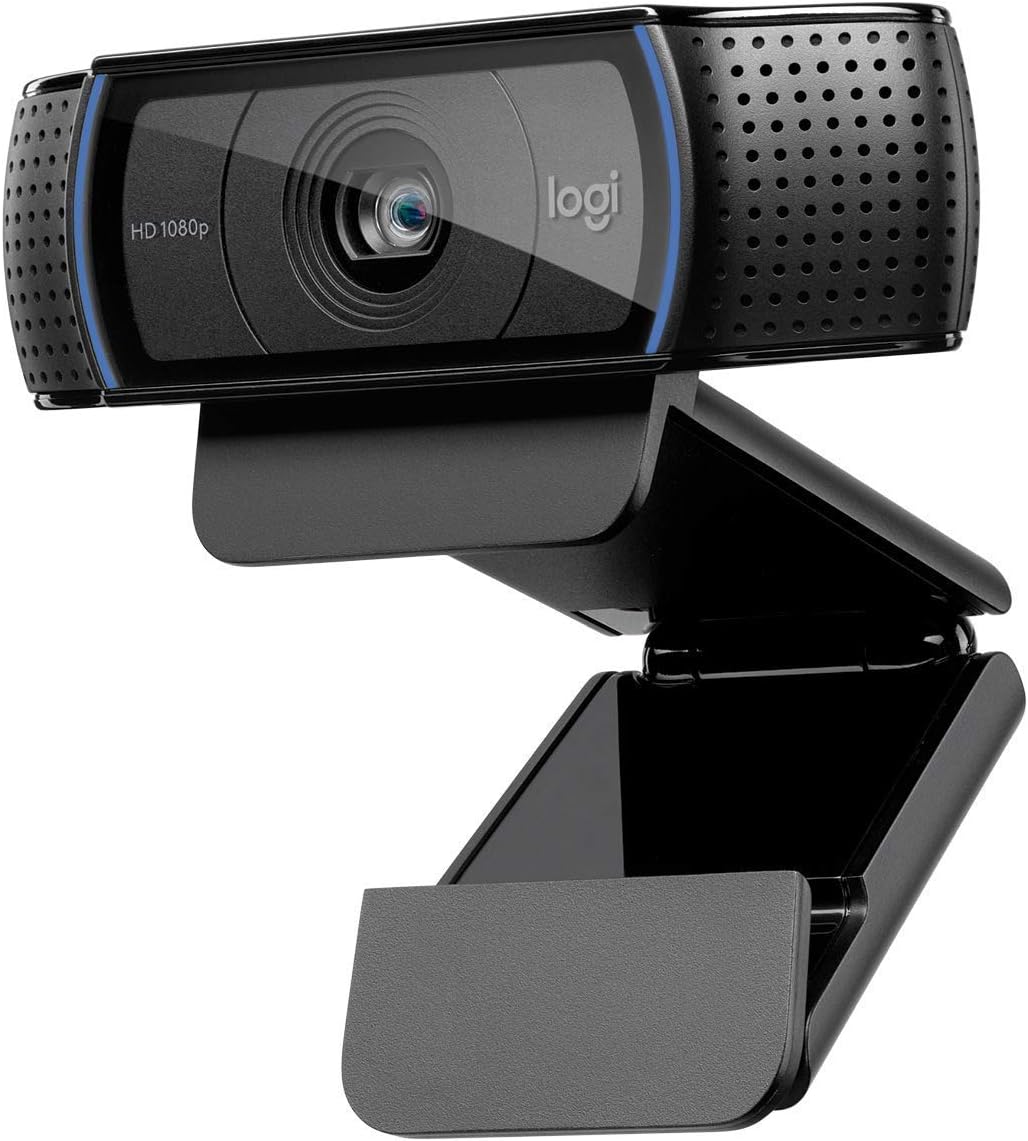


The Logitech C920x stands out as a top contender in the 1080p category. It delivers sharp video quality and reliable audio suitable for various professional and personal tasks.
We may earn a commission when you buy through this link, at no additional cost to you.
Its autofocus and HD lighting adjustment ensure you look clear even in dim settings. The stereo audio with dual microphones captures natural sound making conversations feel more intimate and clear.
While it lacks a built-in privacy shutter, the video quality justifies the choice for many users. The XSplit VCam license offers virtual background options for those needing presentation flexibility without a green screen.
This model is ideal for professionals seeking a balance between cost and performance. Its plug-and-play nature makes it accessible for anyone needing immediate upgrade for home office setups.
The autofocus technology maintains sharpness across varying distances ensuring your face remains the focal point during critical meetings.
Dual microphones work together to reduce background noise ensuring your voice comes through clearly to colleagues on the other end.
We may earn a commission when you buy through this link, at no additional cost to you.
The C920S offers similar core performance to the C920x but adds a crucial privacy shutter. This simple feature gives users peace of mind when the camera is not active.
We may earn a commission when you buy through this link, at no additional cost to you.
Video quality remains crisp with vibrant colors thanks to the glass lens. The stereo audio ensures you do not need separate speakers for small conference calls at your desk.
Some users might prefer more advanced software controls for color adjustment. However the hardware itself is robust and designed for longevity in daily office environments.
This camera is perfect for those who prioritize privacy without sacrificing video quality. It fits seamlessly into any home office setup with minimal fuss.
The snug fitting cover allows you to physically block the lens providing a tangible guarantee of privacy when you step away from the desk.
Whether recording or calling the consistent 1080p resolution ensures your content looks professional and polished across all major platforms.
We may earn a commission when you buy through this link, at no additional cost to you.
The EMEET S600 brings advanced sensor technology to the webcam market. It offers resolution options that exceed standard 1080p requirements for serious content creators.
We may earn a commission when you buy through this link, at no additional cost to you.
The PDAF autofocus ensures quick and precise focusing on your face. Noise cancellation algorithms filter out background distractions improving audio clarity significantly.
While it is a premium option it delivers value for those needing higher quality. The adjustable field of view allows flexibility depending on your room size and needs.
This camera is best suited for streamers and professionals who demand top tier visuals. It justifies its cost with features typically found in much more expensive gear.
Phase detection autofocus locks onto subjects rapidly ensuring you stay sharp even if you move around during your presentation or call.
The ability to adjust the field of view lets you frame yourself perfectly whether working alone or sharing space with others.
We may earn a commission when you buy through this link, at no additional cost to you.
The Brio 101 offers a reliable entry point into high quality webcams. It balances cost and performance effectively for general home office use.
We may earn a commission when you buy through this link, at no additional cost to you.
Auto-light balance helps you look good even in challenging lighting conditions. The privacy slide is a convenient addition for daily security concerns.
Made with recycled plastic it aligns with eco conscious values. However the audio is basic so external mics might be needed for critical calls.
This model is ideal for budget conscious users needing a dependable camera. It works well with all major platforms without requiring complex setup steps.
RightLight boosts brightness significantly helping you avoid dark shadows on your face during video conferences.
Using a high percentage of recycled plastic reduces environmental impact without compromising build quality.
We may earn a commission when you buy through this link, at no additional cost to you.
The EMEET C960 delivers solid performance at a very affordable price. It is designed to meet basic streaming and meeting needs without breaking the bank.
We may earn a commission when you buy through this link, at no additional cost to you.
The 90 degree wide angle lens captures more of your surroundings. Dual omnidirectional mics ensure your voice is picked up clearly from various angles.
Fixed focus works well for standard desk distances but limits flexibility. Privacy is handled well with the included removable cover.
This camera is perfect for students or casual users. It offers good value and essential features for daily virtual interactions.
The wider lens allows you to include whiteboards or props in your frame without moving the camera physically.
USB-A connection with adapter options ensures it fits most computer setups without needing extra ports or dongles.
We may earn a commission when you buy through this link, at no additional cost to you.
The C920e is built for business environments with certifications for major platforms. This ensures seamless integration into professional workflows.
We may earn a commission when you buy through this link, at no additional cost to you.
The 78 degree field of view balances individual focus with sharing space. Tripod mount threads offer versatile mounting options beyond the standard clip.
Privacy screen and clear microphones make it reliable for daily calls. The sturdy design withstands frequent use in busy offices.
This model is best for companies needing uniform hardware. It provides consistency across teams with easy management capabilities.
Zoom and Teams certifications mean you can trust compatibility and optimal performance in those environments.
The 1/4 inch threads allow you to mount on tripods for professional presentations or overhead shots.
We may earn a commission when you buy through this link, at no additional cost to you.
The NexiGo N60 provides a solid entry point with broad OS support. It works well across different operating systems without extra drivers.
We may earn a commission when you buy through this link, at no additional cost to you.
Noise cancelling helps reduce distractions during calls. The glass lens ensures clear images at standard desk distances.
While software control is minimal the plug-and-play design makes it easy to use. The privacy cover is a practical addition for security.
This camera is suitable for casual users and basic work needs. It balances cost with essential features effectively.
Works on Windows Mac Linux and Chrome OS making it a universal choice for mixed device households.
The physical cover blocks the lens ensuring your privacy is maintained when the camera is not active.
We may earn a commission when you buy through this link, at no additional cost to you.
The classic C920 remains a strong performer in the market. Its autofocus and widescreen format deliver consistent quality for calls and recordings.
We may earn a commission when you buy through this link, at no additional cost to you.
Microphones provide clear sound for conferences. It works reliably on both desktops and laptops without issues.
While it lacks newer features like privacy shutters it performs well for core tasks. The build quality is durable for long term use.
This model is ideal for those wanting a proven option. It offers reliability at a competitive price point.
The lens adjusts quickly to keep you sharp even if you lean in or out during a meeting.
Clip design fits most monitors and laptops ensuring easy setup across different devices.
We may earn a commission when you buy through this link, at no additional cost to you.
The Brio 105 is designed for business use with essential certifications. It handles typical meeting needs efficiently and cost effectively.
We may earn a commission when you buy through this link, at no additional cost to you.
Auto-light balance adjusts to your environment ensuring you look presentable. The shutter provides added privacy when away from the desk.
While audio is basic it serves for short calls. The lightweight design makes it easy to move between rooms.
This camera is great for enterprise deployments or home offices. It balances performance with practical features.
RightLight technology balances shadows ensuring consistent lighting even if the room changes throughout the day.
Certifications for platforms like Google Meet ensure it integrates seamlessly into corporate workflows.
We may earn a commission when you buy through this link, at no additional cost to you.
The renewed Brio 100 offers a budget friendly way to access quality. It maintains core features of its newer siblings.
We may earn a commission when you buy through this link, at no additional cost to you.
The 58 degree field of view keeps focus tight on you. Plug-and-play setup ensures immediate readiness for calls.
Audio is integrated for convenience though limited. The renewed status provides savings while delivering consistent performance.
This camera is suitable for tight budgets needing reliability. It is a smart choice for occasional video use.
Renewed units offer the same functionality at a lower price point for cost conscious buyers.
Narrower field of view ensures you remain the center of attention without distractions in the background.
We may earn a commission when you buy through this link, at no additional cost to you.
Selecting the right webcam involves evaluating several technical and practical factors. This section outlines the key considerations to ensure you make an informed choice.
Resolution determines how sharp your video appears to others. 1080p offers a good balance of clarity and bandwidth usage. Higher frame rates provide smoother motion which is useful if you move frequently during calls.
Look for models supporting at least 30fps to ensure fluid video. Most modern devices handle 1080p well so prioritize stability over extreme specs.
Autofocus adjusts the lens to keep you sharp as you move. This is critical if you lean forward or gesture during presentations. Fixed focus relies on a preset distance which may limit flexibility.
For static desks fixed focus is adequate. However dynamic presenters should prioritize autofocus for consistent visual quality without manual adjustments.
Clear audio is as important as video. Built-in mics vary significantly in quality. Some models offer noise cancellation to filter out keyboard sounds or background chatter.
If you take important calls check if the mic captures voice clearly. External mics might be needed if the built-in options are basic.
Webcams struggle in low light causing grainy images. Advanced models use auto-light balance or HDR to improve visibility. Proper room lighting also impacts the final output.
Choose cameras with light correction features if your workspace has inconsistent lighting. Positioning a light source in front of you helps too.
Physical privacy covers are essential for security. They allow you to block the lens when not in use. Without a shutter software settings may not guarantee privacy.
Prioritize models with built-in slides or shutters. This simple addition protects your personal space effectively and provides peace of mind.
The field of view determines how much of your room is captured. A wider angle includes more surroundings but can distort edges. Narrower angles keep focus on you.
Select based on your setup. Wider views work well for sharing spaces while standard views are better for individual work.
Ensure the webcam connects to your devices easily. USB-A is standard but USB-C is common on newer laptops. Drivers should be minimal or plug-and-play.
Check platform certifications for software compatibility. Most work with major platforms but specific certifications ensure better integration.
A sturdy build ensures durability over time. Look for clips that hold tight without damaging monitors. Tripod mounts offer more flexibility for positioning.
Durable materials resist wear. Adjustable clips help position the camera at the right height for comfortable framing.
Begin by plugging the webcam into a direct USB port rather than a hub. This ensures sufficient power for stable performance and reduces latency during calls.
Position the camera at eye level to create a natural angle. Use a stand or stack books if the laptop screen is too low.
Clean the lens gently with a microfiber cloth to maintain clarity. Avoid harsh chemicals that could damage the coating on the glass.
Most modern webcams are plug-and-play and work instantly without installing extra software. However manufacturers may offer apps for advanced settings like framing or color adjustment. Check the manual if you want extra customization.
Adding a desk lamp facing you helps significantly. Cameras with auto-light balance handle dim environments better but direct light always improves clarity. Adjust your room lighting to face the lens.
Some models include adapters but many use standard USB-A. If you have a USB-C only laptop you may need to purchase a separate adapter to connect the device securely.
Fixed focus stays locked at one distance while autofocus adjusts as you move. Autofocus is better for active users but fixed focus is often more stable for static sitting.
Yes many models support streaming platforms like OBS or Twitch. However check compatibility with your console if you plan to capture game footage directly from a TV.
Most modern computers handle 1080p easily. Check your USB ports and operating system requirements. Older machines might struggle with higher resolutions so confirm specs before buying.
Most of the listed models support Mac OS without drivers. Ensure you select a product marked for Mac compatibility. The operating system usually recognizes USB devices automatically.
It is highly recommended for security. A physical cover gives you control over when the camera is active. It protects your privacy effectively even if software fails.
We reviewed ten top models covering different budgets and needs. The Logitech C920x remains a strong all-rounder while options like the EMEET S600 offer premium features.
Prioritize autofocus and light correction for the best visual experience. If privacy matters look for cameras with physical shutters to keep you secure.
Prices and availability change frequently so check current listings before buying. Ensure your selection matches your specific use case for optimal results.