
Redragon K512 RGB Membrane Gaming Keyboard
4.5Editor score
Six onboard macro keys
No software required
RGB lighting modes
This guide compares the top 10 keyboards with macro keys for gaming and productivity, evaluating features like programmability, build quality, and performance.
Finding the right keyboard with macro keys can transform your workflow and gaming experience. These devices allow you to automate complex tasks, execute commands instantly, and customize your setup to match your unique needs without constant software dependency.
We have evaluated the latest models based on their macro capabilities, build quality, switch types, and overall value. Our analysis focuses on how each keyboard handles customization, whether through onboard memory or dedicated software suites for power users.
Each pick below highlights specific strengths and trade-offs to help you decide which model fits your desk. Remember that pricing and availability can fluctuate, so check current listings before making your final purchase decision today.
4.5Editor score

4.1Editor score
4.3Editor score
The following table provides a side-by-side comparison of all ten selected keyboards, highlighting their key specifications and unique features to help you make an informed decision quickly.


The VSD K1 Pro stands out as a versatile mechanical keyboard designed for users who demand high levels of customization. It features a built-in TFT color display and integrated streaming deck capabilities, making it ideal for content creators and gamers alike.
We may earn a commission when you buy through this link, at no additional cost to you.
Its standout feature is the ability to create unlimited switchable pages with LCD keys that can display custom images or animations. The hot-swappable PCB allows you to change switches easily, while the gasket mount provides a premium typing feel with reduced noise.
While the keyboard offers incredible flexibility, it does require software installation for some features like screen calibration and GIF customization. Additionally, certain display functions rely on a wired connection which might limit portability for some users.
If you need a keyboard that doubles as a control hub for streaming or complex workflows, the VSD K1 Pro is a top recommendation. Its blend of mechanical quality and smart display features makes it a unique choice in this category.
The integrated streaming deck function lets you manage OBS or other software directly from the keyboard, streamlining your broadcast workflow efficiently.
Hot-swappable switches allow you to tailor the tactile feel to your preference without soldering, enhancing long-term usability and personalization.
We may earn a commission when you buy through this link, at no additional cost to you.
The Redragon K512 offers an accessible entry point into macro keyboards without sacrificing essential functionality. It features six onboard macro keys that can be programmed on the fly, making it perfect for casual gamers who want instant shortcuts.
We may earn a commission when you buy through this link, at no additional cost to you.
Its affordability is a major advantage, yet it still delivers RGB lighting and a media wheel for volume control. The detachable wrist rest adds comfort during long sessions, ensuring that budget constraints do not mean compromising on ergonomics.
Since it uses membrane switches, the typing feel is softer compared to mechanical options which might not satisfy enthusiasts. Also, deeper customization requires optional software, which limits the on-the-fly capabilities compared to more advanced models.
For users seeking a reliable and affordable keyboard with basic macro support, the Redragon K512 is an excellent choice. It balances cost and functionality well for those who do not need high-end features.
Onboard macro recording allows users to save commands instantly without needing to install drivers or connect to a computer first.
The dedicated media wheel provides quick access to volume adjustments and track skipping, enhancing usability during gaming or media consumption.
We may earn a commission when you buy through this link, at no additional cost to you.
The Corsair K55 RGB PRO is a solid choice for those who prioritize durability and brand reliability. It includes six dedicated macro keys that integrate well with streaming software, making it a great option for casual streamers.
We may earn a commission when you buy through this link, at no additional cost to you.
Its IP42-rated spill-resistant design protects against accidents, which is a significant plus for any desk setup. The dynamic RGB lighting allows for visual customization, adding an aesthetic layer to your gaming environment.
However, achieving the full potential of the macros often requires using the iCUE software which might be complex for some users. Additionally, the membrane switches lack the tactile feedback of mechanical boards which could impact precision.
If you want a durable keyboard with decent macro support from a trusted brand, the Corsair K55 RGB PRO fits the bill. It offers a balanced mix of features for everyday gaming and productivity tasks.
The spill-resistant design ensures that minor accidents do not damage the keyboard, extending its lifespan and reliability for daily use.
Macro keys can be configured for instant streaming commands, allowing smooth transitions between scenes without disrupting your gameplay.
We may earn a commission when you buy through this link, at no additional cost to you.
The Redragon K580 brings mechanical quality to budget-conscious buyers with the added benefit of hot-swappable switches. This feature allows you to experiment with different switch types without soldering, providing a personalized typing experience.
We may earn a commission when you buy through this link, at no additional cost to you.
It includes five macro keys that can be recorded on the fly, ensuring quick access to combos during gaming. The included media wheel adds convenience for volume control, making it a well-rounded tool for both work and play.
The macro count is slightly lower compared to some other models which might limit complex workflows. Also, while optional software exists, the onboard recording might be all that is needed for most users.
For those who want mechanical switches and customization potential without a high price tag, the Redragon K580 is a strong contender. It offers a great balance of features for enthusiasts looking to dip their toes into custom builds.
Hot-swap sockets enable easy replacement of switches, allowing users to change tactile or audio characteristics without technical skill.
Five macro keys provide essential shortcut access without cluttering the keyboard layout, maintaining a clean and professional look.
We may earn a commission when you buy through this link, at no additional cost to you.
The Redragon K550 stands out for its impressive number of onboard macro keys, totaling twelve for extensive command storage. This is ideal for users who rely heavily on shortcuts for productivity or complex gaming strategies.
We may earn a commission when you buy through this link, at no additional cost to you.
Its aluminum top plate gives it a premium look and sturdy feel which withstands heavy use. The extra USB pass-through port adds utility by reducing cable clutter around your desk setup and peripherals.
The custom purple switches provide a distinct clicky sound that may not be suitable for quiet environments. Additionally, the RGB software is optional and basic, limiting advanced lighting customization for some users.
If you need a high number of macros without software dependency, the Redragon K550 is a practical solution. It offers robust build quality and functional features that cater to power users who prioritize utility.
Twelve macro keys offer ample room for saving complex sequences, reducing the need for repeated physical inputs during tasks.
The built-in USB pass-through allows easy connection of a mouse or receiver, keeping your workspace organized and efficient.
We may earn a commission when you buy through this link, at no additional cost to you.
The Razer BlackWidow V4 X offers a sleek design with silent linear switches that cater to users who prefer a quieter typing experience. It includes six dedicated macro keys that can be programmed for various commands quickly.
We may earn a commission when you buy through this link, at no additional cost to you.
The per-key RGB lighting is a highlight, allowing vibrant customization that matches your aesthetic. The multi-function roller and secondary media keys add convenience, making it easy to adjust settings without leaving your game.
However, this model does not come with a wrist rest which some might find necessary for long sessions. Additionally, macro programming relies entirely on Razer software which may not appeal to those seeking hardware-only storage.
For gamers prioritizing silent operation and aesthetic lighting, the Razer BlackWidow V4 X is a compelling option. It delivers a high-quality mechanical experience with enough macro features for standard gaming needs.
Built-in sound dampeners in the switches reduce noise, making this keyboard suitable for shared spaces or late-night sessions.
Per-key RGB lighting allows for dynamic effects that can be synced with games for an immersive visual experience.
We may earn a commission when you buy through this link, at no additional cost to you.
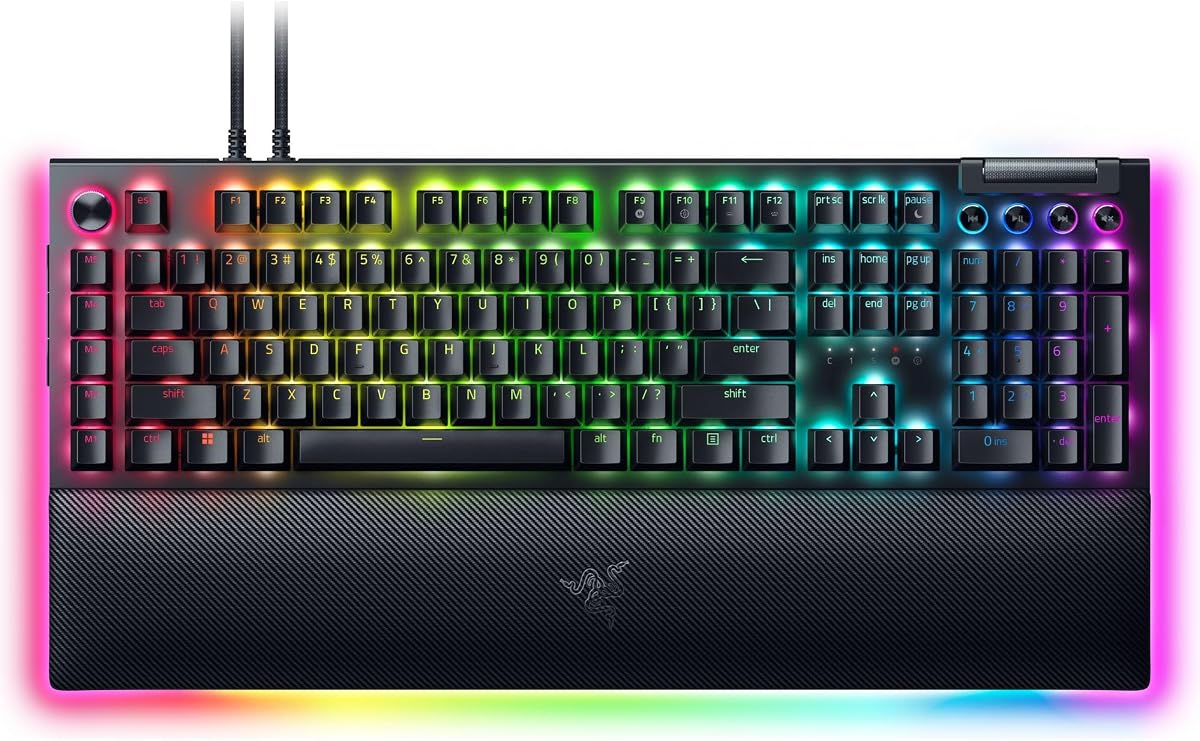
The Razer BlackWidow V4 Pro is a flagship keyboard that combines tactile switches with extensive macro control features. Its eight dedicated macro keys and command dial offer versatile control for both gaming and productivity tasks.
We may earn a commission when you buy through this link, at no additional cost to you.
The immersive underglow lighting adds a striking visual element that enhances your setup aesthetics. The magnetic plush leatherette wrist rest provides significant comfort, ensuring you stay comfortable during extended gaming marathons.
Despite its premium features, the keyboard is quite expensive and relies heavily on software for configuration. Users seeking a standalone solution might find the dependency on Razer Synapse software restrictive.
If you want the best in terms of build quality and macro versatility, the Razer BlackWidow V4 Pro is a top choice. It delivers a luxury experience for users who value comfort and customization highly.
The command dial allows for quick adjustments to volume or brightness, adding another layer of intuitive control to your workflow.
The included wrist rest features underglow lighting and plush material, ensuring maximum comfort and style during long sessions.
We may earn a commission when you buy through this link, at no additional cost to you.
The Redragon K618 PRO offers a unique wireless solution with twenty onboard macro keys, making it one of the most versatile portable options. It supports multiple connection modes including Bluetooth and 2.4GHz for seamless device switching.
We may earn a commission when you buy through this link, at no additional cost to you.
Its low-profile design shortens travel distance which results in faster actuation and lighter typing. The dedicated macro zone allows for instant recording of combos without needing any software installation first.
Low-profile switches can feel different compared to standard ones which might take some time to adjust to. Additionally, maintaining battery life requires attention which is a trade-off for wireless freedom.
For users needing a portable keyboard with extensive macro support, the Redragon K618 PRO is a standout. It bridges the gap between productivity and gaming with impressive flexibility in connectivity.
Tri-mode connectivity allows instant switching between PC, laptop, and tablet without re-pairing which is great for multitaskers.
The ultra-thin profile makes the keyboard easy to transport and fits well in tight workspaces or laptop bags.
We may earn a commission when you buy through this link, at no additional cost to you.
The Logitech G213 Prodigy is a full-sized keyboard designed to balance gaming and productivity. While it does not have dedicated macro keys, its media controls and anti-ghosting matrix ensure reliable performance for everyday tasks.
We may earn a commission when you buy through this link, at no additional cost to you.
Its durable construction repels liquids and dirt making it easy to clean and maintain. The integrated palm rest adds comfort for long sessions and allows you to focus on your work without fatigue.
The lack of dedicated macro keys means you must rely on software for customization which might not be ideal for everyone. Additionally, the membrane switches provide a softer feel than mechanical options.
If you prefer a sturdy and comfortable keyboard for general use, the Logitech G213 Prodigy is a solid pick. It offers reliability and ergonomic design for those who do not need advanced macro functionality.
The spill-resistant design and robust build ensure the keyboard withstands daily wear and tear effectively.
An integrated palm rest provides ergonomic support which reduces strain during extended typing or gaming sessions.
We may earn a commission when you buy through this link, at no additional cost to you.
The Razer BlackWidow V4 combines linear switches with six macro keys to offer a balanced experience for gamers. Its underglow lighting and per-key RGB provide a modern look that enhances your gaming environment significantly.
We may earn a commission when you buy through this link, at no additional cost to you.
The magnetic plush leatherette wrist rest ensures comfort during intense sessions and snaps securely to the keyboard. The media roller adds convenience allowing you to tweak settings without leaving your current task.
However, the price point is high compared to competitors and the underglow does not extend to the wrist rest. This might be a slight letdown for those expecting full immersion across all accessories.
If you seek a high-quality linear keyboard with decent macro support, the Razer BlackWidow V4 is worth considering. It offers a premium feel and features that cater to serious gamers.
Yellow linear switches provide smooth and consistent actuation which is preferred for rapid-fire inputs in competitive games.
Underglow and per-key RGB lighting sync with games to create an immersive visual environment that elevates your setup.
We may earn a commission when you buy through this link, at no additional cost to you.
Choosing the right keyboard with macro keys requires understanding your specific needs regarding customization, build quality, and connectivity.
Consider whether you need onboard memory to save macros without software or if you are comfortable relying on cloud-based software for storage. Onboard memory is crucial for users who switch computers frequently or want instant access.
Prioritize onboard recording if you need simplicity and independence from software dependencies for quick access to macros.
Mechanical switches offer durability and tactile feedback while membrane switches provide a softer feel at a lower cost. Decide if you prefer the clicky, linear, or tactile feedback based on your typing habits.
Select mechanical switches for durability and gaming performance while membrane is suitable for quiet office environments.
Look for features like spill resistance and durable keycaps if your keyboard will be used in demanding environments. A sturdy aluminum plate can also enhance stability and prevent flexing during intense typing sessions.
Choose keyboards with robust build features like aluminum frames or spill-resistant designs for longevity.
Wireless connectivity offers freedom from cables while wired connections ensure zero latency for competitive gaming. Check if the keyboard supports multiple devices via Bluetooth or USB hubs if you work across multiple systems.
Opt for wireless if you need flexibility or wired if you require consistent performance without battery concerns.
An integrated or detachable wrist rest can significantly reduce strain during long sessions. Adjustable feet also help you find a comfortable typing angle that suits your desk setup.
Ensure the keyboard includes ergonomic features like wrist rests to maintain comfort during extended use.
Macros can be found across various price points so determine what features are essential to you. Spending more may get you hot-swappable switches or better lighting but basic models still offer functionality.
Set a budget based on the features you need to balance cost with functionality effectively.
Some advanced macros require software to configure which means you need admin access to install drivers. Ensure the companion software is user-friendly and compatible with your operating system before buying.
Verify that the required software is compatible and easy to use to avoid configuration headaches.
Look for dedicated media wheels or volume keys that add convenience to your workflow. These features allow you to adjust settings without interrupting your game or work tasks.
Prioritize models with extra media controls for added usability during gaming or multimedia consumption.
To start using your macros, press the designated key combination to enter record mode. Select the target key and type the sequence of commands you want to automate, then save it.
Keep your keyboard clean by regularly brushing away dust with a soft cloth. If you have mechanical switches, occasionally removing keycaps allows for deep cleaning without damaging the internals.
If using software, keep it updated to ensure stability and access to new features. For wired models, ensure the cable is not bent sharply to prevent connection issues over time.
Not all keyboards require software; some models allow you to record macros directly on the device using onboard memory. This is common in budget-friendly models or those designed for immediate use without driver installation.
Yes, most modern keyboard software allows you to create game-specific profiles. This means your macros can activate only when a specific application is running, keeping your layout organized and functional.
While macros are generally accepted for utility, some competitive games ban them if they automate complex actions. Always check the game rules or server policies before using automated commands to avoid bans.
The number varies by model but some keyboards support hundreds of macros via software. Onboard storage might be limited to fewer entries depending on the memory chip size and hardware design.
Yes, many macro keyboards are compatible with laptops via USB or Bluetooth. Ensure your laptop has enough ports or use a hub if the keyboard requires a wired connection for full functionality.
Hot-swappable keyboards allow you to change switches without soldering, enabling customization of the typing feel. This is useful if you want to experiment with different switch types or replace worn ones easily.
The VSD K1 Pro offers a unique blend of features for creators while the Redragon K512 is a great budget-friendly option for gamers. Each model brings unique strengths to the table depending on your priorities.
Prioritize what matters most to you such as build quality, connectivity type, or software flexibility. This will help you narrow down choices and find the keyboard that truly suits your workflow needs.
Remember to verify current prices and availability before purchasing to ensure you get the best deal. With the right choice, a keyboard with macro keys can significantly enhance your efficiency and enjoyment.