
Raycue Mac mini Dock
4.3Editor score
Affordable price point
8TB storage expansion
10Gbps data transfer
This guide compares the top Mac Mini M4 dock options for storage and connectivity, helping you find the perfect hub and stand for your setup in October 2026.
Finding the right Mac Mini M4 dock transforms your workspace by adding essential ports and storage without cluttering your desk. A good dock integrates seamlessly with your Mac Mini to provide quick access to external drives, monitors, and peripherals while maintaining a clean aesthetic.
We analyzed the leading docking solutions available for the Mac Mini M4 series, focusing on compatibility, port variety, and build quality. Each product was evaluated based on user feedback, technical specifications, and real-world performance to ensure this list represents the most reliable options on the market.
Every pick in this guide highlights unique strengths tailored to different workflows, from creative professionals needing high-speed storage to general users seeking basic connectivity. Please note that availability and specific feature sets may change over time, so always verify the latest details before making your final purchase decision.
4.3Editor score

4.5Editor score

4.8Editor score
This side-by-side comparison highlights the key specifications and features of each dock to help you identify the best fit for your Mac Mini M4 setup based on your specific needs.
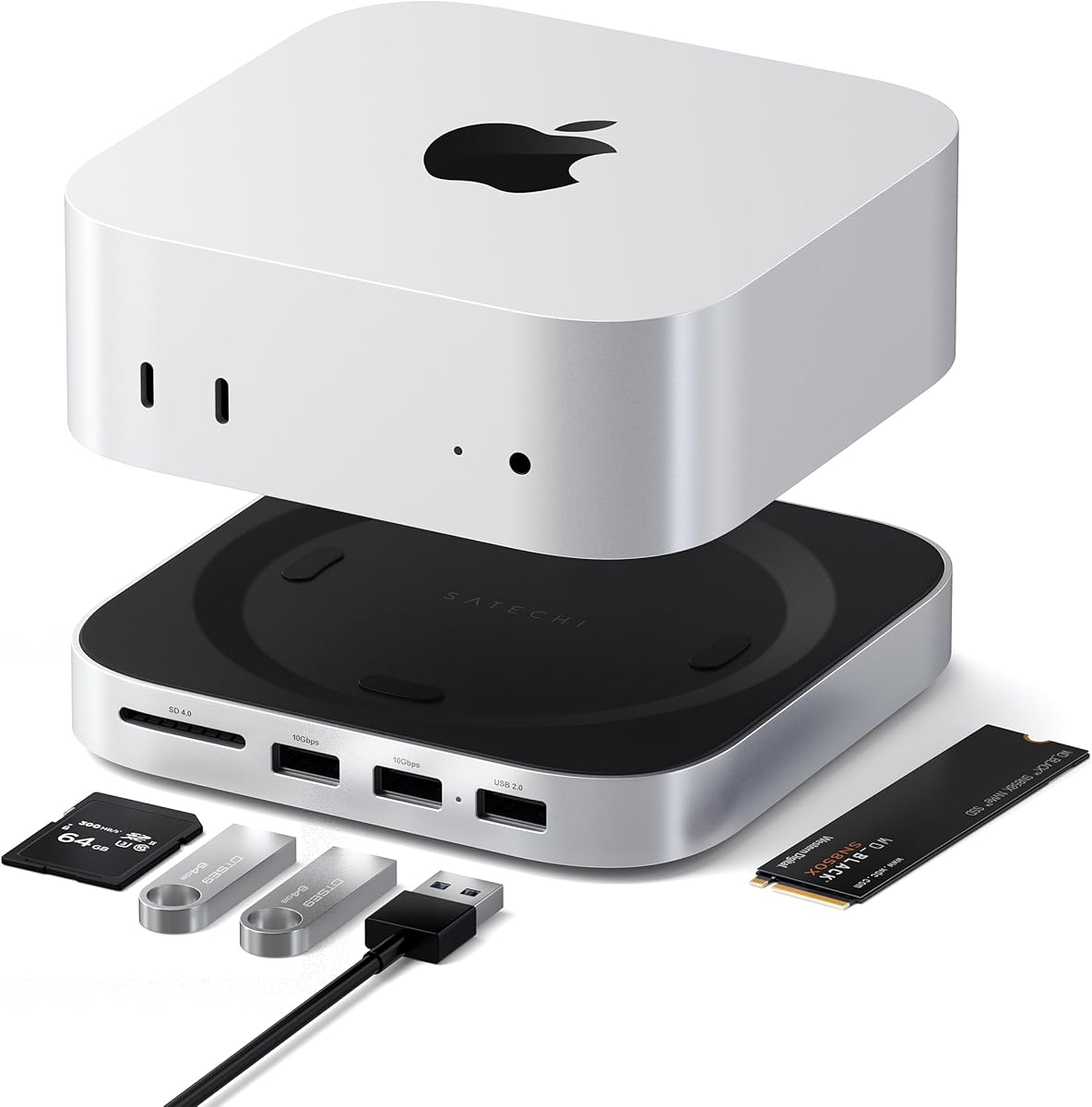


The UGREEN Mac mini Dock & Stand stands out as the top choice for users seeking a balance of storage and connectivity. With a rating of 4.5 stars, it offers a robust solution for expanding your Mac Mini M4 without compromising on aesthetics or performance.
We may earn a commission when you buy through this link, at no additional cost to you.
This dock provides up to 8TB of expandable internal storage using M.2 NVMe SSDs, allowing for seamless 4K editing and backups. The 11-in-1 hub includes multiple USB-A and USB-C ports, plus an SD card reader, ensuring all your devices stay connected easily.
While the transfer speeds are impressive at 10Gbps, users should note that the SSD must be purchased separately. The power cable included is quite short, which might limit placement options on larger desks.
This dock is ideal for creative professionals who need fast local storage and multiple peripheral connections. It transforms your Mac Mini into a complete workstation while keeping the setup tidy and efficient.
Unlock up to 8TB of ultra-fast internal storage to handle large files and backups efficiently without external clutter.
Connect multiple devices simultaneously with a mix of USB-A USB-C, and SD card ports for a complete workflow setup.
We may earn a commission when you buy through this link, at no additional cost to you.
The Satechi Hub & Stand is crafted from industry-grade aluminum to match the aesthetic of the Mac Mini M4. It supports up to 4TB of NVMe storage and offers a clean front-facing port layout for easy access to peripherals.
We may earn a commission when you buy through this link, at no additional cost to you.
Its design prioritizes thermal management with heat-dissipating vents that do not obstruct the Mac Mini fan. This ensures your system remains cool during heavy workloads like video rendering or data transfers.
While the build quality is excellent, the number of USB-A ports is limited compared to other docks. Additionally, the enclosure supports specific SSD sizes, so checking compatibility before purchase is essential.
Choose this dock if you value premium build quality and a streamlined look that blends perfectly with Apple devices. It is a reliable choice for users who need essential connectivity without excess bulk.
Constructed from industry-grade aluminum to match your Mac Mini and ensure durability while adding to the aesthetic appeal.
Features bottom vents and a recessed top to maintain proper airflow and prevent overheating during extended use.
We may earn a commission when you buy through this link, at no additional cost to you.
This dock is engineered for users who need high refresh rate displays for creative work or gaming. It supports 4K at 144Hz via its DisplayPort, allowing for smooth visuals and lag-free experiences when paired with a compatible monitor.
We may earn a commission when you buy through this link, at no additional cost to you.
The unit includes an M.2 SSD enclosure that supports up to 8TB of storage, ensuring you have plenty of space for large media files. Connectivity is robust with USB-A and USB-C ports alongside the video output.
While the display performance is top-notch, the SSD is not included, requiring an extra purchase. The included cable is also short, which may require careful desk arrangement for optimal setup.
This dock is perfect for graphic designers or video editors who need fast data access and high-quality display output. It combines storage expansion with advanced video capabilities in one integrated solution.
Experience smooth visuals with 4K@144Hz DisplayPort support ideal for creative work and entertainment setups.
Combine massive storage expansion with versatile ports to keep all your peripherals connected and ready to use.
We may earn a commission when you buy through this link, at no additional cost to you.
The 4URPC Mac mini Dock is a comprehensive workstation solution designed to simplify your desktop clutter. It combines a stand, SSD enclosure, and extensive connectivity into one sleek unit that supports up to 8TB of storage.
We may earn a commission when you buy through this link, at no additional cost to you.
Its ability to support dual 4K displays alongside the Mac Mini's built-in ports makes it ideal for multitasking. You can manage a full triple-screen workflow without needing extra hubs or adapters on your desk.
The unit is designed to match the Mac Mini perfectly, but the SSD is not included. Also, the larger footprint means you need to ensure you have enough desk space for the dock and accessories.
Select this dock if you need maximum connectivity and display options without a complex cable management setup. It is a high-performing choice for power users who value efficiency and speed.
Support DisplayPort and HDMI output alongside built-in ports to create a robust triple-monitor workspace for productivity.
Eliminate the need for separate hubs and stands by consolidating storage and connectivity into a single dock unit.
We may earn a commission when you buy through this link, at no additional cost to you.
This dock allows for dual-bay NVMe SSD support, enabling users to expand storage up to 16TB with RAID configurations. It is designed for heavy-duty storage needs and comes with a dedicated power adapter for stability.
We may earn a commission when you buy through this link, at no additional cost to you.
The aluminum build includes silent cooling fans to maintain safe temperatures during high-load operations. It also supports multiple displays, making it suitable for complex workflows requiring multiple screens.
However, the setup can be more complex than standard docks, and the fans may produce slight noise. Users must also ensure SSDs are not plugged in while powered on to avoid data loss.
This solution is best for users with massive storage demands and a dedicated workspace. It provides robust expandability and cooling for professional use cases that require high capacity and reliability.
Support two NVMe SSDs to reach up to 16TB of total storage for extensive media libraries and data backups.
Built-in silent fans activate automatically to keep internal components cool even during extended hours of operation.
We may earn a commission when you buy through this link, at no additional cost to you.
The Raycue dock offers an affordable entry point for expanding Mac Mini M4 storage and connectivity. It supports up to 8TB NVMe storage and features a conductive paint shield to prevent Wi-Fi interference from the dock itself.
We may earn a commission when you buy through this link, at no additional cost to you.
Its compact design ensures your workspace remains tidy while providing access to essential ports. The power button lever adds convenience, allowing you to turn on your Mac without lifting it from the dock.
While budget-friendly, it has fewer high-speed ports compared to premium models. Build materials are also more basic than aluminum alternatives, which may affect long-term durability in heavy-use environments.
This dock is perfect for students or home office users needing basic expansion on a tight budget. It delivers essential functionality without compromising on key features like storage and stability.
Gain access to massive storage capacity at a budget-friendly price point suitable for general home and office use.
Conductive paint shielding blocks potential Wi-Fi interference ensuring stable wireless performance during use.
We may earn a commission when you buy through this link, at no additional cost to you.
This ACASIS dock offers a high capacity solution with dual-bay NVMe support for up to 16TB of storage. It includes a 65W power adapter to ensure stable performance and a complete accessory kit for easy installation.
We may earn a commission when you buy through this link, at no additional cost to you.
The aluminum construction provides durable protection for your Mac Mini while maintaining a sleek aesthetic. It supports HDMI outputs for 4K displays, enabling you to extend your workspace effectively.
While powerful, the setup is intricate and requires careful attention when connecting drives. The power adapter adds to the cable management load on your desk.
Choose this dock if you need substantial storage for media production and archival purposes. It is a robust tool for professionals who prioritize data capacity and reliability in their workflow.
Supports two NVMe SSDs to deliver up to 16TB of total storage for extensive data and media management.
Includes all necessary tools and accessories like screwdrivers and thermal pads for a seamless installation experience.
We may earn a commission when you buy through this link, at no additional cost to you.
This dock focuses on Thunderbolt performance with three downstream Thunderbolt 4 ports for massive bandwidth. It delivers up to 40Gbps speeds and supports high-resolution displays including dual 4K setups.
We may earn a commission when you buy through this link, at no additional cost to you.
With 85W power delivery, it can charge your laptop while connected to peripherals. The included GaN charger ensures efficient power management and compact footprint on your desk.
Unlike other picks, this dock does not include an NVMe storage enclosure. It is priced higher than standard hubs, reflecting its premium performance and specialized connectivity features.
It is ideal for users needing maximum bandwidth for multiple high-speed peripherals. If Thunderbolt speed is your priority over storage, this dock provides unmatched performance and display capabilities.
Enjoy up to 40Gbps data transfer speeds across three Thunderbolt 4 ports for high-speed external devices.
Support dual 4K@60Hz displays or single 8K displays for a versatile visual workflow environment.
We may earn a commission when you buy through this link, at no additional cost to you.
The RayCue Mac mini Dock Stand features an elegant aluminum finish that complements your Mac Mini. It supports both NVMe and SATA M.2 SSDs up to 8TB and includes a dedicated USB-C charging port for stable operation.
We may earn a commission when you buy through this link, at no additional cost to you.
Its HDMI port supports 4K at 60Hz for clear video output on monitors or TVs. The compact design ensures easy access to USB ports while maintaining a tidy workspace.
However, it offers only a single HDMI port for external displays, which may limit multi-monitor setups. It also requires an external power supply which adds to cable management.
This dock is a great middle ground for users wanting premium materials and storage without the highest price. It is perfect for home offices needing reliable storage and display expansion.
Compatible with both NVMe and SATA SSDs to give you flexibility in drive selection and purchase options.
Includes a dedicated external USB-C charging port to ensure adequate power supply for connected drives.
We may earn a commission when you buy through this link, at no additional cost to you.
This dock stands out with its built-in 5-inch HD display, perfect for showing notifications or digital clocks. It combines classic Macintosh styling with modern connectivity, featuring 14-in-1 hub capabilities and 8TB storage support.
We may earn a commission when you buy through this link, at no additional cost to you.
The integrated display offers utility beyond just connectivity, acting as a secondary information panel. It supports Thunderbolt and USB-C connectivity to ensure high-speed data transfer and versatile peripheral connections.
The screen resolution is limited to 720p and the price is higher due to the extra features. Also, the retro design may not suit every modern office aesthetic.
Choose this dock if you appreciate unique designs and want extra utility from your station. It is a conversation starter that combines nostalgia with modern performance capabilities.
A built-in 5-inch HD display provides quick access to notifications or media info without opening apps.
Classic Macintosh-inspired design adds a nostalgic touch to your modern workstation setup.
We may earn a commission when you buy through this link, at no additional cost to you.
Choosing the right dock for your Mac Mini M4 requires balancing storage needs, port variety, and design preferences.
If you work with large files like 4K video or raw photos, look for docks that support M.2 NVMe SSDs. These docks allow you to add up to 8TB or even 16TB of internal storage directly to your dock, reducing the need for external drives.
Ensure the dock offers enough ports to connect all your peripherals. Look for a mix of USB-A and USB-C ports with high data transfer speeds like 10Gbps. Thunderbolt 4 docks provide even faster speeds but are often more expensive.
Check if the dock supports the resolution and refresh rates you need. Some docks offer DisplayPort support for 144Hz refresh rates ideal for creative work or gaming, while others may have limited HDMI capabilities.
Aluminum docks tend to be more durable and provide better heat dissipation. Models with active cooling fans are useful if you plan to use storage drives intensively to prevent overheating during long sessions.
Always verify that the dock is explicitly designed for your specific Mac Mini model. Precision-engineered docks ensure a perfect fit and keep essential buttons accessible without requiring you to lift the Mac to turn it on.
Some docks rely on power from your Mac Mini while others require a separate adapter. For stable performance with multiple drives or displays, models with dedicated power adapters are generally more reliable.
Look for docks with shorter cables or integrated power solutions to keep your desk tidy. Clutter-free setups improve workflow efficiency and protect your equipment from accidental disconnections.
Docks range significantly in price based on features. While budget options provide basic connectivity, investing in a model with a solid warranty can save money on potential repairs and ensure long-term reliability.
To install your dock, slide the Mac Mini firmly into the designated slot until it clicks. Connect the dock to your Mac using the provided cable, and plug in any necessary power adapters to ensure stable operation.
For storage expansion, insert your M.2 NVMe SSD into the enclosure slot before placing the dock on your desk. Secure the drive using the provided screws or thermal pads to ensure good heat transfer and physical stability.
Regularly clean the aluminum surface with a soft dry cloth to prevent dust buildup. Avoid placing the dock near heat sources and ensure ventilation ports remain unobstructed to maintain optimal performance.
Yes, most docks do not include an SSD in the box. You will need to purchase a compatible M.2 NVMe SSD separately. Check the product specifications for supported sizes like 2230 or 2280 before buying.
Most docks are specifically designed for the Mac Mini M4 series. Using them with older Intel models may result in fit or compatibility issues. Always confirm the supported models listed in the product description.
High-quality docks are designed with power button levers that allow you to turn the Mac Mini on or off without lifting it. This feature ensures convenient access even when the Mac is seated in the dock.
This depends on the dock model. Some support one HDMI and one DisplayPort output, allowing for dual external displays. Combined with the Mac Mini built-in ports, you can achieve a multi-screen setup.
Some docks draw power from the Mac Mini via USB-C, while others include a dedicated power adapter. For optimal stability with multiple drives or displays, models with external power are recommended.
Most docks offer USB-A and USB-C ports with transfer speeds up to 10Gbps. Thunderbolt 4 models can reach up to 40Gbps for ultra-fast data transfers suitable for professional workflows.
The UGREEN Mac mini Dock & Stand remains the top pick for its balance of storage and connectivity, while the Raycue dock offers an excellent budget-friendly alternative. For those needing maximum performance, the 4URPC and Satechi options provide robust features and premium build quality.
When selecting a dock, prioritize the number of ports and storage capacity that match your daily workflow. High-speed data transfer and display support are essential for creative professionals, while general users may benefit more from space-saving designs.
Please remember that product availability and specifications may change over time. Always verify the latest details and current stock before making your final purchase to ensure you get the best deal available.