
TP-Link ER605
4.4Editor score
Five Gigabit Ports total
One USB WAN Port support
Advanced Security features included
Explore our expert guide comparing the top 10 Dual Wan Router options for reliable connectivity, failover protection, and advanced networking features.
A Dual Wan Router ensures your business never goes offline by connecting multiple internet lines. It manages traffic efficiently and switches instantly if one link fails. This setup boosts speed and reliability for modern work environments.
We evaluated ten top models based on port speed, security features, and ease of use. Our analysis covers both budget-friendly and enterprise-grade devices. Each pick delivers solid performance for diverse network needs today.
Every selection highlights key specs, pros, and cons to help you decide quickly. Prices fluctuate frequently due to demand and promotions. Always verify the current rate before purchasing your ideal networking gear.
4.4Editor score
4.4Editor score

4.2Editor score
This table contrasts key features across all ten selected models side by side. Review specs to find the perfect fit for your specific network infrastructure needs today.



The TP-Link ER605 stands out as a top choice for reliable network continuity with multiple WAN links. Rated 4.4 stars, this wired router provides essential failover and load balancing for small businesses. It ensures your connection remains stable even when one ISP fails.
We may earn a commission when you buy through this link, at no additional cost to you.
Its five Gigabit ports allow flexible configurations with three WAN options. You can use USB for mobile broadband backup. Security is robust with advanced firewall and SPI protection. VPN support includes IPsec, OpenVPN, and L2TP for secure remote access.
While it lacks integrated Wi-Fi, this focus keeps costs low and performance high for wired networks. The interface is straightforward but may lack advanced VLAN segmentation compared to premium gear. For basic redundancy, it is sufficient.
This router is ideal for small offices needing budget-friendly redundancy without sacrificing port count. It balances cost and functionality well. We recommend it for environments where wired stability matters most over wireless versatility.
Three WAN ports allow diverse ISP connections for maximum uptime. You can aggregate bandwidth or failover instantly. This versatility is crucial for growing offices.
Supports up to 20 IPsec tunnels for secure site-to-site links. OpenVPN and PPTP are also available. This ensures data privacy across locations.
We may earn a commission when you buy through this link, at no additional cost to you.
The Peplink B-One offers resilient dual-WAN architecture designed for enterprise branch offices. It delivers up to 1Gbps throughput with seamless failover. The SpeedFusion technology ensures smooth video calls even during ISP transitions. This makes it robust for professional use.
We may earn a commission when you buy through this link, at no additional cost to you.
Its architecture includes two WAN ports and four LAN Gigabit ports. Dual-band Wi-Fi 6 supports many wireless clients. It simplifies Starlink connectivity, allowing backup with cable or fiber. This flexibility supports diverse internet types easily.
Reliability is a key focus, reducing frequent resets common with other models. Automatic firmware updates keep the network secure. However, it is significantly more expensive than basic routers. The interface requires more learning time.
This router suits businesses needing stable, high-speed internet without interruptions. The investment pays off through uptime. We recommend it for branches prioritizing reliability over initial cost savings.
Works with existing internet to create a robust network. It ensures smooth video calls even if primary internet goes down. This feature is vital for remote work.
Seamlessly integrates with Starlink for satellite connectivity. You can load balance cable or fiber with a Starlink connection. This simplifies hybrid network setups.
We may earn a commission when you buy through this link, at no additional cost to you.
The NETGEAR PR60X delivers high performance hardware with one 10G/Multi-Gig configurable port. Rated 4.2 stars, it serves demanding SMEs needing fast throughput. Dual WAN ports provide reliable failover and load balancing. This ensures seamless connectivity for critical apps.
We may earn a commission when you buy through this link, at no additional cost to you.
It features up to 32 VLANs for secure network segmentation. Remote access is protected via IPSec and WireGuard VPN. Up to 100 client devices can connect. This capacity supports growing teams without lag.
The Insight cloud subscription simplifies remote management from anywhere. Integration with Pro WiFi APs enhances the ecosystem. However, the cost is steep for small setups. The 10G port requires matching cables for speed.
This router is ideal for offices needing enterprise-level speed and control. It scales well with business needs. We recommend it for environments where network performance is a top priority.
One 10G port and three 2.5G LAN ports provide massive bandwidth. This supports long-distance backhaul via SFP+. It future-proofs your network significantly.
Supports up to 30 VPN tunnels with OpenVPN. Client connections reach 100 devices. This ensures safe access from remote locations.
We may earn a commission when you buy through this link, at no additional cost to you.
The Cudy R700 supports full OpenWRT for professional-grade network control. It offers five Gigabit Ethernet ports for up to five ISPs. Automatic failover keeps businesses online. This flexibility is unmatched at its price point.
We may earn a commission when you buy through this link, at no additional cost to you.
It includes a complete VPN suite with WireGuard and IPsec. VLAN segmentation and advanced firewall rules are customizable. Diagnostic tools like Ping and Traceroute simplify troubleshooting. You can use the Web GUI or App.
OpenWRT allows custom QoS policies and packages. This suits tech-savvy users. However, standard firmware may be simpler for basic needs. Support is community-driven rather than dedicated.
This device is perfect for home labs or small offices needing advanced routing. It balances power and affordability well. We recommend it for those wanting custom control without high costs.
Connect up to 5 ISPs with automatic failover. Traffic reroutes instantly if one drops. This ensures business continuity effectively.
Built-in WireGuard, OpenVPN, and IPsec servers. You can create site-to-site tunnels. It supports encrypted VPN connections easily.
We may earn a commission when you buy through this link, at no additional cost to you.
The Omada ER707-M2 delivers high-bandwidth aggregation with 2.5Gigabit ports. Rated 4.4 stars, it supports over 500,000 concurrent sessions. This makes it ideal for larger offices. Remote cloud access allows centralized management of sites.
We may earn a commission when you buy through this link, at no additional cost to you.
It includes 100 IPsec tunnels and strong VPN features. USB ports support storage and LTE backup. The interface provides high bandwidth aggregation connectivity. A five-year warranty ensures long-term reliability.
Cloud management brings control from different sites. However, full setup may require specific software. Advanced users benefit most from its depth. Standard setups might find it overkill.
This router fits growing businesses needing speed and centralized oversight. The warranty adds peace of mind. We recommend it for multi-site environments prioritizing scale and speed.
Maximum concurrent sessions reach 500,000. It supports 1000+ clients easily. This handles heavy traffic loads well.
Omada app brings centralized control for sites. All are controlled from a single interface. This simplifies multi-site oversight.
We may earn a commission when you buy through this link, at no additional cost to you.
The ASUS RT-BE88U boosts throughput to 7200Mbps with WiFi 7. It includes two 10G ports for massive wired capacity. AI WAN detection ensures always-on internet. This router is a powerhouse for demanding applications.
We may earn a commission when you buy through this link, at no additional cost to you.
It features a quad-core 2.6GHz CPU. Guest Network Pro supports five SSIDs easily. AiProtection Pro with Trend Micro adds security. The whole-home network supports mesh setups.
This device handles high-speed applications well. However, it is a premium investment. Basic users might not need WiFi 7. It suits enthusiasts with heavy traffic.
Ideal for homes needing top-tier wireless and wired speed. It prioritizes longevity and power. We recommend it for users wanting cutting-edge tech now.
Bolsters wired network capacity up to 34G. One 10G SFP+ and one 10G WAN/LAN port. It handles demanding applications easily.
Establishes always-on internet automatically. Versatile WAN options and USB backup. It supports 4G and 5G tethering.
We may earn a commission when you buy through this link, at no additional cost to you.
The ASUS ExpertWiFi EBG15 offers up to 3 WAN ethernet ports with load balancing. It features IPS intrusion prevention for commercial security. Easy setup via Bluetooth simplifies deployment. This router is designed for business reliability.
We may earn a commission when you buy through this link, at no additional cost to you.
Security includes deep packet inspection and virtual patching. Each port supports VLANs for added safety. The mobile app allows remote control. Backup WAN supports mobile hotspot connections.
Its configuration is straightforward but basic compared to enterprise tools. Some users report lower stability. It works well for simple business needs without complex segmentation.
This router suits small businesses needing secure, simple redundancy. It offers essential features at a moderate price. We recommend it for teams wanting straightforward commercial protection.
Convenient management via web browser or mobile app. Bluetooth setup simplifies initial steps. It reduces deployment time significantly.
Secure public WiFi with Safe Browsing and VPN. IPS includes deep packet inspection. It blocks malicious traffic effectively.
We may earn a commission when you buy through this link, at no additional cost to you.
The D-Link DSR-250V2 follows TAA and NDAA for enhanced trust. It extends corporate networks with strong encryption. Dual WAN failover ensures continuous connectivity for hybrid teams. This router meets strict government standards.
We may earn a commission when you buy through this link, at no additional cost to you.
It supports up to 75 VPN tunnels with AES encryption. Web and SNMP tools offer clear visibility. Management is simplified for easier deployment. Hardware features 75 VPN tunnels and dynamic routing.
Compliance is its main advantage for agencies. However, general users report lower stability. It suits regulated environments needing specific certifications. Support is solid but niche.
Ideal for organizations under strict regulatory rules. It provides trust and basic redundancy. We recommend it for agencies prioritizing compliance and security.
Follows NDAA and TAA standards. Made in Taiwan. It suits agencies seeking elevated data protection.
Automatically switches to backup sources. Load balancing optimizes bandwidth. This minimizes disruptions to tasks.
We may earn a commission when you buy through this link, at no additional cost to you.
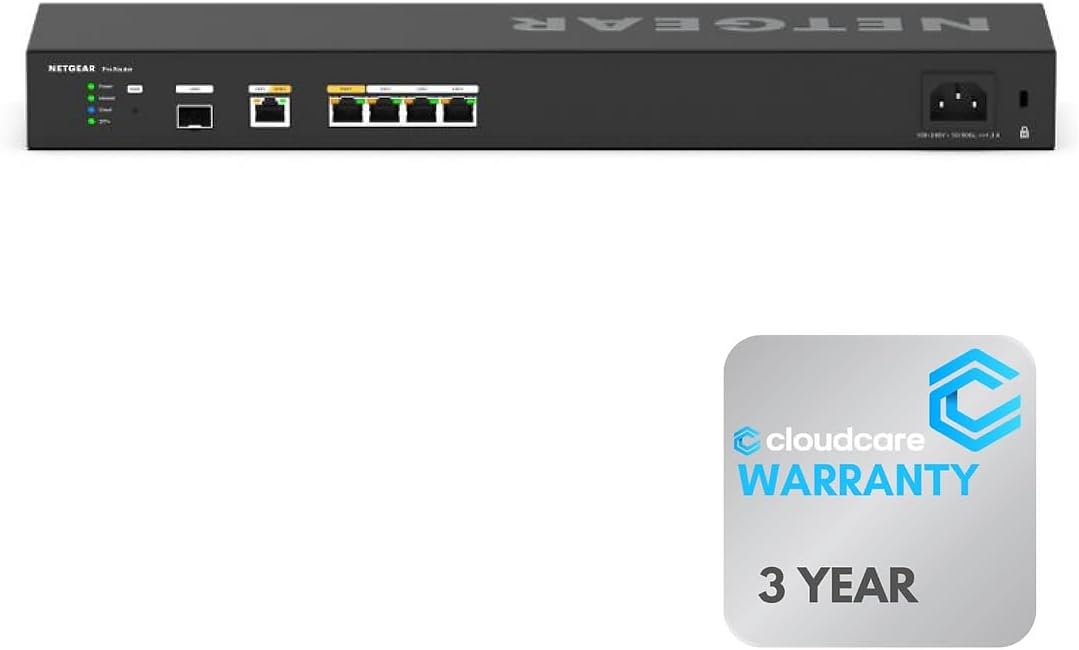
The NETGEAR PR60X 6 provides six 10G ports for maximum speed. It features Dual WAN support for failover. Rack-mountable design saves space in professional environments. Cloud management simplifies monitoring remotely.
We may earn a commission when you buy through this link, at no additional cost to you.
It supports continuous internet access via WAN ports. Cloud Care includes warranty support for purchases. Insight cloud offers easy setup and control. This suits professional networks needing reliability.
High port count ensures speed without bottlenecks. However, it is a premium investment. Cloud reliance may concern privacy-focused users. It works well for managed services.
Ideal for enterprise environments needing massive throughput. It prioritizes scale and centralized control. We recommend it for large offices requiring rack-ready hardware.
Connect wired devices with six 10G/Multi-Gigabit ports. This maximizes speed in your network setup. It supports heavy traffic.
Manage and monitor remotely. Cloud-based control for easy setup. It simplifies maintenance and control.
We may earn a commission when you buy through this link, at no additional cost to you.
The Linksys LRT224 offers basic business requirements with Gigabit ports. Rated 4.0 stars, it supports up to 50 IPsec tunnels. Dual WAN failover ensures reliable connectivity. It suits small businesses needing simple security.
We may earn a commission when you buy through this link, at no additional cost to you.
Firewall throughput reaches 900 Mbps. Load balancing optimizes bandwidth. It is feature-rich enough for wide range of business. Manual troubleshooting guidance is available.
This device is entry-level for VPN needs. More advanced users may need higher tunnel limits. It works well for small offices with basic redundancy.
Ideal for small businesses wanting simple failover. It prioritizes cost-effectiveness and stability. We recommend it for entry-level enterprise needs.
Supports load balancing and WAN failover. It ensures highly reliable Internet connectivity. This suits business continuity well.
Meets wide range of business network needs. Features include 50 IPsec tunnels. It supports mobile VPN easily.
We may earn a commission when you buy through this link, at no additional cost to you.
Selecting a Dual Wan Router requires understanding your network needs. Consider bandwidth requirements, port counts, and security features. This guide helps you prioritize key factors.
Check the router has enough Ethernet ports for your devices. Modern needs often require 2.5G or 10G ports for speed. Ensure you have multiple WAN ports for redundancy.
Prioritize models with Gigabit or Multi-Gigabit ports to avoid bottlenecks.
Confirm the device supports automatic failover when a link drops. Load balancing distributes traffic for better speed. This ensures continuous availability for your business operations.
Look for real-time switching features to minimize downtime during ISP issues.
Review supported protocols like IPsec, OpenVPN, and WireGuard. Tunnel limits matter for connecting remote offices. Strong encryption keeps your data secure during transmission.
Ensure the router handles enough tunnels for your team size.
Choose between cloud or local web management. Cloud options allow remote access for easier maintenance. A clear interface simplifies troubleshooting and setup.
Opt for interfaces that offer detailed logs and alerts.
Look for IPS, SPI firewalls, and intrusion prevention. These protect against external threats and malicious traffic. Commercial-grade security is essential for business networks.
Prioritize models offering regular firmware updates for safety.
Check manufacturer warranty terms for long-term reliability. Business routers should have responsive technical support. Extended warranties reduce risk for critical infrastructure.
Opt for brands with proven track records in networking.
Balance cost against necessary features like speed. Premium models offer better reliability and speed but at a higher cost. Basic models suffice for simple needs.
Select a model that fits both your budget and speed needs.
Ensure compatibility with ISPs and modems. Check supported USB modems for mobile backup. Verify VLAN and firewall compatibility with existing tools.
Test compatibility with your current setup before buying.
Start by connecting your main internet lines to the WAN ports. Configure failover settings via the web interface. This ensures traffic shifts instantly if one line fails.
Monitor logs regularly for connection drops or firewall alerts. Update firmware to maintain security and performance. Restart the device monthly to clear temporary issues.
Keep the router in a cool, well-ventilated area. Dust buildup can cause overheating and slowdowns. Secure it on a stable surface to avoid hardware damage.
A Dual Wan Router connects two or more internet lines to ensure continuous uptime. It manages traffic efficiently and provides failover protection if one ISP fails. This setup boosts reliability for businesses needing stable connections.
Yes, many models support USB 4G or 5G modems for backup. You can plug a compatible hotspot into the USB port. This allows instant failover without needing a second wired line.
Load balancing distributes internet traffic across multiple WAN links. It balances speeds so no single link is overloaded. This improves overall network performance and reliability.
Some models include Wi-Fi but most business routers focus on wired connections. You may need separate access points for wireless needs. Check specs for Wi-Fi 6 or 7 support if required.
Common protocols include IPsec, OpenVPN, L2TP, and WireGuard. These secure remote access and site-to-site links. Most routers offer tunnel limits that scale with business size.
Yes, high-speed ports require Cat6a or Cat7 Ethernet cables. Standard Cat5e may limit speeds to 1Gbps. Verify cable quality before purchasing 10G hardware.
Some models follow TAA or NDAA standards for agencies. These ensure trust and regulatory compliance for government networks. Check specs if you work in a regulated industry.
Update firmware whenever security patches are released. Automatic updates are ideal for keeping systems secure. Regular maintenance helps avoid vulnerabilities and slowdowns.
The TP-Link ER605 and NETGEAR PR60X lead as top choices for value and speed. We picked them for their port counts, VPN support, and failover features.
Prioritize your specific needs like 10G speeds or USB backup. Match your budget with features that truly matter to your workflow.
Check current prices and availability before purchasing. Rates change often, so verify before investing. Ensure you pick the right fit for your network.