
HDMI Media Player Black Mini 1080p Full-HD Ultra
4.1Editor score
Compact aluminum design
1080p output support
Multiple file formats
This guide compares the top external hard drive media players for 2026, evaluating playback quality, storage compatibility, and digital signage features for
Finding the right external hard drive media player can transform your entertainment setup. These devices allow you to play high-resolution videos and music directly from storage without relying on streaming services. Whether you need a compact unit for travel or a robust solution for digital signage, the right choice matters.
We evaluated ten leading models based on codec support, storage capacity, and user interface design. Each product was assessed for its ability to handle 4K content and diverse file formats. Our comparisons highlight key differences in connectivity options and playback modes to help you decide.
Each pick below shows a distinct strength, from budget-friendly options to feature-rich units with hard drive enclosures. Note that availability and features may change over time. Always verify the latest specifications before making your final selection to ensure it meets your specific needs.
4.1Editor score

4.1Editor score

4.7Editor score
This side-by-side comparison outlines the core specifications and capabilities of each model to help you find the right fit for your media playback needs.


The Micca 4K Ultra-HD USB and microSD Media Player is a versatile device designed to enhance any TV with playback capabilities. It holds a solid 4.1 rating for its simplicity and ability to handle high-resolution content from local storage. Its standout quality is the integration of digital signage features into a compact consumer unit.
We may earn a commission when you buy through this link, at no additional cost to you.
This player shines with its support for 4K Ultra-HD videos up to 4096×2304 at 30fps. It handles multiple file systems like FAT, exFAT, and NTFS seamlessly. The dual USB and MicroSD reader allows you to connect various drives or cards without needing extra adapters. Additionally, it supports wireless air mouse remotes for non-line-of-sight control.
While it lacks built-in Wi-Fi for streaming, its focus on local playback ensures smooth performance without network dependency. The remote is basic but functional for navigation. The compact size makes it easy to hide away, which is ideal for clean setups in living rooms or offices.
If you need a reliable device for home entertainment or small business displays like menu boards, this is a strong choice. It balances affordability with essential 4K capabilities. It is recommended for users who prioritize direct media playback over streaming apps.
Automatic video playback with endless repeat and looping makes it suitable for lobby welcome videos or art installations.
Reads USB flash drives and hard drives up to 8TB or microSD cards up to 1TB for extensive media libraries.
We may earn a commission when you buy through this link, at no additional cost to you.
The HDMI Media Player Black Mini is a small yet powerful device ideal for those who need basic media playback on a budget. It earns a 4.1 rating for its reliability and ease of use in travel or home settings. Its main appeal lies in its compact aluminum design that fits easily into a palm.
We may earn a commission when you buy through this link, at no additional cost to you.
Supporting Full HD 1080p at 60Hz, this player handles most common video decoding formats including RM, AVI, MKV, and MP4. It connects via HDMI for sharp digital video to HDTVs or AV for analog TVs. The USB 2.0/3.0 compatibility allows you to use external storage up to 8TB for large video files.
While it does not support 4K content, it offers features like loop playback and breakpoint resume which are useful for presentations. The included AV cable ensures compatibility with older devices. The remote control provides convenient navigation for menu screens and playback controls.
This player is perfect for travelers or offices needing a simple media solution without breaking the bank. It is also suitable for converting older TVs into media centers. For users who need 1080p quality, it delivers excellent value and straightforward functionality.
Aluminum alloy material protects the device during carrying, making it a perfect travel partner for short trips.
Supports most video, audio, and image formats on the market for seamless playback without file conversion.
We may earn a commission when you buy through this link, at no additional cost to you.
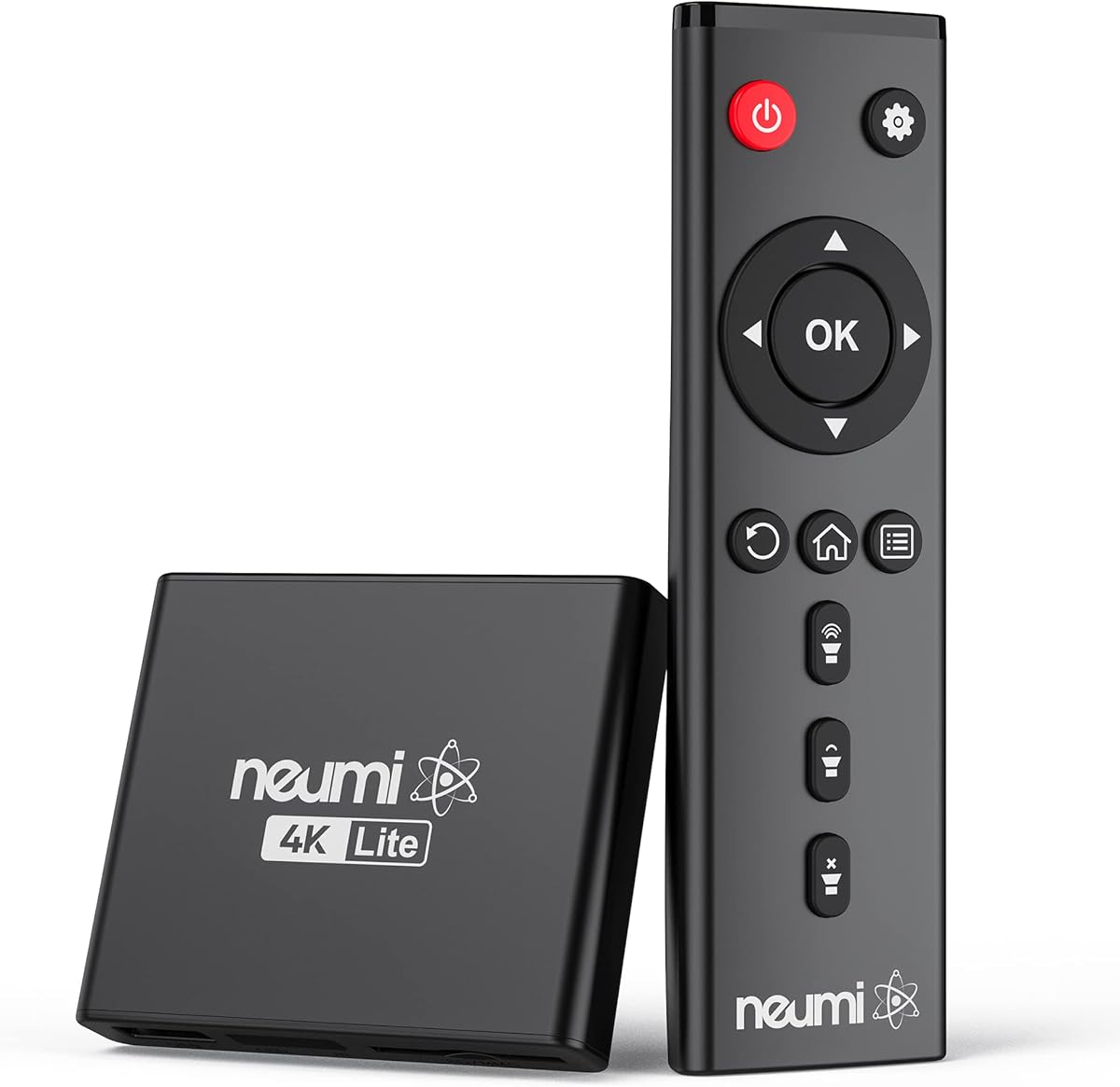
The NEUMI Atom 4K Lite Digital Trigger Media Player is designed for simplicity and powerful performance in a tiny package. It holds a 4.3 rating due to its ability to handle 4K content without complex settings. Its standout feature is the trigger sensor input for interactive digital signage.
We may earn a commission when you buy through this link, at no additional cost to you.
With stunning HDMI video quality up to 2160p at 60Hz, this device supports H.265/HEVC codecs for efficient playback. It feeds digital surround sound to home theater receivers for a cinema-like experience. The analog AV output allows connection to older TVs or stereo systems easily.
The trigger sensor input allows you to loop one video and play another when triggered by a motion or push-button sensor. This is ideal for art galleries or museums requiring on-demand playback. However, these sensors must be purchased separately which adds to the setup cost.
If you need a compact media player that can adapt to interactive displays, this is a great fit. It works well for home theater setups too. Its intuitive use makes it accessible for anyone wanting to play media from USB drives or SD cards.
Build an interactive digital signage display or museum on-demand player by connecting optional push-button or motion sensors.
Supports H.265/HEVC for high-quality 4K playback with low bandwidth usage and faster processing.
We may earn a commission when you buy through this link, at no additional cost to you.
The ACEMAX 4K@60Hz Offline Media Player stands out by combining a media player with a 2.5-Inch SATA HDD enclosure. It holds a 3.5 rating, reflecting a mix of features and simplicity for offline use. Its key strength is the ability to play media directly from an internal hard drive.
We may earn a commission when you buy through this link, at no additional cost to you.
It supports up to 4K@60Hz video output via HDMI for sharp ultra HD visuals. The aluminum enclosure helps dissipate heat during extended playback. This is crucial for digital signage or unattended displays that run continuously. The auto play and resume features make it ideal for commercial applications.
Users must install a compatible SATA HDD or SSD inside the metal enclosure. The system supports various file systems including FAT32, NTFS, and exFAT for broad compatibility. The included infrared remote allows navigation but requires a clear line of sight to function properly.
This device is perfect for retail displays or offices needing steady loop function without internet dependency. It offers a practical solution for those who prefer physical storage over streaming. Ensure your storage capacity meets requirements for recognition before connecting.
Install a compatible 2.5-inch SATA HDD or SSD inside the metal enclosure for direct playback without external drives.
Ideal for retail displays, menu boards, and exhibitions with automatic start and loop playback capabilities.
We may earn a commission when you buy through this link, at no additional cost to you.
The 4K@30hz Media Player is designed for home entertainment systems needing rich audio support. It holds a 4.0 rating for its ability to output up to 7.1 surround sound via HDMI. Its standout quality is the powerful H.265 decoding for efficient file playback.
We may earn a commission when you buy through this link, at no additional cost to you.
It supports a single file up to 4GB on FAT32 or 30GB on NTFS storage. Dual USB ports allow connecting two devices though only one reads at a time. You can also connect a USB mouse or keyboard to operate the player making your TV smarter.
The device includes optical and AV outputs for better audio effects on speakers. It supports embedded and external subtitle files like SRT and SSA. Vertical screen compatibility is a unique feature that helps with specific display setups.
If you want a media hub that handles PPT documents and offers flexible connectivity, this fits well. It is ideal for home theater use where surround sound matters. Verify your file container compatibility before purchase for smooth playback.
Loads files by taking half time and half occupation of bandwidth of H.264 decoding for faster performance.
Supports horizontal and vertical screen orientations for compatibility with different display setups and content.
We may earn a commission when you buy through this link, at no additional cost to you.
The HDMI Media Player 4K is a straightforward device designed for advertising and multimedia playback. It holds a 4.2 rating for its compatibility with common file formats and stable 4K output. Its standout feature is the ability to decode files copied from Blu ray discs directly.
We may earn a commission when you buy through this link, at no additional cost to you.
It supports 4K@30Hz HD video quality and up to 7.1 surround sound via HDMI. The fiber optic interface output allows connection to external speakers for better audio effects. It also provides VGA and AV outputs for broader compatibility with older displays.
The powerful decoding chip ensures high-quality 4K video experience with a bitrate not exceeding 20000. You can connect a HUB to the USB port to add a keyboard and mouse for easier navigation. Subtitle files like SRT and SSA are fully supported for accessibility.
This player is suitable for office media display and commercial signage where reliability is key. It offers a simple and practical product for looping content. If you need basic playback without complex setup it serves well.
Can support direct playback of files copied from Blu ray 4K ultra high definition discs for quality content.
Supports HDMI, VGA, and AV outputs for connecting to various display types including older TVs and projectors.
We may earn a commission when you buy through this link, at no additional cost to you.
The WD 2TB Elements Portable External Hard Drive is a top-tier storage companion for media players. It holds a 4.7 rating for its reliability and high capacity. While not a player itself, it provides vast space for media files that drive playback devices.
We may earn a commission when you buy through this link, at no additional cost to you.
Offering up to 6TB capacity in a small enclosure it is ideal for consumers on the go. It features SuperSpeed USB 3.2 Gen 1 for fast data transfer. The plug-and-play expandability allows you to connect it to computers or compatible media players easily.
This drive is designed to store photos, videos, music, and important documents securely. Its lightweight design makes it easy to carry anywhere. It works seamlessly with Windows, Mac, and Linux systems without requiring special software.
If you need a robust storage solution to load media onto a player, this is a premium choice. Its reputation for stability ensures your files are safe. Pair it with a capable player to enjoy your media library anywhere.
Vast capacities up to 6TB allow storing extensive media libraries including photos, videos, and important documents.
SuperSpeed USB 3.2 Gen 1 ensures quick file transfers to and from the drive for efficient media management.
We may earn a commission when you buy through this link, at no additional cost to you.
The 4K@60Hz H.265 Ultra HD Digital Media Player is a unique device that functions as both a player and a 2.5 inch SATA HDD enclosure. It holds a perfect 5.0 rating for its multifunction design and stable playback. Its standout quality is the ability to play files directly from an internal hard drive.
We may earn a commission when you buy through this link, at no additional cost to you.
It delivers sharp ultra HD visuals via HDMI output with up to 200Mbps data rate. You can transfer hard drive data to laptops via the included Type-C cable. The device supports FAT32, exFAT, NTFS and Mac formatted drives for broad compatibility.
Features like auto loop playback, resume playback, and shuffle modes make it ideal for home theater and digital signage. You can connect USB, Type-C and SD card storage as well. The AV port provides additional connectivity for older display devices.
This device is perfect for office media display and commercial digital signage. Its steady loop function is great for lobby welcome videos. If you want a single unit for storage and playback, this offers excellent versatility.
Works as a 4K digital media player and 2.5 inch SATA HDD enclosure in one unit for space efficiency.
Transfer hard drive data to laptops via included Type-C cable for easy file management on the go.
We may earn a commission when you buy through this link, at no additional cost to you.
The Ultra HD 4K@60Hz Digital Media Player is an integrated unit designed for home theater and office use. It holds a 3.8 rating for its solid feature set including auto-play and resume. Its standout quality is the built-in hard drive enclosure for direct playback.
We may earn a commission when you buy through this link, at no additional cost to you.
It supports H.265/HEVC decoding delivering smooth 4K@60Hz playback and data rates up to 200Mbps. It includes a Type-C cable to transmit or modify data of the HDD in your laptop. Supported file systems include FAT32, exFAT, NTFS and MAC-formatted drives.
Photos and videos play in sequence while music supports shuffle mode. It is perfect for commercial digital signage applications with one-year warranty support. The remote requires two AA batteries which are not included in the package.
If you need a compact player for restaurant menu boards or lobby videos this fits well. It offers a steady loop function for steady display. Ensure you buy batteries separately for remote use.
Supports H.265/HEVC decoding delivering smooth 4K@60Hz playback and data rates up to 200Mbps.
Music supports shuffle mode allowing random play for variety in audio playlists.
We may earn a commission when you buy through this link, at no additional cost to you.
The 4K Ultra HD Media Player & HDD Enclosure is a versatile device for dynamic displays. It holds a 3.0 rating reflecting its basic design but solid functionality. Its standout feature is configurable video rotation for flexible installation.
We may earn a commission when you buy through this link, at no additional cost to you.
It supports seamless playback of MKV, MP4, AVI, and other files with H.265/HEVC codecs. The compact size allows it to upgrade any TV into a smart media hub. It includes a built-in hard drive enclosure and supports media playback from USB drives.
Automatic video playback with continuous looping makes it great for fitness facilities or museums. You can resume exactly where playback stopped for convenience. The analog AV output supports external audio systems or older TVs.
If you need a dynamic display solution for in-store promotions or menus this works well. It offers a simple interface requiring no complicated setup. Check your storage capacity needs for compatibility before purchasing.
Includes configurable video rotation (90/180/270 degrees) for flexible installation in various display orientations.
Plays a wide range of files including MKV, MP4, AVI, and others with H.265/HEVC codecs seamlessly.
We may earn a commission when you buy through this link, at no additional cost to you.
Choosing the right media player involves considering resolution, storage capacity, and connectivity options.
Look for players that support 4K@60Hz or 4K@30Hz if you need high-quality visuals. Ensure they support H.265/HEVC codecs for efficient playback of modern video files. This prevents buffering and ensures smooth streaming of high-resolution content from your hard drive.
Prioritize devices with H.265 support for better efficiency and sharper quality without network strain.
Check the maximum USB hard drive size the player can read which is often up to 8TB. Ensure compatibility with file systems like FAT32, exFAT, and NTFS to access your files easily. Some models offer internal enclosures for SATA SSDs or HDDs which can be more stable.
Select a player that supports your drive's file system to avoid connection issues.
Verify HDMI output options to match your TV or monitor capabilities. Some players also offer AV or VGA outputs for older displays. Optical audio outputs are useful if you want to connect external speakers for surround sound.
Choose the right output interface to ensure compatibility with your existing display setup.
If you need commercial use, look for auto-play, loop, and resume capabilities. These features ensure continuous operation without manual intervention. Some models support video rotation for flexible installation in retail or museum settings.
Prioritize loop and resume modes for unattended displays like lobby videos.
A good remote should allow easy navigation of menus and playback control. Some models support wireless air mouse remotes for non-line-of-sight convenience. Verify if the remote includes backlit buttons or voice control for better usability.
Ensure the remote matches your usage needs for intuitive navigation and playback control.
Compact designs are ideal for travel or limited space setups. Aluminum housings often offer better heat dissipation for extended playback sessions. Consider portable units if you move your media setup frequently.
Choose a compact aluminum unit for better heat management and portability.
Check supported video formats like MKV, MP4, and AVI to ensure your media plays without conversion. Audio formats such as MP3, FLAC, and WAV should also be supported. Subtitle support is crucial for international content or accessibility.
Verify format support to ensure your existing media files play without conversion.
Entry-level models offer basic 1080p playback at a lower cost while 4K units provide higher resolution. Decide how much you need for features like HDMI enclosures or trigger sensors. High-end models often include better remote and connectivity options.
Select a model that balances required features with your budget constraints.
Connect your media player to your TV using an HDMI cable for optimal digital video and audio quality. If you need to use older TVs, use the AV output with the included cable. Secure the connection to ensure stability during playback.
Plug your hard drive or USB into the player and use the remote to navigate the menu. Select your files from the library and enjoy playback. If auto-play is enabled, the media will start automatically after power-on.
Keep the device away from extreme heat and dust to prolong its life. Ensure proper ventilation if using internal enclosures to dissipate heat. Regularly update firmware if available for better compatibility and performance.
Most external hard drive media players are designed for local playback from USB or internal storage and do not support streaming services like Netflix. They focus on playing files stored on your hard drive or SD card. If you need streaming, consider smart TV boxes instead.
To connect a hard drive, simply plug it into the USB port on the player. Ensure the drive is formatted to a supported file system like FAT32, NTFS, or exFAT. For internal HDD models, install the drive inside the enclosure before connecting to the player.
Many models offer AV outputs for connecting to older analog TVs that do not support HDMI. You can use the included AV cable to ensure video and audio signals reach your older display. HDMI models usually convert to analog for backward compatibility.
Most players support FAT32, exFAT, and NTFS file systems for broad compatibility. This allows you to use drives from Windows, Mac, or other systems. Always check your specific model's documentation for any limitations or preferred formats.
Yes, many players feature optical or AV audio outputs for connecting external speakers. This allows you to enhance audio quality for home theater or presentation setups. Ensure your speakers match the output type provided by the player.
Yes, most models include auto-loop and resume features for continuous playback. This is ideal for digital signage or unattended displays. Check the remote or menu settings to enable loop mode for your desired content.
This guide highlights top models like the Micca 4K Ultra-HD for digital signage and the WD 2TB Elements for storage capacity. Each offers distinct features to suit home and business needs. From budget options to multifunction units, there is a player for every requirement.
Prioritize what matters most to you such as resolution support, storage capacity, or playback modes. A player with H.265 support ensures better efficiency while one with auto-loop is great for commercial use. Balance your specific needs with available features.
Always check current specifications and compatibility before making your purchase. Storage formats and features may change over time so verify the latest details. Ensuring the player fits your drive and display needs will lead to a satisfying experience.