
Apolosign 21.5-inch Digital Calendar
4.6Editor score
21.5 inch HD touchscreen display
Dual calendar and Android operating mode
Integrated Google Gemini voice assistant support
This expert guide compares the top digital touchscreen organizer models to help families find the best smart display for scheduling chore tracking and photo
Modern families need centralized systems to manage busy schedules and household tasks efficiently. A digital touchscreen organizer combines calendars, chore charts, and photo frames into one sleek device. These smart displays reduce paper clutter and keep everyone connected throughout the day.
We evaluated ten leading models based on screen quality, syncing capabilities, and user-friendly features. Each product was analyzed for its ability to integrate with existing calendar apps and support family routines. Our goal is to highlight devices that offer value without hidden subscription costs.
Each pick showcases unique strengths like dual modes, large displays, or specific parental controls. While prices fluctuate due to market conditions, the core features remain consistent. Always verify current availability and deals before making your final purchasing decision online.
4.6Editor score

4.4Editor score

4.4Editor score
The following table provides a side-by-side overview of the top digital touchscreen organizer models available this month. Compare screen sizes, unique features, and overall ratings to find the perfect fit for your home.


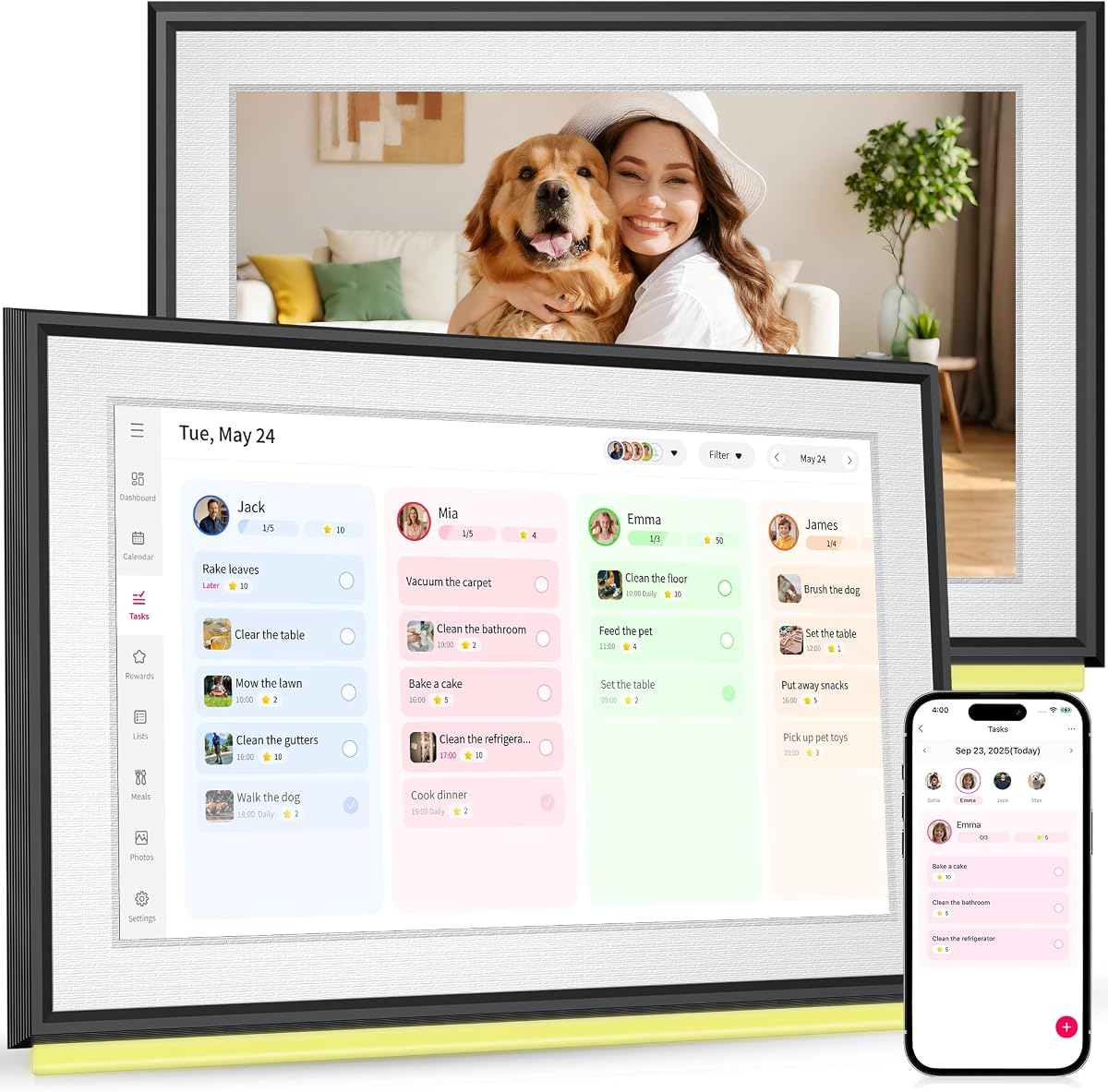

The 15.6 Digital Calendar Wall Touch Screen stands out as a comprehensive family hub with a 4.4 star rating. It seamlessly integrates family calendars, meal planning, and chore charts in one sleek design. This device transforms your home into a coordinated command center without complex technical barriers.
We may earn a commission when you buy through this link, at no additional cost to you.
Key strengths include seamless real-time syncing with Google, Outlook, and iCloud platforms. Multiple family members can edit schedules simultaneously ensuring everyone stays informed. The built-in digital chore chart fosters responsibility through a fun gamified experience that kids enjoy participating in.
Trade-offs include the need to purchase batteries separately and a slightly involved initial setup process. These are acceptable given the robust 2-year warranty and 24/7 customer support. The device ensures smooth operation once configured correctly for long-term daily use.
This organizer is ideal for busy households needing a central coordination point. It aids working parents in managing schedules while helping children plan their study lives. With its 2-year warranty and reliable sync, it is a top recommendation for family organization.
Syncs instantly with major calendar platforms allowing multiple users to update schedules simultaneously without conflicts.
Parents assign tasks and children earn reward points turning daily routines into an engaging and positive experience.
We may earn a commission when you buy through this link, at no additional cost to you.
The Apolosign 21.5-inch Digital Calendar offers a premium experience with a massive display and advanced features. It supports a dual-mode interface allowing users to switch between simple scheduling and a fully customizable Android dashboard. This flexibility makes it unique among standard digital organizers.
We may earn a commission when you buy through this link, at no additional cost to you.
Key strengths include the integration of the Google Gemini voice assistant for hands-free control. Users can check schedules and manage smart home devices directly from the calendar. The anti-glare HD touchscreen ensures clear visibility from any angle in bright rooms.
Trade-offs involve a higher price point and the need for significant wall space to accommodate the 21.5-inch size. However, the included stand allows for versatile desk placement if needed. The robust feature set justifies the cost for tech-savvy families.
This device is perfect for households seeking a smart home hub beyond just scheduling. The Android mode allows downloading apps for expanded functionality. It is a top choice for those wanting the ultimate in digital calendar technology.
Switch between a focused calendar view and a customizable Android dashboard for apps and widgets.
Built-in Google Gemini assistant allows hands-free schedule checks and smart home device control.
We may earn a commission when you buy through this link, at no additional cost to you.
The Digital Calendar 10.1 Touchscreen is an excellent choice for budget-conscious families needing essential organization tools. It offers full access to calendars, chore lists, and meal planning without any monthly fees. This value proposition makes it highly competitive in the market.
We may earn a commission when you buy through this link, at no additional cost to you.
Key strengths include its smart weekly meal manager that displays menus and generates grocery lists automatically. The interactive chore list turns routines into a game that builds responsibility. Kids race to earn stars and unlock rewards making it a hit with children.
Trade-offs include a smaller screen size compared to premium models and a more basic feature set. However, the compact design fits well in smaller kitchens or bedrooms. It remains a highly functional device for core family management tasks.
This organizer is ideal for small families or those new to digital planning. Its affordability and zero subscription model make it accessible to everyone. It is a perfect gift for moms and women holding the household together.
Visual menus and automatic grocery list generation eliminate the daily question of what to cook for dinner.
All features are fully unlocked with no hidden costs ensuring a sustainable long-term usage model.
We may earn a commission when you buy through this link, at no additional cost to you.
The Skylight Calendar features a premium 15.4-inch touchscreen built specifically for busy families. It combines shared schedules with an interactive chore chart to keep everyone in sync. The device mounts easily to any wall or sits on a countertop offering flexible placement.
We may earn a commission when you buy through this link, at no additional cost to you.
Key strengths include its ability to sync with major platforms like Google and Outlook within minutes. The optional Disney mode features icons characters to encourage family collaboration through animations. It brings order to frantic routines with customizable colors and events.
Trade-offs involve the fact that some advanced features like Magic Import require a subscription. However, the core functionality remains free and highly effective. The white finish is elegant but requires regular dusting to maintain its pristine look.
This calendar is ideal for families who value design and seamless sync. The optional premium plan adds fun elements for kids without forcing them. It is a top recommendation for those wanting a stylish hub that looks good in any room.
Optional subscription unlocks iconic character animations to make scheduling fun for younger children.
Connects effortlessly with Google iCloud Outlook Cozi and Yahoo to unify all family schedules.
We may earn a commission when you buy through this link, at no additional cost to you.
This 10.1-inch digital calendar offers a high-resolution display that doubles as a functional photo frame. It provides an all-in-one family organizer with calendar sync and chore charts. The AI-powered imports make setup easier by recognizing data from existing calendars.
We may earn a commission when you buy through this link, at no additional cost to you.
Key strengths include the simple star-based reward system that motivates kids to complete daily tasks. It encourages responsibility while keeping routines consistent without heavy parental involvement. The 1080P screen ensures clear visibility of text and images.
Trade-offs include a relatively compact screen size and basic photo frame functionality. However, it fits well on desks where wall mounting is not possible. The included mounting hardware allows for versatile installation based on your home layout.
This device is ideal for households needing a reliable and affordable central hub. Its clear display and task tracking features help manage daily stress. It makes a thoughtful gift for keeping families organized and on schedule.
Automatically recognizes and imports schedule data from existing calendars to speed up the setup process.
Kids earn stars for completed chores fostering positive daily habits and self-discipline.
We may earn a commission when you buy through this link, at no additional cost to you.
This 15.6-inch digital planner is designed to transform family routines with an intuitive interface. It works as a chore chart and schedule planner with color-coded task assignments. The device is highly rated for its ease of use by kids and seniors alike.
We may earn a commission when you buy through this link, at no additional cost to you.
Key strengths include a customizable task chart and weekly meal planning tools that eliminate daily decision fatigue. The sleep wake mode helps save energy by turning the screen off when not in use. It is a versatile display for kitchens and home offices.
Trade-offs involve the limitation to US-style plugs and lack of Android app ecosystem. However, the included plug ensures compatibility with standard wall outlets. The focus on core features ensures reliability without unnecessary complexity.
This planner is ideal for families seeking a straightforward and effective organization tool. Its high user rating reflects consistent performance and reliability. It makes a thoughtful gift for anyone looking to reduce household chaos.
Color code tasks for different family members to visually organize responsibilities at a glance.
Up-to-date weather information is displayed right alongside daily schedules for better planning.
We may earn a commission when you buy through this link, at no additional cost to you.
This digital calendar serves as a command center replacing messy paper notes with a single screen. It integrates schedule tracking, chore charts, and recipe storage in a sleek design. The scientific management system helps standardize daily routines effectively.
We may earn a commission when you buy through this link, at no additional cost to you.
Key strengths include color classification for different family members and a reward mechanism for chores. Parents can assign tasks and customized reward rules to make them fun. The remote photo sharing feature bonds distant relationships by allowing grandparents to view memories.
Trade-offs include a smaller 10.1-inch screen and limited premium features. However, the 1-year warranty ensures reliable daily use. The setup is super simple via the app and supports both vertical and horizontal placement.
This planner is ideal for families wanting a structured approach to household management. Its focus on parental controls and chore rewards helps cultivate independence. It is a warm and orderly solution for busy modern homes.
Uses exclusive color markers to distinguish plans and chores for different members clearly.
Built-in one-click recipe saving and editable checklists simplify daily household management tasks.
We may earn a commission when you buy through this link, at no additional cost to you.
This device brings daily family life into better organization with a dual-mode interface. It switches between a simple calendar and a customizable Android dashboard for apps. This flexibility allows users to personalize widgets for weather and music.
We may earn a commission when you buy through this link, at no additional cost to you.
Key strengths include smart home control capabilities allowing management of compatible devices like lights. The built-in voice assistant helps check schedules and set reminders hands-free. Anti-glare HD clarity ensures comfortable viewing from any angle in the room.
Trade-offs involve the need to configure the Android mode properly for best results. However, the included help center and guides ensure easy setup. The device stays simple and intuitive for all family members to use daily.
This organizer is ideal for tech-savvy families wanting more than just a calendar. It acts as a fully connected dashboard for home management. It is a top choice for integrating smart home control with daily scheduling.
Manage compatible smart devices like lights and cameras directly from the calendar interface.
Download apps from Google Play to expand functionality beyond standard scheduling features.
We may earn a commission when you buy through this link, at no additional cost to you.
This digital calendar simplifies family scheduling with a clean interactive display. It helps plan weekly meals and transforms into a digital photo frame. The device is designed for desktop placement where wall mounting is not possible.
We may earn a commission when you buy through this link, at no additional cost to you.
Key strengths include easy setup via Wi-Fi and sync with major calendar platforms. It syncs with internet time servers for precise timekeeping. Users can add events directly on the device or through the free mobile app for convenience.
Trade-offs involve the limitation to desktop use and dependency on stable internet. The system requires updates for new features so patience during startup is recommended. However, it remains a reliable command center for daily organization.
This organizer is ideal for families needing a desk-based hub. It reduces chaos by centralizing tasks and photos in one view. It is a practical gift for those wanting to simplify their organized day.
Regular updates like version R-1.5.0 add new features to ensure the device stays current.
Displays dynamic family moments as a screensaver when the calendar is not in use.
We may earn a commission when you buy through this link, at no additional cost to you.
This 21.5-inch digital calendar offers a large display that replaces paper planners effectively. It combines a wall calendar, chore chart, and meal planner into one touchscreen. The device is perfect for busy households needing visibility and clarity.
We may earn a commission when you buy through this link, at no additional cost to you.
Key strengths include customizable themes and font sizes for personalization. The interface is grandparent-friendly ensuring everyone can use it with ease. Sync with Google and iCloud keeps your week planned from your phone instantly.
Trade-offs involve the large footprint and basic reward features compared to others. However, it includes everything needed for wall installation or desk use. The free app allows management of schedules from anywhere convenient.
This calendar is ideal for large homes needing a visible command center. Its large screen ensures everyone in the household stays on the same page. It is a top pick for those prioritizing visibility and family coordination.
Customize themes and font sizes to suit your style and make the interface accessible for all ages.
Download the free app to plan your week from your phone and sync instantly.
We may earn a commission when you buy through this link, at no additional cost to you.
Choosing the right organizer involves balancing screen size, features, and ease of use. This section breaks down the essential factors to consider.
Screen size determines visibility and where you can place the device. Larger displays like 21.5 inches work best for main living areas while 10-inch models fit desks. Look for HD or 1080P resolution to ensure text is readable from a distance.
Prioritize a display with anti-glare coating to maintain clarity in bright kitchens.
Seamless integration with existing calendar apps is critical for adoption. Ensure the device supports Google, Outlook, and iCloud to avoid manual data entry. Real-time sync keeps everyone updated instantly without needing to refresh.
Verify that the sync works bi-directionally so edits on the device update on phones.
Interactive chore charts help children develop responsibility and daily habits. Look for gamified features like star rewards or color-coded tasks to keep kids engaged. A simple interface makes it easy for parents to assign and track progress.
Choose a model that allows for customization to fit your specific family rules.
Many digital organizers require monthly fees for advanced features or storage. Opt for devices that offer core scheduling and syncing for free. Hidden costs can quickly add up and reduce the value of the device over time.
Always check the product details to confirm which features are free versus paid.
When not in use, the device should serve as a digital photo frame. Look for support for common cloud services like Google Photos to automate slideshows. High storage capacity allows you to keep thousands of memories on the device.
A good photo mode adds warmth to your home without using extra space.
Consider whether you need wall mounting hardware or a desk stand. Some models are heavy and require drilling while others are lightweight for tabletop use. Ensure the device comes with the necessary accessories to avoid extra costs.
Flexible placement options help you choose the best view for your household.
Wi-Fi connectivity is essential for syncing and receiving updates. Some advanced models offer voice assistants to manage tasks hands-free. Check if the device supports smart home controls if you want a more integrated experience.
A stable internet connection ensures the device functions correctly as a central hub.
A solid warranty protects your investment against hardware failures or defects. Look for models offering at least a one-year warranty with accessible customer support. Quality brands often provide 24/7 support to help with setup issues.
Reliable support ensures you can resolve any technical glitches quickly and easily.
Start by connecting the device to your Wi-Fi network during setup. Download the companion app on your phone to transfer schedules and photos remotely. This streamlines the initial configuration process significantly.
Regularly update the software to ensure optimal performance and access new features. Keep the screen clean with a soft microfiber cloth to avoid scratching the glass. Avoid using harsh chemicals that might damage the coating.
Place the organizer in a high-traffic area like the kitchen or hallway for maximum use. Adjust the brightness settings to match the lighting conditions of your room. This ensures visibility at all times of the day.
Most models in this guide do not require a monthly subscription for core features. Some premium models offer optional plans for extra apps or cloud storage. Always check the product details to confirm which features are free versus paid.
Yes, most digital organizers support synchronization with major platforms like Google Calendar and Outlook. This allows you to manage your schedule from both the device and your phone.
Access the chore app on the device and create tasks for each family member. You can assign colors and rewards to make it fun and engaging for children.
Yes, when not in use, the device displays photos in a slideshow mode. You can upload pictures via the app or sync with cloud services like Google Photos.
Many models come with wall mounting hardware for secure installation. Some designs are lightweight enough for tabletop placement without needing a stand.
The device will still display local data like photos and saved tasks. However, syncing and real-time updates will pause until the connection is restored.
We reviewed ten top models to help you find the perfect family hub. The Apolosign 21.5-inch offers the best premium experience while the Skylight Calendar provides excellent value.
Prioritize screen size and sync capabilities based on your specific household needs. Ensure the device supports your preferred calendar apps and offers intuitive management.
Always verify current pricing and availability before making your final decision. The best fit for you depends on your budget and desired feature set.