
Nomo Medical Alert System with Fall Detection
4.1Editor score
24/7 monitoring included
Fall detection tags
Two-way voice comms
This guide compares the top 10 elderly monitoring systems for 2026, featuring bed alarms, video monitors, and fall detection pendants to keep seniors safe.
Keeping loved ones safe requires reliable monitoring solutions. Modern systems offer peace of mind through smart alerts, video feeds, and fall detection technology designed for seniors aging in place.
We evaluated ten top-rated products based on range, ease of use, privacy, and alert reliability. Our comparison covers bed alarms, video monitors, and wearable pendants to help you find the perfect fit.
Each pick highlights key features, pros, and cons based on verified user feedback. Remember that prices fluctuate frequently, so check the current listing before making your final purchasing decision today.
4.1Editor score

4.4Editor score

4.4Editor score
The table below provides a quick overview of the ten best elderly monitoring systems available this month. Compare key specifications and features side by side to determine which system fits your home care needs.




The Lunderg Wireless Early Alert Bed Alarm System stands out as a top choice for elderly care. It features a wireless pager that alerts caregivers without disturbing the senior's sleep or dignity.
We may earn a commission when you buy through this link, at no additional cost to you.
Its patented hip-level pad detects movement before the user is out of bed, providing crucial early warnings. The device requires no Wi-Fi, ensuring privacy and simplicity for families who prefer analog solutions.
While the setup is straightforward, users note the sensor pad does need battery replacement after prolonged use. Additionally, it lacks smart app integration, which might limit remote monitoring for some tech-savvy households.
This system is ideal for caregivers seeking a reliable, dignified way to prevent falls at night. The combination of early detection and wireless alerts makes it a leading choice in our comparison.
Traditional alarms can be intrusive, but this system sends alerts directly to your pager. This ensures the senior remains independent while you stay informed about their safety.
By placing the pad at hip level, the system triggers before a full fall occurs. This early warning allows you to assist before the senior leaves the bed.
We may earn a commission when you buy through this link, at no additional cost to you.
The Nomo Medical Alert System offers a full-featured security setup for seniors living alone. It includes a Smart Hub, range extenders, and wearable tags that detect falls and send alerts.
We may earn a commission when you buy through this link, at no additional cost to you.
Its two-way voice communication allows caregivers to speak directly through the hub during emergencies. The system connects via Wi-Fi and includes a trial for professional monitoring through RapidSOS services.
However, users must maintain a monthly subscription to access full 24/7 monitoring after the trial period. Also, since it relies on Wi-Fi, connectivity issues could potentially interrupt alerts if the network goes down.
This premium system is perfect for families wanting professional monitoring support alongside home automation features. Its comprehensive coverage ensures help is always just a click away for seniors in need.
Unlike basic pagers, Nomo includes access to RapidSOS emergency services. This ensures that if a fall occurs, professional help is notified immediately without relying solely on family members.
The hub connects seamlessly to your existing Wi-Fi network. This allows for integration with other smart home features and extends range via satellite extenders for complete home coverage.
We may earn a commission when you buy through this link, at no additional cost to you.
The SYMYNELEC Elderly Monitoring Camera is a budget-friendly option that combines video calling with safety alerts. It features a 2.8-inch screen and automatic fall sound detection to keep you informed.
We may earn a commission when you buy through this link, at no additional cost to you.
Users can initiate calls with a single press, making it easy for seniors to connect with family. The camera includes a physical privacy shutter, allowing parents to hide the lens when desired.
The device must stay plugged in for continuous power, which limits mobility. Initial setup involves an app configuration, which might confuse some seniors but ensures secure access for family members.
This system is ideal for cost-conscious families wanting video interaction without ongoing fees. The absence of monthly costs and strong privacy features make it a standout value in the market.
The physical shutter allows seniors to control when they are being monitored. This feature respects their privacy while still offering peace of mind for caregivers during active hours.
The system listens for loud crashes or cries for help and notifies your phone. This ensures you know immediately if something goes wrong, even if the senior cannot press a button.
We may earn a commission when you buy through this link, at no additional cost to you.
The PILSAMAS WiFi Caregiver Pager connects directly to your home Wi-Fi network for smart alerts. It includes two call buttons and a wearable wristband for flexible monitoring of seniors.
We may earn a commission when you buy through this link, at no additional cost to you.
Notifications appear instantly on your phone app, allowing you to track battery levels and customize alert tones. This flexibility makes it easy to integrate into modern home care routines.
However, the range is limited to 230 feet through walls, which may not cover large properties. Additionally, if you want SMS alerts, you will need to pay a subscription fee for that specific feature.
This system suits tech-comfortable families looking for app-based convenience. The combination of wearable buttons and real-time notifications offers a modern approach to remote caregiver communication.
Connecting via Wi-Fi ensures alerts reach your smartphone instantly. This allows caregivers to monitor seniors from anywhere in the house without carrying a separate radio pager.
You can name each button and assign unique ringtones. This helps identify exactly which area is requesting help, reducing confusion during urgent situations.
We may earn a commission when you buy through this link, at no additional cost to you.
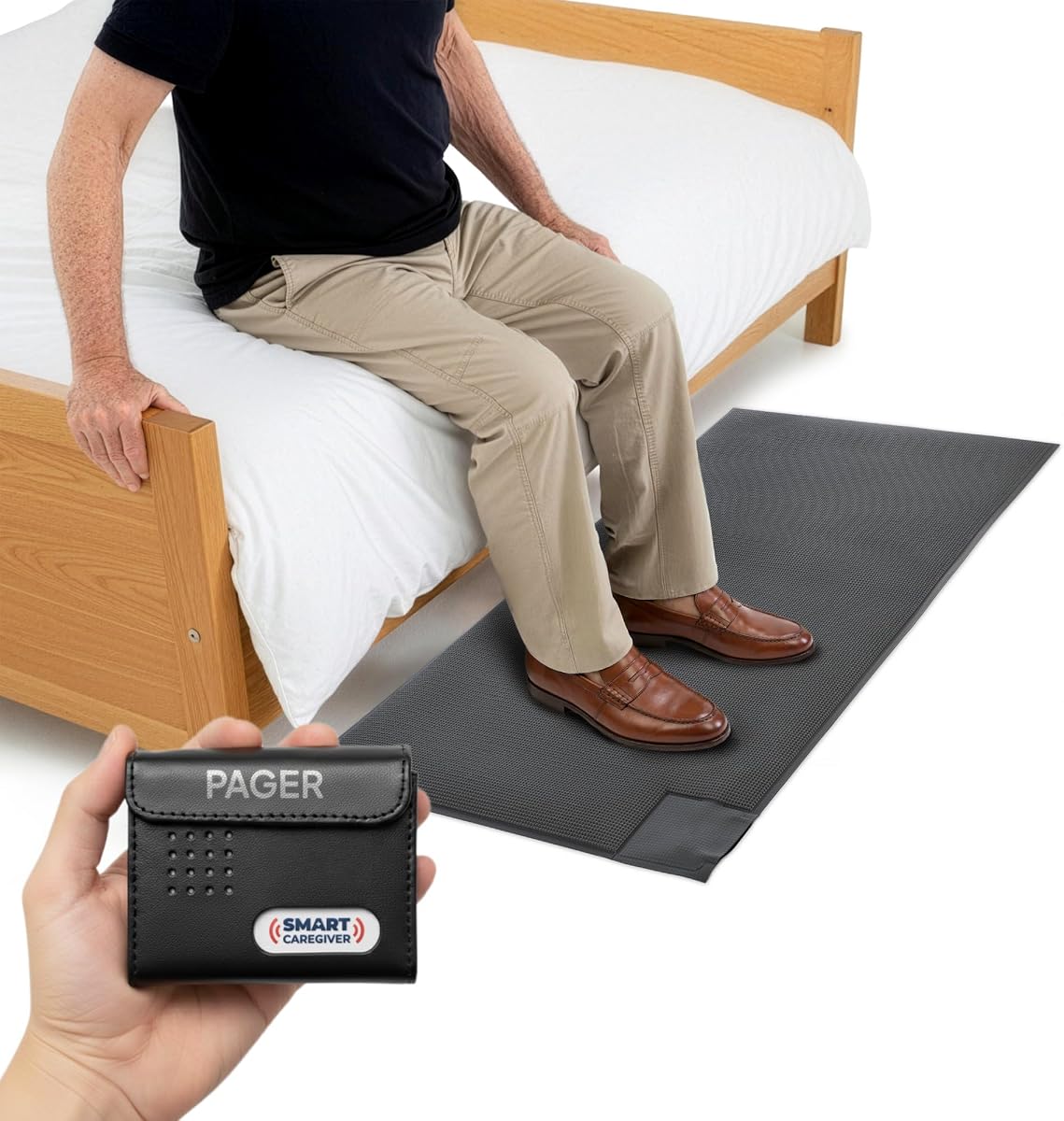
The Smart Caregiver Floor Mat Alarm is a straightforward solution for preventing falls at night. It uses a large durable mat that detects weight when the senior steps on it.
We may earn a commission when you buy through this link, at no additional cost to you.
The included wireless pager alerts you via sound or vibration, ensuring you are notified even in deep sleep. The system connects easily without tools or apps, making it user-friendly.
Caregivers should note that batteries for the pager are sold separately. Additionally, the mat must be placed directly on the floor, which might be less discreet in some bedroom settings.
This device is excellent for seniors with dementia who might wander. Its silent pager options ensure they are not startled while still allowing caregivers to respond promptly to movement.
Placing the mat near the bed detects the first step. This early alert allows you to assist the senior before they walk away, reducing the risk of falls in dark hallways.
The pager can pair with other Smart Caregiver devices. You can expand the system later by adding motion sensors or bed pads to cover more areas of the home.
We may earn a commission when you buy through this link, at no additional cost to you.
The SecuLife Medical Alert Pendant focuses on mobility and GPS tracking for seniors. It sends alerts directly to family contacts rather than a call center, fostering personal connection.
We may earn a commission when you buy through this link, at no additional cost to you.
The device is waterproof and offers two-way voice calling, so seniors can speak to family members during emergencies. It also includes GPS to track location in real time.
However, the system requires a monthly subscription of $20 to function fully. Some users report lower satisfaction, which may indicate connectivity challenges or feature limitations compared to other brands.
This pendant is suitable for active seniors who need to stay connected outside the home. The lack of a long-term contract offers flexibility for those testing medical alert services.
The pendant uses GPS to show you where your loved one is. This is vital for seniors with dementia who may wander outside the home and become disoriented.
Instead of waiting for a call center, alerts go straight to your phone. This ensures faster response times from people you trust most during an emergency.
We may earn a commission when you buy through this link, at no additional cost to you.
The Smart Caregiver Video Monitor prioritizes privacy with a secure Wi-Fi-free connection. It includes a rechargeable camera and monitor for flexible placement throughout the home.
We may earn a commission when you buy through this link, at no additional cost to you.
The system features infrared night vision for clear monitoring in the dark. A dedicated call button allows seniors to request help with specific needs like water or bathroom assistance.
Without a smartphone app, remote monitoring outside the home is not possible. The monitor must be charged via USB, which adds a maintenance step to daily routines.
This setup is best for caregivers who value privacy above all. The local connection ensures no data leaks, and the multiple buttons help identify exactly what type of help is needed.
By avoiding Wi-Fi, the system eliminates hacking risks. This ensures that the video feed remains private and secure for the senior and family only.
The five buttons allow seniors to specify their needs. This reduces confusion for caregivers who might otherwise guess the type of assistance required.
We may earn a commission when you buy through this link, at no additional cost to you.
The Elderly Monitor with Camera includes a unique temperature alert feature to keep seniors comfortable. It uses a 2.8-inch screen and offers a portable design for room mobility.
We may earn a commission when you buy through this link, at no additional cost to you.
Medication reminders can be set on the device, helping seniors maintain their health routine. The lack of Wi-Fi ensures secure connection without internet risks or monthly fees.
The camera does not offer remote pan-tilt controls via app. Battery life is moderate, requiring frequent charging if used continuously for live viewing throughout the day.
This monitor is ideal for users needing health reminders alongside safety. The temperature alerts add an extra layer of care for seniors with climate sensitivity.
The built-in temperature sensor warns you of extreme conditions. This prevents issues related to heat or cold exposure while the senior is resting.
Medication and meal reminders help seniors stay on schedule. These alerts reduce the risk of missed doses for those living independently.
We may earn a commission when you buy through this link, at no additional cost to you.
The CallToU 2-Way Talk Monitor is a practical option for secure video monitoring. It uses FHSS technology to ensure privacy without relying on internet connectivity.
We may earn a commission when you buy through this link, at no additional cost to you.
The device includes a temperature sensor for room alerts and offers a portable receiver that fits in your pocket. This allows caregivers to move freely while staying connected.
The 720P screen resolution is lower than some competitors, which might limit detail in low light. Setup is basic but requires physical assembly of camera and receiver units.
This system works well for daily checks and emergency calls. The SOS button and temperature alerts provide essential safety features for families on a budget.
Frequency Hopping Spread Spectrum ensures a stable signal. This technology prevents interference and keeps video feeds private from external access.
The receiver fits easily in a pocket for mobility. This allows you to monitor from different rooms without being tethered to a base station.
We may earn a commission when you buy through this link, at no additional cost to you.
The Smart Caregiver Motion Sensor is an affordable entry point for elderly monitoring. It detects movement at doors or exits and alerts your wireless pager instantly.
We may earn a commission when you buy through this link, at no additional cost to you.
The system is easy to set up without tools and offers a silent pager option. This is ideal for detecting wandering behavior without disturbing the senior at night.
However, it only includes one sensor and lacks visual camera confirmation. You may want to add additional units for full coverage of the home environment.
This device is perfect for budget-conscious families starting their safety setup. The wireless range and silent alerts make it a reliable tool for monitoring movement patterns.
Placing the sensor near exits detects unauthorized movement. This alerts you if the senior attempts to leave the home at unsafe times.
The motion detector comes with mounting hardware for easy setup. You can place it on walls without professional help or wiring costs.
We may earn a commission when you buy through this link, at no additional cost to you.
Choosing the right monitoring system depends on your home layout and the senior's specific needs. Consider these factors to find a device that ensures safety and privacy.
Systems come with Wi-Fi or local FHSS connections. Wi-Fi allows remote access but requires internet stability. Local connections offer privacy and independence from network issues.
Not all devices detect falls automatically. Look for pendants or sensors with accelerometers. These features alert you instantly if a fall happens without a button press.
Devices need consistent power. Check if the system runs on batteries or plug-in power. Long battery life reduces maintenance and ensures alerts work during power outages.
Ensure the wireless range covers your home. Large houses may require signal extenders. Shorter ranges can lead to missed alerts if the caregiver is far away.
Video monitors should offer encryption or offline options. Local storage or privacy shutters protect dignity. This is vital for seniors who value personal space.
Senior-friendly interfaces are crucial. Look for large buttons and simple setup. Complex apps can frustrate users who lack technical experience or dexterity.
Some systems require fees for monitoring services. Others work fully without monthly costs. Evaluate the budget impact of subscriptions over time before buying.
Consider if the device pairs with other tools. Sensors can add bed mats or door alerts. Modular systems allow you to upgrade as needs change.
Start by placing sensors in high-traffic areas like hallways or bedrooms. Ensure the device has a clear line of sight or signal to the base. This setup prevents dead zones where alerts might fail.
Test the system regularly to ensure it works. Press the button or trigger the sensor to confirm the pager or app reacts. Regular checks prevent failures during actual emergencies.
Keep the devices clean and dry. Dust off cameras and wipe down sensors monthly. Replace batteries as recommended to avoid unexpected power loss during critical moments.
Yes, many systems use local wireless signals like FHSS to operate without internet. These devices send alerts directly to your pager or monitor. This ensures reliability even if your Wi-Fi goes down.
Not always. Some wearable pendants require subscriptions for GPS or 24/7 monitoring. Basic call buttons or local monitors often work for free. Check the specific model before purchasing to confirm costs.
Ranges vary by model. Some reach 300 feet indoors while others go further. Check the specs to ensure it covers your home size. Wall thickness can impact signal strength significantly.
Yes, sensors placed at exits or on mats can detect movement. They alert you when the senior leaves a safe zone. This is helpful for monitoring patients with dementia or mobility issues.
Local monitors do not require an app. They connect directly to a base screen. However, smart models often use apps for remote viewing. Decide based on your preference for connectivity.
Devices will stop sending alerts if power is lost. Check battery levels in your app or device settings. Always replace batteries as scheduled to maintain consistent protection for your loved ones.
Most systems support expansion. You can buy additional motion sensors or call buttons. Pairing them with your existing pager allows you to monitor more areas of the home over time.
Local systems are generally safer. They do not store video in the cloud. Look for encrypted connections or offline modes to ensure your family data remains private and secure online.
We reviewed ten top systems ranging from pendants to video monitors. Each offers unique benefits like fall detection or privacy features. Selecting the right one depends on your specific caregiving needs.
Prioritize reliability and ease of use. A system that is too complex may go unused. Ensure the device fits your daily routine and provides alerts you can trust without fail.
Prices and availability change frequently. Check the current listings for up-to-date offers. Finding the right monitoring system today can ensure safety and peace of mind for your family.