
M.2 Heatsink Cooler 2280 SSD
4.6Editor score
Aluminum alloy construction
Double-sided clip design
Includes thermal silicone pads
This guide compares the top M2 2280 SSD Heatsink options for PS5 and PC, evaluating cooling performance, build quality, and compatibility for every user.
Modern M.2 NVMe SSDs generate significant heat during heavy workloads, which can lead to thermal throttling and reduced performance. Installing a dedicated heatsink helps maintain safe operating temperatures, ensuring your drive runs at peak speed without unnecessary slowdowns or potential hardware damage over time.
We have analyzed ten leading M2 2280 SSD Heatsink models based on material quality, thermal conductivity, ease of installation, and user feedback. Each product was evaluated for its ability to dissipate heat effectively while fitting standard slots in desktop PCs and gaming consoles like the PlayStation 5.
Every pick in this list highlights specific strengths, from budget-friendly options to premium designs with heat pipes. Keep in mind that prices and availability change frequently, so verify current details before making your final purchase decision to ensure you get the best value for your specific setup.
4.6Editor score

4.7Editor score

4.7Editor score
The following table provides a side-by-side comparison of all ten selected heatsinks, highlighting key specifications and unique features to help you quickly identify the best match for your storage needs.


The be quiet! MC1 Pro stands out as a top performer in the M2 2280 SSD Heatsink category, earning a strong rating from users who prioritize reliability. Its advanced aluminum construction with a built-in heatpipe ensures efficient heat transfer away from your drive during intense gaming or creative sessions.
We may earn a commission when you buy through this link, at no additional cost to you.
This cooler is designed to maintain maximum read and write speeds by preventing thermal throttling effectively. The matte black finish matches high-end PC builds seamlessly while offering excellent thermal conductivity. Installation is straightforward, allowing quick setup on your M.2 slot without needing specialized tools or complex adjustments.
While the price is higher than basic aluminum blocks, the performance gain justifies the cost for power users. The only minor trade-off is ensuring precise alignment during installation to secure the fit. However, once installed, it provides long-term durability and consistent cooling for your valuable storage data.
If you demand top-tier performance and a clean aesthetic for your system, this is the recommended choice. It suits professionals and gamers who need their NVMe drives to run cool under heavy workloads without any compromises in speed or stability over extended periods of use.
The integrated heatpipe moves heat away from the SSD controller quickly, keeping temperatures low even during sustained high-speed transfers.
Designed to fit both single and double-sided modules, it accommodates a wide range of modern SSD form factors effortlessly.
We may earn a commission when you buy through this link, at no additional cost to you.
This M.2 Heatsink Cooler offers an excellent entry point for anyone needing basic cooling without spending much. It features a sturdy aluminum alloy body that effectively dissipates heat, making it a popular choice for budget-conscious PC and PS5 users looking for value.
We may earn a commission when you buy through this link, at no additional cost to you.
The double-sided clip design allows for quick tool-free installation, which is a significant advantage for casual builders. It comes with thermal silicone pads to ensure good contact between the drive and the heatsink. Users report temperature drops of 10 to 20 degrees Celsius under typical workloads.
While it lacks advanced features like heat pipes, it performs reliably for standard desktop usage. The plastic clips are simple but secure enough for most stationary setups. It is a practical solution for those who want to protect their SSDs from overheating without breaking the bank.
Ideal for first-time builders or console upgrades, this heatsink balances cost and function perfectly. If you need a no-fuss upgrade to prevent throttling on a budget, this model provides the essential protection you need for your storage drive.
At an incredibly low price, it delivers essential thermal protection that prevents performance drops in standard operating environments.
Designed to fit PS5 installation requirements, making it a great choice for gaming console expansion storage needs.
We may earn a commission when you buy through this link, at no additional cost to you.
The Thermalright HR09 is a premium heatsink designed for users who demand maximum cooling performance for their high-speed SSDs. With a massive fin array and a dedicated heat pipe, it offers superior thermal dissipation capabilities compared to standard aluminum blocks in the market.
We may earn a commission when you buy through this link, at no additional cost to you.
Its design includes advanced thermal pads with high conductivity to ensure efficient heat transfer from the drive to the metal body. The double-sided clip system with adjustable screws provides a stable and secure fit for various drive heights. This results in consistent cooling even during sustained heavy workloads.
Although it is larger and pricier than basic options, the performance benefits are clear. It is built to last and uses high-quality materials that resist corrosion and maintain structural integrity. The trade-off is space, so ensure your case has room for this substantial cooling solution.
Choose this model if you run intensive tasks like video editing or 3D rendering. It delivers top-tier protection against throttling and keeps your drive running at peak performance levels for a long time without any thermal-related issues.
The extensive fin design increases the surface area significantly, allowing air to carry heat away from the drive rapidly.
High-conductivity pads minimize resistance between the SSD and the heatsink, ensuring heat moves quickly where it needs to go.
We may earn a commission when you buy through this link, at no additional cost to you.
The Thermalright TR-M.2 is a robust heatsink known for its reliable performance in desktop environments. It utilizes an aluminum alloy construction with an anodized finish that enhances durability and improves heat dissipation area through specialized surface treatment processes.
We may earn a commission when you buy through this link, at no additional cost to you.
Its double-sided design with clips and screws ensures a tight fit for optimal thermal contact. The included thermal film helps bridge gaps effectively between the drive and the heatsink. Users often see temperature reductions ranging from 10 to 30 degrees depending on airflow conditions.
While not the lightest option available, its sturdy build offers peace of mind for long-term use. The black finish blends well with most PC cases. It is a practical choice for users who want solid cooling performance without paying for unnecessary extra features.
Ideal for standard desktop gaming or workstation setups, it provides consistent cooling that prevents slowdowns. If you need a dependable heatsink for an NVMe drive in a PC case, this model delivers strong results at a reasonable price point.
Anodized sandblasting increases the surface area for heat loss, making the aluminum body more efficient at cooling.
Screw-based mounting ensures the heatsink stays firmly in place, maintaining contact even if the case moves.
We may earn a commission when you buy through this link, at no additional cost to you.
The Thermalright M.2 Pro brings an 8mm heat pipe to the table, offering superior heat conduction compared to standard aluminum. Its silver-gray finish adds a distinct visual touch to your build while maintaining functional efficiency for cooling high-performance drives.
We may earn a commission when you buy through this link, at no additional cost to you.
The double-layer thermal pad design ensures that heat moves from both sides of the SSD effectively. It is compact enough for many cases but requires checking clearance for the pipe thickness. Users appreciate the solid build quality and the reliable temperature control it provides.
This model is well-suited for users who want a step up from basic blocks but do not need a full tower heatsink. The heat pipe spreads heat quickly across the fins. It is a balanced choice for those seeking specific thermal benefits in a mid-range package.
For users running drives that get warm, this heatsink offers a good middle ground. It provides a noticeable improvement over passive blocks and fits well in standard PC builds where moderate cooling is needed for optimal SSD performance.
The 8mm copper pipe moves heat away from the drive instantly, spreading it across the aluminum body for cooling.
Thermal pads on both sides ensure the entire drive surface is covered, minimizing hot spots effectively.
We may earn a commission when you buy through this link, at no additional cost to you.
The Thermaltake MS-1 stands out as a rare active cooling option in this category. It includes a micro blower fan designed to move air directly over the heatsink, ensuring that heat is actively removed from the drive surface during operation.
We may earn a commission when you buy through this link, at no additional cost to you.
The copper heat pipe and reinforced backplate add structural rigidity and thermal mass. While active cooling can be effective, it requires a power connection and may introduce a slight noise level. Users should consider airflow in their specific case before choosing this active solution.
This heatsink is best suited for cases with poor airflow or extremely hot drives that passive cooling cannot handle alone. The steel backplate helps dissipate heat through the motherboard. It is a specialized tool for specific scenarios rather than a general-purpose solution.
Choose this only if you have verified that passive options are insufficient for your workload. It provides maximum cooling power for your SSD, ensuring stable performance even in thermally challenged environments where silence is not the primary concern.
The micro blower fan creates direct airflow across the heatsink, actively removing heat faster than static air.
A stainless steel reinforced backplate adds stability and helps spread heat further through the board.
We may earn a commission when you buy through this link, at no additional cost to you.
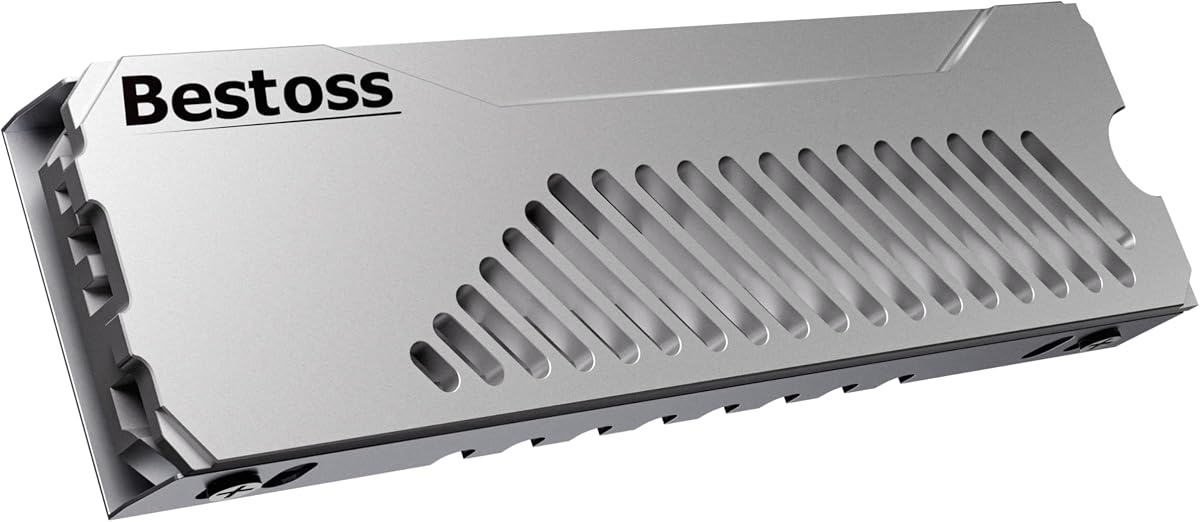
The Bestoss heatsink features a unique hollow design that increases the effective surface area for heat dissipation. It uses a three-sided hollowed-out approach to spread heat across the metal, offering twice the dissipation power of standard single-plane blocks.
We may earn a commission when you buy through this link, at no additional cost to you.
Its thermal conductivity is rated at up to 3 W/(m·K), which helps transfer heat efficiently to the sink. The lightweight build ensures efficient airflow around the drive. This makes it an ideal choice for gaming systems where airflow optimization is key to maintaining performance.
While it focuses on simplicity, the performance results show a temperature difference of 8 to 13 degrees compared to uncooled drives. The matte texture looks good in builds. It is a solid pick for users who value airflow and design simplicity.
If you want a sleek and lightweight option that does not obstruct airflow in your case, this model fits well. It provides reliable cooling for gaming and creative tasks without adding unnecessary bulk to your motherboard setup or storage bay.
The hollow design promotes air movement across the drive, carrying heat away more effectively than solid blocks.
High conductivity silicone pads fill air gaps to ensure heat moves smoothly from the chip to the metal.
We may earn a commission when you buy through this link, at no additional cost to you.
The ARCTIC M2 Pro is explicitly designed to meet the specifications for PlayStation 5 expansion slots, making it a top choice for console gamers. It uses a click mechanism to secure the drive without screws, simplifying the installation process significantly for PS5 users.
We may earn a commission when you buy through this link, at no additional cost to you.
Its additional mass helps dissipate heat efficiently during intensive read and write processes. The TP-3 thermal pads are precisely fitted to adapt to height differences on the controller and NAND. This ensures a consistent interface that reduces thermal resistance effectively.
While the click mechanism is convenient, some users may prefer the security of screws for long-term vibration resistance. However, for console builds, it is a verified compatible option. It helps reduce the risk of thermal throttling during heavy gaming sessions on the PlayStation.
This heatsink is the go-to for PS5 owners looking to expand storage without voiding warranties or risking fit issues. It offers reliable cooling and easy access to the drive whenever maintenance or removal is needed in a console environment.
Meeting Sony's required specifications ensures safe installation and operation within the PS5 system environment.
A click mechanism secures the drive quickly without tools, making installation and removal straightforward for users.
We may earn a commission when you buy through this link, at no additional cost to you.
This 5-pack kit offers exceptional value for users who have multiple M.2 drives to cool. Each unit features aluminum fin-type design to improve airflow and cooling efficiency. It includes thermal pads and rubber bands for tool-free installation, making it convenient for multi-drive setups.
We may earn a commission when you buy through this link, at no additional cost to you.
The 2.0 W/mK conductivity of the pads ensures decent heat transfer to the sink. While the rubber bands are easy to use, they may not feel as secure as screws for some users. It is perfect for workstations with multiple drives where space and cost are constraints.
The value of getting five units at a low price makes this an excellent choice for server-like configurations. It provides protection for multiple drives without needing complex mounting hardware. Each unit is designed to fit standard 2280 form factors effectively.
If you are building a system with several NVMe drives, this kit is a budget-friendly way to cool them all. It offers essential thermal protection across the board while keeping the overall cost of the build low and manageable.
Buying five units together reduces the cost per drive significantly, making multi-drive builds more affordable.
Rubber bands allow installation without any tools, speeding up the setup process for multiple drives.
We may earn a commission when you buy through this link, at no additional cost to you.
The SABRENT Rocket Heatsink uses a combination of copper and aluminum to optimize performance and cost. Copper helps conduct heat away from the hot components, while aluminum provides the surface area for dissipation. It comes with screws and thermal tape for installation.
We may earn a commission when you buy through this link, at no additional cost to you.
This model is designed specifically for desktop computers and supports both single and double-sided modules. The inclusion of all necessary mounting hardware makes it easy to set up. It is a practical choice for users upgrading older or newer desktop storage configurations.
While it is a tried-and-true design, it lacks some of the modern refinements found in newer models. However, it offers reliable cooling and is compatible with a wide range of drives. Its simple approach makes it effective for standard desktop workloads.
If you need a straightforward cooling solution for a desktop system, this heatsink delivers solid performance. It helps maintain drive health and speed without complications, making it a reliable option for general-purpose computing and gaming systems.
Using copper for heat conduction and aluminum for dissipation offers a balanced approach to thermal management.
All necessary screws and tape are included, so you do not need to source extra parts for installation.
We may earn a commission when you buy through this link, at no additional cost to you.
Selecting the right heatsink involves evaluating materials, installation method, and compatibility to ensure optimal cooling for your specific drive and setup needs.
Most heatsinks use aluminum for cost efficiency and weight savings. Higher-end models may include copper heat pipes to transfer heat faster. Look for anodized surfaces that resist corrosion and increase the effective area for cooling.
Choose aluminum for standard use and copper heat pipes for intense workloads to get the best performance.
Some models use screws for a secure fit, while others use clips or rubber bands for tool-free setup. Click mechanisms are common in console heatsinks. Consider how often you might need to remove the drive for maintenance.
Ensure the method matches your comfort level and case requirements for stable long-term operation.
Standard 2280 drives are about 80mm long, but heatsink height varies. Tall heatsinks might block GPU slots or other cards. Measure your available space before buying to avoid fit issues inside your PC case.
Always check height and width specifications to ensure the heatsink fits within your specific build layout.
Thermal pads bridge the gap between the drive and the heatsink. Look for pads with conductivity ratings around 3 W/mK or higher. Lower quality pads may create air gaps that reduce cooling efficiency over time.
Higher conductivity pads ensure heat moves quickly from the chip to the heatsink body for better cooling.
If you plan to use the heatsink in a PlayStation 5, ensure it meets Sony's official height requirements. Some heatsinks are labeled as PS5 compatible and meet these specs. Check dimensions carefully to avoid fitting issues in the console slot.
Only select models verified for PS5 to ensure safe installation and operation in a console environment.
Basic aluminum blocks are affordable and sufficient for most tasks. Premium models with heat pipes cost more but offer better performance. Decide on a budget that balances cooling needs with cost constraints effectively.
Balance your budget with your cooling needs to find the right value for your system.
Heatsinks with fins increase the surface area exposed to air flow. Hollow or open designs allow air to move freely over the metal. Poor airflow designs can trap heat even with a good heatsink.
Look for open designs that allow air to pass through the fins for efficient cooling performance.
To install your heatsink, first power down your PC or console and disconnect all cables to avoid static discharge. Remove any old tape or residue from the drive surface gently using a soft cloth and ensure the area is clean before applying new pads.
Place the thermal pads on the drive or the heatsink as directed by the manufacturer, then carefully press the metal body onto the SSD until it clicks or screws secure. Double-check that the mounting screws are tight enough to hold the drive firmly in place.
Periodically check your system temperatures using software tools to confirm the heatsink is working well. Dust can accumulate on the fins and reduce airflow, so blow out dust gently with compressed air a few times a year to maintain efficiency.
SSDs generate heat during operation, especially high-speed NVMe drives. Without cooling, this heat causes thermal throttling, which slows down read and write speeds significantly. A heatsink dissipates this heat to keep the drive running at peak performance.
Yes, but you must choose a heatsink specifically designed for the PS5 that meets Sony's height restrictions. Standard PC heatsinks may be too tall and cause the console cover not to close. Always check PS5 compatibility before buying.
Use a can of compressed air to blow dust out of the fins from multiple angles. Do not use water or liquids, and avoid brushing the fins hard as they can bend and reduce airflow. Regular cleaning helps maintain cooling efficiency.
Not all drives need them, but high-performance NVMe models often benefit from cooling. If your system shows throttling or high temperatures, a heatsink is recommended. Lower speed drives may run fine without one depending on airflow.
Aluminum is the standard choice because it is lightweight, affordable, and conducts heat well. Copper is better for conduction but is heavier and more expensive. Combining both materials usually provides the best balance of performance and cost.
Most SSD manufacturers do not void the warranty if you add a standard heatsink. However, removing labels or using strong adhesives might void coverage. Always check the warranty terms before modifying the drive surface directly.
Many modern heatsinks are designed to fit both single and double-sided modules. Check the product specifications to confirm compatibility with your specific drive model. Some may require different thermal pad thickness for double-sided drives.
We have explored ten top heatsinks that balance cooling power, price, and compatibility for different users. From budget blocks to premium options with heat pipes, each model offers unique benefits to suit your needs.
When choosing, prioritize material quality and fit for your specific system. High conductivity pads and secure mounting methods ensure reliable cooling that protects your valuable data and maintains drive speed.
Prices and availability change frequently, so always verify the current details before purchasing. Investing in the right heatsink now will keep your system running smoothly and efficiently for years to come.