
Corded Landline Phones for Seniors
4.2Editor score
Photo speed dial buttons
110dB loud ringer
Hands-free calling mode
Discover the best captioned telephone options for hearing loss. This guide compares top models with real-time captions, amplified sound, and easy dialing for
Finding the right communication tool is essential for maintaining connections with loved ones. A captioned telephone offers a unique solution by displaying text alongside audio calls. This technology helps those with hearing loss stay engaged without missing crucial details during conversations.
Our team analyzed numerous models to identify the most reliable and user-friendly options available today. We focused on features like caption accuracy, volume control, and ease of setup. Each product selected provides distinct benefits tailored to different needs and environments.
Each pick highlights specific strengths to help you match a device with your unique requirements. Keep in mind that product details and availability can shift over time. Always verify the latest specifications before making your final purchase decision online.
4.2Editor score

4.3Editor score
4.5Editor score
This side-by-side comparison outlines the key specifications for each model in our list. It helps you quickly identify which device offers the specific features you need for effective communication.


This Hamilton CapTel model stands out as a top choice for those seeking clarity in conversations. With a rating of 4.3 stars, it offers real-time captions displayed on a large touchscreen. Users can listen and read simultaneously, ensuring they do not miss any part of a call.
We may earn a commission when you buy through this link, at no additional cost to you.
The device supports both auto captions and assisted captions with live operator support. This flexibility ensures accurate transcription even during challenging calls. Additionally, the built-in answering machine displays voicemail captions directly on the screen for easy review at any time.
Some users may find the requirement for high-speed internet and FCC registration a minor hurdle. However, the service is free for eligible US residents with hearing loss. The initial setup effort pays off with reliable daily communication assistance.
This phone is ideal for seniors who need visual confirmation of spoken words. Its user-friendly navigation makes it accessible even for those with limited tech experience. Investing in this device can significantly reduce frustration during phone calls.
Real-time captions allow you to verify every word spoken during a call, reducing anxiety about missed details.
View captions for missed calls on the screen so you can respond at your own pace without replaying audio.
We may earn a commission when you buy through this link, at no additional cost to you.
This affordable landline phone simplifies communication for seniors with memory challenges. It features 9 big picture buttons that allow one-click dialing without remembering numbers. The rating of 4.2 stars reflects its reliability for daily use in home settings.
We may earn a commission when you buy through this link, at no additional cost to you.
The loud ringer ensures calls are never missed even in noisy environments. A flashing visual light adds an extra layer of alert for those with hearing difficulties. Since it runs on a standard phone line, no electrical power or batteries are needed.
While the SOS button requires manual programming, it offers peace of mind for emergencies. Users should note that this model does not automatically dial emergency services. However, the simplicity of operation makes it a strong budget-friendly choice.
Families looking for an easy-to-use device without monthly fees should consider this option. It bridges the gap for those with visual or memory impairments effectively. The hands-free feature also helps users with limited hand strength stay connected.
Photo buttons let users call family members by seeing their face rather than remembering a sequence of numbers.
Operates purely on phone line power so it works during blackouts when battery-dependent devices would fail.
We may earn a commission when you buy through this link, at no additional cost to you.
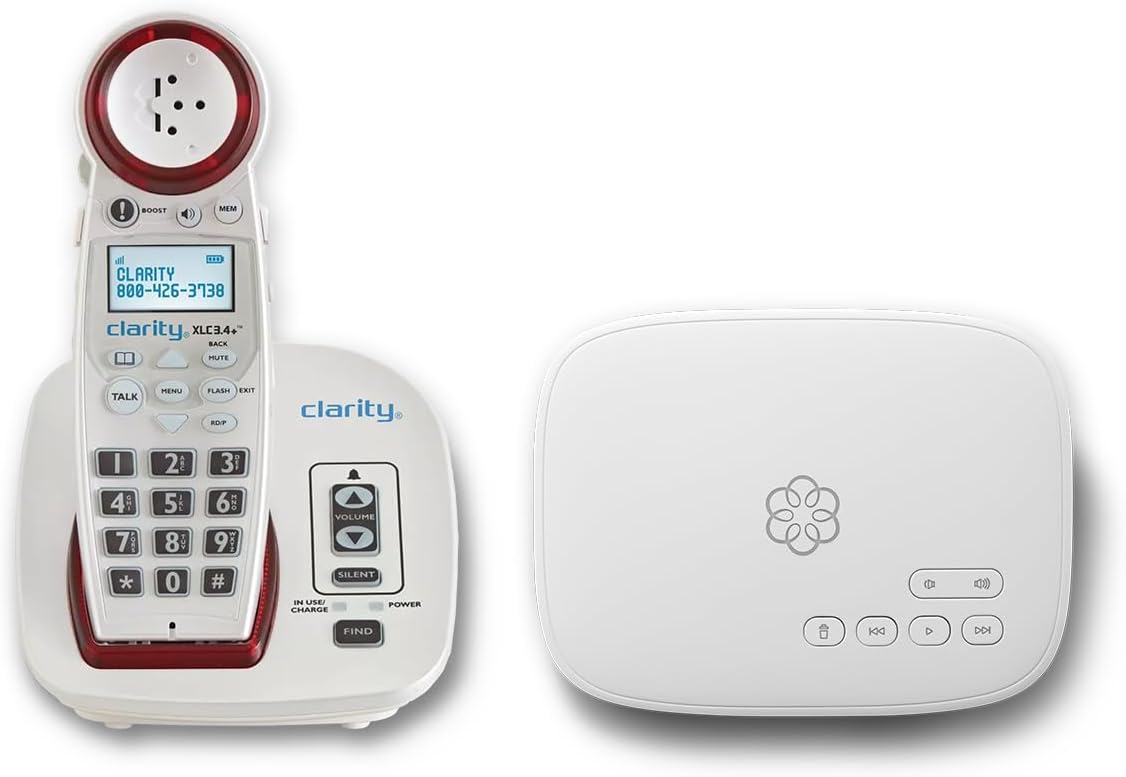
This bundle combines a top-rated service with a specialized handset for hearing impaired users. The Ooma service is frequently praised for reliability and cost-effectiveness. With a high rating of 4.5 stars, it offers a premium communication experience.
We may earn a commission when you buy through this link, at no additional cost to you.
The cordless handset features adjustable volume and visual alerts to assist with hearing needs. Advanced call blocking protects against robocalls and unwanted numbers automatically. The service also includes address-based 911 for safety and text alerts to family members.
A subscription is required which may not suit those seeking a one-time purchase. However, the value of unlimited calling and support often outweighs the monthly cost. Personal setup assistance helps ensure the system is configured correctly from day one.
Ideal for users who want a full-service phone solution with premium support. The combination of hardware and service provides a comprehensive communication system. This is a robust choice for those prioritizing features and ongoing assistance.
Automatic address registration for 911 ensures emergency responders know your location when a call is placed.
The handset technology filters out background noise to improve speech clarity for hard-of-hearing listeners.
We may earn a commission when you buy through this link, at no additional cost to you.
The VTech SN5147 offers a hybrid system with both a corded base and cordless handset. This flexibility allows mobility while maintaining a reliable connection during power outages. The rating of 4.0 stars indicates it is a solid choice for general senior use.
We may earn a commission when you buy through this link, at no additional cost to you.
Features include a 90dB ringer with visual indicators to ensure calls are heard. The smart call blocker helps filter out unwanted robocalls automatically. Four photo speed dial slots allow quick access to important contacts without memorization.
The cordless handset requires charging which might be a concern for some users. However, the base unit ensures calls can still be made or received when power is out. The answering machine supports remote access for checking messages conveniently.
This model is well-suited for households needing multiple handsets or mobility. It balances traditional reliability with modern features like photo dialing. Users should weigh the convenience of cordless usage against the need for power.
The corded base ensures connectivity during storms or outages when cordless phones would lose power.
Supports expansion to four handsets allowing communication across large homes or multi-room settings.
We may earn a commission when you buy through this link, at no additional cost to you.
This device offers a unique approach using voice commands for all telephone operations. It allows users to answer, dial, and hang up without touching the phone. This makes it particularly useful for individuals with mobility or vision difficulties.
We may earn a commission when you buy through this link, at no additional cost to you.
The phone is always on and ready to accept voice commands instantly. It uses the home phone line to connect calls reliably. This design eliminates the need to fumble with buttons or small screens during emergencies.
Users may need to train the device to recognize their specific voice patterns. Privacy is a consideration since the device is always listening. However, the hands-free capability provides significant independence for those with physical limitations.
Consider this phone if physical access to buttons is a primary challenge. It simplifies the calling process to spoken words only. This can reduce frustration and increase confidence in making calls independently.
Allows complete control through spoken words which helps users with arthritis or tremors operate the phone easily.
Immediate response to voice commands ensures urgent calls can be answered or placed without delay.
We may earn a commission when you buy through this link, at no additional cost to you.
This phone focuses on simplicity with large buttons and visual aids. It provides up to 40dB of amplified volume for clearer speech. The rating of 4.2 stars suggests it meets the needs of many seniors with low vision.
We may earn a commission when you buy through this link, at no additional cost to you.
Three replaceable picture buttons allow storage for favorite contacts. The memory is protected even if the phone line is unplugged. This ensures contacts are not lost during maintenance or temporary disconnections.
Wall mounting makes it accessible at different heights or secure locations. Desktop placement is also supported with nonskid pieces. However, there are fewer options for speed dial compared to some other models.
It is a practical choice for basic communication needs without complexity. The visual cues help those who struggle with standard number pads. Setup is straightforward for family members assisting an elder user.
Stored numbers remain saved during power outages so you do not lose important contacts unexpectedly.
Swap out pictures on buttons to update contacts as needs change over time.
We may earn a commission when you buy through this link, at no additional cost to you.
This VoIP phone offers a perfect rating of 5.0 stars for its specialized features. It is designed specifically for seniors with dementia who benefit from image keys. Each key allows inserting a family photo for easy recognition.
We may earn a commission when you buy through this link, at no additional cost to you.
The speaker volume exceeds 110dB which ensures clarity in noisy settings. A red light alerts users to incoming calls or missed messages visually. There is also a dedicated HELP key for instant emergency assistance.
It requires a VoIP service or PBX system to function properly. This may limit use to homes with existing internet telephony setups. However, for compatible environments, it offers high performance and user-friendly design.
Choose this device if you need advanced visual aids and high volume. The wall-mount feature adds stability and ease of access. It serves as a reliable link in healthcare or home care environments.
Photo slots inside buttons help those with memory loss identify callers and dial correctly every time.
A single press of the HELP key connects to pre-programmed contacts for immediate aid.
We may earn a commission when you buy through this link, at no additional cost to you.
This phone focuses on providing clear and amplified audio for calls. It is designed for performance with a standard connection to home lines. The rating of 3.5 stars suggests it may have mixed reviews compared to others.
We may earn a commission when you buy through this link, at no additional cost to you.
The high-definition audio aims to improve clarity for those with mild hearing loss. It does not offer advanced features like photo dialing or VoIP integration. This simplicity can be an advantage for users who want basic functionality.
Lack of detailed feature lists in some sources limits specific evaluation. Users should verify the amplification levels before purchase. It remains an option for those seeking a no-frills amplified device.
Consider this model if you only need better sound quality without extras. The standard connection ensures compatibility with existing phone systems. However, compare features carefully against other options in this category.
Prioritizes sound clarity through amplification to help users hear conversations more easily.
Uses standard telephone wiring making installation straightforward without extra equipment.
We may earn a commission when you buy through this link, at no additional cost to you.
This device allows making and answering calls using voice commands. It includes features like talking caller ID and visual ringer alerts. The rating of 2.1 stars indicates users have found it less reliable than modern options.
We may earn a commission when you buy through this link, at no additional cost to you.
It supports 17 programmable voice memories for speed dialing. There is a loud ringer and hands-free options available. However, the voice recognition system may struggle with different accents or backgrounds.
Users might face limitations compared to newer voice-enabled systems. The low rating suggests potential issues with consistency. It provides basic accessibility but lacks the refinement of current models.
It may serve as a budget option for basic voice access. Verify compatibility and reviews carefully before purchase. For reliable voice control, newer models are generally recommended.
Allows dialing and ending calls by voice without touching buttons.
Includes a visual LED ring to signal incoming calls audibly.
We may earn a commission when you buy through this link, at no additional cost to you.
This phone simplifies calling with 9 picture memory keys for speed dialing. It offers a 110dB ringer and hands-free options for convenience. The rating of 4.2 stars highlights its ease of use for seniors with memory issues.
We may earn a commission when you buy through this link, at no additional cost to you.
The LED call flash provides visual notification for incoming calls. It requires no batteries and connects directly to a phone line. Programming is fast allowing quick setup of favorite contacts by family members.
It lacks internet-based features like caller ID or voicemail. This limits functionality for those needing digital services. However, it serves well as a traditional communication tool for basic needs.
Ideal for caregivers needing a simple bridge to family bonds. The loud volume and picture buttons reduce confusion. It is a reliable tool for keeping lines of communication open effortlessly.
Program contacts in seconds so you can start using the phone immediately without delay.
Flashing LED ensures users know when a call is coming even if sound is muted.
We may earn a commission when you buy through this link, at no additional cost to you.
Selecting the right captioned telephone involves evaluating several key factors to ensure it meets your specific needs. Consider your hearing level, technical setup, and desired features.
Look for phones that offer real-time captions with high accuracy rates. This ensures you can follow conversations without delays that might disrupt the flow of speech.
Prioritize models that support both automated and assisted captioning for reliable results.
Choose a device with adjustable volume levels up to 40dB or higher. This is crucial for users with significant hearing loss who need clear sound clarity.
Verify that the phone offers distinct volume controls for ringer and earpiece.
Ensure the screen is large enough to read comfortably in various lighting conditions. High contrast text helps users with low vision navigate menus easily.
Look for adjustable font sizes to accommodate your specific visual needs.
Check if the phone requires internet or phone line connection. Some captioned phones need Wi-Fi while others work with standard lines.
Verify your home setup supports the required connection type before buying.
Select a model with simple navigation and clear instructions. Complicated menus can be frustrating for users with limited technical experience.
Prioritize devices with one-touch features or voice commands to simplify daily use.
Ensure the phone is hearing aid compatible to avoid interference or feedback. This feature allows for a better listening experience for users with devices.
Look for specific T-coil compatibility or direct audio input options.
Consider phones with emergency call buttons or caller ID alerts. These add extra security for seniors living alone or with mobility issues.
Ensure any SOS features can be configured to reach known contacts effectively.
Begin by reading the manual to understand your phone's specific controls. Place the device on a stable surface near a power source or phone line.
Connect all required cables and test the call functionality. Adjust volume and caption settings to your personal comfort level before daily use.
Keep the screen clean and avoid exposure to moisture or dust. Regularly check for updates to ensure optimal performance over time.
Many captioned telephone services are free for eligible US residents with hearing loss. However, you may need to register and meet specific FCC requirements. The device itself usually requires a purchase or fee.
Most modern captioned phones require high-speed internet for real-time captioning. Traditional landline phones do not work for captioning unless specifically designed. Always check compatibility before purchase.
Anyone can use a captioned phone but some services have eligibility requirements. Generally, users need to demonstrate hearing loss to qualify for free service. Others may use it for accessibility regardless of status.
Caption accuracy is typically high but can vary with background noise or speech clarity. Some systems use operators to assist when automated captions fail. Overall they are reliable for most daily conversations.
Yes, both incoming and outgoing calls can be captioned on most devices. The screen displays text for both parties during the call. This ensures you do not miss details on either end.
Contact the manufacturer or service provider for support. Many companies offer repair or replacement options depending on the model. Check warranty details before purchasing for peace of mind.
We reviewed ten models ranging from simple budget options to advanced voice-enabled systems. Each device offers unique benefits depending on your connectivity needs and technical comfort.
Prioritize features like caption accuracy, amplification, and ease of use when deciding. A model that fits your home setup will ensure consistent performance every day.
Prices and availability may change so verify current details before you buy. Checking reviews and support options ensures you make an informed choice.