
WALI Computer Monitor Stand for Desk
4.7Editor score
Fits monitors up to 44 lbs
Vented design prevents overheating
Adjustable height options available
Finding the right laptop rack for desk can transform your workspace into a more efficient and comfortable environment for daily work and creative projects.
We compared ten highly rated options based on stability, compatibility, build quality, and ergonomic design to help you make an informed decision.
Each pick highlights key features and real user experiences so you can choose the best fit for your setup and budget without confusion.
4.7Editor score

4.8Editor score

4.6Editor score
As an Amazon Associate we earn from qualifying purchases.
The following table provides a side by side comparison of key specifications and features for each laptop rack to help you evaluate them quickly.





The OMOTON Dual Vertical Desk Laptop Stand Holder offers a robust solution for users needing to store multiple devices on one desktop.
We may earn a commission when you buy through this link, at no additional cost to you.
It features an anodized aluminum build that matches MacBook aesthetics while providing the strength needed to hold two laptops simultaneously.
Although it is slightly larger than single stands the dual slot design maximizes space efficiency by stacking devices vertically rather than horizontally.
This stand is ideal for professionals who switch between machines or need a clean setup for both a work and personal laptop.
The double dock design allows you to organize two laptops without cluttering your workspace with separate stands.
Adjustable slots accommodate various laptop thicknesses ensuring a snug fit that prevents wobbling or sliding.
We may earn a commission when you buy through this link, at no additional cost to you.
The NODOCA 2-Slot Laptop Storage for Desk is unique because it attaches to the side of your desk rather than sitting on top.
We may earn a commission when you buy through this link, at no additional cost to you.
This design choice helps reclaim your main work surface while keeping your devices accessible and organized in a vertical position.
Users will appreciate the added convenience of a headphone holder integrated into the base which reduces cable tangle on your desk.
It is best suited for those with thick desks and limited horizontal space who want a sturdy storage solution.
By mounting to the side of the desk this stand frees up your main work area for other tasks.
The built-in hook allows you to hang headphones or controllers keeping them handy but out of the way.
We may earn a commission when you buy through this link, at no additional cost to you.
The BYMECOST No Drill Under Desk Laptop Mount provides a clever way to hide your laptop or accessories out of sight.
We may earn a commission when you buy through this link, at no additional cost to you.
Installation is straightforward with a clip on design that does not require screws or tools to secure to your desk frame.
The hollow structure ensures good airflow which is critical for preventing overheating when storing electronics under your workspace.
This is an excellent choice for gamers or professionals who need to keep devices close but visually unobtrusive.
Mounting under the desk keeps your laptop safe from spills and saves visual space on your work surface.
Dedicated openings help route charging cables neatly so cords do not dangle or tangle.
We may earn a commission when you buy through this link, at no additional cost to you.
This adjustable laptop stand focuses on ergonomics allowing you to tailor the height and angle to your specific comfort needs.
We may earn a commission when you buy through this link, at no additional cost to you.
The metal build provides a sturdy base that prevents wobbling even when typing directly on the device.
Airflow is prioritized with ventilation holes on the top which helps maintain optimal thermal performance during long sessions.
It is a great option for remote workers who need a comfortable posture fix without sacrificing desk space.
Adjusting the stand reduces neck strain by bringing your screen to eye level for prolonged periods.
Open design ensures air circulates under the device keeping it cool and preventing throttling.
We may earn a commission when you buy through this link, at no additional cost to you.
The LOXP Adjustable Laptop Stand stands out for its 360 rotating base which offers unmatched flexibility for collaboration.
We may earn a commission when you buy through this link, at no additional cost to you.
Made from fiber metal it is more durable than standard aluminum stands while maintaining a sleek professional look.
The rotating feature is particularly useful when working in shared spaces or needing to show content to colleagues easily.
It is ideal for travelers who want a robust stand that does not compromise on stability or adjustability.
Rotate your device to face others or change angles instantly without moving the entire stand.
The foldable design allows you to slip it into a bag making it perfect for frequent commuters.
We may earn a commission when you buy through this link, at no additional cost to you.
The BESIGN LS03 is a timeless design that focuses on simplicity and stability for daily laptop use.
We may earn a commission when you buy through this link, at no additional cost to you.
It elevates your laptop by six inches which helps you align your eyes with the screen to reduce neck pain.
The open design promotes natural airflow keeping your device cool without requiring additional fans or vents.
This stand is perfect for users who want a dependable no fuss solution that looks good on any desk.
The detachable design means you can assemble it in seconds without tools or complicated instructions.
The aluminum finish matches modern tech and provides a clean and professional appearance for your workspace.
We may earn a commission when you buy through this link, at no additional cost to you.
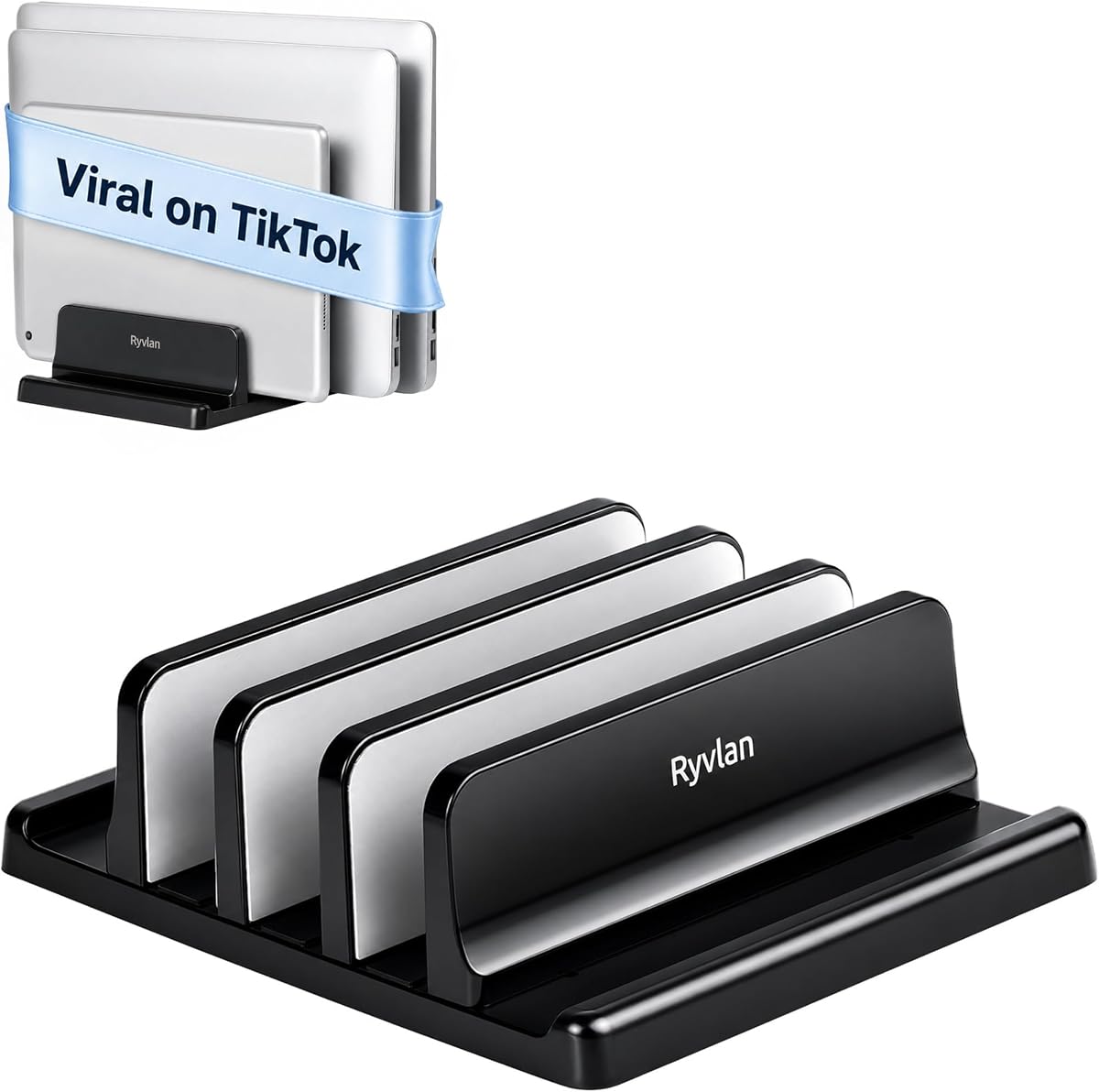
This stand offers incredible versatility with three slots designed to hold laptops phones and tablets all at once.
We may earn a commission when you buy through this link, at no additional cost to you.
The adjustable slots allow you to accommodate different thicknesses ensuring every device is held firmly in place.
It is built from impact-resistant ABS plastic which is durable and protects against daily wear and tear.
It is the perfect choice for families or offices where multiple devices need to be organized centrally.
Clear desk clutter by storing phones tablets and laptops together in one tidy vertical stack.
Slots adjust via wrench to fit devices of different sizes securely without wobbling.
We may earn a commission when you buy through this link, at no additional cost to you.
The Vaydeer Vertical Laptop Stand offers a simple yet effective way to store your laptop and accessories together.
We may earn a commission when you buy through this link, at no additional cost to you.
It features a 3 in 1 design that allows vertical placement of a laptop alongside a phone or tablet.
The adjustable width ensures that even large laptops up to 17.3 inches can fit securely without sliding.
It is a budget friendly option for those who need basic organization without investing in heavy metal stands.
High quality ABS plastic provides strong stability while keeping the stand easy to move around.
Soft silicone mats cover the groove to prevent scratches on your valuable devices.
We may earn a commission when you buy through this link, at no additional cost to you.
The Elestoria 5- Slot Vertical Laptop Stand is a heavy duty solution designed for power users with multiple high end devices.
We may earn a commission when you buy through this link, at no additional cost to you.
It can dock up to four laptops and one tablet using sliding brackets that adjust tool free to fit different thicknesses.
The solid aluminum construction ensures maximum stability which is crucial when holding heavier gaming laptops securely.
This stand is best for professionals who need to manage a tech ecosystem with multiple devices in one place.
Accommodates thick gaming laptops up to 17.3 inches which many smaller stands cannot hold securely.
Adjust the width using screws at the bottom to secure devices quickly without extra tools.
We may earn a commission when you buy through this link, at no additional cost to you.
This monitor stand doubles as a robust laptop riser offering exceptional value for users who need to support heavy devices.
We may earn a commission when you buy through this link, at no additional cost to you.
The large shelf can hold up to 44 pounds making it suitable for both laptops and larger monitors.
It features an adjustable height design that lets you raise your screen to a comfortable viewing position.
It is an ideal budget pick for home offices that need a functional durable solution without high costs.
Supports devices up to 44 pounds ensuring stability for heavier laptops or all in one PCs.
Multiple height levels allow you to find the perfect ergonomic position for your eyes and neck.
We may earn a commission when you buy through this link, at no additional cost to you.
Choosing the right laptop rack requires understanding your desk setup and device needs to ensure stability and comfort.
The material of your laptop rack determines its lifespan and stability. Metal stands like aluminum or steel are generally more durable and better at dissipating heat than plastic ones. Look for premium alloys that feel solid and have protective coatings to resist scratches and corrosion over time.
Metal offers better stability and heat resistance compared to lighter plastic materials.
Ensure the rack fits your laptop dimensions including width and thickness. Adjustable slots or clamps are ideal because they accommodate different models from ultrabooks to thick gaming machines. Always check the maximum weight limit to ensure your device is supported safely.
Adjustable designs ensure a snug fit for various laptop sizes and weights.
If you travel often consider a foldable or lightweight model that can fit in a bag. Fixed stands are more stable for home offices but may take up permanent space. Evaluate whether you need a portable solution or a permanent stationary desk setup.
Folding stands offer versatility for travelers while fixed stands provide stability.
Proper elevation is critical for maintaining good posture. A good rack should raise your screen to eye level to reduce neck strain. Adjustable height options allow you to tailor the stand to your sitting or standing desk configuration.
Raising the screen to eye level helps prevent neck and shoulder pain.
Overheating can shorten your laptop lifespan so look for stands with open designs or ventilation holes. Enclosed stands may trap heat while open frameworks allow air to circulate around the device. This is especially important for intensive tasks like gaming or rendering.
Open designs promote better airflow to keep your laptop cool during use.
A wide base prevents the stand from tipping over when you type directly on the laptop. Anti-slip pads on the bottom protect your desk surface and keep the stand firmly in place. Stability is paramount to avoid accidental drops or spills.
Wide bases and rubber pads ensure the stand stays secure on your desk.
Some stands include extra features like cable management slots or headphone hooks. These small additions help keep your workspace organized by reducing cable clutter. Decide if these extras justify the price difference for your specific workflow.
Cable management hooks keep your workspace tidy and functional.
Laptop racks range from affordable plastic options to premium metal ones. Determine your budget and prioritize features that matter most to you. Often the best value comes from stands that balance build quality with essential ergonomic features.
Balance cost with essential features like stability and ergonomic design.
Place your laptop rack on a level surface and adjust the slots to fit your device securely before placing it down.
Clean the stand regularly with a soft dry cloth to prevent dust from accumulating in the slots and joints.
Inspect the anti-slip pads periodically and replace them if they show signs of wear to maintain stability.
Yes many laptop racks are designed with ventilation holes or open structures that promote airflow around your device. This helps dissipate heat more effectively than placing the laptop flat on a desk.
Most racks are safe but always check the weight limit and size compatibility before purchasing. Ensure the slots are padded to prevent scratches on your device casing.
Yes provided the stand is stable and has a wide base. Ensure the rack does not wobble when you type to avoid discomfort or potential damage.
Use a soft dry or slightly damp cloth to wipe down the surfaces. Avoid harsh chemicals that could damage protective coatings or padding.
Many modern stands feature adjustable slots that can be widened or narrowed to fit different laptop thicknesses securely.
Measure your available desk space before buying. Some stands like under desk mounts save space while others require more surface area.
Several models offer multi-device slots that can hold tablets or phones alongside laptops for better organization.
Metal stands are more durable and offer better cooling whereas plastic stands are lighter and often more affordable. Choose based on your priority.
We reviewed ten top options including the OMOTON Dual Vertical for dual device needs and the WALI stand for budget conscious buyers.
Prioritize stability and ergonomics when selecting a rack to ensure it enhances your productivity without compromising comfort.
Check current prices and availability before purchasing as deals and stock levels may change frequently on online retailers.