
Hard Drive Reader USB 3.0 & Type C
4.1Editor score
USB 3.0 and Type C
Supports up to 20TB
Plug and play operation
Finding the right laptop hard drive adapter kit is essential for anyone needing to access old data or upgrade storage without opening a computer. These tools bridge the gap between internal drives and external ports, making data migration simple and safe for users of all skill levels.
We evaluated ten leading adapter kits based on compatibility, transfer speed, power stability, and build quality. Our analysis focuses on how well each kit handles different drive types, ensures reliable connections, and supports various operating systems for seamless integration into your workflow.
Each pick highlights key strengths and ideal use cases to help you choose the right solution for your specific needs. Prices and availability change frequently, so please verify current details before purchasing to ensure you get the best value for your budget.
4.1Editor score

4.4Editor score
4.6Editor score
As an Amazon Associate we earn from qualifying purchases.
This side-by-side comparison highlights the key specifications and features of the top ten adapter kits available today to help you make an informed decision for your data recovery needs.


The Unitek USB 3.0 IDE/SATA Adapter stands out as a top choice for users needing versatile data access. With a 4.4 rating, it offers reliable performance for migrating data from old hard drives or upgrading to new SSDs without hassle.
We may earn a commission when you buy through this link, at no additional cost to you.
Its dual-drive capability allows simultaneous connection of one IDE and one SATA drive, which is rare in this category. The adapter supports 2.5 and 3.5 inch drives plus optical drives, ensuring broad compatibility. High-speed USB 3.0 and SATA III interfaces deliver fast transfer rates up to 6Gbps.
While it requires a separate USB-A port and external power for 3.5 drives, these are minor trade-offs for the flexibility provided. The included power adapter ensures stable operation, reducing risks of data loss during transfers.
This kit is ideal for IT professionals and home users managing diverse drive collections. It balances performance and versatility well, making it a recommended pick for most laptop hard drive adapter needs.
Accessing two drives at once saves time during backups or data comparisons without needing multiple adapters.
USB 3.0 and SATA III support ensure you can move large files quickly without bottlenecks.
We may earn a commission when you buy through this link, at no additional cost to you.
This budget-friendly adapter delivers solid value for casual users needing basic drive connectivity. With a 4.1 rating, it handles common data recovery and transfer tasks efficiently without breaking the bank.
We may earn a commission when you buy through this link, at no additional cost to you.
It supports both USB 3.0 and Type C connections, making it versatile for modern laptops and older desktops. The ability to support drives up to 20TB ensures future-proofing for growing storage needs. Plug-and-play functionality means setup is instant on Windows, Mac, and Linux.
Trade-offs include slower IDE transfer speeds compared to SATA and a simpler build that may feel less durable. However, for occasional use, these are acceptable compromises given the low cost.
Choose this kit if you prioritize cost savings and occasional data access. It is perfect for students or small businesses needing a reliable tool without premium features.
USB-C and USB 3.0 options ensure compatibility with a wide range of devices.
Get essential adapter features at a fraction of the price of premium models.
We may earn a commission when you buy through this link, at no additional cost to you.
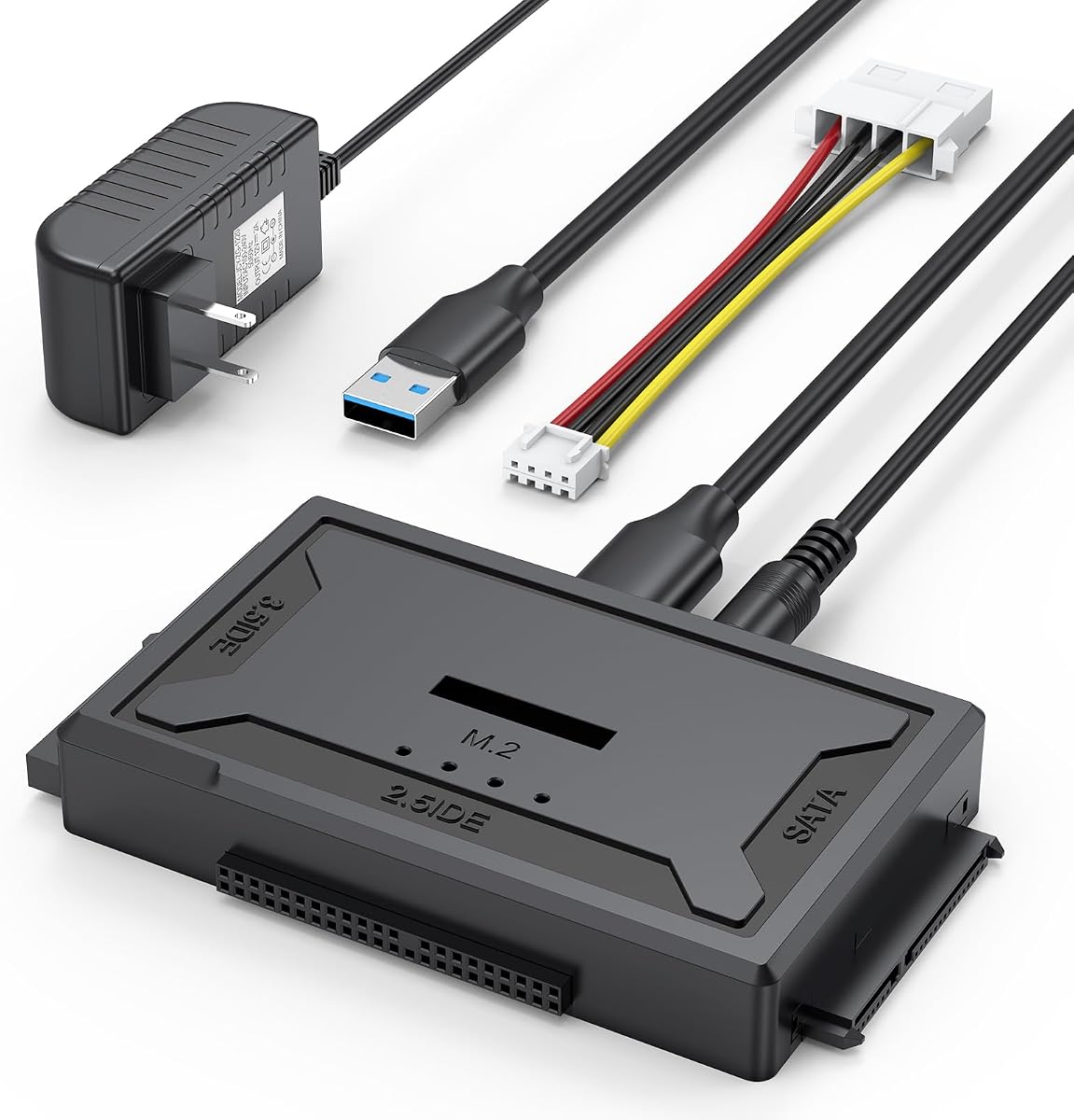
For power users and IT pros, this 4-in-1 reader offers unmatched versatility with M.2 NVMe support alongside SATA and IDE. Its 4.6 rating reflects robust performance for complex data retrieval tasks.
We may earn a commission when you buy through this link, at no additional cost to you.
The adapter supports up to 10Gbps for M.2 drives, making it one of the fastest options available. It handles any size of M.2 drives plus 2.5 and 3.5 inch SATA and IDE drives. The updated design features a softer, flexible power cable for easier connections.
The higher cost is justified by the broad compatibility and speed. However, users new to drive recovery might find the variety of options overwhelming without careful reading of the manual.
This kit is ideal for professionals handling diverse hardware or those needing fast M.2 access. It is the ultimate tool for comprehensive data management.
Access modern NVMe drives alongside legacy options for complete hardware compatibility.
10Gbps speeds ensure minimal wait times when dealing with large modern SSDs.
We may earn a commission when you buy through this link, at no additional cost to you.
This adapter kit offers a balanced solution for data recovery with solid speed and power support. With a 4.3 rating, it performs well for standard transfer tasks across Windows, Mac, and Linux.
We may earn a commission when you buy through this link, at no additional cost to you.
It features USB 3.0 for speeds up to 5Gbps and includes a 12V power adapter for stable 3.5 drive operation. The compact design makes it portable, while hot swap support adds convenience for frequent use.
Users should note the 6TB capacity limit and potential need for jumper settings on very old IDE drives. These are minor limitations for most modern storage needs.
Choose this kit for reliable everyday data access. It is a good middle-ground option for users wanting both speed and stability.
Included power adapter ensures drives spin up reliably without electrical issues.
Compact size allows you to carry it easily in a laptop bag.
We may earn a commission when you buy through this link, at no additional cost to you.
This reader delivers consistent performance with thoughtful design upgrades for easier use. Its 4.6 rating highlights reliability for recovery and transfer tasks across multiple drive types.
We may earn a commission when you buy through this link, at no additional cost to you.
The extended body design makes connecting 3.5 IDE ports easier, while the softer cable reduces connection issues. It supports Blu-ray drives for media reading, expanding its utility beyond standard hard drives.
While it costs more than basic models, the build quality and support justify the expense. Users with older hardware will appreciate the ergonomic improvements.
Choose this for demanding recovery needs where ease of use matters. It is a robust choice for professionals needing consistent results.
Extended body and softer cables make connecting old drives much easier and safer.
Read optical drives too for complete media recovery and backups.
We may earn a commission when you buy through this link, at no additional cost to you.
Designed for SATA users, this docking station offers ease of use and speed. With a 4.4 rating, it simplifies drive swapping for backups or upgrades without tools.
We may earn a commission when you buy through this link, at no additional cost to you.
The lay-flat bay allows quick drive insertion, and hot-swap capability means you can switch drives without rebooting. UASP support enables faster data transfers when paired with a compatible host.
The main limitation is lack of IDE support, so it suits modern drives only. However, for SATA users, this is a premium experience.
Choose this if you mainly handle SATA SSDs or HDDs. It is perfect for tech-savvy users prioritizing speed and convenience.
Slide drives in and out easily without screws or tools for quick access.
Supported UASP protocol speeds up transfers compared to standard USB 3.0.
We may earn a commission when you buy through this link, at no additional cost to you.
This cable adapter is perfect for laptop users with 2.5 inch drives needing a small, portable solution. Its 4.7 rating reflects high satisfaction with its simple and effective design.
We may earn a commission when you buy through this link, at no additional cost to you.
It connects directly to USB without extra power, making it ideal for travel. UASP support ensures faster transfers, and plug-and-play works on all major OS.
It does not support 3.5 drives, but for 2.5 SATA use cases, it is excellent. Some older high-capacity drives may need a powered hub.
Choose this for travel or minimal desk setups. It is the best portable option for 2.5 SATA drives.
Tiny size fits in a pocket for accessing drives on the go.
No power brick needed for most standard 2.5 drives.
We may earn a commission when you buy through this link, at no additional cost to you.
This enclosure turns a 2.5 SATA drive into a protected external drive with ease. Its 4.6 rating highlights user approval for its protective and functional design.
We may earn a commission when you buy through this link, at no additional cost to you.
Push-to-open installation means no tools are needed. It supports USB-C and Type-A for flexible connection options. The case provides physical protection better than bare adapters.
Limitations include lack of IDE support and fixed 2.5 size. However, for SSD users, it is ideal.
Choose this to safely store or carry a drive. It is perfect for travelers needing a rugged external drive.
Enclosure shields the drive from drops and dust better than bare connectors.
Slide the drive in and out in seconds without tools.
We may earn a commission when you buy through this link, at no additional cost to you.
This reader allows simultaneous use of one IDE and one SATA drive for efficient transfers. With a 4.3 rating, it balances versatility and performance well.
We may earn a commission when you buy through this link, at no additional cost to you.
It includes both USB 3.0 and Type C ports, plus a power adapter. The ability to work with two drives at once is rare and useful for backups.
Trade-offs include needing to initialize new drives and a limit on simultaneous IDE connections. These are minor for most users.
Choose this for dual-drive scenarios. It is a good choice for mixed drive environments.
Copy files between IDE and SATA simultaneously without swapping cables.
USB 3.0 and Type C adapt to different computer models.
We may earn a commission when you buy through this link, at no additional cost to you.
This kit stands out for optical drive support alongside standard HDD and SSD connections. Its 4.5 rating reflects strong user satisfaction with its comprehensive features.
We may earn a commission when you buy through this link, at no additional cost to you.
It handles 2.5 and 3.5 drives plus optical drives like DVD-ROM. The USB-C and USB 3.0 ports ensure wide compatibility, and the power adapter ensures stability.
Users must ensure proper power connection and drive initialization. However, for complete media and data access, it is excellent.
Choose this for optical data needs too. It is a thorough solution for legacy media recovery.
Access CD and DVD drives for full system recovery and backups.
Strong user rating indicates consistent performance across tasks.
We may earn a commission when you buy through this link, at no additional cost to you.
Selecting the right adapter kit requires understanding your drive types, connection needs, and usage frequency.
Ensure the adapter supports your specific drive interfaces such as SATA or IDE and sizes like 2.5 or 3.5 inches. Some kits are SATA only, while others support both legacy IDE and modern SATA.
Match the adapter to your drives to avoid incompatibility and wasted cost.
Check if your laptop has USB-A, USB-C, or both. Adapters may provide one or both, and USB-C is becoming standard on newer machines.
Choose an adapter with the ports your computer supports to avoid needing extra dongles.
3.5 inch drives require external power, often 12V, to operate reliably. Ensure the kit includes the needed adapter if you plan to use desktop drives.
For 2.5 inch drives, USB bus power is often enough, but an external adapter adds stability.
Look for USB 3.0 or higher support for faster file transfers. SATA III and USB 3.0 provide speeds up to 5 or 6 Gbps for better performance.
Higher speed reduces wait times when moving large datasets or backups.
A sturdy adapter with reliable connectors reduces risk of connection loss or damage during use. Flexible cables and solid housing help in frequent handling.
Invest in quality build materials for long-term reliability and drive safety.
Verify compatibility with your OS such as Windows, Mac, or Linux. Most kits work across these, but some may need extra steps on specific systems.
Choose a kit confirmed to work with your main OS for plug-and-play convenience.
Features like LED indicators, on/off switches, or optical drive support add value. These improve usability and expand the range of devices you can connect.
Decide which features you need to avoid paying for extras you won't use.
Balance cost against the features and reliability you require. Many kits include warranties that protect your investment against defects.
Consider warranty length and customer support when comparing options for peace of mind.
Always connect the power adapter before attaching drives to ensure stable operation and prevent data loss during power fluctuations.
Avoid removing drives while data is being transferred; wait for the activity LED to stop before disconnecting to keep your data safe.
Store the adapter in a cool, dry place away from direct sunlight and moisture to prolong cable and connector life.
Most adapters are plug-and-play and require no drivers on Windows, Mac, and Linux. Some older systems might need basic drivers that typically install automatically.
Yes, kits with external 12V power adapters support 3.5 drives. Ensure you always connect the power supply for stable performance with these larger drives.
Check the cable connections and power supply. Ensure your drive is initialized in Disk Management if new. Try a different USB port if needed.
These kits are designed for safe data recovery when used correctly. Ensure stable power and avoid unplugging during active transfers to protect your data.
Only specific kits explicitly supporting M.2 NVMe will work. Most standard adapters only support SATA and IDE. Check the product specs carefully before purchasing.
Some adapters support optical drives like CD and DVD. Look for kits that mention optical compatibility if you need to read discs.
Choose an adapter that includes a Type-C port or cable. Some models come with both USB-A and USB-C for maximum flexibility.
Some kits limit drives to 6TB, while others support up to 20TB. Check the specs for capacity limits matching your drive size.
We reviewed ten top adapter kits ranging from budget-friendly options to premium solutions with advanced features like M.2 support. Each was chosen for reliability and real-world usability.
Prioritize compatibility with your drives and your laptop ports. Consider transfer speed needs and power supply to avoid frustrating setup issues later on.
Prices and stock change often, so confirm current details before buying. The right adapter can make data recovery quick and hassle-free for any user.