
Laptop Cooling Pad with 3 Quiet Fans
4.3Editor score
Five level height adjustment
Three ultra-silent cooling fans
Built-in phone holder included
Finding the right computer fan stand is essential for maintaining optimal device performance and extending hardware lifespan. Whether you are working on intensive tasks or gaming, proper airflow prevents overheating and ensures stability during long sessions.
We evaluated ten top-rated models based on cooling efficiency, build quality, adjustability, and user feedback. Each product was analyzed for its ability to handle different device sizes while providing ergonomic benefits and reliable ventilation for various computing needs.
Each pick highlights unique strengths like silent operation, adjustable angles, or robust metal construction. Prices and availability change frequently so check the links for current deals before making your final decision on which stand fits your workspace best.
4.3Editor score

4.4Editor score
4.6Editor score
As an Amazon Associate we earn from qualifying purchases.
This side-by-side comparison outlines the key specifications and unique features of each selected computer fan stand to help you quickly identify the best match for your specific cooling and ergonomic requirements.


The Kootek Laptop Cooling Pad stands out as the top choice for users needing reliable cooling and connectivity. It features five whisper-quiet fans that maintain optimal temperatures without disturbing your focus. The dual USB hub adds practical value for connecting peripherals easily.
We may earn a commission when you buy through this link, at no additional cost to you.
Its ergonomic design includes six adjustable height settings which help reduce neck strain during long work sessions. The dual USB hub allows you to connect mice or drives without cluttering your laptop ports. Blue LEDs indicate fan status while the on-off switches let you control fan groups.
While the stand is sturdy it is heavier than portable options so it is better for fixed desks. The non-dimmable LEDs might be bright for dark environments but they are easy to switch off. Overall it balances performance and comfort effectively.
Choose this model if you need a versatile stand for work or gaming that supports various laptop sizes. It is an ideal gift for students or professionals needing better airflow and organization. The combination of cooling and connectivity makes it a smart investment.
Five fans with LEDs ensure rapid heat dissipation keeping your device cool even during intense tasks.
Six height settings allow you to customize the viewing angle for better posture and reduced fatigue.
We may earn a commission when you buy through this link, at no additional cost to you.
This cooling pad offers excellent value for families or students needing a reliable solution without breaking the bank. Three large ultra-silent fans keep laptops cool during gaming or study sessions. A wheel switch on top allows easy fan speed control without complex buttons.
We may earn a commission when you buy through this link, at no additional cost to you.
The five-level height adjustment helps you find a comfortable posture whether sitting at a desk or table. Extra USB ports let you connect multiple devices like flash drives or mice effortlessly. A built-in phone holder is a unique touch for keeping your phone visible during calls.
While the material is durable ABS and steel it lacks the premium feel of aluminum stands. The fan speed wheel is small but functional for adjusting airflow quickly. For the price it delivers solid performance and practical features.
Ideal for budget-conscious buyers this stand works well for work gaming or online classes. It is a thoughtful gift for anyone needing better laptop ventilation. The phone holder adds convenience for multitasking at home.
Includes a phone holder and USB ports making it perfect for busy households with multiple devices.
Five height levels ensure you can set the perfect angle to avoid neck and shoulder strain.
We may earn a commission when you buy through this link, at no additional cost to you.
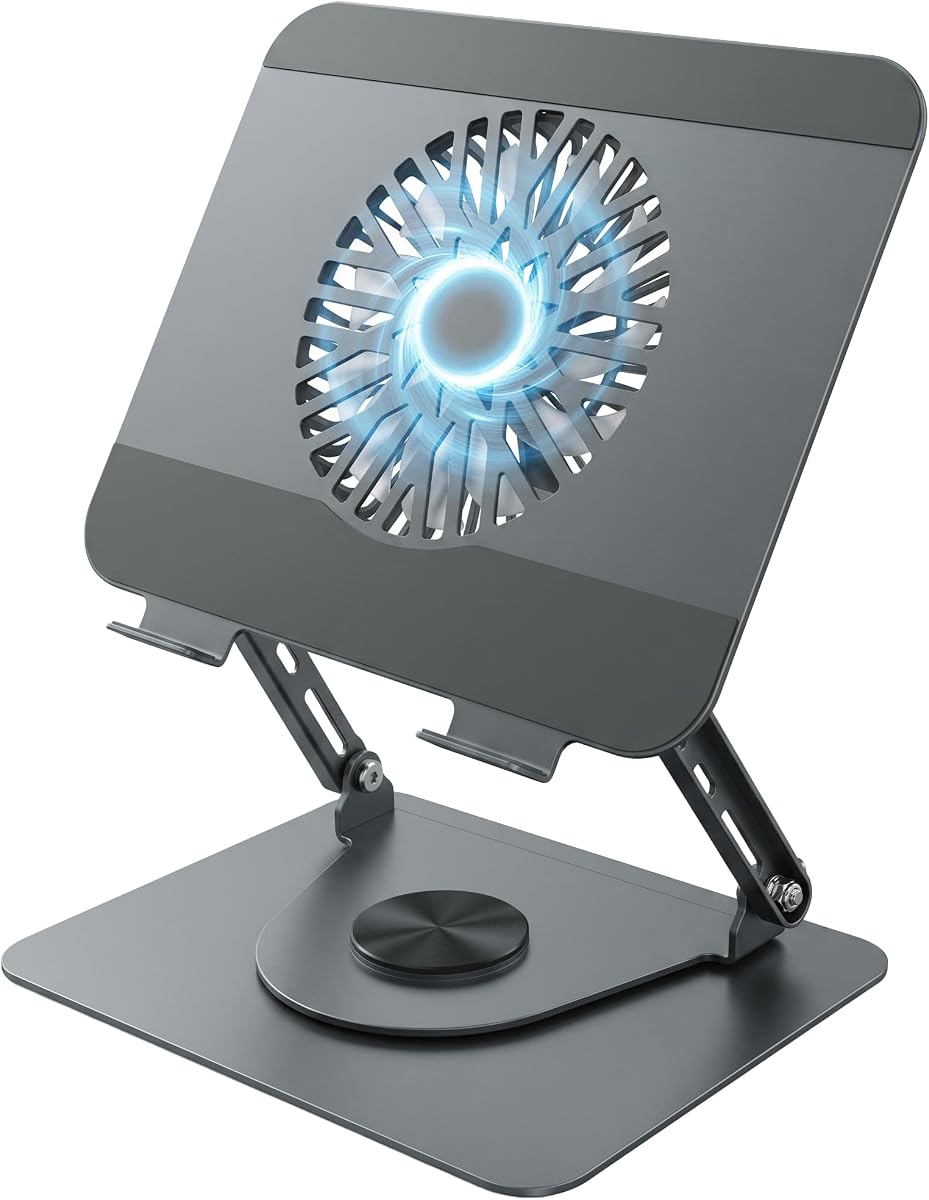
This premium stand excels with its smooth rotation and integrated cooling system perfect for professional environments. The 360 degree rotating base makes it easy to share screens during meetings or presentations. An integrated central fan prevents heat buildup during demanding work or gaming sessions.
We may earn a commission when you buy through this link, at no additional cost to you.
Adjustable height and angle settings let you find the perfect eye-level position for comfort. Non-slip silicone pads protect your device from scratches and keep it secure on the stand. The elevated platform creates extra desk space for storing keyboards or notes underneath.
The price is higher than basic pads but the build quality and features justify the cost. The fan is built into the base so you cannot replace it separately if it fails. However it runs quietly and effectively maintains airflow.
Choose this if you need a versatile stand for collaborative work or high-performance computing. It keeps laptops cool while improving ergonomics and desk organization. The rotating base adds a unique benefit for presenters and remote workers.
The 360 degree base allows effortless screen sharing without moving the entire stand.
Integrated central fan ensures air moves constantly under the device to prevent overheating.
We may earn a commission when you buy through this link, at no additional cost to you.
The YICOSUN stand is ideal for travelers or those needing a compact solution with modern aesthetics. Two ultra-quiet fans provide efficient airflow while advanced RGB lighting adds a stylish touch. The aluminum alloy construction ensures durability while keeping the weight low for easy carrying.
We may earn a commission when you buy through this link, at no additional cost to you.
Its foldable design makes storage simple whether in a bag or under a desk. Adjustable cooling speeds let you balance noise and airflow based on your needs. The ergonomic height adjustments help maintain better posture during long work or gaming sessions.
While the fans are quieter than some models there are fewer of them which may limit cooling power for heavy loads. The RGB lights can be turned off if you prefer a minimalist look. Overall it balances style and function well.
Buy this if you want a portable stand that looks great and fits in small spaces. It suits laptops between ten and sixteen inches well. The aluminum build ensures it lasts through regular travel or daily use.
Lightweight design makes it easy to carry and store for on-the-go use.
Premium aluminum alloy ensures long-lasting stability and resistance to wear.
We may earn a commission when you buy through this link, at no additional cost to you.
This stand combines functionality with versatility supporting laptops from fourteen to eighteen inches easily. The active cooling fan helps prevent overheating during long sessions. An open-frame design promotes airflow while the foldable structure saves space when not in use.
We may earn a commission when you buy through this link, at no additional cost to you.
Adjustable load capacity allows you to modify the range using a screw tool for heavier devices. A phone mount and multiple ports provide extra convenience for connecting accessories. Non-slip base pads keep the stand secure on any surface.
The need for a screw tool to adjust capacity might be slightly inconvenient for quick changes. The design is functional rather than stylish but it does the job well. It is a practical choice for varied laptop sizes.
Select this if you need a stand that can handle different device weights and sizes. The cooling fan and phone mount add useful features for everyday use. It is a reliable option for home or office setups.
Supports a wide range of laptop sizes ensuring flexibility for different devices.
Folds to just 1.3 inches thick for easy storage and transport.
We may earn a commission when you buy through this link, at no additional cost to you.
This stand is built for durability with a solid steel frame that supports high-speed fans. It fits standard 120mm and 140mm PC fans for DIY cooling projects. The 360 degree vertical rotation lets you direct airflow upward downward or at an angle as needed.
We may earn a commission when you buy through this link, at no additional cost to you.
Thumb screws allow quick assembly without extra tools making setup simple and fast. The weighted base ensures stability even when using industrial or high-RPM fans. It is designed for permanent desktop use to keep your equipment cool.
Be aware that the fan is not included so you need to source one separately. The metal edges require careful handling during installation but gloves are recommended for safety. It is a robust solution for targeted cooling.
Choose this if you need a stable mount for specific PC or router cooling. The adjustable direction helps optimize airflow for your setup. It is perfect for tech enthusiasts managing heat in their workspaces.
360 degree rotation allows precise control over cooling direction for any device.
Steel construction with a weighted base provides excellent stability for high-speed fans.
We may earn a commission when you buy through this link, at no additional cost to you.
This upgraded version features full-aluminum construction ensuring durability and resistance to rust. It is designed for standard 120mm PC fans making it a precise fit for common cooling units. The vertical rotation channels airflow wherever you need it for maximum flexibility.
We may earn a commission when you buy through this link, at no additional cost to you.
Tool-free installation with thumb screws means you can set it up quickly without extra hardware. Heavy-duty construction keeps the stand steady even when fans run at high speeds. It is a reliable choice for desktop electronics cooling.
Note that it does not support 140mm fans so check your fan size before purchasing. The matte black finish is simple but fits well in most office environments. It is a practical and durable option for fans.
Buy this if you need a dedicated mount for 120mm fans that won't warp or corrode. The aluminum build adds longevity compared to plastic options. It is a solid investment for consistent cooling performance.
Crafted from premium aluminum alloy ensuring durability and rust resistance.
360 degree vertical rotation allows precise cooling direction for any setup.
We may earn a commission when you buy through this link, at no additional cost to you.
This stand offers broad compatibility supporting both 120mm and 140mm PC fans. Heavy-duty metal construction ensures it remains stable at high fan speeds. The 360 degree vertical rotation delivers ultimate cooling flexibility for any angle.
We may earn a commission when you buy through this link, at no additional cost to you.
Thumb screws allow tool-free installation making it easy to mount and adjust your fan quickly. The design is straightforward but effective for directing airflow where needed. It is ideal for general desktop cooling needs.
Since fans are not included you must have a compatible fan ready for installation. The black finish blends into most desk setups without distraction. It is a solid pick for versatile cooling projects.
Choose this if you need a flexible mount that handles common fan sizes. The metal build ensures it lasts through long-term use. It is a practical solution for maintaining optimal temperatures.
Fits both 120mm and 140mm square frame PC fans for versatile use.
Heavy-duty metal construction ensures stability even at high fan speeds.
We may earn a commission when you buy through this link, at no additional cost to you.
This bracket supports fans from 120mm to 180mm offering wide versatility for custom builds. Precision damped pivot hinges allow 360 degree horizontal and 180 degree vertical tilt for secure positioning. Crafted from high-quality aluminum alloy via precision CNC machining for a refined look.
We may earn a commission when you buy through this link, at no additional cost to you.
Tool-free installation using included thumbscrews makes adjusting for different fan sizes simple. The wide base features anti-slip pads and cross-shaped holes to keep the unit steady. It delivers durable performance with a sleek elegant appearance.
The price is higher than basic models due to the premium aluminum build and finish. Since the fan is not included you need to buy one separately. However the build quality justifies the investment for enthusiasts.
Select this if you need a premium mount for larger fans and custom cooling. The CNC finish adds an aesthetic touch to your setup. It is an ideal choice for those valuing design and durability.
Precision CNC machining delivers a smooth texture with excellent corrosion resistance.
Three damped pivot hinges allow secure positioning at any angle.
We may earn a commission when you buy through this link, at no additional cost to you.
This stand uses a thick solid metal frame to eliminate vibration and shaking during use. It fits 120mm and 140mm fans with precision pre-drilled mounting holes. The fully vertical 360 degree rotation lets you angle fans freely for unlimited airflow direction.
We may earn a commission when you buy through this link, at no additional cost to you.
Large textured thumb knobs make assembly quick without needing screwdrivers or drills. It is versatile for cooling laptops routers modems or even 3D printer hot ends. The solid construction ensures rock-solid stability even with high-RPM fans.
Like other stands in this category the fan is not included so you must buy one separately. The design is functional and robust but lacks decorative flair. However performance and stability are top priorities for cooling.
Choose this if you need a reliable stand that minimizes noise and vibration. The quick assembly and solid build make it a top pick for durability. It suits hobbyists and professionals needing consistent cooling performance.
Solid metal frame ensures the stand stays rock-solid even with high-speed fans.
Versatile use for laptops routers modems and 3D printers.
We may earn a commission when you buy through this link, at no additional cost to you.
Selecting the right computer fan stand depends on your specific device type cooling needs and desk setup. This guide breaks down the essential factors to consider for making an informed decision.
Ensure the stand matches your laptop or PC fan dimensions. Most stands support specific inch ranges or millimeter fan sizes like 120mm or 140mm. Check compatibility lists to avoid fit issues.
Always verify size requirements before purchasing to ensure proper fit for your device or fan.
Look for stands with multiple fans or active cooling mechanisms. More fans generally mean better airflow but check noise levels for your environment. Integrated fans vs. standalone mounts offer different cooling strategies.
Prioritize stands with adequate airflow capacity to handle your device heat output effectively.
Materials like aluminum alloy or steel provide better durability and heat dissipation than plastic. Heavier metal bases reduce vibrations and improve stability. Check for rust-proof coatings if used in humid environments.
Choose metal builds for long-term stability and better heat resistance.
Adjustable height and angle settings help reduce neck strain and improve posture. Some stands offer multiple height levels or pivoting mechanisms. Ensure the stand allows comfortable viewing angles for your tasks.
Opt for stands with flexible adjustments to customize your workspace ergonomically.
If you travel or have a small desk, foldable and lightweight stands are beneficial. Some models collapse flat for easy transport while others are bulky for fixed setups. Consider where the stand will sit most of the time.
Select a foldable design if space saving or mobility is a priority.
Extras like USB hubs phone holders or RGB lighting add value depending on your needs. Built-in hubs reduce cable clutter while holders keep phones accessible. Evaluate which extras improve your workflow.
Choose stands with features that match your daily workflow and accessory needs.
Quiet operation is vital for home offices or study environments. Look for fans rated for low decibel output or noise-free operation. Some stands allow fan control to balance performance and noise.
Check noise ratings to ensure the stand does not disturb your focus or meetings.
Tool-free assembly with thumb screws simplifies setup and adjustments. Some models require tools for load adjustments which can be cumbersome. Consider how often you plan to reconfigure the stand.
Pick stands with quick-release or tool-free mechanisms for hassle-free daily use.
Place the stand on a flat stable surface to ensure optimal cooling performance. Adjust the height and angle to a comfortable position before placing your laptop on it.
Regularly clean dust from the fans and vents using compressed air to maintain airflow efficiency. Check all screws and knobs periodically to ensure they remain tight.
For portable stands fold and store them safely when not in use to prevent damage. Avoid placing heavy items on the stand beyond its specified load capacity.
Most stands support laptops ranging from 10 to 18 inches. Always check the manufacturer specifications to confirm compatibility with your specific device size before purchasing.
Most universal stands fit MacBooks, Dell, HP, and other common brands. However some specialized models might have limitations so verify compatibility lists for best results.
Many modern stands feature quiet operation rated below 40dB. Look for whisper-quiet or ultra-silent models if you work in noise-sensitive environments.
Yes, many stands include controls like switches or wheels to adjust fan speed. This allows you to balance cooling power and noise levels as needed.
Use compressed air to blow out dust from fan blades and vents regularly. Wipe the exterior with a soft dry cloth to remove fingerprints and debris.
Yes, stands improve airflow which prevents overheating and can extend your device lifespan. They also enhance ergonomics reducing neck strain during long sessions.
Some stands include fans built-in while others are mounts that require you to provide your own fan. Check the product description to confirm what is included.
We reviewed ten top computer fan stands ranging from budget-friendly pads to premium mounts. The Kootek Cooling Pad leads with its five fans and USB hub while the Heavy Duty Stand offers robust metal stability.
Prioritize your needs such as portability noise levels or build material before making a choice. Consider whether you need integrated cooling or a standalone mount for external fans.
Remember to check current availability and deals since prices fluctuate frequently. Select the stand that best fits your workspace for optimal comfort and device health.