
V-one Wired USB Gaming Controller Gamepad Joystick for PC (Windows XP/7/8/10/11) & Steam & Android & PS3 – Red
4.2Editor score
Wide compatibility with many systems
Plug and play setup ease
Affordable price for casual gamers
Discover the top 10 joysticks for Windows 11 compared for flight sims and gaming, featuring detailed specs, pros, and cons to help you choose.
Finding the right joystick for Windows 11 can transform your gaming experience from flat to immersive. Whether you love flight sims or racing games, a quality controller adds precision and comfort that a keyboard simply cannot match for serious players.
We compared ten top-rated joysticks based on compatibility, build quality, and user feedback. This list covers budget-friendly options and premium models, ensuring you find a device that fits your setup and budget without sacrificing performance or reliability during long sessions.
Each pick shows key features, pros, and cons to help you decide quickly. Note that prices change often, so check current listings before buying. We aim to guide you toward the best value and performance for your specific gaming needs on Windows 11.
4.2Editor score

4.4Editor score

4.0Editor score
This side-by-side comparison highlights key specs for all ten joysticks. Use it to quickly compare features like button count, compatibility, and special tech to find the right match for your Windows 11 gaming setup.






The Thrustmaster T.16000M FCS stands out as a top pick for Windows 11 users seeking precision. With a strong rating, it delivers consistent control thanks to its advanced sensor technology. This joystick is designed for serious flight sim enthusiasts who need reliability.
We may earn a commission when you buy through this link, at no additional cost to you.
Its H.E.A.R.T technology ensures that precision levels remain high over time, avoiding the drift common in cheaper models. The fully ambidextrous design allows left or right-handed users to customize the layout easily. Sixteen action buttons with tactile identification help you operate without looking.
While it lacks vibration feedback, the trade-off is justified by the durability and accuracy. Some users might prefer a detachable throttle, but this stick focuses on core flight control excellence. It is a solid choice for dedicated pilots.
Buy this if you want a long-term investment in flight simulation. It suits those who prioritize accuracy over extra features like force feedback. Check current pricing for the best deal before adding to your cart.
The sensor tech ensures performance stays high for years of gameplay.
Customizable parts make it comfortable for both left and right-handed gamers.
We may earn a commission when you buy through this link, at no additional cost to you.
The Logitech G X56 offers a comprehensive flight simulator experience with unmatched control. Its high-end rating reflects its robust feature set, including over 180 programmable inputs. This system is ideal for users who demand maximum customization.
We may earn a commission when you buy through this link, at no additional cost to you.
Military-grade precision ensures that every movement translates accurately in-game. The RGB lighting adds a modern aesthetic that matches gaming rigs. Adjustable force options let you tailor resistance to your preference for comfort during long sessions.
However, it requires two USB ports and comes at a premium price. This might be too much for casual gamers or those with limited desktop space. The setup can also be complex for beginners new to flight sims.
Choose this if you are building a serious cockpit setup. It suits users who need extensive controls and enjoy RGB customization. Verify your USB availability before purchasing to avoid connectivity issues.
With 189 inputs, you can map every command without using the keyboard.
The spring system allows you to adjust stick force for better comfort.
We may earn a commission when you buy through this link, at no additional cost to you.
The V-one Wired USB Controller offers great value for Windows 11 gamers on a budget. With a solid rating, it provides reliable performance without breaking the bank. Its compatibility with Android adds versatility for mobile gaming too.
We may earn a commission when you buy through this link, at no additional cost to you.
Plug and play functionality means you can start playing quickly without complex installs. The vibration feedback adds a nice touch to gameplay, enhancing immersion during action scenes. Multi-mode support lets you switch between PC and Android easily.
While it lacks premium features like force feedback or advanced ergonomics, it meets basic needs well. It is not suitable for Xbox consoles, which limits cross-platform use. This is best for PC users with limited funds.
Buy this if you want an affordable entry into joystick gaming. It suits casual players who do not need high-end specs. Check current listings to ensure you get the best price for your needs.
Most users can start gaming immediately without installing drivers on Windows.
Works on PC and Android devices, expanding your gaming options.
We may earn a commission when you buy through this link, at no additional cost to you.
The Thrustmaster T-Flight Hotas One combines a joystick and throttle for a complete flight sim experience. Its high rating reflects user satisfaction with its ergonomic design and ease of use. This model works well for both console and PC gamers.
We may earn a commission when you buy through this link, at no additional cost to you.
The detachable throttle allows you to use the stick on your lap or desk as needed. Adjustable resistance helps you find a comfortable feel for long sessions. Plug and play setup ensures you spend more time flying and less time configuring.
Some users note that the suction cups may not hold firm on all desk surfaces. While it is versatile, ensure you get the version with throttle for full functionality. It offers a balance of quality and price.
Choose this if you want a balanced setup for flight sims. It suits users who value flexibility and comfort. Check compatibility with your specific game before purchasing to ensure full feature support.
The detachable throttle lets you adapt to your gaming space.
Adjustable resistance helps reduce hand fatigue during long flights.
We may earn a commission when you buy through this link, at no additional cost to you.
The PXN 2113PRO offers a solid flight stick for Windows 11 users. Its moderate rating indicates decent performance for the price. This controller is designed for PC flight sims and includes useful features like vibration.
We may earn a commission when you buy through this link, at no additional cost to you.
With 12 programmable buttons, you can map essential commands easily. The ergonomic design ensures comfort during extended gaming sessions. Vibration adds a layer of realism, though it may require driver adjustments for optimal use.
Users should note that it is PC-only and not compatible with Xbox or Mac. Setup can require some driver tweaks to get full vibration. It is a good option for budget-conscious PC pilots.
Buy this if you need a dedicated PC flight stick. It suits those who prioritize value over premium build. Check driver requirements before purchasing to ensure smooth setup on your system.
Twelve programmable buttons let you tailor controls to your needs.
Designed for Windows systems, offering focused flight sim support.
We may earn a commission when you buy through this link, at no additional cost to you.
The Guillemot Thrustmaster T.16000M FCS is a top contender for durability and precision. Its strong rating reflects reliability in flight sim environments. This joystick is built for users who demand long-term consistency.
We may earn a commission when you buy through this link, at no additional cost to you.
H.E.A.R.T technology ensures precision does not degrade, making it reliable for years. The ambidextrous design allows for a customized fit for left or right hands. Sixteen tactile buttons help you operate controls efficiently.
While it lacks force feedback, the focus on precision is clear. Some users may need to update drivers for full compatibility. This is a solid choice for serious pilots who prioritize accuracy.
Choose this if you want a durable option for flight sims. It suits users who value long-term performance over extra features. Check current prices to get the best deal for your setup.
Sensor technology ensures consistent performance over years of use.
Target software helps manage profiles for different games easily.
We may earn a commission when you buy through this link, at no additional cost to you.
The Microsoft Sidewinder Precision 2 offers a classic flight control experience. Its solid rating highlights reliable performance for Windows users. This joystick is known for its rudder control and programmability.
We may earn a commission when you buy through this link, at no additional cost to you.
The rotating handle provides precise rudder control, which is essential for many sims. With 16 programmable functions, you can map commands to suit your playstyle. The 146 degree throttle adds versatility to your setup.
While it is an older model, it still performs well for basic needs. Some users may need to install drivers for older systems. This is a good option for fans of traditional flight controls.
Buy this if you appreciate classic design and reliability. It suits users who need solid rudder control. Check compatibility with your games before purchasing to ensure full feature access.
The rotating handle offers exact control for realistic flight maneuvers.
Save different profiles to switch between games quickly.
We may earn a commission when you buy through this link, at no additional cost to you.
The Thrustmaster USB Joystick is a simple option for basic flight control. Its moderate rating reflects its entry-level nature. This model is designed for users who need essential controls without complexity.
We may earn a commission when you buy through this link, at no additional cost to you.
The point of view button adds immersion without using keyboard shortcuts. With 3 axis and 4 buttons, it covers the basics of flight movement. The ergonomic handle ensures comfort for short gaming sessions.
It lacks advanced features like many programmable buttons or vibration. This is best for casual players or those new to flight sims. It offers a low-risk way to try joystick gaming.
Choose this if you need a simple and affordable joystick. It suits beginners who want to learn without spending much. Check current listings for the best price before buying.
Ideal for users who want plug and play without complex config.
Ergonomic handle provides decent comfort for casual use.
We may earn a commission when you buy through this link, at no additional cost to you.
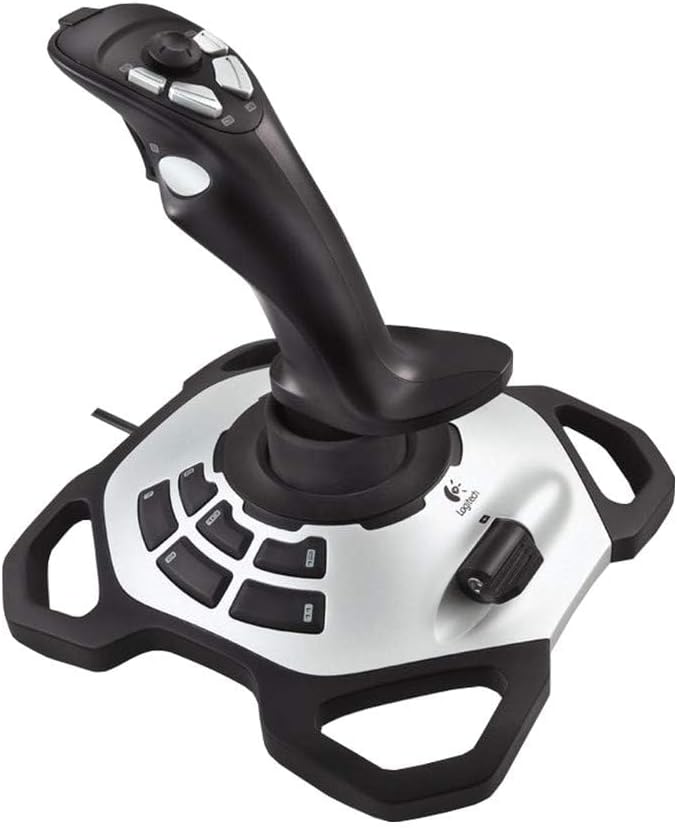
The Logitech Extreme 3D Pro offers a balance of performance and price. Its strong rating indicates high user satisfaction for flight sims. This fightstick is a popular choice for those seeking mid-range quality.
We may earn a commission when you buy through this link, at no additional cost to you.
Precision design ensures accurate control in games. Durable build quality means it can handle long gaming sessions. Smooth axis movement allows for subtle adjustments during critical maneuvers.
While it lacks a dedicated throttle, it focuses on core stick performance. Some users may need a separate throttle for full setup. This is a reliable option for most flight enthusiasts.
Buy this if you want a proven mid-range option. It suits users who value reliability and smooth control. Check current pricing to ensure you get the best value.
Axis movement is designed for precision and responsiveness.
High-quality materials ensure long-term performance.
We may earn a commission when you buy through this link, at no additional cost to you.
The VOYEE PC Controller is a versatile option for mixed platforms. Its high rating reflects satisfaction with its comfort and compatibility. This wired controller works well for Xbox and PC gamers.
We may earn a commission when you buy through this link, at no additional cost to you.
Ergonomic grips ensure comfort during extended play. The 7.2ft cord allows flexible seating arrangements. Rumble control enhances immersion during action scenes in supported games.
While it is not a dedicated flight stick, it offers a solid general control experience. Some users may need drivers for specific titles. It is a good choice for those using multiple systems.
Choose this if you need a flexible multi-platform option. It suits users who value comfort and cord length. Check compatibility with your specific setup before purchasing.
Works on Xbox 360 and Windows PCs for flexible gaming.
Ergonomic design reduces hand strain during long sessions.
We may earn a commission when you buy through this link, at no additional cost to you.
Selecting the right joystick for Windows 11 involves considering several key factors. This guide outlines what to look for to ensure compatibility and performance.
Ensure the joystick supports Windows 11. Some older models may need drivers or updates to function correctly.
Check if the device works with your specific games or platforms like Xbox.
Look for durable materials and solid construction. High-quality builds last longer and provide better feedback.
Ergonomic designs reduce fatigue during long gaming sessions.
More buttons allow for greater customization and control mapping. Consider how many commands you need to access.
Programmable buttons help streamline complex game actions.
Precision axes are crucial for flight and racing sims. Smooth movement ensures accurate in-game actions.
Hall Effect sensors are preferred for long-term accuracy.
Vibration adds immersion by simulating in-game events. This feature enhances the realism of your experience.
Ensure the feedback is strong enough for your preference.
Plug and play devices save time on installation. Some models require software for full functionality.
Check if drivers are available for your Windows version.
Set a budget based on your needs. Entry-level models are affordable but may lack advanced features.
Invest in premium options if you play serious simulations.
Left-handed users need joysticks that are customizable. This ensures comfort and usability for everyone.
Check if parts are removable or adjustable.
Connect your joystick via USB and let Windows detect it. Install any drivers from the manufacturer if required.
Calibrate the device in settings to ensure accurate movement. Adjust buttons and axes to your preference.
Keep the joystick clean and dry. Avoid exposing it to dust or liquids to maintain performance.
Most models listed are fully compatible with Windows 11. Some older devices may require driver updates. Check manufacturer support pages for specific details on compatibility.
Many joysticks are plug and play for Windows 11. However, advanced features often need drivers. Visit the manufacturer's website for the latest software.
Yes, many work for racing sims. Flight sticks are best for aviation, while gamepads may suit racing better. Check game settings for controller support.
Joysticks have a vertical stick for precise control. Gamepads are handheld with dual sticks. Joysticks are ideal for flight sims, gamepads for general gaming.
Some models offer wireless connectivity. Wired options are more common for lower latency. Check product specs for wireless capabilities.
Yes, entry-level models are beginner-friendly. They offer essential controls without complex setups. Choose based on your game preferences and budget.
We have reviewed the top 10 joysticks for Windows 11, covering budget to premium options. Each offers unique strengths for flight or general gaming.
Prioritize compatibility and build quality when making your choice. Consider the buttons and axes that suit your preferred games.
Check current prices and reviews before buying. This ensures you get the best value for your gaming setup.