
Brother HL-L2405W
4.1Editor score
Compact wireless design
Manual feed slot for envelopes
Dual-band WiFi connectivity
Compare the top laser printer with envelope feeder options for home and office use, featuring speed, connectivity, and paper handling capabilities.
Finding a reliable laser printer with envelope feeder capabilities is crucial for professionals and home offices that handle significant mailing tasks. These devices streamline document creation and envelope printing without requiring separate specialized equipment for every job.
This guide evaluates ten top models based on print speed, connectivity options, paper handling flexibility, and overall reliability. We focus on how each unit manages envelope feeding specifically while maintaining consistent quality for standard documents.
Each review highlights standout features and potential trade-offs to help you choose the right machine for your workflow. Please note that availability and specifications may change over time, so verify details before purchasing.
4.1Editor score

4.3Editor score

4.4Editor score
The following table provides a side-by-side overview of key specifications for all ten models reviewed in this guide, focusing on print speed and paper handling.




The Brother HL-L2405W stands out as an affordable option for users needing reliable laser printing with envelope capabilities. It achieves a solid 4.1 star rating based on consistent performance in home office environments.
We may earn a commission when you buy through this link, at no additional cost to you.
Its standout quality lies in the manual feed slot which allows for direct envelope printing without complex tray adjustments. The dual-band wireless connectivity ensures stable connections across various devices in the network.
Trade-offs include the lack of automatic duplex printing which may increase paper usage for two-sided documents. Envelope feeding requires manual intervention which can slow down high-volume mailing tasks.
This printer suits home users or small teams with moderate printing needs who prioritize cost and space efficiency. Its simple setup makes it ideal for those new to laser printing technology.
The Brother Mobile Connect app allows remote management and printing from smartphones anywhere.
Manual feed slot enables printing on envelopes and specialty paper types easily.
We may earn a commission when you buy through this link, at no additional cost to you.
The Brother MFC-L5915DW delivers exceptional speed and efficiency for busy office environments requiring heavy document processing. Its 4.3 star rating reflects strong performance in productivity-focused settings.
We may earn a commission when you buy through this link, at no additional cost to you.
Key strengths include print speeds reaching 50 ppm which significantly reduces wait times for large batches. The auto document feeder supports two-sided scanning which streamlines digitization workflows.
Trade-offs involve the higher price point and larger size which may not fit compact spaces. Manual envelope feeding is still standard which might require planning for large mailings.
This model is perfect for businesses needing high-volume monochrome printing and scanning capabilities. Its reliability ensures consistent output for professional documents and reports.
Scans up to 56 ipm with a 70-page auto document feeder for efficiency.
Compatible with ultra high-yield toner cartridges to reduce long-term costs.
We may earn a commission when you buy through this link, at no additional cost to you.
The Brother HL-L2460DW balances speed and compactness with a 4.0 star rating suitable for home offices needing reliable printing. It adds duplex capabilities which were missing in the previous model.
We may earn a commission when you buy through this link, at no additional cost to you.
Key strengths include automatic two-sided printing which saves paper and reduces waste effectively. The 36 ppm speed handles moderate workloads without significant delays during peak hours.
Trade-offs include the reliance on manual feed slots for envelopes which limits automation. The rating suggests some users may find setup or connectivity less straightforward.
This printer fits users who need duplexing and speed in a small package. It is ideal for small teams or home offices with space constraints.
Prints two-sided documents automatically to save time and paper.
Connects via dual-band wireless for flexible placement options.
We may earn a commission when you buy through this link, at no additional cost to you.
The HP LaserJet MFP M234sdw offers balanced features for small teams needing reliable black and white printing and scanning. It holds a 4.2 star rating reflecting ease of use and setup.
We may earn a commission when you buy through this link, at no additional cost to you.
Key strengths include the auto document feeder which simplifies scanning and copying tasks. Security features are built-in to protect against potential network attacks effectively.
Trade-offs may include envelope handling details which are less explicit compared to Brother models. The focus on small teams limits capacity for larger enterprise environments.
This device is suitable for small offices requiring straightforward printing and security. Its ease of use makes it a strong choice for non-technical users.
Automatically detects and resolves connectivity issues for stability.
Eliminate steps in repetitive tasks using the mobile application.
We may earn a commission when you buy through this link, at no additional cost to you.
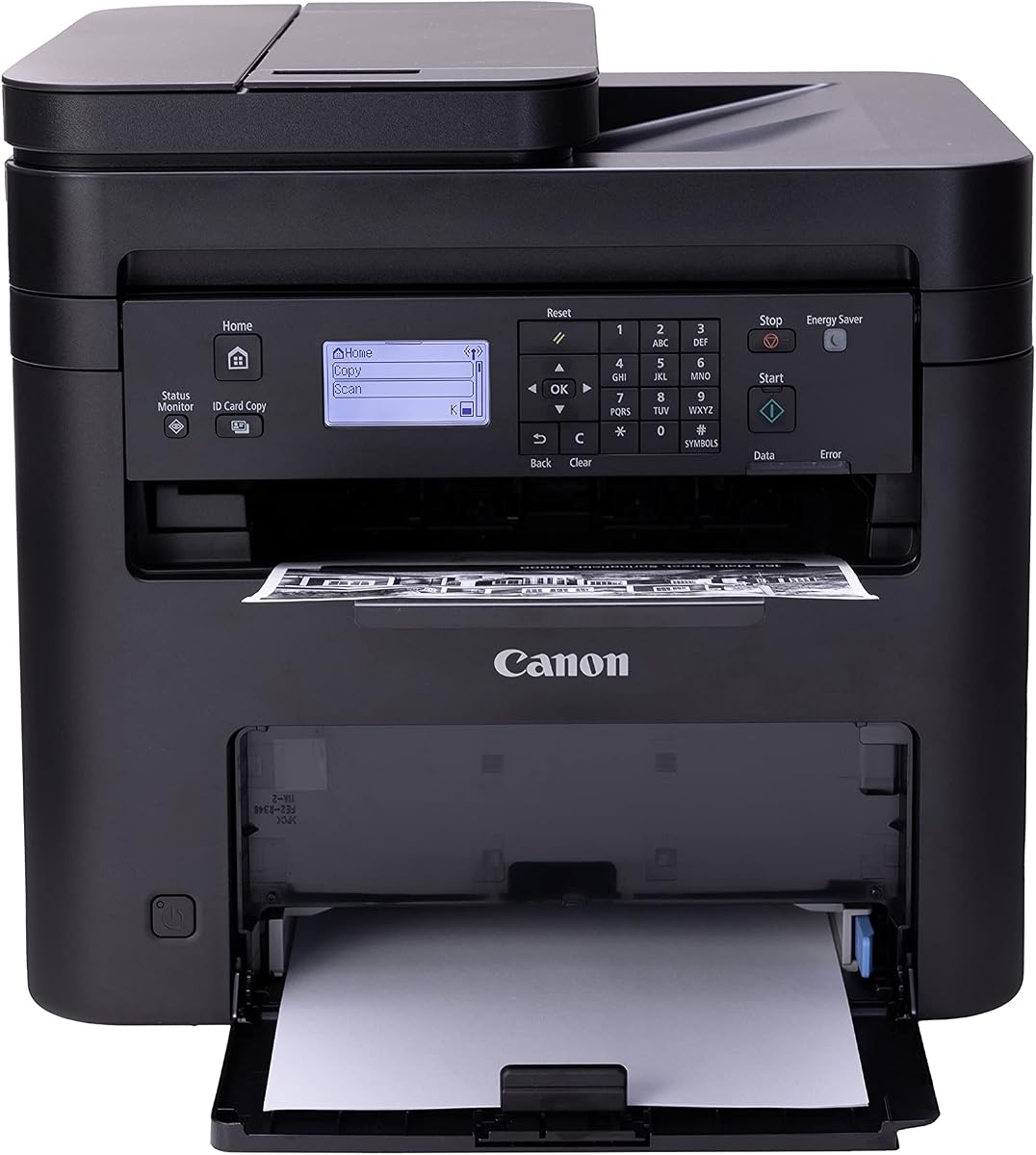
The Canon imageCLASS MF273dw is a solid multifunction option with a 4.2 star rating indicating consistent reliability for office environments. It combines printing scanning and copying in a compact unit.
We may earn a commission when you buy through this link, at no additional cost to you.
Key strengths include a quick first print time of approximately 5.3 seconds which helps with sporadic printing. Auto 2-sided printing is standard for saving paper without manual intervention.
Trade-offs include lower throughput compared to higher-end models which might delay large batches. Envelope capabilities are implied but less detailed in primary descriptions.
This printer fits small offices needing basic multifunction capabilities without high cost. Its fast first print speed suits users with intermittent printing needs.
Automatic duplex helps save paper and reduce waste effectively.
Starts printing quickly to reduce wait time on urgent tasks.
We may earn a commission when you buy through this link, at no additional cost to you.
The Brother MFC-L2820DW earns Editor's Choice status for combining comprehensive office functions with reliable envelope feeding. It holds a 4.3 star rating based on performance and usability.
We may earn a commission when you buy through this link, at no additional cost to you.
Key strengths include the 50-page auto document feeder which streamlines multi-page scanning. The 2.7-inch touchscreen simplifies navigation and allows easy cloud app integration.
Trade-offs include manual envelope feeding which may require attention during large mailings. It lacks color printing which limits versatility for marketing materials.
This model is ideal for small offices needing fax and scanning alongside printing. Its intuitive interface makes it accessible for all skill levels.
Intuitive interface enables effortless navigation and cloud app access.
Connect via dual-band wireless or Ethernet for shared network access.
We may earn a commission when you buy through this link, at no additional cost to you.
The Canon imageCLASS MF462dw II provides robust workflow features with a 4.2 star rating reflecting solid performance in diverse environments. It stands out for its expandable paper handling.
We may earn a commission when you buy through this link, at no additional cost to you.
Key strengths include the 5-inch color touchscreen which allows customized access to frequent tasks. Expandable paper capacity ensures it can handle high-volume tasks without interruption.
Trade-offs involve a higher price point compared to entry-level options which might strain tight budgets. Envelope specifics are not the primary marketing focus.
This printer suits businesses needing high capacity and intuitive control. It is ideal for offices where workflow efficiency is a top priority.
Intuitive interface allows quick access to most used features.
Add optional cassettes to handle larger volumes without refill.
We may earn a commission when you buy through this link, at no additional cost to you.
The Brother MFC-L8930CDW offers premium color capabilities and security with a 4.4 star rating reflecting high satisfaction among business users. It supports high-quality color documents alongside standard printing.
We may earn a commission when you buy through this link, at no additional cost to you.
Key strengths include advanced security features like triple layer security to protect network devices. The large touchscreen supports up to 64 customized shortcuts for efficiency.
Trade-offs include the higher cost which may not suit small budgets. Envelope handling is robust but manual feeding still applies.
This device is perfect for businesses needing color output and strong security. It supports professional marketing materials and secure document handling.
Triple layer security helps protect devices and safeguard networks effectively.
Flexible connectivity and shortcuts streamline daily office workflows.
We may earn a commission when you buy through this link, at no additional cost to you.
The HP LaserJet Pro MFP 3101sdw holds the highest rating of 4.5 stars reflecting exceptional reliability and trust. It is designed for small teams requiring professional quality printing.
We may earn a commission when you buy through this link, at no additional cost to you.
Key strengths include award-winning reliability ensuring consistent performance page after page. The dependable Wi-Fi seeks the best connection to stay online without interruption.
Trade-offs include strict cartridge requirements which may limit third-party options. Customization options are more limited compared to enterprise models.
This printer suits small teams prioritizing reliability over advanced features. Its dependable performance ensures business continuity during critical operations.
Performance you can count on page after page in business.
Toner designed for sharp professional-quality prints every time.
We may earn a commission when you buy through this link, at no additional cost to you.
The Brother MFC-L2690DW is a sturdy compact option with a 4.4 star rating indicating strong build quality and reliability. It emphasizes robust construction for busy schedules.
We may earn a commission when you buy through this link, at no additional cost to you.
Key strengths include the manual feed slot which offers professional prints on envelopes and card stock. The 250-sheet tray reduces refills and improves efficiency.
Trade-offs include slower print speeds which may delay large document batches. Manual intervention is still required for specialty paper types.
This model fits users needing durability in a compact footprint. It is suitable for environments where physical build quality matters most.
Offers professional prints on a variety of paper types and sizes.
Handles letter and legal sizes easily to improve efficiency.
We may earn a commission when you buy through this link, at no additional cost to you.
Selecting the right laser printer involves evaluating several key factors that impact daily workflow and printing efficiency.
Print speed is critical for businesses handling large volumes of documents daily. Higher ppm rates reduce wait times and increase overall office productivity.
Prioritize models with speeds above 30 ppm for faster output and better workflow integration.
Paper handling determines how easily a printer manages different media types including envelopes. Look for models with manual feed slots or specialized trays for envelopes.
Ensure the printer supports multiple paper sizes to avoid frequent tray changes.
Modern printers must connect seamlessly to various devices and networks. Wireless connectivity like dual-band WiFi allows flexible placement without cables.
Check for Ethernet ports and mobile printing support for versatile network setups.
All-in-one models combine printing scanning and copying reducing the need for multiple machines. This saves space and consolidates workflow functions effectively.
Select models with scanning capabilities if digitization is part of your daily tasks.
Security protects sensitive data during transmission and storage. Built-in encryption and secure access features prevent unauthorized usage effectively.
Look for triple layer security or advanced encryption for business environments.
Long-term maintenance costs can exceed the initial purchase price of the printer. High-yield toner cartridges reduce frequent replacements and lower operating expenses.
Compare toner yield and availability to ensure sustainable long-term costs.
Space constraints often dictate which printer fits into your specific office setup. Compact models allow placement in shared spaces without obstruction.
Measure your available space before purchasing to ensure a perfect fit.
An intuitive interface reduces training time and operational errors. Touchscreens with clear menus make navigation and settings adjustments easier.
Choose models with customizable shortcuts for frequently used tasks.
Proper maintenance ensures consistent print quality and extends the lifespan of your printer. Clean the rollers regularly to prevent paper jams and envelope feeding issues.
Use genuine toner cartridges designed for your specific printer model to avoid internal damage and poor print quality. This also ensures optimal performance and warranty compliance.
Store paper and envelopes in dry conditions to prevent moisture absorption which can cause jams. Keep the printer covered when not in use to avoid dust accumulation.
Not all laser printers support envelopes directly. You need models with a manual feed slot or dedicated envelope tray to print on them properly without jams.
Most supported printers handle standard business envelopes like #10 size. Always check the specific product specifications for exact supported sizes before purchase.
Place envelopes into the manual feed slot with the flap facing down and aligned to the right. Feed them one at a time to avoid jams.
Duplex printing applies to standard documents and not envelopes. Envelopes typically require single-sided printing due to their structure and adhesive.
Yes, most models offer wireless connectivity and mobile apps for printing directly from smartphones and tablets without a computer connection.
Use compressed air to remove dust from the feed area and rollers regularly. Follow the manufacturer schedule for internal cleaning and maintenance.
Choosing the right laser printer with envelope feeder capabilities depends on your specific printing volume and space requirements. The Brother MFC-L2820DW offers a strong balance of features for small offices.
Prioritize models with reliable manual feed slots and robust connectivity to ensure smooth daily operations. Security and maintenance costs should also factor into your final decision.
Remember that printer specifications and availability can change over time. Verify current details and reviews before making your final purchase to ensure satisfaction.