
Ubiquiti Unifi Security Appliance
4.5Editor score
Integration with Unifi Controller
Convenient VLAN Support
VPN Server Included
This comprehensive guide compares the top firewall appliances for businesses and home users, evaluating performance, security features, and ease of use to help
Securing your network is more critical than ever in today's digital landscape. A reliable firewall appliance acts as the first line of defense against cyber threats, malware, and unauthorized access. Choosing the right device ensures your data remains protected while maintaining optimal network performance for all connected devices.
We evaluated ten leading firewall appliances based on throughput speed, port connectivity, security features, and ease of management. Our analysis covers solutions for small businesses, home labs, and enterprise branch offices. Each product was assessed on hardware capabilities, supported software, and overall value proposition for network security needs.
Each pick in this guide highlights specific strengths and ideal use cases to help you make an informed decision. While we provide detailed specifications and performance insights, please note that pricing and availability can change frequently. We recommend verifying current details before purchasing to ensure you get the best deal for your specific requirements.
4.5Editor score

4.4Editor score

4.7Editor score
The following table provides a side-by-side comparison of all ten firewall appliances, highlighting key specifications, performance metrics, and unique features to help you identify the best fit for your network security needs.



The FortiGate-60F stands out as a top contender for enterprise-grade network security. With a 4.4 rating from users, it delivers robust performance and comprehensive threat protection. This appliance is designed to handle diverse networking needs with high-density connections and advanced security features.
We may earn a commission when you buy through this link, at no additional cost to you.
Its extensive connectivity includes ten Gigabit Ethernet RJ45 ports, offering flexibility for WAN, DMZ, and internal networks. The powerful system-on-a-chip acceleration ensures top-tier security with 1.4 Gbps IPS throughput. Enhanced SSL inspection and SD-WAN capabilities make it ideal for secure, high-speed network operations.
While the device is powerful, it does not include a service subscription, meaning security services must be purchased separately. The price point is higher than budget options, but the performance and feature set justify the investment for organizations requiring reliable security.
Businesses seeking a scalable and secure network solution will find the FortiGate-60F an excellent choice. Its user-friendly management and integration with Fortinet's Security Fabric streamline deployment and maintenance, making it a standout option for modern network infrastructure.
Ten Gigabit Ethernet ports provide the flexibility needed for complex network configurations without requiring additional switches.
Continuous threat intelligence from FortiGuard Labs identifies and mitigates both known and unknown threats effectively.
We may earn a commission when you buy through this link, at no additional cost to you.
The Ubiquiti Unifi Security Appliance offers exceptional value for small businesses and home users. With a 4.5 rating, it provides powerful firewall performance integrated seamlessly with the Unifi Controller. This device simplifies network management while ensuring secure communications through built-in VPN capabilities.
We may earn a commission when you buy through this link, at no additional cost to you.
Key strengths include convenient VLAN support and QoS features optimized for enterprise VoIP. The appliance supports Gigabit Ethernet and offers three ports for flexible connections. Its compact design allows for easy wall mounting or desktop placement, making it unobtrusive in any environment.
While the port count is limited compared to enterprise models, it suffices for smaller networks. The lack of advanced threat detection features means it is best suited for basic security needs rather than complex enterprise requirements.
For those already invested in the Unifi ecosystem, this appliance is a logical choice. It balances affordability with essential security features, ensuring your network remains protected without breaking the budget.
Integration with the Unifi Controller allows for centralized control over your entire network infrastructure.
Built-in VPN server enables secure communications for remote users accessing your network resources.
We may earn a commission when you buy through this link, at no additional cost to you.
The SonicWall TZ280 delivers premium security with up to 2.5 Gbps firewall inspection. Rated 4.7 by users, it uses SonicWall's patented Reassembly-Free Deep Packet Inspection engine for superior performance. This appliance is built for small businesses and branches needing robust protection without enterprise complexity.
We may earn a commission when you buy through this link, at no additional cost to you.
Key strengths include comprehensive threat protection like intrusion prevention, gateway anti-malware, and application control. The connectivity options include eight Gigabit Ethernet ports and two SFP ports for flexible network design. Zero-touch deployment and cloud management via NSM simplify setup and ongoing maintenance.
While powerful, the unit is sold without a service subscription, so security services must be purchased separately. The desktop form factor is compact but may not suit all rack-mounted environments. These trade-offs are acceptable for the performance and ease of use offered.
Organizations prioritizing high-speed security and ease of management will appreciate the TZ280. Its combination of advanced features and user-friendly operation makes it a top choice for securing modern distributed networks.
The Reassembly-Free Deep Packet Inspection engine delivers high-speed performance without compromising security depth.
Network Security Manager provides centralized visibility and control for distributed sites and remote workers.
We may earn a commission when you buy through this link, at no additional cost to you.
The Protectli Vault FW4B is a compact, fanless firewall appliance ideal for space-constrained environments. With a 4.6 rating, it combines quiet operation with robust hardware including an Intel Quad Core processor and 8GB RAM. This device supports popular open-source firewall software for flexible deployment.
We may earn a commission when you buy through this link, at no additional cost to you.
Its standout qualities include four Gigabit Ethernet ports and hardware support for AES-NI encryption. The inclusion of USB, HDMI, and COM ports offers versatility for various use cases. US-based support adds peace of mind for users needing assistance.
However, no operating system is pre-installed, requiring users to install and configure their preferred software. Additionally, coreboot BIOS must be installed by the user, which may deter those seeking a plug-and-play experience. These requirements are manageable for technically inclined users.
For users seeking a silent, efficient firewall that can run pfSense or OPNsense, the FW4B is an excellent option. It balances performance and form factor effectively for home labs or small offices.
AES-NI hardware acceleration ensures secure data handling without significant performance overhead.
Compatibility with multiple open-source firewall platforms allows customized security solutions.
We may earn a commission when you buy through this link, at no additional cost to you.
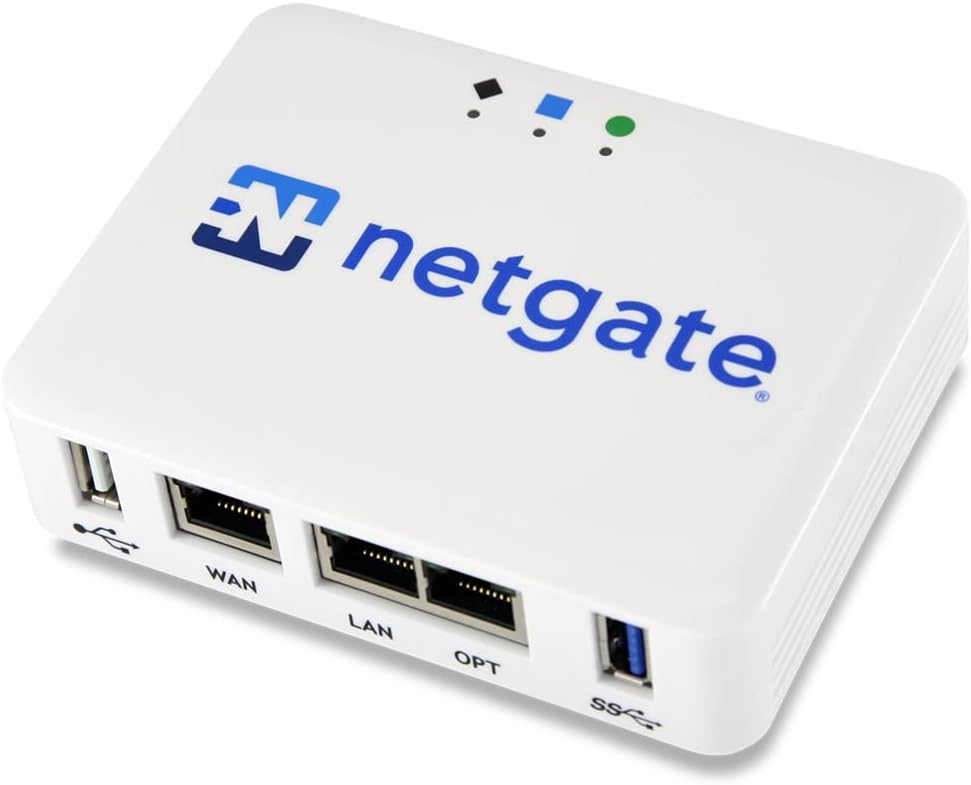
The Netgate 1100 pfSense+ offers a complete solution with pre-loaded software for quick setup. Rated 4.1 by users, it provides near gigabit routing with a dual-core ARM processor. This gateway is business-ready with included technical support and lifetime software updates for ongoing protection.
We may earn a commission when you buy through this link, at no additional cost to you.
Key strengths include three Gigabit Ethernet switched ports and low power consumption. The compact form factor allows silent operation on a desktop or wall mount. Access to expert technical assistance enhances the user experience significantly.
While the throughput is lower than premium models at 650 Mbps, it suits home or small office networks well. Delivery requires an adult signature, which may be inconvenient for some users. These trade-offs are acceptable for the included support and software value.
For users wanting a reliable, supported pfSense solution without hardware hassle, the 1100 is a strong choice. It balances essential features with ongoing support effectively.
Continuous security patches and updates ensure your gateway stays protected against new threats.
24/7/365 technical assistance provides peace of mind for setup and troubleshooting.
We may earn a commission when you buy through this link, at no additional cost to you.
The Protectli Vault FW4C brings 2.5 Gigabit networking to compact firewall appliances. With a 4.5 rating, it features four 2.5G Ethernet ports for faster connections. This fanless device supports popular open-source software for flexible security configurations.
We may earn a commission when you buy through this link, at no additional cost to you.
Its standout quality is the inclusion of 2.5G NICs, ideal for networks exceeding gigabit speeds. AES-NI hardware support ensures efficient encryption handling. The compact design and US-based support add practical value for deployment.
The device has lower RAM and SSD capacity compared to the FW4B, which may limit performance under heavy loads. Also, no OS is pre-installed requiring user setup. These constraints are acceptable for users prioritizing faster network speeds.
For those needing faster than gigabit connections in a small form factor, the FW4C is a compelling option. It balances speed and size effectively for modern home or small office networks.
2.5 Gigabit ports enable faster data transfer and better utilization of high-speed internet connections.
Fanless design ensures quiet operation ideal for offices or living spaces.
We may earn a commission when you buy through this link, at no additional cost to you.
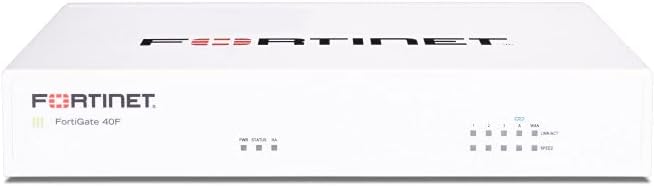
The FortiGate-40F is designed for small businesses needing reliable security without complexity. With a 4.2 rating, it offers a fanless desktop form factor and essential connectivity. This appliance integrates advanced threat protection and simplified management for easy deployment.
We may earn a commission when you buy through this link, at no additional cost to you.
Key strengths include five Gigabit Ethernet ports and 1 Gbps IPS throughput. Fortinet's purpose-built security processor delivers industry-leading performance for SSL traffic. AI-powered FortiGuard Labs integration ensures comprehensive threat identification.
Like other FortiGate models, it does not include a service subscription, adding to the total cost. The port count is suitable for small networks but may not scale well. These trade-offs are acceptable for the performance and management ease offered.
Small businesses seeking a balance of performance, size, and ease of use will find the 40F suitable. It delivers enterprise-grade security features in a compact package.
Purpose-built security processors ensure high performance even with encrypted traffic inspection.
Zero Touch Integration with Security Fabric streamlines initial setup and management.
We may earn a commission when you buy through this link, at no additional cost to you.
The FortiGate-100E provides robust network security with extensive protection capabilities. Rated 4.7 by users, it protects against known exploits and malware while detecting unknown attacks. This appliance identifies thousands of applications to enforce granular security policies.
We may earn a commission when you buy through this link, at no additional cost to you.
Its standout quality is the comprehensive threat intelligence and application visibility. The device ensures security across all network traffic, whether encrypted or not. This level of protection is essential for businesses needing detailed control.
Limited detailed specifications in the product description make performance metrics less transparent. Full capabilities require a separate subscription which adds to the cost. However, the high rating indicates strong user satisfaction.
Organizations prioritizing application control and advanced threat detection will find the FG-100E valuable. It delivers essential security features with a trusted brand reputation.
Identifying thousands of applications allows for precise security policies and usage control.
Continuous updates ensure protection against emerging threats and zero-day attacks.
We may earn a commission when you buy through this link, at no additional cost to you.
The Palo Alto PAN-PA-220 delivers next-generation firewall capabilities in a compact appliance. While rated 3.0, it offers eight ports and secure connectivity for modern networks. This device provides essential security features from a trusted industry leader.
We may earn a commission when you buy through this link, at no additional cost to you.
Key strengths include next-generation security features and flexible port options. The compact design suits environments where space is limited. Palo Alto's reputation suggests reliable security technology even with limited public details.
The lower user rating may indicate setup challenges or specific feature limitations not meeting all expectations. Detailed specifications are scarce in the listing. These factors should be considered before purchase.
For users invested in the Palo Alto ecosystem or needing compact next-gen protection, this appliance is an option. Ensure support requirements and feature sets align with your needs.
Advanced capabilities include deep packet inspection and application awareness for modern threats.
Eight ports provide ample connections for diverse network configurations and segmentation.
We may earn a commission when you buy through this link, at no additional cost to you.
The FortiGate-60F with UTP bundle provides hardware plus a year of security services. Rated 4.2 by users, it secures against advanced threats with web filtering and anti-botnet technologies. This package is tailored for medium-sized businesses needing robust protection.
We may earn a commission when you buy through this link, at no additional cost to you.
Key strengths include FortiCare Premium support and unified threat protection. The bundle simplifies setup by including necessary services upfront. Effective filtering technologies safeguard against sophisticated threats out of the box.
The price is higher than hardware-only options due to included services. Subscription is limited to one year requiring renewal. These factors are acceptable for businesses wanting immediate protection and support.
Medium businesses seeking a complete solution without separate service purchases will find this bundle valuable. It delivers convenience and comprehensive security in one package.
UTP bundles multiple security services into one subscription for simplified management and comprehensive defense.
FortiCare Premium ensures high-quality assistance and service continuity for critical operations.
We may earn a commission when you buy through this link, at no additional cost to you.
Selecting the right firewall appliance requires careful consideration of your network size, security needs, and budget constraints.
Throughput determines how much traffic your firewall can inspect without slowing down your network. Look for IPS throughput and threat protection speeds that match or exceed your internet bandwidth.
Choose a model with throughput ratings higher than your expected traffic load to ensure smooth performance.
Port count and types affect how many devices you can connect directly. Consider Gigabit Ethernet or faster ports to support modern high-speed networks.
Ensure the appliance has enough ports for your WAN, LAN, and DMZ needs without requiring additional switches.
Advanced features like intrusion prevention, application control, and SSL inspection are vital for comprehensive protection. Evaluate which features are included versus requiring a subscription.
Prioritize appliances offering built-in threat protection and regular updates to defend against evolving cyber threats.
Some appliances come pre-loaded with firewall software while others require installation. Check compatibility with your preferred operating system or open-source solutions.
Select a device that supports your existing software preferences to streamline setup and management.
A user-friendly management console simplifies configuration and monitoring. Look for intuitive dashboards and remote management capabilities.
Choose a solution that offers easy visibility and control to reduce administrative overhead.
Many appliances require annual subscriptions for updates and threat intelligence. Factor in recurring costs when calculating total cost of ownership.
Evaluate whether bundled service packages offer better value than purchasing hardware and services separately.
Physical size and mounting options matter for placement. Desktop models suit small spaces while rack-mount units fit enterprise cabinets.
Select a form factor that aligns with your installation environment and space availability.
Reliable technical support and warranty coverage provide peace of mind. Check for included support duration and service quality.
Choose a vendor with strong reputation for assistance and responsive customer service.
Begin by connecting your internet source to the WAN port and internal devices to LAN ports. Configure basic settings via the web interface or controller software to establish initial connectivity.
Regularly update firmware and security signatures to maintain protection against new threats. Schedule periodic reviews of firewall rules and logs to detect anomalies and optimize performance.
Ensure the appliance is placed in a well-ventilated area to prevent overheating. Keep physical connections secure and inspect cables periodically to avoid connectivity issues.
A firewall appliance is a dedicated hardware device that monitors and controls incoming and outgoing network traffic based on security rules. It acts as a barrier between your internal network and external threats to protect data and devices.
Many appliances offer basic protection without a subscription but require one for advanced features like threat intelligence and updates. Check each product's specifications to understand included capabilities and ongoing costs.
Match the firewall's IPS throughput to your internet speed and expected internal traffic. Selecting a model with higher throughput ensures the appliance can inspect all traffic without bottlenecks.
Some appliances like Protectli and Netgate support open-source solutions such as pfSense and OPNsense. Others come pre-loaded with proprietary software. Verify compatibility before purchase.
Hardware-only units provide basic firewall capabilities while bundles include services like threat protection and support for a defined period. Bundles simplify setup but add to the total cost of ownership.
You should install firmware and signature updates as soon as they become available to stay protected. Regular updates ensure your device defends against the latest vulnerabilities and attacks.
This guide highlights ten diverse firewall appliances suited for different network sizes and security needs. The FortiGate-60F stands out for performance while the Ubiquiti Unifi offers budget-friendly integration.
Prioritize throughput, port requirements, and security features when comparing models. Consider whether bundled services provide value for your specific business scenario.
Prices and availability change frequently so verify current details before purchasing. Investing in the right firewall appliance protects your network and data effectively.